

Bundling strategies
If you use Multisite Management to distribute content, you have three bundling strategies available when creating a bundle. The selected bundling strategy defines whether or which additional elements related to the selected element are automatically added to the bundle.
You can choose between the following bundling strategies:
- None: No additional elements are added to the bundle.
- Include content references: Only relevant content-related elements are automatically added to the bundle.
- Include outgoing references: All referenced elements, both content-related and technical, are automatically added to the bundle.
- <Project specific bundling strategy>: Elements are added to the bundle according to the project-specific strategy.
Below the strategies are explained based on a simple use case.
A Simple Use Case
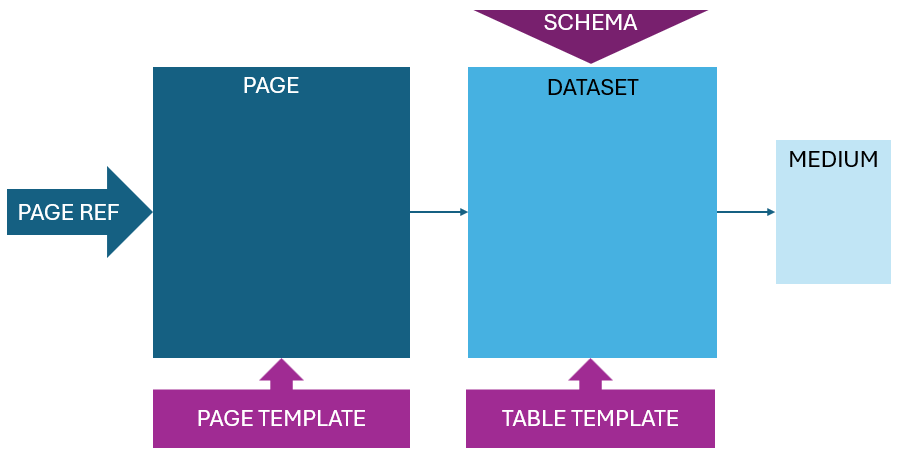
The starting point of the example illustrating the three bundling strategies is a simple project. The project consists of a single page. A page reference ("Page Ref") links to the page in the navigation. The page is based on a page template ("Page Template"). On the page itself, a dataset is referenced. The dataset is based on a schema and a table template. The schema defines the underlying data structure of the table, while the table template specifies how editors can interact with the dataset. In the dataset, a medium, for example, an image, is referenced.
Bundling Strategy: None
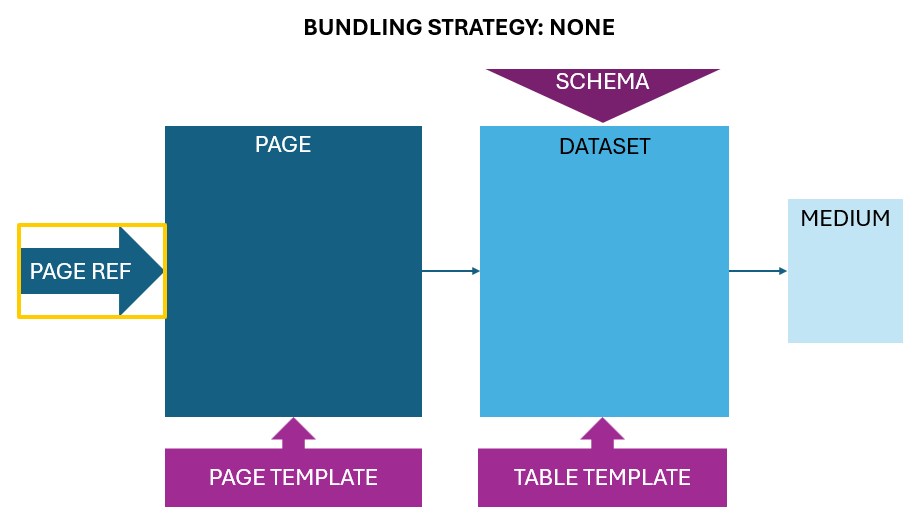
If the page reference is added to a bundle and the bundling strategy is selected as None, no additional elements will be added to the bundle. The content of the bundle consists solely of the page reference.
If you want to include additional referenced elements, you have to manually add them to the bundle via Related Elements.
Bundling Strategy: Include content references
If the page reference is added to a bundle and the bundling strategy Include content references is selected, then all referenced content-related elements are automatically added to the bundle. In this example, the following elements are automatically added in addition to the selected page reference: page, dataset, and medium.

Bundling Strategy: Include outgoing references
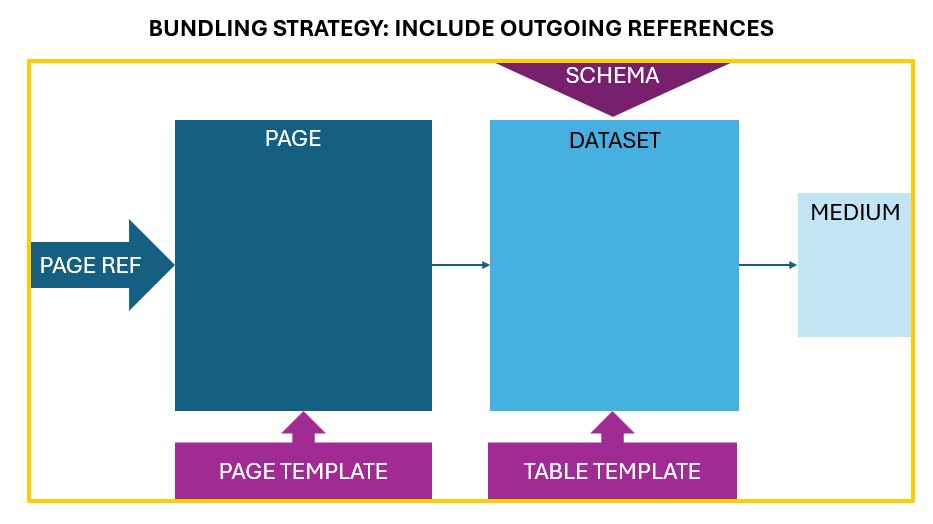
When the page reference is added to a bundle and the bundling strategy Include outgoing references is selected, all referenced elements are automatically added to the bundle - this includes both content-related and technical elements. In this example, when transporting the page reference and using the strategy Include outgoing references, the following elements are automatically added to the bundle: page, page template (technical element), dataset, schema (technical element), table template (technical element), and medium.
Bundling Strategy: Project-specific bundling strategy
The elements added to the bundle depend on the implemented project-specific strategy. You can find a simple example here.
Bundling Strategy: None
If you use the Bundling Strategy None, no referenced elements will be added to the bundle. This strategy should be used when you want to transport individual elements. Alternatively, you can manually add referenced elements to the bundle via Related Elements to create a customized bundle.
Bundling Strategy: Include content references
The bundling strategy Include content references automatically adds referenced content-related elements to the bundle. The elements added depend on the element type. Additionally, references are resolved recursively, meaning that references to references are also included. Which references are followed recursively depends on the element type.
The following table describes which referenced elements depending on the source element are directly included in the bundle and which elements are followed recursively.
| Source element | Referenced elements added to bundle | Referenced elements followed recursively |
|---|---|---|
| Page reference | Page, medium, dataset | Page |
| Page | Page reference, page, medium, dataset | Medium, dataset |
| Section | Page reference, page, medium, dataset | Medium, dataset |
| Section reference | Page reference, page, Medium, dataset | Medium, dataset |
| Dataset | Page reference, page, medium, dataset | |
| Medium | Page, medium, dataset |
Example
The source element is a page that references a page reference and a medium. When this page is added to a bundle with the bundling strategy Include content references, the following occurs:
- The page reference and the medium are added to the bundle.
- The page reference is not followed recursively.
- The medium is followed recursively, and the referenced elements are considered.
- If the references of the medium are of type "page," "medium," or "record," they are also added to the bundle.
Bundling Strategy: Include outgoing references
The bundling strategy "Include outgoing references" recursively adds all referenced technical and content-related elements starting from the source element to a bundle. This means that templates from the template store are also transported. This strategy should only be used for self-contained project parts, e.g., new campaigns that were created based on templates specifically designed for this purpose, or landing pages that exist separately from the rest of the project.
Example
The starting point is a page reference that points to an event page. The page is based on a page template that has been specifically created for this event page. On the page, a paragraph and a medium within the paragraph are referenced. Using the strategy Include outgoing references, the content-related references to the page, paragraph, and medium, as well as the technical references to the page template and paragraph template, are included.
Project-specific bundling strategy
From MSM version 2.1.0 (2026.7) onwards, you can implement and use project-specific bundling strategies. This allows you to utilize strategies that deviate from the standard options.
Example
The starting point is a menu item with several pages, such as a global landing page with multiple variants. With the help of a project-specific bundling strategy, you can define a method that ensures that when this menu item is added to a bundle, all subordinate pages, along with the corresponding media folder, are automatically included. The media folder is fully included, regardless of whether all the media contained within it is referenced on the pages. This way, local teams can select from the entire media pool of the folder after transport, without requiring global editors to reference each individual media item or manually add it to the bundle.