
Release Notes
1 General
Browser compatibilities (Micorsoft Edge)
In general FirstSpirit always works with the latest version of a third-party component. They are regularly tested by e-Spirit AG and measures are taken to eliminate any errors and incompatibilities. This also applies to browsers for using FirstSpirit ServerMonitoring, ContentCreator and FragmentCreator.
The recommended browsers for FirstSpirit FragmentCreator are currently:
- Google Chrome
- Microsoft Edge
Microsoft Edge was recently moved to a new technological basis (Chromium) by the manufacturer. This new version will be automatically delivered to customers as planned with a Windows update from mid-January 2020.
Also in this case FirstSpirit supports the latest version of Microsoft Edge. In particular, MicroApps (MicroApp Framework) do not work with “old” versions of Microsoft Edge, so the new (chromium-based) version of Microsoft Edge should be used for working with FirstSpirit.
2 ContentCreator
ContentCreator re-design: Release
The design and technical basis of the FirstSpirit ContentCreator have been revised. The use of the revised ContentCreator (also “FirstSpirit CXT ContentCreator”) is officially released with the current FirstSpirit release, the ramp-up / EAP phase is completed.
In principle, the new design does not involve any functional changes for editors. At a few central points, the user guidance has been additionally optimized.
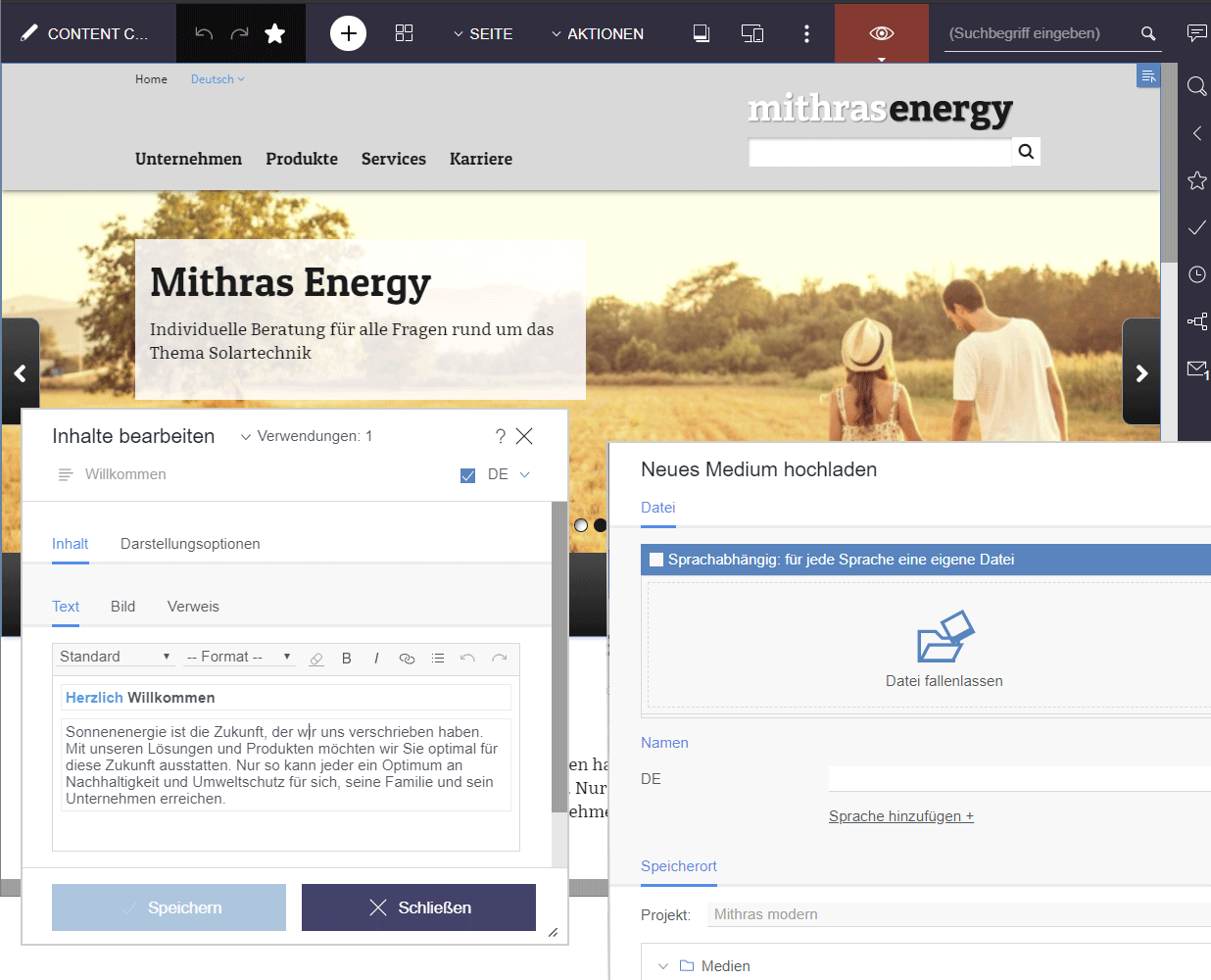
In addition to the new design with fresher colours and modern design language, the redesigned menu bar is particularly striking: The status display has been moved to the right-hand edge of the ContentCreator and actions for creating new content can now be found centrally and prominently under the + icon. Another new feature is that not only pages and datasets are now displayed in the working area, but also media: in contrast to the dialog/window variant of Media administration previously used, this brings with it completely new viewing and editing options: for example, it is now also possible to crop images there. For easier orientation, the menu bar now also shows the element level on which the user is currently located.
The report area has been extended to display recently visited elements (“Visited lately”). Additionally, the so-called “Dashboard” now displays the information of the most important reports: the status of the current element, possibilities to start or switch workflows on the element, open tasks and latest visited elements.
For developers, a change to the revised ContentCreator does not in principle involve any migration effort either. Only in very rare cases can there be any compatibility problems with customer-specific modules. In this case please contact e-Spirit Technical Support (https://help.e-spirit.com).
How to activate the revised “FirstSpirit CXT ContentCreator”
The revised ContentCreator is automatically available with the current FirstSpirit release in the form of a module. In future releases the module will receive new features and bug fixes - like other modules - automatically through updates of the FirstSpirit server.
By default, the classic ContentCreator with the “old” design is used for all projects.
In order to use the revised “FirstSpirit CXT ContentCreator”, it must be activated (server-wide or project-wise, as required). This is done in the FirstSpirit ServerManager, in each case using the “Use new design” checkbox. This must be activated in the following places:
1) in “Server properties / Web applications” / “ContentCreator” tab:
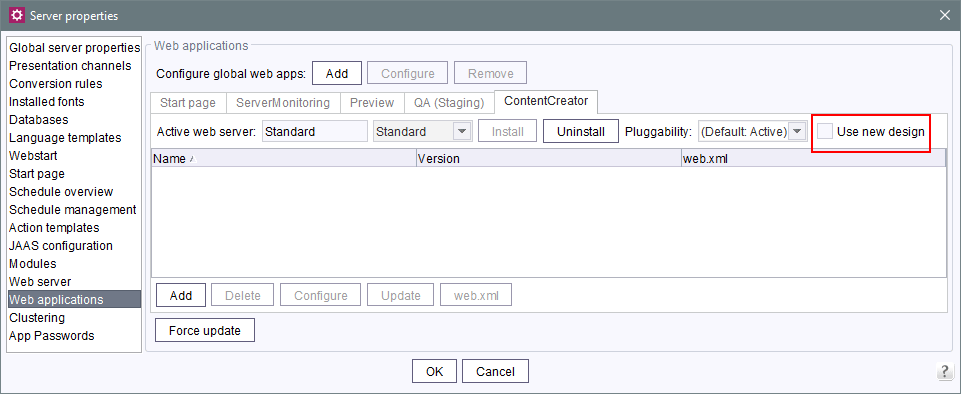
This setting affects all projects that use the global ContentCreator instance. (“Global ContentCreator instance”: No web server is configured on the “ContentCreator” tab in the “Project properties / Web components”: “[None]”).
2) in “Project properties / Web components” / “ContentCreator” tab:
If there are project-local ContentCreator instances, the checkbox must also be activated for these. (“Project-local ContentCreator instance”: A different web server is configured on the “ContentCreator” tab in “Project properties / Web components”.)
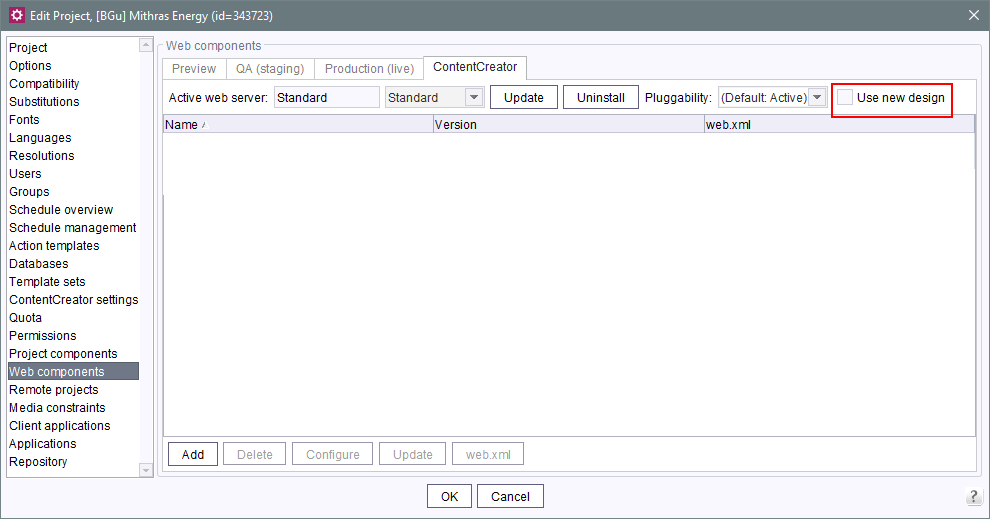
If “Jetty Web Server” is to be used as web server, FirstSpirit must be used at least in version 2019-12.
The modifications must be deployed (“Update” or “Install” button).
With these settings, all projects on the server use the ContentCreator in the new design.
For example, if you want to test the new design for one project only, a local ContentCreator instance must exist for this project. The new design must be activated for this instance using the repective checkbox. In the server properties, the checkbox must then be deactivated.
If necessary, you can switch between the two ContentCreator versions by activating / deactivating the checkbox (and then deploying).
Documentation
Currently, the user documentation for the ContentCreator is being revised and adapted to the new design; other documentation (e.g. “FirstSpirit Online Documentation” (ODFS)) will follow. The presentation in the documentation therefore does not yet correspond in places to the interface in the new design and may differ from the ContentCreator that you are using.
Further planning
- FirstSpirit 2020-02/03: The revised ContentCreator will be used by default for all projects (first for cloud customers, then also for on-premise customers). If necessary, you can switch back to the “old” ContentCreator by deactivating the checkbox.
- FirstSpirit 2020-07: Omission of the “old” ContentCreator. Then only the revised ContentCreator will be available to all customers. Until then the functionality and compatibility of customer-specific modules should be checked and - if necessary with the help of e-Spirit - adapted to the new technological basis.
3 Input components
3.1 FS_LIST: Ramp-down phase: The input component is no longer supported
With FirstSpirit 2020-01, the input component FS_LIST is no longer supported. The component can no longer be used from this point on. That means forms with FS_LIST can no longer be edited and the expected output will no longer be generated.
Overview: steps of the ramp down phase for the FS_LIST input component
In order to make the phasing out of FS_LIST as low-risk as possible, the removal is carried out in several steps:
- (Done) With FirstSpirit version 5.2R3 the input component FS_LIST, for creating and maintaining lists, has been deprecated.
- (Done) With FirstSpirit 2019-11 in all projects, when generating or previewing data from the FS_LIST input component a deprecation warning will be logged.
- (Done) With FirstSpirit 2020-01 the input component is no longer supported. The component can no longer be used from this point on.
- In order to minimize the risk of production problems, particularly for customers with longer update cycles, during a six months transition period it will be possible to temporarily re-active FS_LIST. In order to do so please contact e-Spirit Technical Support.
- With FirstSpirit 2020-07 the input component will be removed from FirstSpirit, and can no longer be used in any project from that moment on.
Migration: switch to alternative FirstSpirit input components
e-Spirit recommends developers and end users to switch to alternative FirstSpirit input components at an early stage.Before updating to FirstSpirit 2020-01 or higher, all FS_LIST uses must be converted to one of the successor components.
As replacements the input components FS_CATALOG, FS_INDEX, and CMS_INPUT_SECTIONLIST are available, likewise providing functionality for the bundling of contents and thus largely taking over the FS_LIST use cases.
- FS_LIST, type DATABASE can be replaced by an FS_INDEX input component.
- FS_LIST, type INLINE can be replaced by an FS_CATALOG input component.
- FS_LIST with tag MEDIAMODE can be replaced by an FS_INDEX input component, when using the
DatasetDataAccessPlugin(tagSOURCE), which is delivered with FirstSpirit by default. - FS_LIST, type PAGE can be replaced by the input component CMS_INPUT_SECTIONLIST.
- FS_LIST, type SERVICE can be replaced by an FS_INDEX input component, when using a corresponding data access plug-in.
A detailed guide for the transition of existing projects is provided via the FirstSpirit Documentation.
After the transition to the new input components a return to FS_LIST is not possible - not even after a server downgrade.Please contact e-Spirit Technical Support if you have questions or feedback regarding the migration away from FS_LIST.
3.2 Improved Deprecation Warnings
Starting with FirstSpirit 2019-11 when generating or previewing data from input components with the status “deprecated” a deprecation warning is logged. This message is meant to make it easier for users to locate and migrate “deprecated” input components (e.g. in order to facilitate the FS_LIST input component's ramp-down phase).
With the current FirstSpirit release this service is improved. This was achieved by consolidating all deprecation warnings of a project, and writing them to the first section of the log file (in the case of generation in the generation log file, and in the case of a preview under “Show preview errors”).
Note: Now when invoking “Show preview errors” on a page, the deprecation warnings for input components without any connection to that page will also be rendered.
“Deprecated” input components:
- are no longer maintained by e-Spirit
- are still functional and can be used in FirstSpirit projects
- will be dropped in the future
The following input components are currently “deprecated”:
- CMS_INPUT_CONTENTAREALIST (should be migrated to FS_CATALOG)
- CMS_INPUT_CONTENTLIST (should be migrated to FS_INDEX)
- CMS_INPUT_FILE (should be migrated to FS_REFERENCE)
- CMS_INPUT_LINKLIST (should be migrated to FS_CATALOG)
- CMS_INPUT_OBJECTCHOOSER (should be migrated to FS_INDEX)
- CMS_INPUT_PAGEREF (should be migrated to FS_REFERENCE)
- CMS_INPUT_PICTURE (should be migrated to FS_REFERENCE)
- CMS_INPUT_TABLIST (should be migrated to FS_INDEX)
When using a deprecated input component and
- generating or
- calling “Show preview errors” on a page
all deprecation warnings of a project, with the location of the usage (i.e. the respective template), are logged. Example:
Usage of deprecated form element CMS_INPUT_PICTURE for variable 'ttPicture' in
template 'testschema.testtable' (ID: 455559)
This applies to all components used in a form, even if they do not render contents via the template.
The deprecation warning can be disabled by
- commenting out the input component in the form with CMS_COMMENT or by
- migrating the input component in the project to a different input component.
Contact e-Spirit Technical Support if you have questions or feedback regarding the migration.
4 FirstSpirit Content Experience Tools (CXT)
4.1 Latest module versions
FirstSpirit 2020-01 supports the following module versions for “FirstSpirit Content Experience Tools”:
| Module / file name | Version number |
FirstSpirit CXT DAP Bridgedataservice-[version].fsm | 1.24 |
FirstSpirit CXT FragmentCreatorfragment-creator-[version].fsm | 1.32 |
FirstSpirit Fragment DAPfragmentdap-[version].fsm | 1.20 |
FirstSpirit Media DAPmediadap-[version].fsm | 1.20 |
FirstSpirit Markdown Editormarkdown-editor-[version].fsm | 1.17* |
FirstSpirit Tagging Editortagging-editor-[version].fsm | 1.17 |
FirstSpirit CXT FragmentCreator - CaaS Integrationcaas-integration-[version].fsm | 1.15 |
* The module “FirstSpirit Markdown Editor” requires from version 1.17 FirstSpirit 2019-12 or higher.
4.2 FragmentCreator: Easier selection of other medium
Media in an input component FS_INDEX with DataAccessPlugin component “FirstSpiritMediaAccess/Connector” can now be replaced more easily. The following icon was introduced for this purpose:
.png)
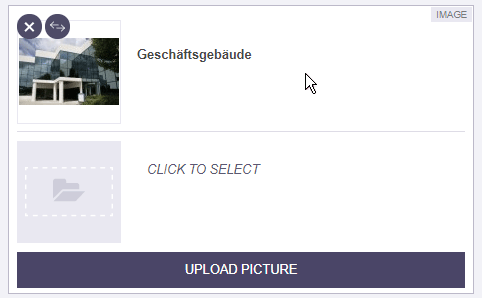
A click on it opens the selection dialog from which the desired medium can be selected.
Overview
| ID | Description | Categories |
|---|---|---|
| CORE-11395 | Performance improvement when using the input component FS_CATALOG in projects with many languages. |
ContentCreator, Input Components, Performance |
| CORE-11691 | Error handling when uploading reporting data has been improved. Reporting is only applied if it has been explicitly activated for the corresponding instance. |
Debugging, FirstSpirit Administrator, Server Administrator, Tasks |
| CORE-11699 | The use of the revised ContentCreator (also “FirstSpirit CXT ContentCreator”) is officially released as of the current FirstSpirit release. Further information can be found in chapter “ContentCreator: ContentCreator re-design: Release”. |
ContentCreator, Developer, Editor, FirstSpirit Administrator, ServerManager |
| CORE-11722 | With the current FirstSpirit release all deprecation warnings of a project are consolidated and logged in the first section of the log file (in the case of generation in the generation log file and in the case of a preview under “Show preview errors”). Further information can be found in chapter “Input components: Improved Deprecation Warnings”. |
Developer, Input Components, Template Development |
| CORE-11741 | With FirstSpirit 2020-01, the input component FS_LIST is no longer supported. The component can no longer be used from this point on. That means forms with FS_LIST can no longer be edited and the expected output will no longer be generated. |
ContentCreator, Developer, Input Components, Migration, SiteArchitect, Template Development |
| CXT-580 | Improved user guidance when selecting another medium (FS_INDEX). |
Editor, FirstSpirit Content Experience Tools (CXT), FragmentCreator, Input Components, Media |
| CXT-1111 | When starting MicroApps in FragmentCreator (creating/editing fragments or uploading images), the error message |
FirstSpirit Content Experience Tools (CXT) |
| CXT-1189 | FirstSpirit Content Experience Tools: Latest module versions |
Developer, FirstSpirit Administrator, FirstSpirit Content Experience Tools (CXT), FragmentCreator, Modules |
| CXT-1200 | The new (chromium-based) version of Microsoft Edge should be used for working with FirstSpirit. Further information can be found in chapter “General: Browser compatibilities (Micorsoft Edge)”. |
Developer, Editor, FirstSpirit Content Experience Tools (CXT), FragmentCreator |
Deprecations
| Functionality | Deprecated as of | Will be removed / Was removed as of |
|---|---|---|
| Input component FS_LIST | 5.2R3 | 2020-07 |
| Input component CMS_INPUT_CONTENTAREALIST | 5.2R3 | |
| Input component CMS_INPUT_CONTENTLIST | 5.2R3 | |
| Input component CMS_INPUT_FILE | 5.2R3 | |
| Input component CMS_INPUT_LINKLIST | 5.2R3 | |
| Input component CMS_INPUT_OBJECTCHOOSER | 5.2R3 | |
| Input component CMS_INPUT_PAGEREF | 5.2R3 | |
| Input component CMS_INPUT_PICTURE | 5.2R3 | |
| Input component CMS_INPUT_TABLIST | 5.2R3 | |
| FirstSpirit Access API: de.espirit.firstspirit.agency.GroupsAgent | 5.2R15 | |
| FirstSpirit Access API: delete (de.espirit.firstspirit.access.AccessUtil) | 5.2R18 | |
| Windows installation program | 2018-06 | 2020-06 |
| FirstSpirit Access API: release (de.espirit.firstspirit.access.AccessUtil) | 2018-06 | |
| FirstSpirit Access API: getLastLoginAsDate (de.espirit.firstspirit.agency.UserStatisticsAgent) | 2018-07 | |
| FirstSpirit Access API: remainingDurationOfCurrentStageInMillis (de.espirit.firstspirit.server.MaintenanceModeInfo) | 2018-07 | 2025-13 |
| FirstSpirit Access API: getStartingTimeOfStageAsDate (de.espirit.firstspirit.server.MaintenanceModeInfo) | 2018-07 | 2025-13 |
| FirstSpirit Access API: getSelectedWebserverConfiguration (de.espirit.firstspirit.access.serverConfiguration) | 2018-10 | 2025-13 |
| FirstSpirit Access API: setSelectedWebserverConfiguration (de.espirit.firstspirit.access.serverConfiguration) | 2018-10 | 2025-13 |
| FirstSpirit Access API: getSelectedWebServer (de.espirit.firstspirit.access.project.Project) | 2018-10 | 2025-13 |
| FirstSpirit Access API: setSelectedWebServer (de.espirit.firstspirit.access.project.Project) | 2018-10 | 2025-13 |
| FirstSpirit Access API: getLostAndFoundStoreNodes(); (de.espirit.firstspirit.feature.FeatureInstallResult) | 2018-10 | |
| FirstSpirit Access API: getDeletedStoreNodes(); (de.espirit.firstspirit.feature.FeatureInstallResult) | 2018-10 | |
| FirstSpirit Access API: de.espirit.firstspirit.access.store.Previewable | 2019-01 | |
| Java 8 support for FirstSpirit | 2019-05 | 2020-06 |
| WebSphere Application Server support for FirstSpirit | 2019-05 | |
| Legacy mode for the FirstSpirit server | 2019-06 | 2022-03 |
| Java Web Start support for FirstSpirit | 2019-10 | 2020-06 |
| FirstSpirit ContentCreator (old design / old technology) | 2019-11 | 2020-07 |