
Release Notes
1 Administration
Apache Tomcat / Java Servlet Specification 3.0: Improved pluggability detection for web applications
“Web framework pluggability” has been introduced in version 3.0 of the Java Servlet Specification (see Java Servlet 3.0 Specification). This enables the following, for example:
- Modularization of
web.xmlor - Configuration of components via Java annotations.
Globally, “web framework pluggability” is activated in FirstSpirit using the WEBAPP_ENABLE_PLUGGABILITY_FEATURES_DEFAULT parameter (default value “true”) in the fs-server.conf file (see Area: Web Applications chapter (fs-server.conf)). With this setting, all Java classes are scanned for annotations upon deployment.
If the function is not required, it can be deactivated globally or for individual web applications so that deployment on the web server does not take longer than necessary. The “pluggability” selection field is used for configuring and deactivating individual web applications; this applies to either global web applications (FirstSpirit ServerManager, Server properties/Web applications) or the web components of a project (FirstSpirit ServerManager, Project properties/Web components).
As of FirstSpirit 2021-01, pluggability detection for web applications has been improved. Pluggability is now guaranteed to be activated automatically if at least one web component in a web application requires pluggability. The pluggability of a web component is affected by the metadata-complete and absolute-ordering attributes.
The new behavior ensures that incorrect configurations result in fewer conflicts. Where necessary, this also overwrites the explicit “Inactive” setting for pluggability in ServerManager (see Server properties/Web applications).
2 FirstSpirit Content Experience Tools (CXT)
2.1 Latest module versions
FirstSpirit 2021-01 supports the following module versions for “FirstSpirit Content Experience Tools”:
| Module / file name | Version number |
FirstSpirit CXT DAP Bridgedataservice-[version].fsm | 1.37 |
FirstSpirit CXT FragmentCreatorfragment-creator-[version].fsm | 2.17 |
FirstSpirit Fragment DAPfragmentdap-[version].fsm | 1.32 |
FirstSpirit Media DAPmediadap-[version].fsm | 1.26* |
FirstSpirit PageRef DAPpagerefdap-[version].fsm | 1.4 |
FirstSpirit Markdown Editormarkdown-editor-[version].fsm | 1.25* |
FirstSpirit Tagging Editortagging-editor-[version].fsm | 1.25 |
FirstSpirit CXT FragmentCreator - CaaS Integrationcaas-integration-[version].fsm | 1.26 |
* These modules require FirstSpirit 2020-03 or higher from this version.
2.2 Dimension when creating new fragments
The “variant” principle of FirstSpirit Content Experience Tools allows for different variants of a fragment. A variant dimension of a fragment may be the language, for instance.
Variants are implemented from a technical perspective using a <CMS_GROUP> form with the identifier editions in the metadata template. In this case, the language variable is what enables the editor to select the language and the (language-dependent) content to be stored.
The FS_INDEX component can be used to create new fragments in a remote project, for example. The current variant dimension is now always preselected in the latest release, e.g.
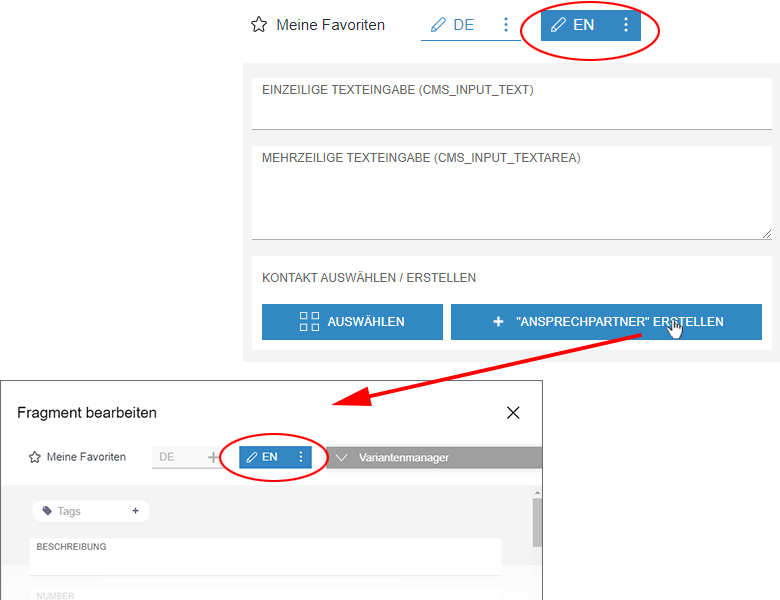
Another variant dimension can be selected in this dialog if necessary.
The new fragment is created in the remote project that is specified via the remote attribute in the PROJECT tag of the applicable FS_INDEX component.
If the variant dimensions defined by means of editions in the source project and target project are different from one another, a random target project dimension is preselected.
FS_INDEX code example:
<FS_INDEX name="fragments" useLanguages="no">
     <LANGINFOS>
       <LANGINFO lang="EN" label="Select / create contact person"/>
       <LANGINFO lang="*" label="Kontakt auswählen / erstellen"/>
     </LANGINFOS>
     <SOURCE name="FirstSpiritFragmentAccess/FSFAConnector">
       <PROJECT remote="fragments">
         <CATEGORY uid="contacts"/>
       </PROJECT>
     </SOURCE>
</FS_INDEX>
3 Module Development, Scripts, API
Java 11: Integrating a JAXB library locally within a module
The JAXB package javax.xml.bind (Java Architecture for XML Binding) has been removed as of Java 11. When upgrading FirstSpirit modules to Java 11, module developers must now ensure that modules requiring this resource provide it themselves. For this purpose, the ScheduleTaskApplication interface now supports the integration of a JAXB library locally within a module.
4 Modules: Content Transport
ContentTransport and CorporateContent: Improvement in large-scale data stability
The multisite management functions “FirstSpirit ContentTransport” and “FirstSpirit CorporateContent” make it possible to transport project content and properties from a source project to a target project. In the case of both functions, stability and performance have been improved when transporting large data volumes. It is now possible to transport large data volumes with little memory usage. The improved behavior also has an impact on importing/exporting zip files via the corresponding context menu functions in SiteArchitect.
For more information on the functions referred to above, see:
5 Template development
JSON function: New “nonDisplayedSectionsRendering” configuration parameter
The new nonDisplayedSectionsRendering configuration parameter can be used to generate the output of hidden sections.
$CMS_SET(#global.json.nonDisplayedSectionsRendering, true)$If the value is set to “true”, an additional “displayed” attribute is generated for each section.
If the value is set to “false” (default value), this attribute is not generated.
If this option is set to “true” in the page template for the global setting, for example, the “displayed” attribute is then used to show the language-dependent setting for each section, which determines whether the section is to be displayed or not.
Example:

DE (check mark in box): attribute is output with “true”:
"displayed": trueEN (no check mark in box): attribute is output with “false”:
"displayed": falseNote: If the configuration parameter is not set, sections that do not have a check mark will not be output at all. Setting the parameter not only adds additional attributes during output, but also generates hidden sections.
Overview
| ID | Description | Categories |
|---|---|---|
| CORE-11728 | JSON function: The new |
Developer, Support for JSON |
| CORE-12449 | An error has been corrected which, in very rare cases, may have made it impossible to use the translation help. |
Editor, SiteArchitect |
| CORE-12465 | The JSON output now also supports the transfer of the project settings page. In this case, the output takes place along the same lines as pages in the Page Store. |
Developer, Support for JSON |
| CORE-12838 | After a project backup, the project (repository and registry) is now immediately closed if it is not in use by any other processes. Previously, the project was closed after the usual timeout (20 minutes). |
Server Administrator, Tasks |
| CORE-12896 | As of FirstSpirit 2021-01, pluggability detection for web applications has been improved. Pluggability is now guaranteed to be activated automatically if at least one web component in a web application requires pluggability. |
FirstSpirit Administrator, ServerManager |
| CORE-12984 | Stability and performance have been improved when transporting large data volumes in FirstSpirit. |
Content Transport, Corporate Content |
| CORE-13013 | An error has been fixed that could cause special characters in names to be transported incorrectly when using Content Transport. |
Content Transport |
| CORE-13025 | The error message issued when resource conflicts are detected during module installation has been enhanced to better identify conflicting resources. |
Debugging, Developer, FirstSpirit Administrator, Module development |
| CORE-13059 | When resources were previously being configured in the |
Module development, Modules |
| CORE-13099 | A problem has been solved which could lead to an incorrect display of the autostart status of a service in the ServerManager. |
ServerManager |
| CORE-13117 | An error has been fixed that in very rare cases could lead to a service being started at FirstSpirit startup before the script permissions required by this service had been initialized. |
FirstSpirit Administrator, Modules |
| CORE-13145 | In the version history, the editor now sees the message “Changes cannot be shown, as some elements are no longer available within the project history.” instead of an error if the requested content is no longer available in the project. This behavior applies to archived templates, for example, if the “Show changes to templates” option is called up in the version history. |
Editor, SiteArchitect, Version history |
| CORE-13146 | The ScheduleTaskApplication interface now supports the integration of a JAXB library locally within a module. |
Java, Module development |
| CXT-1617 | The current variant dimension is now always preselected during the process of creating new fragments. |
Editor, FirstSpirit Content Experience Tools (CXT), FragmentCreator |
| CXT-1974 | Previously, the results list of search dialogs displayed copy templates and most recently used elements as a priority. Now, the search term and filters are evaluated first. |
ContentCreator, Editor, Input Components, Search |
| CXT-2027 | The dialog for renaming (menu items or folders in the Media management, for example) now also works again in projects with more than 7 languages. |
ContentCreator, Editor, Languages |
| CXT-2042 | Using the “Fragment DAP” module, fragments from a fragment project can be referenced via the “Fragments” report. The report is now only available if there is a remote project that is actually a fragment project and only fragment projects are shown as available for selection. |
ContentCreator, Editor, FirstSpirit Administrator, FirstSpirit Content Experience Tools (CXT), Modules, Reports |
| CXT-2051 | FirstSpirit Content Experience Tools: Latest module versions |
Developer, FirstSpirit Administrator, FirstSpirit Content Experience Tools (CXT), FragmentCreator, Modules, Server Administrator |
| CXT-2073 | Temporarily, the use of CMS_INPUT_DOM and CMS_INPUT_DOMTABLE could be limited when using certain format templates. |
ContentCreator, Editor, Input Components |
Deprecations
| Functionality | Deprecated as of | Will be removed / Was removed as of |
|---|---|---|
| Input component CMS_INPUT_CONTENTAREALIST | 5.2R3 | |
| Input component CMS_INPUT_CONTENTLIST | 5.2R3 | |
| Input component CMS_INPUT_FILE | 5.2R3 | |
| Input component CMS_INPUT_LINKLIST | 5.2R3 | |
| Input component CMS_INPUT_OBJECTCHOOSER | 5.2R3 | |
| Input component CMS_INPUT_PAGEREF | 5.2R3 | |
| Input component CMS_INPUT_PICTURE | 5.2R3 | |
| Input component CMS_INPUT_TABLIST | 5.2R3 | |
| FirstSpirit Access API: de.espirit.firstspirit.agency.GroupsAgent | 5.2R15 | |
| FirstSpirit Access API: delete (de.espirit.firstspirit.access.AccessUtil) | 5.2R18 | |
| FirstSpirit Access API: release (de.espirit.firstspirit.access.AccessUtil) | 2018-06 | |
| FirstSpirit Access API: getLastLoginAsDate (de.espirit.firstspirit.agency.UserStatisticsAgent) | 2018-07 | |
| FirstSpirit Access API: remainingDurationOfCurrentStageInMillis (de.espirit.firstspirit.server.MaintenanceModeInfo) | 2018-07 | 2025-13 |
| FirstSpirit Access API: getStartingTimeOfStageAsDate (de.espirit.firstspirit.server.MaintenanceModeInfo) | 2018-07 | 2025-13 |
| FirstSpirit Access API: getSelectedWebserverConfiguration (de.espirit.firstspirit.access.serverConfiguration) | 2018-10 | 2025-13 |
| FirstSpirit Access API: setSelectedWebserverConfiguration (de.espirit.firstspirit.access.serverConfiguration) | 2018-10 | 2025-13 |
| FirstSpirit Access API: getSelectedWebServer (de.espirit.firstspirit.access.project.Project) | 2018-10 | 2025-13 |
| FirstSpirit Access API: setSelectedWebServer (de.espirit.firstspirit.access.project.Project) | 2018-10 | 2025-13 |
| FirstSpirit Access API: getLostAndFoundStoreNodes(); (de.espirit.firstspirit.feature.FeatureInstallResult) | 2018-10 | |
| FirstSpirit Access API: getDeletedStoreNodes(); (de.espirit.firstspirit.feature.FeatureInstallResult) | 2018-10 | |
| FirstSpirit Access API: de.espirit.firstspirit.access.store.Previewable | 2019-01 | |
| WebSphere Application Server support for FirstSpirit | 2019-05 | |
| Legacy mode for the FirstSpirit server | 2019-06 | 2022-03 |
| Control files for Windows and Linux operating systems (old) | 2020-08 | 2021-02 |
| Database layer for Oracle Database 11g/12c | 2020-12 | 2025-05 |