
Release Notes
1 General
The manner in which connection settings are configured has been optimized for users.
It is now possible to allocate considerably more memory for FirstSpirit desktop applications (SiteArchitect, ServerManager) in the connection settings.
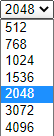
The connection settings now also contain recommended values for memory (2048 MB), compression (deflate speed), and encryption (TLS), which are prepopulated for users.
Note: If the connection settings were already modified in the past or activated via the “Use settings” option, then the existing values are retained.
2 ContentCreator
2.1 Image upload now also from other browser windows/tab
Uploading images is possible in many places in ContentCreator, e.g.:
- via the menu function “Upload new medium”
- in the Media administration
- via the input elements (if configured accordingly; both via form and via the (preview) page itself)
- FS_REFERENCE
- CMS_INPUT_IMAGEMAP
- FS_BUTTON
- via the “Edit image” function on images in reports and in the navigation bar
In addition to an upload from the workstation, images can now also be uploaded from other browser windows/tabs in the ContentCreator.
This requires that the server that delivers the image allows cross-origin requests. Otherwise an error message will be displayed.
If the mouse pointer is held over an area of a preview page where an image can be dropped, this area will be framed.
For more information, see the “Documentation for FirstSpirit ContentCreator” (https://docs.e-spirit.com/contentcreator/editing-preview/media/index.html#upload)
2.2 Upload of media with insufficient permissions
if configured accordingly, media can be uploaded using the FS_REFERENCE and CMS_INPUT_IMAGEMAP input components (upload attribute).
If the current user does not have sufficient permissions to upload the medium (using drag-and-drop or the “New medium” or “Upload image” icon), this is now indicated in the “Upload new medium” dialog by padlock symbols, e.g.:
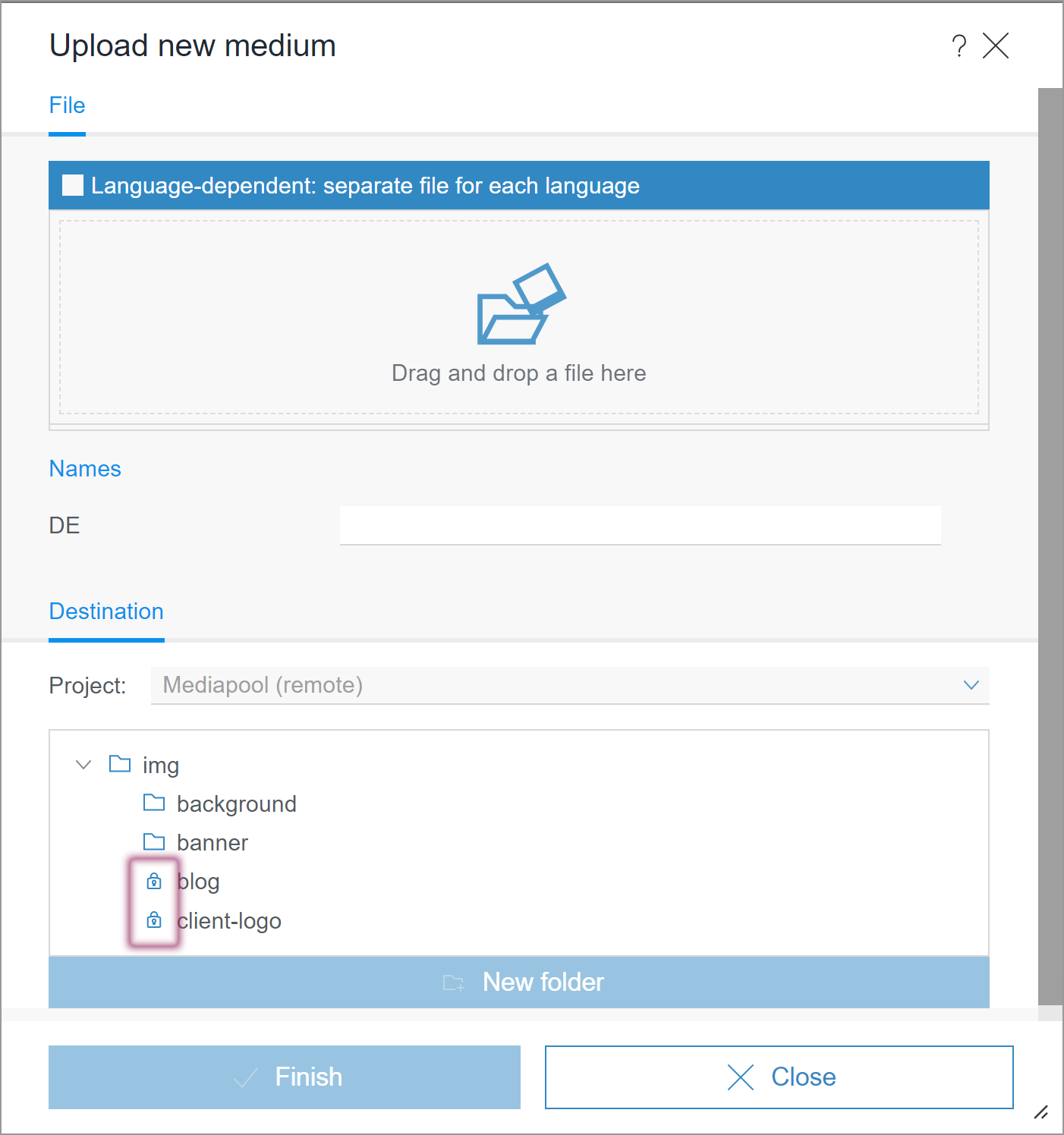
A node with this icon cannot be selected, so closing the dialog using “Finish” is not possible.
Previously, the lack of permissions was not indicated until the dialog was saved or closed. Error message:
Upload failed.
You do not have sufficient permissions to store the medium in the selected folder.
If several (remote) projects are allowed as target (<PROJECTS> tag), an upload is now possible in ContentCreator via FS_REFERENCE and CMS_INPUT_IMAGEMAP even if the permissions set for one project are insufficient.
Previously, an upload was rejected with this error message:
An unexpected error occurred.2.3 Visualization of invalid format templates (CMS_INPUT_DOM/TABLE)
As of FirstSpirit 2021-02, a colored marking of invalid formatting in the rich text editor has been introduced:
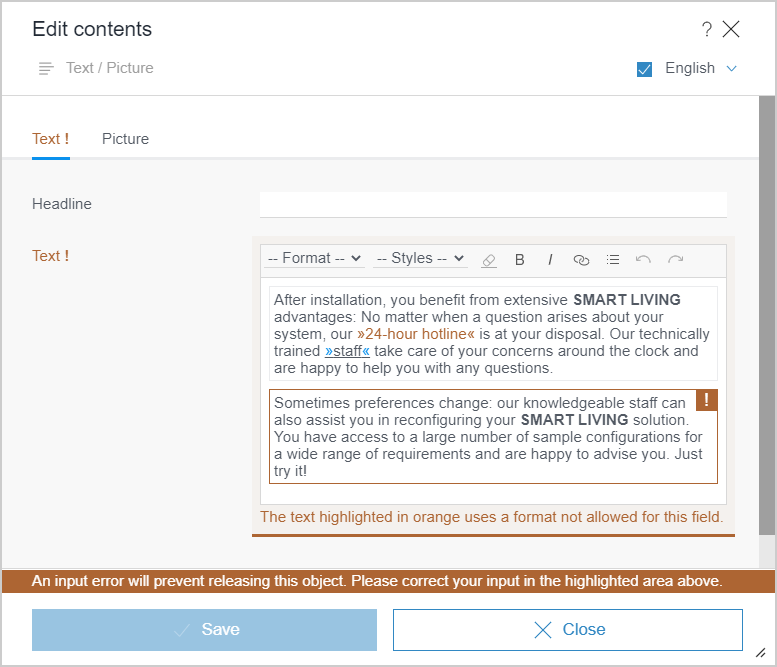
- orange marking: This concerns a format template which exists in the project but is not permitted for the respective rich text editor.
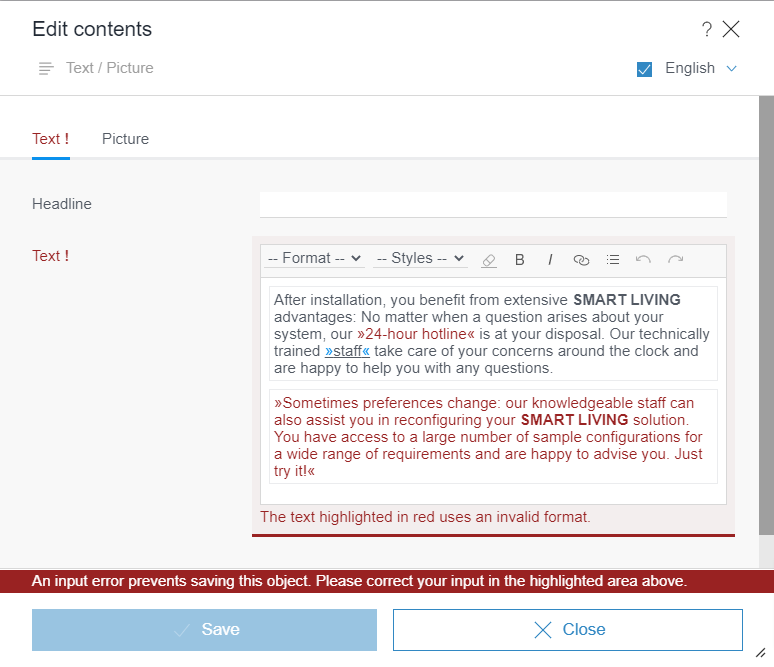
- red marking: This concerns a format template that has been subsequently deleted or is unknown for some other reason.
With the current release, the visualization has been marginally adjusted:
orange marking:
red marking:
3 Input components
An input component used that is not available on the server (anymore) is identified as incorrect
Using input components that are not available on the server (anymore) no longer causes the entire form to be shown as incorrect; only the unknown input component is displayed as incorrect.
The missing component is identified in the form by the following text:
Display errors in the editor (...). There is no component registered as (...)!The following principles apply to missing input components within a form:
- If an unknown input component is used, this does not affect other input components in the relevant form; it is now possible to edit and save corresponding nodes.
- When saving, it is ensured that the content of the unknown input component is not modified.
- If the unknown input component is post-installed on the server (e.g., FS_MARKDOWN) or replaced by a compatible input component (e.g., FS_LIST) later, then the relevant content will be available once more. This method ensures that, despite the input components being unsupported, there will be no loss of data.
- It is not possible to output the content of an unknown input component in the preview or the generation.
- If an unsupported input component (e.g., FS_LIST) in a dataset is used to reference another dataset via a foreign key relationship, the corresponding dataset cannot be saved. In this case, a corresponding error message is displayed to the editor.
Background: A save operation in this instance would lead to data loss, since information is not available on the referenced datasets.
4 FirstSpirit Content Experience Tools (CXT)
4.1 Latest module versions
FirstSpirit 2021-03 supports the following module versions for “FirstSpirit Content Experience Tools”:
| Module / file name | Version number |
FirstSpirit CXT DAP Bridgedataservice-[version].fsm | 1.38 |
FirstSpirit CXT FragmentCreatorfragment-creator-[version].fsm | 2.21 |
FirstSpirit Fragment DAPfragmentdap-[version].fsm | 1.35 |
FirstSpirit Media DAPmediadap-[version].fsm | 1.28* |
FirstSpirit PageRef DAPpagerefdap-[version].fsm | 1.6 |
FirstSpirit Markdown Editormarkdown-editor-[version].fsm | 1.26* |
FirstSpirit Tagging Editortagging-editor-[version].fsm | 1.26 |
FirstSpirit CXT FragmentCreator - CaaS Integrationcaas-integration-[version].fsm | 1.27 |
* These modules require FirstSpirit 2020-03 or higher from this version.
4.2 FragmentCreator: Displaying input components side by side or in groups
As of the current release, new display options for input components have been created for greater clarity in the FragmentCreator:
Display side by side (noBreak)
By default, input components in FragmentCreator are displayed in one line each.
As of the latest release, input components can now be displayed side by side as well, e.g.:
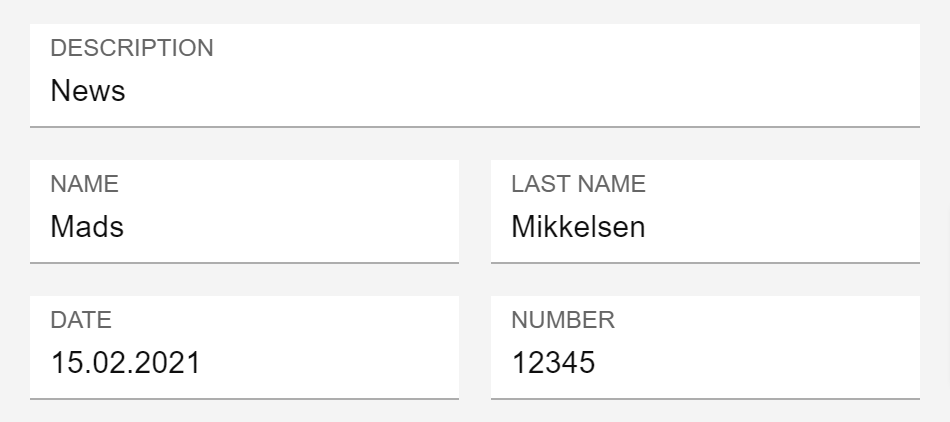
To achieve this, the input components
- CMS_INPUT_TEXT
- CMS_INPUT_NUMBER
- CMS_INPUT_DATE
now support the noBreak attribute.
This attribute can be used to suppress the automatic line break after an input component.
To suppress the automatic line break, assign the value yes:
noBreak="yes"Example:
...
<CMS_INPUT_TEXT name="author1" noBreak="yes">
     <LANGINFOS>
       <LANGINFO lang="*" label="Name"/>
     </LANGINFOS>
</CMS_INPUT_TEXT>

<CMS_INPUT_TEXT name="author2">
     <LANGINFOS>
       <LANGINFO lang="*" label="Last name"/>
     </LANGINFOS>
</CMS_INPUT_TEXT>


<CMS_INPUT_DATE name="creationDate" mode="date" noBreak="yes">
     <LANGINFOS>
       <LANGINFO lang="*" label="Date"/>
     </LANGINFOS>
</CMS_INPUT_DATE>

<CMS_INPUT_NUMBER name="number" type="double">
     <LANGINFOS>
       <LANGINFO lang="*" label="Number"/>
     </LANGINFOS>
</CMS_INPUT_NUMBER>
The default value for noBreak is no (i.e.: no wrap).
Note: If the width is too small (i.e. not all of the input components will fit in the intended line), form lines will be broken even if noBreak="yes" has been set; this is to ensure a minimum width for the input components.
The option of extending the input components across the full width (hFill attribute) is not supported.
Groupings (CMS_GROUP)CMS_GROUP is used to group input components of a form graphically in order to achieve a better overview.
Input components can be displayed
- on several tabs
- among each other with frames
As of the current release, CMS_GROUP is also supported in FragmentCreator.
.png)
Code example:
<CMS_MODULE>

   <CMS_GROUP name="group" tabs="top">

     <CMS_GROUP name="text">
       <LANGINFOS>
         <LANGINFO lang="*" label="Text"/>
       </LANGINFOS>

       <CMS_INPUT_TEXT name="headline" useLanguages="no">
         <LANGINFOS>
           <LANGINFO lang="*" label="Headline"/>
           <LANGINFO lang="DE" label="Überschrift"/>
         </LANGINFOS>
       </CMS_INPUT_TEXT>

       <FS_MARKDOWN name="markdown">
         <LANGINFOS>
           <LANGINFO lang="*" label="Text"/>
         </LANGINFOS>
       </FS_MARKDOWN>

     </CMS_GROUP>

     <CMS_GROUP name="picture">
       <LANGINFOS>
         <LANGINFO lang="*" label="Picture"/>
         <LANGINFO lang="DE" label="Bild"/>
       </LANGINFOS>

       <FS_INDEX name="picture">
         <LANGINFOS>
           <LANGINFO lang="*" label="Picture"/>
           <LANGINFO lang="DE" label="Bild"/>
         </LANGINFOS>
         <SOURCE name="FirstSpiritMediaAccess/Connector"/>
       </FS_INDEX>

       <CMS_INPUT_TOGGLE name="toggle">
         <LANGINFOS>
           <LANGINFO lang="*" label="Alignment"/>
           <LANGINFO lang="DE" label="Ausrichtung"/>
         </LANGINFOS>
         <OFF>
           <LANGINFO lang="*" label="Right"/>
           <LANGINFO lang="DE" label="Rechts"/>
         </OFF>
         <ON>
           <LANGINFO lang="*" label="Left"/>
           <LANGINFO lang="DE" label="Links"/>
         </ON>
       </CMS_INPUT_TOGGLE>

     </CMS_GROUP>

   </CMS_GROUP>

</CMS_MODULE>
Attributes:
name: This optional attribute can be used to specify a technical identifier for the grouping.
Unlike identifiers of input components (also attributename), the identifier forCMS_GROUPdoes not have to be unique within a form.tabs: By default, groupings are displayed with frames below each other. To display them on individual tabs, usetabs="top".scrollable: This optional attribute can be used to specify whether scrollbars should be displayed or not.
Possible values are:
fixed: Do not use scrollbars.
vertical: Use vertical scrollbars.
horizontal: Use horizontal scrollbars.
both: Use horizontal and vertical scrollbars.height: This optional attribute can be used to specify the display height of the grouping in pixels.
If the parameter is not specified, the height is based on the included input components.LANGINFOS/LANGINFO: These tags are used to define the label.
If these tags are not specified, no label is displayed for the grouping.
Note The values left, bottom and right for the tabs attribute, which can be used to display tabs on the left, right or bottom in the SiteArchitect, are not taken into account for the display in the FragmentCreator.
4.3 Generating referenced elements from remote projects
“FirstSpirit Content Experience Tools” (CXT) enables elements from other projects (known as “remote projects”) to be referenced: fragments, media, and page references. The “FirstSpirit Fragment DAP” (fragmentdap-[version].fsm), “FirstSpirit Media DAP” (mediadap-[version].fsm), or “FirstSpirit PageRef DAP” (pagerefdap-[version].fsm) modules are used for this purpose.
When generating a FirstSpirit project in which elements have been referenced via these modules, the released status of the referenced element is now taken into account.
Previously, a new revision would first need to be created in the FirstSpirit project performing the generation, so that (released) changes to the remote fragments referenced therein would be taken into account in a generation process.
This change means historic states of the referenced elements cannot be generated any more (via
context.setStartTime(<Date in the past>);in a script preceding the generation job).
5 Compatibility
Modules and extensions for FirstSpirit 2021-03
The following modules and extensions are compatible with FirstSpirit 2021-03:
| Module name/File name | Version number | Compatibility |
FirstSpirit Update Archivefs-update-[version].tar.gz | 1.0.12 | - |
FirstSpirit Install Archiv fs-install-[version].tar.gz | 1.0.12 | - |
FirstSpirit LauncherFSLauncher.exe | 1.0.38 | as of FirstSpirit 2018-08 |
FirstSpirit Launcher JRE modulefs-launcher-jre-[version].fsm | 1.16 | as of FirstSpirit 2020-11 |
FirstSpirit SAML Login modulefs-saml-login-[version].fsm | 1.1 | as of FirstSpirit 2019-02 |
FSDevToolsfs-cli-[version].tar.gzfs-cli-[version].zip | 2.6.6 | as of FirstSpirit 2020-08 |
FirstSpirit Module Gradle Pluginfirstspirit-module-gradle-plugin-[version].jar | 1.0.0 | as of FirstSpirit 2019-06 |
6 SiteArchitect
Improved support for the "Variable for sitemap text"
The manner in which database content is output on the page can be controlled for page references that link to pages with an embedded data source. When the page reference is selected in FirstSpirit SiteArchitect, the “Content” tab is also shown in the editing area, next to the project language tabs.
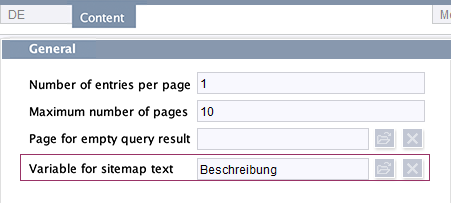
Setting at page reference level (Content tab)
The “Variable for sitemap text” setting can be used to select a column from the data source. The content of this column is then output for displaying/labeling the referenced page in a sitemap (see Documentation: Settings at page reference level). This setting can be used to dynamically design the output of page references in a menu overview, in page groups, on multiPages, or for navigation purposes (see, e.g., Documentation: Navigation/multiPages).
New behavior:
In FirstSpirit 2021-03 and higher, also available for selection for the “Variable for sitemap text” setting is database content whose values are maintained in FirstSpirit in complex input components (e.g., CMS_INPUT_DOM). The FirstSpirit framework attempts to only output the values that are relevant in this context automatically. This means, for example, formatting is automatically removed and only plain text is output for the value of an input component with type CMS_INPUT_DOM.
Restrictions:
- Complex input components can only be used if they are mapped to a FirstSpirit editor column of the corresponding dataset.
- If a field is selected via a foreign key relationship, the unmodified content of the field will still be output from the database, as has always been the case. We recommend only using simple text input components in this instance.
- Please note that when using an appropriate URL generator (such as Advanced URLs), the setting is also used for the file name of the corresponding page. It must be ensured that the content does not exceed the file system's permissible limits for file names, otherwise the files will not be generated. In such a case, error
java.io.FileNotFoundException:...(File name too long)will be recorded during the generation process.
Previous behavior:
Previously, the unmodified content of the field was output from the database, which is only appropriate for input components that save plain text (e.g., CMS_INPUT_TEXT).
7 SiteArchitect / ServerManager
7.1 Display issue in Java 11 resolved: Dialog transparency
As part of the preliminary work being done on the planned switchover of the FirstSpirit byte code level from Java 8 to Java 11, the Java functionalities used internally are currently being adapted and substituted. By making an internal switchover from AWTUtilities to the default Java API, FirstSpirit 2021-03 has also resolved an existing display problem in FirstSpirit running Java 11. In the Java-based FirstSpirit desktop apps (SiteArchitect, ServerManager), dialogs (e.g., Help dialog / About FirstSpirit) are once again displayed with a transparent border.
7.2 FirstSpirit Desktop Apps do not start with Java 8
As part of product maintenance, support for Java 8 was discontinued with FirstSpirit 2020-06. In the process, the Java versions for Oracle Java 8 and AdoptOpenJDK 8 contained in the “FirstSpirit Launcher JRE” module were also removed.
However, older versions of the “FirstSpirit Launcher JRE” module could still be used together with a current version of the FirstSpirit Launcher to start the FirstSpirit Desktop Apps (SiteArchitect, ServerManager). If the “Java 8” option was selected in this older module version, this configuration was still possible.
With the current version 1.0.38 of the FirstSpirit Launcher, this option has now been removed (due to an incompatibility with Java 16+). A corresponding configuration (current launcher, older module “FirstSpirit Launcher JRE” with Java 8) results in the FirstSpirit Desktop Apps no longer starting. This adjustment is necessary to release FirstSpirit version 2021/04 with support for OpenJDK 16 (non-LTS; Release date 2021-03) (for the FirstSpirit server and the FirstSpirit Desktop Apps).
Are adjustments to the new behavior necessary?
If problems occur when starting the FirstSpirit Desktop Apps (SiteArchitect, ServerManager), please check whether Java 8 is still configured for starting via the “FirstSpirit Launcher JRE” module. In this case, please remove the old configuration.
If problems continue to occur when using the FirstSpirit Launcher or if it is still absolutely necessary to start the FirstSpirit Desktop Apps via Java 8 in your specific FirstSpirit environment (e.g. because the FirstSpirit SiteArchitect uses a customer-specific module that requires Java 8), it is possible to temporarily reactivate the start via Java 8 for a transitional period. To do this, please contact e-Spirit Technical Support.If the start via Java 8 will be reactivated, the use of Java 16+ with FirstSpirit is not possible.
8 System
Updates to integrated third-party software
The following internal software has been updated in the latest FirstSpirit release:
ASM (library for analyzing and modifying Java byte code)
Updated from version 9.0 to version 9.1.
Overview
| ID | Description | Categories |
|---|---|---|
| CORE-9158 | By making an internal switchover from AWTUtilities to the default Java API, FirstSpirit 2021-03 has also resolved an existing display issue in FirstSpirit running Java 11. In the Java-based FirstSpirit desktop apps (SiteArchitect, ServerManager), dialogs (e.g., Help dialog / About FirstSpirit) are once again displayed with a transparent border. |
Editor, Java, ServerManager, SiteArchitect |
| CORE-11999 | The “Template inspection” setting is ignored in the case of an output via the “JSON” template set, as the setting may result in an invalid JSON output. The output always takes place as though the option were deactivated. |
Developer, Support for JSON, Template Debugger |
| CORE-12072 | Using input components that are not available on the server (anymore) no longer causes the entire form to be shown as incorrect; only the unknown input component is displayed as incorrect. |
Input Components |
| CORE-12534 | In FirstSpirit 2021-03 and higher, also available for selection for the “Variable for sitemap text” setting is database content whose values are updated in FirstSpirit in complex input components (e.g., |
Developer, Editor, Site Store, SiteArchitect |
| CORE-12655 | Links to remote projects were erroneously requested in a historic preview with the revision information for the current project. |
Advanced URL, Developer, Generation, Remote access |
| CORE-12750 | The manner in which connection settings are configured has been optimized for users and the configuration prepopulated with default settings. |
FirstSpirit home page, Launcher |
| CORE-13229 | In very rare instances, an extremely large amount of storage space was required (up to an |
Debugging, Generation, Performance, Support for JSON |
| CORE-13288 | Internal software has been updated in the latest FirstSpirit release. Further information can be found in chapter “System: Updates to integrated third-party software”. |
FirstSpirit Administrator, Integrated software |
| CORE-13291 | In very rare cases, a NullPointerException could occur during the recursive release of FirstSpirit objects. The error has been fixed. |
Editor, Release |
| CORE-13297 | In the latest FirstSpirit version, the JSON function supports direct usage of FirstSpirit's own unique identifiers (UUIDs). This means that queries on the FS_GID in queries used in the Site Store are now correctly converted if the |
Developer, Support for JSON |
| CORE-13301 | In very rare instances, an insertion error sometimes occurred in the “Merge” dialog of the version history in FirstSpirit SiteArchitect and when calling the function via the FirstSpirit API ( |
Developer, FirstSpirit API, SiteArchitect, Version history |
| CORE-13306 | If a zip file containing no features is selected when loading a feature, a meaningful error message is now displayed. ( |
Content Transport |
| CORE-13317 | In FirstSpirit 2021-02 and higher, FirstSpirit desktop applications (SiteArchitect, ServerManager) are started automatically for all users via the FirstSpirit Launcher. The For this reason, the Release Notes for FirstSpirit 2021-02 recommended modifying the |
Developer, Editor, FirstSpirit Administrator, Launcher, ServerManager, SiteArchitect |
| CORE-13365 | Fixed a bug that could cause unnecessary file handles to remain open when updating web applications. |
ContentCreator, FirstSpirit Administrator |
| CORE-13369 | The following modules and extensions are compatible with FirstSpirit 2021-03. |
Developer, FirstSpirit Administrator, Modules, Server Administrator |
| CORE-13433 | For older versions of the “FirstSpirit Launcher JRE” module, Java 8 could still be configured to start the FirstSpirit Desktop Apps (SiteArchitect, ServerManager) via the FirstSpirit Launcher. With the current version 1.0.38 of the FirstSpirit Launcher, this option has now been removed (due to an incompatibility with Java 16+). A corresponding configuration (current launcher, older module “FirstSpirit Launcher JRE” with Java 8) leads to FirstSpirit Desktop Apps no longer starting. |
Developer, Java, Launcher, ServerManager, SiteArchitect |
| CXT-642 | Generation of elements (fragments, media, pages) from remote projects, which have been referenced via a “Fragment DAP”, “Media DAP”, or “PageRef DAP” module. |
FragmentCreator |
| CXT-1204 | New layout options for input components now allow better clarity: groupings and side-by-side display. |
Developer, Editor, FirstSpirit Content Experience Tools (CXT), FragmentCreator, Input Components, Template Development |
| CXT-1666 | The settings made under “Appearance in editor” for format templates (e.g., for text, background, and border colors) are now again taken into account in ContentCreator in the rich text editors using them (CMS_INPUT_DOM and CMS_INPUT_DOMTABLE). |
ContentCreator, Developer, Editor, Input Components |
| CXT-1778 | In addition to an upload from the workstation computer, images can now also be uploaded from other browser windows/tabs in ContentCreator. |
ContentCreator, Editor, Input Components, Media, Media Store |
| CXT-2006 | Logging in case a variant cannot be created in FragmentCreator via the “Translated” button because the “TranslationStudio” module is not configured correctly has been improved. In addition, the message “The variant could not be created” is displayed in the client. |
Debugging, Developer, Editor, FirstSpirit Administrator, FirstSpirit Content Experience Tools (CXT), FragmentCreator |
| CXT-2078 | Upload of media with insufficient permissions |
ContentCreator, Developer, Editor, Input Components, Media, Permissions, Remote access |
| CXT-2106 | The visualization of invalid format templates in CMS_INPUT_DOM and CMS_INPUT_DOMTABLE has been modified. |
ContentCreator, Editor, Input Components |
| CXT-2155 | FirstSpirit Content Experience Tools: Latest module versions |
Developer, FirstSpirit Administrator, FirstSpirit Content Experience Tools (CXT), FragmentCreator, Modules |
| CXT-2156 | If a user who has started or switched a workflow forward is unknown because, for example, he has been deleted in the meantime, the corresponding entry is now displayed correctly in the “Tasks” report. |
ContentCreator, Editor, FirstSpirit Administrator, Reports, Workflow |
| CXT-2157 | In the case of long-running script operations with client interactions, it was possible that threads were not terminated correctly. This occurred under certain circumstances if the user closed the ContentCreator before the script could request the client interaction (for example |
ContentCreator, Developer, Editor, FirstSpirit Administrator |
| DEVEX-467 | FSDevTools: When updating modules using command |
Developer, FSDevTools |
Deprecations
| Functionality | Deprecated as of | Will be removed / Was removed as of |
|---|---|---|
| Input component CMS_INPUT_CONTENTAREALIST | 5.2R3 | |
| Input component CMS_INPUT_CONTENTLIST | 5.2R3 | |
| Input component CMS_INPUT_FILE | 5.2R3 | |
| Input component CMS_INPUT_LINKLIST | 5.2R3 | |
| Input component CMS_INPUT_OBJECTCHOOSER | 5.2R3 | |
| Input component CMS_INPUT_PAGEREF | 5.2R3 | |
| Input component CMS_INPUT_PICTURE | 5.2R3 | |
| Input component CMS_INPUT_TABLIST | 5.2R3 | |
| FirstSpirit Access API: de.espirit.firstspirit.agency.GroupsAgent | 5.2R15 | |
| FirstSpirit Access API: delete (de.espirit.firstspirit.access.AccessUtil) | 5.2R18 | |
| FirstSpirit Access API: release (de.espirit.firstspirit.access.AccessUtil) | 2018-06 | |
| FirstSpirit Access API: getLastLoginAsDate (de.espirit.firstspirit.agency.UserStatisticsAgent) | 2018-07 | |
| FirstSpirit Access API: remainingDurationOfCurrentStageInMillis (de.espirit.firstspirit.server.MaintenanceModeInfo) | 2018-07 | 2025-13 |
| FirstSpirit Access API: getStartingTimeOfStageAsDate (de.espirit.firstspirit.server.MaintenanceModeInfo) | 2018-07 | 2025-13 |
| FirstSpirit Access API: getSelectedWebserverConfiguration (de.espirit.firstspirit.access.serverConfiguration) | 2018-10 | 2025-13 |
| FirstSpirit Access API: setSelectedWebserverConfiguration (de.espirit.firstspirit.access.serverConfiguration) | 2018-10 | 2025-13 |
| FirstSpirit Access API: getSelectedWebServer (de.espirit.firstspirit.access.project.Project) | 2018-10 | 2025-13 |
| FirstSpirit Access API: setSelectedWebServer (de.espirit.firstspirit.access.project.Project) | 2018-10 | 2025-13 |
| FirstSpirit Access API: getLostAndFoundStoreNodes(); (de.espirit.firstspirit.feature.FeatureInstallResult) | 2018-10 | |
| FirstSpirit Access API: getDeletedStoreNodes(); (de.espirit.firstspirit.feature.FeatureInstallResult) | 2018-10 | |
| FirstSpirit Access API: de.espirit.firstspirit.access.store.Previewable | 2019-01 | |
| WebSphere Application Server support for FirstSpirit | 2019-05 | |
| Legacy mode for the FirstSpirit server | 2019-06 | 2022-03 |
| Database layer for Oracle Database 11g/12c | 2020-12 | 2025-05 |