
Release Notes
1 General
Omission of Java Web Start and the “Switch Projects” function
With “Java Web Start”, Java applications can be downloaded from the Internet and executed with a single click. It has been included in Java since version 5.0. However, Java Web Start was omitted in version 11.
The discontinuation of support for “Java Web Start” for FirstSpirit occurred with FirstSpirit 2019-10. Since the omission of Java 8 (FirstSpirit 2020-06), “Java Web Start” can no longer be used.
With the latest release, Java Web Start has now been permanently omitted and is no longer included in FirstSpirit.
It is replaced by the FirstSpirit Launcher.
In this context, the “Switch Projects” function is now available again in the FirstSpirit SiteArchitect (menu “Project”). For technical reasons, it was not possible to use this function with the FirstSpirit Launcher.
With this function, the currently open project is closed and a project selection dialog is displayed. The desired project to be opened can then be selected.
A warning is displayed if the opened project still contains objects in Editing mode. Contents that were changed in these objects but have not been saved will be lost when switching projects.
2 ContentCreator
2.1 “Data sources” in the FirstSpirit ContentCreator: Official release
The latest release now includes the official release for the use of the “Data sources” (“Content Store”) in the ContentCreator. It provides a clear display of datasets. Datasets can be conveniently created and edited in this view.
.png)
Icon in the menu bar for opening the Data sources view in the ContentCreator
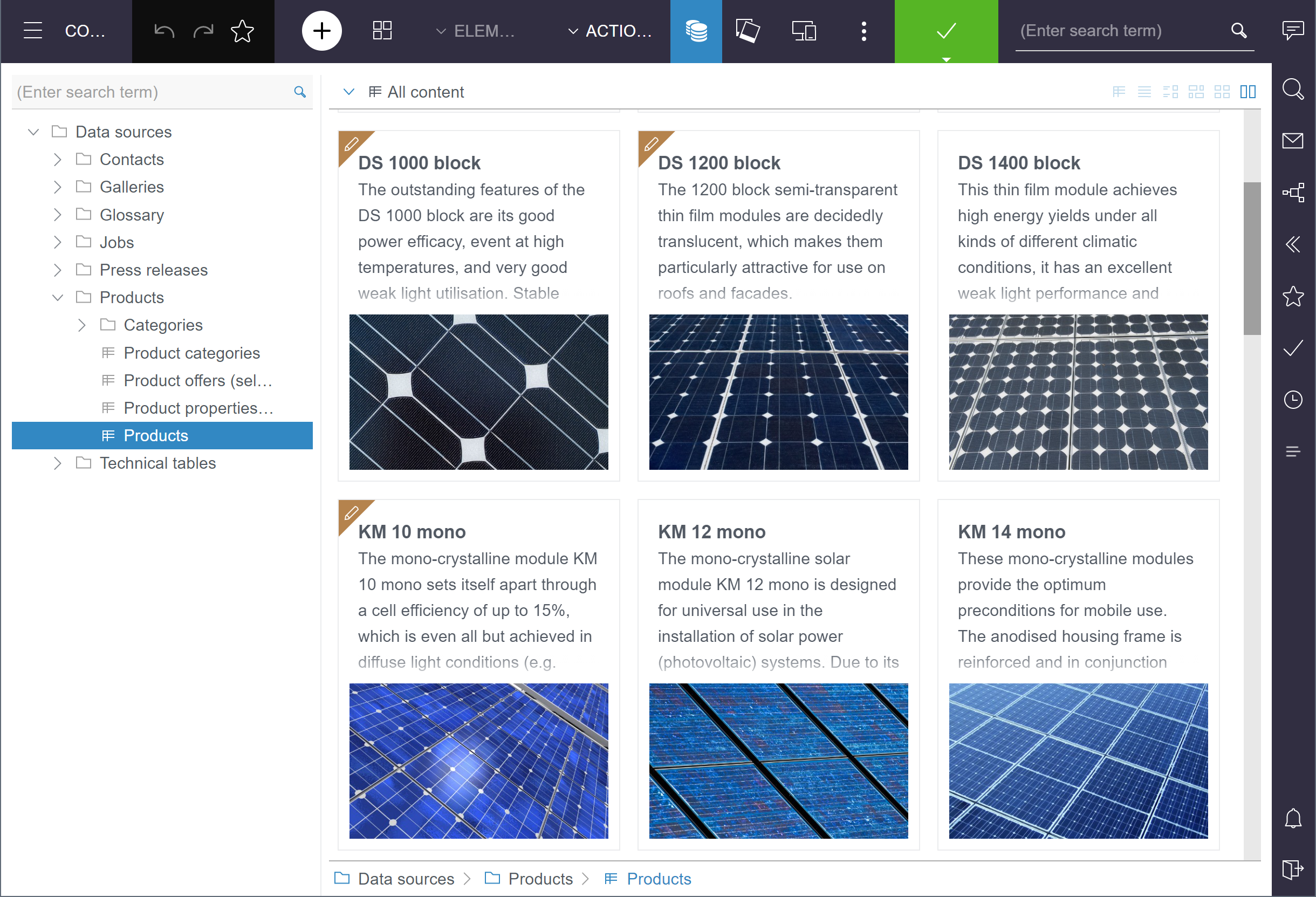
During the BETA phase (since FirstSpirit 2021-08), the functionality had to be activated explicitly (via “Tailored UI”). In the latest release, the function is now available in every project as standard.
The latest release also improved the table display, so that media from remote projects that are referenced via an FS_REFERENCE component as well as contents from FS_INDEX components that are mapped to an XML column are now also shown.
The existing manual for editors, developers and administrators was adapted as well.
If necessary, the functionality of the “Data sources” in the ContentCreator can be deactivated via “Tailored UI”: either completely (EntityManagement: Enabled, the icon in the menu bar will then be hidden) or only certain functions.
The user guidance for releasing datasets is currently being revised and new handling will be provided with a later FirstSpirit release. Currently, the release of datasets requires a switch to the “Dashboard”. This also applies to media.
2.2 Creating pages as reference
Generate new pages in the ContentCreator using the “Create new page” function in the menu

For example, you can choose if you want to create a copy of a specific page or an empty page with a specific page template.
With the latest release, you can now also create a Reference for a specific page (“Reference page” option).
With this method, contents of pages can easily be used again at another place in the project.
-2.png)
The selected page is inserted as a “reference” in the position you define in the “Navigation” area.
The selected page then exists in both positions in the project with the same content.
Changes to the content of one of the two pages are generally also reflected in the respective reference.
If a page is referenced in this way elsewhere on the website, this is visualized in the title bar of dialogs (“References”).
2.3 Creating pages: search for templates
When creating a new page in the ContentCreator, the editor can select a page template using the “Empty page” option as the basis for the creation of the new page.
.png)
The desired page template can be determined by searching.
The latest release now only takes the following elements of page templates into account for the search:
- Display name
- Reference name
- “Comment” field
Upper and lower case will thereby be ignored (as before). The behavior is thereby the same as with the search for section and link templates.
In the past, a full-text search of the entire page template was carried out. This included a search through texts on all tabs of a page template. This resulted in too many hits with little relevance.
2.4 Scripts in ContentCreator
Scripts allow functions that are not yet present in FirstSpirit to be implemented quickly.
In the ContentCreator, these functions can currently be accessed via the “Actions” menu.
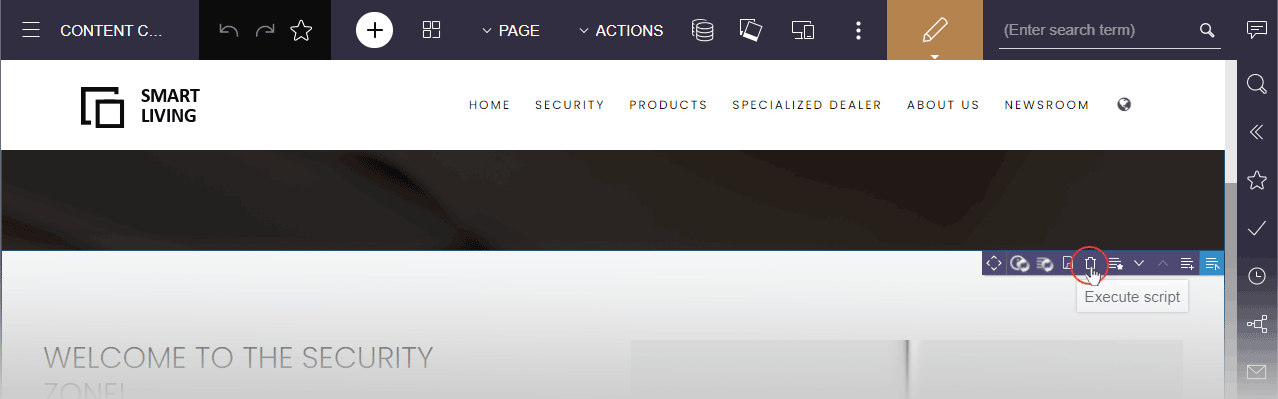
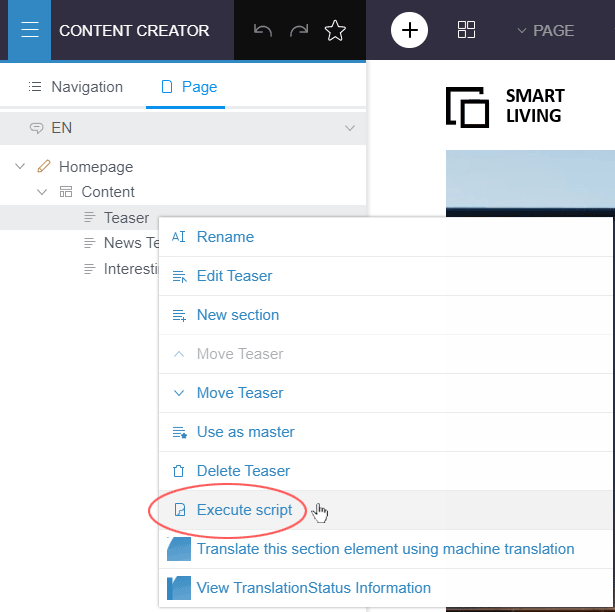
With the latest release, functions that are implemented with FirstSpirit scripts can now also be provided in the following places:
EasyEdit Toolbar
Navigation View
On pages, “Page” tab, menu item “Execute script”
For this purpose, a new scope was introduced for scripts:
ContentCreator
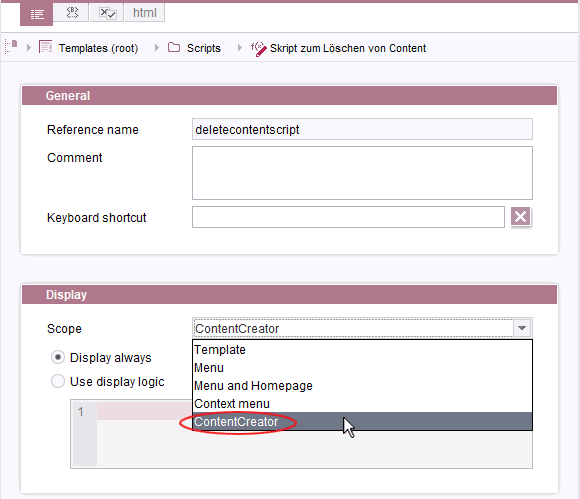
Script template, “Scope” menu
If there are several scripts for which this new scope has been configured, they will be displayed in alphabetical order of their list name in a list. Folders are thereby ignored.
Restriction: This action is currently only available for elements from Page Store, not for elements of the Site, Media or Content Store.
If true is returned in the executed script (return true;), the respective preview will be updated in this case. Accordingly, if a script makes changes, a preview reload can be triggered as needed.
For further information, see https://docs.e-spirit.com/odfs/templates-basic/composition-tem/scripts/index.html
Note: FirstSpirit scripts present a lightweight option for the integration of new functions in FirstSpirit. However, for reasons of stability, it is recommended to implement functions that are needed or used long-term as a FirstSpirit module with executable or plug-in.
2.5 Forwarding of pages to external URLs or pages from other FirstSpirit projects
It is also possible to reference external addresses or pages from remote projects instead of a page in the respective FirstSpirit project for navigation points. When navigating to the corresponding menu item on the website, the external URL or the page from the remote project will then be displayed instead of a page from the FirstSpirit project.
Until now, it was only possible to set this up in the FirstSpirit SiteArchitect (with “page references”).
With the latest release, the configuration is now also possible in the navigation view in the ContentCreator, “Navigation” tab, context menu entry “Edit link” on “pages”:
-2.png)
The desired link can be set up for each language in the following dialog:
-2.png)
- Internal (FirstSpirit): This is a default setting: the referenced page (Page Store) in the current FirstSpirit project is used and displayed when the corresponding navigation item is selected.
- External Address (URL): This option is used to enter a reference to an external address. The address must begin with
http://(e.g.,http://www.e-spirit.com). This address is displayed when the corresponding navigation item is selected. - Related project: This option is used to reference a page from a “related project”. The selected page from the related project is displayed when the corresponding navigation item is selected.
Note: “Related projects” are configured in the project properties in FirstSpirit ServerManager and require a valid license for access to remote projects.
The pages that are displayed in the preview when the “External address (URL)” and “Related project” options are selected cannot be edited.
3 External Synchronization / Content Transport
FSDevTools now includes manuals in HTML format
The “FSDevTools” command line tool simplifies export and import operations between a FirstSpirit project and the file system using predefined commands.
Until now, the manual of usable parameters was integrated and could be accessed via the command line (fs-cli help or fs-cli help <command> for a specific command).
The latest FSDevTools release (Release 3.1.0) also includes the manual in HTML format.
It is available at docs/index.html. The manual is generated automatically with each new release so that the release is always delivered with the correct version.
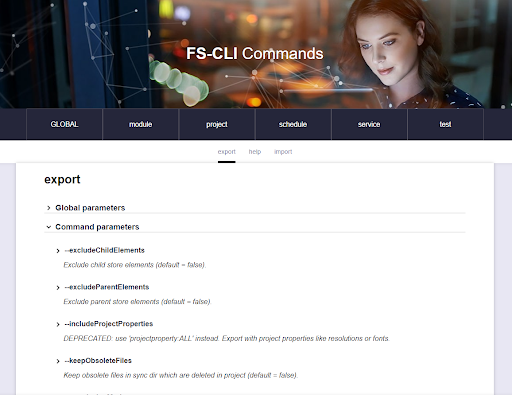
The plan is to also provide the manual with a future release publicly on the central docs.e-spirit.com manual page.
4 FirstSpirit Content Experience Tools (CXT)
Latest module versions
FirstSpirit 2021-11 supports the following module versions for “FirstSpirit Content Experience Tools”.
| Module / file name | Version number |
FirstSpirit CXT Plattformplatform-[version].fsm | 2.5.1 |
FirstSpirit CXT DAP Bridgedataservice-[version].fsm | 1.44.1 |
FirstSpirit CXT FragmentCreatorfragment-creator-[version].fsm | 3.4.3 |
FirstSpirit Fragment DAPfragmentdap-[version].fsm | 1.40.3 |
FirstSpirit Media DAPmediadap-[version].fsm | 1.31.2* |
FirstSpirit PageRef DAPpagerefdap-[version].fsm | 1.9.2 |
FirstSpirit Markdown Editormarkdown-editor-[version].fsm | 1.29.1* |
FirstSpirit Tagging Editortagging-editor-[version].fsm | 1.29.1 |
FirstSpirit CXT FragmentCreator - CaaS Integrationcaas-integration-[version].fsm | 1.31.2 |
* These modules require FirstSpirit 2020-03 or higher from this version.
5 Compatibility
Modules and extensions for FirstSpirit 2021-11
The following modules and extensions are compatible with FirstSpirit 2021-11:
| Module name/File name | Version number | Compatibility |
FirstSpirit Update Archivefs-update-[version].tar.gz | 2.1.0 | - |
FirstSpirit Install Archiv fs-install-[version].tar.gz | 2.1.0 | - |
FirstSpirit LauncherFSLauncher.exe | 1.0.42 | as of FirstSpirit 2018-08 |
FirstSpirit Launcher JRE modulefs-launcher-jre-[version].fsm | 1.19 | as of FirstSpirit 2020-11 |
FirstSpirit SAML Login modulefs-saml-login-[version].fsm | 1.3 | as of FirstSpirit 2019-02 |
FSDevToolsfs-cli-[version].tar.gzfs-cli-[version].zip | 3.1.0 | as of FirstSpirit 2021-07 |
FirstSpirit Module Gradle Pluginfirstspirit-module-gradle-plugin-[version].jar | 2.3.2 | as of FirstSpirit 2019-06 |
6 System
Updates to integrated third-party software
The following internal software has been updated in the latest FirstSpirit release:
- Eclipse Jetty (included in the
fs-jetty.fsm/“FirstSpirit Jetty Service” module)
Update from Version 9.4.39 to Version 9.4.44
This update rectified an error that was preventing the uploading of media in the FirstSpirit SiteArchitect and ContentCreator using drag-and-drop with operation of the Jetty module in HTTPS mode.
Eclipse Jetty is not supported for operation with FirstSpirit Content Experience Tools (CXT).
Overview
| ID | Description | Categories |
|---|---|---|
| CORE-12358 | Omission of Java Web Start and the “Switch Projects” function |
Developer, Editor, FirstSpirit Administrator, Java, Project switch, SiteArchitect, Webstart |
| CORE-13245 | In rare cases, schedules that were set up for a specific day of the week per month were not executed at the right time. |
Developer, FirstSpirit Administrator, Tasks |
| CORE-13699 | Internal software has been updated in the latest FirstSpirit release. Further information can be found in chapter “System: Updates to integrated third-party software”. |
Developer, FirstSpirit Administrator |
| CORE-13904 | An error that could cause incorrectly generated links to a page that was defined with SEO-URL as project start page (e.g., “ |
Advanced URL |
| CORE-13926 | An error has been fixed which, in very rare cases, could result in that contents were incorrectly displayed for short periods of time with the use of SSO after the user session had expired. |
Editor, Media, Sessions |
| CORE-13930 | In very rare cases, the Downstream Manager may behave erroneously when the FirstSpirit Server is started. |
Server Administrator |
| CORE-13942 | In rare cases, a 500 error could occur when starting the FirstSpirit ContentCreator. |
ContentCreator, Editor |
| CORE-13953 | An error has been fixed which, in very rare cases, could cause the closing of a repository or a registry database even though it was still in use. |
FirstSpirit Administrator, Repository |
| CORE-13959 | With the latest release, functions that are implemented with FirstSpirit scripts can now be provided in other places in the FirstSpirit ContentCreator. Further information can be found in chapter “ContentCreator: Scripts in ContentCreator”. |
ContentCreator, Developer, Template Development, Template Store |
| CORE-13969 | The MBean |
Debugging, Developer, FirstSpirit Administrator, Repository |
| CORE-13973 | An error that could cause the unavailability of CSV files that can be downloaded or sent via the Mail icon in the “Codes” area in ServerMonitoring has been corrected. |
Debugging, FirstSpirit Administrator, Server Administrator, ServerMonitoring |
| CORE-13988 | FirstSpirit Content Experience Tools: Latest module versions |
Developer, FirstSpirit Administrator, FirstSpirit Content Experience Tools (CXT), FragmentCreator, Modules |
| CORE-13992 | Errors when using an LDAP link may now lead to that, in addition to a |
Debugging, FirstSpirit Administrator |
| CORE-13993 | An error has been corrected, which could lead to the incorrect transport of permissions when transporting workflow permissions using “fs-cli” (FSDevTools). Note: If the transport of the permissions did not work correctly, delete the transport directory in the file system and restart the transport. If the directory cannot be deleted, change the respective nodes in the source and restart the transport. |
Developer, FSDevTools, FirstSpirit Administrator, Permissions, Workflow |
| CORE-13998 | The behavior of FirstSpirit in certain high-load situations has been improved so that the server exhibits a better response behavior in these cases. |
Performance, Server Administrator |
| CORE-14007 | When determining the Health status of the FirstSpirit Server (“ServerMonitoring”/“Health Center”), |
Debugging, FirstSpirit Administrator, ServerMonitoring |
| CORE-14015 | A new attribute has been added to the MBean |
Debugging, FirstSpirit Administrator, ServerMonitoring |
| CORE-14018 | Modules and extensions for FirstSpirit 2021-11 |
Developer, FSDevTools, Launcher, Modules |
| CXT-1365 | An error has been fixed which, in very rare cases, could cause the detail page of a dataset not to be displayed in the ContentCreator after a Refresh (F5). |
ContentCreator, Database, Editor |
| CXT-1614 | Forwarding of pages to external URLs or pages from other FirstSpirit projects |
ContentCreator, Editor, Navigation view |
| CXT-2421 | The search for page templates when creating pages has been improved to exclude fewer relevant page templates from search hits. Further information can be found in chapter “ContentCreator: Creating pages: search for templates”. |
ContentCreator, Editor, Search |
| CXT-2436 | Creating pages as reference Further information can be found in chapter “ContentCreator: Creating pages as reference”. |
ContentCreator, Editor |
| CXT-2438 | The user guidance of FS_DATASET and FS_REFERENCE has been aligned: You can now click in the area in FS_REFERENCE components in which the selected element is shown and open the selection dialog as long as no element is selected yet. |
ContentCreator, Editor, Input Components |
| CXT-2440 | If a page reference is linked with a “Related project”, an error message appeared in the browser console when the page is selected in the ContentCreator. No status will be displayed for such a page because no context element is available. |
ContentCreator, Editor, Remote access |
| CXT-2450 | Clicking on a link that does not lead to another page ( |
ContentCreator, Editor |
| CXT-2451 | In the InEdit mode, the size of editing windows is now restricted to the size of the preview again, so that the toolbar with the InEdit icons is visible again at all times. |
ContentCreator, Editor |
| CXT-2459 | In some cases, the “Last modification” display in the Element status of a Preview page in the FirstSpirit ContentCreator only took changes to page references (Site Store) into account: if the last change was made to the referenced page (Page Store), it was not listed under “Last modification”, instead, only the last change to the page reference was listed. |
ContentCreator, Editor, Version history |
| CXT-2460 | The latest FirstSpirit release includes the official release for the use of the “Data Store” in the FirstSpirit ContentCreator. |
Content Store, ContentCreator, Database, Editor |
| CXT-2461 | Depending on the project configuration, the EasyEdit icons of multiple elements (e.g., nested sections) are summarized in a toolbar. The area for which the respective action is carried out can then be selected from a pop-up menu. |
ContentCreator, Editor, Input Components |
| DEVEX-457 | The latest FSDevTools release includes the manual of the usable parameters in HTML format. |
Developer, Documentation, External synchronization, FSDevTools, FirstSpirit API |
Deprecations
| Functionality | Deprecated as of | Will be removed / Was removed as of |
|---|---|---|
| Input component CMS_INPUT_CONTENTAREALIST | 5.2R3 | |
| Input component CMS_INPUT_CONTENTLIST | 5.2R3 | |
| Input component CMS_INPUT_FILE | 5.2R3 | |
| Input component CMS_INPUT_LINKLIST | 5.2R3 | |
| Input component CMS_INPUT_OBJECTCHOOSER | 5.2R3 | |
| Input component CMS_INPUT_PAGEREF | 5.2R3 | |
| Input component CMS_INPUT_PICTURE | 5.2R3 | |
| Input component CMS_INPUT_TABLIST | 5.2R3 | |
| FirstSpirit Access API: de.espirit.firstspirit.agency.GroupsAgent | 5.2R15 | |
| FirstSpirit Access API: delete (de.espirit.firstspirit.access.AccessUtil) | 5.2R18 | |
| FirstSpirit Access API: release (de.espirit.firstspirit.access.AccessUtil) | 2018-06 | |
| FirstSpirit Access API: getLastLoginAsDate (de.espirit.firstspirit.agency.UserStatisticsAgent) | 2018-07 | |
| FirstSpirit Access API: remainingDurationOfCurrentStageInMillis (de.espirit.firstspirit.server.MaintenanceModeInfo) | 2018-07 | 2025-13 |
| FirstSpirit Access API: getStartingTimeOfStageAsDate (de.espirit.firstspirit.server.MaintenanceModeInfo) | 2018-07 | 2025-13 |
| FirstSpirit Access API: getSelectedWebserverConfiguration (de.espirit.firstspirit.access.serverConfiguration) | 2018-10 | 2025-13 |
| FirstSpirit Access API: setSelectedWebserverConfiguration (de.espirit.firstspirit.access.serverConfiguration) | 2018-10 | 2025-13 |
| FirstSpirit Access API: getSelectedWebServer (de.espirit.firstspirit.access.project.Project) | 2018-10 | 2025-13 |
| FirstSpirit Access API: setSelectedWebServer (de.espirit.firstspirit.access.project.Project) | 2018-10 | 2025-13 |
| FirstSpirit Access API: getLostAndFoundStoreNodes(); (de.espirit.firstspirit.feature.FeatureInstallResult) | 2018-10 | |
| FirstSpirit Access API: getDeletedStoreNodes(); (de.espirit.firstspirit.feature.FeatureInstallResult) | 2018-10 | |
| FirstSpirit Access API: de.espirit.firstspirit.access.store.Previewable | 2019-01 | |
| WebSphere Application Server support for FirstSpirit | 2019-05 | |
| Legacy mode for the FirstSpirit server | 2019-06 | 2022-03 |
| Database layer for Oracle Database 11g/12c | 2020-12 | 2025-05 |
| FirstSpirit Access API: redirectTemplateLogToDefaultLog() (Interface RenderingAgent.Renderer) | 2021-05 |