
Release Notes
1 Administration
1.1 Announcement: New release name schema
With FirstSpirit 2021-09, the release interval was changed from monthly to every 4 weeks.
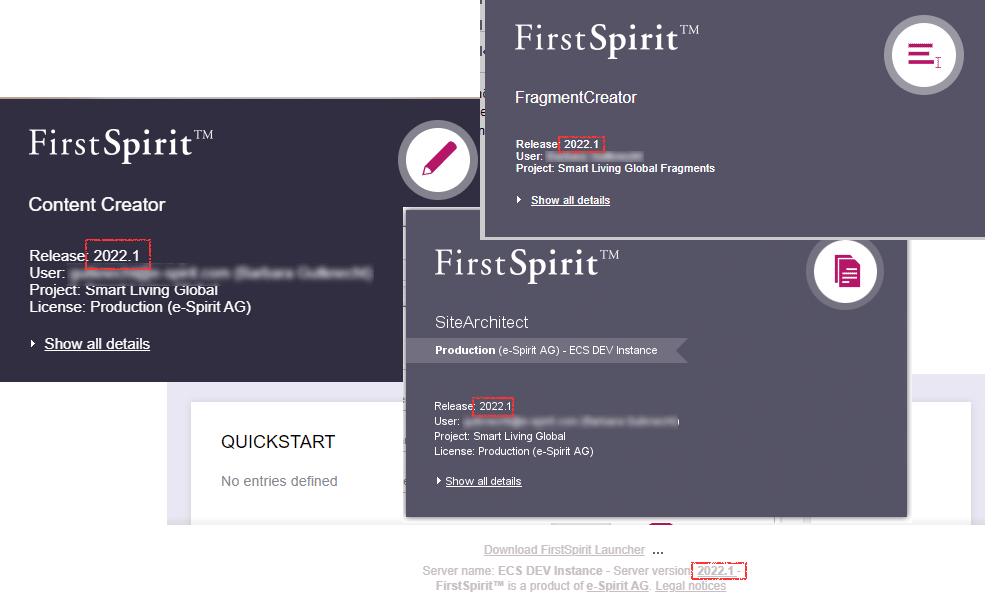
It is planned to adjust the name of the releases to this condition at the turn of the year to 2022: to create releases with more flexibility, the release name wil no longer base on the digits of the month (e.g. FirstSpirit 2021-12) but will use a continuous counter. The digits of the year are separated from this counter with a period, e.g.
2022.1for the first release of the year 2022.
The release name is used in familiar places such as info dialog boxes.
1.2 Handling of project components for deactivated projects
When updating the uses of modules (FirstSpirit ServerManager / Server properties / Modules, “Update uses” / “Updating”), project components of deactivated projects are now no longer considered.
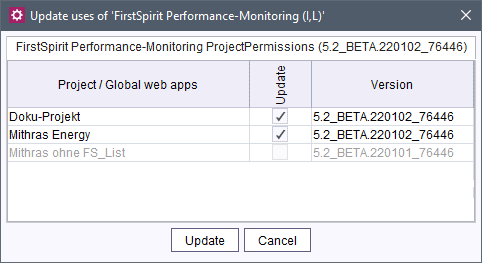
Furthermore, the administrator is notified during the reactivation of a project (FirstSpirit ServerManager / Project / Reactivate), if it uses a project component for which the module is not (no longer) installed on the server. In this case, he can remove the project component or install the module.
2 ContentCreator
Expansion of the status display
The status of elements is displayed in the menu bar at the top right. There – depending on the respective element type and status – different actions can be executed, e.g. starting and continuing workflows, displaying earlier versions of a page, etc.
Until now, the status for selected media and datasets was found in the “Dashboard”.
With the latest release, the design of the status display has been revised to also be able to take the status of media and datasets as well as multi-selections into account.
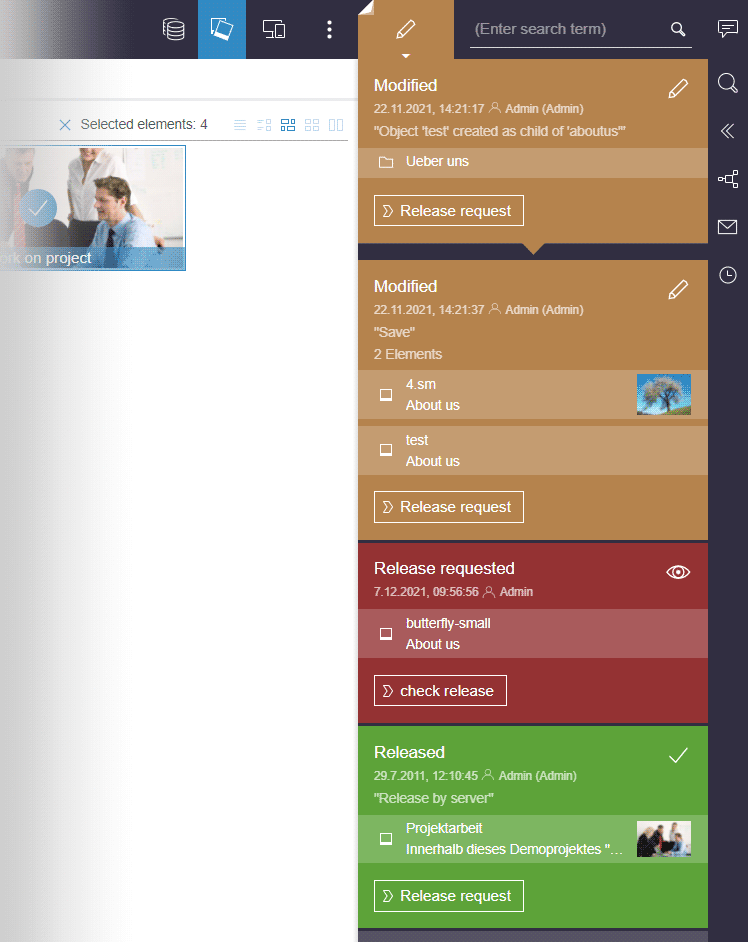
Which information and actions does the status display offer?
In addition to information for the respective element, the status shows information on the last change.
Available workflow actions are visualized via button.
Below the colored status information, it is possible to open additional views for pages (e.g. earlier versions of the page, hidden or deleted sections) or rectify validation problems.
Which element does the status apply to?
- In the preview (which means on a page), the displayed status refers to this page.
Additional views of the page (e.g. an earlier version) can be opened with the corresponding buttons. - In the Media management or the Data sources view, the displayed status refers to the respective folder that is selected in the navigation bar.
For elements that are located in this folder and that were selected by clicking (media, datasets or other folders), the status and available actions are shown below as own status entries (visualized with arrow down).
In the Media management and Data sources view, multiple elements can be selected via click and workflows can be started on them. A bent corner indicates that a selection has been made and the status display applies to the selected folder and at least one selected element located in it.

If several of the selected elements are in the same workflow step, the workflow is activated for them at the same time by pressing the corresponding button.
Further information on operation
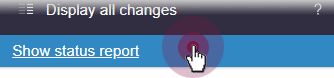
A click on the status icon or the “Show status report” button fixes the status display: this way, it remains open when changing to other elements so that the status of each desired element can be checked conveniently.
The display remains open until the user clicks on the status button again or opens another report.
The function of the “Status notifications” was visually adapted to the new design of the status display (“Status notifications”: plug-in, FirstSpirit Developer API, package de.espirit.firstspirit.webedit.plugin.status).
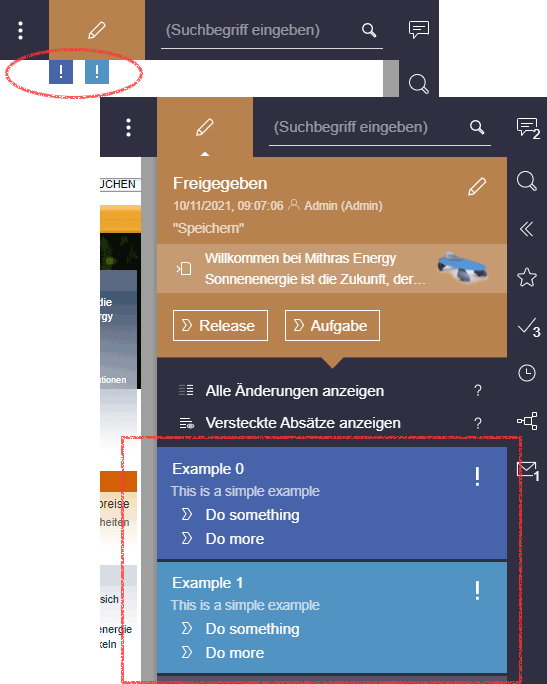
Status information is no longer displayed in the “Dashboard”. Until now, status information was displayed there for elements of the Media management and Data sources.
For more information, see also https://docs.e-spirit.com/contentcreator/menu-functions/element-status/index.html.
3 FirstSpirit Content Experience Tools (CXT)
Latest module versions
FirstSpirit 2021-12 supports the following module versions for “FirstSpirit Content Experience Tools”.
| Module / file name | Version number |
FirstSpirit CXT Plattformplatform-[version].fsm | 2.5.2 |
FirstSpirit CXT DAP Bridgedataservice-[version].fsm | 1.44.2 |
FirstSpirit CXT FragmentCreatorfragment-creator-[version].fsm | 3.4.4 |
FirstSpirit Fragment DAPfragmentdap-[version].fsm | 1.40.4 |
FirstSpirit Media DAPmediadap-[version].fsm | 1.31.3* |
FirstSpirit PageRef DAPpagerefdap-[version].fsm | 1.9.3 |
FirstSpirit Markdown Editormarkdown-editor-[version].fsm | 1.29.2* |
FirstSpirit Tagging Editortagging-editor-[version].fsm | 1.29.2 |
FirstSpirit CXT FragmentCreator - CaaS Integrationcaas-integration-[version].fsm | 1.31.3 |
* These modules require FirstSpirit 2020-03 or higher from this version.
4 Compatibility
Modules and extensions for FirstSpirit 2021-12
The following modules and extensions are compatible with FirstSpirit 2021-12:
| Module name/File name | Version number | Compatibility |
FirstSpirit Update Archivefs-update-[version].tar.gz | 2.1.0 | - |
FirstSpirit Install Archiv fs-install-[version].tar.gz | 2.1.0 | - |
FirstSpirit LauncherFSLauncher.exe | 1.0.42 | as of FirstSpirit 2018-08 |
FirstSpirit Launcher JRE modulefs-launcher-jre-[version].fsm | 1.19 | as of FirstSpirit 2020-11 |
FirstSpirit SAML Login modulefs-saml-login-[version].fsm | 1.3 | as of FirstSpirit 2019-02 |
FSDevToolsfs-cli-[version].tar.gzfs-cli-[version].zip | 3.1.0 | as of FirstSpirit 2021-07 |
FirstSpirit Module Gradle Pluginfirstspirit-module-gradle-plugin-[version].jar | 3.0.2 | as of FirstSpirit 2019-06 |
5 System
Updates to integrated third-party software
The following internal software has been updated in the latest FirstSpirit release:
- AWS SDK (Amazon API for automatic image recognition, used in the “FirstSpirit Image Recognition” module)
Update to version 2.17.58
With this update, more attributes can now be identified and saved for images with an analysis via the “FirstSpirit Image Recognition” module.
Also refer to Amazon Recognition News. - Apache Batik (Display, creation and manipulation of scalable vector graphics, SVG)
Update to version 1.14 - TwelveMonkeys ImageIO (extended Java support for image file formats)
Update to version 3.7.0
6 Template development
6.1 JSON: New "translated" attribute for pages
With the latest release, the JSON output now also contains information for pages on whether the “Page is completely translated to this language” checkmark is activated in the SiteArchitect or not.
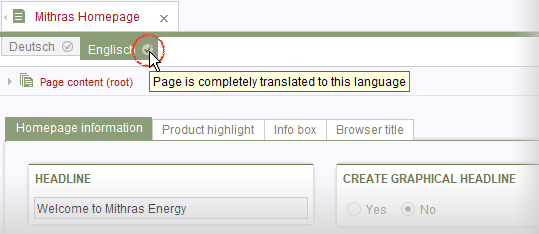
SiteArchitect: "Page is completely translated to this language” option
(See also https://docs.e-spirit.com/odfs/edocs/fsar/page-store/settings-at-pag/index.html)
If the checkmark is activated for the current language of the page, the value of the associated attribute is translated true, if the checkmark is not activated for this language, the value is false, e.g.
{
    "fsType": "Page",
    "name": "translated_status",
    "displayName": "translated_status",
    "identifier": "c3af851b-7429-4d28-9487-ca6e4c3311e8",
    "translated": false,
    "uid": "translated_status",
    "uidType": "PAGESTORE",
    "template": {
       "fsType": "PageTemplate",
       "name": "pt_empty_page",
       "displayName": "pt_empty_page",
       "identifier": "7c020f2f-719c-4334-8efc-f44015333d2a",
       "uid": "pt_empty_page",
       "uidType": "TEMPLATESTORE"
},
...
6.2 Snippets: Syntax validation
The display of objects (pages, sections, datasets, media, etc.) can be influenced at many places of the FirstSpirit Clients, such as in search result lists, reports, selection dialogs, etc. The so-called “Snippets” are used for this. The configuration occurs on the “Snippet” tab of the respective template, for media on the “Snippet” tab of the selected metadata template for the project.
With the latest FirstSpirit release, the syntax of snippet definitions is now checked during saving. If it is incorrect, a corresponding note is displayed and the template cannot be saved.
Example for an error message:
Incorrect syntax in Extract definition
... (at line 4, column 48)
Note: Only the general syntax will be checked. However, there is no check to verify that the variable names that are used are correct and if the applied methods and operators are compatible with the respective object type.
Overview
| ID | Description | Categories |
|---|---|---|
| CORE-13129 | The latest FirstSpirit release checks the syntax of Snippet definitions when saving. Further information can be found in chapter “Template development: Snippets: Syntax validation”. |
Debugging, Developer, Snippets, Template Development, Template Store |
| CORE-13640 | In very rare cases, switching the language dependency of a medium resulted in an interaction with a data-modifying upload hook. |
Media, SiteArchitect |
| CORE-13851 | With the latest release, the JSON output now also contains information for pages on whether the “Page is completely translated to this language” checkmark is set or not. |
Developer, Languages, Page Store, Support for JSON |
| CORE-13981 | An error has been fixed that, with the use of FSDevTools (fs-cli) could lead to that a change of the |
Developer, FSDevTools, FirstSpirit Administrator, Permissions |
| CORE-13986 | When opening the FirstSpirit ContentCreator, errors could occur. Subsequently, certain functionalities, such as switching workflows could not be used. |
ContentCreator, Workflow |
| CORE-14011 | In very rare cases, problems with fonts could prevent a Content Transport feature from being installed. The behavior has been changed so that such problems no longer prevent the installation of a feature. |
Content Transport |
| CORE-14017 | In the MBean From these, information can be read out regarding the extent to which the corresponding cache is utilized (e.g. |
Debugging, FirstSpirit Administrator, ServerMonitoring |
| CORE-14020 | The uploading of images with a format that is not supported (as media type “Image”) by FirstSpirit now leads to a more meaningful error message in the FirstSpirit SiteArchitect: |
Debugging, Editor, Media |
| CORE-14032 | Handling of project components for deactivated projects |
FirstSpirit Administrator, Modules, ServerManager |
| CORE-14043 | With use of the “FirstSpirit Image Recognition” module, it was not possible to upload images in certain formats to the FirstSpirit SiteArchitect. Furthermore, images were not uploaded to FirstSpirit when no or no valid login credentials were configured for “FirstSpirit Image Recognition” (“Access key”). Important for non-Cloud customers: After any module update, the FirstSpirit Server must be restarted for the changes to become effective. |
Developer, Editor, FirstSpirit Administrator, Media |
| CORE-14044 | An error has been fixed, which, in very rare cases, could cause a |
External synchronization, FSDevTools, Permissions, Workflow |
| CORE-14062 | FirstSpirit Content Experience Tools: Latest module versions |
Developer, FirstSpirit Administrator, FirstSpirit Content Experience Tools (CXT), FragmentCreator, Modules |
| CORE-14097 | Announcement: New release name schema Further information can be found in chapter “Administration: Announcement: New release name schema”. |
FirstSpirit Administrator |
| CXT-2407 | Internal software has been updated in the latest FirstSpirit release. Further information can be found in chapter “System: Updates to integrated third-party software”. |
Developer, FirstSpirit Administrator, Media, Modules |
| CXT-2458 | In the input element for the selection of datasets (FS_DATASET), only datasets that match the data source from the drop-down list are now offered for selection. |
Content Store, ContentCreator, Input Components |
| CXT-2471 | With the latest release, the design of the status display has been revised to also be able to take the state of media and datasets as well as multi-selections into account. Further information can be found in chapter “ContentCreator: Expansion of the status display”. |
ContentCreator, Editor, Release, Reports |
| CXT-2477 | If the FirstSpirit ContentCreator is used in the OCM mode (FirstSpirit Omnichannel Manager), clicking on historical entries in the “Project history” report resulted in the display of an error message in the browser console ( Background: based on the concept, historic states of objects are generally not available in OCM due to a use with FirstSpirit Content as a Service (“CaaS”). There, contents are maintained in the “current” and in the “released” state. The “Project history” report is therefore not functional in OCM. |
Editor, FirstSpirit Omnichannel Manager, Omnichannel Manager / Third Party Preview, Reports |
| CXT-2485 | In FirstSpirit ContentCreator, when using the “Site-store based” Element Status Provider, in some cases the change status was visualized correctly but labeled incorrectly. This labeling has been corrected. |
ContentCreator, Editor, Workflow |
| DEVEX-525 | Modules and extensions for FirstSpirit 2021-12 |
Developer, FSDevTools, FirstSpirit Administrator, Launcher, Modules |
Deprecations
| Functionality | Deprecated as of | Will be removed / Was removed as of |
|---|---|---|
| Input component CMS_INPUT_CONTENTAREALIST | 5.2R3 | |
| Input component CMS_INPUT_CONTENTLIST | 5.2R3 | |
| Input component CMS_INPUT_FILE | 5.2R3 | |
| Input component CMS_INPUT_LINKLIST | 5.2R3 | |
| Input component CMS_INPUT_OBJECTCHOOSER | 5.2R3 | |
| Input component CMS_INPUT_PAGEREF | 5.2R3 | |
| Input component CMS_INPUT_PICTURE | 5.2R3 | |
| Input component CMS_INPUT_TABLIST | 5.2R3 | |
| FirstSpirit Access API: de.espirit.firstspirit.agency.GroupsAgent | 5.2R15 | |
| FirstSpirit Access API: delete (de.espirit.firstspirit.access.AccessUtil) | 5.2R18 | |
| FirstSpirit Access API: release (de.espirit.firstspirit.access.AccessUtil) | 2018-06 | |
| FirstSpirit Access API: getLastLoginAsDate (de.espirit.firstspirit.agency.UserStatisticsAgent) | 2018-07 | |
| FirstSpirit Access API: remainingDurationOfCurrentStageInMillis (de.espirit.firstspirit.server.MaintenanceModeInfo) | 2018-07 | 2025-13 |
| FirstSpirit Access API: getStartingTimeOfStageAsDate (de.espirit.firstspirit.server.MaintenanceModeInfo) | 2018-07 | 2025-13 |
| FirstSpirit Access API: getSelectedWebserverConfiguration (de.espirit.firstspirit.access.serverConfiguration) | 2018-10 | 2025-13 |
| FirstSpirit Access API: setSelectedWebserverConfiguration (de.espirit.firstspirit.access.serverConfiguration) | 2018-10 | 2025-13 |
| FirstSpirit Access API: getSelectedWebServer (de.espirit.firstspirit.access.project.Project) | 2018-10 | 2025-13 |
| FirstSpirit Access API: setSelectedWebServer (de.espirit.firstspirit.access.project.Project) | 2018-10 | 2025-13 |
| FirstSpirit Access API: getLostAndFoundStoreNodes(); (de.espirit.firstspirit.feature.FeatureInstallResult) | 2018-10 | |
| FirstSpirit Access API: getDeletedStoreNodes(); (de.espirit.firstspirit.feature.FeatureInstallResult) | 2018-10 | |
| FirstSpirit Access API: de.espirit.firstspirit.access.store.Previewable | 2019-01 | |
| WebSphere Application Server support for FirstSpirit | 2019-05 | |
| Legacy mode for the FirstSpirit server | 2019-06 | 2022-03 |
| Database layer for Oracle Database 11g/12c | 2020-12 | 2025-05 |
| FirstSpirit Access API: redirectTemplateLogToDefaultLog() (Interface RenderingAgent.Renderer) | 2021-05 |