
Release Notes
1 Administration
Starting FirstSpirit using Linux has been further improved with the new "fs-server start script".
To further secure operation of the FirstSpirit Server using Linux and to simplify the central configuration, a further, optional configuration file has been introduced.
This new fs-server-custom.shconf file can be used
- to define the user with which the FirstSpirit Server is to be started.
- to define the path to the Java version.
The file is not updated automatically when the FirstSpirit backend is updated and is therefore not included in fs-update*.tar.gz. For servers that have already been installed, the file can be extracted from fs-install*.tar.gz.
In the file, the corresponding lines must then be uncommented (# at the start of the line removed) and the required values entered
RUN_AS_USER=<Username>
export FS_JAVA_HOME=<path to java>
2 General
Cessation of support for Microsoft Internet Explorer
With the latest FirstSpirit release, we are planning to cease support for Microsoft Internet Explorer as a browser for using the FirstSpirit web apps. The manufacturer is also gradually replacing Microsoft Internet Explorer with Microsoft Edge.
The point of reference for using FirstSpirit is always the latest version of the Chrome browser available on the operating system in question. Regular tests are performed on this browser and steps are taken to eliminate errors based on error messages.
Browsers that are similar to Chrome (such as Apple Safari) are also supported and tested, but functionality may be restricted (e.g., limited SVG support).
Overview of current browser compatibilities:
Recommended browsers / reference:
- Google Chrome
- Microsoft Edge
Compatible browsers:
- Mozilla Firefox
- Apple Safari (subject to restrictions)
Not compatible:
- Microsoft Internet Explorer
- Opera and others
The “FirstSpirit Technical Data Sheet” has been adapted accordingly (https://docs.e-spirit.com/odfs/edocs/admi/technical-requi/index.html).
3 ContentCreator
3.1 Retirement of the "old" ContentCreator and further design improvement
The design and technical basis of FirstSpirit ContentCreator were revised. With FirstSpirit 2020-01, the revised ContentCreator was officially released for use. As of FirstSpirit 2020-03, the revised ContentCreator is used by default for all projects. In addition to the internal quality assurance measures, feedback on specific operational scenarios from customers and partners has since been promptly incorporated into the development.
If necessary, it was possible to easily switch between the old and new ContentCreator on a project-by-project basis. We plan to retire the “old” ContentCreator with the current release; at this point, all customers will only be able to use the revised Content Creator.
The checkbox which previously enabled users to switch between the old and new ContentCreator (FirstSpirit ServerManager / “Server properties / Web applications” or “Project properties / Web components” / “ContentCreator”, option “Use new design”) has been removed in this context. When switching from previous FirstSpirit versions to 2020-07, settings which were made for the server and/or project in those versions will no longer be taken into account. From FirstSpirit Server 2020-07, only the revised ContentCreator is used.
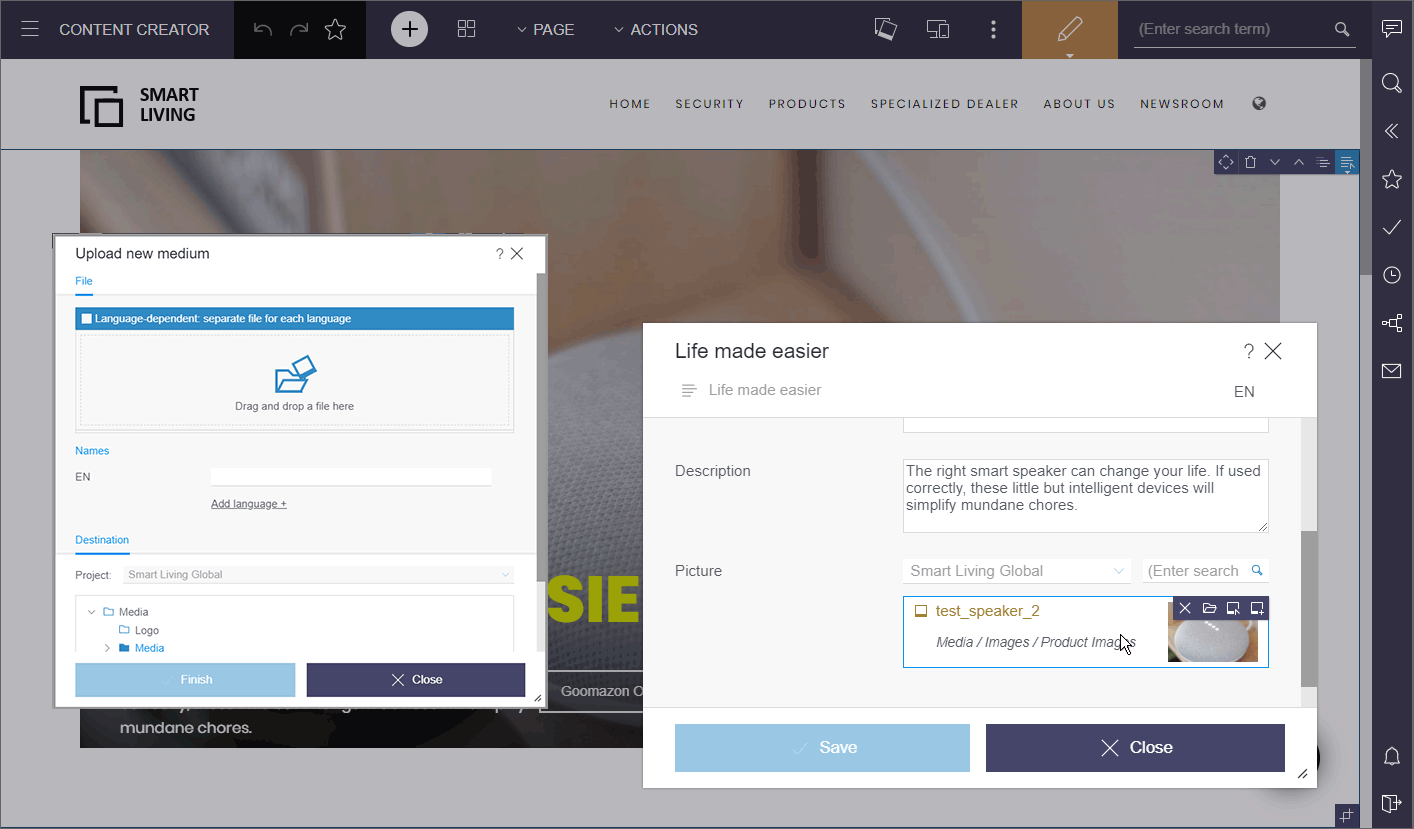
For editors, no functional changes are associated with the new design in principle. At just a few central locations, the user prompting and guidance has additionally been optimized.
As of FirstSpirit 2020-07 a number of design and user experience optimizations were made based on customer feedback, including
- “ACTIONS” menu:
Here you can now visually differentiate between scripts, (contextless) workflows and plugIns, again. - FS_CATALOG/FS_INDEX:
New display option “Grid” (compared to “Symbols”, the thumbnails are not adjusted to the existing space)
- Media management:
The last row of entries is no longer stretched over the entire page width. - Adaptation of dialog buttons for a uniform cross-client UI

- Optimized layout for integrated help texts and tooltips
- In release messages, which are temporarily displayed in the upper left corner below the menu bar, the relevant names are now also displayed for media folders and the top level of media management (“Media”).
For developers and administrators, the switch to the revised ContentCreator does not involve any migration work. Only in very rare cases, there may be compatibility problems with customer-specific modules. In such cases, please contact e-Spirit Technical Support (https://help.e-spirit.com/).
Information on using the new FirstSpirit ContentCreator
- Resource requirements: The change in technologies used for ContentCreator (“MicroApp Framework”) increases the resource and system requirements. For this reason, you should check and, if necessary, increase resources, in particular for the application server (e.g., Apache Tomcat) and specifically the hard drive capacity and Java Heap.
Where possible, ContentCreator should be used as a global web application. ContentCreator should only be run as its own project instance (“projectlocal”) where it is absolutely necessary to do so. - Working with Apache Tomcat: If Apache Tomcat is used as the application server, we recommend that Apache Tomcat is restarted after each update.
- Pluggability: The Pluggability option has to be activated for unrestricted use of the new FirstSpirit Content Creator (FirstSpirit ServerManager / “Server properties / Web applications” or “Project properties / Web components” / “ContentCreator”). When using ContentCreator, the system automatically activates pluggability mode (log entry:
WARN 03.02.2020 15:58:20.902 (de.espirit.firstspirit.server.module.WebServerManagerImpl): Force enabled pluggability for 'fs5webedit' in project '-1'.). This has no effect on the interface itself; the option “Pluggability” may still show as being set to “Inactive” even though the option is activated. - Working in the browser: The new ContentCreator is not compatible with Microsoft Internet Explorer. We recommend using Google Chrome and Microsoft Edge Chromium for the new ContentCreator. See also chapter “Cessation of support for Microsoft Internet Explorer”.
Manual
The manual has already largely been adapted to the new design. In just a few places, the interfaces illustrated do not match the interface in the new design and may differ from the version of ContentCreator you are using.
3.2 Ramp-up: Less manual image cropping thanks to "Smart Cropping"
The concept of “image resolutions” in FirstSpirit has always enabled the uniform use of image sizes in online presences. The resolutions required for a project are automatically calculated and generated by the system as standard.
However, depending on the image material and project settings, these automatically generated resolutions must often be checked by the editor and manually adjusted: In some project setups (e.g. when concrete widths and heights are specified for images) the resolutions are compressed, the proportions of the delivered image material do not match the proportions and sizes required for the internet presence. In other cases, the editor may want to select a different focus for some images and move a different area to the center of attention.
Smart Cropping largely eliminates the need to check the individual resolutions and manual adjustment by the editor: thanks to intelligent technology, a suitable section can be selected manually for all resolutions of one image at the same time.
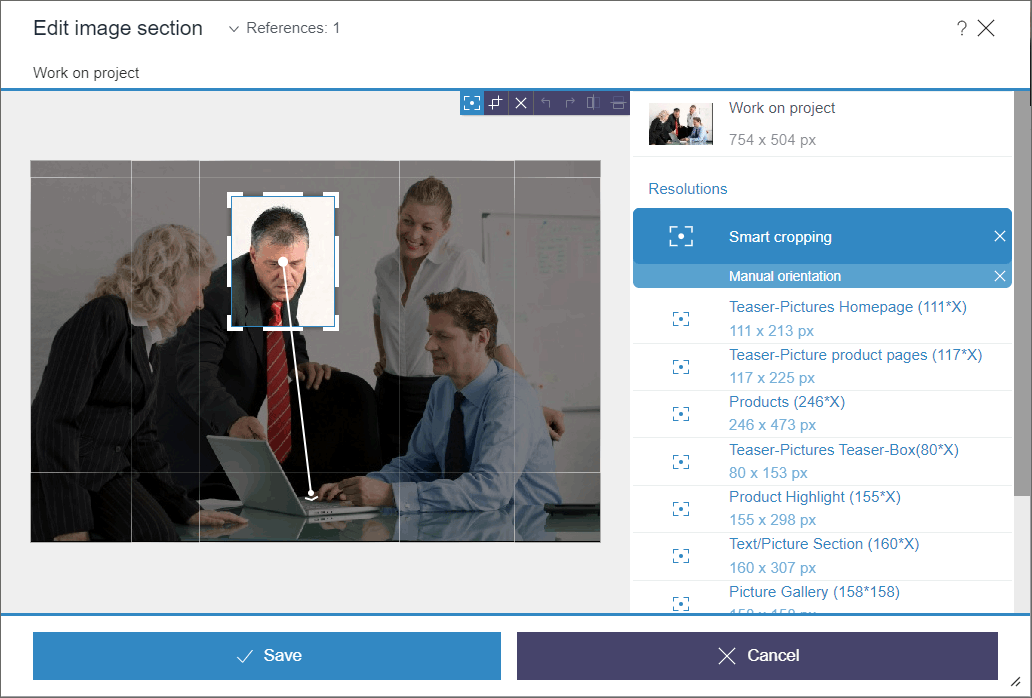
For this purpose, a suitable cropping is automatically calculated for each resolution on the basis of an area that the editor can determine in the image as the main motif using a selection frame (“focus area”).
In this process the “Golden ratio” is applied: This ensures that the image composition appears organically and harmoniously proportioned instead of static and constructed.
By default, this is done from the center of the image, i.e. the cutouts are extended towards the center of the image. However, the editor can also use the “angle of view” function to determine the direction of the original image in which the cutouts should be extended (top, bottom, right, left...). With this angle of view you can control which area of the image is relevant for the resolutions and should be considered for the automatic cropping.
In the case of images with people, for example, the viewing angle can ideally be selected so that the person and his or her viewing direction as well as the target is in the focus area.
In this context, existing APIs were extended and new ones were created, for example to define focus areas without user interaction.
The new feature can be tested with FirstSpirit 2020-07 in the scope of a ramp-up phase and will be made available to some selected customers and partners for trying out. Feedback from this phase is promptly incorporated into the development. Are you also interested in testing the new functionality? Then please contact your responsible customer or partner manager.
An official release for all customers is planned for the 4th quarter of 2020.
4 Input components
4.1 The output behavior when accessing the CMS_INPUT_PERMISSION input component via the API has been corrected.
If no metadata has been defined for an element or if the box for the “Define permissions” option in the CMS_INPUT_PERMISSION input component has not been checked, an empty list is now returned for the input component.
Before querying the content, a check should be carried out to see whether metadata has been defined for this element and whether these permissions have been applied or inherited there.
( <IDProvider>.hasMeta() && !<IDProvider>.getMetaFormData().get(null,
   <Name of the input component>).get().isInherited() )
If the above query returns “false”, the correct values are located on the node in the parent chain for which this query returns “true”.
4.2 FS_LIST: Ramp-down phase complete: input component no longer included
As of FirstSpirit 2020-07, the FS_LIST input component is no longer included. The component has been removed from FirstSpirit and is no longer available for use. This means it is no longer possible to edit forms with FS_LIST and expected content will no longer be generated on the output side. This concludes the ramp-down phase.
Overview: Process of ramp-down phase for input component FS_LIST
To ensure that the FS_LIST component was phased out with minimum risk, it was removed in multiple stages:
- (Complete) As of FirstSpirit 5.2R3, the input component for creating and managing lists FS_LIST was discontinued.
- (Complete) As of FirstSpirit 2019-11, a deprecation warning was logged as a first step in all projects, when data was generated from an FS_LIST input component, or when data from an FS_LIST component was previewed.
- (Complete) As of FirstSpirit 2020-01, the FS_LIST input component stopped receiving support. It was no longer possible to use the component from this point.
- To minimize the risk of production problems, particularly in cases involving customers with longer update cycles, there was a six-month transition period during which it was possible to reactivate FS_LIST temporarily.
- (Complete) As of FirstSpirit 2020-07, the input component has been removed from FirstSpirit and can no longer be used in any projects.
The FS_CATALOG, FS_INDEX, and CMS_INPUT_SECTIONLIST input components are available as substitutes. They also provide content bundling functions, which means that they largely cover the same functions as FS_LIST.
- FS_LIST, type DATABASE can be substituted with an input component of type FS_INDEX.
- FS_LIST, type INLINE can be substituted with an input component of type FS_CATALOG.
- FS_LIST with MEDIAMODE tag can be substituted with an input component of type FS_INDEX, using the
DatasetDataAccessPlugin(SOURCEtag) supplied as standard. - FS_LIST, type PAGE can be substituted with the input component CMS_INPUT_SECTIONLIST.
- FS_LIST, type SERVICE can be substituted with an input component of type FS_INDEX, using a corresponding database access plug-in.
Detailed guidelines for performing conversion in ongoing projects are provided in the FirstSpirit documentation.
Once a conversion to the new input components has been performed, it will no longer be possible to revert back to FS_LIST, even if the server is downgraded.If you have any questions or feedback on migrating FS_LIST, please contact e-Spirit Technical Support.
5 FirstSpirit Content Experience Tools (CXT)
5.1 Latest module versions
FirstSpirit 2020-07 supports the following module versions for “FirstSpirit Content Experience Tools”:
| Module / file name | Version number |
FirstSpirit CXT DAP Bridgedataservice-[version].fsm | 1.30 |
FirstSpirit CXT FragmentCreatorfragment-creator-[version].fsm | 2.8 |
FirstSpirit Fragment DAPfragmentdap-[version].fsm | 1.27 |
FirstSpirit Media DAPmediadap-[version].fsm | 1.24* |
FirstSpirit PageRef DAPpagerefdap-[version].fsm | 1.1 |
FirstSpirit Markdown Editormarkdown-editor-[version].fsm | 1.22* |
FirstSpirit Tagging Editortagging-editor-[version].fsm | 1.22 |
FirstSpirit CXT FragmentCreator - CaaS Integrationcaas-integration-[version].fsm | 1.23 |
* These modules require FirstSpirit 2020-03 or higher from this version.
5.2 FragmentCreator: Design revision (status bar)
As part of the revision and consolidation of the technical basis for FirstSpirit ContentCreator and FragmentCreator, FragmentCreator's graphical interface has been revised and adapted in line with the design principles of ContentCreator.
The design update does not include any functional changes for editors or developers. All functions in the interfaces are generally available in their familiar positions. The design update will not give rise to any additional development or operational work.
The changes in the latest release concern the status bar along the bottom edge of the screen.
Now:
.png)
Previously:
.png)
Adjustment of the manual regarding the design is carried out gradually. The presentation in the manual may therefore no longer correspond to the current software.
5.3 MicroApps API: Providing variants with actions from MicroApps
In FragmentCreator, favored variants can now be provided with actions from customer-specific MicroApps. The variant tabs are being expanded to include 3 dots that can be used to access editing options for MicroApps. For example:

When an action is selected, it affects the selected variant.
By default, the standard workflows for release (“Request release” / request_release) and deletion (“Request deletion” / delete_fragment_wf) are started there.
See also https://docs.e-spirit.com/odfs/edocs/cxt/workflows/index.html.
Only actions for which the user has the appropriate permissions are shown.
To provide this UI interface with actions from customer-specific MicroApps, the MicroApp must support the new VariantActionContext. This contains
- the projectId
ID of the project in question - a documentId
ID of the variant in question - a command
the required action, e.g., 'EditVariant' - the application (optional)
Currently, the value 'fragmentcreator' can be used here to specify that MicroApps are to be displayed at this point.
Example:
{ command: 'EditVariant', documentId: '4757cadc-d71e-4a58-9f3e-5cfbe86a9caa',
   projectId: 1, application: 'fragmentcreator'}
Note: The API is currently intended for internal use only and is being tested internally and by partners. In the future, it will also be made available to external customers.
6 Module Development, Scripts, API
The classes from the Apache PDFBox open-source library have been removed from fs-[isolated-]webrt.jar
The classes from the “Apache PDFBox” open-source library have been removed from fs[-isolated-]webrt.jar.
If these classes were used during module development (which was only possible for modules that contain web applications in legacy mode), they are now missing and must be added explicitly to the web application. This means the “Apache PDFBox” library must be provided in the module as a “web-resource” by being added to the module[-isolated].xml file, e.g.:
<web-resources>
   <resource name="org.apache.pdfbox:pdfbox" version="2.0.17">
       lib/pdfbox-2.0.17.jar
   </resource>
</web-resources>
7 SiteArchitect / ContentCreator
New attributes for rules: ID, UID, GID, template
The following properties are now available in the rules for corresponding elements:
- ID: determining the ID of a FirstSpirit element
- UID: determining the reference name/UID of a FirstSpirit element
Sections do not technically have a UID, which is why the display name is returned in this case. - GID: determining the global ID (GID) of a FirstSpirit element
- TEMPLATE: determining the template of the current FirstSpirit element
The reference name of the template is returned (UID).
Code snippet:
<PROPERTY name="ID" source="#global"/><PROPERTY name="UID" source="#global"/><PROPERTY name="GID" source="#global"/><PROPERTY name="TEMPLATE" source="#global"/>On a page, for example, the information for the page is returned (even if the rule is executed in a section within an FS_CATALOG input component, for instance).
Metadata returns information about the element on which the metadata has been defined.
8 SiteArchitect / ServerManager
Database connection: support for the parameter jdbc.MAXSTRINGLENGTH
The database integration of the FirstSpirit Server is configured via the ServerManager (Server properties / Databases). All connected database layers on the server, i.e. all connections to a database from the server, are listed here. The optional JDBC parameter jdbc.MAXSTRINGLENGTH can be used in the database layer to define the maximum number of characters of a VARCHAR column when creating a new database table. If a higher value is specified for a string attribute than the one defined via parameter jdbc.MAXSTRINGLENGTH, this string attribute is stored as a different data type (e.g. as BLOB, CLOB or TEXT) in the database. If no value is set here, a default value is set depending on the database used.
New behavior:
With the current FirstSpirit release the parameter jdbc.MAXSTRINGLENGTH is supported for the following databases:
- PostgreSQL
- Oracle 19c
The following applies to PostgreSQL:
- Default value: If no value is defined using
jdbc.MAXSTRINGLENGTH, the default value255is used. - Maximum value: It is not recommended to define values higher than
65534.
The following applies to Oracle 19c:
- Default value: If no value is defined using
jdbc.MAXSTRINGLENGTH, the default value2000is used. - Recommendation: Depending on the character set (parameter
jdbc.oracle.CHARACTERSET), it is useful to adjust the character length. For Oracle 19c, for example, the character setAL32UTF8with character length8191is recommended. The recommended value for the respective character set can be found in the FirstSpirit Documentation (see “Values to be used for Oracle 19c (depending on the character set)”). - Maximum value: If values are specified for the parameter that are higher than the recommended value of the specified character set (parameter
jdbc.oracle.CHARACTERSET), a corresponding message is logged in the server log. The maximum value for the respective character set can be found in the FirstSpirit Documentation (see “Values to be used for Oracle 19c (depending on the character set)”).- For values that are higher than the maximum value of the specified character set, an ERROR is logged, and the value is reduced to the maximum value.
- For values higher than the recommended value and smaller than the maximum value of the specified character set, a corresponding WARN message is logged, in which the recommended value is displayed.
For all other recommended and compatible database systems, the parameter jdbc.MAXSTRINGLENGTH is ignored. Instead, the hard-coded default values of the respective database are used.
I use the parameter jdbc.MAXSTRINGLENGTH in my existing layer configuration. Do I have to modify the configuration?
e-Spirit recommends that customers who use the jdbc.MAXSTRINGLENGTH parameter in an existing PostgreSQL database configuration remove the parameter from the configuration before updating to FirstSpirit 2020-07. This recommendation also applies if an existing Oracle database configuration (with the parameter jdbc.MAXSTRINGLENGTH) is converted to an Oracle 19c configuration.Background: The parameter has been ignored so far. After an update to FirstSpirit 2020-07 the parameter is then used for existing PostgreSQL or Oracle 19c database configurations. Depending on the value that is set for the parameter in the configuration, the data types of the string attributes can change during the first sync to the database, and data can therefore possibly be lost.
More information:
9 System
Update of internally used software
As of the current release, the following internally used software has been updated:
- Spring Boot (used for MicroApp Framework)
Update from version 2.2.5 to version 2.3.1 - Spring Cloud Hoxton (used for MicroApp Framework)
Update from version Hoxton.SR3 to version Hoxton.SR5
Overview
| ID | Description | Categories |
|---|---|---|
| CORE-11046 | In very rare cases, restoring deleted objects may result in an error. If the cause of this error is that the target folder cannot be found (e.g., because it is deleted at the same time as objects are restored), there will now be a specific |
Editor, FirstSpirit Administrator, SiteArchitect |
| CORE-11079 | An error has been corrected which made it difficult to analyze problems when displaying input masks. In such cases, the exception that was actually causing the problem is now output instead of the unhelpful NullPointerException. |
FirstSpirit Administrator, Input Components, SiteArchitect |
| CORE-11407 | Behavior has been corrected which, in very rare cases, may have resulted in erroneous behavior when elements were deleted. |
Editor, SiteArchitect |
| CORE-11784 | The design and technical basis of FirstSpirit ContentCreator were revised. The “old” ContentCreator retires with the latest release. |
ContentCreator, Editor, FirstSpirit Administrator |
| CORE-11797 | If the FS_CATALOG component was being used in a nested manner, it was possible that content from the translation help would not transfer correctly. The corresponding error has been rectified. |
Editor, Input Components, SiteArchitect |
| CORE-12006 | An error has been corrected which, in very rare cases, may have resulted in a |
FirstSpirit Administrator, Modules, SiteArchitect |
| CORE-12016 | The output behavior when accessing the CMS_INPUT_PERMISSION input component via the API has been corrected. |
Metadata, Permissions |
| CORE-12023 | The ID, UID, GID, and the corresponding template of FirstSpirit elements can now be determined using rules. |
ContentCreator, Developer, Dynamic Forms, Editor, Input Components, Template Development |
| CORE-12024 | When using the translation help, it was possible that an error would occur if the data had been created with an input component which is no longer available (e.g., FS_LIST). The error has been corrected, so the current source data now displays properly. |
Editor, Input Components, Migration, SiteArchitect |
| CORE-12161 | In rare cases, saving an FS_CATALOG input component may have resulted in erroneous behavior. |
Editor, Input Components, SiteArchitect |
| CORE-12205 | The classes from the “Apache PDFBox” open-source library have been removed from |
Developer, Module development, Modules |
| CORE-12209 | Ramp-up phase for new feature: “Smart Cropping” reduces the effort for manual image cropping thanks to automatic operation |
ContentCreator, Editor, FirstSpirit Administrator, Media, Media Store |
| CORE-12240 | When adding a new database layer via the ServerManager (Server Properties / Databases / Add), problems could occur if special connection parameters ( |
Database, ServerManager |
| CORE-12262 | Changes to an object which have taken place from one revision number to another revision number can be displayed in FirstSpirit using differential visualization (via context menu “Version History” / Button: “Compare”). An error in the display of this view in combination with dropped input components (such as FS_LIST) has been corrected. |
Input Components, SiteArchitect |
| CORE-12368 | Starting FirstSpirit using Linux has been further improved with the new “fs-server start script”. |
Server Administrator |
| CORE-12388 | With the current FirstSpirit release, the parameter |
Database, Migration |
| CORE-12414 | Erroneous behavior could occur when creating remote references with the |
Developer, FirstSpirit API |
| CORE-12460 | As of FirstSpirit 2020-07, the FS_LIST input component is no longer included. The component is no longer available for use. This means it is no longer possible to edit forms with FS_LIST and expected content will no longer be generated on the output side. |
ContentCreator, Developer, Input Components, Migration, SiteArchitect, Template Development |
| CORE-12473 | During module updates, it was not possible to end and restart an associated service correctly with certain module configurations. This has been resolved by correcting the update process. |
FirstSpirit Administrator, Module development, Modules |
| CXT-193 | Workflow permissions (context menu: “Extras” / “Change Permissions” / “Workflow permissions” tab), which should apply to all users, (“All” checkbox activated) are now correctly evaluated in FragmentCreator. Previously, a 500 or 403 error message appeared. |
Developer, FirstSpirit Content Experience Tools (CXT), FragmentCreator, Permissions, Template Development, Workflow |
| CXT-760 | In FragmentCreator, favored variants can now be provided with actions from customer-specific MicroApps. The standard workflows for release and deletion are started there by default. |
Developer, FirstSpirit API, FirstSpirit Content Experience Tools (CXT), FragmentCreator, Module development, Modules, Workflow |
| CXT-1360 | Indents/outdents in lists which are generated in FragmentCreator in the input element for formatted text entries ( |
Editor, FirstSpirit Content Experience Tools (CXT), FragmentCreator |
| CXT-1464 | Although thumbnails/preview images are displayed for images in the Upload dialog for media or in the FS_INDEX input component, for example, a standardized placeholder image is now used for displaying files (e.g., PDF, HTML, TXT). |
Editor, FirstSpirit Content Experience Tools (CXT), FragmentCreator, Input Components, Media |
| CXT-1477 | FragmentCreator: Design revision (status bar) |
Editor, FirstSpirit Content Experience Tools (CXT), FragmentCreator |
| CXT-1560 | In the FS_INDEX selection dialog, entries (media or fragments) are now sorted according to change date, unless another explicit search term has been specified. |
Editor, FirstSpirit Content Experience Tools (CXT), FragmentCreator, Input Components |
| CXT-1571 | In the case of external references, opening the navigation view in ContentCreator may have resulted in a NullPointerException (error message: |
ContentCreator, Editor |
| CXT-1622 | Support for Microsoft Internet Explorer has ceased. |
ContentCreator, Developer, Editor, FirstSpirit Administrator, FirstSpirit Content Experience Tools (CXT), FragmentCreator, Module development, ServerMonitoring |
| CXT-1627 | HTTP requests with verbs other than GET were previously answered with a generic 500 message in the event of an error. The correct error code is now being provided. |
Debugging, Developer, FirstSpirit Content Experience Tools (CXT), Module development |
| CXT-1628 | Update of internally used software Further information can be found in chapter “System: Update of internally used software”. |
FirstSpirit Administrator, FirstSpirit Content Experience Tools (CXT), FragmentCreator, Integrated software |
| CXT-1640 | The registration for MicroApps now reacts more flexibly to URLs with and without final slash. |
Developer, FirstSpirit Content Experience Tools (CXT), Module development |
| CXT-1672 | FirstSpirit Content Experience Tools: Latest module versions |
Developer, FirstSpirit Administrator, FirstSpirit Content Experience Tools (CXT), FragmentCreator, Modules, ServerManager |
| CXT-1678 | The |
ContentCreator, Developer, FirstSpirit API, Module development, Version history |
| CXT-1717 | When using the module “FirstSpirit CXT FragmentCreator - CaaS Integration” , an |
FirstSpirit Administrator, FirstSpirit Content Experience Tools (CXT), FirstSpirit Content as a Service (CaaS) |
| DEVEX-378 | When using “FirstSpirit External Synchronization”, an additional mapping file ( The command line tool FSDevTools supports the new option as of version 2.6. Without a mapping file (default behavior when using “FirstSpirit External Synchronization”), the dbnames of the column names and tables are optimized in line with the database during synchronization, as before. In standard application cases (without the additional |
Database, Developer, External synchronization |
Deprecations
| Functionality | Deprecated as of | Will be removed / Was removed as of |
|---|---|---|
| Input component FS_LIST | 5.2R3 | 2020-07 |
| Input component CMS_INPUT_CONTENTAREALIST | 5.2R3 | |
| Input component CMS_INPUT_CONTENTLIST | 5.2R3 | |
| Input component CMS_INPUT_FILE | 5.2R3 | |
| Input component CMS_INPUT_LINKLIST | 5.2R3 | |
| Input component CMS_INPUT_OBJECTCHOOSER | 5.2R3 | |
| Input component CMS_INPUT_PAGEREF | 5.2R3 | |
| Input component CMS_INPUT_PICTURE | 5.2R3 | |
| Input component CMS_INPUT_TABLIST | 5.2R3 | |
| FirstSpirit Access API: de.espirit.firstspirit.agency.GroupsAgent | 5.2R15 | |
| FirstSpirit Access API: delete (de.espirit.firstspirit.access.AccessUtil) | 5.2R18 | |
| FirstSpirit Access API: release (de.espirit.firstspirit.access.AccessUtil) | 2018-06 | |
| FirstSpirit Access API: getLastLoginAsDate (de.espirit.firstspirit.agency.UserStatisticsAgent) | 2018-07 | |
| FirstSpirit Access API: remainingDurationOfCurrentStageInMillis (de.espirit.firstspirit.server.MaintenanceModeInfo) | 2018-07 | 2025-13 |
| FirstSpirit Access API: getStartingTimeOfStageAsDate (de.espirit.firstspirit.server.MaintenanceModeInfo) | 2018-07 | 2025-13 |
| FirstSpirit Access API: getSelectedWebserverConfiguration (de.espirit.firstspirit.access.serverConfiguration) | 2018-10 | 2025-13 |
| FirstSpirit Access API: setSelectedWebserverConfiguration (de.espirit.firstspirit.access.serverConfiguration) | 2018-10 | 2025-13 |
| FirstSpirit Access API: getSelectedWebServer (de.espirit.firstspirit.access.project.Project) | 2018-10 | 2025-13 |
| FirstSpirit Access API: setSelectedWebServer (de.espirit.firstspirit.access.project.Project) | 2018-10 | 2025-13 |
| FirstSpirit Access API: getLostAndFoundStoreNodes(); (de.espirit.firstspirit.feature.FeatureInstallResult) | 2018-10 | |
| FirstSpirit Access API: getDeletedStoreNodes(); (de.espirit.firstspirit.feature.FeatureInstallResult) | 2018-10 | |
| FirstSpirit Access API: de.espirit.firstspirit.access.store.Previewable | 2019-01 | |
| WebSphere Application Server support for FirstSpirit | 2019-05 | |
| Legacy mode for the FirstSpirit server | 2019-06 | 2022-03 |
| FirstSpirit ContentCreator (old design / old technology) | 2019-11 | 2020-07 |
| Support for Microsoft Internet Explorer for FirstSpirit Web Apps | 2020-05 | 2020-07 |