
Release Notes
1 Administration
MBean ‘HealthManager’ was enhanced with additional information
The MBean HealthManager now also transmits information to the web applications that are included in the delivery of FirstSpirit as standard.
The file server-incidents.log (downloadable in FirstSpirit ServerMonitoring under “FirstSpirit / Monitoring / Codes” via the envelope icon) now also contains the following information:
- registrations of the standard web applications
- complete failure of one or more of the standard web applications
Example log messages:
WEBAPP INFO 15.09.2021 14:43:59.037 (de.espirit.firstspirit.server.ServerManagerImpl)
   Web application started: fs5root
RUN_LEVEL INFO 27.09.2021 09:09:44.091 (de.espirit.firstspirit.server.RunLevelHolder)
   Reached run level: CORE_WEBAPPS_STARTED(080)
Further, the MBean HealthManager now also considers the free hard drive space for the calculation of the server status.
For all writable and file systems involved on the FirstSpirit server, there are now separate MBeans that can be shown below HealthManager MBeans. The relative path in the server directory is used as the name.
If the free space in one of the file systems involved falls below 5% of the file system size or 640 MB (depending on which value is smaller), the server is deemed to be degraded, and a warning is issued for the respective file system.
If a warning e-mail is configured in the FirstSpirit ServerManager in case of insufficient available hard drive space (under Server properties / Global server properties / “Warning at”), the percentage is used as a warning limit for the MBeans instead.
Insufficient hard drive space is also recorded in the file server-incidents.log, e.g.
Insufficient free space on '/home/fsserver/Daten/CMSServer4/work
   (name=tmpfs, type=tmpfs)' detected, 185.801 MB left on file store.
Additionally, the MBean HealthManager now also checks the load on the server: if it is too high (e.g., as long as more than 5% of the processor time is used for garbage collections), the server is also deemed to be degraded. The exceeding and then dropping below the limit is recorded in the file server-incidents.log, e.g.
High Java VM garbage collection overhead detected: 5.30 %The status of the MBean HealthManager of the server is now also visualized in the FirstSpirit Health Center (in FirstSpirit ServerMonitoring). There, it is possible to read directly in the status bar above the respective server name in the “FirstSpirit landscape” whether the server is in a problematic state.
The color and symbol coding is now as follows:
.png)
The checkmark on a green background means that the server is not reporting any current problems.
.png)
The exclamation mark on a yellow background means that the server is not reporting any current problems. However, the license will expire in the next 30 days and should be renewed.
.png)
The exclamation mark on a red background means that the server is in the degraded state.
2 General
Java-Support: Eclipse Temurin and Java 17
To reduce dependency on Oracle's Java development and also so that longer-term plans can be made for the benefit of our customers, e-Spirit has increased its focus on the use of OpenJDK for some time, especially from manufacturer AdoptOpenJDK. All AdoptOpenJDK binaries and scripts are licensed in Open Source and available free of charge.
In approx. April 2021, the project “AdoptOpenJDK” switched to the “Eclipse Foundation” and is now called Eclipse Adoptium. The JDK has the name “Temurin”.
The latest releases can be downloaded from https://adoptium.net.
See also AdoptOpenJDK-Blog.
Further, Java 17 was published in mid September. JDK 17 is offered by most providers as Long-Term-Support (LTS) version. It follows Java 11, which currently has LTS status.
Internally, the first preparations were made for the test phase for the use of Java 17 (Temurin) with FirstSpirit. The objective is to release Java 17 in a future FirstSpirit release for use with FirstSpirit.
3 ContentCreator
3.1 “FirstSpirit Image Recognition” supports now images in “WebP” format
The “FirstSpirit Image Recognition” module now supports, in addition to the “JPEG” and “PNG” formats, images in “WebP” format:
During the upload, the images are now analyzed, the corresponding metadata is set (if configured) and the focus is set or automatically cropped.
3.2 Function "editorId": Opening forms in a specific language
When using the editorId function, forms in ContentCreator are opened in the current language by default (#global.language).
The new parameter
languagecan be used to specify a language in which a form should be opened.
The parameter expects the abbreviation of the language or the language object, e.g.
<div$CMS_VALUE(editorId(editorName:"st_text", language:"FR"))$>
<div$CMS_VALUE(editorId(editorName:"st_text", language:#global.getLanguage("FR")))$>
For more information about the editorId function please see
3.3 Improvements in data source management in ContentCreator (BETA)
Currently, the functionality of the “Data source management” in ContentCreator is still in Beta phase.
The following improvements have been made with the current release based on customer feedback:
- Columns containing the input component CMS_INPUT_DATE are now also displayed in the table view.
When mapping to the data types Date or Long, sorting is also possible. - In the data source management of ContentCreator, for media of type “File”, the name is now displayed in the table view (instead of a type icon as before).
“Broken references” are visualized in red font.
For common information about the Beta phase of the “Data source management” in ContentCreator, please see the release notes for FirstSpirit 2021-08 (https://docs.e-spirit.com/odfs/releasenotes/2021-08/FirstSpirit_Releasenotes_EN.pdf).
4 FirstSpirit Content Experience Tools (CXT)
4.1 Latest module versions
FirstSpirit 2021-10 supports the following module versions for “FirstSpirit Content Experience Tools”.
| Module / file name | Version number |
FirstSpirit CXT Plattformplatform-[version].fsm | 2.5.0 |
FirstSpirit CXT DAP Bridgedataservice-[version].fsm | 1.44.1 |
FirstSpirit CXT FragmentCreatorfragment-creator-[version].fsm | 3.4.2 |
FirstSpirit Fragment DAPfragmentdap-[version].fsm | 1.40.2 |
FirstSpirit Media DAPmediadap-[version].fsm | 1.31.2* |
FirstSpirit PageRef DAPpagerefdap-[version].fsm | 1.9.2 |
FirstSpirit Markdown Editormarkdown-editor-[version].fsm | 1.29.1* |
FirstSpirit Tagging Editortagging-editor-[version].fsm | 1.29.1 |
FirstSpirit CXT FragmentCreator - CaaS Integrationcaas-integration-[version].fsm | 1.31.2 |
* These modules require FirstSpirit 2020-03 or higher from this version.
4.2 Checking status pages "allowedRedirectHosts"
Via the parameter
allowedRedirectHostsURLs to which redirecting is allowed can be defined.
The status pages that can be set up for the CXT platform and the FragmentCreator (each under ~/status) now also check the configuration of this parameter.
The parameter can be configured in FirstSpirit, e.g. in the file fs-server.conf.
If the configuration is incorrect (which means the current host is not configured with the parameter allowedRedirectHosts), an error message is recorded in the log and a corresponding error message is displayed in the browser console.
Note on the status page in the event of an error:
External hostname is not allowed as a redirect host in the FirstSpirit server configuration.4.3 Configuring the time limit for connections to FirstSpirit
With the new parameter cxt.platform.firstspirit.connection-timeout, a time limit (in seconds) can be defined for the FragmentCreator, after which the FirstSpirit connections are disconnected automatically again when they are no longer in use.
The parameter can be defined in the file web.xml of the WebApp component “FragmentCreator”, which is configured in the matching global web application for the FragmentCreator (“FirstSpirit ServerManager / Server properties / Web applications”):
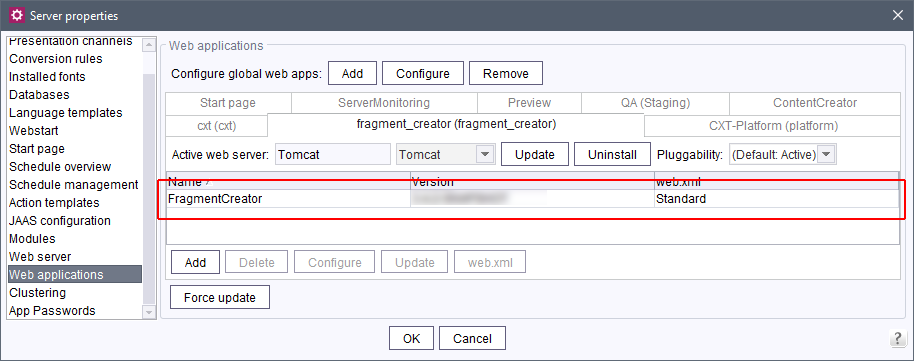
or in the properties file cxt-fragment-creator.properties.
A value that is too low can result in that users are unexpectedly logged out. However, a high value maintains multiple connections when users close their browser without logging out.
The default setting provides that connections are automatically disconnected after 12 hours when they are no longer in use.
Excerpt from the default web.xml:
<context-param>
 <param-name>cxt.platform.firstspirit.connection-timeout</param-name>
 <param-value>43200</param-value>
</context-param>
5 Compatibility
Modules and extensions for FirstSpirit 2021-10
The following modules and extensions are compatible with FirstSpirit 2021-10:
| Module name/File name | Version number | Compatibility |
FirstSpirit Update Archivefs-update-[version].tar.gz | 2.1.0 | - |
FirstSpirit Install Archiv fs-install-[version].tar.gz | 2.1.0 | - |
FirstSpirit LauncherFSLauncher.exe | 1.0.41 | as of FirstSpirit 2018-08 |
FirstSpirit Launcher JRE modulefs-launcher-jre-[version].fsm | 1.19 | as of FirstSpirit 2020-11 |
FirstSpirit SAML Login modulefs-saml-login-[version].fsm | 1.3 | as of FirstSpirit 2019-02 |
FSDevToolsfs-cli-[version].tar.gzfs-cli-[version].zip | 3.0.2 | as of FirstSpirit 2021-07 |
FirstSpirit Module Gradle Pluginfirstspirit-module-gradle-plugin-[version].jar | 2.3.2 | as of FirstSpirit 2019-06 |
6 Module Development, Scripts, API
6.1 Workflows: Determination of permissions via 'isTransitionAllowed'
The interface WorkflowAgent (FirstSpirit Developer-API, Package de.espirit.firstspirit.workflow) was expanded with the method
isTransitionAllowedThis method determines if a transition can be executed by a specific user on a specific store element.
In contrast, the method getTransitionPermission (Transition transition) in the interface WorkflowPermission (FirstSpirit Access-API, Package de.espirit.firstspirit.access.store.templatestore) determines the authorization of a transition, but potentially modifies the permission model and generates a new WorkflowTransitionPermission, when no permissions have been defined for the respective transition yet. The API documentation has now been clarified with the current release at this point.
Instead, the new method isTransitionAllowed should now be used.
The method
isWorkflowAllowedof the interface StoreElement (FirstSpirit Access-API, Package de.espirit.firstspirit.access.store) can be used prior to starting a workflow to test if starting is categorically permitted for the respective workflow and the respective store element.
6.2 getPageRefs(): Determining page references of a page
With API, the page references of a page can now be determined with the convenience method
<page>.getPageRefs()(FirstSpirit Access-API, Package de.espirit.firstspirit.access.store.pagestore, Interface Page)
7 System
Updates to integrated third-party software
As of the current release, the following internally used software has been updated:
- Spring Boot (used for MicroApp Framework)
Update to version 2.5.4
8 Template development
8.1 Receiving "Dataset" instead of "Entity"
The current release now includes a new method that makes it possible in a template from an Entity (which, for example, is generated by the “contentSelect” function) to receive a Dataset:
getDatasetThis method expects the input of a reference name of the respective table template in quotation marks, e.g.
getDataset("products.product")If the Dataset cannot be determined, null is returned.
Example:
$CMS_FOR(_entity, cs_press_releases)$
    $CMS_SET(_dataset, _entity.getDataset("products.product"))$
    $-- ... --$
$CMS_END_FOR$
Here cs_press_releases is the variable / identifier of the contentSelect function, products.product is the reference name of the table template.
Alternatively, the following notation can be used. In this case, the conversion already takes place when the FOR loop is called.
$CMS_FOR(_dataset, cs_press_releases.map(entity->entity.getDataset("products.product")))$
    $-- ... --$
$CMS_END_FOR$
For more information, see:
8.2 JSON: Validity period / lifespan of sections (attribute 'lifespan')
As of the current release, the JSON output now also includes information about section validity periods, if available.
For this purpose the new attribute
lifespanhas been introduced.
If a certain validity period is set, the additional attribute lifespan is output with the section.
This attribute always has a value for the start time:
...
"lifespan": {
                  "start": "2021-10-15T14:00:00Z",
                }
For unlimited validity periods, no end time is output.
For validity periods with a time limit, the end time is also output:
...
"lifespan": {
                  "start": "2021-10-15T14:00:00Z",
                  "end": "2021-12-31T23:59:59Z",
                 }
Example output of a section:
{
               "fsType": "Section",
               "name": "cms_input_text",
               "displayName": "CMS_INPUT_TEXT",
               "identifier": "1df5eccf-c5ac-40ab-805a-6411c8dc3b69",
               "lifespan": {
                  "start": "2021-10-02T11:46:06Z",
                  "end": "2021-10-03T11:46:09Z"
}
Overview
| ID | Description | Categories |
|---|---|---|
| CORE-12664 | With the new method |
Content Store, Database, Developer, FirstSpirit API, Template Development |
| CORE-12673 | The new parameter |
ContentCreator, Developer, Input Components, Languages, Template Development |
| CORE-13127 | With API, the page references of a page can now be determined with convenience method. |
Developer, Module development |
| CORE-13657 | Thanks to a workaround that bypasses a problem in the current Microsoft SQL Server JDBC drivers, they can now also be used in FirstSpirit. |
Content Store, Database, Developer, FirstSpirit Administrator |
| CORE-13759 | In the project component “FirstSpirit AdvancedUrlFactory Configuration”, the project-specific conversion rule -CUSTOM- is now persistent: Changing the rule from -CUSTOM- to another no longer resets the rule -CUSTOM-. |
Advanced URL, Developer, FirstSpirit Administrator, Generation |
| CORE-13784 | An error has been eliminated that, in very rare cases, could result in that a |
Database, Developer |
| CORE-13837 | Fixed an error that could cause the schedule to create a Content Transport feature to fail if the archiving feature was used in the project. |
Archiving, Content Transport, FirstSpirit Administrator, Tasks |
| CORE-13860 | Some texts of the interface of the |
ContentCreator, Editor |
| CORE-13870 | Links from the FirstSpirit Online Documentation to the API Documentation (FirstSpirit Access-API, FirstSpirit Developer-API, Java SE Core-API) are working again after converting the design of the API Documentation of Oracle, Version 11+. |
Developer, Documentation, FirstSpirit API |
| CORE-13877 | The new |
Developer, FirstSpirit API, Workflow |
| CORE-13880 | The MBean |
Debugging, FirstSpirit Administrator, Monitoring, Performance, ServerMonitoring |
| CORE-13901 | FirstSpirit Content Experience Tools: Latest module versions |
Developer, FirstSpirit Administrator, FirstSpirit Content Experience Tools (CXT), FragmentCreator, Modules |
| CORE-13910 | Update of internally used software. Further information can be found in chapter “System: Updates to integrated third-party software”. |
Developer, FirstSpirit Administrator, FirstSpirit Content Experience Tools (CXT) |
| CORE-13916 | Searching in the online help in the FirstSpirit ContentCreator now returns search results again. |
ContentCreator, Documentation, Editor, Search |
| CORE-13932 | AdoptOpenJDK is now called “Temurin” and Java 17 was published Further information can be found in chapter “General: Java-Support: Eclipse Temurin and Java 17”. |
Developer, FirstSpirit Administrator, Java |
| CORE-13946 | As of the current release, the JSON output now also includes information about section validity periods, if available. |
Developer, Page Store, Support for JSON |
| CORE-13966 | Modules and extensions for FirstSpirit 2021-10 |
Developer, FSDevTools, Launcher, Modules |
| CXT-1935 | It is not possible to move a section in the navigation bar to a content area that is not approved for the section type. The corresponding information will now be displayed. In the past, only an error was shown in the console in this case. |
ContentCreator, Editor |
| CXT-2096 | The “FirstSpirit Image Recognition” module now also supports “WebP” format images. |
ContentCreator, Editor, Media |
| CXT-2295 | The status pages of the CXT platform and the FragmentCreator now also check the configuration of |
Debugging, Developer, FirstSpirit Administrator, FirstSpirit Content Experience Tools (CXT), FragmentCreator |
| CXT-2341 | With the new parameter |
Developer, FirstSpirit Administrator, FirstSpirit Content Experience Tools (CXT) |
| CXT-2409 | In rare cases, a display problem occurred during the creation of sections in ContentCreator: Only a white page was shown. A reload was required to display the page correctly again. |
ContentCreator, Editor |
| CXT-2417 | Improvements in data source management in ContentCreator (BETA) |
Content Store, ContentCreator, Editor, Input Components, Media |
| CXT-2422 | Lists in the input component FS_MARKDOWN (type “Quill”) in the FragmentCreator were not always stored correctly. |
Editor, FirstSpirit Content Experience Tools (CXT), FragmentCreator |
Deprecations
| Functionality | Deprecated as of | Will be removed / Was removed as of |
|---|---|---|
| Input component CMS_INPUT_CONTENTAREALIST | 5.2R3 | |
| Input component CMS_INPUT_CONTENTLIST | 5.2R3 | |
| Input component CMS_INPUT_FILE | 5.2R3 | |
| Input component CMS_INPUT_LINKLIST | 5.2R3 | |
| Input component CMS_INPUT_OBJECTCHOOSER | 5.2R3 | |
| Input component CMS_INPUT_PAGEREF | 5.2R3 | |
| Input component CMS_INPUT_PICTURE | 5.2R3 | |
| Input component CMS_INPUT_TABLIST | 5.2R3 | |
| FirstSpirit Access API: de.espirit.firstspirit.agency.GroupsAgent | 5.2R15 | |
| FirstSpirit Access API: delete (de.espirit.firstspirit.access.AccessUtil) | 5.2R18 | |
| FirstSpirit Access API: release (de.espirit.firstspirit.access.AccessUtil) | 2018-06 | |
| FirstSpirit Access API: getLastLoginAsDate (de.espirit.firstspirit.agency.UserStatisticsAgent) | 2018-07 | |
| FirstSpirit Access API: remainingDurationOfCurrentStageInMillis (de.espirit.firstspirit.server.MaintenanceModeInfo) | 2018-07 | 2025-13 |
| FirstSpirit Access API: getStartingTimeOfStageAsDate (de.espirit.firstspirit.server.MaintenanceModeInfo) | 2018-07 | 2025-13 |
| FirstSpirit Access API: getSelectedWebserverConfiguration (de.espirit.firstspirit.access.serverConfiguration) | 2018-10 | 2025-13 |
| FirstSpirit Access API: setSelectedWebserverConfiguration (de.espirit.firstspirit.access.serverConfiguration) | 2018-10 | 2025-13 |
| FirstSpirit Access API: getSelectedWebServer (de.espirit.firstspirit.access.project.Project) | 2018-10 | 2025-13 |
| FirstSpirit Access API: setSelectedWebServer (de.espirit.firstspirit.access.project.Project) | 2018-10 | 2025-13 |
| FirstSpirit Access API: getLostAndFoundStoreNodes(); (de.espirit.firstspirit.feature.FeatureInstallResult) | 2018-10 | |
| FirstSpirit Access API: getDeletedStoreNodes(); (de.espirit.firstspirit.feature.FeatureInstallResult) | 2018-10 | |
| FirstSpirit Access API: de.espirit.firstspirit.access.store.Previewable | 2019-01 | |
| WebSphere Application Server support for FirstSpirit | 2019-05 | |
| Legacy mode for the FirstSpirit server | 2019-06 | 2022-03 |
| Database layer for Oracle Database 11g/12c | 2020-12 | 2025-05 |
| FirstSpirit Access API: redirectTemplateLogToDefaultLog() (Interface RenderingAgent.Renderer) | 2021-05 |