
Release Notes
1 Administration
1.1 Update of internally used software
As of the release 2023.3, the following internally used software has been updated.
- Java Service Wrapper (configuration and monitoring of FirstSpirit Java VM, 3.5.46 --> 3.5.50)
Note: When the FirstSpirit server is updated (auto-update, in-place upgrade), the Java Service Wrapper files are not automatically updated. The Java Service Wrapper can be updated via the tar gzip update archive (file fs-update-[version].tar.gz) as described in the FirstSpirit installation instructions.
Additional documentation: - Log4j (2.17.2 --> 2.19.0)
- Google Web Toolkit (“GWT”, used for the ContentCreator, 2.9.0 --> 2.10.0)
- Gson (2.8.0 --> 2.10)
- metadata-extractor (2.11.0 --> 2.18.0)
- Apache POI (3.7 --> 5.2.2)
- commons-codec (1.11 --> 1.15)
- commons-collections (4.1 --> 4.4)
- commons-math (3.6.1, new)
- xmlbeans (2.5.0 --> 5.0.3)
- dom4j (1.6.1 --> no longer used)
Note: Since “Legacy Mode” is no longer supported, affected modules should be switched to “Isolated Mode” if possible (see Module development).
1.2 FirstSpirit on Apple M1 or Linux AArch64
If FirstSpirit is installed locally on a device with an Apple M1 or Linux AArch64 processor, it is now possible to use a Java version designed specifically for this architecture.
Note: For productive FirstSpirit servers, you still can only use a Linux or Windows operating system (see Technical requirements and recommendations (→Documentation for Administrators)).
1.3 Create project per copy
Using this function, projects located on the server can be copied directly without using the “Export” and “Import” functions separately.
This function is only available to server administrators.
In the Project template field, the desired project that should be copied can be selected. The options can be freely defined (similar to import).
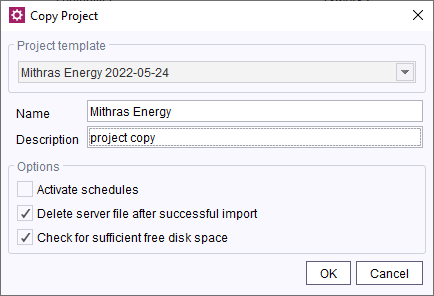
Project copy
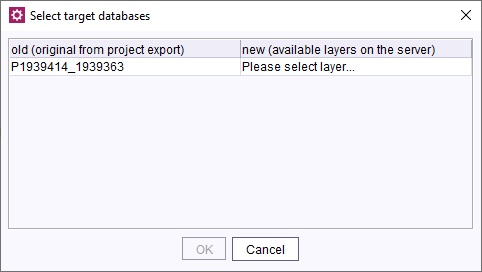
If database contents are used within the project to be copied, these contents must be mapped to a new database layer. A new database layer or one that already exists on the server must be assigned to each individual schema of the project.
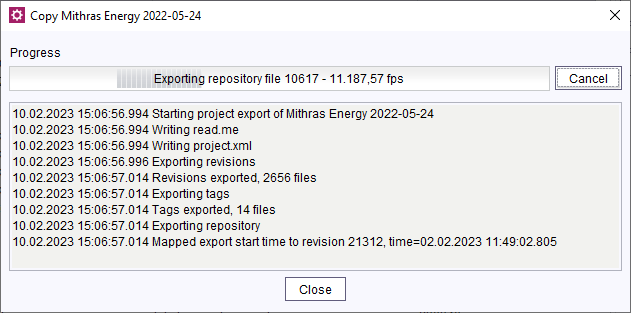
Closing the progress window and the ServerManager have no effect on the process.
For more information, see FirstSpirit Manual for Administrators, chapter “Project”.
1.4 Disk space check during project export
In the course of a project export, the remaining disk space is continuously being checked.
If the remaining disk space reaches the set warning limit, the export is aborted and the incomplete export file is deleted. More information on setting warning and shutdown limits (FirstSpirit ServerManager / Server properties / Global server properties (→Documentation for Administrators)).
2 FirstSpirit Content Experience Tools (CXT)
2.1 Latest module versions
FirstSpirit 2023.3 supports the following module versions for “FirstSpirit Content Experience Tools”.
| Module / file name | Version number |
FirstSpirit CXT Plattformplatform-[version].fsm | 3.0.3 |
FirstSpirit CXT DAP Bridgedataservice-[version].fsm | 1.44.10 |
FirstSpirit CXT FragmentCreatorfragment-creator-[version].fsm | 4.0.3 |
FirstSpirit Fragment DAPfragmentdap-[version].fsm | 1.40.16 |
FirstSpirit Media DAPmediadap-[version].fsm | 1.31.9* |
FirstSpirit PageRef DAPpagerefdap-[version].fsm | 1.9.9 |
FirstSpirit Markdown Editormarkdown-editor-[version].fsm | 1.29.8* |
FirstSpirit Tagging Editortagging-editor-[version].fsm | 1.29.8 |
FirstSpirit CXT FragmentCreator - CaaS Integrationcaas-integration-[version].fsm | 1.31.9 |
* These modules require FirstSpirit 2020-03 or higher from this version.
2.2 Extension of the MicroApp JavaScript API
When opening MicroApp modal windows via the MicroApp JavaScript API of the CXT platform, it is possible to set the z-index of the modal window (interface CxtMicroAppConfig, optional field frameZIndex).
3 Media
Enhanced SVG processing
The processing of SVG files that have been wrongly configured has been improved. In many cases, the files can be uploaded and used despite an unsupported configuration.
Note: In case of problems with an image file, the reasons will be listed in the log file. Wrong configurations can cause displaying problems of thumbnails inside FirstSpirt.
4 SiteArchitect / ServerManager
Cleaning up <FirstSpiritROOT>/data/schedule
When a schedule entry is deleted, the directory <FirstSpiritROOT>/data/schedule is being cleaned up, as well.
Note: Old data in this direcory can be deleted following the path: ServerManager > Server > Clean-up
Overview
| ID | Description | Categories |
|---|---|---|
| CORE-7708 | Use Ctrl + LEFT MOUSE CLICK to be taken to the script which is directly referenced within a CMS_RENDER call. |
Template Development |
| CORE-12153 | Cleaning up of |
Server Administrator, ServerManager |
| CORE-14494 | A unique identifier (UUID) can now be set as a constant for |
Template Development |
| CORE-14704 | Using an |
ContentCreator, Input Components |
| CORE-14812 | As of the current FirstSpirit version, projects located on the server can be copied directly without using the “Expor”t and “Import” functions separately. Further information can be found in chapter “Administration: Create project per copy”. |
Server Administrator |
| CORE-14955 | Project export: checking of remaining disk space to prevent server shutdown |
Server Administrator |
| CORE-14959 | If modules were implemented incorrectly, this could lead to reports not being displayed in the SiteArchtect if they were created in other modules. The problem has been resolved. |
Reports, SiteArchitect |
| CORE-15003 | Update of internally used software Further information can be found in chapter “Administration: Update of internally used software”. |
Integrated software |
| CORE-15028 | When a CloudFront invalidation was used with the AWS S3 deployment module, this could lead to the invalidation being executed incorrectly. The problem has been resolved. |
AWS S3 Deployment |
| CORE-15031 | Operating a local FirstSpirit server on Apple M1 or Linux AArch64 with Java version designed directly for this architecture. |
Web server |
| CORE-15042 | Processing enhancement for wrongly configured SVG image files Further information can be found in chapter “Media: Enhanced SVG processing”. |
Media Store |
| CORE-15104 | FirstSpirit Content Experience Tools: Latest module versions |
FirstSpirit Content Experience Tools (CXT) |
| CORE-15106 | For rules, the presence of properties (e.g. |
Dynamic Forms |
| CORE-15110 | Schedule entries that do not react to a termination within 15 minutes no longer cause the server to receive the “degraded” status. In these cases, a FATAL message is logged in the |
Server Administrator |
| CORE-15121 | In very rare cases, a continuous increase in unauthenticated socket connections and proportionally high memory usage on the FirstSpirit server could occurr. |
Server Administrator |
| CORE-15136 | Log4j classes are not stored any longer in the classpath of web apps. If you need to access Log4j classes, integrate the automatically provided web component “Log4j Libraries” in the web app. |
Logging, Server Administrator |
| CXT-2756 | Changes to media elements were not properly taken into account by a media folder's filter settings. |
ContentCreator |
| CXT-2769 | The availability of MicroApps can be configured via the management page. With the current version it is now possible to exit the management page with the help of the “Quit” button. The user is then redirected to the FirstSpirit start page. |
FirstSpirit Content Experience Tools (CXT) |
| CXT-2775 | Folders in the filter settings of the search dialog were unsorted. |
ContentCreator |
| CXT-2785 | In ContentCreator, the selected media view for the media management is now being saved. the settings refer to the current server and is stored in the browser cache. |
ContentCreator, Media Store |
| CXT-2799 | In ContentCreator, bookmarks to data records were not displayed if no preview page was configured for their data source. The problem has been resolved: the referenced data record can be called-up directly in the data source management using the bookmark. |
Content Store, ContentCreator |
| CXT-2812 | The |
ContentCreator, FirstSpirit API |
| CXT-2814 | When opening MicroApp modal windows via the MicroApp JavaScript API of the CXT platform it is now possible to set the |
Developer, FirstSpirit Content Experience Tools (CXT), Module development |
Deprecations
| Functionality | Deprecated as of | Will be removed / Was removed as of |
|---|---|---|
| Input component CMS_INPUT_CONTENTAREALIST | 5.2R3 | |
| Input component CMS_INPUT_CONTENTLIST | 5.2R3 | |
| Input component CMS_INPUT_FILE | 5.2R3 | |
| Input component CMS_INPUT_LINKLIST | 5.2R3 | |
| Input component CMS_INPUT_OBJECTCHOOSER | 5.2R3 | |
| Input component CMS_INPUT_PAGEREF | 5.2R3 | |
| Input component CMS_INPUT_PICTURE | 5.2R3 | |
| Input component CMS_INPUT_TABLIST | 5.2R3 | |
| FirstSpirit Access API: de.espirit.firstspirit.agency.GroupsAgent | 5.2R15 | |
| FirstSpirit Access API: delete (de.espirit.firstspirit.access.AccessUtil) | 5.2R18 | |
| FirstSpirit Access API: release (de.espirit.firstspirit.access.AccessUtil) | 2018-06 | |
| FirstSpirit Access API: getLastLoginAsDate (de.espirit.firstspirit.agency.UserStatisticsAgent) | 2018-07 | |
| FirstSpirit Access API: remainingDurationOfCurrentStageInMillis (de.espirit.firstspirit.server.MaintenanceModeInfo) | 2018-07 | 2025-13 |
| FirstSpirit Access API: getStartingTimeOfStageAsDate (de.espirit.firstspirit.server.MaintenanceModeInfo) | 2018-07 | 2025-13 |
| FirstSpirit Access API: getSelectedWebserverConfiguration (de.espirit.firstspirit.access.serverConfiguration) | 2018-10 | 2025-13 |
| FirstSpirit Access API: setSelectedWebserverConfiguration (de.espirit.firstspirit.access.serverConfiguration) | 2018-10 | 2025-13 |
| FirstSpirit Access API: getSelectedWebServer (de.espirit.firstspirit.access.project.Project) | 2018-10 | 2025-13 |
| FirstSpirit Access API: setSelectedWebServer (de.espirit.firstspirit.access.project.Project) | 2018-10 | 2025-13 |
| FirstSpirit Access API: getLostAndFoundStoreNodes(); (de.espirit.firstspirit.feature.FeatureInstallResult) | 2018-10 | |
| FirstSpirit Access API: getDeletedStoreNodes(); (de.espirit.firstspirit.feature.FeatureInstallResult) | 2018-10 | |
| FirstSpirit Access API: de.espirit.firstspirit.access.store.Previewable | 2019-01 | |
| WebSphere Application Server support for FirstSpirit | 2019-05 | |
| Database layer for Oracle Database 11g/12c | 2020-12 | 2025-05 |
| FirstSpirit Access API: redirectTemplateLogToDefaultLog() (Interface RenderingAgent.Renderer) | 2021-05 | |
| Support for Log4j 1 | 2022-05 | 2024-06 |