
Release Notes
1 Administration
1.1 Omission of the 'Legacy mode': Legacy files will no longer be available
The primary objective of the “Isolated mode” of the FirstSpirit Server is to give the module developer more freedom in the selection of the libraries that are used. Especially the potential conflicts with libraries that were included with the FirstSpirit core in the “Legacy mode” are thereby be minimized.
In February 2019 (2019-02), the “Isolated mode” was released. Since then, this is the standard for all newly installed servers.
Since 2019-06, the “Legacy mode” has been discontinued.
With the latest release, FirstSpirit Servers that are still operated in “Legacy mode” will no longer be updated to newer releases (fs-update tar.gz).
Omission of files
As of the latest FirstSpirit release, the following files will no longer be provided and should be replaced as follows:
fs-access.jar -> fs-isolated-runtime.jar
fs-server.jar -> fs-isolated-server.jar
fs-webrt.jar -> fs-isolated-webrt.jar
Migration note/Compatibility
As of the latest release, the Installer (fs-install tar.gz) and Updater (fs-update tar.gz) no longer support the “Legacy mode”.
This means that a server must be changed over prior to an update of the backend system to version 3.0.0 to the “Isolated mode”!
Is my server affected?
An indication of that a server is operated in the “Isolated mode” is the I (for “Isolated”) in the server version number in the corresponding dialogs (e.g.5.2.220309.80296 (I)), for example on the FirstSpirit start page.
In addition, FirstSpirit Servers running in “Isolated mode” use the fs-isolated-server.jar file in the ~/server/lib-isolated directory (instead of the fs-server.jar file in the ~/server/lib directory in the “Legacy mode”).
Server and customer-specific modules that have not yet been changed over to the “Isolated mode” should be adapted accordingly.
If you need assistance with the change-over, please contact e-Spirit Technical Support.
To change over FirstSpirit Server and customer-specific modules to the “Isolated mode” see also https://docs.e-spirit.com/odfs/edocs/modd/index.en.html.
1.2 FirstSpirit start page and FragmentCreator projects
Projects that are available on the server can be opened via the FirstSpirit start page. The user can thereby also select the desired client to be used to open the project.
Available clients can be configured in the
- Server Properties
(FirstSpirit ServerManager/Server Properties/Start page) - Project Properties
(FirstSpirit ServerManager/Project Properties/Applications)
If the FragmentCreator was enabled for a project in the Project Properties in the “Applications” area (“ApplicationPlugin: FragmentCreator”), this could lead to long load times of the Start page. The project selection of the FragmentCreator (during starting or project change) only displayed projects, which contained obligatory metadata template for Fragment projects.
The most recent release now only evaluates the setting of the “ApplicationPlugin: FragmentCreator” checkbox in the list of enabled applications: this means that all projects for which the “ApplicationPlugin: FragmentCreator” checkbox is not explicitly deactivated will be displayed in the project selection.
To display a project in the project selection list of the FragmentCreator, the checkbox must be activated.
The checkbox is deactivated by default for projects that are created new:
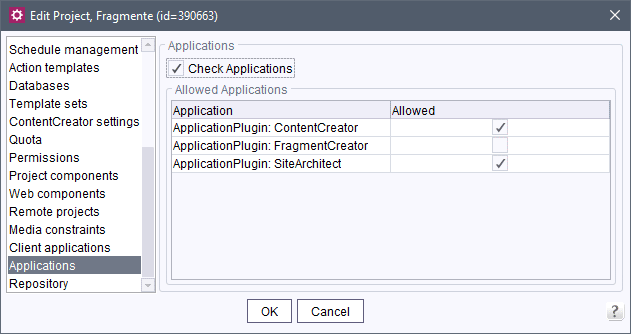
If the project does not contain the required metadata template, the following message is shown when the project is opened on the FirstSpirit start page:
The project is not yet prepared for fragments. You may change the project settings and
   remove the FragmentCreator from the allowed applications, if necessary.
1.3 Release of Java 17
In September 2021, Java 17 was deployed. JDK 17 is deployed by most providers as Long-Term-Support (LTS) version. It follows Java 11, which currently includes the LTS state.
The latest FirstSpirit release includes the official release for the use of Java 17 with FirstSpirit. Java 11 continues to apply as reference.
At the same time, this release discontinues the support for Java 16.
It is expected that FirstSpirit will remain functional with Java 16. However, e-Spirit AG does not carry out tests with Java 16 or eliminate FirstSpirit problems that are related to Java 16.
For further documentation, see https://docs.e-spirit.com/odfs/edocs/admi/technical-requi/index.html.
1.4 Compatibility: 'PostGreSQL’ database
The latest release includes the official release for the use of PostgreSQL 14.x with FirstSpirit. PostgreSQL 11 remains valid as reference.
It is planned to make PostgreSQL 14 the official reference version in a later release.
In addition, PostgreSQL 12.x and PostgreSQL 13.x have been included in the list of compatible databases.
However, the PostgreSQL 9.x version has no longer been maintained/supported by the manufacturer since November 2021, so that there is no support by FirstSpirit, either.
1.5 Modules and extensions for FirstSpirit 2022.3
The following modules and extensions are compatible with FirstSpirit 2022.3:
| Module name/File name | Version number | Compatibility |
FirstSpirit Update Archivefs-update-[version].tar.gz | 3.0.0 | - |
FirstSpirit Install Archiv fs-install-[version].tar.gz | 3.0.0 | - |
FirstSpirit LauncherFSLauncher.exe | 1.0.43 | as of FirstSpirit 2018-08 |
FirstSpirit Launcher JRE modulefs-launcher-jre-[version].fsm | 1.19 | as of FirstSpirit 2020-11 |
FirstSpirit SAML Login modulefs-saml-login-[version].fsm | 1.3 | as of FirstSpirit 2019-02 |
FSDevToolsfs-cli-[version].tar.gzfs-cli-[version].zip | 3.1.0 | as of FirstSpirit 2021-07 |
FirstSpirit Module Gradle Pluginfirstspirit-module-gradle-plugin-[version].jar | 3.0.3 | as of FirstSpirit 2019-06 |
1.6 Web server and web apps: New MBeans
The latest FirstSpirit release provides two new MBeans. They can be used to evaluate the load on web servers, for example.
WebAppManager: this MBean can be used to read out all web applications from the installed modules and their use in the configured web applications.WebServerManager: this MBean can be used to determine which web applications are installed on which web server.
1.7 Web server: Recognition of JVM Hiccups
Hiccups of the Java VM are now also registered by the Application Server on which the FirstSpirit web applications are running and logged in the fs-server.log file. Furthermore, also in the server-incidents.log file, for example,
WARN  08.02.2022 09:09:58.299 (de.espirit.firstspirit.server.HealthStatus):
   HICCUP (de.espirit.firstspirit.server.statistic.HiccupMeter) Web application VM
   hiccup detected: ...
The settings of the fs-server.conf in the VM hiccup detector MBean area thereby apply.
Note: For each Java VM, only one registration of the corresponding MBean HiccupMeter occurs.
This means that the Java VM Hiccups are not monitored via the web applications for the Jetty web server because this already takes place via the FirstSpirit Server. If web applications of more than one FirstSpirit Server are running on an application server, the hiccups are only reported to the FirstSpirit Server with the web application that registered the HiccupMeter first.
1.8 Web server: Rework for the removal of the InternalJetty
Until now, the ~/web directory served as a generation directory of the “InternalJetty” and is no longer needed since the removal of the “InternalJetty” (implemented with FirstSpirit 2022.1).
Automatic removal of files and directories that are no longer required
With the update to FirstSpirit-Release 2022.3 or higher, all FirstSpirit web applications are removed once from the ~/web directory. Unless the directory contains other data, it will also be deleted. (INFO message in the logging: ...Deleting legacy web directory:...)
If the directory contains files that are not FirstSpirit web applications, the directory structure and files will remain unchanged. (WARN message in the logging: ...Legacy web directory not deleted, the directory is not empty:...)
Web servers that use the ~/web directory can thereby continue to be used without problems.
Fallback generation directory
If no web server is configured or no web directory is specified for web servers of type “Tomcat” (= the field “Web directory” is empty, e.g., because FirstSpirit does not have access to the file system of the Tomcat), a generation as fallback to the directory occurred automatically until now
~/web/fs5staging
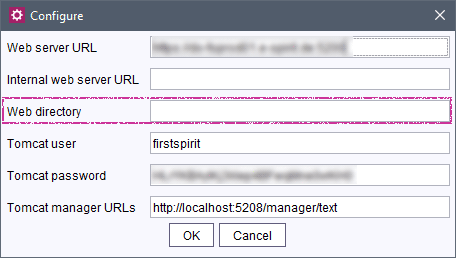
With the latest release (FirstSpirit 2022.3), the directory of the web application fs5staging of the “Jetty Web Server” is now used in the fallback case:
~/data/modules/FirstSpirit Jetty Server.JettyService/webapps/fs5staging/webappThe “Jetty Web Server” is an integrated Jetty web server in FirstSpirit that is provided in form of the system module fs-jetty.fsm.
The associated (JettyService) function runs by default. If this function does not run, the generation directory is also used in the fallback case, but the “Jetty Web Server” is then not accessible and access to the generation directory is not possible.
If you are using customer-specific extensions (scripts, modules, etc.) that respond to changes in the ~/web/fs5staging directory, they must be adjusted for the new path accordingly.
For an easier determination of whether the ~/web directory is still used in projects, the following is recorded in the log in the fallback case since FirstSpirit 2022.1 (INFO log level):
Fallback to web directory:[...]2 ContentCreator
2.1 Media: enter descriptive text
A descriptive text can now also be stored for media in the FirstSpirit ContentCreator. For example, this text can be output on the website as alternative text (alt tag).
The corresponding field is shown next to the medium after a file is selected:
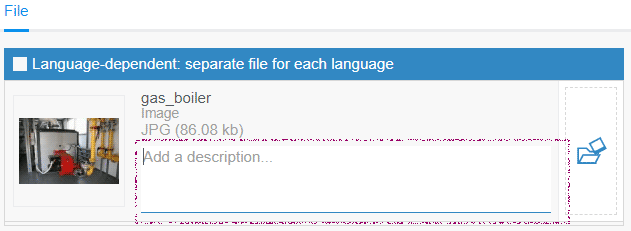
- For language-dependent media, a description can be entered for every language in which a file was selected.
- For language-independent media, a language-independent description can be entered.
2.2 Configuring the navigation bar via Tailored UI
The navigation bar in the FirstSpirit ContentCreator can now be configured via the
Navigation: Enabledfunction of the “Tailored UI” (e.g. deactivated).
The “Edit navigation” menu entry in the “Actions” menu, which opened the navigation bar, is no longer needed and has been removed in this context.
For more information on the “Tailored UI”, see also https://docs.e-spirit.com/odfs/template-develo/contentcreator/customization/standard-functi/index.html
2.3 Navigation bar: Creating sections
New sections can now also be created in the navigation bar of the FirstSpirit ContentCreator for content areas (in the “Page” area, via
RIGHT-CLICK
or context menu).
It will then be inserted in the first position of the content area.
The creation of sections can now be controlled separately for the navigation bar and the EasyEdit bar via the “Tailored UI” as follows:
Navigation: Create Section
This switch is new in the latest FirstSpirit Release.
It controls the “New section” function in the navigation bar.
By default, the function is available to all users in all projects.Preview: Create Section
This switch controls the “New section” function in the EasyEdit bar:

Preview: Create Section switch was also used to control the function in the navigation bar. In existing projects, in which the function should not be available in the navigation bar, it must now be deactivated via the Navigation: Create Section switch accordingly.For more information on the “Tailored UI”, see also https://docs.e-spirit.com/odfs/template-develo/contentcreator/customization/standard-functi/index.html
2.4 Making script functions available
Scripts allow functions that are not present in FirstSpirit to be implemented quickly.
In the FirstSpirit ContentCreator, script functionalities were previously accessible via the “Actions” menu as well as the EasyEdit toolbar and navigation bar; however, in that case only for elements of content management (script type “ContentCreator”).
In the latest release, “ContentCreator” type scripts are now also available for elements of Site, Media and Data Store.
Exception: elements from remote projects
.png)
.png)
The script actions can be controlled individually via the Tailored UI:
EntityManagement: Execute scriptMediaManagement: Execute scriptNavigation: Execute scriptPreview: Execute script
For further information, see https://docs.e-spirit.com/odfs/templates-basic/composition-tem/scripts/index.html
Note: FirstSpirit scripts present a lightweight option for the integration of new functions in FirstSpirit. However, for reasons of stability, it is recommended to implement functions that are needed or used long-term as a FirstSpirit module with executable or plug-in.
2.5 Search: Only hits with Visible permission
The “Search” report now only displays elements in the search results list for which the editor has the “Visible” permission. Otherwise, the element is not displayed as a search result. In the past, elements for which the editor did not have Visible permissions were also displayed labeled ** No access **.
Note: If Visible permissions are missing in the parent chain of the respective element, it continues to be displayed in the search results list with the ** No access ** label. Multiple invisible elements are thereby summarized in one.
3 FirstSpirit Content Experience Tools (CXT)
Latest module versions
FirstSpirit 2022.3 supports the following module versions for “FirstSpirit Content Experience Tools”.
| Module / file name | Version number |
FirstSpirit CXT Plattformplatform-[version].fsm | 2.5.3 |
FirstSpirit CXT DAP Bridgedataservice-[version].fsm | 1.44.3 |
FirstSpirit CXT FragmentCreatorfragment-creator-[version].fsm | 3.4.6 |
FirstSpirit Fragment DAPfragmentdap-[version].fsm | 1.40.6 |
FirstSpirit Media DAPmediadap-[version].fsm | 1.31.4* |
FirstSpirit PageRef DAPpagerefdap-[version].fsm | 1.9.4 |
FirstSpirit Markdown Editormarkdown-editor-[version].fsm | 1.29.3* |
FirstSpirit Tagging Editortagging-editor-[version].fsm | 1.29.3 |
FirstSpirit CXT FragmentCreator - CaaS Integrationcaas-integration-[version].fsm | 1.31.4 |
* These modules require FirstSpirit 2020-03 or higher from this version.
4 SiteArchitect
Section references: Takeover of the output state
The state of the source section with respect to the output (“Include this section in the output”) is now taken over when a section reference is created. It can be changed again later independently for the source section and the section reference. The state of the output is no longer synchronized between source section and section reference after creating a section reference.
5 Template development
contentSelect: Direct indication of queries
Queries can now be referenced directly in the contentSelect function using the queryUid parameter.
Example:
<CMS_FUNCTION name="contentSelect" resultname="myContentSelectFunction">
   	<CMS_PARAM name="queryUid" value="mySchema.myQuery"/>
</CMS_FUNCTION>
For more information, see https://docs.e-spirit.com/odfs/template-develo/template-syntax/functions/header/contentselect/index.html.
Overview
| ID | Description | Categories |
|---|---|---|
| CORE-12536 | The evaluation and display of changes within the version comparison was improved for the FS_CATALOG input component. |
Editor, SiteArchitect, Version history |
| CORE-12643 | Queries can now be referenced directly in the contentSelect function. |
Content Store, Database, Developer, Template Development |
| CORE-13679 | In the project selection, all projects for which the “ApplicationPlugin: FragmentCreator” checkbox is not explicitly deactivated will be displayed. |
FirstSpirit Administrator, FirstSpirit home page, FragmentCreator |
| CORE-14045 | As of the latest FirstSpirit release, some binary files ( |
FirstSpirit Administrator, ServerManager, ServerMonitoring |
| CORE-14046 | Modules and extensions for FirstSpirit 2022.3. |
Developer, FSDevTools, FirstSpirit Administrator, Launcher, Modules |
| CORE-14067 | Hiccups of the Java VM are now also registered by the Application Server on which the FirstSpirit web applications are running and logged in the fs-server.log file. |
Monitoring, Server Administrator |
| CORE-14085 | An error has been fixed that could result in that in rare cases, not all required data was exported with project exports that had limits with respect to time or the number of revisions (“Only export more recent revisions” or “Limit number of exported revisions to”). This could result in errors after the import, such as incorrect parent/child relations. |
FirstSpirit Administrator, ServerManager |
| CORE-14131 | The latest FirstSpirit release has implemented rework for the omission of the “InternalJetty”. |
FirstSpirit Administrator, FirstSpirit Jetty Web Server, ServerManager, ServerMonitoring, Web server |
| CORE-14142 | The state of the source section with respect to the output (“include this section in the output”) is now taken over when a section reference is created. |
Editor, Page Store, SiteArchitect |
| CORE-14190 | The latest FirstSpirit release includes the official release for the use of Java 17 with FirstSpirit. At the time, the support for Java 16 is discontinued. Further information can be found in chapter “Administration: Release of Java 17”. |
FirstSpirit Administrator, Java |
| CORE-14191 | The latest FirstSpirit release provides new MBeans. Further information can be found in chapter “Administration: Web server and web apps: New MBeans”. |
FirstSpirit Administrator, Monitoring, Web server |
| CORE-14193 | The latest FirstSpirit release includes the official release for the use of PostgreSQL 14.x with FirstSpirit. Further information can be found in chapter “Administration: Compatibility: 'PostGreSQL’ database”. |
Content Store, Database, Developer, FirstSpirit Administrator |
| CORE-14203 | The statistic data that, for example, can be accessed in ServerMonitoring under “Monitoring/Codes” or “Activities” via the envelope icon is now also saved via a server restart. |
Monitoring, Server Administrator, ServerMonitoring |
| CORE-14214 | In the JSON output, the date is now always output in the unabbreviated format including seconds and milliseconds. Example: "2022-02-14T08:32:00.000Z" |
Support for JSON |
| CORE-14220 | An error has been eliminated that, in rare cases, could lead to unusually long generating actions due to an incorrect cache storage distribution. |
Server Administrator |
| CORE-14225 | FirstSpirit Content Experience Tools: Latest module versions |
Developer, FirstSpirit Administrator, FirstSpirit Content Experience Tools (CXT), FragmentCreator, Modules |
| CXT-1600 | Checking of rules has been optimized. |
ContentCreator, Dynamic Forms |
| CXT-1975 | When creating a new page in the ContentCreator, the position of the new page is now initially visible in the navigation. |
ContentCreator, Editor |
| CXT-2288 | When creating a new page in the ContentCreator, the selected options are now highlighted more clearly. |
ContentCreator, Editor |
| CXT-2308 | For the creation of new sections, the consideration of user permissions for sections that can be used as master copies has been improved. |
ContentCreator, Editor, Permissions |
| CXT-2313 | The navigation bar in the FirstSpirit ContentCreator can now be configured via the |
ContentCreator, Developer, Editor, FirstSpirit Administrator, Navigation view |
| CXT-2348 | A selection of the next editor is now possible when activating multiple workflows at the same time. |
ContentCreator, Editor, Workflow |
| CXT-2354 | An error has been corrected which, in very rare cases, may have resulted in display errors with the use of InEdit. |
ContentCreator |
| CXT-2370 | New sections can now also be created for content areas in the navigation bar of the FirstSpirit ContentCreator. And, the creation of sections can now be controlled separately for the navigation bar and the EasyEdit bar via the “Tailored UI”. Further information can be found in chapter “ContentCreator: Navigation bar: Creating sections”. |
ContentCreator, Developer, Editor, Navigation view |
| CXT-2374 | Switching languages in the form could incorrectly cause change recognition when the form contained one of the FS_CATALOG, CMS_INPUT_IMAGEMAP, CMS_INPUT_LINK or CMS_INPUT_PERMISSION input components. |
ContentCreator, Editor |
| CXT-2466 | Scripts in ContentCreator Further information can be found in chapter “ContentCreator: Making script functions available”. |
ContentCreator, Developer, Template Development, Template Store |
| CXT-2504 | The permissions for deleting datasets are now also evaluated correctly in the FirstSpirit ContentCreator: Previously, datasets could only be deleted via the state display in case of special permissions configurations to the extent that a corresponding workflow was available. Now, deletion is also possible analogously via EasyEdit icon. |
Content Store, ContentCreator, Database, Editor, Permissions, Workflow |
| CXT-2506 | A descriptive text can now also be stored for media in the FirstSpirit ContentCreator. Further information can be found in chapter “ContentCreator: Media: enter descriptive text”. |
ContentCreator, Editor, Media, Media Store |
| CXT-2509 | A deletion via workflow could result in a |
ContentCreator, Editor |
| CXT-2510 | In rare cases, it was possible with open Media management or Data sources view, that the state display was incorrectly referencing the preview element. |
ContentCreator, Editor |
| CXT-2520 | The deletion of a dataset now always leads to an update of the dataset view. In the past, some datasets continued to be displayed after the deletion. |
Content Store, ContentCreator, Database, Editor |
| CXT-2521 | The permission check when editing datasets via InEdit has been improved and now no longer leads to an |
ContentCreator, Editor, Permissions |
| CXT-2522 | The “Search” report now only displays elements in the search results list for which the editor has the “Visible” permission. |
ContentCreator, Permissions, Search |
| CXT-2524 | Some elements that were created new under the root node were not displayed directly in the tree view of the FirstSpirit ContentCreator. |
ContentCreator, Editor, Media Store, Navigation view |
| CXT-2525 | In rare cases it was possible that the navigation bar was displayed incorrectly in the FirstSpirit ContentCreator under macOS (error message: |
ContentCreator, Editor, Navigation view |
| CXT-2530 | An error has been eliminated that resulted in that the entire parts tree was marked recursively as changed in the ContentCreator when executing the action “Show in navigation menu” or “Hide in navigation menu”. Now, only the changed folder is marked accordingly. |
ContentCreator, Editor, Navigation view |
| CXT-2534 | In the navigation bar of the FirstSpirit ContentCreator, the “New section” function is now also available for sections that are based on a table template. Note: It is still not possible to create sections in the ContentCreator that are based on a table template (“data section”). |
ContentCreator, Editor, Navigation view |
Deprecations
| Functionality | Deprecated as of | Will be removed / Was removed as of |
|---|---|---|
| Input component CMS_INPUT_CONTENTAREALIST | 5.2R3 | |
| Input component CMS_INPUT_CONTENTLIST | 5.2R3 | |
| Input component CMS_INPUT_FILE | 5.2R3 | |
| Input component CMS_INPUT_LINKLIST | 5.2R3 | |
| Input component CMS_INPUT_OBJECTCHOOSER | 5.2R3 | |
| Input component CMS_INPUT_PAGEREF | 5.2R3 | |
| Input component CMS_INPUT_PICTURE | 5.2R3 | |
| Input component CMS_INPUT_TABLIST | 5.2R3 | |
| FirstSpirit Access API: de.espirit.firstspirit.agency.GroupsAgent | 5.2R15 | |
| FirstSpirit Access API: delete (de.espirit.firstspirit.access.AccessUtil) | 5.2R18 | |
| FirstSpirit Access API: release (de.espirit.firstspirit.access.AccessUtil) | 2018-06 | |
| FirstSpirit Access API: getLastLoginAsDate (de.espirit.firstspirit.agency.UserStatisticsAgent) | 2018-07 | |
| FirstSpirit Access API: remainingDurationOfCurrentStageInMillis (de.espirit.firstspirit.server.MaintenanceModeInfo) | 2018-07 | 2025-13 |
| FirstSpirit Access API: getStartingTimeOfStageAsDate (de.espirit.firstspirit.server.MaintenanceModeInfo) | 2018-07 | 2025-13 |
| FirstSpirit Access API: getSelectedWebserverConfiguration (de.espirit.firstspirit.access.serverConfiguration) | 2018-10 | 2025-13 |
| FirstSpirit Access API: setSelectedWebserverConfiguration (de.espirit.firstspirit.access.serverConfiguration) | 2018-10 | 2025-13 |
| FirstSpirit Access API: getSelectedWebServer (de.espirit.firstspirit.access.project.Project) | 2018-10 | 2025-13 |
| FirstSpirit Access API: setSelectedWebServer (de.espirit.firstspirit.access.project.Project) | 2018-10 | 2025-13 |
| FirstSpirit Access API: getLostAndFoundStoreNodes(); (de.espirit.firstspirit.feature.FeatureInstallResult) | 2018-10 | |
| FirstSpirit Access API: getDeletedStoreNodes(); (de.espirit.firstspirit.feature.FeatureInstallResult) | 2018-10 | |
| FirstSpirit Access API: de.espirit.firstspirit.access.store.Previewable | 2019-01 | |
| WebSphere Application Server support for FirstSpirit | 2019-05 | |
| Legacy mode for the FirstSpirit server | 2019-06 | 2022-03 |
| Database layer for Oracle Database 11g/12c | 2020-12 | 2025-05 |
| FirstSpirit Access API: redirectTemplateLogToDefaultLog() (Interface RenderingAgent.Renderer) | 2021-05 | |
| PostgreSQL 9.x support for FirstSpirit | 2022-03 | 2022-03 |