
Release Notes
1 Administration
1.1 Project import: Check disk space
With the latest release, you can now check if the available disk space is sufficient when importing a project (FirstSpirit ServerManager | Project | Import).
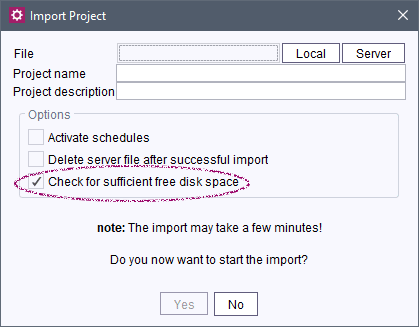
If the “Check for sufficient free disk space” checkbox is activated, a check will run before the import to determine if there is sufficient disk space for the project import without reducing the free memory enough to cause the FirstSpirit Server to shut down.
Note: In case of this check, it is assumed that there are no database contents that occupy the available memory of the FirstSpirit. Furthermore, this check estimates the additionally required disk space beyond the pure data storage (e.g., for the search index, relation graph, etc.). In rare cases, it is thereby possible that the server shuts down in spite of this check due to a lack of memory.
1.2 S3 Deployment: Select generation type
Generation type detection by the AWS S3 Deployment module has been improved (full or partial generation), e.g.,
INFO  18.03.2022 17:31:11.365 {uID=0,seID=885317,pID=881777} (com.espirit.ps.aws.
   services.s3.GenerationType): Generation type was set to [full | partial generation].
In this context, new methods have been created in the FirstSpirit Developer API in the de.espirit.firstspirit.scheduling package, ScheduleTaskExecutionContext interface, that allow access in a ScheduleTaskApplication to the executing ScheduleTask:
getTask();
getTaskIndex();
In addition, the automatic recognition of the generation type has been improved:
- Until now, a decision was made based on the first generation action (or the first generation task) whether or not files must be deleted from the S3 bucket. The action / task was thereby taken into account regardless of whether it was active or not.
- Now, all active generation actions that occur in the sequence prior to the S3 Deployment Task are taken into account. If one of these actions is a partial generation (“partial generation”), a deployment is executed without deletion.
The deployment can now be configured using a newly implemented drop-down box based on the individual project requirements (“Deployment options”), within the project component and / or within a AWS S3 Deployment action (in “Schedule management”)
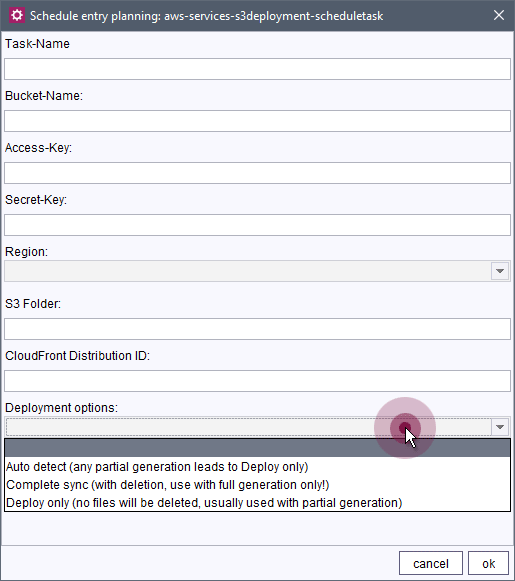
- (Empty)
The setting from the project component is used (AWS Services Configuration ProjectApp). - Auto detect (any partial generation leads to Deploy only):
The automatic recognition is used (see explanation above):
The review includes all active generation schedules that occur in the sequence prior to the S3 Deployment Task. If one of these schedules is a partial generation (“partial generation”), a deployment without deletion is executed. - Complete sync (with deletion, use with full generation only!):
The S3 Deployment is executed with deletion of obsolete files in the S3 bucket.
This option should only be selected for full generations. - Deploy only (no files will be deleted, usually used with partial generation):
The S3 Deployment is executed without deletion of obsolete files in the S3 bucket.
This option is generally used for partial generations.
Note: It is recommended to select the suitable deployment type for the individual project requirements from this drop-down box by hand and not to use the automatic recognition.
More information
1.3 ServerManager: Display of web applications and web components
The display of available web applications and web components has been improved (FirstSpirit Server Manager/“Server Properties/Web Applications” and “Project Properties/Web Components”):
If it is not possible to display all web applications/components at the same time due to the width of the dialog, you can now use the arrow symbols to scroll through the elements:
.png)
You can use the following icon to display the elements as a list:
.png)
In the past, all existing web applications/components were displayed in multiple lines underneath each other when the width of the dialog was too narrow to display all elements at the same time.
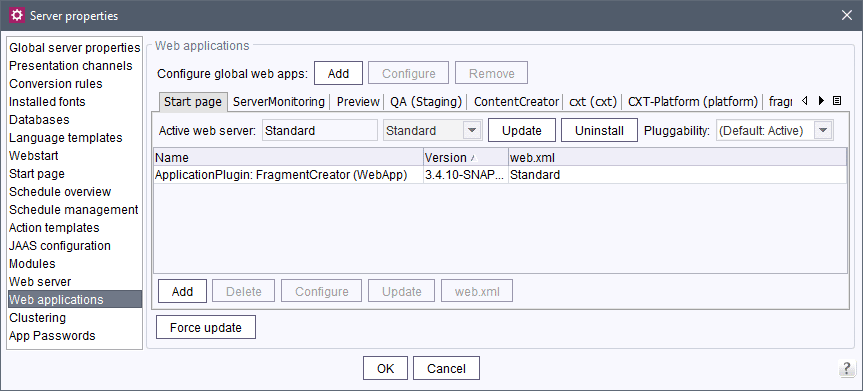
The new display method also builds the display (especially in case of many web applications/components) significantly faster than before.
1.4 Configuring the default value for stack depth
The new generate.defaultMaxStackSize parameter can be used to define the default value for the stack size server-wide in the fs-server.conf file.
Default value: 75.
In the past, the default value specified by the #global.maxStackSize parameter was 50.
For more information, see
generate.defaultMaxStackSizeparameter: https://docs.e-spirit.com/odfs/edocs/admi/firstspirit-ser/configuration-f/firstspirit-ser/area-server/index.html#generate_defaultmaxstacksize- Stack depth in FirstSpirit: https://docs.e-spirit.com/odfs/template-develo/template-syntax/system-objects/global/preview-specifi/index.html#_global_maxstacksize
2 Administration / Modules
FirstSpirit Module Gradle Plugin: Support for "Legacy mode" has been discontinued
With FirstSpirit 2022.3, the support for the “Legacy mode” for FirstSpirit Server and module developer has been discontinued.
With the latest release, the support for the “Legacy mode” was also removed in the FirstSpirit Module Gradle Plugin (firstspirit-module-gradle-plugin-[version].jar). The current version of the plug-in is 4.0.0.
With this version, only module-isolated.xml files are now generated. However, modules that contain a module.xml file cause an error message when generating.
3 ContentCreator
"FirstSpirit Image Recognition” module: Improvement of performance
The performance when calling the Amazon Recognition API has been improved:
Recognition of faces and celebrities is now only executed when labels such as Human, Person or Face have been recognized first.
Likewise, text recognition is only executed when a Text label has been recognized first.
Based on Debug log output, you can now track which API calls are made, e.g.,
... Calling the 'detectLabels' Amazon Image Rekognition API endpoint
... Calling the 'detectFaces' Amazon Image Rekognition API endpoint
As part of this change, the AWS SDK has been updated to Version 2.17.173.
4 FirstSpirit Content Experience Tools (CXT)
Latest module versions
FirstSpirit 2022.6 supports the following module versions for “FirstSpirit Content Experience Tools”.
| Module / file name | Version number |
FirstSpirit CXT Plattformplatform-[version].fsm | 2.5.5 |
FirstSpirit CXT DAP Bridgedataservice-[version].fsm | 1.44.5 |
FirstSpirit CXT FragmentCreatorfragment-creator-[version].fsm | 3.4.9 |
FirstSpirit Fragment DAPfragmentdap-[version].fsm | 1.40.10 |
FirstSpirit Media DAPmediadap-[version].fsm | 1.31.5* |
FirstSpirit PageRef DAPpagerefdap-[version].fsm | 1.9.5 |
FirstSpirit Markdown Editormarkdown-editor-[version].fsm | 1.29.4* |
FirstSpirit Tagging Editortagging-editor-[version].fsm | 1.29.4 |
FirstSpirit CXT FragmentCreator - CaaS Integrationcaas-integration-[version].fsm | 1.31.5 |
* These modules require FirstSpirit 2020-03 or higher from this version.
Overview
| ID | Description | Categories |
|---|---|---|
| CORE-12121 | The display of the available web applications and web components has been improved. |
FirstSpirit Administrator, ServerManager, Web applications |
| CORE-12672 | When using the “Preview Errors” function, changes of the output channel for the links in Stacktrace are now also taken into account accordingly, so that a direct jump to errors from other output channels is also possible. |
Debugging, Developer, SiteArchitect |
| CORE-13411 | An error has been fixed, which, in very rare cases, could cause jar files that are stored in the |
FirstSpirit Administrator, ServerManager |
| CORE-13705 | The generation type detection by the AWS-S3 Deployment module has been improved. Further information can be found in chapter “Administration: S3 Deployment: Select generation type”. |
FirstSpirit Administrator, Generation, Modules |
| CORE-13886 | With the latest release, you can now check if the available disk space is sufficient when importing a project. Further information can be found in chapter “Administration: Project import: Check disk space”. |
FirstSpirit Administrator, Project export / import, ServerManager |
| CORE-13962 | If the relevant revision has been archived, an INFO instead of a WARN is now logged when loading a feature. |
Content Transport, Debugging, Developer, FirstSpirit Administrator, Logging |
| CORE-14333 | The new |
FirstSpirit Administrator, Performance |
| CORE-14349 | The conversion to “Log4j 2” could cause |
Debugging, FirstSpirit Administrator, Logging |
| CORE-14380 | An error has been fixed which, in rare cases, could cause sessions opened with the ServerManager to temporarily remain. |
FirstSpirit Administrator, ServerManager, Sessions |
| CORE-14386 | FirstSpirit Content Experience Tools: Latest module versions |
Developer, FirstSpirit Administrator, FirstSpirit Content Experience Tools (CXT), FragmentCreator, Modules |
| CORE-14391 | If the parameters of the fs-server.conf file have invalid values, this is now documented with a WARN message in the log. In the past, only one DEBUG was logged. |
Debugging, FirstSpirit Administrator, ServerMonitoring |
| CXT-1910 | The performance when calling the Amazon Recognition API has been improved. |
ContentCreator, FirstSpirit Administrator, Media, Performance |
| CXT-2579 | In FirstSpirit, elements, such as images, sections, pages, datasets, etc., can be used repeatedly. The term “References” in the title bar of Editing dialogs in the FirstSpirit ContentCreator indicates that the respective element (such as an image) is used on a page or in a dataset (“referenced”). |
ContentCreator, Editor |
| DEVEX-510 | With the latest release, the “FirstSpirit Module Gradle Plugin” can no longer be used to generate modules in the “Legacy mode”. |
Developer, FirstSpirit Administrator, Isolated mode, Module development, Modules |
Deprecations
| Functionality | Deprecated as of | Will be removed / Was removed as of |
|---|---|---|
| Input component CMS_INPUT_CONTENTAREALIST | 5.2R3 | |
| Input component CMS_INPUT_CONTENTLIST | 5.2R3 | |
| Input component CMS_INPUT_FILE | 5.2R3 | |
| Input component CMS_INPUT_LINKLIST | 5.2R3 | |
| Input component CMS_INPUT_OBJECTCHOOSER | 5.2R3 | |
| Input component CMS_INPUT_PAGEREF | 5.2R3 | |
| Input component CMS_INPUT_PICTURE | 5.2R3 | |
| Input component CMS_INPUT_TABLIST | 5.2R3 | |
| FirstSpirit Access API: de.espirit.firstspirit.agency.GroupsAgent | 5.2R15 | |
| FirstSpirit Access API: delete (de.espirit.firstspirit.access.AccessUtil) | 5.2R18 | |
| FirstSpirit Access API: release (de.espirit.firstspirit.access.AccessUtil) | 2018-06 | |
| FirstSpirit Access API: getLastLoginAsDate (de.espirit.firstspirit.agency.UserStatisticsAgent) | 2018-07 | |
| FirstSpirit Access API: remainingDurationOfCurrentStageInMillis (de.espirit.firstspirit.server.MaintenanceModeInfo) | 2018-07 | 2025-13 |
| FirstSpirit Access API: getStartingTimeOfStageAsDate (de.espirit.firstspirit.server.MaintenanceModeInfo) | 2018-07 | 2025-13 |
| FirstSpirit Access API: getSelectedWebserverConfiguration (de.espirit.firstspirit.access.serverConfiguration) | 2018-10 | 2025-13 |
| FirstSpirit Access API: setSelectedWebserverConfiguration (de.espirit.firstspirit.access.serverConfiguration) | 2018-10 | 2025-13 |
| FirstSpirit Access API: getSelectedWebServer (de.espirit.firstspirit.access.project.Project) | 2018-10 | 2025-13 |
| FirstSpirit Access API: setSelectedWebServer (de.espirit.firstspirit.access.project.Project) | 2018-10 | 2025-13 |
| FirstSpirit Access API: getLostAndFoundStoreNodes(); (de.espirit.firstspirit.feature.FeatureInstallResult) | 2018-10 | |
| FirstSpirit Access API: getDeletedStoreNodes(); (de.espirit.firstspirit.feature.FeatureInstallResult) | 2018-10 | |
| FirstSpirit Access API: de.espirit.firstspirit.access.store.Previewable | 2019-01 | |
| WebSphere Application Server support for FirstSpirit | 2019-05 | |
| Database layer for Oracle Database 11g/12c | 2020-12 | 2025-05 |
| FirstSpirit Access API: redirectTemplateLogToDefaultLog() (Interface RenderingAgent.Renderer) | 2021-05 | |
| Support for Log4j 1 | 2022-05 | 2024-06 |