
Release Notes
1 Administration
1.1 The support for the Windows installation program and the tar archive (Unix) is discontinued
With the end of Java 8 support, the support for the Windows installation program (.exe) (as announced with 2018-06) and at the same time the support for the previous tar archive (.tgz) for all Unix systems will also be discontinued.
The previous installation options will be replaced by new installation options for the FirstSpirit server and update options for the FirstSpirit backend, which were released with FirstSpirit 2019-06:
fs-install-[version].tar.gzto install the FirstSpirit server andfs-update-[version].tar.gzto update the FirstSpirit backend.
The new archives can be used flexibly for different requirements. They are compatible with all supported operating systems and can be used for servers in isolated and legacy mode.
Another benefit of the new installation and update options is the automatic update of the (Java) version-specific start parameters for the server start. For all new installations based on the installation archive fs-install-[version].tar.gz, a configuration file fs-wrapper-vendor.conf is created, which contains the recommended manufacturer start options for starting the FirstSpirit server. This file is automatically updated when the FirstSpirit backend is updated via the FirstSpirit update archive fs-update-[version].tar.gz - so it always contains the current start options for the respective Java version.
Further documentation:
1.2 End of support: Java Web Start
Up to now, the FirstSpirit desktop apps (FirstSpirit SiteArchitect and ServerManager) could be started and updated (roll-out) via Java Web Start or via the FirstSpirit Launcher.
The Java Web Start functionality is included in Oracle Java 8, but is not supported from Oracle Java 11 on. OpenJDK does not offer a comparable technology. Therefore, since FirstSpirit does no longer support Oracle Java 8, the option of starting and rolling out the FirstSpirit desktop applications via Java Web Start will no longer be supported (as announced with 2019-10). The FirstSpirit JNLP files, which were required for Java Web Start, will also be dropped.
In most cases it is possible to switch to the new FirstSpirit Launcher without having to modify the configuration. The FirstSpirit Launcher supports a fully automatic update (of both the Launcher itself and the JRE). When using the launcher, the launcher version available on the FirstSpirit server is determined and an update is started if the version on the server is higher. What’s more, the new Launcher offers a tray application that gives the user a convenient overview of the FirstSpirit Java applications that are currently active and that have been used recently.
Further documentation:
2 General
End of Java 8 support
With the current FirstSpirit release, Oracle Java 8 and OpenJDK 8 are no longer supported by FirstSpirit.
Background: FirstSpirit is operated successfully by customers and partners with a wide range of different third-party components (operating systems, JDKs, servlet engines, application servers, and databases) and external libraries. Some of these components / libraries are no longer compatible with Java 8 in their current version. This applies, for example, to the internal Apache Derby database supplied with FirstSpirit. As a consequence, updates can no longer be carried out for those third-party components / libraries, which is particularly critical for security-relevant updates.
Oracle has not provided any public updates for Java 8 since February 2019 and recommends that developers and end users transition to a higher Java version in order to continue receiving public updates and security enhancements.
Also, with the end of Java 8 support, as announced before:
- The support for the Windows installer and the legacy tar archive (.tgz) for all Unix systems is dropped. We advise our customers to use the new installation method via the install archive (see Installing FirstSpirit).
- The option of starting the FirstSpirit desktop applications via Java Web Start is no longer available. (The Java Web Start functionality is included in Oracle Java 8, but is not support from Oracle Java 11 on. OpenJDK does not offer a comparable technology.) Therefore, SiteArchitect and ServerManager can now be started solely via the FirstSpirit Launcher (see FirstSpirit Launcher documentation). The FirstSpirit JNLP files, which were required for Java Web Start, will also be dropped.
The ramp-down phase for Java 8:
- started as planned in the second quarter of 2020. First, the Java 8 compatibility tests were gradually reduced.
- With the current FirstSpirit version, Java 8 functionality has been removed from FirstSpirit:
- Wrapper configuration: All definitions for Java 8 have been removed from the standard configuration files for the Java Service Wrapper (
fs-wrapper[.isolated].conf,fs-wrapper-vendor.conf) provided by e-spirit.
The standard configuration files are provided via the FirstSpirit installation archive or the FirstSpirit update archive and can be found in the folder<FirstSpiritROOT>/conf/conf-all/after a new installation or after updating the FirstSpirit backend. The adjustments are included from wrapper version 1.0.8 onwards.
A Java version 11 or higher is now required to start the FirstSpirit server. - Launcher JRE module: Oracle Java 8 and AdoptOpenJDK 8 are no longer included in the FirstSpirit Launcher JRE module. The FirstSpirit Launcher JRE module currently offers the versions AdoptOpenJDK 11.0.7+10 (default) and AdoptOpenJDK 14+36.
- Wrapper configuration: All definitions for Java 8 have been removed from the standard configuration files for the Java Service Wrapper (
- In 2020Q4 the byte code level will be switched from Java 8 to Java 11. From this point on, all Java versions prior to Java 11 (LTS) will be incompatible with FirstSpirit.
This means that FirstSpirit will no longer be executable with Oracle Java 8 or OpenJDK 8 and that e-Spirit AG will no longer implement any measures to eliminate errors or problems associated with Java 8. We recommend that you switch to a higher Java version soon.
On the server side, a change from Java 8 to Java 11 (and higher) should be tested extensively on a test system, especially when using third-party components and individual customer extensions. Java 8 and Java 11 in parts differ considerably, which may result in existing libraries and implementations being incompatible with Java 11 (and higher). In such cases, updating the respective libraries, if possible, may help. When changing from Java 8 to Java 11 (and higher) we recommend changing the FirstSpirit server to Isolated Mode at the same time, in order to avoid having to test modules and implementations twice. For this topic, see Switching to Isolated Mode.3 ContentCreator
Navigation view and evaluation of permissions: Hiding invisible elements
Permission management in FirstSpirit makes it possible to assign permissions to users and groups. Permissions can be assigned with a high level of granularity for each FirstSpirit element in a project. Permissions are assigned in FirstSpirit SiteArchitect using the “Extras / Change permissions” context menu function on the required element or subtree of a project.
Elements of the Site Store (menu levels, page references, etc.)

that are not visible to the current user (“Visible” checkbox is deactivated), such as
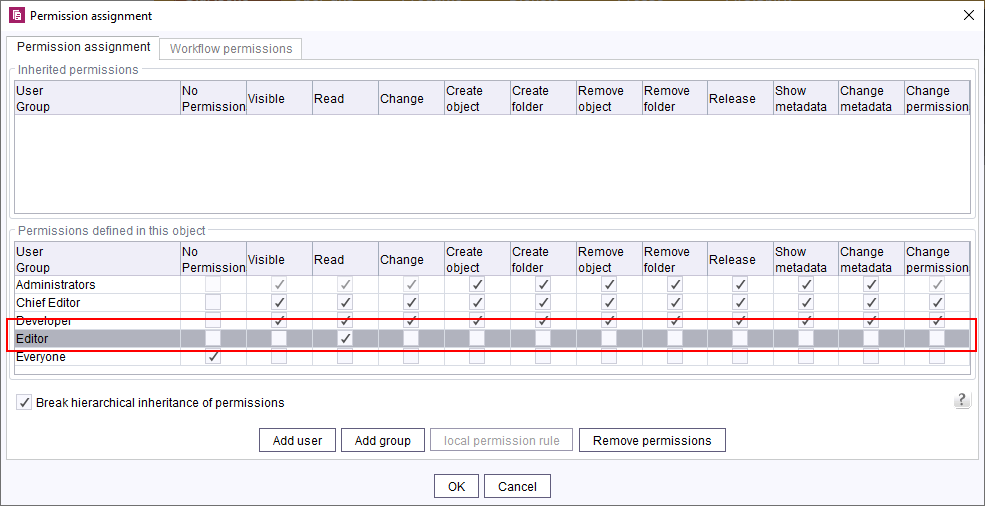
are now no longer shown on the left-hand edge of the screen in the navigation view.
Previously, ** No access ** was shown in these cases:
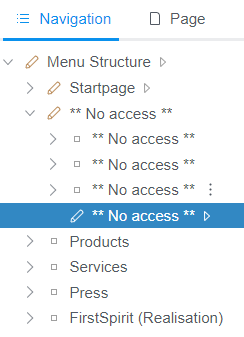
If a user or a group should not be able to edit the content of a page, the permissions for the page in question need to be assigned in the Page Store.
For more information about permission assignment in FirstSpirit, see https://docs.e-spirit.com/odfs/edocs/fsar/permissions-sit/editorial-permi/index.html.
4 FirstSpirit Content Experience Tools (CXT)
4.1 Latest module versions
FirstSpirit 2020-06 supports the following module versions for “FirstSpirit Content Experience Tools”:
| Module / file name | Version number |
FirstSpirit CXT DAP Bridgedataservice-[version].fsm | 1.29 |
FirstSpirit CXT FragmentCreatorfragment-creator-[version].fsm | 2.6 |
FirstSpirit Fragment DAPfragmentdap-[version].fsm | 1.26 |
FirstSpirit Media DAPmediadap-[version].fsm | 1.23* |
FirstSpirit PageRef DAPpagerefdap-[version].fsm | 1.0 |
FirstSpirit Markdown Editormarkdown-editor-[version].fsm | 1.21* |
FirstSpirit Tagging Editortagging-editor-[version].fsm | 1.21 |
FirstSpirit CXT FragmentCreator - CaaS Integrationcaas-integration-[version].fsm | 1.21 |
* These modules require FirstSpirit 2020-03 or higher from this version.
4.2 Labeling input elements in FragmentCreator ("display language")
FirstSpirit provides consistent support for the multi-language concept:
- Via the start page, it is possible to select the language for the labeling on the menu bar, dialogs, etc. (interface language).
The interface languages that are currently available are English, German, Spanish, French, Italian, Dutch, and Russian. - However, the project developer uses the editorial language (also called the display language) to control the language for displaying input elements, tooltips, etc.
The lang attribute (in the LANGINFOS / LANGINFO tag) is now taken into account for the editorial language, e.g.:
<CMS_INPUT_TEXT name="headline" useLanguages="no">
     <LANGINFOS>
       <LANGINFO lang="*" label="Headline"/>
       <LANGINFO lang="DE" label="Überschrift"/>
     </LANGINFOS>
</CMS_INPUT_TEXT>
If the interface language selected is “German”, the input element labeling (label attribute) also takes “German” into account (“DE” in the example above):
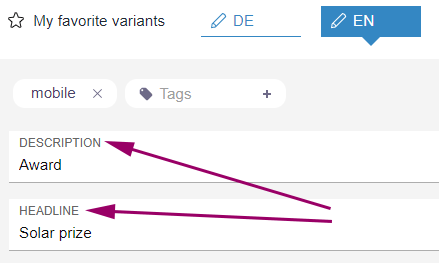
In the case of interface languages that are not included in the editorial languages available, the master language is used as a fallback option.
4.3 Optimizations for multi-user mode
The editing area or MicroApps did not always show the current state of a variant after another user had made changes to the content, for example.
It is now only necessary to perform a manual update if another user is editing the content simultaneously.
In this case, all the input elements of the variant (“form”) are locked for editing and the following message is output:
The changes can not be saved - the element was modified on server.Clicking on
CONFLICTING CHANGES! Click here to reload.updates the display; the variant can now be edited again.
Note: When FS_INDEX is in use, referenced fragments are not automatically updated.
4.4 PageRef Access Plugin (PageRefDAP): Referencing pages
As of the current release, references to pages can now be created using the new PageRef Access Plugin module (PageRef DAP).
The references to pages selected by the user can be output as HTML links.
Provision and Installation
The corresponding module file (file name extension: .fsm) can be requested from Technical Support:
pagerefdap-[version].fsmThe module is installed using the FirstSpirit ServerManager, in the “Server properties / Modules” dialog using the “Install” button.
Remote configuration
To enable references to pages from other FirstSpirit projects, the desired project must be configured as a “Remote project” in the project properties (FirstSpirit ServerManager):
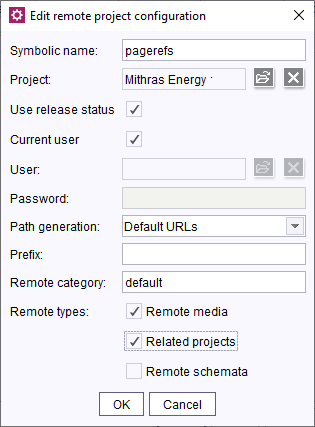
Web component “PageRef DAP for ContentCreator”
The plugin can be used in ContentCreator using the Web component “PageRef DAP for ContentCreator”.
To do this, the web component must be added to the relevant project in the “ContentCreator” area (“FirstSpirit ServerManager / Project properties / Web components”).
Use in projects
If the module has been installed, it can be addressed from the component for selecting references, “FS_INDEX”.
The editor can select one or more page references from the configured remote project(s).
Syntax example for FS_INDEX, tab “Form”:
<FS_INDEX name="links">
    <LANGINFOS>
      <LANGINFO lang="*" label="Page referencing / links"/>
      <LANGINFO lang="DE" label="Seitenreferenzen / Links"/>
    </LANGINFOS>
    <SOURCE name="FirstSpiritPageRefAccess/PageRefConnector">
      <PROJECT remote="pagerefs">
        <FOLDER uid="products"/>
      </PROJECT>
    </SOURCE>
</FS_INDEX>SOURCE: This tag is used to specify the FirstSpirit module and the DataAccessPlugin component via the mandatory parametername. In this case: “FirstSpiritPageRefAccess/PageRefConnector”.PROJECT: This tag is used to specify the remote project from which references are to be made available. The symbolic project name of the remote project must be specified via the mandatory parameterremote.FOLDER: The selection can be restricted to folders of the referenced project by using theFOLDERtag. If several folders are to be taken into account, aFOLDERtag must be specified for each folder. The name of the folder in question is entered using theuidparameter (reference name).
If the configuration was made correctly, the editor will be able to select page references:
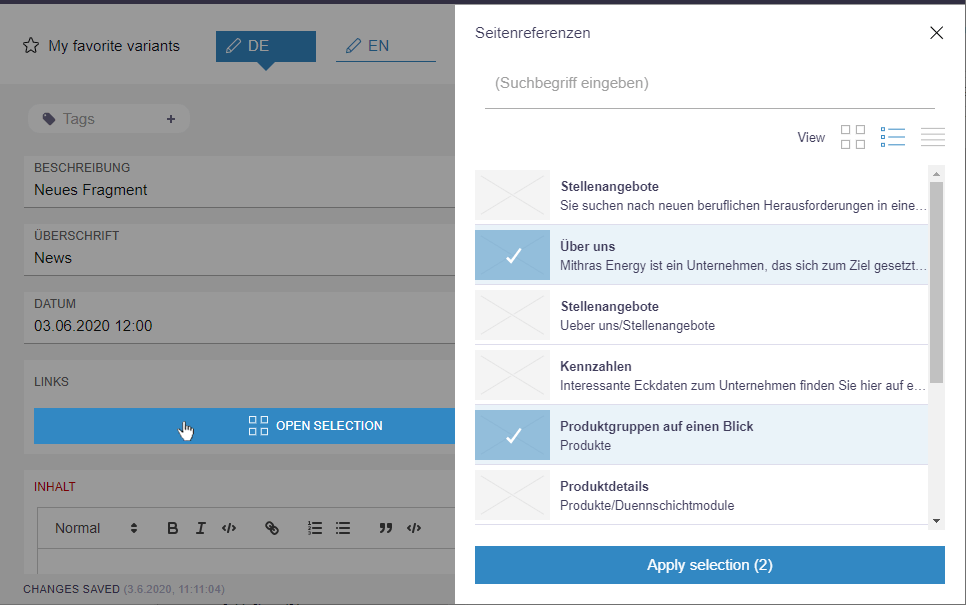
Selection
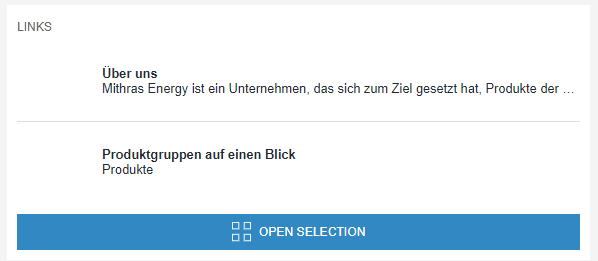
FS_INDEX with selected page references
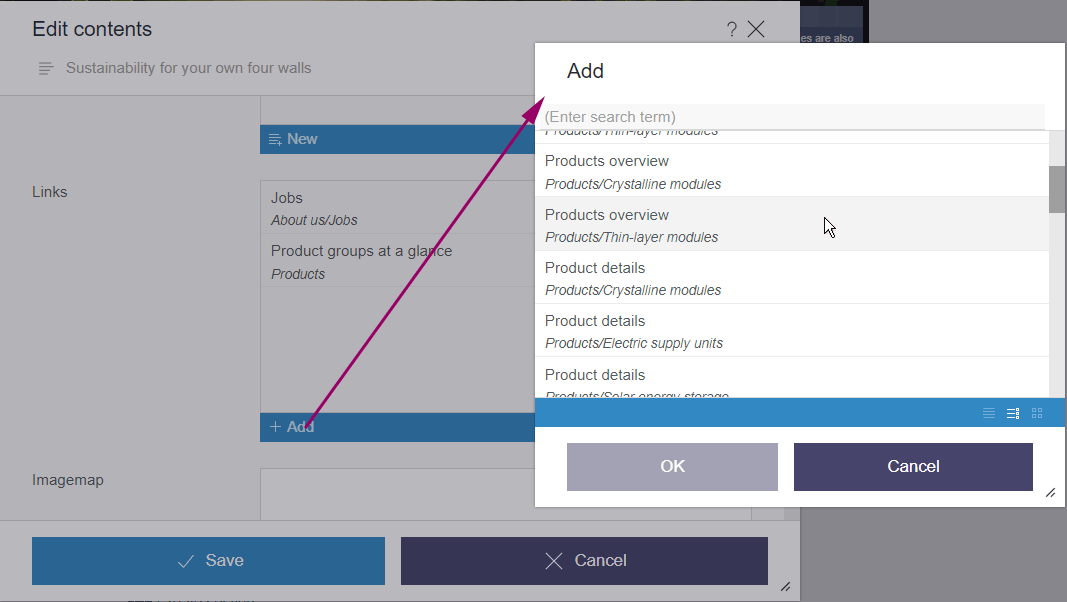
Representation in ContentCreator:
Output in FirstSpirit projects
The page references selected by the editor can be output in a FirstSpirit project as follows:
$CMS_FOR(pageref, links.values())$<br />
     <a href="$CMS_REF(pageref)$")$">
      $CMS_VALUE(pageref.uid)$  <br/>
     </a>
$CMS_END_FOR$
5 Compatibility
New layer for Oracle Database 19c
The available database layer for Oracle Database 11g/12c is, due to changes in database and driver, not compatible with Oracle Database 19c.
In order to establish FirstSpirit compatibility with Oracle Database 19c a new database layer (Oracle19cLayer) thus had to be implemented.
Generally, you can either simply use a new database layer, or you can update the existing database layer.
Use the new database layer:
In order to use the new database layer (Oracle19cLayer), you simply have to add it in the server properties (ServerManager) in the database section, and configure it according to your local requirements (see Server properties / Databases)
Update existing database layer:
In order to update an Oracle Database 12c used with FirstSpirit to Oracle Database 19c, you can,
- export a FirstSpirit project, and import it as a new project with Oracle Database 19c or
- change database layers by pausing the server, updating the database and manually switching database layers.
Migrating from Oracle Database 11g/12c to 19c without changing the database the new features of Oracle Database 19c can not be used, and we thus do not advise doing so!
Warning! When updating an Oracle Database 12c to 19c you should follow the vendor guidelines.
Note: Oracle 19c support has already undergone extensive testing, but currently still is in “EAP” status (“Early Access Program”). Not all use cases and migration scenarios could be tested. Thus it is important that you extensively check your use cases in a test environment!The EAP phase will be accompanied through the FirstSpirit Community (community.e-spirit.com). This way questions and problems can be dealt with in a timely manner.
Extensive documentation regarding the use of Oracle Database 19c with FirstSpirit will also be published in the Community soon (initially in German only). The recommendations contained in this documentation for the configuration of the Oracle database and the FirstSpirit server should always be adhered to.
Final release of the new layer is planned for Q3/2020.
6 SiteArchitect / ContentCreator
The Mithras Energy demo project is no longer available
With the current FirstSpirit release the Mithras Energy demo project for ContentCreator and SiteArchitect is no longer available and will no longer be distributed with FirstSpirit (as announced with FirstSpirit 2020-02).
e-Spirit replaces the demo project with the contemporary FirstSpirit Experience Accelerator (see FirstSpirit Experience Accelerator documentation).
The FirstSpirit Experience Accelerator is a new, important building block in the FirstSpirit ecosystem. It contains reference implementations for important content modules (including Shoppable Image and Video, Touchpoint Editing, Teaser Carousel, and Banner) and can be used as a quick entry into a new FirstSpirit project. The objective of the FirstSpirit Experience Accelerator is a faster product launch in the enterprise and eCommerce environment.
7 SiteArchitect / ServerManager
"FirstSpirit Launcher JRE" module: update to Java versions
The Java versions included in the “FirstSpirit Launcher JRE” module were updated in the latest FirstSpirit release:
In addition to the version supplied with the FirstSpirit Launcher, AdoptOpenJDK 11.0.7+10.2 (default), the following Java variant is currently available:
- AdoptOpenJDK 14.0.1+7.1
For documentation on the “FirstSpirit Launcher JRE” module, see the corresponding manual.
8 System
Update of internally used software
As of the current release, the following internally used software has been updated:
Eclipse Jetty (contained in the module fs-jetty.fsm / “FirstSpirit Jetty Service”)
Update from version 9.4.27 to version 9.4.28
Library com.fasterxml.jackson.core:jackson-databind
(contained in the DataAccessPlugin implementation example module for accessing web services using the standardized Open Data Protocol (OData))
Update from version 2.4.2 to version 2.11.0
For general information on the module see: https://docs.e-spirit.com/ (Examples)
Overview
| ID | Description | Categories |
|---|---|---|
| CORE-11351 | Changing from |
Debugging, Developer, Module development, Services |
| CORE-12223 | The Java versions included in the “FirstSpirit Launcher JRE” module were updated in the latest FirstSpirit release. |
Java, Launcher |
| CORE-12250 | Update of internally used software. Further information can be found in chapter “System: Update of internally used software”. |
Developer, FirstSpirit Administrator, FirstSpirit Jetty Web Server, Integrated software |
| CORE-12261 | Fixed a bug that could cause a freeze of the application in very rare cases (deadlock in |
Developer, FirstSpirit API |
| CORE-12289 | The configuration of permitted applications (“FirstSpirit ServerManager - Project properties - Applications”) is now taken into account for export and import when using the “External Synchronization” functionality. |
Developer, External synchronization |
| CORE-12322 | In FirstSpirit ServerMonitoring, external groups of users are displayed in the “User” area only for server administrators, no longer for project administrators. |
FirstSpirit Administrator, Permissions, Server Administrator, ServerMonitoring |
| CORE-12336 | As previously announced, with the end of Java 8 support, the support for the Windows installation program (.exe) and, at the same time, the support for the previous tar archive (.tgz) for all Unix systems will also be discontinued. The previous installation options will be replaced by new installation options for the FirstSpirit server and update options for the FirstSpirit backend. |
FirstSpirit Administrator, Java, Server Administrator |
| CORE-12337 | End of Java 8 support: As part of product maintenance, support for Java 8 with FirstSpirit version 2020-06 will be discontinued. Further information can be found in chapter “General: End of Java 8 support”. |
Developer, FirstSpirit Administrator, Java, Server Administrator |
| CORE-12338 | Up to now, the FirstSpirit desktop apps (FirstSpirit SiteArchitect and ServerManager) could be started and updated (roll-out) via Java Web Start or via the FirstSpirit Launcher. With the current FirstSpirit version, FirstSpirit no longer supports the option of starting and rolling out the FirstSpirit desktop applications via Java Web Start (as announced with 2019-10). Further information can be found in chapter “Administration: End of support: Java Web Start”. |
FirstSpirit Administrator, Server Administrator, ServerManager, SiteArchitect |
| CORE-12339 | With the current FirstSpirit release the Mithras Energy demo project for ContentCreator and SiteArchitect is no longer available and will no longer be distributed with FirstSpirit. e-Spirit replaces the demo project with the contemporary FirstSpirit Experience Accelerator. |
ContentCreator, Developer, Editor, FirstSpirit Administrator, SiteArchitect |
| CORE-12343 | New layer for Oracle Database 19c Further information can be found in chapter “Compatibility: New layer for Oracle Database 19c”. |
Database |
| CORE-12362 | An error was fixed that could cause that saving an FS_INDEX input component that references datasets was not possible. |
Content Store, Developer, Editor, Input Components |
| CXT-177 | As of the current release, references to pages can now be created using the new PageRef Access Plugin module. |
Developer, Editor, FirstSpirit Administrator, FirstSpirit Content Experience Tools (CXT), FragmentCreator, Modules, Remote access, ServerManager, Template Development |
| CXT-578 | The ability for several editors to edit variants has been optimized. |
Editor, FirstSpirit Content Experience Tools (CXT), FragmentCreator, Sessions |
| CXT-711 | The language defined using the |
Editor, FirstSpirit Content Experience Tools (CXT), FragmentCreator, Languages |
| CXT-1483 | When the “BasicWorkflows” ( |
ContentCreator, Developer, Editor, Workflow |
| CXT-1561 | The navigation view no longer shows elements for which the user does not have “Visible” permissions. |
ContentCreator, Developer, Editor, Permissions |
| CXT-1596 | FirstSpirit Content Experience Tools: Latest module versions |
Developer, FirstSpirit Administrator, FirstSpirit Content Experience Tools (CXT), FragmentCreator, Modules, ServerManager |
| CXT-1603 | The language in which the preview page is displayed could not be changed in the preview itself after opening the navigation view (e.g. via a language switch on the preview page). |
ContentCreator, Editor, Languages |
| DEVEX-140 | The current FSDevTools release (release 2.5.10) supports the execution of project and server schedules by means of the “schedule start” command. The parameters required for execution are transferred via the command line using the following schema:
Additionally, the “schedule list” command can be used to list all the server schedules or project schedules for a certain project:
Parameters:
Example: Information about the schedule and the execution duration is provided in the log. Note: The command line tool should not be exited before the schedule is finished. Information about the individual commands is available via the |
Developer, FSDevTools |
Deprecations
| Functionality | Deprecated as of | Will be removed / Was removed as of |
|---|---|---|
| Input component FS_LIST | 5.2R3 | 2020-07 |
| Input component CMS_INPUT_CONTENTAREALIST | 5.2R3 | |
| Input component CMS_INPUT_CONTENTLIST | 5.2R3 | |
| Input component CMS_INPUT_FILE | 5.2R3 | |
| Input component CMS_INPUT_LINKLIST | 5.2R3 | |
| Input component CMS_INPUT_OBJECTCHOOSER | 5.2R3 | |
| Input component CMS_INPUT_PAGEREF | 5.2R3 | |
| Input component CMS_INPUT_PICTURE | 5.2R3 | |
| Input component CMS_INPUT_TABLIST | 5.2R3 | |
| FirstSpirit Access API: de.espirit.firstspirit.agency.GroupsAgent | 5.2R15 | |
| FirstSpirit Access API: delete (de.espirit.firstspirit.access.AccessUtil) | 5.2R18 | |
| Windows installation program | 2018-06 | 2020-06 |
| FirstSpirit Access API: release (de.espirit.firstspirit.access.AccessUtil) | 2018-06 | |
| FirstSpirit Access API: getLastLoginAsDate (de.espirit.firstspirit.agency.UserStatisticsAgent) | 2018-07 | |
| FirstSpirit Access API: remainingDurationOfCurrentStageInMillis (de.espirit.firstspirit.server.MaintenanceModeInfo) | 2018-07 | 2025-13 |
| FirstSpirit Access API: getStartingTimeOfStageAsDate (de.espirit.firstspirit.server.MaintenanceModeInfo) | 2018-07 | 2025-13 |
| FirstSpirit Access API: getSelectedWebserverConfiguration (de.espirit.firstspirit.access.serverConfiguration) | 2018-10 | 2025-13 |
| FirstSpirit Access API: setSelectedWebserverConfiguration (de.espirit.firstspirit.access.serverConfiguration) | 2018-10 | 2025-13 |
| FirstSpirit Access API: getSelectedWebServer (de.espirit.firstspirit.access.project.Project) | 2018-10 | 2025-13 |
| FirstSpirit Access API: setSelectedWebServer (de.espirit.firstspirit.access.project.Project) | 2018-10 | 2025-13 |
| FirstSpirit Access API: getLostAndFoundStoreNodes(); (de.espirit.firstspirit.feature.FeatureInstallResult) | 2018-10 | |
| FirstSpirit Access API: getDeletedStoreNodes(); (de.espirit.firstspirit.feature.FeatureInstallResult) | 2018-10 | |
| FirstSpirit Access API: de.espirit.firstspirit.access.store.Previewable | 2019-01 | |
| Java 8 support for FirstSpirit | 2019-05 | 2020-06 |
| WebSphere Application Server support for FirstSpirit | 2019-05 | |
| Legacy mode for the FirstSpirit server | 2019-06 | 2022-03 |
| Java Web Start support for FirstSpirit | 2019-10 | 2020-06 |
| FirstSpirit ContentCreator (old design / old technology) | 2019-11 | 2020-07 |
| Mithras Energy demo project | 2020-02 | 2020-06 |
| Support for Microsoft Internet Explorer for FirstSpirit Web Apps | 2020-05 | 2020-07 |