
Release Notes
1 Administration
1.1 Change the order of the project languages by drag-and-drop
All languages used in a project are listed via the project properties in the FirstSpirit Server Manager (“FirstSpirit ServerManager / Project / Properties / Languages”). The defined project languages are displayed in the defined order in SiteArchitect. In addition to using the context menu, the order of the project languages can now also be changed by using the mouse pointer (drag-and-drop).
The following applies: The master language always remains at the top of the sequence.
1.2 Metaspace: Note on the configuration of the Java VM
The metaspace (another native memory area next to the heap) is automatically managed by the Java VM. A different configuration of this memory area, for example using the parameters MetaspaceSize or MaxMetaspaceSize, is no longer recommended.
These parameters can be configured in the configuration file fs-wrapper*.conf and were previously set automatically, provided that the installation or update of the FirstSpirit server was carried out via an old installation path, e.g. the Windows installation file (.exe): for Microsoft Windows Server (discontinued with 2018-06).
Please check if your configuration conforms to this recommendation. If necessary, you can manually remove the MetaspaceSize or MaxMetaspaceSize parameters from the fs-wrapper*.conf.
If you install or upgrade using the new Tar Gzip archives (released with 2019-06), no adjustment is required:
fs-install-[version].tar.gzfor installing the FirstSpirit server andfs-update-[version].tar.gzfor updating the FirstSpirit server
Further documentation:
2 General
2.1 Announcement: FirstSpirit Experience Accelerator
e-Spirit has so far provided demo projects with sample basic content and configurations. These will be replaced in the future by the contemporary “FirstSpirit Experience Accelerator”. The FirstSpirit Experience Accelerator is a new, important building block in the FirstSpirit ecosystem. It contains reference implementations for important content modules (including Shoppable Image and Video, Touchpoint Editing, Teaser Carousel, and Banner) and can be used as a quick entry into a new FirstSpirit project. The objective of the FirstSpirit Experience Accelerator is a faster product launch in the enterprise and eCommerce environment.
The “Mithras Energy” demo project (for ContentCreator and SiteArchitect) will be dropped in the future and will no longer be distributed with FirstSpirit.
2.2 New JSON format version 1.1
With the current FirstSpirit release a new version of the JSON output format is released. The new JSON format version 1.1 contains several improvements over version 1.0 (see below). Starting with FirstSpirit 2020-02 the new format version will be used (default setting).
The previous format version 1.0 remains supported but is to be replaced in the medium term.
The format version can be set explicitly via the JSON settings:
$CMS_SET(#global.json.formatVersion, "1.1")$
If the format version is not set explicitly, the latest JSON format version (now 1.1) will always be used.
Overview of the changes:
1) New attribute “page” for page references:
When rendering a page reference, the corresponding page is now rendered as a child attribute “page”.
As a result, the page reference attributes only contain values of the page reference. All values that belong to the page (for example, the attribute “formData”) are now in the page's JSON object. (Previously, when a page reference was rendered, the values from both the page and the page reference were merged to keep the JSON object structure as simple as possible).
2) The attribute “metaFormData” is always rendered by default:
Any object's meta data will now be rendered, unless rendering is explicitly disabled via $CMS_SET(#global.json.metaDataRendering, false)$.
Before the behavior was opposite - metadata rendering explicitly had to be activated with $CMS_SET(#global.json.metaDataRendering, true)$.
3) Rendering of display names (attribute “displayname”):
The display name is rendered in the current language, in the attribute “display name”, for all nodes that can have display names.
When no display name was defined, the display name is taken from the master language. If that display name has not been set either, the node's reference name is rendered.
4) The attribute “valueSchema” has been removed:
The attribute “valueSchema” is no longer being rendered.
5) The attribute “identifier” has been removed (rendering of input components):
When rendering the data of input components only the attribute “name” is being rendered. The attribute “identifier” has been removed, since both attributes contained the same information.
Rendering of a page reference in format version 1.1 (simplified representation):
{
   "fsType": "PageRef",
   "name": "pt_metadata_selective_1",
   "displayName": "pt_metadata_selective",
   "identifier": "15ff7b8d-9059-4721-b92b-e697e153fc85",
   "uid": "pt_metadata_selective_1",
   "uidType": "SITESTORE_LEAF",
   "metaFormData": {
      "meta_field1": {
         "fsType": "CMS_INPUT_TEXT",
         "name": "meta_field1",
         "identifier": "meta_field1",
         "value": null,
         "valueSchema": {
            "type": "null"
         }
      },
      "meta_field2": {
         "fsType": "CMS_INPUT_TEXT",
         "name": "meta_field2",
         "identifier": "meta_field2",
         "value": "value_field2_set",
         "valueSchema": {
            "type": "string"
         }
      },
      "meta_field3": {
         "fsType": "CMS_INPUT_DATE",
         "name": "meta_field3",
         "identifier": "meta_field3",
         "value": null,
         "valueSchema": {
            "type": "null"
         }
      }
   },
  "page": {
      "fsType": "Page",
      "name": "pt_metadata_selective_1",
      "displayName": "pt_metadata_selective",
      "identifier": "76a0b7c2-3ec8-4908-88e8-53c2f43d9902",
      "uid": "pt_metadata_selective_1",
      "uidType": "PAGESTORE",
      "template": {
         "fsType": "PageTemplate",
         "name": "pt_empty_page",
         "displayName": "pt_empty_page",
         "identifier": "7c020f2f-719c-4334-8efc-f44015333d2a",
         "uid": "pt_empty_page",
         "uidType": "TEMPLATESTORE"
      },
      "formData": {
      },
     "metaFormData": {
         "meta_field1": {
            "fsType": "CMS_INPUT_TEXT",
            "name": "meta_field1",
            "identifier": "meta_field1",
            "value": "value_field_1",
            "valueSchema": {
               "type": "string"
            }
         },
         "meta_field2": {
            "fsType": "CMS_INPUT_TEXT",
            "name": "meta_field2",
            "identifier": "meta_field2",
            "value": null,
            "valueSchema": {
               "type": "null"
            }
         },
         "meta_field3": {
            "fsType": "CMS_INPUT_DATE",
            "name": "meta_field3",
            "identifier": "meta_field3",
            "value": null,
            "valueSchema": {
               "type": "null"
            }
         }
      },
      "children": [

      ]
   }
}
3 ContentCreator
Rollout of the new ContentCreator
Design and technical basis of the FirstSpirit ContentCreator have been revised. With FirstSpirit 2020-01 the use of the revised ContentCreator was officially released. Since then, all customers have been able to use the ContentCreator in the revised design, as long as this has been configured accordingly in the server/project settings.
As scheduled, the “new” ContentCreator will be automatically rolled out to all cloud customers with the current release: For all projects started with the ContentCreator, the revised design will be used as of this release.
If required, you can switch back to the “classic” ContentCreator for individual projects by deactivating the “Use new design” checkbox in the FirstSpirit ServerManager under “Project properties / Web components” / “ContentCreator” tab.
For all customers, the “new” ContentCreator will be used as planned with the upcoming release (FirstSpirit 2020-03): Then the revised ContentCreator will automatically be used for all projects. If any problems occur, the “old” can be easily switched back to if necessary. With FirstSpirit 2020-07, however, the ContentCreator in the “old” design will be discontinued as planned, so the recommendation is to use the new ContentCreator for all projects as early as possible.
Why was the ContentCreator revised at all and how? - Our blog article will give you a look behind the scenes of the design development for the new ContentCreator: https://www.e-spirit.com/en/blog/contentcreator_redesign.html.
Documentation
Currently, the user documentation for the ContentCreator is being revised and adapted to the new design; other documentation (e.g. “FirstSpirit Online Documentation” (ODFS)) will follow. The presentation in the documentation therefore does not yet correspond in places to the interface in the new design and may differ from the ContentCreator that you are using.
In addition, you can now find the user documentation for the ContentCreator as an HTML version (instead of PDF) on the central documentation server docs.e-spirit.com.
Notes on operating the new FirstSpirit ContentCreator
- Up to now, for unrestricted use of the new FirstSpirit ContentCreator, the Pluggability option had to be set to “Active”. With the current release, pluggability is enforced for the new FirstSpirit ContentCreator. This means: If the new FirstSpirit ContentCreator is used, the Pluggability mode is automatically activated by the system (log entry:
WARN 03.02.2020 15:58:20.902 (de.espirit.firstspirit.server.module.WebServerManagerImpl): Force enabled pluggability for 'fs5webedit' in project '-1'.). This has no effect on the user interface, so the “Pluggability” option may be set to “Inactive” even though the option is enabled.
For more information about the “Pluggability” option please see FirstSpirit Manual for Administrators, page Web applications or Web components. - The technology change of the ContentCreator (“MicroApp Framework”) leads to an increased resource requirement and increased system requirements. This is particularly noticeable during the current transition period, during which the “new” and the “old” ContentCreator can be operated in parallel.
- For this reason, resources should be checked and, if necessary, increased especially in the area of the application server used (e.g. Apache Tomcat), especially the hard disk space and the Java heap.
- If possible, the ContentCreator should be used as a global Web application. The ContentCreator should only be operated as a separate project instance (“project local”) if this is absolutely necessary.
- When using Apache Tomcat as an application server, it is generally recommended that Apache Tomcat be restarted after each update of FirstSpirit.
4 FirstSpirit Content Experience Tools (CXT)
4.1 Latest module versions
FirstSpirit 2020-02 supports the following module versions for “FirstSpirit Content Experience Tools”:
| Module / file name | Version number |
FirstSpirit CXT DAP Bridgedataservice-[version].fsm | 1.25 |
FirstSpirit CXT FragmentCreatorfragment-creator-[version].fsm | 2.0 |
FirstSpirit Fragment DAPfragmentdap-[version].fsm | 1.21 |
FirstSpirit Media DAPmediadap-[version].fsm | 1.21 |
FirstSpirit Markdown Editormarkdown-editor-[version].fsm | 1.18* |
FirstSpirit Tagging Editortagging-editor-[version].fsm | 1.18 |
FirstSpirit CXT FragmentCreator - CaaS Integrationcaas-integration-[version].fsm | 1.17 |
* The module “FirstSpirit Markdown Editor” requires from version 1.17 FirstSpirit 2019-12 or higher.
4.2 FragmentCreator: Design revision
As part of the revision and consolidation of the technical basis for FirstSpirit ContentCreator and FragmentCreator, the graphic interface of FragmentCreator was revised and adapted to the design principles of ContentCreator (see also the “Rollout of the new ContentCreator” chapter).
In principle, no functional changes for editors or developers are associated with the design update. Generally, all functions in the user interfaces are available in their familiar positions. The design update will not give rise to any additional development or operational work.
The design changes relate to the color and shape of the icons, fonts, and background colors:
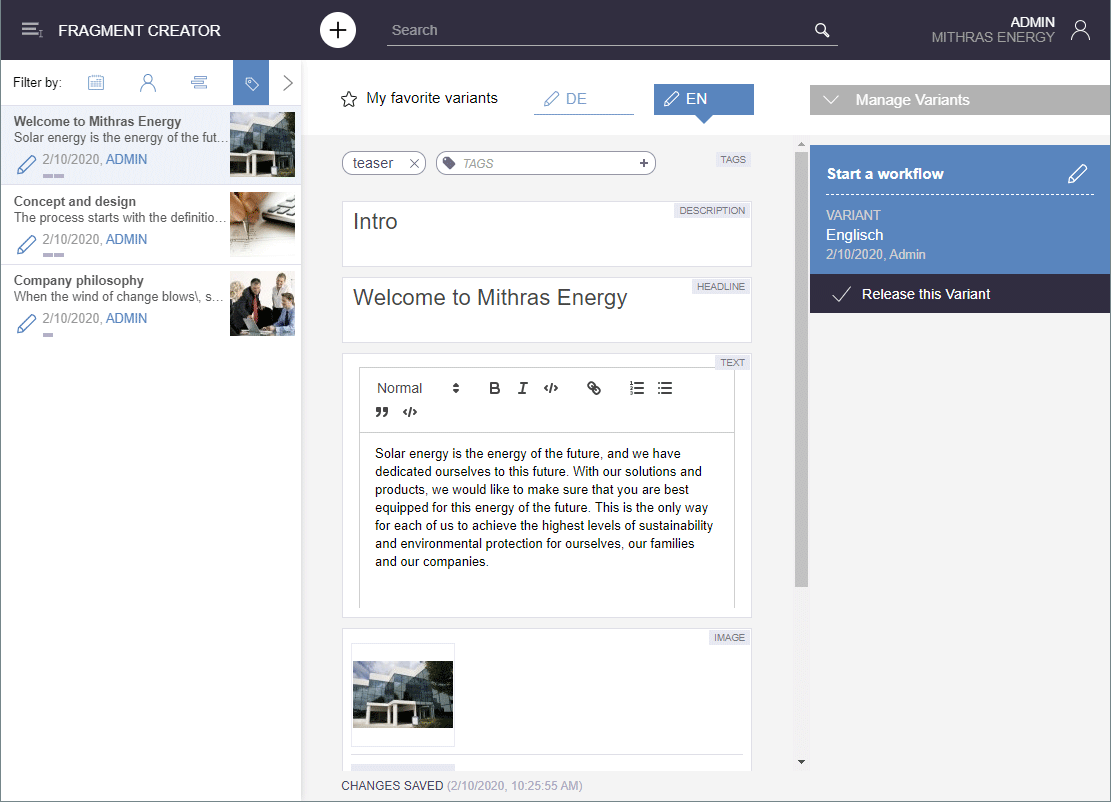
For better orientation, the currently selected fragment is now highlighted more clearly in the fragment list (left side of the screen). The current user is now displayed in the fragment list in blue font, all other users in grey font.
In the variant overview (right side of the screen, “Manage Variants”) you can now select more than one variant with a click and start a workflow for them.
The detailed information that was previously displayed for the selected fragment or variant underneath the task area in the bottom right-hand corner is the same as the information in the status display. Therefore, it has now been removed to make the display clearer.
The user guidance when uploading and selecting pictures in an input element (button “Upload Picture”) has also been improved in this context:
In principle, all pictures that are dragged into the upload dialog by drag-and-drop will now be referenced in the respective input element after the upload (visualized by check mark symbols). Previously, the pictures to be referenced in the input element had to be actively selected.
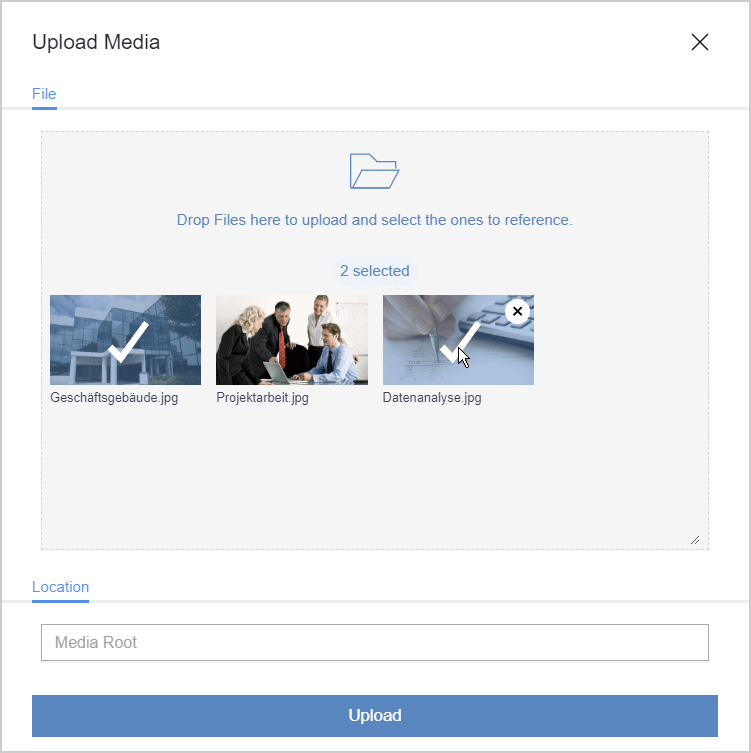
By clicking on the desired picture you can still select/unselect it. This allows you to control which pictures are to be referenced in the relevant input element.
After a successful upload (button “Upload”) the upload dialog now closes automatically and no longer needs to be closed manually. Exception: If an error occurs, the dialog remains open, shows a corresponding error message and the affected pictures are not uploaded.
The adaptation of the documentation with regard to the design and the revised functionalities is successive, therefore the presentation in the documentation potentially no longer corresponds to the current software status.
5 Repository
Improved archiving function
Pictures/media can exist in various resolutions in the project. If necessary, the system automatically creates image data in the correct resolution, when a medium is being requested in a certain resolution for the first time. Such image data (for one resolution) is saved on the server in an image cache (MEDIA_STORE_CACHED_PICTURES).
This method speeds up generation times, as generating large numbers of media in many different resolutions is very time-consuming. However, the image cache increases the project's data volume. Up to now, it has only been possible to remove automatically calculated resolutions from the project's data inventory again via a project export (by deactivating the “Export automatically calculated image resolutions” option).
This method has been improved in the latest FirstSpirit release. Using project archiving (the “Archive old project states” schedule), all calculated media/pictures whose resolutions are no longer available in the project can now be removed from the image cache. These resolutions were previously removed via “Project properties” – “Resolutions” – “Delete”.
To use project archiving, the “Content, media, and data content” option must be activated under “Objects”:
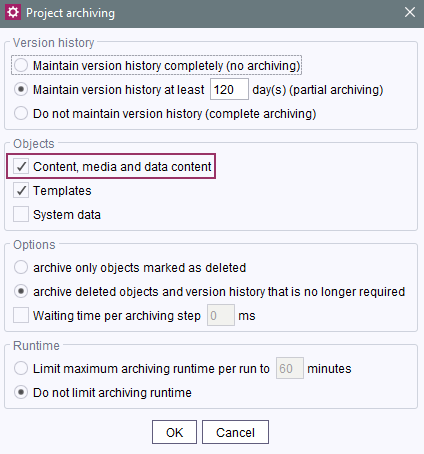
ServerManager – Project-based schedule entries – Project archiving
During archiving, the automatically calculated resolutions that are no longer required are subsequently removed from the project and are no longer carried over to the archive file.
The automatically calculated resolutions that are no longer required are removed regardless of the additional settings in place for the project archiving process (e.g., for “Version history” and “Options”).
Advantages:
- The project size is reduced.
- Loading times are reduced.
- The FirstSpirit Server's overall performance is improved.
For more documentation, see:
6 System
Update of internally used software
As of the current release, the following internally used software has been updated:
- Spring Boot (used for MicroApp Framework)
Update from version 2.2.1 to version 2.2.2
Overview
| ID | Description | Categories |
|---|---|---|
| CORE-8756 | In addition to using the context menu, the order of the project languages (“FirstSpirit ServerManager / Project / Properties / Languages”) can now also be changed by using the mouse pointer (drag-and-drop). |
FirstSpirit Administrator, Languages, ServerManager |
| CORE-10797 | When transporting datasets via “External Synchronization” or “Content Transport”, updates were occasionally not recognized. The error only occurred if an input component was set to the value |
Content Transport, External synchronization |
| CORE-11607 | Project archiving has been improved in the latest FirstSpirit release. Using project archiving (the “Archive old project states” schedule), all automatically calculated media/pictures whose resolutions have already been deleted in the project can now be removed from the image cache. Further information can be found in chapter “Repository: Improved archiving function ”. |
Archiving, FirstSpirit Administrator, Performance, ServerManager |
| CORE-11740 | Sessions | |
| CORE-11796 | The metaspace (another native memory area next to the heap) is automatically managed by the Java VM. A different configuration of this memory area, for example using the parameters |
Server Administrator |
| CORE-11800 | With the current FirstSpirit release a new version of the JSON output format is released. From FirstSpirit 2020-02 the new format version 1.1 is used (standard setting). The previous format version 1.0 remains supported but is to be replaced in the medium term. Further information can be found in chapter “General: New JSON format version 1.1”. |
Developer, Support for JSON |
| CORE-11835 | An error was fixed that could cause data not to be displayed when migrating the input component FS_LIST (discontinued with 2020-01) to FS_INDEX. The problem only occurred in rare cases in connection with inconsistent data. |
Developer, Input Components, Migration |
| CORE-11866 | In very rare cases, an error occurred while using the ContentCreator, which was caused by a “not authorized” message. This error has been fixed. |
ContentCreator |
| CORE-11870 | Rollout of the new ContentCreator Further information can be found in chapter “ContentCreator: Rollout of the new ContentCreator”. |
ContentCreator, FirstSpirit Administrator, Performance |
| CORE-11871 | The “Mithras Energy” demo project (for ContentCreator and SiteArchitect) will be dropped in the future and will no longer be distributed with FirstSpirit. |
ContentCreator, Developer, Editor, SiteArchitect |
| CORE-11906 | If a particular key term (e.g. FS_LIST) is selected in a FirstSpirit template and the “F1” key (or optionally the “Help” button) is pressed at the same time, the FirstSpirit documentation for this subject area is opened. For deprecated input components, the FirstSpirit documentation refers to alternative input components (e.g. FS_REFERENCE instead of CMS_INPUT_PICTURE ). For the input component FS_LIST (that is no longer available) and all deprecated input components replaced by FS_LIST (e.g. CMS_INPUT_CONTENTLIST), the documentation refers to the corresponding migration guide. |
Developer, Input Components, Migration |
| CORE-11913 | An error was fixed that could cause information in languages that are only present in the target project to be lost when transporting FS_LIST data migrated to FS_CATALOG. This problem affected all converted FS_LIST input components (discontinued with 2020-01) if they were converted with FirstSpirit version 2019-12 or 2020-01. |
Content Transport, External synchronization, Input Components, Migration |
| CXT-879 | When using the module “FirstSpirit CXT FragmentCreator - CaaS Integration”, releases and other switching of workflows are now also taken into account during the event-based generation of fragments on the preview CaaS server. In addition, an error has been fixed that prevented the generation by task from being completed. |
FirstSpirit Administrator, FirstSpirit Content Experience Tools (CXT), FirstSpirit Content as a Service (CaaS), Tasks, Workflow |
| CXT-1122 | FragmentCreator's graphical interface is currently being revised. |
Editor, FirstSpirit Content Experience Tools (CXT), FragmentCreator |
| CXT-1158 | When the “FirstSpirit CXT FragmentCreator - CaaS Integration” is being used, all affected fragments are now transferred correctly to the required CaaS instance again, even if they have been generated for each schedule by the server. |
FirstSpirit Administrator, FirstSpirit Content Experience Tools (CXT), FirstSpirit Content as a Service (CaaS), Tasks |
| CXT-1162 | A problem relating to the FirstSpirit Omnichannel Manager, the |
FirstSpirit API, Omnichannel Manager / Third Party Preview |
| CXT-1209 | Update of internally used software Further information can be found in chapter “System: Update of internally used software”. |
FirstSpirit Administrator, Integrated software |
| CXT-1215 | In rare cases, creating a new variant or starting workflows had to be executed twice in succession. |
Editor, FirstSpirit Content Experience Tools (CXT), FragmentCreator, Workflow |
| CXT-1262 | FirstSpirit Content Experience Tools: Latest module versions |
Developer, FirstSpirit Administrator, FirstSpirit Content Experience Tools (CXT), FragmentCreator, Modules |
Deprecations
| Functionality | Deprecated as of | Will be removed / Was removed as of |
|---|---|---|
| Input component FS_LIST | 5.2R3 | 2020-07 |
| Input component CMS_INPUT_CONTENTAREALIST | 5.2R3 | |
| Input component CMS_INPUT_CONTENTLIST | 5.2R3 | |
| Input component CMS_INPUT_FILE | 5.2R3 | |
| Input component CMS_INPUT_LINKLIST | 5.2R3 | |
| Input component CMS_INPUT_OBJECTCHOOSER | 5.2R3 | |
| Input component CMS_INPUT_PAGEREF | 5.2R3 | |
| Input component CMS_INPUT_PICTURE | 5.2R3 | |
| Input component CMS_INPUT_TABLIST | 5.2R3 | |
| FirstSpirit Access API: de.espirit.firstspirit.agency.GroupsAgent | 5.2R15 | |
| FirstSpirit Access API: delete (de.espirit.firstspirit.access.AccessUtil) | 5.2R18 | |
| Windows installation program | 2018-06 | 2020-06 |
| FirstSpirit Access API: release (de.espirit.firstspirit.access.AccessUtil) | 2018-06 | |
| FirstSpirit Access API: getLastLoginAsDate (de.espirit.firstspirit.agency.UserStatisticsAgent) | 2018-07 | |
| FirstSpirit Access API: remainingDurationOfCurrentStageInMillis (de.espirit.firstspirit.server.MaintenanceModeInfo) | 2018-07 | 2025-13 |
| FirstSpirit Access API: getStartingTimeOfStageAsDate (de.espirit.firstspirit.server.MaintenanceModeInfo) | 2018-07 | 2025-13 |
| FirstSpirit Access API: getSelectedWebserverConfiguration (de.espirit.firstspirit.access.serverConfiguration) | 2018-10 | 2025-13 |
| FirstSpirit Access API: setSelectedWebserverConfiguration (de.espirit.firstspirit.access.serverConfiguration) | 2018-10 | 2025-13 |
| FirstSpirit Access API: getSelectedWebServer (de.espirit.firstspirit.access.project.Project) | 2018-10 | 2025-13 |
| FirstSpirit Access API: setSelectedWebServer (de.espirit.firstspirit.access.project.Project) | 2018-10 | 2025-13 |
| FirstSpirit Access API: getLostAndFoundStoreNodes(); (de.espirit.firstspirit.feature.FeatureInstallResult) | 2018-10 | |
| FirstSpirit Access API: getDeletedStoreNodes(); (de.espirit.firstspirit.feature.FeatureInstallResult) | 2018-10 | |
| FirstSpirit Access API: de.espirit.firstspirit.access.store.Previewable | 2019-01 | |
| Java 8 support for FirstSpirit | 2019-05 | 2020-06 |
| WebSphere Application Server support for FirstSpirit | 2019-05 | |
| Legacy mode for the FirstSpirit server | 2019-06 | 2022-03 |
| Java Web Start support for FirstSpirit | 2019-10 | 2020-06 |
| FirstSpirit ContentCreator (old design / old technology) | 2019-11 | 2020-07 |
| Mithras Energy demo project | 2020-02 | 2020-06 |