
Release Notes
1 Administration
1.1 Omission of the integrated “InternalJetty” web server
Just like the FirstSpirit-Core, the use of third-party components is subject to intensive quality assurance. A plethora of supported operating systems, Java versions, interfaces to third-party systems and their combination and configuration options lead to an extremely high test complexity. In order to be able to ensure good serviceability and sustainability for the further development of FirstSpirit, the support for components that are no longer supported and/or used in regular intervals is discontinued. During a transitional period, customers and partners are given sufficient time to switch the operation, including with support provided by e-Spirit Technical Support, to alternative solutions. In the final step, the software code for components that are no longer supported will then be removed.
For the integrated “InternalJetty” web server, this last step was completed with the latest FirstSpirit Release.
The functionality has no longer been supported since August 2018 (2018-08) and has been discontinued by e-Spirit for quite some time.
The use of an external web server (specifically “Apache Tomcat”) is recommended as a substitution.
For new installations of FirstSpirit as of Release 2022.1, the “Jetty Web Server” is used as a web server as standard. This is a system module that is included in FirstSpirit (“FirstSpirit Jetty Server”). A configuration is possible using this module (FirstSpirit ServerManager / Server properties/ Modules / “FirstSpirit Jetty Server”).
Notes for existing FirstSpirit installations (migration)
A migration only affects on-premise customers and should already have been completed.
In the rare case that the “InternalJetty” is still configured for one or more web applications, a corresponding note has been displayed on the FirstSpirit start page for FirstSpirit administrators (“Application(s) of the internal Jetty detected...”).
If an external web server is not already being used, then before an update to FirstSpirit 2022.1, the “InternalJetty” must be deactivated (INTERNAL_SERVLET_ENGINE=0 parameter in the fs-server.conf file) and “FirstSpirit Jetty Server” must be activated and configured as web server.
With an update to FirstSpirit 2022.1, web applications that are still using the “InternalJetty” will be migrated automatically to the web server that is configured for the FirstSpirit default application “FirstSpirit start page” (fs5root). If this is not possible, the web applications are migrated to the “FirstSpirit Jetty Server”.
For more information about the migration of a web server, see https://docs.e-spirit.com/odfs/edocs/admi/firstspirit-ser/server-properti/web-server/index.html#migrieren_eines_webservers.
Fallback generation directory
If no web server is configured or for web servers of type “Tomcat” no web directory is specified (= the field “Web directory” is empty), a generation is done (as before) automatically into the directory
~/web/fs5staging
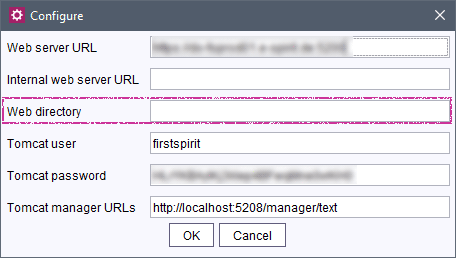
The directory ~/web served so far as generation directory of the “InternalJetty” and will be omitted in the future completely.
Therefore it is planned to adapt also the fallback generation directory with a future release accordingly.
In order to be able to determine more easily now whether the ~/web directory is still used in projects, with FirstSpirit 2022.1 the following will be recorded in the log in the case of a fallback (log level INFO):
Fallback to web directory:[...]Removing parameters and files that are no longer needed
The following parameters in the fs-server.conf are no longer needed and should be removed when the “InternalJetty” is no (longer) used:
INTERNAL_SERVLET_ENGINE

# root directory of all web applications
WEB_DIR

# WEBAPP_xyz_PATH: directory of this web application
WEBAPP_ROOT_PATH
WEBAPP_WEBEDIT5_PATH
WEBAPP_WEBMON_PATH
WEBAPP_STAGING_PATH
WEBAPP_PREVIEW_PATH

WEBAPP_WEBEDIT_PATH
Likewise, the fs-webapp.xml file is no longer needed and can be removed.
1.2 Modules and extensions for FirstSpirit 2022.1
The following modules and extensions are compatible with FirstSpirit 2022.1:
| Module name/File name | Version number | Compatibility |
FirstSpirit Update Archivefs-update-[version].tar.gz | 2.1.0 | - |
FirstSpirit Install Archiv fs-install-[version].tar.gz | 2.1.0 | - |
FirstSpirit LauncherFSLauncher.exe | 1.0.43 | as of FirstSpirit 2018-08 |
FirstSpirit Launcher JRE modulefs-launcher-jre-[version].fsm | 1.19 | as of FirstSpirit 2020-11 |
FirstSpirit SAML Login modulefs-saml-login-[version].fsm | 1.3 | as of FirstSpirit 2019-02 |
FSDevToolsfs-cli-[version].tar.gzfs-cli-[version].zip | 3.1.0 | as of FirstSpirit 2021-07 |
FirstSpirit Module Gradle Pluginfirstspirit-module-gradle-plugin-[version].jar | 3.0.2 | as of FirstSpirit 2019-06 |
2 General
New release name schema
With FirstSpirit 2021-09, the release interval was changed from monthly to every 4 weeks.
At the turn of the year to 2022, the name of the release has now been adjusted to this condition: to create releases with more flexibility, the release name is no longer based on the digits of the month (e.g. FirstSpirit 2021-12) but uses a continuous counter. The digits of the year are separated from this counter with a period, e.g.
2022.1for the first release of the year 2022.
The release name is used in familiar places such as info dialog boxes.
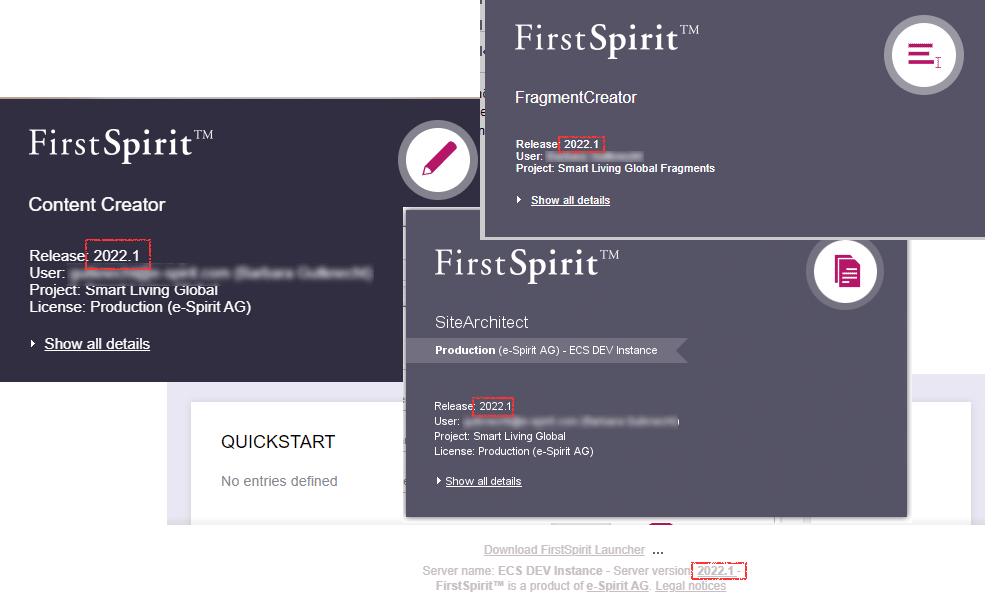
You will continue to receive information on new releases in the Community.
FirstSpirit instances of Cloud customers are automatically updated to the respective latest release (as part of the so-called “Patch Days”).
3 ContentCreator
3.1 Navigation: Tree display is now clearer and better arranged
The navigation bar, which can be opened on the left-hand side of the screen, maps the hierarchical structure of the site (“Navigation” tab) or the page currently selected (“Page” tab) in a clear tree structure.
Various information about the elements of the navigation bar is visualized in form of icons, e.g. the workflow status, if metadata has been set, etc.
With the latest release, the display has been revised:
- While the element type icons continue to be displayed in front of the respective node, all other icons are now displayed after the element for better clarity.
- The design of some icons was marginally revised.
Overview of some visualizations:
| released | no special visualization |
| edited / changed |
.png) |
| in workflow |
.png) |
| start node |
.png) |
| hidden |
.png) |
| metadata defined |
.png) |
If a corresponding workflow is configured for the project (FirstSpirit ServerManager / Project properties / Options / Workflow to delete elements), menu levels can now also be deleted directly in the navigation bar by using the “Delete” action.
3.2 Tailored UI: Restricting or enabling functions for user groups
The “Tailored UI” function allows for the project-specific arrangement, hiding, and disabling of functions in the ContentCreator. With this method, the interface of the ContentCreator can be adjusted comfortably to the requirements of each project as well as those of the editors. This is configured using the project component “CXT ContentCreator: Feature Configuration ProjectApp” (“FirstSpirit ServerManager/Project Properties/Project Components”).
Until now, the configuration affected all users of the respective project. With the latest release, the configuration can be limited to specific user groups.
The corresponding configuration dialog has now been expanded and marginally adjusted accordingly:
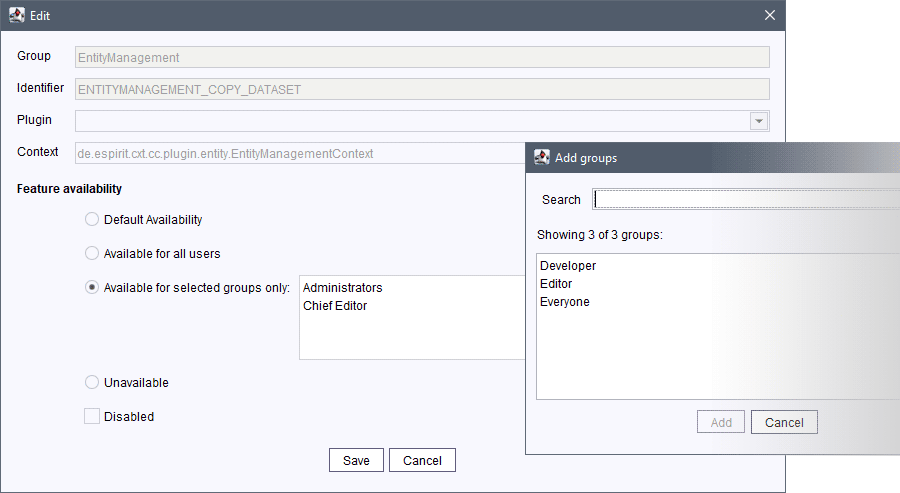
Configuration dialog
By default, the “Default availability” applies to the selected function. The function is thereby generally available to and can be used by all users of the project.
Via the options
- “Available for all users”
- “Available for selected groups only”
it is now possible to choose between an availability for all users on one hand and for users of specific groups on the other.
Available for all users: The function is available for all users of the project.
Available for selected groups only: The function is limited to (one or more) user group(s). The desired groups can be selected using the Plus icon. All groups that are defined for the project are thereby available. See also Dialog “Add groups” paragraph.
If groups are defined (groups are shown in the box), they will only be evaluated when the “Available for selected groups only” option is activated.
If no groups are defined (no groups are shown in the box), but the “Available for selected groups only” option is activated, the function is not available to any users (“unavailable”).
Dialog “Add groups”
The list of groups in the “Add groups” dialog is sorted alphabetically. External groups appear at the end of the list.
Groups that are no longer valid (such as deleted groups), are shown in red font.
Configuration on server level
All external groups of known projects are offered in the respective configuration dialog in the Dialog “Add groups”.
Whether group restrictions have been made for a function can be checked in the overview.
For more information about the “Tailored UI”, see https://docs.e-spirit.com/odfs/template-develo/contentcreator/customization/standard-functi/index.html.
4 FirstSpirit Content Experience Tools (CXT)
Latest module versions
FirstSpirit 2022.1 supports the following module versions for “FirstSpirit Content Experience Tools”.
| Module / file name | Version number |
FirstSpirit CXT Plattformplatform-[version].fsm | 2.5.2 |
FirstSpirit CXT DAP Bridgedataservice-[version].fsm | 1.44.2 |
FirstSpirit CXT FragmentCreatorfragment-creator-[version].fsm | 3.4.5 |
FirstSpirit Fragment DAPfragmentdap-[version].fsm | 1.40.5 |
FirstSpirit Media DAPmediadap-[version].fsm | 1.31.3* |
FirstSpirit PageRef DAPpagerefdap-[version].fsm | 1.9.3 |
FirstSpirit Markdown Editormarkdown-editor-[version].fsm | 1.29.2* |
FirstSpirit Tagging Editortagging-editor-[version].fsm | 1.29.2 |
FirstSpirit CXT FragmentCreator - CaaS Integrationcaas-integration-[version].fsm | 1.31.3 |
* These modules require FirstSpirit 2020-03 or higher from this version.
5 Module Development, Scripts, API
"de.espirit.firstspirit.common.GidAgent" expanded with "getGid" method
The new .getGid method of the GidAgent interface (FirstSpirit Developer API, Package de.espirit.firstspirit.common) enables the determination of the GID of elements.
6 Template development
JSON: Output of metadata in sections
If the output of metadata is activated for the JSON generation via
$CMS_SET(#global.json.metaDataRendering, true)$it will now also be included in the output for sections accordingly, e.g.
...
 "meta_field": {
         "fsType": "CMS_INPUT_TEXT",
         "name": "meta_field1",
         "value": "content_value1"
      }
...
Overview
| ID | Description | Categories |
|---|---|---|
| CORE-11930 | The search in the FirstSpirit SiteArchitect was adjusted (not only the global search but also the search in data sources), so that the search results now better meet the expectations from a technical perspective in cases where the search string contains special characters (except umlauts). This partially results in that more and better results containing special characters are found without having to use quotation marks. Please note that corresponding special characters are not taken into account for the search, which means they do not influence the search result. |
Content Store, Database, Editor, Search, SiteArchitect |
| CORE-13277 | Output of metadata for sections in the case of JSON generation |
Developer, Support for JSON |
| CORE-13799 | The integrated “InternalJetty” web server, which is no longer supported, has been removed completely from the code. |
FirstSpirit Administrator, FirstSpirit Jetty Web Server, ServerManager, ServerMonitoring, Web server |
| CORE-13802 | New release name schema Further information can be found in chapter “General: New release name schema”. |
Developer, Editor, FirstSpirit Administrator |
| CORE-14042 | An error has been fixed that led to that after using the |
Developer, FirstSpirit API, Template Development |
| CORE-14072 | In rare cases, the presence of an inconsistent child list (“Child not found”) led to a log entry of the |
Debugging, Developer |
| CORE-14074 | Some inquiries to the server received a timeout of one minute. This ensures that a missing answer to these inquiries does not result in that the corresponding thread is waiting continuously. |
FirstSpirit Administrator, Performance, Web server |
| CORE-14076 | Modules and extensions for FirstSpirit 2022.1 |
Developer, FSDevTools, FirstSpirit Administrator, Launcher, Modules |
| CORE-14086 | In very rare cases, a deadlock could occur in the client - server communication and subsequent freezing of the SiteArchitect. This occurred when a service or manager call was made where its parameter serialization triggered another server call. This problem has been corrected. |
Editor, FirstSpirit Administrator, SiteArchitect |
| CORE-14088 | An error has been fixed which could lead to an increased memory requirement due to outdated (project-local) FirstSpirit web applications on an Apache Tomcat web server. |
FirstSpirit Administrator, Web server |
| CORE-14106 | The |
Developer, FirstSpirit API |
| CORE-14107 | Adjustments have been made to logging to eliminate a memory leak that occurred in rare cases. |
Debugging, Developer, FirstSpirit Administrator |
| CORE-14117 | FirstSpirit Content Experience Tools: Latest module versions |
Developer, FirstSpirit Administrator, FirstSpirit Content Experience Tools (CXT), FragmentCreator, Modules |
| CXT-1799 | With the latest release the availability of functions that can be configured using the “Tailored UI” is limited to specific user groups. |
ContentCreator, Developer, FirstSpirit Administrator, Modules, Permissions |
| CXT-2398 | Some comments in the version history for actions that were carried out in the FirstSpirit ContentCreator were not clear. This has been improved. |
ContentCreator, Editor |
| CXT-2404 | The display of the navigation bar has been improved. |
ContentCreator, Editor, Navigation view, Workflow |
| CXT-2479 | In the media and data source management in the FirstSpirit ContentCreator, the message that an object cannot be edited due to a competing access has been improved (e. g. “The required element 'xyz' is currently being edited by 'userabc'.”). |
Content Store, ContentCreator, Media Store |
| CXT-2480 | If an error occurs when uploading images to the FirstSpirit ContentCreator (e.g. format is not supported by FirstSpirit), it will now lead to a more clearly stated error message: |
ContentCreator, Editor, Media, Media Store, Modules |
| CXT-2486 | The “Tasks” report also displayed page references and datasets from remote projects for which a visualization option is not available. It now only displays media from remote projects. |
Content Store, ContentCreator, Database, Editor, Remote access, Reports |
Deprecations
| Functionality | Deprecated as of | Will be removed / Was removed as of |
|---|---|---|
| Input component CMS_INPUT_CONTENTAREALIST | 5.2R3 | |
| Input component CMS_INPUT_CONTENTLIST | 5.2R3 | |
| Input component CMS_INPUT_FILE | 5.2R3 | |
| Input component CMS_INPUT_LINKLIST | 5.2R3 | |
| Input component CMS_INPUT_OBJECTCHOOSER | 5.2R3 | |
| Input component CMS_INPUT_PAGEREF | 5.2R3 | |
| Input component CMS_INPUT_PICTURE | 5.2R3 | |
| Input component CMS_INPUT_TABLIST | 5.2R3 | |
| FirstSpirit Access API: de.espirit.firstspirit.agency.GroupsAgent | 5.2R15 | |
| FirstSpirit Access API: delete (de.espirit.firstspirit.access.AccessUtil) | 5.2R18 | |
| FirstSpirit Access API: release (de.espirit.firstspirit.access.AccessUtil) | 2018-06 | |
| FirstSpirit Access API: getLastLoginAsDate (de.espirit.firstspirit.agency.UserStatisticsAgent) | 2018-07 | |
| FirstSpirit Access API: remainingDurationOfCurrentStageInMillis (de.espirit.firstspirit.server.MaintenanceModeInfo) | 2018-07 | 2025-13 |
| FirstSpirit Access API: getStartingTimeOfStageAsDate (de.espirit.firstspirit.server.MaintenanceModeInfo) | 2018-07 | 2025-13 |
| FirstSpirit Access API: getSelectedWebserverConfiguration (de.espirit.firstspirit.access.serverConfiguration) | 2018-10 | 2025-13 |
| FirstSpirit Access API: setSelectedWebserverConfiguration (de.espirit.firstspirit.access.serverConfiguration) | 2018-10 | 2025-13 |
| FirstSpirit Access API: getSelectedWebServer (de.espirit.firstspirit.access.project.Project) | 2018-10 | 2025-13 |
| FirstSpirit Access API: setSelectedWebServer (de.espirit.firstspirit.access.project.Project) | 2018-10 | 2025-13 |
| FirstSpirit Access API: getLostAndFoundStoreNodes(); (de.espirit.firstspirit.feature.FeatureInstallResult) | 2018-10 | |
| FirstSpirit Access API: getDeletedStoreNodes(); (de.espirit.firstspirit.feature.FeatureInstallResult) | 2018-10 | |
| FirstSpirit Access API: de.espirit.firstspirit.access.store.Previewable | 2019-01 | |
| WebSphere Application Server support for FirstSpirit | 2019-05 | |
| Legacy mode for the FirstSpirit server | 2019-06 | 2022-03 |
| Database layer for Oracle Database 11g/12c | 2020-12 | 2025-05 |
| FirstSpirit Access API: redirectTemplateLogToDefaultLog() (Interface RenderingAgent.Renderer) | 2021-05 |