
Release Notes
1 Administration
Automatic deletion of export file
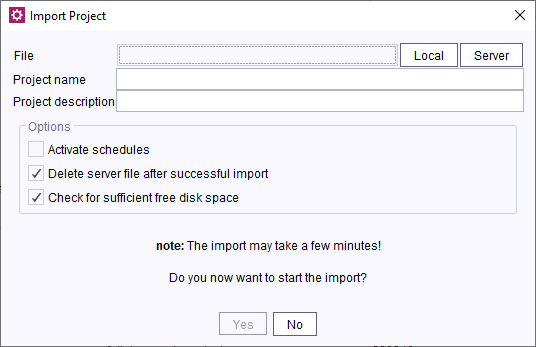
When importing projects, the default setting was so far to keep the export file on the server. Deleting it needed to be done either manually or actively set for an automatic deletion.
Now, the option to automatically delete the export file after the import completion is active by default. This results in the disk space to be available immediately after the import is completed.
2 Administration / Modules
Web compatibility module discontinued
The web compatibility module (fs-web-compatibility.fsm) ensures the operation of existing web applications requiring the presence of external classes in fs-webrt.jar in the process of moving to an isolated server. Additionally, the module contains dependencies which are no longer available in fs-isolated-webrt.jar.
Currently, the module is used only extremely rarely and has been updated only in exceptional cases lately, as announced.
The module will no longer be distributed starting with the current FirstSpirit version.
If the module is required, it is still possible to use an old version without any issues.More information: Modules: Ensuring compatibility (→Isolated Mode Guide), “Modules with WebApp Components” chapter.
3 ContentCreator
Using structure variables in ContentCreator
Structure variables can now be edited inside ContentCreator.
This functionality can only be used by server or project administrators. The group of administrators can be restricted via TailoredUI.Editing structure variables
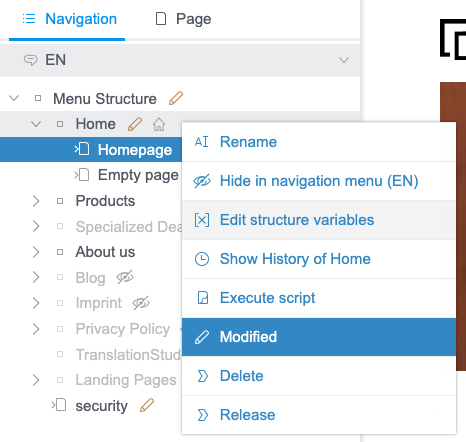
From within the context menu of SiteStore folder navigation, it is now possible to edit structure variables:
The pop-up dialog lists all variables that have been defined for the current folder:
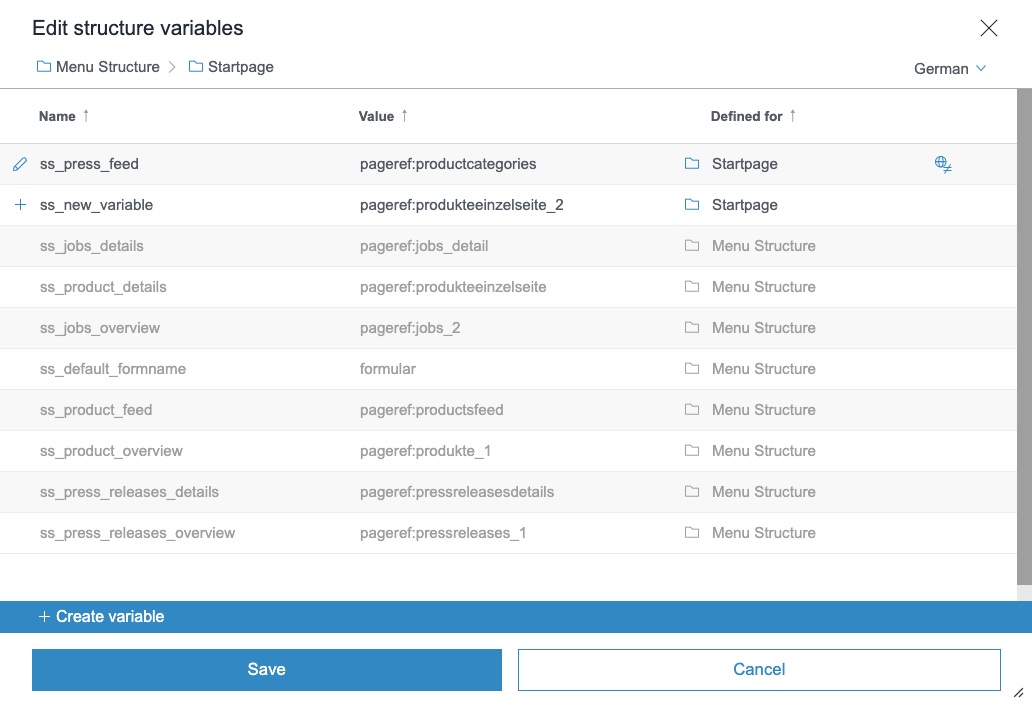
- New variables are marked with a “+” icon
- Inherited variables are displayed in gray
- Inherited but changed variables are marked with a “pencil” icon
- The “Defined for” column indicates name of the folder for which the displayed value of the variable is defined
- If the variable does not have the same value for all languages, it is marked with a respective icon
Actions

The entered values can be changed for new variables. Click the “trash bin” icon to delete the variable.

The original values can be changed for inherited variables.

Note: Inherited values are not checked for their validity.
The values received from inherited variables that have already been changed, can also be changed. Click the “X” icon to reset any changes to inherited values: The variable will be restored in its original state.
Editing a variable
When editing a variable, a pop-up dialog is displayed:
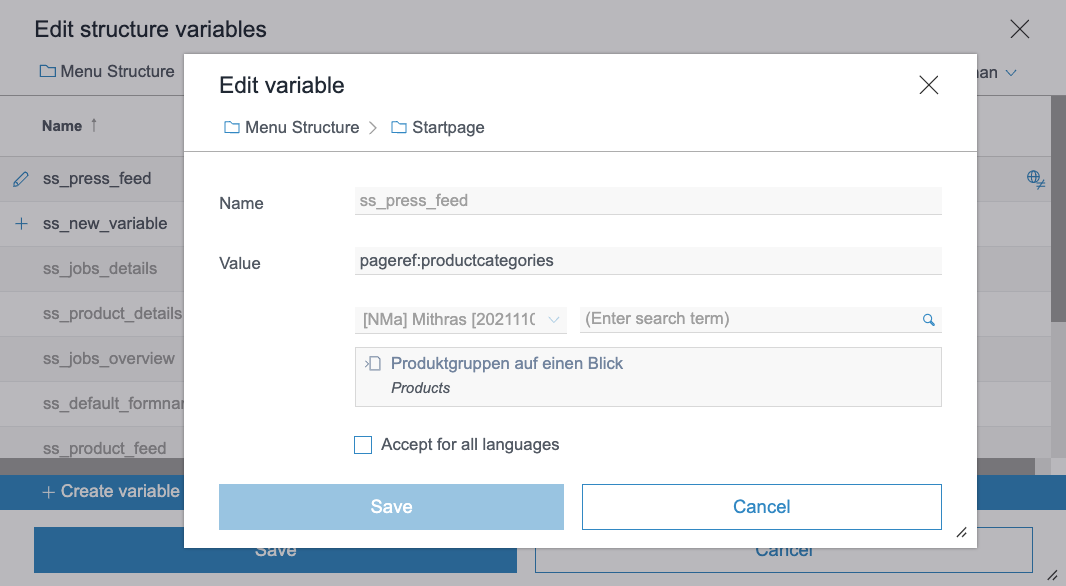
To change a structure variable's value (a page reference or a media reference), enter the exact value of the variable into the “Value” field. Alternatively, you can search and select a value in the search field. The variable's name will be filled-in automatically.
“Accept for all languages”: The variable's value will be applied to all languages. The option is active by default if the variable's value is already identical in all languages.
Creating a variable
When creating a variable, a pop-up dialog is displayed:
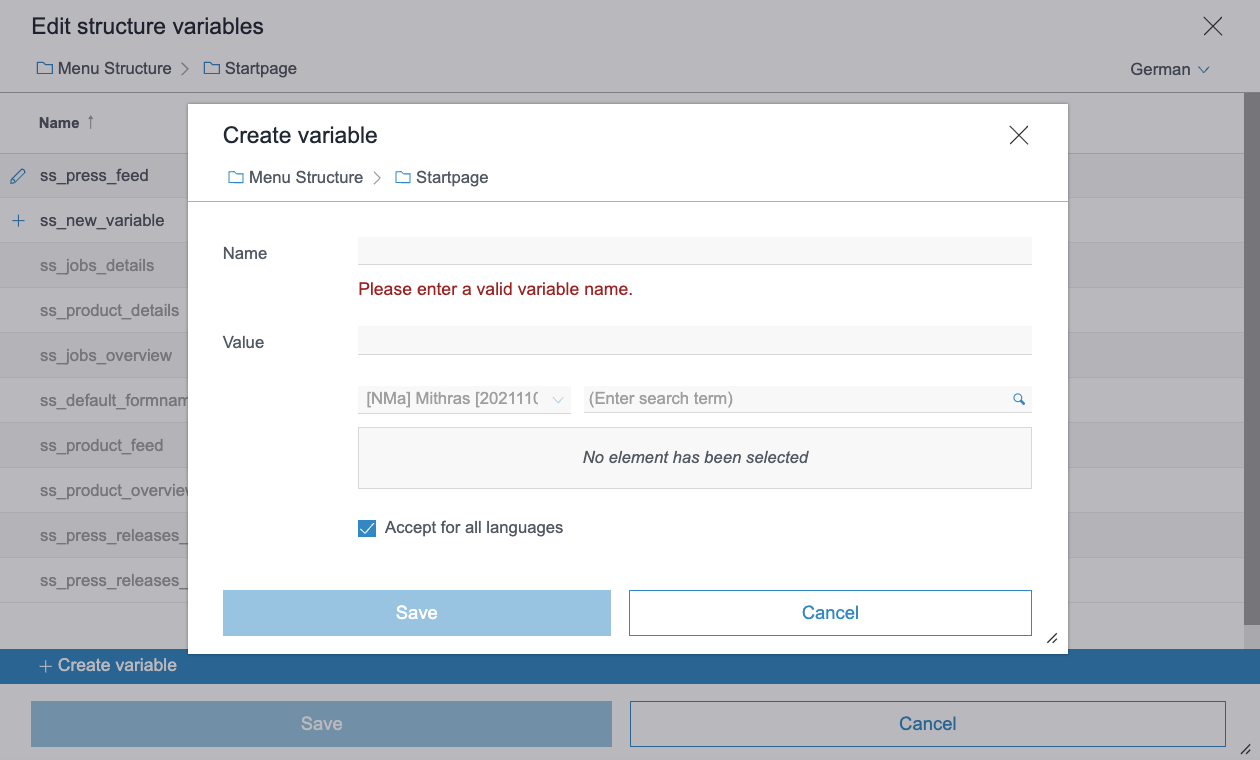
To create a structure variable you need to specify its name and value.
“Accept for all languages”: The variable's value will be applied to all languages.
4 FirstSpirit Content Experience Tools (CXT)
Latest module versions
FirstSpirit 2023.4 supports the following module versions for “FirstSpirit Content Experience Tools”.
| Module / file name | Version number |
FirstSpirit CXT Plattformplatform-[version].fsm | 3.0.5 |
FirstSpirit CXT DAP Bridgedataservice-[version].fsm | 1.44.10 |
FirstSpirit CXT FragmentCreatorfragment-creator-[version].fsm | 4.0.4 |
FirstSpirit Fragment DAPfragmentdap-[version].fsm | 1.40.17 |
FirstSpirit Media DAPmediadap-[version].fsm | 1.31.9* |
FirstSpirit PageRef DAPpagerefdap-[version].fsm | 1.9.9 |
FirstSpirit Markdown Editormarkdown-editor-[version].fsm | 1.29.8* |
FirstSpirit Tagging Editortagging-editor-[version].fsm | 1.29.8 |
FirstSpirit CXT FragmentCreator - CaaS Integrationcaas-integration-[version].fsm | 1.31.9 |
* These modules require FirstSpirit 2020-03 or higher from this version.
5 Compatibility
FSDevTools version 4.4.1 required for FirstSpirit version 2023.4
Compatibility: The new version of fs-cli is still compatible with older versions of FirstSpirit (up to 2023.3).
6 Media
SVG image processing
The change recently announced with FirstSpirit version 2023.3 to improve the processing of incorrectly configured SVG image files (CORE-15042) will not be available in the next FirstSpirit version 2023.4. In a later FirstSpirit version this change will be restored.
Unfortunately, we have identified that the implementation of this change may lead to some unexpected problems. Therefore, we have temporarily deactivated this change and point out that uploading and using SVG files with unsupported configurations in version 2023.4 could again lead to a misbehaviour.
7 Module Development, Scripts, API
Recursion identification in JSON output via inline JSON function
With the current FirstSpirit version, enhancements were made to the identification of recursions in JSON output via the inline JSON function which lead to a change in behavior.
The JSON function can be called up multiple times recursively during the rendering process. When paragraphs and data records were called up recursively, this could lead either to missing output or to a FirstSpirit server's OutOfMemoryException – depending on the FirstSpirit server's configuration.
The identification of recursions during a JSON function's call up has been improved. If a reference is detected, the reference to the paragraph or data record is output as a placeholder and the recursion is cancelled for that place.
The behavior for direct rendering of data records viaRenderingAgent has been changed.- So far, the data record was output despite the
dataRenderDepth=0parameter. - Now, only the reference to the data record is output for the place.
If dataRenderDepth=1 (default value) is specified, the behavior remains unchanged. The data record is output, connected data records are output as references.
For more information, see Enhanced JSON support / Configuration (→FirstSpirit Online Documentation), chapter “Configuration”.
8 Template development
JSON object for projects without defined project settings page template
If no page template was defined in a project for the project settings page, then no output was generated when outputting the project settings via the json function.
With the current FirstSpirit release a JSON object is always generated when the project settings page is output. If no page template has been defined, the attribute "template" has the value "null".
Overview
| ID | Description | Categories |
|---|---|---|
| CORE-13551 | Error handling has been enhanced for resource conflicts during module installation. |
Modules, Server Administrator |
| CORE-14890 | The API classes |
FirstSpirit API, Logging |
| CORE-14914 | Recursion identification enhancements in the JSON output via the inline JSON function |
Support for JSON |
| CORE-14930 | When the RenderingAgent (FirstSpirit Developer API, package |
Developer, FirstSpirit API |
| CORE-15138 | The server connection cleaning up process has been improved. |
Server Administrator |
| CORE-15147 | Automatic deletion of export file after import completion Further information can be found in chapter “Administration: Automatic deletion of export file”. |
Server Administrator |
| CORE-15148 | When ContentTransport features were saved locally, special characters in the file name could lead to an incompatibility with the file system. The problem has been resolved: when saving a file, special characters are deleted from the file name. |
Content Transport |
| CORE-15157 | A potential memory leak existed when connections within the server were used. The problem has been resolved. |
Server Administrator |
| CORE-15169 | The handling of file handles has been further improved. |
Server Administrator |
| CORE-15170 | If the FirstSpirit server's utilization of ThreadPool-Queues reaches at least 90%, the server receives the status “Degraded”. You can search for such events in the |
ServerMonitoring |
| CORE-15176 | The web compatibility module ( |
Isolated mode, Modules |
| CORE-15188 | FirstSpirit Content Experience Tools: Latest module versions |
FirstSpirit Content Experience Tools (CXT) |
| CORE-15202 | When using the functionality “External Synchronization” or FSDevTools ( |
External synchronization |
| CORE-15227 | A JSON object is always created when the project settings page is output, even if no page template is assigned to the project settings page. |
Support for JSON |
| CORE-15250 | The change recently announced with FirstSpirit version 2023.3 to improve the processing of incorrectly configured SVG image files (CORE-15042) will not be available in the next FirstSpirit version 2023.4. In a later FirstSpirit version this change will be restored. Further information can be found in chapter “Media: SVG image processing”. |
Media Store |
| CXT-2681 | Creating and editing structure variables in ContentCreator |
ContentCreator |
| CXT-2823 | In ContentCreator, deep links were not taken into account; the required element was not displayed. The problem has been resolved. |
ContentCreator |
| CXT-2827 | For move operations in the navigation, no event was sent for |
ContentCreator |
| CXT-2850 | If during the CXT platform's startup no connection to the FirstSpirit server could be established, this led to authentication issues in the CXT platform. The problem has been resolved: If the FirstSpirit server is available within 5 minutes, authentication issues do not occur. |
FirstSpirit Content Experience Tools (CXT) |
| DEVEX-608 | In order to use “fs-cli” (FSDevTools) with the current FirstSpirit version 2023.4, at least version 4.4.1 of “fs-cli” is required. |
FSDevTools |
Deprecations
| Functionality | Deprecated as of | Will be removed / Was removed as of |
|---|---|---|
| Input component CMS_INPUT_CONTENTAREALIST | 5.2R3 | |
| Input component CMS_INPUT_CONTENTLIST | 5.2R3 | |
| Input component CMS_INPUT_FILE | 5.2R3 | |
| Input component CMS_INPUT_LINKLIST | 5.2R3 | |
| Input component CMS_INPUT_OBJECTCHOOSER | 5.2R3 | |
| Input component CMS_INPUT_PAGEREF | 5.2R3 | |
| Input component CMS_INPUT_PICTURE | 5.2R3 | |
| Input component CMS_INPUT_TABLIST | 5.2R3 | |
| FirstSpirit Access API: de.espirit.firstspirit.agency.GroupsAgent | 5.2R15 | |
| FirstSpirit Access API: delete (de.espirit.firstspirit.access.AccessUtil) | 5.2R18 | |
| FirstSpirit Access API: release (de.espirit.firstspirit.access.AccessUtil) | 2018-06 | |
| FirstSpirit Access API: getLastLoginAsDate (de.espirit.firstspirit.agency.UserStatisticsAgent) | 2018-07 | |
| FirstSpirit Access API: remainingDurationOfCurrentStageInMillis (de.espirit.firstspirit.server.MaintenanceModeInfo) | 2018-07 | 2025-13 |
| FirstSpirit Access API: getStartingTimeOfStageAsDate (de.espirit.firstspirit.server.MaintenanceModeInfo) | 2018-07 | 2025-13 |
| FirstSpirit Access API: getSelectedWebserverConfiguration (de.espirit.firstspirit.access.serverConfiguration) | 2018-10 | 2025-13 |
| FirstSpirit Access API: setSelectedWebserverConfiguration (de.espirit.firstspirit.access.serverConfiguration) | 2018-10 | 2025-13 |
| FirstSpirit Access API: getSelectedWebServer (de.espirit.firstspirit.access.project.Project) | 2018-10 | 2025-13 |
| FirstSpirit Access API: setSelectedWebServer (de.espirit.firstspirit.access.project.Project) | 2018-10 | 2025-13 |
| FirstSpirit Access API: getLostAndFoundStoreNodes(); (de.espirit.firstspirit.feature.FeatureInstallResult) | 2018-10 | |
| FirstSpirit Access API: getDeletedStoreNodes(); (de.espirit.firstspirit.feature.FeatureInstallResult) | 2018-10 | |
| FirstSpirit Access API: de.espirit.firstspirit.access.store.Previewable | 2019-01 | |
| WebSphere Application Server support for FirstSpirit | 2019-05 | |
| Database layer for Oracle Database 11g/12c | 2020-12 | 2025-05 |
| FirstSpirit Access API: redirectTemplateLogToDefaultLog() (Interface RenderingAgent.Renderer) | 2021-05 | |
| Support for Log4j 1 | 2022-05 | 2024-06 |