
Release Notes
1 Administration
1.1 FirstSpirit is currently not compatible with Tomcat 10
Apache Tomcat can be used as an external web server with FirstSpirit, and can be operated either on the same host as the FirstSpirit server or on its own dedicated host (standalone / remote).
FirstSpirit is currently compatible with the following Tomcat versions:
- Apache Tomcat 9.0.31 or higher
- Apache Tomcat 8.5.51 or higher
With the release of the milestone 1 version of Tomcat 10 on 20.02.2020, there was a change from Java EE to Jakarta EE (see http://tomcat.apache.org/).
This changed the namespace (package) for all implemented APIs from javax.* to jakarta.*. This change requires extensive adjustments to the FirstSpirit web applications (FirstSpirit Start Page, ContentCreator, etc.) to enable migration from Tomcat 9.0 and lower to Tomcat 10 and higher.
At the current time FirstSpirit is incompatible with Tomcat 10 and the use of a Tomcat version higher than 9.0 is also not recommended.
1.2 ServerManager: Deleting template sets
Template sets (e.g., “Intranet”, “RSS feed”) are defined for the project from the presentation channels (e.g., “json”, “html”). Template sets for a project are created and edited via “FirstSpirit ServerManager / Project properties / Template sets”.
Template sets can now be removed from the project via “FirstSpirit ServerManager / Project properties / Template sets / Delete” (previously it was only possible to deactivate them). To prevent accidental deletion, an additional dialog box is shown before deletion (“Do you really want to delete this template set?”).
The deletion of a template set cannot be undone!If a template set is accidentally removed from a project, please contact our Technical Support team immediately to restore the template set.
For more information on template sets, see the Documentation for administrators.
2 ContentCreator
2.1 New ContentCreator: Rollout for all customers
The design and technical basis of FirstSpirit ContentCreator were revised:
- With FirstSpirit 2020-01, the revised ContentCreator was officially released for use. Since this point, all customers have been able to use the revised design of the ContentCreator as long as the appropriate settings have been configured accordingly in server/project settings.
- With FirstSpirit 2020-02, the “new” ContentCreator was automatically rolled out to all cloud customers.
With the current release, the “new” ContentCreator is now automatically used for all projects started with ContentCreator (for cloud and on-premises customers).
If necessary, the customer can switch back to the “original” ContentCreator for a project by deactivating the checkbox “Use new design” on the “ContentCreator” tab in FirstSpirit ServerManager, under “Server properties / Web applications” or “Project properties / Web components”. See also FirstSpirit Manual for Administrators, FirstSpirit ServerManager / Server properties / Web applications or FirstSpirit ServerManager / Project properties / Web components.
With FirstSpirit 2020-07, we are planning to remove the “old” ContentCreator design, so we recommend that customers start to use the “new” ContentCreator for all projects as soon as possible.
Why and how was the ContentCreator redesigned? – Check out our blog for a glimpse behind the scenes of the design and development process for the new ContentCreator: www.e-spirit.com/us/blog/contentcreator_redesign.html.
Interactive help and documentation
As part of the redesign, we incorporated more help messages and tips into the standard ContentCreator interface to help users understand the changes. These messages can be switched off in a message dialog (“Deactivate all tips”).
Large-scale updates were made to the user documentation for ContentCreator and the documentation for developers (“FirstSpirit Online Documentation” (ODFS)) based on the new design; other documentation will follow. In some places, the interfaces shown in the documentation do not match the interface in the new design and may differ from the version of ContentCreator you are using.
Information on using the new FirstSpirit ContentCreator
- Up to and including FirstSpirit 2020-01, the Pluggability option had to be set to “Active” for unrestricted use of the new FirstSpirit ContentCreator. Since the rollout of FirstSpirit 2020-02, pluggability is force-enabled for the new FirstSpirit ContentCreator. This means that if the new FirstSpirit ContentCreator is used, the system automatically activates pluggability mode (log entry:
WARN 03.02.2020 15:58:20.902 (de.espirit.firstspirit.server.module.WebServerManagerImpl): Force enabled pluggability for 'fs5webedit' in project '-1'.). This has no effect on the interface itself; the option “Pluggability” may still show as being set to “Inactive” even though the option is activated.
For further information on the option “Pluggability”, see also FirstSpirit Manual for Administrators, page Web applications or Web components. - The change in technologies used for the ContentCreator (“MicroApp Framework”) increases the resource and system requirements. This is particularly noticeable during the currently ongoing transition period, in which the “new” and the “old” versions of ContentCreator can be run in parallel.
- For this reason, you should check and, if necessary, increase resources, in particular for the application server (e.g., Apache Tomcat) and specifically the hard drive capacity and Java Heap.
- Where possible, ContentCreator should be used as a global web application. ContentCreator should only be run as its own project instance (“projectlocal”) where it is absolutely necessary to do so.
- If Apache Tomcat is used as the application server, we recommend that Apache Tomcat is restarted after each update.
- If “Jetty Web Server” is used as a web server, you must use at least FirstSpirit version 2019-12.
2.2 Project selection
With the current release, the handling of project selection has been improved.:
If only one project is available to the editor on a server, this project is started directly when ContentCreator is started via the FirstSpirit start page using the following icon:

The project selection dialog is no longer displayed.
If several projects are available to the editor on a server, he can now easily switch between the projects using the new function “Change project” in the “Further functions” menu (3 points):
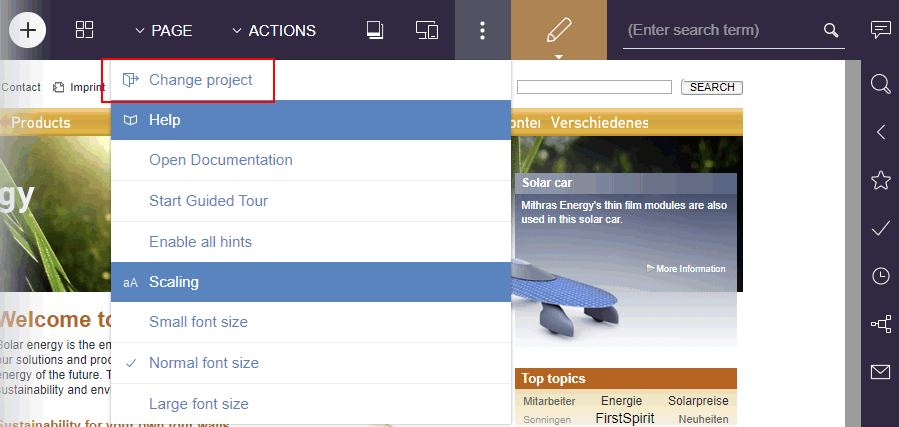
This function logs off the user and opens the project selection dialog from which the user can select the desired project for editing (via ContentCreator):
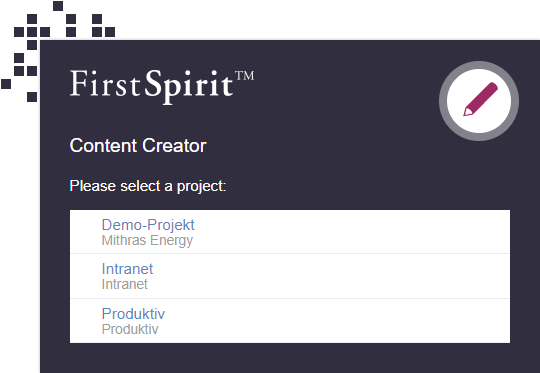
3 FirstSpirit Content Experience Tools (CXT)
3.1 Latest module versions
FirstSpirit 2020-03 supports the following module versions for “FirstSpirit Content Experience Tools”:
| Module / file name | Version number |
FirstSpirit CXT DAP Bridgedataservice-[version].fsm | 1.26 |
FirstSpirit CXT FragmentCreatorfragment-creator-[version].fsm | 2.1 |
FirstSpirit Fragment DAPfragmentdap-[version].fsm | 1.22 |
FirstSpirit Media DAPmediadap-[version].fsm | 1.22* |
FirstSpirit Markdown Editormarkdown-editor-[version].fsm | 1.19* |
FirstSpirit Tagging Editortagging-editor-[version].fsm | 1.19 |
FirstSpirit CXT FragmentCreator - CaaS Integrationcaas-integration-[version].fsm | 1.18 |
* These modules require FirstSpirit 2020-03 or higher from this version.
3.2 Markdown: Creating links using "DataAccessPlugins"
Formatted texts are entered in the FragmentCreator using the input component FS_MARKDOWN.
Example syntax:
<FS_MARKDOWN name="text" useLanguages="no">
    <LANGINFOS>
      <LANGINFO lang="*" label="Content"/>
      <LANGINFO lang="DE" label="Inhalt"/>
    </LANGINFOS>
</FS_MARKDOWN>
Up to now, when using the markdown editor “Quill” (see file web.xml, parameter markdownEditorType, vaue: quill or empty), it was possible to link text in addition to formatting, using the icon
.png)
As of the current release, further referencing options can be made available via this icon. To do this, a corresponding DataAccessPlugin (DAP) must be specified, via which the references are made available in the project. This DataAccessPlugin must implement the interface UrlSupporting (FirstSpirit Developer API, package de.espirit.firstspirit.client.plugin.dataaccess.aspects, also new with FirstSpirit 2020-03, see Chapter 5.2: “DAP: New aspect 'UrlSupporting' for URL generation”).
Currently, for example, the “Media Data Access Plugin” can be connected, which is included in the standard scope of delivery of the MicroApp Framework / FirstSpirit Content Experience Tools. With this plugin, images and files of other formats can be referenced in the Markdown Editor.
Example syntax FS_MARKDOWN
<FS_MARKDOWN name="text" useLanguages="no">
    <DATALINKSOURCES>
      <DATALINKSOURCE name="files" mode="file"
          plugin="FirstSpiritMediaAccess/Connector">
        <LANGINFOS>
          <LANGINFO lang="*" label="Files"/>
          <LANGINFO lang="DE" label="Dateien"/>
       </LANGINFOS>
      </DATALINKSOURCE>
      <DATALINKSOURCE name="pictures" mode="picture"
          plugin="FirstSpiritMediaAccess/Connector">
        <LANGINFOS>
          <LANGINFO lang="*" label="Pictures"/>
          <LANGINFO lang="DE" label="Bilder"/>
        </LANGINFOS>
      </DATALINKSOURCE>
    </DATALINKSOURCES>
    <LANGINFOS>
      <LANGINFO lang="*" label="Content"/>
      <LANGINFO lang="DE" label="Inhalt"/>
    </LANGINFOS>
</FS_MARKDOWN>
Referencing in the Markdown Editor is enabled by specifying the tag
DATALINKSOURCESDefinition of the DataAccessPlugin to be used
Which DataAccessPlugin should be available for referencing in the respective Markdown component is determined by the mandatory tag
DATALINKSOURCEThe following mandatory attributes are required:
name
plugin
name is a component-wide unique identifier for the reference type. You can use this identifier to access the value stored for the reference type in the output / in JSON.
Via the attribute plugin the desired DataAccessPlugin, for the “Media Data Access Plugin” for example
plugin="FirstSpiritMediaAccess/Connector"You can also specify several different DataAccessPlugins.
Use the label attribute to implement a language-dependent label for the DataAccessPlugin iin the list of referencing types to be selected in the markdown editor.
Configuration of the selection (via “Media Data Access Plugin”)
Using the optional attribute
modeyou can restrict when using the “Media Data Access Plugin” (analogous to the definition in FS_INDEX with “Media Data Access Plugin”) whether only images (mode="picture") or only files of other formats (mode="file") should be selectable. By default (without specifying mode) all element types can be selected as reference.
By default, when using the “Media Data Access Plugin”, a selection of references from the entire media management of the local project can be made.
The selection can be limited to special folders by specifying the tags PROJECT and FOLDER. The reference name of the desired folder is specified via the uid attribute, for example
<PROJECT>
  <FOLDER uid="contact"/>
</PROJECT>
If media should be selected from a remote project, this can also be defined via the PROJECT tag. The mandatory parameter remote must be used to specify the symbolic project name of the remote project, for example
<PROJECT remote="media">Example syntax:
...
<DATALINKSOURCES>
      <DATALINKSOURCE name="pictures" mode="picture"
          plugin="FirstSpiritMediaAccess/Connector">
        <LANGINFOS>
          <LANGINFO lang="*" label="Pictures"/>
          <LANGINFO lang="DE" label="Bilder"/>
        </LANGINFOS>
        <PROJECT>
          <FOLDER uid="contact"/>
        </PROJECT>
      </DATALINKSOURCE>
</DATALINKSOURCES>
...
Appearance in FragmentCreator
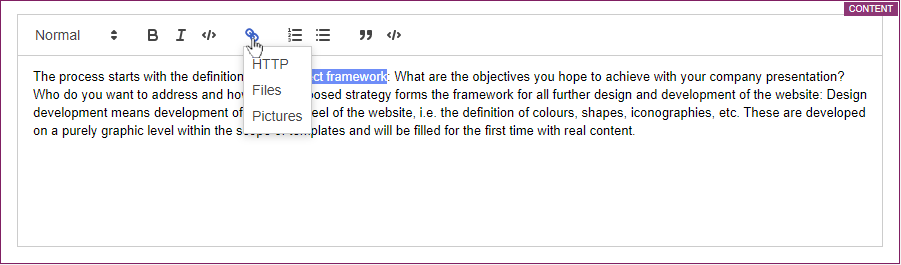
Inserting a link
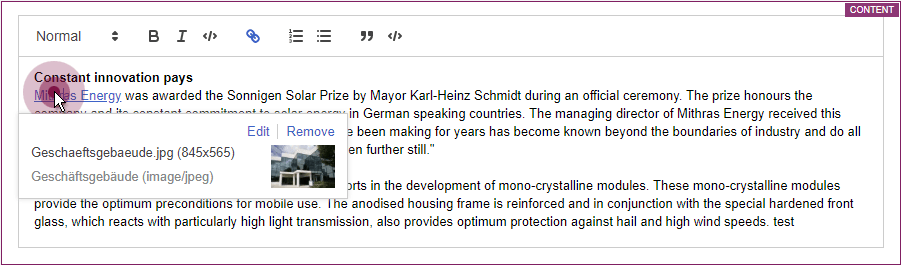
Inline view of an image referencing
Output / JSON
The JSON output of the Markdown Editor has been extended accordingly:
Attribute dataLinks: This attribute is included in JSON output whenever there is a reference in the Markdown component via DataAccessPlugin.
The link or reference is mapped using a special link schema that is used internally:
dap://{linkSource}/{objectId}dap://: URI schema/protocol{linkSource}: Identifier of the DAP configuration in the Markdown component (attributenamein theDATALINKSOURCEtag){objectId}: Identifier of the DAP object selected by the editor
The values in curly brackets are URL-encoded. An example of a resolved version could look like this:
[link text](dap://pictures/id1234)Where [link text] is the text in the Markdown component that is linked.
Attributes identifier, url, value: These attributes in the dap object come from the implementation of the DataAccessPlugin used:
identifier: Identifier of the DAP object selected by the editorurl: resolved URL of the DAP object selected by the editorvalue: JSON output that the DataAccessPlugin provides for the DAP object selected by the editor
Attributes htmlExt, markdownExt, textExt: If one of the DAP links contained in the Markdown Editor can be converted to an external URL due to the implementation of the DataAccessPlugin used, these attributes are created in addition to the attributes used for internal representation without the suffix Ext. In the case of media, an external URL can then be a URL under which the image can be viewed and/or downloaded, for example.
Example JSON output of a Markdown component:
{
   "html": "<p><a href=\"dap:\/\/linkSource\/id1234\">link text<\/a><\/p>\n",
   "markdown": "[link text](dap:\/\/linkSource\/id1234)",
   "text": "\"link text\" (dap:\/\/linkSource\/id1234)",
   "htmlExt": "<p><a href=\"#1234\">link text<\/a><\/p>\n",
   "markdownExt": "[link text](#1234)",
   "textExt": "\"link text\" (#1234)",
   "dataLinks": {
     "dap:\/\/linkSource\/id1234": {
       "identifier": "id1234",
       "url": "#1234",
       "value": {
         "store": "mediastore",
         "id": 1234
       }
     }
   }
}
Access in the template
The access to contents with resolved references can be done for example via the generated JSON:
$CMS_VALUE(json(#this).get("markdown").get("value").get("htmlExt"))$Further information
- Markdown Editor module
- Configuration of the input component FS_MARKDOWN
- General information about JSON output
4 Module Development, Scripts, API
4.1 DAP: New aspect "UrlSupporting" for URL generation
You can use the input component FS_INDEX to connect external components or modules that are to make data available to the input component. The data is made available using “DataAccessPlugins”. This data can then be selected (that is, referenced) using FS_INDEX. Function and appearance of “DataAccessPlugins” depends to a great extent on the individual implementation of the plug-in. The implementation of a “DataAccessPlugin” uses the packages de.espirit.firstspirit.client.plugin.dataaccess and de.espirit.firstspirit.client.plugin.dataaccess.aspects of the FirstSpirit Developer API and others.
With the current release the package de.espirit.firstspirit.client.plugin.dataaccess.aspects has been extended by the aspect UrlSupporting.
This can be used to determine a URL string for an object that originates from a “DataAccessPlugin”. For this purpose, an UrlGenerationContext is passed (new interface with this name in the same package). Among other things, this context grants access to the URL creator (provider) to be used, the language and the status of the object (released or not released).
The JSON generation of the FS_INDEX input component and its entries was extended by an attribute url (if the DAP implements this aspect):
{
   "identifier": "...",
   "fsType": "...",
   "value": {...},
   "valueSchema": {...},
   "url": "..."
 }
For a medium from the “Media Data Access Plugin” (Media DAP), the value could be
"/media/Solar_panel.png"An exemplary use of the new aspect could look like this:
final UrlSupporting<T> urlSupporting = dapSession.getAspect(UrlSupporting.TYPE);
if (urlSupporting != null) {
  UrlGenerationContext context = UrlGenerationContext.builder().from
                 (jsonOrGenerationContext).create();
  Optional<String> dapObjectUrl = urlSupporting.getUrl(context, dapObject);
}
Note: If an error occurs when generating the URL in the DAP (e.g. java.lang.NullPointerException), this is only recorded in the log as a warning and there will be no JSON output.
Example “Media Data Access Plugin” (Media DAP)
With FirstSpirit 2020-03, the new aspect has been incorporated into the “Media Data Access Plugin” (Media DAP) module, which is included in the standard scope of delivery of the MicroApp Framework / FirstSpirit Content Experience Tools. This plugin can be used to reference images and files of other formats in the Markdown Editor. See also Chapter 3.2: “Markdown: Creating links using 'DataAccessPlugins'”.
4.2 New Aspect "FormReferenceContaining" (provide a form element's model reference)
The (entered) values of FirstSpirit input components can contain references to other objects (so-called “value references”).
An input component of type FS_INDEX (with DatasetDataAccessPlugin), for example, holds references to all datasets that are referenced via this input component.
Aside from these value references an input component can hold further references regarding the input component's GOM representation (FirstSpirit GUI Object Model (GOM)) (so-called “model references”).
For an input component of type FS_INDEX (with DatasetDataAccessPlugin), for example, this is the reference to the desired table template (that is defined in the TEMPLATE tag under the template's form tab).
An input component developer can now provide the form element's (e.g. input component's) model references via the aspect FormReferenceContaining, with the method List<Reference> collectFormReferences(F formElement) (FirstSpirit Developer API, package de.espirit.firstspirit.client.access.editor).
The value references of a form element can be provided, with the aspect ReferenceContaining<T> (FirstSpirit Developer API, package de.espirit.firstspirit.client.access.editor), just like before.
5 Security
Apache Tomcat AJP: Vulnerability (Ghostcat)
A Chinese security company has discovered a vulnerability in the binary communication protocol Apache JServ Protocol (AJP) used by Tomcat. This vulnerability has been named “Ghostcat” and is referenced as CVE-2020-1938.
The following Tomcat version series, which have been recommended by e-Spirit to date, are also demonstrably affected:
- Apache Tomcat 8.x before version 8.5.51 and
- Apache Tomcat 9.x before version 9.0.31
Furthermore, we recommend checking the AJP Connector configuration in each installation and adjusting it if necessary, as the AJP Connector was activated by default in the
server.xml configuration file before the above-mentioned versions.In the meantime, Apache Tomcat versions 8.5.51 and 9.0.31 have been released, which are considered secure and fix the underlying configuration problem in the default configuration.
With these versions, the default behavior of the AJP Connector has changed:
- By default, the AJP Connector only listens to the loopback address (previously all).
- Additionally, a secret must now be specified for the connection. (If required, the secret obligation can also be altered) by the parameter
secretRequired.
Please consult the Apache Tomcat migration guide for the necessary adjustments:
- for version 8.5 or
- for version 9.0
Further information can also be found in the Ghostcat notes of the individual Linux distributions, e.g. for RHEL: access.redhat.com/solutions/4851251
6 System
6.1 Updates to integrated third-party software
The following internal software has been updated in the latest FirstSpirit release:
Java
The JRE, which is used as standard to run FirstSpirit SiteArchitect and ServerManager, was updated from version 11.0.5 to version 11.0.6.
This is the Java version recommended by e-Spirit. When using the “FirstSpirit Launcher JRE” module, this is the “Default” configuration point.
The Java versions in the “FirstSpirit Launcher JRE” module were updated: AdoptOpenJDK 13.0.1 to version 13.0.2, AdoptOpenJDK 8u232 to version 8u242 (“outdated”).
Install4j (used for FirstSpirit Launcher)
Updated from version 8.0.2 to version 8.0.4.
ASM (library for analyzing and modifying Java byte code)
Updated from version 7.2 to version 7.3.1.
Apache FOP (Formatting Objects Processor)
Via the module fs-fop.fsm (for the output of FirstSpirit content in PDF format).
Updated from version 2.2 to version 2.4.
Pack200 removed (jar packing tool)
The Pack200 compression of jar files transferred from the server to the user's computer when the FirstSpirit desktop applications are launched was expanded in preparation for upcoming Java14 support. If the FirstSpirit desktop applications are still started via Java Web Start, the uncompressed jars are now transferred. (The Java Web Start function is still present in Oracle Java 8 but has been removed in Oracle Java 11. OpenJDK does not offer a comparable technology).
Java Service Wrapper (configuration and monitoring of FirstSpirit Java VM)
Updated from version 3.5.39 to version 3.5.42.
Note: When the FirstSpirit server is updated (auto-update, in-place upgrade), the Java Service Wrapper files are not automatically updated. The Java Service Wrapper can be updated via the tar gzip update archive (file fs-update-5.2.*.tar.gz) as described in the FirstSpirit installation instructions.
Additional documentation:
6.2 FirstSpirit server: New control files for Windows and Linux
Java and the Java Service Wrapper are prerequisites for operating a FirstSpirit server. The Java Service Wrapper and corresponding control files are provided by e-Spirit via:
- the installation archive (for new installations) or
- the update archive (for existing installations)
Both archives can be downloaded (for access data, please contact Technical Support).
The control files for Windows and Linux operating systems, which are included in both archives, have been enhanced by two new control files, with the current FirstSpirit release.
The new control files support a range of functions that were not available in the previous control files (including install under Linux). The scope of functions of the new control files can be called via the integrated help (Usage, Command syntax, Commands) in the command line, for example via the call fs-server (under Linux):
test@fs_example:~$ fs-server
Usage: /home/fs_example/firstspirit/bin/fs-server [ console | start | stop | restart |
       condrestart | status | install | installstart | remove | dump ]
Commands:
  console      Launch in the current console.
  start        Start in the background as a daemon process.
  stop         Stop if running as a daemon or in another console.
  restart      Stop if running and then start.
  condrestart  Restart only if already running.
  status       Query the current status.
  install      Install to start automatically when system boots.
  installstart Install and start running as a daemon process.
  remove       Uninstall.
  dump         Request a Java thread dump if running.
This new development's result can be tested as part of an Early Access Program (EAP) starting with FirstSpirit 2020-03. An early, constructive feedback helps us to identify problems faster and more easily, thus allowing us to add missing functionality. For feedback please consult our Technical Support (for partners) or your designated Account Manager (for customers).
Since these new control files are still in the EAP phase, we do not recommend using them in production environments.Control files in the installation archive or in the update archive:
- new: fs-server (for Linux)
- new: fs-server.bat (for Windows)
- fs5 (for Linux)
- fs5.cmd (for Windows)
Prerequisite for using the new control files:
An update of the Tanuki Java Service Wrapper to version 3.5.42 is necessary.
Further documentation:
7 Template development
Extended output options for snippets
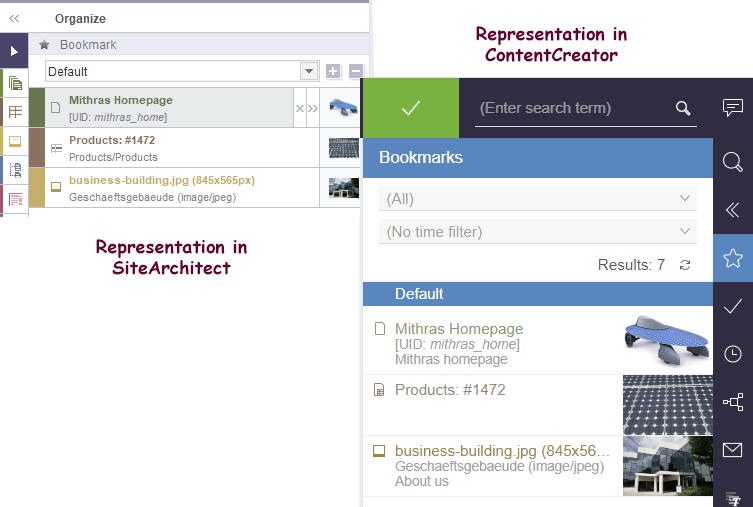
At many points in the FirstSpirit clients the presentation of objects (pages, sections, datasets, media, etc.) can be influenced, for example in search result lists, reports, selection dialogs, etc. The so-called “Snippets” are used for this. The configuration is done on the “Snippet” tab of the respective template, for media on the “Snippet” tab of the metadata template selected for the project.
As of the current release, the output options for snippets have been extended. For example, the display name or the UID of the desired element can be output. For this purpose, you can now use the variable
#itemin the fields “Label” and “Extract” on the “Snippet” tab.
It returns the respective tree element. Object-specific methods from the interface IDProvider (FirstSpirit Access API, package de.espirit.firstspirit.access.store) can in turn be applied to this.
Examples
#item.getDisplayName(#language)Outputs the display name of the respective object in the respective language.
#item.UidOutputs the UID of the respective object.
Example
#item.getDisplayName(#language)
"[UID:" + " " +italic(#item.getUid) + "]"
For datasets, the use of #item.getDisplayName() is not allowed, as this will output the snippet itself. Instead, the default value for the snippet will be displayed (data source name and ID of the dataset, separated by a # character. For example, the GID of a dataset can be specified using
#item.getEntity().getGid()Furthermore, #item is not available in the data type Card.
For media (snippets of the Metadata Template) the following variables are additionally available:
- #medium: provides information on the medium in XML format (PICTURE or FILE)
- #mediumtype: identifies whether the medium is an image or a file (PICTURE or FILE)
- #extension: identifies the file extension
- #filename: identifies the file name
- #filesize: determines the file size in bytes
- #mimetype: identifies the MIME type
- #resolution: determines the dimensions of the image in pixels (only for
PICTURE)
Example
Label:
#filename + "." + #extension + if(#mediumtype == "Picture", " (" + #resolution
   + "px)", "")
Extract:
#item.displayName(#item.project.masterLanguage) + " (" + #mimetype + ")"Gives as title the file name with file extension and the resolution of the selected medium, as text extract the display name and the MIME type.
#item is not available and a warning of the type java.lang.UnsupportedOperationException or java.lang.RuntimeException will be logged (“Expression failed”). This should be taken into account during template development.For further information about snippets please see FirstSpirit Online Documentation, https://docs.e-spirit.com/odfs/template-develo/snippets/index.html.
Overview
| ID | Description | Categories |
|---|---|---|
| CORE-3312 | Via “FirstSpirit ServerManager / Project properties / Template sets / Delete”, you can now delete template sets for a project. This action cannot be undone. Further information can be found in chapter “Administration: ServerManager: Deleting template sets”. |
FirstSpirit Administrator, ServerManager, Template Store |
| CORE-10498 | The output options for snippets have been extended ( |
Developer, Editor, FirstSpirit API, Snippets |
| CORE-11516 | When copying elements using the |
Developer, FirstSpirit API |
| CORE-11522 | An error was fixed that could cause folder structures from the file system not to be transferred to the FirstSpirit Media Store when using the Media Import Wizard. |
Media Store, SiteArchitect |
| CORE-11772 | Internal software has been updated in the latest FirstSpirit release. Further information can be found in chapter “System: Updates to integrated third-party software”. |
FirstSpirit Administrator, Integrated software, Java, Launcher, Modules |
| CORE-11808 | New interface |
Data Access Plug-In, Developer, Editor, FirstSpirit Content Experience Tools (CXT), FragmentCreator, Media |
| CORE-11857 | An input component developer can now provide the form element's (e.g. input component's) model references via the aspect |
Developer, FirstSpirit API, Template Development |
| CORE-11859 | During start-up of a FirstSpirit server, information about the current runlevel is provided. An error has been fixed, which caused the runlevel of the FirstSpirit server to be incorrect (after a restart) when using an external web server, unless the external web server was also restarted. This error had no effect on the functionality of the web applications. Now the correct runlevel is reached at the latest 15 minutes after starting the FirstSpirit server. |
Server Administrator, Web server |
| CORE-11878 | A potential memory leak in ContentCreator has been fixed. |
ContentCreator, FirstSpirit Administrator |
| CORE-11919 | The control files for Windows and Linux operating systems have been enhanced with the current FirstSpirit release. The new control files support a range of functions that were not available in the previous control files (including |
Launcher, Server Administrator |
| CORE-11932 | Rollout of the new ContentCreator for all customers |
ContentCreator, Editor, FirstSpirit Administrator, Modules, ServerManager |
| CORE-11992 | A vulnerability has been discovered in the Apache JServ Protocol (AJP) binary communication protocol used by Tomcat (Ghostcat CVE-2020-1938). The vulnerability is classified as critical. e-Spirit therefore recommends a prompt update to a secure Tomcat version (8.5.51 or 9.0.31). We also recommend checking the AJP Connector configuration in each installation and adjusting it if necessary, as the AJP Connector was activated by default in the |
FirstSpirit Administrator, Security, Server Administrator, Web server |
| CORE-11993 | Due to the change from Java EE to Jakarta EE and the associated change of namespace (package) in Tomcat 10, FirstSpirit is currently not compatible with Tomcat 10. |
FirstSpirit Administrator, Server Administrator, Web server |
| CXT-652 | As of the current release, project-specific referencing options can be made available in the markdown editor Quill. |
Data Access Plug-In, Developer, Editor, FirstSpirit Content Experience Tools (CXT), FragmentCreator, Media |
| CXT-742 | Content from the FragmentCreator can also be edited in the ContentCreator if configured accordingly. Modifications are now visible in the preview directly when the corresponding form is closed, not only after a manual update of the preview page. |
ContentCreator, Editor, FirstSpirit Content Experience Tools (CXT), FragmentCreator |
| CXT-1224 | With the current release the information on the current project, the FirstSpirit version used, and the FirstSpirit license can be copied again in the new ContentCreator using the “Copy to clipboard” icon. Previously an error message of the type |
ContentCreator, Developer, Editor |
| CXT-1245 | With the current release, the handling of project selection has been improved. Further information can be found in chapter “ContentCreator: Project selection”. |
ContentCreator, Editor, FirstSpirit home page, Project switch |
| CXT-1290 | The security of the MicroApp Framework and the FragmentCreator has been increased, particularly with regard to cross-site request forgery attacks. |
Editor, FirstSpirit Administrator, FirstSpirit Content Experience Tools (CXT), FragmentCreator, Security |
| CXT-1296 | In rare cases, pages that were newly created in the ContentCreator were not displayed directly in the preview. |
ContentCreator, Editor |
| CXT-1300 |
|
ContentCreator, Developer, Languages |
| CXT-1301 | The language display in the new ContentCreator has been corrected (interface language). |
ContentCreator, Developer, Editor, Workflow |
| CXT-1302 | The input component CMS_INPUT_DATE is used to enter the date and/or time. |
Developer, Editor, FirstSpirit Content Experience Tools (CXT), FragmentCreator, Input Components |
| CXT-1308 | Improved behavior of the new ContentCreator when using modules with incompatible libraries. |
ContentCreator, Developer, FirstSpirit API, Module development |
| CXT-1334 | FirstSpirit Content Experience Tools: Latest module versions |
Developer, FirstSpirit Administrator, FirstSpirit Content Experience Tools (CXT), FragmentCreator, Modules |
| CXT-1359 | An error in the browser “Chromium” in combination with FirstSpirit Omnichannel Manager could lead to drag-and-drop not being possible in the new ContentCreator (e.g. when moving menu levels via “ACTIONS / Edit navigation”). |
ContentCreator, Editor, FirstSpirit Omnichannel Manager |
Deprecations
| Functionality | Deprecated as of | Will be removed / Was removed as of |
|---|---|---|
| Input component FS_LIST | 5.2R3 | 2020-07 |
| Input component CMS_INPUT_CONTENTAREALIST | 5.2R3 | |
| Input component CMS_INPUT_CONTENTLIST | 5.2R3 | |
| Input component CMS_INPUT_FILE | 5.2R3 | |
| Input component CMS_INPUT_LINKLIST | 5.2R3 | |
| Input component CMS_INPUT_OBJECTCHOOSER | 5.2R3 | |
| Input component CMS_INPUT_PAGEREF | 5.2R3 | |
| Input component CMS_INPUT_PICTURE | 5.2R3 | |
| Input component CMS_INPUT_TABLIST | 5.2R3 | |
| FirstSpirit Access API: de.espirit.firstspirit.agency.GroupsAgent | 5.2R15 | |
| FirstSpirit Access API: delete (de.espirit.firstspirit.access.AccessUtil) | 5.2R18 | |
| Windows installation program | 2018-06 | 2020-06 |
| FirstSpirit Access API: release (de.espirit.firstspirit.access.AccessUtil) | 2018-06 | |
| FirstSpirit Access API: getLastLoginAsDate (de.espirit.firstspirit.agency.UserStatisticsAgent) | 2018-07 | |
| FirstSpirit Access API: remainingDurationOfCurrentStageInMillis (de.espirit.firstspirit.server.MaintenanceModeInfo) | 2018-07 | 2025-13 |
| FirstSpirit Access API: getStartingTimeOfStageAsDate (de.espirit.firstspirit.server.MaintenanceModeInfo) | 2018-07 | 2025-13 |
| FirstSpirit Access API: getSelectedWebserverConfiguration (de.espirit.firstspirit.access.serverConfiguration) | 2018-10 | 2025-13 |
| FirstSpirit Access API: setSelectedWebserverConfiguration (de.espirit.firstspirit.access.serverConfiguration) | 2018-10 | 2025-13 |
| FirstSpirit Access API: getSelectedWebServer (de.espirit.firstspirit.access.project.Project) | 2018-10 | 2025-13 |
| FirstSpirit Access API: setSelectedWebServer (de.espirit.firstspirit.access.project.Project) | 2018-10 | 2025-13 |
| FirstSpirit Access API: getLostAndFoundStoreNodes(); (de.espirit.firstspirit.feature.FeatureInstallResult) | 2018-10 | |
| FirstSpirit Access API: getDeletedStoreNodes(); (de.espirit.firstspirit.feature.FeatureInstallResult) | 2018-10 | |
| FirstSpirit Access API: de.espirit.firstspirit.access.store.Previewable | 2019-01 | |
| Java 8 support for FirstSpirit | 2019-05 | 2020-06 |
| WebSphere Application Server support for FirstSpirit | 2019-05 | |
| Legacy mode for the FirstSpirit server | 2019-06 | 2022-03 |
| Java Web Start support for FirstSpirit | 2019-10 | 2020-06 |
| FirstSpirit ContentCreator (old design / old technology) | 2019-11 | 2020-07 |
| Mithras Energy demo project | 2020-02 | 2020-06 |