
Release Notes
1 Administration
1.1 'externalGroupFilter': Group filter on login
By default, when a user authenticates via an external provider (e.g. LDAP, SAML Identity Provider), the complete group information that is transmitted is stored in FirstSpirit.
Via the new
externalGroupFilterparameter which is defined in fs-server.conf, it is now possible to define via a regular expression which subset of this group information should be taken over by FirstSpirit.
Example:
externalGroupFilter=.*(csm_admin|FirstSpirit).*1.2 Providing language templates automatically
With the current release, FirstSpirit provides templates for all languages supported by the Java version used by the FirstSpirit server.
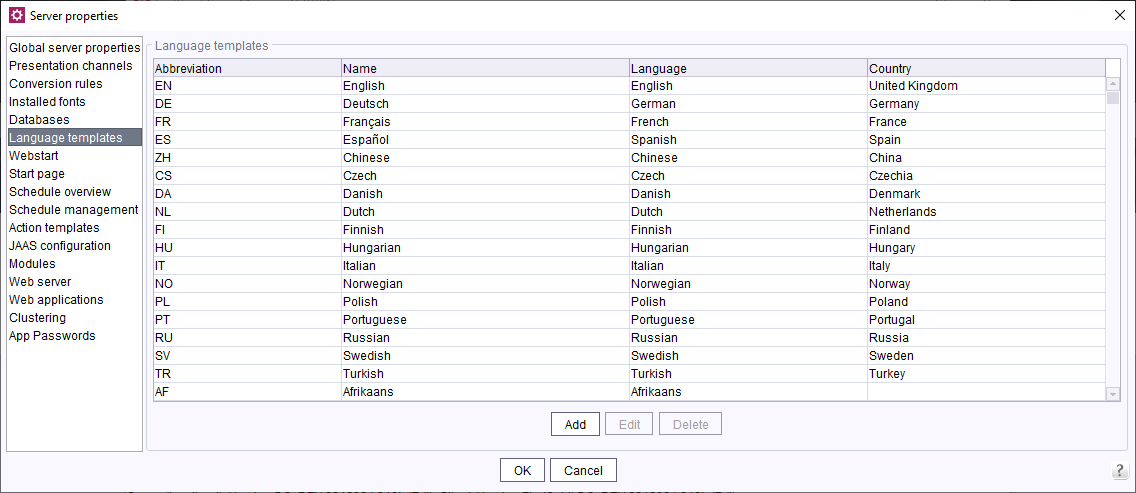
Language templates
1.3 Placeholder in the definition of external groups
When defining external groups, since FirstSpirit version 2022.12 it is possible to use a placeholder in the form
${name of the placeholder} can be defined. This placeholder is replaced accordingly during the project import.
The placeholders can be defined as -D parameters in fs-wrapper.isolated.conf, as variables of the operating system, in fs-server-aux.conf or fs-server.conf (with decreasing priority). Variables that are passed to the FirstSpirit Java process as -D parameters thus have the highest priority, while variables defined in the fs-server.conf are overwritten by all other places (see FirstSpirit ServerMonitoring / FirstSpirit / Configuration / Server (→Documentation for Administrators)).
Example (with 3 wildcards):
cn=${developer},ou=${department},dc=${company},dc=comNote: This function is useful in connection with project templates (see FirstSpirit ServerManager / Menu bar items / Project (→Documentation for Administrators)).
1.4 Create new project from template
For FirstSpirit servers on which projects are frequently created that are based on the same foundation (e.g. predefined groups, users, orders, templates, ...) there is now the option of creating corresponding project templates that can be selected when a new project is created.
This menu item is only available to server administrators.
A project template can be created by setting up and exporting a project accordingly.
Note: The name of the project is used as the display name of the template.
The project export file must be stored in the <FirstSpiritROOT>/data/templates/projects directory.
When creating a new project the Project template field is only displayed if project templates are also stored on the FirstSpirit server. The project templates stored there are offered for selection in a drop-down input component.
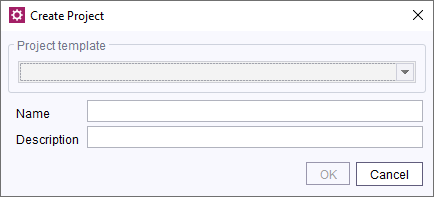
Project – Create from template
If one of these projects is selected, the corresponding project will be imported (orders will be activated, any existing schemas must be linked to the corresponding database layer).
For more information, see FirstSpirit Manual for Administrators, chapter “Project”.
2 ContentCreator
TailoredUI: Server-wide configuration via service
The Tailored UI is now server-wide configurable using the “Feature Configuration Service”, project-specific settings are no longer mandatory.
For projects to which the project component “CXT ContentCreator Extension: Feature Configuration” (“FirstSpirit ServerManager / Project properties / Project components”) is or was added, the configuration made there is taken into account. For projects without this project component, the configuration of the Feature Configuration Service is taken into account.
Existing configuration made at project level before an upgrade to FirstSpirit 2022.12 is still valid after an upgrade to FirstSpirit 2022.12. If a configuration is to be made at server level, the project component “CXT ContentCreator Extension: Feature Configuration” must be removed for the project or projects concerned so that a configuration made at server level takes effect in the project. To adopt an existing project configuration at server level, the From Project button can be used.
3 FirstSpirit Content Experience Tools (CXT)
3.1 Latest module versions
FirstSpirit 2022.12 supports the following module versions for “FirstSpirit Content Experience Tools”.
| Module / file name | Version number |
FirstSpirit CXT Plattformplatform-[version].fsm | 3.0.0 |
FirstSpirit CXT DAP Bridgedataservice-[version].fsm | 1.44.9 |
FirstSpirit CXT FragmentCreatorfragment-creator-[version].fsm | 4.0.0 |
FirstSpirit Fragment DAPfragmentdap-[version].fsm | 1.40.13 |
FirstSpirit Media DAPmediadap-[version].fsm | 1.31.8* |
FirstSpirit PageRef DAPpagerefdap-[version].fsm | 1.9.8 |
FirstSpirit Markdown Editormarkdown-editor-[version].fsm | 1.29.7* |
FirstSpirit Tagging Editortagging-editor-[version].fsm | 1.29.7 |
FirstSpirit CXT FragmentCreator - CaaS Integrationcaas-integration-[version].fsm | 1.31.8 |
* These modules require FirstSpirit 2020-03 or higher from this version.
3.2 Extension and modification of the MicroApp JavaScript API
The MicroApps API was changed: new methods were added and one method was renamed. This concerns the JavaScript objects
CxtMicroAppBridge
CxtMicroApps
Querying possible MicroApps was previously done using the method
getButtonsThis method has been renamed to
requestMicroAppActionsWith this query now a list of
contextTypes (optional) and
clientIds (mandatory field) can be passed.
MicroApps define themselves which contextTypes and clientIds they support.
Possible clientIds are for example
content-creator or
fragment-creator
Example
previously
window.CxtMicroApps.getButtons(context).then(...)now
window.CxtMicroApps.requestMicroAppActions(clientId, contextTypes, context).then(...)4 SiteArchitect / ServerManager
Unique GID of a project in project properties
With the current FirstSpirit version the unique GID of a project is displayed in the project properties. This GID can be copied but not changed.
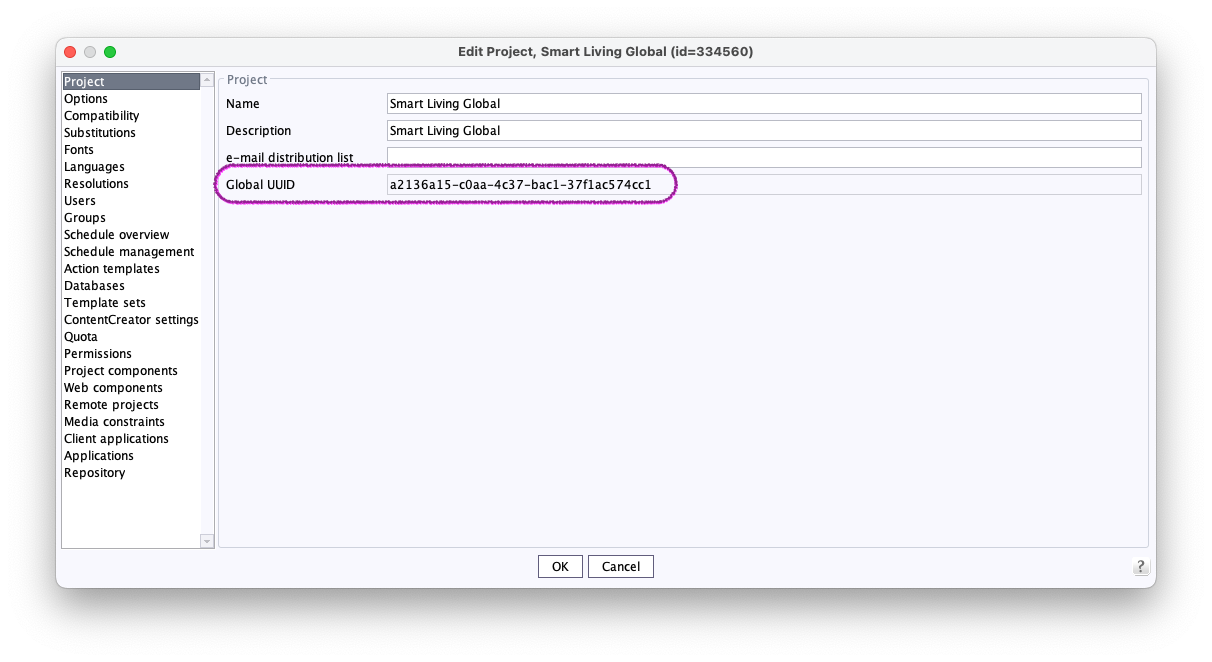
The unique GID of a project
5 System
Integrated Software
With the current FirstSpirit version, the following, internally used software has been updated:
- JxBrowser (Chrome browser engine for displaying the integrated preview in FirstSpirit SiteArchitect)
Update to version 7.27
The engine now uses “Chromium” in the version 102.0.5005.167.
Overview
| ID | Description | Categories |
|---|---|---|
| CLOUDPROV-19 | With version 1.6.11 a misbehavior in the AWS S3 Deployment module was corrected that caused the upload not to terminate when the associated schedule entry was canceled. |
AWS S3 Deployment |
| CORE-11147 | The standardized JSON output has been adjusted. The forward slash is no longer protected by a preceding backslash. |
Support for JSON |
| CORE-11161 | In the current FirstSpirit version, updated internally used software. Further information can be found in chapter “System: Integrated Software”. |
Integrated software, Preview, SiteArchitect |
| CORE-14401 | In rare cases, a WARN message |
Database, FirstSpirit Administrator |
| CORE-14577 | The connection URL for Java-clients like the SiteArchitect to the FirstSpirit server now omits the port number if a default port is used, e.g. 443 for HTTPS. |
FirstSpirit Administrator |
| CORE-14646 | The |
FirstSpirit Administrator |
| CORE-14691 | The Javadoc of the |
FirstSpirit API |
| CORE-14699 | FirstSpirit provides templates for all languages supported by the Java version used by the FirstSpirit server. |
Server Administrator |
| CORE-14703 | A new project can now be created from a project template. Further information can be found in chapter “Administration: Create new project from template”. |
FirstSpirit Administrator |
| CORE-14705 | An error has been fixed that in very rare cases could cause an “Enterprise Backup” run to fail with an “unknown revision” exception. |
FirstSpirit Administrator |
| CORE-14709 | An error could occur in SiteArchitect when a dataset was loaded during startup for which the current user does not have read permissions. |
SiteArchitect |
| CORE-14724 | An error has been eliminated that could lead to problems when indexing in the remote projects with cross-project database use (such as in certain Corporate Content scenarios). |
Corporate Content, Database, Developer, FirstSpirit Administrator |
| CORE-14726 | New |
FirstSpirit Administrator |
| CORE-14747 | The unique GID of a project is displayed in the project properties. |
ServerManager |
| CORE-14759 | In the “fs-server start script” for Linux a misleading configuration entry ( |
Server Administrator |
| CORE-14761 | Adjustments in FirstSpirit SecurityFilter: For the Strict-Transport-Security header, the property |
FirstSpirit Administrator, Security |
| CORE-14787 | The Module “FirstSpirit Security” was not fully functional within FirstSpirit versions 2022.10 and 2022.11. |
FirstSpirit Administrator, Modules |
| CORE-14799 | If a schedule is canceled but the running schedule action is not finished within 5 minutes, a FATAL error message is now logged.
|
FirstSpirit Administrator |
| CORE-14811 | When defining external groups, it is possible to define a placeholder. |
FirstSpirit Administrator |
| CORE-14818 | When using the new Chrome browser (JxBrowser 7.x), an IllegalStateException could occur during preview navigation. |
Preview |
| CORE-14823 | FirstSpirit Content Experience Tools: Latest module versions |
Developer, FirstSpirit Administrator, FirstSpirit Content Experience Tools (CXT), FragmentCreator, Modules |
| CORE-14832 | When creating a new project, the default language will now be configured using |
FirstSpirit Administrator |
| CORE-14856 | If the staging directory is mapped to an application server without its webapps directory being known to FirstSpirit (e.g. Tomcat without corresponding configuration), a generation-task, together with the |
FirstSpirit Administrator |
| CORE-14884 | When using the updated Chrome integration, reload loops could occur if the preview contained inner frames and the content highlighting follows both the workspace and preview. |
Preview, SiteArchitect |
| CXT-2018 | The Tailored UI is now server-wide configurable using the “Feature Configuration Service”, project-specific settings are no longer mandatory. |
ContentCreator, Developer, Editor, FirstSpirit Administrator |
| CXT-2715 | When using custom UploadHooks, a rejected file upload could result in empty Media elements. |
ContentCreator |
| CXT-2722 | The MicroApps API was changed: new methods were added and one method was renamed. |
Developer, FirstSpirit Content Experience Tools (CXT), Module development |
| CXT-2723 | Within subforms the user groups could not be checked using IN_GROUP rules. |
ContentCreator, Dynamic Forms |
| DEVEX-567 | Fixed an error in the command |
FSDevTools |
Deprecations
| Functionality | Deprecated as of | Will be removed / Was removed as of |
|---|---|---|
| Input component CMS_INPUT_CONTENTAREALIST | 5.2R3 | |
| Input component CMS_INPUT_CONTENTLIST | 5.2R3 | |
| Input component CMS_INPUT_FILE | 5.2R3 | |
| Input component CMS_INPUT_LINKLIST | 5.2R3 | |
| Input component CMS_INPUT_OBJECTCHOOSER | 5.2R3 | |
| Input component CMS_INPUT_PAGEREF | 5.2R3 | |
| Input component CMS_INPUT_PICTURE | 5.2R3 | |
| Input component CMS_INPUT_TABLIST | 5.2R3 | |
| FirstSpirit Access API: de.espirit.firstspirit.agency.GroupsAgent | 5.2R15 | |
| FirstSpirit Access API: delete (de.espirit.firstspirit.access.AccessUtil) | 5.2R18 | |
| FirstSpirit Access API: release (de.espirit.firstspirit.access.AccessUtil) | 2018-06 | |
| FirstSpirit Access API: getLastLoginAsDate (de.espirit.firstspirit.agency.UserStatisticsAgent) | 2018-07 | |
| FirstSpirit Access API: remainingDurationOfCurrentStageInMillis (de.espirit.firstspirit.server.MaintenanceModeInfo) | 2018-07 | 2025-13 |
| FirstSpirit Access API: getStartingTimeOfStageAsDate (de.espirit.firstspirit.server.MaintenanceModeInfo) | 2018-07 | 2025-13 |
| FirstSpirit Access API: getSelectedWebserverConfiguration (de.espirit.firstspirit.access.serverConfiguration) | 2018-10 | 2025-13 |
| FirstSpirit Access API: setSelectedWebserverConfiguration (de.espirit.firstspirit.access.serverConfiguration) | 2018-10 | 2025-13 |
| FirstSpirit Access API: getSelectedWebServer (de.espirit.firstspirit.access.project.Project) | 2018-10 | 2025-13 |
| FirstSpirit Access API: setSelectedWebServer (de.espirit.firstspirit.access.project.Project) | 2018-10 | 2025-13 |
| FirstSpirit Access API: getLostAndFoundStoreNodes(); (de.espirit.firstspirit.feature.FeatureInstallResult) | 2018-10 | |
| FirstSpirit Access API: getDeletedStoreNodes(); (de.espirit.firstspirit.feature.FeatureInstallResult) | 2018-10 | |
| FirstSpirit Access API: de.espirit.firstspirit.access.store.Previewable | 2019-01 | |
| WebSphere Application Server support for FirstSpirit | 2019-05 | |
| Database layer for Oracle Database 11g/12c | 2020-12 | 2025-05 |
| FirstSpirit Access API: redirectTemplateLogToDefaultLog() (Interface RenderingAgent.Renderer) | 2021-05 | |
| Support for Log4j 1 | 2022-05 | 2024-06 |