
Release Notes
1 ContentCreator
1.1 Handling of language-independent script-based dialogs and behavior of "ShowFormDialogOperation"
Forms and rules (“Dynamic forms”) can be defined for FirstSpirit scripts (like all template types). The form can then be displayed in the desired position via
context.showForm();The validation (evaluation of the rules) can be deactivated on a language-specific basis so that rules defined for the form are ignored for the language(s) in question (FirstSpirit ServerManager / Project properties / Languages, “Validate language” checkbox).
Previously, in the case of language-independent forms, rules were not evaluated in ContentCreator in some cases as the preview language was taken into account for the form rather than the master language.
With the latest release, the setting in the project properties (“Languages”, “Validate language” checkbox) will be taken into account according to the master language in the case of language-independent forms as well (in the same way as in FirstSpirit SiteArchitect).
Furthermore, the use of ShowFormDialogOperation (de.espirit.firstspirit.ui.operations package, FirstSpirit Developer API) has been adapted to the behavior of SiteArchitect. This interface can be used to create and configure project-specific dialogs.
- Preselection of the language:
setPreselectedLanguage(...)
IfsetPreselectedLanguage(...)is not defined, the dialog is opened in the master language. - Definition of language set:
setMultiLanguage(...)
For language-dependent (multilingual) forms, it is necessary to callsetMultiLanguage(true). The language set to be edited is transferred toperform(...)and can then be selected in the dialog via the menu.
Alternatively,setMultiLanguage(false)(default) can be used if content is only to be changed in one specified language. If multiple languages are transferred withperform(...)in this case, only the preselected or first language can be edited and a debug log message will be output.
Example:
...
import de.espirit.firstspirit.agency.FormsAgent;
import de.espirit.firstspirit.agency.LanguageAgent;
import de.espirit.firstspirit.agency.OperationAgent;
import de.espirit.firstspirit.ui.operations.ShowFormDialogOperation;

...

formsAgent = context.requireSpecialist(FormsAgent.TYPE);
form = formsAgent.getForm(formdefinition);

la = context.requireSpecialist(LanguageAgent.TYPE);
langs = la.getLanguages();
en = la.getProjectLanguages(false).get("EN");
de = la.getProjectLanguages(false).get("DE");
fr = la.getProjectLanguages(false).get("FR");

sfd = context.requireSpecialist(OperationAgent.TYPE).getOperation
 (ShowFormDialogOperation.TYPE);
sfd.setTitle("My form");
sfd.setMultiLanguage(true);
sfd.setPreselectedLanguage(fr);
sfd.setRuleset(rules);
sfd.setValidation(true);
sfd.perform(form, langs);
In this example, the dialog is opened with the predefined language (“FR”). The language can be selected in the dialog via the menu.
1.2 Navigation view: New functions
In FirstSpirit ContentCreator, the structure of a site is mapped by means of menu items and pages:
While every page

represents a concrete web page, each menu item

corresponds to a menu item in the site navigation.
Defining start menus/pages
Depending on the site structure, a menu item may comprise not only several sub-menu items, but also several different pages. Equally, there can be menu items which do not have any pages.
Previously, it was only possible to set which specific page or menu item is opened when the user clicks on menu items on the site via FirstSpirit SiteArchitect.
With the latest release, this can now also be controlled via FirstSpirit ContentCreator using the following context menu functions in the navigation view:
- Set as default start menu
If a menu item has no concrete page or several sub-menu items, clicking on the corresponding menu item on the site takes the user directly to the pages in the subpages set as the “default start menu”. - Set as start page
If there are several pages on a menu level, clicking on the corresponding menu item on the site displays the page set as the “start page”.
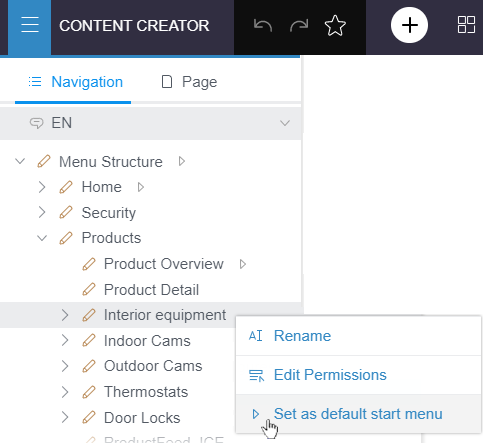
Changes in this area must be released in order to appear on the site.
Which element is the start menu/page in each case can be checked in the navigation view via the

Controlling visibility of menu items
Previously, the visibility of menu items could be set for each language in FirstSpirit SiteArchitect using the “Display in navigation menu” option for a menu level (“Properties” tab):
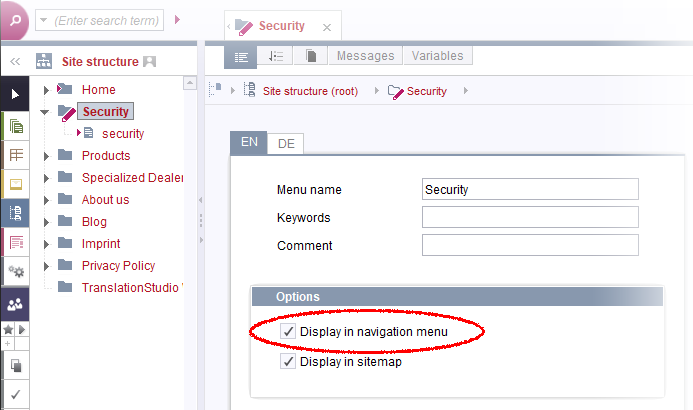
This option allows menu items to be temporarily removed from the site on a language-specific basis and added back in again later.
With the latest release, this setting can now also be made in FirstSpirit ContentCreator in the navigation view:
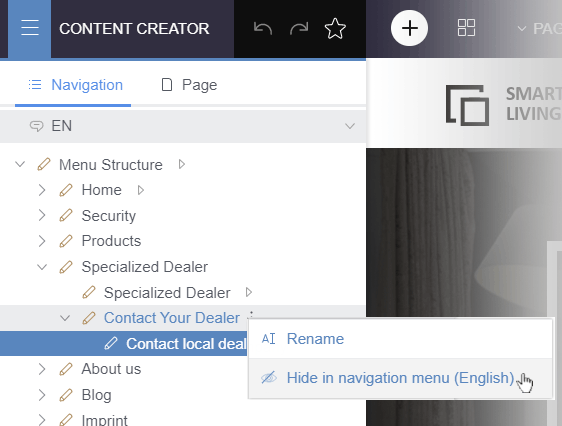
- Hide in navigation menu
The menu item in question will no longer be displayed on the site in the selected language. - Show in navigation menu
Hidden menu items will once again be displayed on the site in the selected language.
Changes in this area must be released in order to appear on the site.
Menu items that are hidden / not visible on the site are visualized by the following icon in the navigation view:
.png)
In addition, the menu name is grayed out.
For more information, see FirstSpirit Manual for Editors (ContentCreator), “Menu functions / Navigation”
(https://docs.e-spirit.com/contentcreator/menu-functions/navigation/index.html)
1.3 Tailored UI: Sorting of functions in the interface
As of FirstSpirit 2020-10, functions can be hidden on a project-specific basis in FirstSpirit ContentCreator (“Tailored UI”).
In the latest release, this functionality has been optimized and further configuration options have been implemented:
Configurable functions
In addition to the standard ContentCreator functions, all ItemsPlugins recognized by FirstSpirit are listed in the configuration dialog and can be edited there.
In order to configure functions originating from customer-specific modules, the “Plug-in” field is now an editable combo box. This also lists the ItemsPlugins recognized by FirstSpirit.
The table columns in the configuration dialog can now be sorted by clicking on the column header to make it easier to find features.
Influencing the sorting of menu entries and icons
The order of features in the ContentCreator interface can now also be influenced via the “Features: Order” tab (“FirstSpirit ServerManager / Project properties / Project components / CXT ContentCreator Extension: Feature Configuration”).
The functions are bundled into groups to provide a better overview.
The functions can be sorted within their group via drag-and-drop. Changes are saved directly without a prompt appearing.
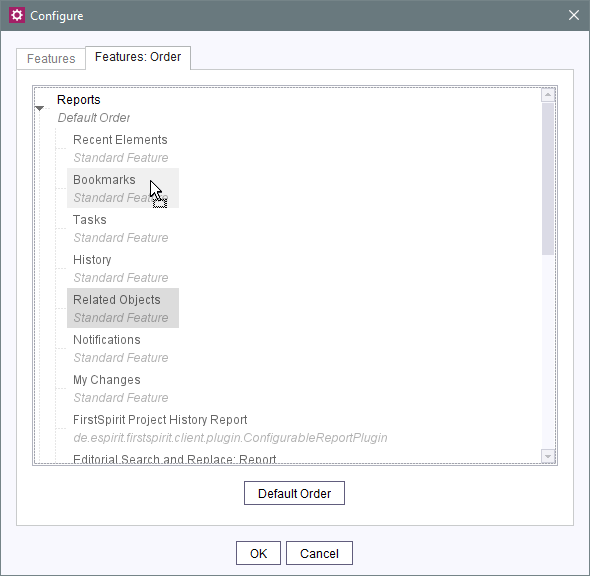
If the standard sorting of a group has been changed, this is indicated by the “Custom Order” label. The sorting is also shown in the overview (“Order” column).
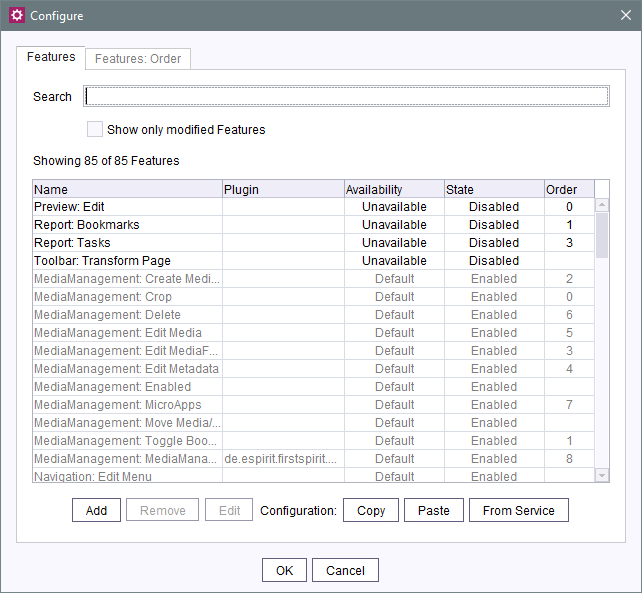
The standard sorting can be restored on a group-specific basis with a click.
Restrictions:
The defined order of the functions is to be considered as a guideline. It may differ slightly in the client so as not to circumvent design and operating specifications for ContentCreator:
For functions in the preview, for example, automatic grouping takes place as soon as several icon bars are nested, and there is also a primary action, e.g., editing.
The “My changes” report is always displayed in the lower area irrespective of its position in the sort order. The positions of the “Search” and “Dashboard” reports cannot be changed. Nor can they be hidden.
In general, the functions of right-aligned menu bars (EasyEdit) are also sorted right-aligned.
Server-wide configuration
In addition to the local project configuration, the “Feature Configuration Service” can also be used to make server-wide settings (FirstSpirit ServerManager / “Modules / FirstSpirit CXT ContentCreator Extension”):
Prerequisite: The “CXT ContentCreator Extension: WebApp for ContentCreator” web component must be added in the “ContentCreator” area (FirstSpirit ServerManager / “Server properties / Web applications”).
If there are ContentCreator instances that are local to a project, the web component must also be added there (under FirstSpirit ServerManager / “Project properties / Web components”).
Configuration is carried out in the same way as at project level.
Note: Currently, the project component “CXT ContentCreator Extension: Feature Configuration” (“FirstSpirit ServerManager / Project properties / Project components”) must be present for every server project for which configuration of the ContentCreator functions is to be carried out. This project component is currently still used to carry out the configuration for each project.
Configuration that is carried out at server level (via the “Feature Configuration Service”) must currently be transferred to the relevant project via the From Service function in order to be used there.
A future release will include configuration of the “Feature Configuration Service” for projects without the “CXT ContentCreator Extension: Feature Configuration” project component. Use of the project component will then be optional; configuration at server level will be sufficient.
An existing configuration from a project can be adopted for the server in the “Feature Configuration Service” via the From Project button.
Conversely, a configuration made at server level can also be adopted for a project via the From Service button.
Existing configurations are overwritten without a prompt appearing; inheritance of settings or similar is not supported.
If necessary, the entire current configuration can be exported in JSON format and then transferred to a different FirstSpirit Server.
Migration notes:
- Actions that were previously found in the
StoreTreedefault group (functions of the tree view in the navigation bar and in the Media Management) are now found in theNavigationgroup. TheStoreTreedefault group has been removed. This change will be carried out automatically when updating to the latest FirstSpirit release. There is no need to change anything manually. - An existing configuration that was made before upgrading to FirstSpirit 2020-12 at project level is still valid after upgrading to FirstSpirit 2020-12. To transfer a configuration made at server level, the From Service function of the “CXT ContentCreator Extension: Feature Configuration” project component can be used for the desired project(s) so that a configuration made at server level can take effect in the project.
For more information, see FirstSpirit Online Documentation, “Template development / ContentCreator / Customization / Standard functions” (https://docs.e-spirit.com/odfs/template-develo/contentcreator/customization/standard-functi/index.html)
1.4 Invalid format templates in CMS_INPUT_DOM and CMS_INPUT_DOMTABLE
For CMS_INPUT_DOM and CMS_INPUT_DOMTABLE, the FORMATS tag can be used to define format templates that may be used in the input component, e.g.
  <CMS_INPUT_DOM name="st_text" hFill="yes" list="no">
         <FORMATS>
           <TEMPLATE name="standard"/>
           <TEMPLATE name="h3"/>
         </FORMATS>
         <LANGINFOS>
           <LANGINFO lang="*" label="Text"/>
         </LANGINFOS>
</CMS_INPUT_DOM>
Previously, if the FORMATS configuration was changed later, e.g., by removing a TEMPLATE definition, this could mean that existing content could no longer be saved in ContentCreator (e.g., error message “Referenced element 'xyz' does not exist.”).
With the latest release, CMS_INPUT_DOM and CMS_INPUT_DOMTABLE now also take into account format templates that are no longer valid in ContentCreator (in the same way as SiteArchitect). This means that corresponding formatting will be retained even when saving.
Even if the text is edited within the formatting, the formatting will be retained after saving.
1.5 Visualizing connection problems in ContentCreator
Previously, slow connections resulting from connection problems could lead to frequent reloading of the whole client. Now, in the event of connection problems, a message is displayed at the bottom of the browser rather than reloading the page:

(“There are problems with your network connection. Please contact your administrator!”)
Exceptions:
An automatic reload will still take place for
- authentication errors (error code 403 / “Access denied/impermissible”, followed by the log-in page being displayed)
- maintenance mode (a corresponding text is displayed in the client)
Examples of possible causes of connection problems: The connection between the browser and the application server (e.g., Apache Tomcat) is not stable. Furthermore, the use of HTTP 2.0 can result in problems, depending on the configuration and slow connections (see writeTimeout attribute on the https://tomcat.apache.org/tomcat-9.0-doc/config/http2.html page).
The affected connection should be checked by the administrator (e.g., via the network activity in the browser and the access log of the application server) and an analysis should be carried out to determine why requests are not being finished.
1.6 Template development: Updating the preview in ContentCreator
In the template development process, the ContentCreator preview allows the developer to check the changes they make to templates.
Previously, content often had to be changed and saved in order for changes to the underlying template to be taken into account in the preview.
With the latest release, updating the preview in ContentCreator after making changes to templates has been improved, thus simplifying template development.
If changes to underlying templates are not shown in the ContentCreator preview, the preview can be manually updated as follows:
- F5 : ContentCreator is reloaded.
- Ctrl + R : Only the preview is reloaded.
In both cases, /forceRefresh=1 is automatically appended to the URL.
1.7 WebeditElementStatusProviderPlugin: More element types added
With the new ContentCreator, the state display in the menu bar now takes into account not only pages (PageRef element type) and datasets (Dataset element type), but also other elements such as media folders.
In this context, the WebeditElementStatusProviderPlugin interface (de.espirit.firstspirit.workflow package, FirstSpirit Developer API) now includes the optional method
isSupported(IDProvider)This method allows the plug-in to offer support for elements other than the standard PageRef and Dataset element types.
It returns information to indicate whether the plug-in supports the relevant element (true) or not (false).
As before, the plug-in also allows dependent objects to be taken into account for the state display and workflows with the
getReleaseState()
getWorkflowGroups()
methods. Thanks to the new method, these dependences can now also be taken into account for other element types.
However, no dependences are taken into account for all IDProvider elements that are not supported according to the configured plug-in.
For more information, see the chapter on the plug-in development of the “Element Status Provider” (ESP): https://docs.e-spirit.com/odfs/plug-developmen/contentcreator/interactive-fea/element-status/functional-over/index.html
2 External Synchronization
FSDevTools: Support for the configuration of web components, project applications and services
With the current FSDevTools release (Release 2.6.4), developers can configure web components, project applications and services using the “FSDevTools” command line tool.
Use cases:
- Install/update (and roll-out) web components in Web Apps
- Add/update project components to projects
- Configure/restart services
Configuration is done via a configuration file in JSON format using the command fs-cli module configure -mcf|--moduleConfigFile "path/to/configFile.json".
The results of the call can be saved to an additional file (also in JSON format) via the command fs-cli [...] [-rf|--resultFile "path/to/result.json"].
Syntax:
fs-cli [...] [-rf|--resultFile "path/to/result.json"]
module configure -mcf|--moduleConfigFile "path/to/configFile.json".
If files are uploaded during configuration, they are automatically uploaded to the appropriate directory for the module.
If a folder is specified in the JSON configuration file, the corresponding folder structure is rebuilt in the server's file system (creating only subfolders under the specified folder).
3 FirstSpirit Content Experience Tools (CXT)
Latest module versions
FirstSpirit 2020-12 supports the following module versions for “FirstSpirit Content Experience Tools”:
| Module / file name | Version number |
FirstSpirit CXT DAP Bridgedataservice-[version].fsm | 1.35 |
FirstSpirit CXT FragmentCreatorfragment-creator-[version].fsm | 2.13 |
FirstSpirit Fragment DAPfragmentdap-[version].fsm | 1.29 |
FirstSpirit Media DAPmediadap-[version].fsm | 1.26* |
FirstSpirit PageRef DAPpagerefdap-[version].fsm | 1.4 |
FirstSpirit Markdown Editormarkdown-editor-[version].fsm | 1.24* |
FirstSpirit Tagging Editortagging-editor-[version].fsm | 1.24 |
FirstSpirit CXT FragmentCreator - CaaS Integrationcaas-integration-[version].fsm | 1.26 |
* These modules require FirstSpirit 2020-03 or higher from this version.
4 Compatibility
4.1 Release of the new Oracle Database 19c database layer
The latest FirstSpirit release includes the definitive release of the Oracle Database 19c database layer.
The FirstSpirit Community (https://community.e-spirit.com) still contains a detailed migration guide for switching from Oracle Database 11g/12c to Oracle Database 19c for use with FirstSpirit.
The old database layer Oracle Database 11g/12c (de.espirit.or.impl.oracle.OracleLayer) will be removed in the future. This is scheduled to take place with FirstSpirit 2021-06.
4.2 Note on the compatibility of FirstSpirit with Apple silicon
With the company's own M1 processor, Apple switches to an ARM architecture. Applications that were developed for an x86 architecture (such as FirstSpirit) can still be executed using the “Rosetta 2” emulation technology.
e-Spirit is currently not aware of any problems when using FirstSpirit with “Rosetta 2”. However, native support of the ARM architecture is currently not planned for FirstSpirit.
5 Module Development, Scripts, API
SnippetAgent: New methods for transferring FormData objects
Methods for transferring FormData objects have been added to the SnippetAgent interface (de.espirit.firstspirit.agency package, FirstSpirit Access API).
The new methods
getSnippetProvider(@NotNull FormData formData, @NotNull Snippet snippet)getSnippetProvider(@NotNull FormData formData, @NotNull Snippet snippet, @NotNull
SnippetContext context)make it possible to obtain a SnippetProvider by transferring the corresponding FormData object.
6 SiteArchitect / ContentCreator
Dynamic forms: Accessing information from other forms
In the latest FirstSpirit version, the rule evaluation (“Dynamic forms” functionality) has been expanded for ContentCreator and SiteArchitect.
What's new?
The services FormDataValueService and MetaDataValueService will be provided. These services provide access to the information of an IDProvider.
Furthermore, three new properties are now available in the rules for corresponding elements:
PAGE_ID:Determining the ID of a FirstSpirit element of the Page typePAGE_UID:Determining the reference name / UID of a FirstSpirit element of the Page typePROJECT_PROPERTIES_ID:Determining the ID of project properties.
These are in addition to the existing properties:
ID:Determining the ID of a FirstSpirit elementUID:Determining the reference name / UID of a FirstSpirit element. Sections do not technically have a UID, which is why the display name is returned in this case.GID:Determining the global ID (GID) of a FirstSpirit elementTEMPLATE:Determining the template of the current FirstSpirit element. The reference name of the template is returned (UID).
Why do I need this functionality?
With the expanded functionality, it is possible to access FirstSpirit elements in a rule execution even if these elements are outside the current context. This means that information from other forms (e.g., form data from another page, from metadata forms, or from the project settings) can be retrieved and used in the current rule execution.
How can I use this functionality?
Availability and configuration:
In the latest FirstSpirit version, the services FormDataValueService and MetaDataValueService are automatically available in SiteArchitect and in ContentCreator. It is not necessary to configure or activate the functionality separately.
Usage:
The data is retrieved within the form (in the “Rules” tab) using the <SCHEDULE/> tag.
- The
FormDataValueServiceenables access to the data of a form. - The
MetaDataValueServiceenables access to the data of a metadata form.
The following parameters are used to access a FirstSpirit element (within the <SCHEDULE/> tag):
IDandStoretype,UIDandUIDType, orGIDandTemplate(for datasets only).
Further parameters are then used to restrict the selection:
- to specific input components (
FIELDparameter) - to content in a specific language (
LANGUAGEparameter)
Further information on the new parameters and additional examples:
- see manual Accessing information from other forms.
Example:
Access to metadata at page level (<SCHEDULE/> tag):
Example A enables access to metadata (service="MetaDataValueService").
The input component value (“md_layout”) (via the FIELD parameter) of the “PAGE_UID” page (via the UID and UIDTYPE parameters) is retrieved here.
Use in the current context (<DO/> tag):
This value is saved in the input component (“st_layouttext”) of the current section so that the value can then continue to be used in other rules.
	<RULE when="ONLOCK">
		<SCHEDULE delay="0" id="A" service="MetaDataValueService">
			<PARAM name="UID">
				<PROPERTY name="PAGE_UID" source="#global"/>
			</PARAM>
			<PARAM name="UIDTYPE">
				<TEXT>PAGESTORE</TEXT>
			</PARAM>
			<PARAM name="FIELD">
				<TEXT>md_layout</TEXT>
			</PARAM>
			<PARAM name="LANGUAGE">
				<PROPERTY source="#global" name="MASTER" />
			</PARAM>
		</SCHEDULE>
		<DO>
			<PROPERTY name="VALUE" source="st_layouttext"/>
		</DO>
	</RULE>
7 System
Updates to integrated third-party software
The following internal software has been updated in the latest FirstSpirit release:
Eclipse Jetty (contained in the module fs-jetty.fsm / “FirstSpirit Jetty Service”)
Update from version 9.4.31 to version 9.4.33
As before, use of Eclipse Jetty for production purposes is not recommended!Install4j (used for FirstSpirit Launcher)
Updated from version 8.0.4 to version 8.0.8.
Java The following new Java version is available:
- Integrated in FirstSpirit (default): 11.0.9.1+1 64bit AdoptOpenJDK
- In the FirstSpirit Launcher JRE module: 15.0.1+9 64bit AdoptOpenJDK
Java Service Wrapper (configuration and monitoring of FirstSpirit Java VM)
Updated from version 3.5.42 to version 3.5.44.
Note: When the FirstSpirit server is updated (auto-update, in-place upgrade), the Java Service Wrapper files are not automatically updated. The Java Service Wrapper can be updated via the tar gzip update archive (file fs-update-[version].tar.gz) as described in the FirstSpirit installation instructions.
Additional documentation:
- on Java Service Wrapper (manual for administrators)
- on Updating the Java Service Wrapper (installation instructions)
Spring Boot (used for MicroApp Framework)
Update from version 2.3.1 to version 2.3.5
Spring Cloud Hoxton (used for MicroApp Framework)
Update from version Hoxton.SR5 to version Hoxton.SR8
Overview
| ID | Description | Categories |
|---|---|---|
| CORE-11554 | The handling of redirects when resolving URIs in the context of client/server communication has been improved. |
FirstSpirit Administrator, Server Administrator, SiteArchitect |
| CORE-12045 | In the latest FirstSpirit version, the rule evaluation (“Dynamic forms” functionality) has been expanded for ContentCreator and SiteArchitect. This means that information from other forms (e.g., form data from another page, from metadata forms, or from the project settings) can be retrieved and used in the current rule execution. |
ContentCreator, Dynamic Forms, Services, SiteArchitect, Template Development |
| CORE-12270 | The optional method |
ContentCreator, Developer, FirstSpirit API |
| CORE-12411 | A missing log file for schedules could lead to a display error in ServerMonitoring (menu item: “Logfiles / according to deployment / History”). |
FirstSpirit Administrator, Server Administrator, ServerMonitoring |
| CORE-12702 | Methods for transferring FormData objects have been added to the |
FirstSpirit API |
| CORE-12821 | When querying elements via the method |
ContentCreator, Developer, Module development |
| CORE-12890 | An error has been fixed that could lead to temporarily inconsistent states because no order had been defined for deleting objects from various stores via the |
Developer, FirstSpirit API |
| CORE-12892 | Internal software has been updated in the latest FirstSpirit release. Further information can be found in chapter “System: Updates to integrated third-party software”. |
Developer, FirstSpirit Administrator, FirstSpirit Content Experience Tools (CXT), FirstSpirit Jetty Web Server, Integrated software, Java, Launcher |
| CORE-12898 | The start times for the FirstSpirit Clients have been improved by optimizing the rollout of the application buffer. This results in shorter waiting times, particularly when starting for the first time after a FirstSpirit update. |
Performance, Server Administrator, ServerManager, SiteArchitect |
| CORE-12959 | An error has been fixed that could have meant that the data import was not completed due to a timeout when using the Content Transport feature to move large volumes of data. |
Content Transport |
| CORE-13045 | The latest FirstSpirit release includes the definitive release of the Oracle Database 19c database layer. |
Database, Developer, FirstSpirit Administrator |
| CORE-13072 | Native support of Apple M1/Apple silicon is currently not planned for FirstSpirit. However, the FirstSpirit desktop apps (ServerManager, SiteArchitect) can still be executed on Mac computers with Apple silicon using the “Rosetta 2” emulation technology. |
ContentCreator, Developer, Editor, FirstSpirit Administrator, ServerManager, SiteArchitect |
| CXT-1505 | With the latest release, FirstSpirit ContentCreator can also be used to define which elements are to be start menus/pages. Furthermore, it is possible to set whether or not menu items should be displayed for each language of the site. Further information can be found in chapter “ContentCreator: Navigation view: New functions”. |
ContentCreator, Editor, Navigation view |
| CXT-1539 | The option “Duplicate section” (under the “New section” function) can be used to duplicate the selected section. In rare cases – if only one section template was approved for the relevant content area – this function was not available. |
ContentCreator, Editor |
| CXT-1577 | As expected, the FragmentCreator's project selection (when starting or changing projects) now only shows fragment projects. |
Developer, FirstSpirit Administrator, FirstSpirit Content Experience Tools (CXT), FragmentCreator |
| CXT-1735 | With the latest release, “Tailored UI” offers new configuration options: sorting of features in the client interface and cross-project settings. |
ContentCreator, Developer, Editor, FirstSpirit Administrator, Module development, Modules, ServerManager |
| CXT-1774 | Updating the preview in ContentCreator during the template development process has been improved. |
ContentCreator, Developer, Input Components, Template Development, Template Store |
| CXT-1831 | When editing referenced datasets via FS_DATASET, the preview is now updated after closing the form so that the modified content is displayed automatically. |
ContentCreator, Database, Developer, Editor, Input Components, Preview |
| CXT-1842 | CMS_INPUT_DOM and CMS_INPUT_DOMTABLE now also take into account format templates that are no longer valid in ContentCreator. |
ContentCreator, Editor, Input Components |
| CXT-1861 | The behavior of language-independent forms in scripts in connection with rules in ContentCreator has been optimized and the behavior of |
ContentCreator, Developer, Dynamic Forms, FirstSpirit API, Input Components, Languages, Template Development |
| CXT-1920 | In the event of connection problems, a message is now displayed at the bottom of the browser. |
ContentCreator, Debugging, Developer |
| CXT-1922 | Switching the language in the navigation view in ContentCreator (e.g., in an empty project) could result in a |
ContentCreator, Editor, Languages |
| CXT-1924 | If a smaller section than the target size is selected for an image in the “Crop image” dialog, the image is now automatically scaled up to the resolution size again by the system. |
ContentCreator, Media, Media Store |
| CXT-1932 | Temporarily, when cropping language-dependent images, the language could not be selected directly. |
ContentCreator, Editor, Media, Media Store |
| CXT-2010 | Incorrect remote configuration (e.g., missing user permissions) no longer means that the Media Management cannot be opened (error message e.g., |
ContentCreator, Developer, Editor, Media Store, Remote access |
| CXT-2011 | FirstSpirit Content Experience Tools: Latest module versions |
Developer, FirstSpirit Administrator, FirstSpirit Content Experience Tools (CXT), Modules |
| DEVEX-349 | With the current FSDevTools release (Release 2.6.4), developers can configure web components, project applications and services using the “FSDevTools” command line tool. |
Developer, External synchronization, FSDevTools |
Deprecations
| Functionality | Deprecated as of | Will be removed / Was removed as of |
|---|---|---|
| Input component CMS_INPUT_CONTENTAREALIST | 5.2R3 | |
| Input component CMS_INPUT_CONTENTLIST | 5.2R3 | |
| Input component CMS_INPUT_FILE | 5.2R3 | |
| Input component CMS_INPUT_LINKLIST | 5.2R3 | |
| Input component CMS_INPUT_OBJECTCHOOSER | 5.2R3 | |
| Input component CMS_INPUT_PAGEREF | 5.2R3 | |
| Input component CMS_INPUT_PICTURE | 5.2R3 | |
| Input component CMS_INPUT_TABLIST | 5.2R3 | |
| FirstSpirit Access API: de.espirit.firstspirit.agency.GroupsAgent | 5.2R15 | |
| FirstSpirit Access API: delete (de.espirit.firstspirit.access.AccessUtil) | 5.2R18 | |
| FirstSpirit Access API: release (de.espirit.firstspirit.access.AccessUtil) | 2018-06 | |
| FirstSpirit Access API: getLastLoginAsDate (de.espirit.firstspirit.agency.UserStatisticsAgent) | 2018-07 | |
| FirstSpirit Access API: remainingDurationOfCurrentStageInMillis (de.espirit.firstspirit.server.MaintenanceModeInfo) | 2018-07 | 2025-13 |
| FirstSpirit Access API: getStartingTimeOfStageAsDate (de.espirit.firstspirit.server.MaintenanceModeInfo) | 2018-07 | 2025-13 |
| FirstSpirit Access API: getSelectedWebserverConfiguration (de.espirit.firstspirit.access.serverConfiguration) | 2018-10 | 2025-13 |
| FirstSpirit Access API: setSelectedWebserverConfiguration (de.espirit.firstspirit.access.serverConfiguration) | 2018-10 | 2025-13 |
| FirstSpirit Access API: getSelectedWebServer (de.espirit.firstspirit.access.project.Project) | 2018-10 | 2025-13 |
| FirstSpirit Access API: setSelectedWebServer (de.espirit.firstspirit.access.project.Project) | 2018-10 | 2025-13 |
| FirstSpirit Access API: getLostAndFoundStoreNodes(); (de.espirit.firstspirit.feature.FeatureInstallResult) | 2018-10 | |
| FirstSpirit Access API: getDeletedStoreNodes(); (de.espirit.firstspirit.feature.FeatureInstallResult) | 2018-10 | |
| FirstSpirit Access API: de.espirit.firstspirit.access.store.Previewable | 2019-01 | |
| WebSphere Application Server support for FirstSpirit | 2019-05 | |
| Legacy mode for the FirstSpirit server | 2019-06 | 2022-03 |
| Control files for Windows and Linux operating systems (old) | 2020-08 | 2021-02 |
| Database layer for Oracle Database 11g/12c | 2020-12 | 2025-05 |