
Release Notes
1 Administration
1.1 Extended session information
In the server-infos.zip file, additional information about the session is now provided (sessions.txt).
The server-infos.zip file can be downloaded in ServerMonitoring under "FirstSpirit / Monitoring / Metrics" via the envelope.
1.2 Project import: Import new users
With the new option “Import new users”, it can be controlled during project import whether new users should be imported.
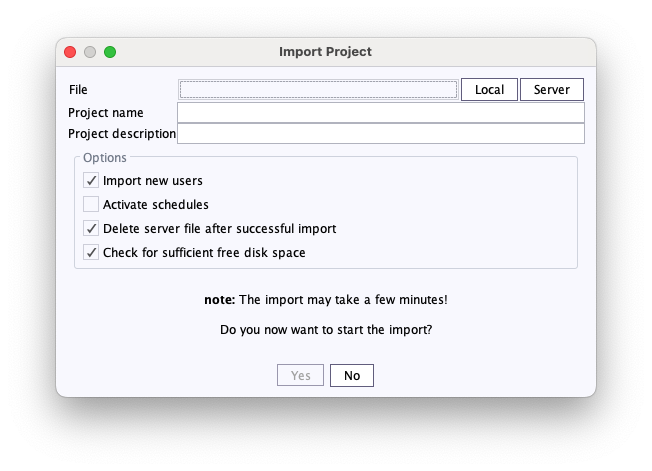
Project import: Import new users
If this checkbox is enabled, all users of the project are retained. Users not present on the server will be created anew, and existing users will be assigned to the project. If the checkbox is disabled, only the users already on the server will be assigned to the project.
2 FirstSpirit Content Experience Tools (CXT)
Latest module versions
FirstSpirit 2024.13 supports the following module versions for FirstSpirit Content Experience Tools.
| Module / file name | Version number |
FirstSpirit CXT Plattformplatform-[version].fsm | 6.1.11 |
FirstSpirit CXT DAP Bridgedataservice-[version].fsm | 1.44.29 |
FirstSpirit CXT FragmentCreatorfragment-creator-[version].fsm | 5.0.16 |
FirstSpirit Fragment DAPfragmentdap-[version].fsm | 1.40.37 |
FirstSpirit Media DAPmediadap-[version].fsm | 1.31.27 |
FirstSpirit PageRef DAPpageref-[version].fsm | 1.9.27 |
FirstSpirit Markdown Editormarkdown-editor-[version].fsm | 1.29.27 |
FirstSpirit Tagging Editortagging-editor-[version].fsm | 1.29.27 |
FirstSpirit CXT FragmentCreator - CaaS Integrationcaas-integration-[version].fsm | 1.31.26 |
FirstSpirit Image Assistantimagerecognition-module-[version].fsm | 1.0.56 |
FirstSpirit Analyze AsisstantFirstSpirit-AiAnalyze-[version].fsm | 0.9.7 |
Template Development MicroAppfs-sitedev-microapp-[version].fsm | 0.9.37 |
FirstSpirit Multisite Managementfs-multisite-[version].fsm | 1.5.0 |
3 AI-powered tools
Support for Azure OpenAI
For the integration of OpenAI with FirstSpirit, support for Azure OpenAI has been added.
The token usage for processing images (when using Image Assistant) may differ when using Azure OpenAI depending on the configured model. You may need to adjust the token limits for your deployed model accordingly.For more information, see OpenAI Connector Module.
4 Module: Multisite Management
4.1 Multisite Management: Release for Back Transport functionality
Multisite Management (MSM) enables the distribution of content from a source project to one or more target projects.
The new MSM Back Transport functionality, on the other hand, allows content from such a target project to be transferred back to the source project.
With the current release, the Back Transport functionality is officially released.
For more information, see the documentation for the MSM Back Transport.
4.2 Permission management in Multisite Management
The permission management in FirstSpirit enables the allocation of permissions to users and groups. With the current release, it is now possible to grant specific user groups the right to use Multisite Management (MSM).
The configuration of the groups is possible in the project component "FirstSpirit Multisite Management | Bundle management."
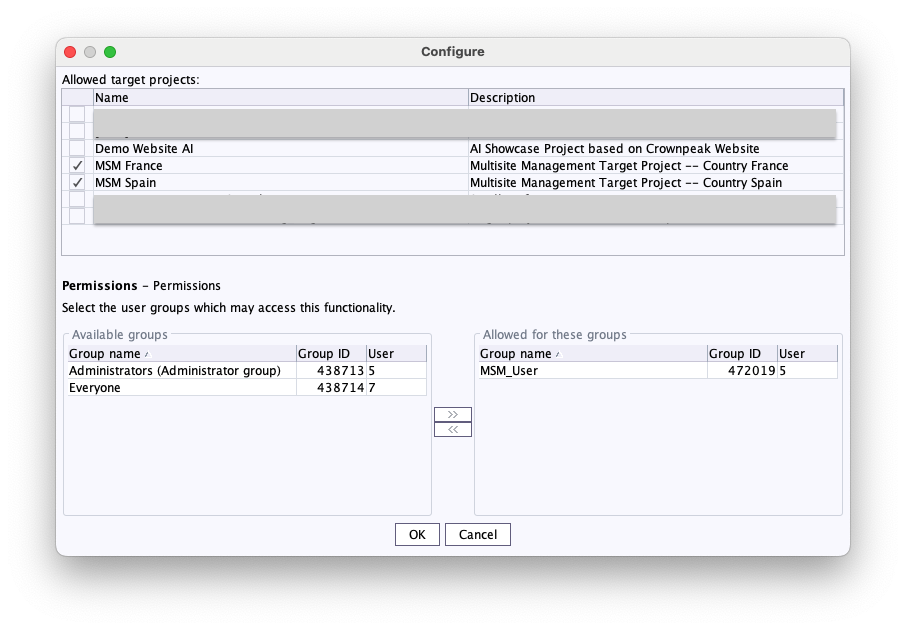
At the start of the MSM application, it is checked whether the user has permission to access each project defined as a possible target project for the master project. If the user does not have permission for at least one project, the MSM application will not start and will display an appropriate error message.
The behavior regarding the restriction of target projects has changed.Previously: No project was explicitly selected, so all active projects on the server are available as potential target projects.
New: If no project has been explicitly selected, there is also no active project on the server available as a possible target project. This means that the target projects must now be defined intentionally. By default, no possible target projects are defined.
Overview
| ID | Description | Categories |
|---|---|---|
| CORE-12817 | With the new option “Import new users”, it can be controlled during project import whether new users should be imported. Further information can be found in chapter “Administration: Project import: Import new users”. |
Server Administrator |
| CORE-13649 | Evaluation of the permissions in Multisite Management |
Multisite Management |
| CORE-15027 | If the target project has more languages than the source project, there may be incorrect behavior when transporting language-dependent preset values using ContentTransport or external synchronization. |
Content Transport, External synchronization |
| CORE-15131 | In the AWS S3 deployment module, attempts are now made to retry failed calls to the CloudFront invalidation multiple times. |
AWS S3 Deployment |
| CORE-15458 | When displaying the usages of referenced objects (e.g., media), there may have been a misrepresentation if the table template used was deleted. |
SiteArchitect |
| CORE-16161 | When duplicating a project in the ServerManager, the project components defined in the source project are now transferred correctly. |
ServerManager |
| CORE-16168 | A problem with updating link editor content using ContentTransport has been fixed when the target project has more languages than the source project. |
Content Transport |
| CORE-16287 | The main project can now be used as a media pool project in branch projects. The adjustment of the corresponding “remote project configurations” for the respective branch project is now automatically done by the Bamboo plans when a corresponding YAML configuration is available. |
Template Development |
| CORE-16296 | MSM: Release for the Back Transport functionality |
Multisite Management |
| CORE-16444 | With the current FirstSpirit version, the date can be compared with the current time during rule evaluation. Example: |
Dynamic Forms |
| CORE-16515 | The display of the list of available target projects has been optimized. |
Multisite Management |
| CORE-16598 | Several Java classes from the gom package are now part of the FirstSpirit Access API. |
FirstSpirit API |
| CORE-16637 | With the current FirstSpirit version, extended session information for analysis can now be downloaded. Further information can be found in chapter “Administration: Extended session information”. |
Server Administrator |
| CORE-16666 | For the integration of OpenAI with FirstSpirit, support for Azure OpenAI has been added. Further information can be found in chapter “AI-powered tools: Support for Azure OpenAI”. |
AI-powered tools |
| CORE-16690 | When transporting outdated (deprecated) |
Content Transport, External synchronization |
| CORE-16696 | The pre-installed prompts “Shorten” and “Improve” have been optimized. |
AI-powered tools, Analyze Assistant, Content Assistant |
| CORE-16698 | In the Analyze Assistant, project administrators can now manage the list of possible operations. For more information, see the documentation for Analyze Assistant. |
AI-powered tools |
| CORE-16704 | FirstSpirit Content Experience Tools: Latest module versions |
FirstSpirit Content Experience Tools (CXT) |
| CORE-16786 | In the ServerMonitoring, there were issues on certain subpages when using Apache Tomcat 10.1.32+. |
ServerMonitoring |
| CXT-3409 | In OCM 3.0, a |
FirstSpirit Omnichannel Manager |
| CXT-3411 | The default prompt “Translate” now has an option to select the target language. |
AI-powered tools |
| CXT-3412 | Rules with the use of the global properties |
ContentCreator, Dynamic Forms |
| CXT-3413 | When uploading files within a form dialog (e.g., via a properly configured FS_BUTTON), issues may occur. |
ContentCreator, Media |
| CXT-3421 | When copying DOM content via a ValueService or FS_BUTTON, the text from embedded links was not correctly retained. |
ContentCreator |
| CXT-3435 | When using the TranslationOperation and the automatic translation via a TranslationPlugin, DOMTABLE content could not be translated. |
ContentCreator |
Deprecations
| Functionality | Deprecated as of | Will be removed / Was removed as of |
|---|---|---|
| Input component CMS_INPUT_CONTENTAREALIST | 5.2R3 | |
| Input component CMS_INPUT_CONTENTLIST | 5.2R3 | |
| Input component CMS_INPUT_FILE | 5.2R3 | |
| Input component CMS_INPUT_LINKLIST | 5.2R3 | |
| Input component CMS_INPUT_OBJECTCHOOSER | 5.2R3 | |
| Input component CMS_INPUT_PAGEREF | 5.2R3 | |
| Input component CMS_INPUT_PICTURE | 5.2R3 | |
| Input component CMS_INPUT_TABLIST | 5.2R3 | |
| FirstSpirit Access API: de.espirit.firstspirit.agency.GroupsAgent | 5.2R15 | |
| FirstSpirit Access API: delete (de.espirit.firstspirit.access.AccessUtil) | 5.2R18 | |
| FirstSpirit Access API: release (de.espirit.firstspirit.access.AccessUtil) | 2018-06 | |
| FirstSpirit Access API: getLastLoginAsDate (de.espirit.firstspirit.agency.UserStatisticsAgent) | 2018-07 | |
| FirstSpirit Access API: remainingDurationOfCurrentStageInMillis (de.espirit.firstspirit.server.MaintenanceModeInfo) | 2018-07 | 2025-13 |
| FirstSpirit Access API: getStartingTimeOfStageAsDate (de.espirit.firstspirit.server.MaintenanceModeInfo) | 2018-07 | 2025-13 |
| FirstSpirit Access API: getSelectedWebserverConfiguration (de.espirit.firstspirit.access.serverConfiguration) | 2018-10 | 2025-13 |
| FirstSpirit Access API: setSelectedWebserverConfiguration (de.espirit.firstspirit.access.serverConfiguration) | 2018-10 | 2025-13 |
| FirstSpirit Access API: getSelectedWebServer (de.espirit.firstspirit.access.project.Project) | 2018-10 | 2025-13 |
| FirstSpirit Access API: setSelectedWebServer (de.espirit.firstspirit.access.project.Project) | 2018-10 | 2025-13 |
| FirstSpirit Access API: getLostAndFoundStoreNodes(); (de.espirit.firstspirit.feature.FeatureInstallResult) | 2018-10 | |
| FirstSpirit Access API: getDeletedStoreNodes(); (de.espirit.firstspirit.feature.FeatureInstallResult) | 2018-10 | |
| FirstSpirit Access API: de.espirit.firstspirit.access.store.Previewable | 2019-01 | |
| WebSphere Application Server support for FirstSpirit | 2019-05 | |
| Database layer for Oracle Database 11g/12c | 2020-12 | 2025-05 |
| FirstSpirit Access API: redirectTemplateLogToDefaultLog() (Interface RenderingAgent.Renderer) | 2021-05 |