
Release Notes
1 Administration
1.1 Browser compatibilities
FirstSpirit is an enterprise content management system that was designed for use in complex IT landscapes and which supports numerous operating systems, Java Runtime Environments, and databases. To guarantee high-quality software and ensure that FirstSpirit can run in all supported configurations, regular quality assurance tests are carried out. However, the large number of third-party components that are supported, the short release cycles, and the combination and configuration options for third-party components mean that testing is extremely complex.
As a result, FirstSpirit generally supports the latest version of a third-party component. These are regularly tested by e-Spirit AG and measures are taken to rectify any errors or incompatibilities. When looking at and selecting third-party components to be supported for operation with FirstSpirit, e-Spirit also gives special consideration to components that cover the largest possible market shares and that are used successfully by a large number of customers.
This includes the browsers that are used to access the FirstSpirit web apps: Because Microsoft Internet Explorer has been gradually replaced by Microsoft Edge, First Spirit will no longer support Microsoft Internet Explorer in future. Instead, Google Chrome and Microsoft Edge Chromium are recommended. The development of the new ContentCreator was already strongly focused on these two browsers: The new ContentCreator is therefore no longer compatible with Microsoft Internet Explorer for technical reasons.
Cessation of support for Microsoft Internet Explorer for all FirstSpirit web apps is planned for FirstSpirit 2020-07. We also plan to retire the “old” ContentCreator with this release.
The point of reference is always the latest version of the Chrome browser available on the operating system in question. Regular tests are performed on this browser and steps are taken to eliminate errors based on error messages.
Browsers that are similar to Chrome (such as Apple Safari) are also supported and tested, but functionality may be restricted (e.g., limited SVG support).
An overview of planned browser compatibilities from FirstSpirit 2020-07:
Recommended browsers/reference:
- Google Chrome
- Microsoft Edge
Compatible browsers:
- Mozilla Firefox
- Apple Safari (subject to restrictions)
Not compatible:
- Microsoft Internet Explorer
- Opera and others
The “FirstSpirit Technical Data Sheet” has been adapted accordingly (https://docs.e-spirit.com/odfs/edocs/admi/technical-requi/index.html).
1.2 The FirstSpirit session cookie now supports the attribute SameSite
FirstSpirit uses several standard web applications (fs5root, fs5webedit, fs5webmon, fs5preview, fs5staging) as well as possibly additional, project-local web applications (fs5webedit_PROJECTID and fs5preview_PROJECTID). For authentication of the web applications (WebAuthentication) on the FirstSpirit server, a technology is used which uses randomly generated session cookies. Through the use of session cookies, the user's login data only has to be transferred once from the web browser to the FirstSpirit server. After the successful login, the web browser uses exclusively the unique session cookie, which is valid for a limited period of time, and which is then sent from the web browser to the server with every further server enquiry, instead of the login data, in order to authenticate the user there.
The session cookie is an integral part of the Servlet API and is used for many other use cases besides authentication.
Many browsers (including Chrome 80) have massively restricted third-party cookies since the beginning of the year. All cookies that do not have the attribute SameSite=None are automatically restricted to first-level domains. This behavior leads to problems when FirstSpirit web applications are integrated into other web applications (e.g. as IFrame). In this case the new standard browser behavior ensures that the FirstSpirit session cookies are blocked by the browser and that the users in the embedded FirstSpirit web application can no longer be authenticated via the session cookie, for example.
For this use case with the current FirstSpirit release the session cookie can be extended by the attribute SameSite=None. SameSite is a standard that is intended to prevent cookies from being automatically sent by the browser with so-called cross-site requests and thus offers protection against cross-site request forgery (CSRF). In addition to this security aspect, the SameSite attribute allows you to define which cookies can be read in which context.
SameSite attribute requires a “Secure” flag. Cookies with SameSite=None without a “Secure” flag are rejected by the browser. The “Secure” flag defines that a cookie is always sent over a secure HTTPS connection.The value for the FirstSpirit Session Cookies can be set via the configuration file fs-server.conf, both globally via the parameter servletSessionCookieSameSite and individually for specific WebApp paths, e.g. servletSessionCookieSameSite.fs5webmon=None for FirstSpirit ServerMonitoring. A WebApp-specific configuration overwrites the global setting servletSessionCookieSameSite for this WebApp path.
In the default configuration (of the fs-server.conf config file) no global value is set for servletSessionCookieSameSite.
# Servlet engine session cookie SameSite attribute. If left empty, the SameSite
# attribute for the session cookie is not
# set and the servlet engine defaults apply.
# Supported values: None, Strict, Lax
servletSessionCookieSameSite=
# Servlet engine session cookie SameSite attribute for a specific webapp context path.
# 'ROOT' is the reserved name for the root webapp context path.
# servletSessionCookieSameSite.ROOT=None
# servletSessionCookieSameSite.fs5webmon=None
# servletSessionCookieSameSite.webappContextPath=None
Possible values for the SameSite attibute:
- Strict:
- The session cookie is only sent in the first-party context (i.e. only if the page for the cookie matches the URL in the browser) and
- not together with cross-site requests initiated by third-party websites.
- Lax:
- The session cookie is only sent in the first-party context (i.e. only if the page for the cookie matches the URL in the browser) and
- only together with cross-site requests that are considered “safe”. This applies to secure HTTP methods (GET, HEAD, OPTIONS, and TRACE) and top-level navigation (actions that cause the URL in the browser address bar to change, such as links).
SameSite=Laxis the default setting in modern browsers.
- None:
- The session cookie is sent in all contexts (i.e. also in the third-party context), i.e. sending is allowed across origins.
- In this setting, the attribute does not provide any additional protection against CSRF. However, this setting can be useful if a FirstSpirit web application is to be integrated into another web application.
- Value not set (FirstSpirit default):
- If the value is not set, the default settings of the Servlet Engine are used.
- If no value is configured here for the
SameSiteattribute, the browser default setting is used. Modern browsers interpret an unset SameSite attribute asSameSite=Lax.
fs-server.conf configuration file. In most cases the default setting covers both security aspects (good protection against cross-site request forgery) and user concerns (good user experience).Only in exceptional cases (e.g. FirstSpirit as an embedded web app) a change is necessary.
2 ContentCreator
2.1 Workflows: Selecting a deadline time
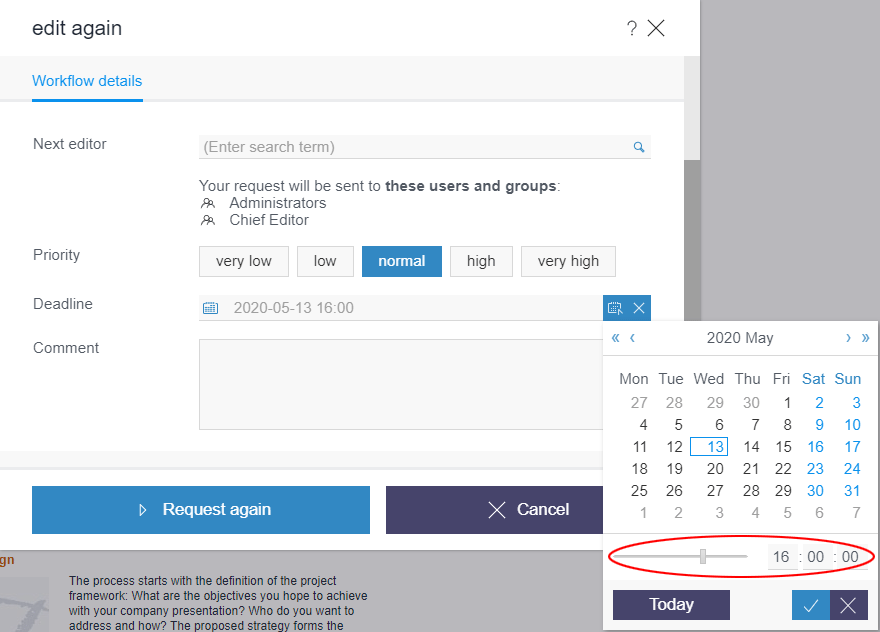
For workflows, a deadline can be specified by which the entire workflow must be completed. The deadline, which can be selected by the editor, is shown to the next editor in the corresponding action window. Furthermore, the deadline is shown in the report area for tasks.
Previously, it was only possible to select a date as the deadline. In the current release, a time can also be selected.
2.2 User prompting/UX: Display of check boxes, radio buttons and toggles
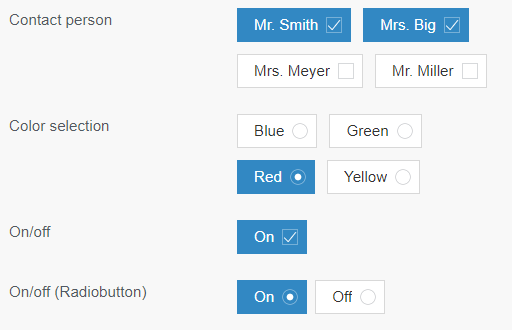
The input elements “check box” (CMS_INPUT_CHECKBOX), “radio button” (CMS_INPUT_RADIOBUTTON) and “toggle” (CMS_INPUT_TOGGLE) allow the selection of values specified by the project developer. “Radio buttons” and “toggles” allow the selection of one value; a “check box” allows the selection of multiple values. With “radio buttons” and “toggles”, activating a field deactivates any previously selected field; with a “check box”, this is not the case.
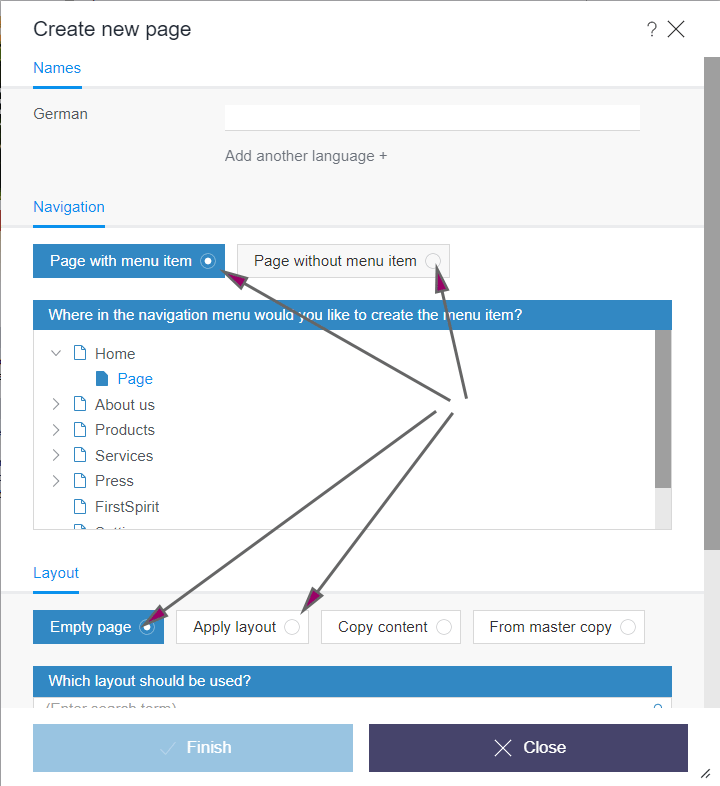
In the new FirstSpirit ContentCreator, these input elements are now once again easier to distinguish from one another. The editor can more easily see the status of these input elements in a form and how they are operated: “Radio buttons” are now represented by circles, while “check boxes” are boxes.
This new visualization also affects ContentCreator dialogs, such as the “Create new page” dialog:
2.3 Tables: Vertical alignment of content in cells (“valign”)
The vertical alignment can now be determined for content in tables (CMS_INPUT_DOM / “Inline tables” and CMS_INPUT_DOMTABLE) in FirstSpirit ContentCreator. To do this, the new attribute valign can be used in a similar way to the existing attribute align (for horizontal alignment). The predefined keywords for the different alignments are
- top
- middle (default setting)
- bottom
1) Example – CMS_INPUT_DOM / Inline tables:
Style templates can be used to define table layout properties for inline tables, e.g., background color, text alignment, etc. The form for entering vertical text alignment in a style template (e.g., in the “standard style template”) must contain the identifier valign.
Example:
<CMS_INPUT_RADIOBUTTON name="valign" gridHeight="1" useLanguages="no">
     <ENTRIES>
       <ENTRY value="top">
         <LANGINFOS>
           <LANGINFO lang="*" label="Top"/>
           <LANGINFO lang="DE" label="Oben"/>
         </LANGINFOS>
       </ENTRY>
       <ENTRY value="middle">
         <LANGINFOS>
           <LANGINFO lang="*" label="Centre"/>
           <LANGINFO lang="DE" label="Zentriert"/>
         </LANGINFOS>
       </ENTRY>
       <ENTRY value="bottom">
         <LANGINFOS>
           <LANGINFO lang="*" label="Bottom"/>
           <LANGINFO lang="DE" label="Unten"/>
        </LANGINFOS>
       </ENTRY>
     </ENTRIES>
     <LANGINFOS>
       <LANGINFO lang="*" label="Vertical alignment"/>
       <LANGINFO lang="DE" label="Vertikale Ausrichtung"/>
     </LANGINFOS>
</CMS_INPUT_RADIOBUTTON>
Display in ContentCreator:
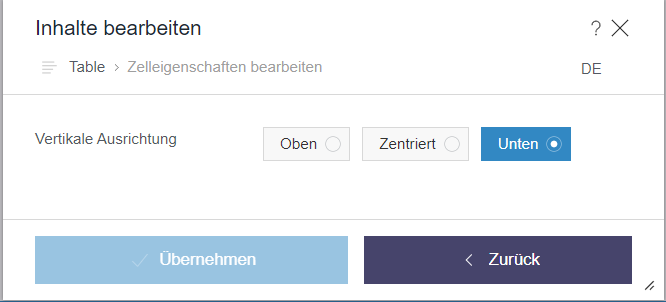
The alignment that is defined by the editor in the corresponding dialog “Edit cell properties” can be output in the HTML template set of the style template, for example, and therefore in the preview and on the generated page, e.g.,
...
style='
   ...
   $CMS_VALUE(if(!valign.isEmpty, "vertical-align:" + valign + ";"))$
   ...
      '
2) Example – CMS_INPUT_DOMTABLE:
For CMS_INPUT_DOMTABLE, cell properties are defined by the editor via a dialog that can be configured via the attribute propertyConfig. The vertical alignment of content can also be activated via the keyword valign, e.g.,
<CMS_INPUT_DOMTABLE name="table"
         propertyConfig="
         valign:Vertical alignment:
           [top:Top|middle:Middle|bottom:Bottom],
         align:Horizontal alignment:
           [left:Left|center:Center|right:Right]">
     <LANGINFOS>
       <LANGINFO lang="*" label="Table"/>
       <LANGINFO lang="DE" label="Tabelle"/>
     </LANGINFOS>
</CMS_INPUT_DOMTABLE>
Display in ContentCreator:
.png)
The properties of a cell of a CMS_INPUT_DOMTABLE, defined by the editor, can be evaluated and output via the HTML template set of the standard format template “Table cell”. The system object #cell is available for this purpose.
Example:
<td..
   ...
   $CMS_VALUE(if(!#cell.valign.isEmpty, " valign='" + #cell.valign + "'"))$
   $CMS_VALUE(if(!#cell.align.isEmpty, " align='" + if(#cell.align == "block",
        "justify", #cell.align) + "'"))$
   ...
</td>
Note: There are no plans to introduce corresponding support for the attribute valign for FirstSpirit SiteArchitect.
For more information, see
- Templates for inline tables: https://docs.e-spirit.com/odfs/templates-basic/composition-tem/inline-tables/index.html
- CMS_INPUT_DOMTABLE: https://docs.e-spirit.com/odfs/template-develo/forms/input-component/domtable/index.html
#stylesystem object: https://docs.e-spirit.com/odfs/template-develo/template-syntax/system-objects/style/index.html#cellsystem object: https://docs.e-spirit.com/odfs/template-develo/template-syntax/system-objects/cell/index.html
3 External Synchronization / Content Transport
External Synchronization and Content Transport: Improved support for shared access to a database
Using the “FirstSpirit External Synchronization” and “FirstSpirit Content Transport” mechanisms, database content (datasets) and the associated database structures (schemas, tables, columns) of a FirstSpirit project (source project) can be exported and imported into other FirstSpirit projects (target projects). The dbnames of column names and tables are recalculated during synchronization. This behavior can, under the following conditions, lead to the problem that columns and tables in the target projects cannot be found in the database:
- the FirstSpirit schemas of the participating projects reference the same database tables (and do not point to their own database tablespaces) and
- the
dbnamesdo not match the automatically calculateddbnames
For this special use case an additional mapping file (Mapping.xml) can now be used when exporting and importing database schemas. In this file the database names of the source project are stored together with FirstSpirit's own unique identifiers (UUIDs), e. g.:
<xs:gid dbName="j_categories_column_x" uuid="66843bbe-da0d-46e3-a136-76bd93d782bb"/>
<xs:gid dbName="j_categories_column_y" uuid="4ba29641-26af-4edd-bac0-5a352913974d"/>
...
Using this unique assignment, it is now possible to synchronize the database schemas of read-only-connected databases (“No Schema Sync”) via “External Synchronization” or “Content Transport” as follows:
- If a schema is changed in the source project and synchronized with other FirstSpirit projects using one of the two mechanisms, the names of database tables and database columns are transferred from the source project to the target projects.
- If a new database table or database column is created in the target project, the corresponding
dbnameof the source schema is now preferred.
When using “FirstSpirit External Synchronization” the mapping file (Mapping.xml) can be added to the export file via a new option in the interface ExportOperation.SchemaOptions (setExportGidMapping=true) as follows:
ExportOperation exportOperation = ... // get the export operation via agent;
ExportOperation.SchemaOptions schemaOptions = exportOperation.addSchema(schema);
schemaOptions.setExportGidMapping(true);
ExportOperation.Result result = exportOperation.perform(...);
The previous export format did not have to be extended for the new functionality. The export format in version 3.2 can still be used.
The command line tool “FSDevTools” will only support the new option from version 2.6 on. This version is not yet available. By default, no mapping file is created when using “FSDevTools” (setExportGidMapping=false).Without a mapping file (default behavior when using “FirstSpirit External Synchronization”) the dbnames of the column names and tables are recalculated as before during synchronization. For the regular use cases there will be no deviation during recalculation, so that the use of a mapping file is not necessary.
When using the “FirstSpirit Content Transport” functionality, the mapping file (Mapping.xml) is automatically generated and used.
4 FirstSpirit Content Experience Tools (CXT)
4.1 Latest module versions
FirstSpirit 2020-05 supports the following module versions for “FirstSpirit Content Experience Tools”:
| Module / file name | Version number |
FirstSpirit CXT DAP Bridgedataservice-[version].fsm | 1.28 |
FirstSpirit CXT FragmentCreatorfragment-creator-[version].fsm | 2.4 |
FirstSpirit Fragment DAPfragmentdap-[version].fsm | 1.25 |
FirstSpirit Media DAPmediadap-[version].fsm | 1.23* |
FirstSpirit Markdown Editormarkdown-editor-[version].fsm | 1.21* |
FirstSpirit Tagging Editortagging-editor-[version].fsm | 1.21 |
FirstSpirit CXT FragmentCreator - CaaS Integrationcaas-integration-[version].fsm | 1.21 |
* These modules require FirstSpirit 2020-03 or higher from this version.
4.2 Extension of MicroApps API: Embedding of MicroApps into a page ("widget")
Previously, MicroApps in MicroApp Framework could be called up as modal dialogs via the MicroApps API (CxtMicroApps.getButtons(context)).
In the current release, the MicroApps API has been expanded to include the method CxtMicroApps.embedMicroApp, which can be used to embed MicroApps directly into an HTML page (“widget”).
The API also allows handlers to be added and used, and enables responses to events.
Note: The API is currently intended for internal use only and is being tested internally and by partners. In the future, it will also be made available to external customers.
4.3 Fragment DAP: filter fragments in report by category
Previously, the Fragment DAP <SOURCE name="FirstSpiritFragmentAccess/FSFAConnector"> report allowed to filter for fragments based on a remote project filter and search terms. With this release, a new filter adds the option to limit the listed fragments based on their category.
The default filter settings are unrestricted, which allows to view all available fragments from every remote project.
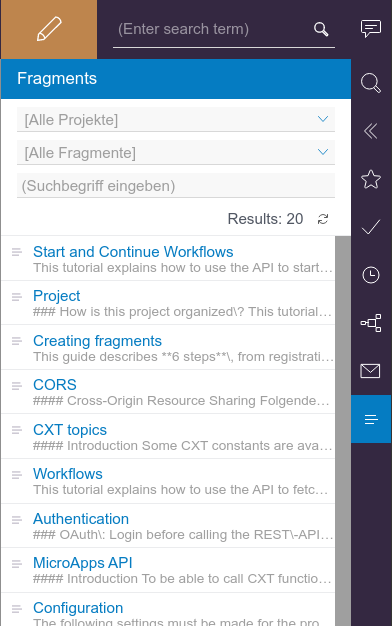
Fragment DAP report with no filters applied
In addition to the previous functionality that allowed searching for search terms or limiting the list to fragments from a specific project, the new drop-down menu for category filtering is added. It contains all categories of the remote projects and selecting any category will filter for fragments that belong to that category.
In case that the same category name is available in more than one project, selecting that category filter displays all fragments belonging to that category from any project. To filter the results, a specific project or search terms be applied, just as before.
4.4 FragmentCreator: Revision of the design (input fields)
As part of the revision and merging of the technical basis for FirstSpirit ContentCreator and FragmentCreator, the graphic interface of FragmentCreator was revised and adapted to the design principles of ContentCreator.
The design update does not involve any functional changes for editors or developers. All functions in the interfaces are available in principle at the known positions. Neither on the development side nor on the operational side are there any costs associated with the design update.
The modifications of the current release primarily affect the input fields for text and selection as well as the tags (CMS_INPUT_TEXT, CMS_INPUT_CHECKBOX, CMS_INPUT_COMBOBOX, CMS_INPUT_RADIOBUTTON, FS_TAGGING and others).
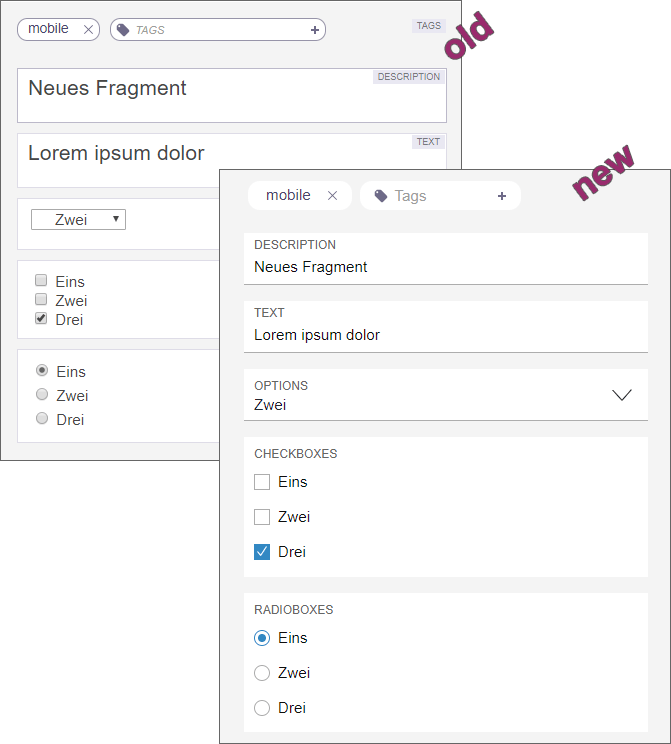
The adaptation of the documentation with regard to the design is successive, therefore the presentation in the documentation potentially no longer corresponds to the current software status.
5 Module Development, Scripts, API
5.1 Global module resources: Improved stability when resolving dependencies
Module resources have a specific scope. This means that the corresponding jars and directories can either only be reached within the module (locally within the module) or server-wide (globally). Global resources (scope=“global”) are also available to other modules on the server. However, all classes are in a namespace and each class can therefore only exist once. It is for this reason that different versions of a class cannot be used.
Classloading and versioning of resources: If the same global resources are provided by several modules in different versions, only one of these global resources can be used by all modules. To prevent conflicts between different modules, the classes are – as far as possible – loaded via individual module Classloaders that are separated from each other. In the case of global resources, one of these classes is then made available via the combined, global Classloader.
If names are identical, an attempt is made to ascertain whether resources are compatible with one another. In order to do this, the unique identifier (“name”) and the version of the resource supplied (“version”) are required in the resource definition (module.xml) and it is necessary to specify the minimum compatible version (“minVersion”) (optional) and the maximum compatible version (“maxVersion”), e.g.:
<web-resources>
 <resource name="..." version="4.4" minVersion="4.4" maxVersion="4.5.2">
    lib/httpclient-compatibility.jar
 </resource>
</web-resources>
Previous behavior
Previously, it was not possible to ensure that the latest version of a global resource was always used. Resources locally within a module were loaded via the relevant module Classloader and one of these resources was then made available via the combined global Classloader. Although this process ensured that the versions were compatible with the other modules (based on “name”, “maxVersion”, and “minVersion”), the latest version (i.e., the version with the highest version number) was not always used.
This behavior could cause problems when modules were updated; for example, because services that access these global resources no longer functioned with a different version.
New behavior
The latest FirstSpirit release ensures that in normal operation, the latest version of a global resource is always used (i.e., the version with the highest version number), even if these were previously loaded via various module Classloaders. If several modules provide the same version of a global resource, in this case, too, the global resource is always loaded from the same module. The compatibility of the versions with the other modules is still taken into account (based on “name”, “maxVersion”, and “minVersion”).
The following applies: If several modules provide the same global resource, and if the versions are compatible with each other, the version with the highest version number is always used.
This increases the stability when it comes to resolving dependencies after a module update. There is now a greater probability that modules containing global resources which are used by different services will remain functional after a module update. In isolated cases, however, restarting the FirstSpirit Server may still be necessary.
Additional documentation:
5.2 JSON function: Improved support for FS_REFERENCE
In the latest FirstSpirit release, the JSON function also supports referenced objects of the input component FS_REFERENCE.
No new version of the JSON output format will be published for this change; the changes will be made in the current format version 1.1.
Overview of changes in format version 1.1
The input component FS_REFERENCE is used to record any reference. The type of referenced object is not predetermined: References to media (images and files), page references, folders, sections on the current page, and many other objects can be defined.
Using the JSON function, the referenced FirstSpirit objects of the input component FS_REFERENCE can now be transferred to a JSON object structure (previously the referenced objects were not rendered). In this process, the object itself is not rendered; the function only renders the data that is required for referencing.
Example: An input component of type FS_REFERENCE refers, via the sections=“only” mode, to the sections on the current page.
The output of the page reference (or the page) in format 1.1 therefore contains the new area “section”: which holds data on the referenced sections (“fsType”: “Section”)
"st_reference_pageref": {
   "fsType": "FS_REFERENCE",
   "name": "st_reference_pageref",
   "value": {
      "fsType": "PageRef",
      "name": "test",
      "identifier": "c88bc52c-aab9-4f66-870c-1354ca73fcb1",
      "uid": "test",
      "uidType": "SITESTORE_LEAF",
      "url": "http:\/\/www.myurl.de\/external_sync_DE\/test.json",
      "section": {
            "fsType": "Section",
            "name": "cms_input_text",
            "displayName": "CMS_INPUT_TEXT",
            "identifier": "c56cbc16-e70d-426d-af0f-16de05578922"
         }
      }
   }
}
Additional documentation:
Notes on the format version
The format version can be explicitly configured via the JSON settings:
$CMS_SET(#global.json.formatVersion, "1.1")$
If an unchanged JSON output is required outside the framework of FirstSpirit updates, the format version should be explicitly set in the project settings under Global Settings.
If the format version is not explicitly set, the latest JSON format version (1.1) will always be used.
5.3 Creating a pop-up dialog as a warning message
Pop-up dialogs created using the interface RequestOperation (FirstSpirit Developer-API, Package de.espirit.firstspirit.ui.operations) can now also be created as warning messages via Enum RequestOperation.Kind (FirstSpirit Developer-API, Package de.espirit.firstspirit.ui.operations):
Example:
import de.espirit.firstspirit.agency.OperationAgent;
import de.espirit.firstspirit.ui.operations.RequestOperation;
import de.espirit.firstspirit.ui.operations.RequestOperation.Kind;

opAgent = context.requireSpecialist(OperationAgent.TYPE);
if (opAgent != null) {
      RequestOperation requestOp = opAgent.getOperation(RequestOperation.TYPE);
      requestOp.setKind(Kind.WARN);
      requestOp.setTitle("Whoa, there!");
      requestOp.perform("Once you delete this content, there's no getting it back.
         Make sure you want to do this!");
  } else {
   context.logInfo("...");
  }
Possible types (RequestOperation.Kind):
- WARN (new)
- INFO
- QUESTION
- ERROR
In SiteArchitect and ServerManager, WARNING-type pop-up dialogs are displayed with an exclamation mark, and INFO-type pop-up dialogs are displayed with an “i” symbol.
In ContentCreator, there is no visual difference between WARNING-type and INFO-type pop-up dialogs. Both types are displayed in exactly the same way with an exclamation mark.
5.4 Improved configuration options for user-specific URLs (AdvancedUrlCreator)
FirstSpirit provides API interfaces and a reference implementation (“Advanced URL Creator”) in order to integrate user-specific path strategies for URL generation in FirstSpirit. All configuration parameters (including the standard parameters evaluated by FirstSpirit as well as user-defined parameters) must either be defined via a schedule script that is executed before the actual generation schedule or via the configuration settings in the module.xml file.
The FirstSpirit framework evaluates some predefined standard parameters directly. These include:
- useWelcomeFileNames (for configuring start page references)
- stripWelcomeFileNames (removes the extension
/index.*from the Advanced URL)
For more standard parameters, see the FirstSpirit manual: Standard configuration parameters.
The following applies to all parameters: The capitalization of parameters is not relevant, i.e., useWelcomeFileNames, USEWELCOMEFILENAMES, or usewelcomefilenames are all valid designations for the same parameter.
The parameters “useWelcomeFileNames” and “stripWelcomeFilenames”, which are used for the configuration of user-specific path strategies for URL generation, offer new configuration options in the latest FirstSpirit release.
Change relating to the parameter “useWelcomeFileNames”
The “useWelcomeFileNames” parameter can be used to configure start page references.
context.setProperty("#urlCreatorSettings",
Collections.singletonMap("usewelcomefilenames", "true"));
Previous behavior:
Possible values:
trueoryesor value not set (default value)falseorno
true or yes (default value): If the parameter is passed with the value “true” (default value), the file name index.* is always provided for page references which are marked as the start page of a folder in the Site Store when an Advanced URL is generated (regardless of the display name or the file name from the properties dialog).
In standard URL generation mode,
../en/startpage/mithras_home.htmlbecomes the following in advanced mode with “useWelcomeFileNames” (true):
../Startpage/index.htmlFor page references which are not marked as start pages, on the other hand, the display name continues to be used when the Advanced URL is generated.
false or no: If the parameter is passed with the value “false”, regardless of whether a page reference is a start page or not, the URLs are generated based on the display name of the page reference (with the blank space being replaced by a “-” character):
../Startpage/Mithras-Homepage.htmlNew behavior:
Possible values:
trueoryesor value not set (default value): Only the first HTML template set uses Welcomefilenames.falseorno: No Welcomefilenames are used.all: All HTML template sets use Welcomefilenames. (This type of configuration can lead to identical URLs, see (*)).- Comma-separated list of template sets: All listed channels use Welcomefilenames. (This type of configuration can lead to identical URLs, see (*)).
true or yes: If the parameter is passed with the value “true” (default value), the file name index.* is provided for page references which are marked as the start page of a folder in the Site Store when an Advanced URL is generated (regardless of the display name or the file name from the properties dialog) – but this only applies to the first HTML template set (e.g., “html”), whereas for all other template sets (e.g., “php”) the URLs are still generated based on the display name for the page reference (with the blank space being replaced by a “-” character).
../Startpage/index.htmlfalse or no: If the parameter is passed with the value “false”, regardless of whether a page reference is a start page or not, the URLs are generated based on the display name of the page reference (with the blank space being replaced by a “-” character):
../Startpage/Mithras-Homepage.htmlall: If the parameter is passed with the value “all”, the file name index.* is provided for page references which are marked as the start page of a folder in the Site Store when an Advanced URL is generated (regardless of the display name or the file name from the properties dialog) – for all HTML template sets contained in the project. (This type of configuration can lead to identical URLs, see (*)).
List of template sets: If a list of template sets is passed to the parameter, the file name index.* is provided for page references which are marked as the start page of a folder in the Site Store when an Advanced URL is generated (regardless of the display name or the file name from the properties dialog) – for all HTML template sets that are included in the list. The name of the template set is given here (“template set name”: see FirstSpirit product manual under Template sets for a project). (This type of configuration can lead to identical URLs, see (*)).
Change relating to the parameter “stripWelcomeFileNames”
The “stripWelcomeFileNames” parameter is only relevant if the URL path strategy used also uses the “useWelcomeFileNames” configuration parameter.
The “stripWelcomeFileNames” parameter can be used to remove the “/index*” extension added by “useWelcomeFileNames” from the Advanced URL (but not from the file name under which the page is stored in the file system).
factorySettings = new HashMap();
factorySettings.put("usewelcomefilenames", "true");
factorySettings.put("stripwelcomefilenames", "true");
context.setProperty("#urlCreatorSettings", factorySettings);
Previous behavior:
Possible values:
trueoryesor value not set (default value)falseorno
If the parameters “useWelcomeFileNames” and “stripWelcomeFileNames” are passed with the value “true” (default value), the display name of the start page is removed from the Advanced URL for page references which are marked as the start page of a folder in the Site Store.
In standard URL generation mode,
../en/startpage/mithras_home.htmlbecomes the following (in the file system) in advanced mode with “useWelcomeFileNames” and “stripWelcomeFileNames”:
../Startpage/index.htmland the Advanced URL becomes:
../StartpageAs a result, although the start page of the “Startpage” folder is created in the file system with the extension “/index.*”, it can (if the web server has been configured accordingly) be called via the “/Startpage/” URL.
If the project contains more than one template set, “stripWelcomeFileNames” only removes “index.{master extension}”. “Master extension” is the file extension from the first template set (usually “html”).
If the “stripWelcomeFileNames” parameter is passed with the value “false”, the extension “/index.*” is retained for all start page references both in the file system and in the Advanced URL.
New behavior:
Possible values:
trueoryesor value not set (default value): “/index.*” (usually “/index.html”) is shortened.falseorno: URL is not shortened- List of extensions: All listed extensions (e.g., “/index.html” and “/index.php”) are shortened.
true or yes: If the “stripWelcomeFileNames” parameter is passed with the value “true” (default value), the start page of the “Startpage” folder is created in the file system with the extension “/index.*”, but can (if the web server has been configured accordingly) be called via the “/Startpage/” URL.
false or no: If the “stripWelcomeFileNames” parameter is passed with the value “false”, the extension “/index.*” is retained for all start page references both in the file system and in the Advanced URL.
List of extensions: If a list of extensions is passed to the parameter, the extension “/index.*” is shortened for page references which are marked as the start page of a folder in the Site Store when an Advanced URL is generated and, with the right web server configuration, can be called via the relevant URL (in a similar way to the behavior with the value “true”). The names of the extensions are given here (“Target file extension:” see FirstSpirit product manual under Template sets for a project).
6 SiteArchitect / ContentCreator
Workflow: Changing the order of transitions on an activity
A workflow is a sequence of tasks that is completed according to a fixed, predefined structure. In FirstSpirit, this is made up of state, activities, and transitions. Transitions form the link between activities and states.
Project-specific workflows can be created using a graphical editor in FirstSpirit SiteArchitect (“Templates” / “Workflows”). Instances of these workflows can then be started in context on each element in a FirstSpirit project (SiteArchitect: context menu in the tree view / “Workflow” and in ContentCreator via the element state) or, if there is no context, using the FirstSpirit menu bar (“Tasks” / “Workflow” or in ContentCreator via “Actions”). Every instance of a workflow has to run according to the rules set in the workflow. For each activity, a dialog opens that offers the editor the option to advance the workflow by choosing a transition (via a button in the dialog).
In the latest FirstSpirit release, the order for displaying the transitions on an activity in a workflow can be configured.
The configuration is managed on the workflow in FirstSpirit SiteArchitect “(Templates” / “Workflows”) in the “State diagram” tab. If a manual activity is selected in the graphical editor, the new property “Transitions” will appear in the Properties view (right) under “General”. This will show all outgoing transitions for the selected activity. The transitions can be opened in a separate window via the

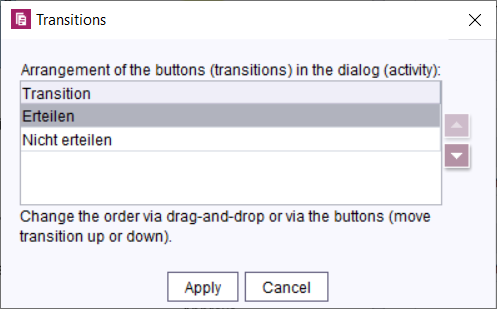
Changing the order of outgoing transitions
The changed order affects the display of buttons in the dialog.
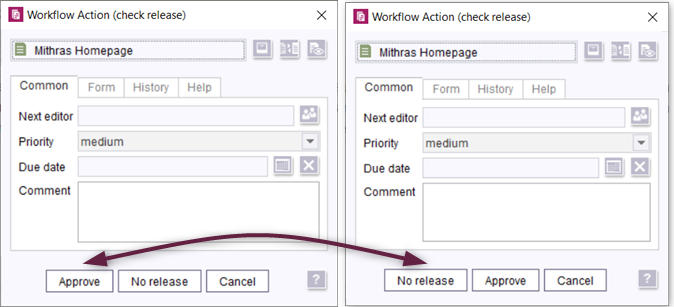
Changed order of transitions in dialog
Further information:
7 System
Updates to integrated third-party software
The following internal software has been updated in the latest FirstSpirit release:
ASM (library for analyzing and modifying Java byte code)
Updated from version 7.3.1 to version 8.0.1.
8 Template development
Workflows: More configuration options for context-based information in e-mails
In e-mails sent by workflows, special placeholders may be used that are automatically replaced by the system based on the context. For example, this can be used to include a link to preview the page on which the workflow is active or to provide a wide range of other information in the e-mail.
The placeholders can be configured based on the properties of an activity or a transition in the “E-mail” tab “(Template store”/“Workflows”/“State diagram”). When a transition or an activity is switched, e-mails containing the relevant information are then sent automatically.
In the current FirstSpirit release, the following options have been added to the placeholders:
%DATE_TIME%= due date (when set) with time. The format is localized, e.g., in the English version: “February 25, 1986 at 11:04:37 AM CET”.%HISTORY_SHORT%= History of the workflow instance showing only the last three entries in ascending order (e.g., entry: 8, 9, 10).%HISTORY_LAST%= History of the workflow instance showing only the last entry (e.g., entry: 10).%HISTORY_DESC%= History of the workflow instance showing all entries in descending order (e.g., entry: 10, 9, 8, 7, 6, 5, 4, 3, 2, 1).%HISTORY_SHORT_DESC%= History of the workflow instance showing only the last three entries in descending order (e.g., entry: 10, 9, 8).%LAST_USER_FULLNAME%= The last editor; the full name of the person is displayed (if this is not known, the login name is shown).%NEXT_USER_FULLNAME%= The names of the persons permitted to edit the workflow at the next stage. The full names are displayed (if these are not known, the login names are shown).
All previous placeholders are still supported:
%FIRSTspiritURL%= HTTP connection mode (standard mode; master language)%FIRSTspiritSOCKETURL%= SOCKET connection mode (master language)%PAGESTORE_PREVIEW_URL%= Preview URL for a page from the Page Store (master language)%SITESTORE_PREVIEW_URL%= Preview URL for a page reference from the Site Store (master language)%WF_NAME%= Name of the workflow%CREATOR%= The name of the person who created the workflow. The full name is displayed (if this is not known, the login name is shown).%LAST_USER%= The name of the person who last edited the workflow. The login name is shown.%LAST_COMMENT%= Last comment%NEXT_USER%= The names of the persons permitted to edit the workflow at the next stage. The login names are shown.%PRIORITY%= Priority%DATE%= Due date (only if set)%HISTORY%= History of the workflow instance showing all entries in ascending order (e.g., entry: 1, 2, 3, 4, 5, 6, 7, 8, 9, 10).%WEBeditURL%= WebEdit link to the preview of the page (master language)
Additional documentation:
Overview
| ID | Description | Categories |
|---|---|---|
| CORE-7678 | In e-mails sent by workflows, special placeholders may be used that are automatically replaced by the system based on the context. In the current FirstSpirit release, these placeholders have been expanded to include further configuration options. |
Developer, FirstSpirit Administrator, Release, Workflow |
| CORE-9572 | In the current release, a deadline time can now also be selected for workflows, in addition to the deadline date. Further information can be found in chapter “ContentCreator: Workflows: Selecting a deadline time”. |
ContentCreator, Editor, Workflow |
| CORE-10832 | In the latest FirstSpirit release, the order for displaying transitions on a workflow activity can be configured. The configuration is managed on the workflow in FirstSpirit SiteArchitect (“Templates” / “Workflows”) in the State diagram tab via the new property “Transitions”. The altered order affects the display of the buttons that are shown when a workflow is run through via the dialog box for the corresponding activity. |
ContentCreator, FragmentCreator, SiteArchitect, Template Store, Workflow |
| CORE-10834 | The configuration options for the parameters “useWelcomeFileNames” and “stripWelcomeFilenames”, which are used for the configuration of user-specific path strategies for URL generation, have been extended in the latest FirstSpirit release. |
Advanced URL, Developer, Generation, Migration, SiteArchitect |
| CORE-11462 | The “FirstSpirit External Synchronization” and “FirstSpirit Content Transport” mechanisms now provide an additional mapping file ( |
Content Transport, Database, Developer, External synchronization, FirstSpirit API |
| CORE-11711 | If the same global resources are provided by several modules in different versions, only one of these global resources can be used by all modules. The latest FirstSpirit release ensures that in normal operation, the latest version (i.e., the version with the highest version number) of a global resource is always used. This increases the stability when it comes to resolving dependencies after a module update. |
Developer, Isolated mode, Module development, Modules |
| CORE-12038 | With the current FirstSpirit release the FirstSpirit session cookie can be extended by the attribute |
FirstSpirit Administrator, Security, Server Administrator, ServerMonitoring |
| CORE-12068 | Pop-up dialogs created using the interface |
ContentCreator, Developer, FirstSpirit API, Module development, ServerManager, SiteArchitect |
| CORE-12085 | Using the JSON function, the referenced FirstSpirit objects of the input component FS_REFERENCE can now be transferred to a JSON object structure (previously the referenced objects were not rendered). In this process, the object itself is not rendered; the function only renders the data that is required for referencing. No new version of the JSON output format will be published for this change; the changes will be made in the current format version 1.1. |
Developer, Support for JSON |
| CORE-12129 | An error was rectified that could have meant that the Classloading for a service did not function as expected. |
Developer, FirstSpirit Administrator, Modules, Server Administrator |
| CORE-12171 | The vertical alignment of content in tables can now also be defined by the editor in FirstSpirit ContentCreator (CMS_INPUT_DOM / “Inline tables” and CMS_INPUT_DOMTABLE). |
ContentCreator, Developer, Editor |
| CORE-12229 | Internal software has been updated in the latest FirstSpirit release. Further information can be found in chapter “System: Updates to integrated third-party software”. |
FirstSpirit Administrator, Integrated software |
| CORE-12245 | When updating the “SpellService” module (file |
Modules, Spell Checker |
| CORE-12246 | An error was rectified which was causing the |
FirstSpirit Administrator, Modules, ServerManager, Services |
| CORE-12298 | A FirstSpirit server is installed via the installation archive |
Server Administrator |
| CXT-864 | The Fragment DAP report now features filtering fragments by category. |
Data Access Plug-In, Editor, FirstSpirit Content Experience Tools (CXT), Reports |
| CXT-1243 | FragmentCreator: Revision of the design (input fields) |
Developer, Editor, FirstSpirit Content Experience Tools (CXT), FragmentCreator, Input Components |
| CXT-1268 | In the current release, MicroApps can now be integrated directly into HTML pages using the MicroApps API (“widget”). |
Developer, FirstSpirit API, FirstSpirit Content Experience Tools (CXT), FragmentCreator, Module development |
| CXT-1315 | Browser compatibilities Further information can be found in chapter “Administration: Browser compatibilities”. |
ContentCreator, Developer, Editor, FirstSpirit Administrator, FirstSpirit Content Experience Tools (CXT), FragmentCreator |
| CXT-1339 | Nested frames are now prevented in the new ContentCreator: Instead of another instance of ContentCreator being opened in an existing ContentCreator window (due to a corresponding template configuration in the project), an empty page is now displayed. |
ContentCreator, Developer, Editor |
| CXT-1413 | In rare cases, data could not be edited because of timing problems. Instead, a loading animation was displayed. |
ContentCreator, Editor |
| CXT-1465 | Workflows can be started and advanced with the flyout menu via the element state in the right-hand menu bar. Due to a timing problem, an incomplete or outdated view was sometimes displayed. The available workflow actions are now displayed directly, without the need to manually update the page. |
ContentCreator, Editor |
| CXT-1466 | No datasets could be created or edited via FS_INDEX with DatasetDataAccessPlugin if this input component was used in a metadata form. |
Content Store, ContentCreator, Data Access Plug-In, Developer, Editor, Input Components, Template Development |
| CXT-1482 | For security reasons, access to the error page for the MicroApp Framework introduced in FirstSpirit 2020-04 (accessible via |
Debugging, Developer, FirstSpirit Administrator, FirstSpirit Content Experience Tools (CXT), Security |
| CXT-1490 | In the new ContentCreator, the user prompting/UX for the input elements “check box” (CMS_INPUT_CHECKBOX), “radio button” (CMS_INPUT_RADIOBUTTON) and “toggle” (CMS_INPUT_TOGGLE) have been improved. |
ContentCreator, Developer, Editor, Input Components |
| CXT-1525 | FirstSpirit Content Experience Tools: Latest module versions |
Developer, FirstSpirit Administrator, FirstSpirit Content Experience Tools (CXT), FragmentCreator, Modules |
| CXT-1528 | Temporarily, when using the “FirstSpirit CXT FragmentCreator - CaaS Integration” module when releasing fragments, the content was no longer transferred to live CaaS instances, but only to preview CaaS instances. |
Developer, FirstSpirit Content as a Service (CaaS), FragmentCreator, Release |
Deprecations
| Functionality | Deprecated as of | Will be removed / Was removed as of |
|---|---|---|
| Input component FS_LIST | 5.2R3 | 2020-07 |
| Input component CMS_INPUT_CONTENTAREALIST | 5.2R3 | |
| Input component CMS_INPUT_CONTENTLIST | 5.2R3 | |
| Input component CMS_INPUT_FILE | 5.2R3 | |
| Input component CMS_INPUT_LINKLIST | 5.2R3 | |
| Input component CMS_INPUT_OBJECTCHOOSER | 5.2R3 | |
| Input component CMS_INPUT_PAGEREF | 5.2R3 | |
| Input component CMS_INPUT_PICTURE | 5.2R3 | |
| Input component CMS_INPUT_TABLIST | 5.2R3 | |
| FirstSpirit Access API: de.espirit.firstspirit.agency.GroupsAgent | 5.2R15 | |
| FirstSpirit Access API: delete (de.espirit.firstspirit.access.AccessUtil) | 5.2R18 | |
| Windows installation program | 2018-06 | 2020-06 |
| FirstSpirit Access API: release (de.espirit.firstspirit.access.AccessUtil) | 2018-06 | |
| FirstSpirit Access API: getLastLoginAsDate (de.espirit.firstspirit.agency.UserStatisticsAgent) | 2018-07 | |
| FirstSpirit Access API: remainingDurationOfCurrentStageInMillis (de.espirit.firstspirit.server.MaintenanceModeInfo) | 2018-07 | 2025-13 |
| FirstSpirit Access API: getStartingTimeOfStageAsDate (de.espirit.firstspirit.server.MaintenanceModeInfo) | 2018-07 | 2025-13 |
| FirstSpirit Access API: getSelectedWebserverConfiguration (de.espirit.firstspirit.access.serverConfiguration) | 2018-10 | 2025-13 |
| FirstSpirit Access API: setSelectedWebserverConfiguration (de.espirit.firstspirit.access.serverConfiguration) | 2018-10 | 2025-13 |
| FirstSpirit Access API: getSelectedWebServer (de.espirit.firstspirit.access.project.Project) | 2018-10 | 2025-13 |
| FirstSpirit Access API: setSelectedWebServer (de.espirit.firstspirit.access.project.Project) | 2018-10 | 2025-13 |
| FirstSpirit Access API: getLostAndFoundStoreNodes(); (de.espirit.firstspirit.feature.FeatureInstallResult) | 2018-10 | |
| FirstSpirit Access API: getDeletedStoreNodes(); (de.espirit.firstspirit.feature.FeatureInstallResult) | 2018-10 | |
| FirstSpirit Access API: de.espirit.firstspirit.access.store.Previewable | 2019-01 | |
| Java 8 support for FirstSpirit | 2019-05 | 2020-06 |
| WebSphere Application Server support for FirstSpirit | 2019-05 | |
| Legacy mode for the FirstSpirit server | 2019-06 | 2022-03 |
| Java Web Start support for FirstSpirit | 2019-10 | 2020-06 |
| FirstSpirit ContentCreator (old design / old technology) | 2019-11 | 2020-07 |
| Mithras Energy demo project | 2020-02 | 2020-06 |
| Support for Microsoft Internet Explorer for FirstSpirit Web Apps | 2020-05 | 2020-07 |