
Release Notes
1 Administration
1.1 Update of internally used software
As of the release 2025.10, the following internally used software has been updated.
- Spring Boot
Update to version 3.5.3- CXT Platform
- DataService
- ContentCreator
- Template Development MicroApp
1.2 Use of the Jetty Web Server
With FirstSpirit 2023.9, the integrated Embedded Tomcat Web Server for web applications was introduced.
Starting with version 2024.12, the Embedded Tomcat will replace the previous Jetty Web Server as the default server for web applications.
Support for the Jetty Web Server will be discontinued with FirstSpirit 2026.2.
If the Jetty Web Server is still configured on a FirstSpirit server for one or more web applications, FirstSpirit administrators will see a corresponding notice on the start page of the FirstSpirit server with the current release.
Crownpeak recommends switching the web applications to the Embedded Tomcat Web Server at an early stage.
For productive operations, an external web server is still recommended.2 FirstSpirit Content Experience Tools (CXT)
Latest module versions
FirstSpirit 2025.10 supports the following module versions for FirstSpirit Content Experience Tools.
| Module / file name | Version number |
FirstSpirit CXT Plattformplatform-[version].fsm | 6.2.0 |
FirstSpirit CXT DAP Bridgedataservice-[version].fsm | 1.45.0 |
FirstSpirit CXT FragmentCreatorfragment-creator-[version].fsm | 5.0.24 |
FirstSpirit Fragment DAPfragmentdap-[version].fsm | 1.40.47 |
FirstSpirit Media DAPmediadap-[version].fsm | 1.31.36 |
FirstSpirit PageRef DAPpageref-[version].fsm | 1.9.36 |
FirstSpirit Markdown Editormarkdown-editor-[version].fsm | 1.29.35 |
FirstSpirit Tagging Editortagging-editor-[version].fsm | 1.29.35 |
FirstSpirit CXT FragmentCreator - CaaS Integrationcaas-integration-[version].fsm | 1.31.34 |
FirstSpirit Image Assistantimagerecognition-module-[version].fsm | 1.0.65 |
FirstSpirit Analyze AsisstantFirstSpirit-AiAnalyze-[version].fsm | 0.9.10 |
Template Development MicroAppfs-sitedev-microapp-[version].fsm | 0.10.0 |
FirstSpirit Multisite Managementfs-multisite-[version].fsm | 1.5.9 |
FirstSpirit Collaboration (Beta)fs-collaboration-[version].fsm | 0.9.0 |
3 AI-powered tools
Image Assistant: Folder Scan
The existing rescan functionality of the Image Assistant has been extended to now also allow scanning entire media folders in the media store. This enables editors to conveniently generate missing AI-generated image metadata (alt-text) for up to 100 images simultaneously without overwriting existing metadata. Images are only considered if the alt text is missing in the metadata. Nested folders are also taken into account.
A modal dialog displays the progress during processing and also offers the option to move the operation to the background. After completion, a result display appears that informs about the success.
The configuration of the FirstSpirit AI is mandatory for the use of the Image Assistant for alt-text generation.4 Module Development, Scripts, API
Executing scripts with isolated class loader
In the current version, new scripts are executed by default with the isolated class loader.
For special use cases, there is still a setting available that allows the activation of the not recommended legacy class loader.
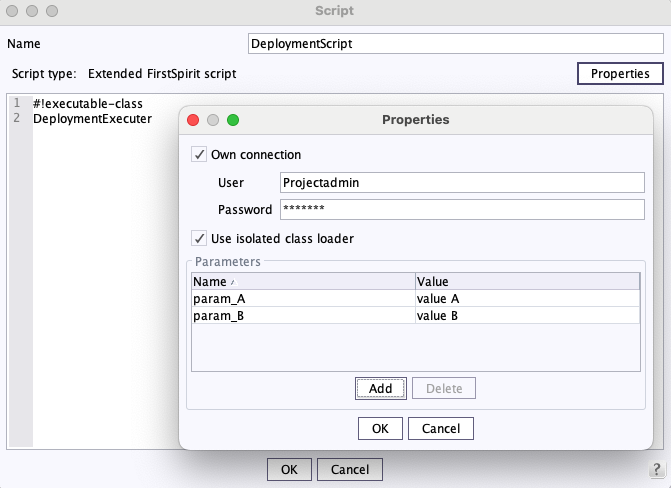
The use of internal classes that are only accessible via the legacy class loader results in a WARN message when using this loader. However, if the isolated class loader is used, accessing internal classes leads to an error, as this usage is not supported.
Crownpeak therefore recommends that all customers promptly update their scripts and avoid using internal classes, as the use of internal classes will only be possible for a limited transitional period.
If a conversion is not possible, you are kindly asked to report the relevant use case via Customer Support.
5 Modules: AWS S3-Deployment
Connection settings for the S3 deployment
In the AWS S3 deployment module, connection settings for the internal HTTP client can now be configured. This can be done through a script that runs before the S3 deployment.
An example script looks as follows:
context.setProperty("http.connectionTimeout",
                     java.time.Duration.ofSeconds(30));
context.setProperty("http.connectionAcquisitionTimeout",
                     java.time.Duration.ofSeconds(15));
The following settings can be configured:
| Setting | Java type |
| http.connectionTimeout | java.time.Duration |
| http.connectionAcquisitionTimeout | java.time.Duration |
| http.maxConcurrency | java.lang.Integer |
This allows for the optimization of the connection settings for the deployment.
Overview
| ID | Description | Categories |
|---|---|---|
| CORE-16807 | Scripts have historically been executed with FirstSpirit's internal class loader. This contains classes that can change or be removed at any time without warning. For increased stability, the option "Use isolated class loader" can now be activated in the properties of a script. Please check for use of internal classes before switching this setting. New script tasks are now executed by default with the isolated class loader. |
Developer |
| CORE-17159 | In certain cases, during the release of move operations, the references of the moved element were not correctly updated. |
Release |
| CORE-17274 | Deactivating an internal web server could lead to log entries with error messages such as the following: |
Server Administrator, Web server |
| CORE-17277 | When creating login tickets during a generation process, the error message " |
Generation |
| CORE-17281 | It is now possible to configure connection settings for the internal HTTP client in the FirstSpirit AWS S3 deployment module to reduce timeouts during uploads and increase stability. |
AWS S3 Deployment |
| CORE-17312 | In FirstSpirit templates, an issue with the output of CMS_TRIM expressions has been fixed. |
Template Development |
| CORE-17328 | The status calculation as well as the detection of changed elements during external synchronization have been optimized. |
External synchronization |
| CORE-17330 | Under certain circumstances, configured session cookies were not correctly forwarded from SiteArchitect to the website. |
Server Administrator, SiteArchitect |
| CORE-17344 | Use of the Jetty Web Server Further information can be found in chapter “Administration: Use of the Jetty Web Server”. |
FirstSpirit Jetty Web Server, Server Administrator |
| CORE-17347 | The version of the integrated web server module "Embedded Tomcat" has been increased to 10.1.44. The use is not suitable for productive operation and should only be for testing purposes. |
Server Administrator |
| CORE-17357 | FirstSpirit Content Experience Tools: Latest module versions |
FirstSpirit Content Experience Tools (CXT) |
| CORE-17390 | In connection with the language-dependent release, archiving tasks could end up in an endless loop, which caused increased load on the FirstSpirit server and the database. |
Archiving, Language-dependent Release |
| CORE-17408 | In the Git-based template development for FirstSpirit, the pipeline |
Template Development |
| CXT-3493 | Under certain circumstances, no new connections could be established to MicroApps such as Site Developer or Multisite Management. Under certain circumstances, no new connections could be established to MicroApps such as Template Development for ContentCreator or Multisite Management. |
FirstSpirit Content Experience Tools (CXT) |
| CXT-3524 | FirstSpirit Image Assistant now enables AI-based scanning of entire media folders in ContentCreator for efficient alt-text generation with a maximum of 100 images per action. Further information can be found in chapter “AI-powered tools: Image Assistant: Folder Scan”. |
AI-powered tools, Media Store |
| CXT-3551 | The change view in the preview is now redrawn when the navigation size changes. This can also be triggered via the existing API WE_API.Preview.repaint(). |
ContentCreator |
| CXT-3558 | Update of internally used software Further information can be found in chapter “Administration: Update of internally used software”. |
Integrated software |
| CXT-3591 | A bug in the browser console was fixed, which occurred when using interface languages that are neither German nor English. |
Template Development for ContentCreator |
| CXT-3597 | When using a CMS_INPUT_PERMISSION input component, problems could occur if permission groups contained umlauts. |
ContentCreator, Input Components |
| CXT-3602 | In OCM 3.0, the pencil icon indicating the option to edit individual input components was still missing, which appears when the mouse moves over these components. |
FirstSpirit Omnichannel Manager |
Deprecations
| Functionality | Deprecated as of | Will be removed / Was removed as of |
|---|---|---|
| Input component CMS_INPUT_CONTENTAREALIST | 5.2R3 | |
| Input component CMS_INPUT_CONTENTLIST | 5.2R3 | |
| Input component CMS_INPUT_FILE | 5.2R3 | |
| Input component CMS_INPUT_LINKLIST | 5.2R3 | |
| Input component CMS_INPUT_OBJECTCHOOSER | 5.2R3 | |
| Input component CMS_INPUT_PAGEREF | 5.2R3 | |
| Input component CMS_INPUT_PICTURE | 5.2R3 | |
| Input component CMS_INPUT_TABLIST | 5.2R3 | |
| FirstSpirit Access API: de.espirit.firstspirit.agency.GroupsAgent | 5.2R15 | |
| FirstSpirit Access API: delete (de.espirit.firstspirit.access.AccessUtil) | 5.2R18 | |
| FirstSpirit Access API: release (de.espirit.firstspirit.access.AccessUtil) | 2018-06 | |
| FirstSpirit Access API: getLastLoginAsDate (de.espirit.firstspirit.agency.UserStatisticsAgent) | 2018-07 | |
| FirstSpirit Access API: remainingDurationOfCurrentStageInMillis (de.espirit.firstspirit.server.MaintenanceModeInfo) | 2018-07 | 2025-13 |
| FirstSpirit Access API: getStartingTimeOfStageAsDate (de.espirit.firstspirit.server.MaintenanceModeInfo) | 2018-07 | 2025-13 |
| FirstSpirit Access API: getSelectedWebserverConfiguration (de.espirit.firstspirit.access.serverConfiguration) | 2018-10 | 2025-13 |
| FirstSpirit Access API: setSelectedWebserverConfiguration (de.espirit.firstspirit.access.serverConfiguration) | 2018-10 | 2025-13 |
| FirstSpirit Access API: getSelectedWebServer (de.espirit.firstspirit.access.project.Project) | 2018-10 | 2025-13 |
| FirstSpirit Access API: setSelectedWebServer (de.espirit.firstspirit.access.project.Project) | 2018-10 | 2025-13 |
| FirstSpirit Access API: getLostAndFoundStoreNodes(); (de.espirit.firstspirit.feature.FeatureInstallResult) | 2018-10 | |
| FirstSpirit Access API: getDeletedStoreNodes(); (de.espirit.firstspirit.feature.FeatureInstallResult) | 2018-10 | |
| FirstSpirit Access API: de.espirit.firstspirit.access.store.Previewable | 2019-01 | |
| WebSphere Application Server support for FirstSpirit | 2019-05 | |
| FirstSpirit Access API: redirectTemplateLogToDefaultLog() (Interface RenderingAgent.Renderer) | 2021-05 | |
| Omnichannel Manager 2.x | 2025-01 | |
| FragmentCreator | 2025-01 | 2025-12 |
| Jetty Web Server | 2025-09 | 2026-02 |
| Java SecurityManager | 2025-09 | 2025-11 |