
Release Notes
1 Administration
Display of the derby layers used in the project
In the ServerManager, derby layers are now hidden in the project properties under the “Databases” option if they have not been selected.
Using the new checkbox “Show databases for all projects”, all database layers can be shown.
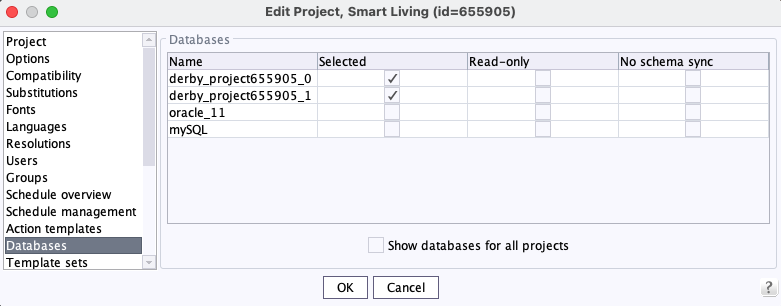
Show database for all projects
2 Administration / Modules
Migration to Jakarta Servlet 6.0
The migration to Jakarta Servlet 6.0 is an essential step to ensure the security of web applications.
With the current FirstSpirit version 2023.9, the changeover to Jakarta Servlet 6.0 with support for automatic migration took place.
Support for automatic migration will be removed with FirstSpirit 2024.9.
In contrast to the phased rollout for cloud customers, on-premises customers are able to test and migrate their FirstSpirit servers once version 2023.9 has been released.
However, we strongly recommend to wait with the update of productive servers at least until release 2023.11 since we aim to guarantee the compatibility for modules provided by Crownpeak with that release.Important:
- If FirstSpirit is run in an on-premises scenario, the Tomcat version must be updated when migrating to the FirstSpirit JakartaEE edition. Since the servlet version will be updated to 6.0, a 10.1.x version of Tomcat is required.
- The use of FirstSpirit version 2023.9 requires that Java version 17 is used.
The FirstSpirit installation may be affected if any of the following conditions apply:
- The FirstSpirit installation is not maintained in the Crownpeak Cloud and deploys web-applications to an application server like Apache Tomcat.
- A custom module is used that contains a WebApp component with code that uses the legacy Java Servlet API.
- A custom module is used that contains a WebApp component with dependencies that use the old JavaEE API, e.g.,
Spring Boot 2.x.
More information and updates can be found in the Crownpeak Community and the detailed Jakarta FAQ.
Contact Customer Support Team if you have questions or feedback regarding the migration.
3 ContentCreator
SEO URLs in ContentCreator
SEO URLs could so far only be managed in SiteArchitect (see Global settings / URL Settings / “SEO URLs” tab (→Documentation FirstSpirit SiteArchitect))
The SEO URL functionality now is also available in ContentCreator.
Configuration
With the new project component “CXT ContentCreator: URL Configuration ProjectApp” a list of “UrlCreators” can be configured.
Action
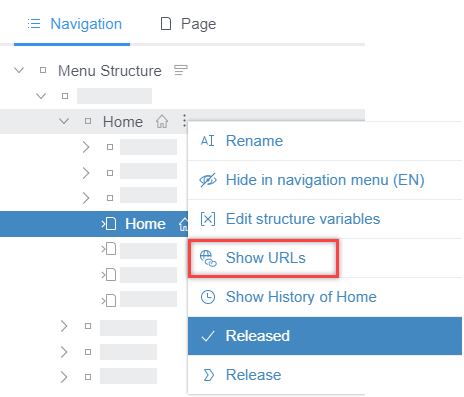
There is a new action Show URLs with which the new functionality can be called up. The action is available in the navigation for the menu structure.
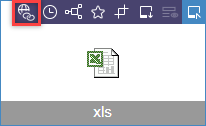
For media and media folders, the functionality can be accessd via the icon in the action menu.
Both actions can be deactivated via TailoredUI and are active by default.
For more information, see FirstSpirit Manual for Editors (ContentCreator), “Menu functions / Navigation / SEO URLs”.
4 FirstSpirit Content Experience Tools (CXT)
4.1 Latest module versions
FirstSpirit 2023.9 supports the following module versions for FirstSpirit Content Experience Tools.
| Module / file name | Version number |
FirstSpirit CXT Plattformplatform-[version].fsm | 5.0.1 |
FirstSpirit CXT DAP Bridgedataservice-[version].fsm | 1.44.14 |
FirstSpirit CXT FragmentCreatorfragment-creator-[version].fsm | 5.0.0 |
FirstSpirit Fragment DAPfragmentdap-[version].fsm | 1.40.22 |
FirstSpirit Media DAPmediadap-[version].fsm | 1.31.13 |
FirstSpirit PageRef DAPpageref-[version].fsm | 1.9.13 |
FirstSpirit Markdown Editormarkdown-editor-[version].fsm | 1.29.12 |
FirstSpirit Tagging Editortagging-editor-[version].fsm | 1.29.12 |
FirstSpirit CXT FragmentCreator - CaaS Integrationcaas-integration-[version].fsm | 1.31.12 |
4.2 Access the MicroApp management page via the FirstSpirit start page
Under
/management(appended to the URL of the platform), a management page can be reached that can be used to configure the availability of the MicroApps, for example:
http://myServer:8080/cxt-platform/managementTo reach the management page without having to know the URL, a start button can be configured on the FirstSpirit start page.
For this, the “ApplicationPlugin: MicroApp Management” has to be added to the web application “Start page””.
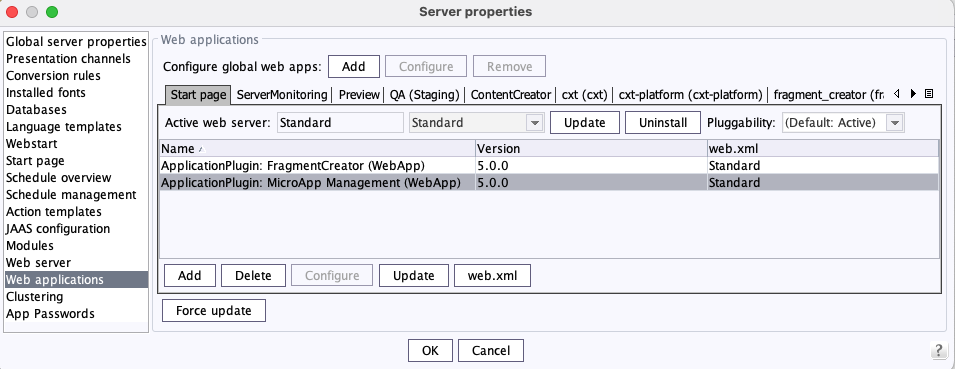
The web component must also be deployed there (“Install” / “Update” button).
The ApplicationPlugin for “MicroApp Management” then has to be added in the “Home page” area (“FirstSpirit ServerManager / Server / Properties / Home page”):
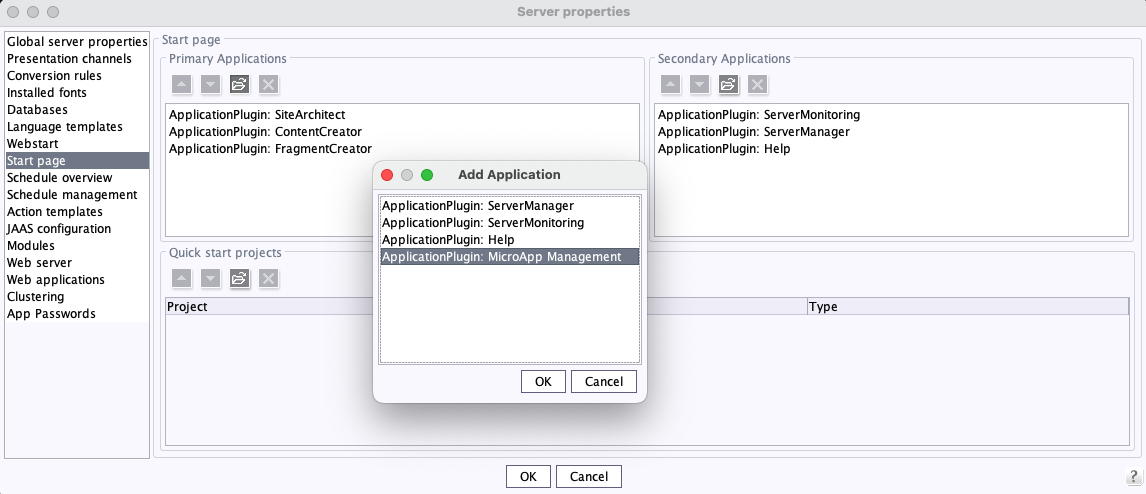
Once the plugin has been selected, the icon for launching “MicroApp Management” is available on the start page.
The management page can only be accessed by server or project administrators.5 Module Development, Scripts, API
API: Synchronize all existing pages with one template
With the current FirstSpirit version it is possible to apply changes to the definition of the content areas of a page template to all pages based on it via the FirstSpirit API.
The new SynchronizeTemplateBodiesOperation (FirstSpirit Access API, Package de.espirit.firstspirit.store.operations) allows the content areas of a template to be synchronised in all pages based on it.
6 Modules (general)
Embedded Tomcat integration
With the current FirstSpirit version 2023.9, “FirstSpirit Embedded Tomcat Web Server” is introduced as an additional web server alongside the “Jetty Web Server”.
Both “FirstSpirit Embedded Tomcat Web Server” and “Jetty Web Server” are to be used for testing purposes only and are not intended for productive use.
For further information please refer to FirstSpirit Manual for Administrators, Chapter “FirstSpirit ServerManager / Server properties / Web server”, “FirstSpirit Embedded Tomcat Web Server” paragraph.
7 SiteArchitect
GID of a store element in the technical properties
With the current FirstSpirit version, the unique GID (“Global ID”) of a store element is displayed in the technical properties of this element (context menu “Extras / Display properties”).
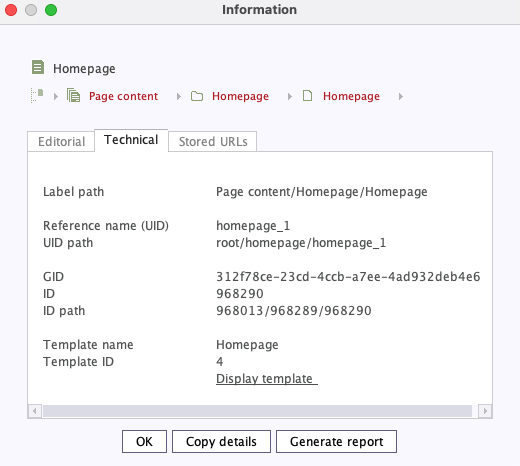
Store element GID
8 System
Updates to integrated third-party software
The following internally used software was updated with the current FirstSpirit release:
- Eclipse Jetty
Modulfs-jetty.fsm: update to 12.0.0
As before, use of Eclipse Jetty for production purposes is not recommended!
9 Template development
Images: Automatic detection of configuration changes regarding scaling
If the configuration for calculating resolutions is changed via the ImageWriteParams (the user-defined project property), the corresponding resolutions are recalculated once the next time they are accessed.
Note: During the first generation with the current FirstSpirit version, provided ImageWriteParams has been set, the resolutions are recalculated once. This does not applies to manually defined resolutions.
Overview
| ID | Description | Categories |
|---|---|---|
| CORE-4719 | With the current FirstSpirit version it is possible to apply changes to the definition of the content areas of a page template to all pages based on it via the FirstSpirit API. |
FirstSpirit API, Template Development |
| CORE-7880 | In project properties only derby layers used in the project are displayed by default (“FirstSpirit ServerManager / Project properties / Databases”). |
Database, ServerManager |
| CORE-13284 | In SiteArchitect, the currently selected language for a Store Element is now automatically shown when opening the Translation help window for the Element. |
SiteArchitect |
| CORE-15194 | If a link template is hidden, it will no longer be shown in the selection of a FS_CATALOG input component in SiteArchitect. |
SiteArchitect |
| CORE-15222 | With the current FirstSpirit version 2023.9, a new embedded web server “FirstSpirit Embedded Tomcat Web Server” with Tomcat 10.1 was made available. Further information can be found in chapter “Modules (general): Embedded Tomcat integration”. |
Integrated software, Modules, Server Administrator |
| CORE-15240 | Problems loading certain image formats have been improved by adding explicit initialisation of the Java ImageIO plugins. |
Media |
| CORE-15396 | The technical properties of a store element in SiteArchitect now also display the GID (“Global ID”). |
SiteArchitect |
| CORE-15406 | If the configuration for calculating resolutions is changed via the |
Media |
| CORE-15430 | Fixed a bug that in very rare cases could cause changes to SEO URLs for folders to not be applied immediately. |
SiteArchitect |
| CORE-15480 | The discussion forum (“menu bar / Extras”) has been removed from SiteArchitect. |
SiteArchitect |
| CORE-15518 | A classloading problem with Gson on the server was fixed. |
Developer |
| CORE-15520 | FirstSpirit Content Experience Tools: Latest module versions |
FirstSpirit Content Experience Tools (CXT) |
| CORE-15525 | The “FirstSpirit Personalisation” module did not define required dependencies to |
Modules |
| CORE-15534 | Migration to Jakarta Servlet 6.0 |
FirstSpirit Administrator, Java, Module development, Modules, Server Administrator |
| CORE-15546 | Updates to integrated third-party software Further information can be found in chapter “System: Updates to integrated third-party software”. |
Integrated software |
| CXT-1621 | Improved display when multiple MicroApps are open (e.g. Edit Fragment --> Upload Media). |
FirstSpirit Content Experience Tools (CXT), FragmentCreator |
| CXT-2414 | SEO URL management possible in ContentCreator Further information can be found in chapter “ContentCreator: SEO URLs in ContentCreator”. |
ContentCreator |
| CXT-2819 | The MicroApp management page can now be accessed via the FirstSpirit start page. |
FirstSpirit Content Experience Tools (CXT), Server Administrator |
| CXT-2947 | In rare cases, the display of the Markdown editor could lead to erroneous behavior. |
FragmentCreator |
Deprecations
| Functionality | Deprecated as of | Will be removed / Was removed as of |
|---|---|---|
| Input component CMS_INPUT_CONTENTAREALIST | 5.2R3 | |
| Input component CMS_INPUT_CONTENTLIST | 5.2R3 | |
| Input component CMS_INPUT_FILE | 5.2R3 | |
| Input component CMS_INPUT_LINKLIST | 5.2R3 | |
| Input component CMS_INPUT_OBJECTCHOOSER | 5.2R3 | |
| Input component CMS_INPUT_PAGEREF | 5.2R3 | |
| Input component CMS_INPUT_PICTURE | 5.2R3 | |
| Input component CMS_INPUT_TABLIST | 5.2R3 | |
| FirstSpirit Access API: de.espirit.firstspirit.agency.GroupsAgent | 5.2R15 | |
| FirstSpirit Access API: delete (de.espirit.firstspirit.access.AccessUtil) | 5.2R18 | |
| FirstSpirit Access API: release (de.espirit.firstspirit.access.AccessUtil) | 2018-06 | |
| FirstSpirit Access API: getLastLoginAsDate (de.espirit.firstspirit.agency.UserStatisticsAgent) | 2018-07 | |
| FirstSpirit Access API: remainingDurationOfCurrentStageInMillis (de.espirit.firstspirit.server.MaintenanceModeInfo) | 2018-07 | 2025-13 |
| FirstSpirit Access API: getStartingTimeOfStageAsDate (de.espirit.firstspirit.server.MaintenanceModeInfo) | 2018-07 | 2025-13 |
| FirstSpirit Access API: getSelectedWebserverConfiguration (de.espirit.firstspirit.access.serverConfiguration) | 2018-10 | 2025-13 |
| FirstSpirit Access API: setSelectedWebserverConfiguration (de.espirit.firstspirit.access.serverConfiguration) | 2018-10 | 2025-13 |
| FirstSpirit Access API: getSelectedWebServer (de.espirit.firstspirit.access.project.Project) | 2018-10 | 2025-13 |
| FirstSpirit Access API: setSelectedWebServer (de.espirit.firstspirit.access.project.Project) | 2018-10 | 2025-13 |
| FirstSpirit Access API: getLostAndFoundStoreNodes(); (de.espirit.firstspirit.feature.FeatureInstallResult) | 2018-10 | |
| FirstSpirit Access API: getDeletedStoreNodes(); (de.espirit.firstspirit.feature.FeatureInstallResult) | 2018-10 | |
| FirstSpirit Access API: de.espirit.firstspirit.access.store.Previewable | 2019-01 | |
| WebSphere Application Server support for FirstSpirit | 2019-05 | |
| Database layer for Oracle Database 11g/12c | 2020-12 | 2025-05 |
| FirstSpirit Access API: redirectTemplateLogToDefaultLog() (Interface RenderingAgent.Renderer) | 2021-05 | |
| Support for Log4j 1 | 2022-05 | 2024-06 |