
Release Notes
1 Administration
1.1 Logon with Kerberos: 3DES and RC4 no longer supported
Java 17 no longer supports the 3DES and RC4 crypto algorithms (see also https://bugs.openjdk.org/browse/JDK-8139348). SSO login in FirstSpirit is then no longer possible. Instead, a stronger crypto algorithm should be used, e.g. AES.
If FirstSpirit is operated with Kerberos module or Windows SSO, the keytab file should therefore be adapted.
Under Java 11 (use with FirstSpirit no longer recommended) this change can also be made, since Java 11 also already supports AES256-SHA1 (see Java 11 documentation).
The adaptation of the keytab file can be done, for example, as follows with ktutil:
1)Create backup
$ cp test.keytab test.keytab.bak2) Customize the keytab file
$ ktutil
ktutil:  read_kt test.keytab
ktutil:  list -e
slot KVNO Principal
---- ---- ---------------------------------------------------------------------
 1    7 HTTP/fs5host.mydomain.net@MYDOMAIN.NET (des-cbc-crc)
 2    7 HTTP/fs5host.mydomain.net@MYDOMAIN.NET (des-cbc-md5)
 3    7 HTTP/fs5host.mydomain.net@MYDOMAIN.NET (arcfour-hmac)
 4    7 HTTP/fs5host.mydomain.net@MYDOMAIN.NET (aes256-cts-hmac-sha1-96)
ktutil:  delete_entry 1
ktutil:  delete_entry 1
ktutil:  delete_entry 1
ktutil:  list -e
slot KVNO Principal
---- ---- ---------------------------------------------------------------------
 1    7 HTTP/fs5host.mydomain.net@MYDOMAIN.NET (aes256-cts-hmac-sha1-96)
ktutil:  write_kt test-updated.keytab
ktutil:  quit
3) Check that the new file does not contain weak/deprecated algorithms
$ ktutil
ktutil:  read_kt test-updated.keytab
ktutil:  list -e
slot KVNO Principal
---- ---- ---------------------------------------------------------------------
 1    7 HTTP/HTTP/fs5host.mydomain.net@MYDOMAIN.NET (aes256-cts-hmac-sha1-96)
ktutil:  quit
4) Copy permissions of the original file
$ chmod --reference=test.keytab test-updated.keytab5) Replace the original file
$ mv --force test-updated.keytab test.keytab6) Restart FirstSpirit, Tomcat and other services if necessary
In addition, the Active Directory Controller should be adapted (admin rights required!) to enable AES Encryption there. See: https://techcommunity.microsoft.com/t5/core-infrastructure-and-security/decrypting-the-selection-of-supported-kerberos-encryption-types/ba-p/1628797.
Important: Enable AES for service accounts for which an SPN is specified. Please note that a null value for msDS-SupportedEncryptionTypes will cause the DC to issue service tickets and session keys with RC4.
See also “FirstSpirit Dokumentation für Administratoren”: https://docs.e-spirit.com/odfs/edocs/admi/firstspirit-ser/configuration-f/login-process-f/kerberos-ticket/index.html.
1.2 Deactivating projects: Improved handling of project-local web applications
When a project is deactivated, local project web applications are now automatically uninstalled from the configured web server. If the web server is not accessible, the local project web applications remain installed on it (as always).
When the project is reactivated, a message indicates that the web applications must be rolled out again (“Project reactivated. However, its web apps (if there are any) have not been deployed. They can be deployed manually via the ‘Edit Project’ dialog.”). You can do this either manually via the ServerManager or they will be installed automatically during the next server restart.
The deinstallation of local project web applications that are no longer needed releases the corresponding resources on the web server and prevents possible subsequent problems when the FirstSpirit Server is updated with the deactivated (or deleted) project.
See https://docs.e-spirit.com/odfs/edocs/admi/firstspirit-ser/menu-bar-items/project/index.html for more information.
1.3 Disabling integrated web server (Jetty Web Server)
Using the new parameter webserver.jetty.hide you can disable the integrated webserver “Jetty Web Server”.
For this purpose the parameter must be set to true:
webserver.jetty.hide=trueFor more information, see also FirstSpirit Manual for Administrators:
- about usage of web servers: https://docs.e-spirit.com/odfs/edocs/admi/firstspirit-ser/server-properti/web-server/index.html
- about the configuration file fs-server.conf: https://docs.e-spirit.com/odfs/edocs/admi/firstspirit-ser/configuration-f/firstspirit-ser/index.html (area “Web Applications”).
1.4 Java 17: Adjustment of the wrapper
Java 17 compatibility was introduced with the current backend version. The fs-wrapper-vendor.conf file has been extended with corresponding --add-opens calls for this purpose.
On the customer side, the same --add-opens parameters should be specified for the Apache Tomcat web server that are also used for FirstSpirit. For customer-specific modules, it may also be necessary to add --add-opens calls, in this case in the fs-wrapper.isolated.conf file.
2 ContentCreator
Version history now also for media and datasets
The “Project history” report in ContentCreator has been revised to include elements of media and data source management.
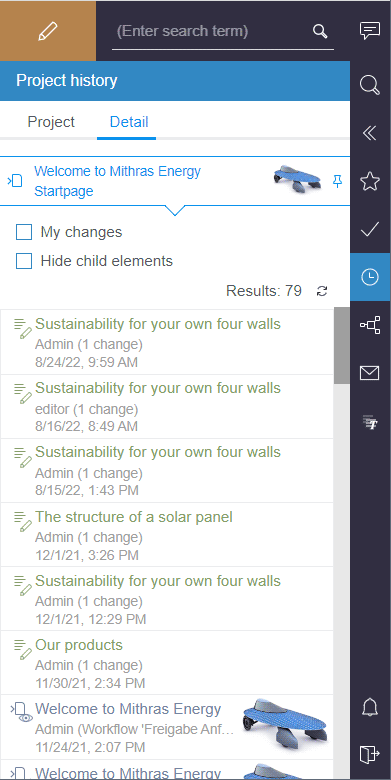
The “Project” and “Detail” tabs list the last changes made to the project or to a specific element.
Additionally, on elements in the main area, in the navigation bar and on entries of the report itself, the function “Show history” can be used to open the history of the respective element in the report.
.png)
For more information, see https://docs.e-spirit.com/contentcreator/report-area/project-history/index.html.
This functionality can be hidden via “Tailored UI”, using the “Show History” feature.
For more information on the “Tailored UI” see https://docs.e-spirit.com/odfs/template-develo/contentcreator/customization/standard-functi/index.html.
3 FirstSpirit Content Experience Tools (CXT)
Latest module versions
FirstSpirit 2022.10 supports the following module versions for “FirstSpirit Content Experience Tools”.
| Module / file name | Version number |
FirstSpirit CXT Plattformplatform-[version].fsm | 2.5.7 |
FirstSpirit CXT DAP Bridgedataservice-[version].fsm | 1.44.8 |
FirstSpirit CXT FragmentCreatorfragment-creator-[version].fsm | 3.4.11 |
FirstSpirit Fragment DAPfragmentdap-[version].fsm | 1.40.12 |
FirstSpirit Media DAPmediadap-[version].fsm | 1.31.7* |
FirstSpirit PageRef DAPpagerefdap-[version].fsm | 1.9.7 |
FirstSpirit Markdown Editormarkdown-editor-[version].fsm | 1.29.6* |
FirstSpirit Tagging Editortagging-editor-[version].fsm | 1.29.6 |
FirstSpirit CXT FragmentCreator - CaaS Integrationcaas-integration-[version].fsm | 1.31.7 |
* These modules require FirstSpirit 2020-03 or higher from this version.
Overview
| ID | Description | Categories |
|---|---|---|
| CLOUDPROV-6 | An error has been eliminated that could result in that the part matching for the S3 deployment could not be configured correctly. Additional log outputs were also added during deployment to make it easier to recognize possible configuration errors. |
AWS S3 Deployment, FirstSpirit Administrator |
| CORE-14013 | The input components in format templates of the type “style template” are now automatically defined as language-independent. |
SiteArchitect, Template Store |
| CORE-14069 | When a project is deactivated, local project web applications are now automatically uninstalled from the configured web server. When the project is reactivated, a message indicates that the web applications must be rolled out again. |
FirstSpirit Administrator, Performance, ServerManager, Web applications |
| CORE-14317 | FirstSpirit's own Jar files (access.jar, fs-isolated-webrt.jar,...) must not be included in customer-specific modules, as FirstSpirit adds these during installation in the correct version and duplicates are otherwise to be expected. In the current version, warning messages are written to the log if such Jar files are detected. |
Developer, FirstSpirit Administrator, Module development |
| CORE-14461 | Due to changes in the build process of FirstSpirit, the composition of internally used jar files has changed. However, this should have no effect on users or developers. |
Developer, FirstSpirit Administrator |
| CORE-14469 | Unused connections to the FirstSpirit server are now removed more quickly. The resources reserved by them can thus also be released again more quickly. |
FirstSpirit Administrator, Performance, Sessions |
| CORE-14512 | A problem with the “FirstSpirit Portal” module (“SAP Business Package for FirstSpirit”, |
FirstSpirit Administrator, Isolated mode |
| CORE-14519 | To increase security, access to the preview has been limited to users who have access to the underlying project. |
Editor, Permissions, Security |
| CORE-14522 | Disabling the integrated web server (“Jetty Web Server”) |
FirstSpirit Administrator, FirstSpirit Jetty Web Server, Web server |
| CORE-14530 | The Connection Management has been improved so that unused projects can now be closed faster in some cases. |
FirstSpirit Administrator, Sessions |
| CORE-14546 | Fixed a bug that could cause problems when creating pages in very rare cases (in ContentCreator). |
Editor, Performance |
| CORE-14568 | An error has been fixed which could cause parameters that extended the URL to be lost when logging in. |
FirstSpirit Administrator |
| CORE-14600 | Related to the functionality “FirstSpirit ContentTransport”, the display of feature content has been improved. If datasets are automatically added via the associated data source, this data source is now also displayed in the summary if no datasets are (yet) contained there. Thus, corresponding configurations can now also be easily removed from the ContentTransport feature in this special case. |
Content Transport |
| CORE-14621 | Incorrectly configured modules no longer cause the FirstSpirit server to be inaccessible. Previously, the DownstreamManager did not start in this case, so that only RunLevel 40 was reached (error message e.g. |
FirstSpirit Administrator, Modules, Services |
| CORE-14622 | Java 17 no longer supports the 3DES and RC4 crypto algorithms. Instead, a secure algorithm should be used, e.g. AES. This may affect the KerberosLoginModule. |
FirstSpirit Administrator, Modules |
| CORE-14637 | Java 17 compatibility was introduced with the current backend version. The Further information can be found in chapter “Administration: Java 17: Adjustment of the wrapper”. |
FirstSpirit Administrator, Java |
| CORE-14641 | FirstSpirit Content Experience Tools: Latest module versions |
Developer, FirstSpirit Administrator, FirstSpirit Content Experience Tools (CXT), FragmentCreator, Modules |
| CXT-1663 | The “Project history” report in ContentCreator has been revised to include elements of media and data source management. |
ContentCreator, Editor, Reports |
| CXT-2616 | When uploading media to the media management in ContentCreator, newly uploaded media were not marked in all cases (“Upload new mediu” in the menu bar, drag-and-drop). This behavior has been corrected. |
ContentCreator, Editor, Media, Media Store |
| CXT-2683 | If many pages were converted into menu items one after the other, this could lead to a misbehaviour. |
ContentCreator |
| CXT-2686 | Subsequent changes to the form definition of list properties in DOM editors (attributes |
ContentCreator |
Deprecations
| Functionality | Deprecated as of | Will be removed / Was removed as of |
|---|---|---|
| Input component CMS_INPUT_CONTENTAREALIST | 5.2R3 | |
| Input component CMS_INPUT_CONTENTLIST | 5.2R3 | |
| Input component CMS_INPUT_FILE | 5.2R3 | |
| Input component CMS_INPUT_LINKLIST | 5.2R3 | |
| Input component CMS_INPUT_OBJECTCHOOSER | 5.2R3 | |
| Input component CMS_INPUT_PAGEREF | 5.2R3 | |
| Input component CMS_INPUT_PICTURE | 5.2R3 | |
| Input component CMS_INPUT_TABLIST | 5.2R3 | |
| FirstSpirit Access API: de.espirit.firstspirit.agency.GroupsAgent | 5.2R15 | |
| FirstSpirit Access API: delete (de.espirit.firstspirit.access.AccessUtil) | 5.2R18 | |
| FirstSpirit Access API: release (de.espirit.firstspirit.access.AccessUtil) | 2018-06 | |
| FirstSpirit Access API: getLastLoginAsDate (de.espirit.firstspirit.agency.UserStatisticsAgent) | 2018-07 | |
| FirstSpirit Access API: remainingDurationOfCurrentStageInMillis (de.espirit.firstspirit.server.MaintenanceModeInfo) | 2018-07 | 2025-13 |
| FirstSpirit Access API: getStartingTimeOfStageAsDate (de.espirit.firstspirit.server.MaintenanceModeInfo) | 2018-07 | 2025-13 |
| FirstSpirit Access API: getSelectedWebserverConfiguration (de.espirit.firstspirit.access.serverConfiguration) | 2018-10 | 2025-13 |
| FirstSpirit Access API: setSelectedWebserverConfiguration (de.espirit.firstspirit.access.serverConfiguration) | 2018-10 | 2025-13 |
| FirstSpirit Access API: getSelectedWebServer (de.espirit.firstspirit.access.project.Project) | 2018-10 | 2025-13 |
| FirstSpirit Access API: setSelectedWebServer (de.espirit.firstspirit.access.project.Project) | 2018-10 | 2025-13 |
| FirstSpirit Access API: getLostAndFoundStoreNodes(); (de.espirit.firstspirit.feature.FeatureInstallResult) | 2018-10 | |
| FirstSpirit Access API: getDeletedStoreNodes(); (de.espirit.firstspirit.feature.FeatureInstallResult) | 2018-10 | |
| FirstSpirit Access API: de.espirit.firstspirit.access.store.Previewable | 2019-01 | |
| WebSphere Application Server support for FirstSpirit | 2019-05 | |
| Database layer for Oracle Database 11g/12c | 2020-12 | 2025-05 |
| FirstSpirit Access API: redirectTemplateLogToDefaultLog() (Interface RenderingAgent.Renderer) | 2021-05 | |
| Support for Log4j 1 | 2022-05 | 2024-06 |