
Release Notes
1 General
Outlook: Support for OpenJDK 16
For FirstSpirit, e-Spirit supports:
- OpenJDK: the current Java version as well as the latest LTS (Long-Term-Support) variant.
- Oracle Java: only the latest LTS (Long-Term-Support) variant.
This applies to both the FirstSpirit Server and the FirstSpirit desktop applications.
These are for the current FirstSpirit version:
- Oracle Java 11 (in the current version)
- OpenJDK 15 (in the current version)
- OpenJDK 11 (in the current version)
In February 2021 e-Spirit started the test phase for the use of OpenJDK 16 (non-LTS; Release Date 2021/03) with FirstSpirit. During this phase, the FirstSpirit desktop applications (SiteArchitect, ServerManager) and the FirstSpirit server will be subject to intensive internal testing. We currently expect to release FirstSpirit version 2021/04 with support for OpenJDK 16.
With the support for OpenJDK 16, the support for OpenJDK 15 (non-LTS; Release Date 2020/09) expires. (FirstSpirit is expected to remain functional with OpenJDK 15. However, e-Spirit AG will neither carry out tests with OpenJDK 15 nor implement any measures designed to eliminate errors or problems that are exclusively associated with the use of OpenJDK 15.
Further documentation see FirstSpirit: Technical requirements and recommendations.
2 ContentCreator
Handling of rich-text editors (CMS_INPUT_DOM/TABLE)
There have been issues with inserting formatted text in rich-text editors in ContentCreator (CMS_INPUT_DOM and CMS_INPUT_DOMTABLE) as well as when using the “Undo” function by icon.
These have been resolved.
Rich-text editors provide editors with a variety of formatting options. However, this can result in invalid HTML being output, depending on the project configuration.
The new functions referred to below are designed to help the editor identify invalid formatting.
In general, project-specific sign formatting is now enclosed in square arrows so that it can be identified more easily in the editor:
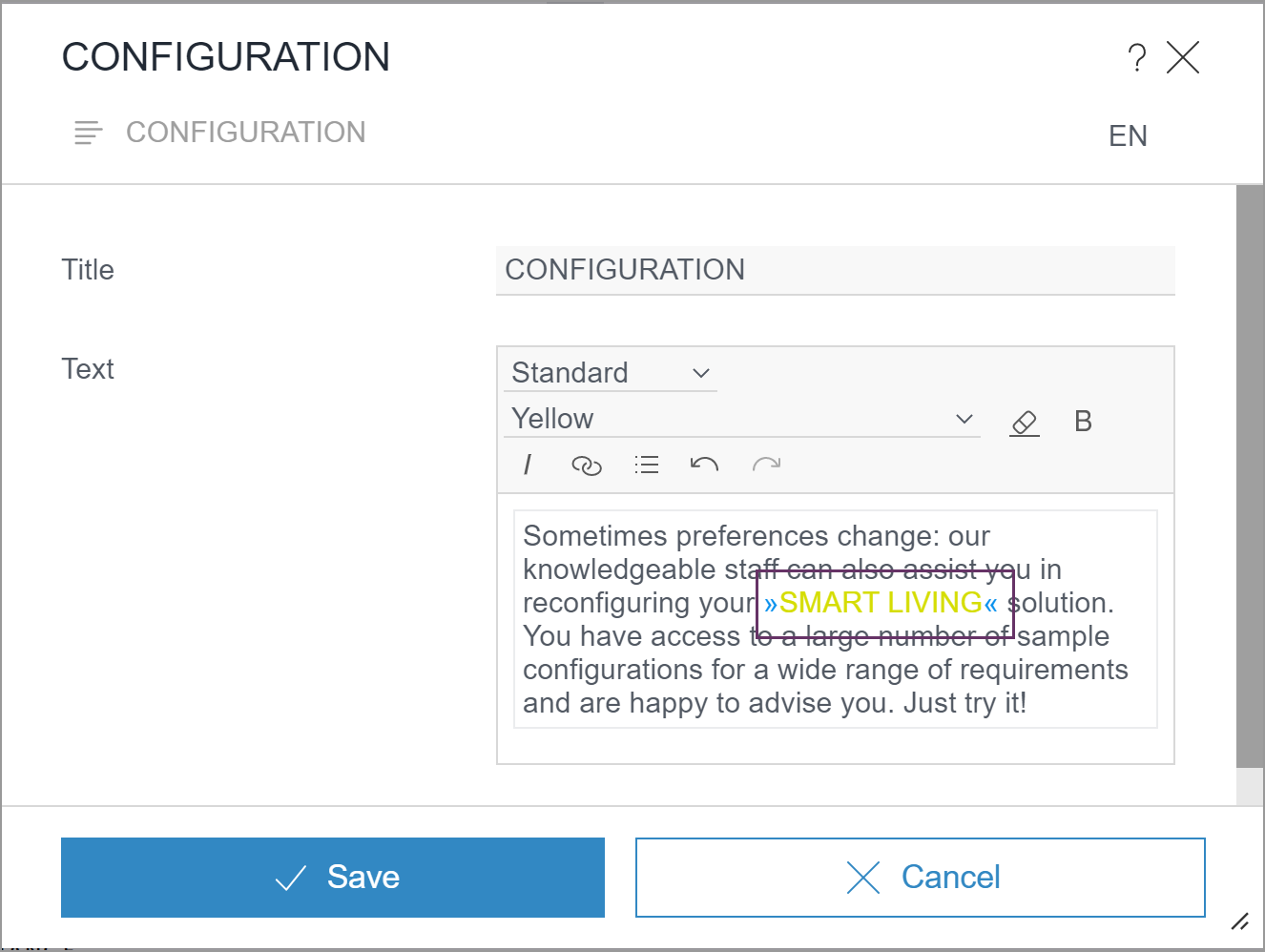
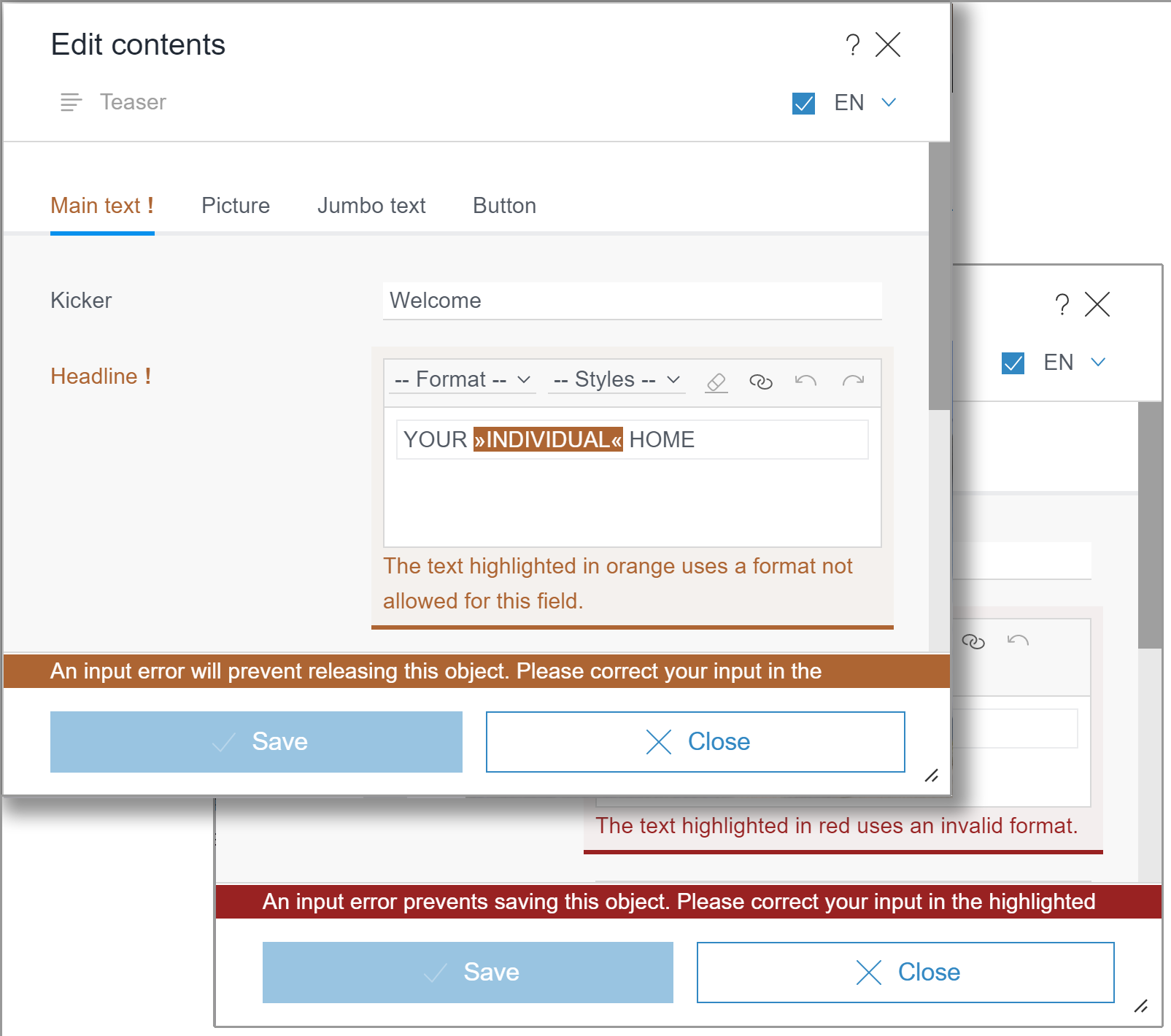
Additionally, text with invalid formatting is now highlighted in color in the rich-text editor, providing a visual indication of a rule violation:
- orange: This indicates a format template that is in the project but is not permitted for the rich-text editor in question.
It can be saved, but the formatting concerned should be removed before release (“prevents release”). - red: This indicates a format template that has subsequently been deleted or is unrecognized for another reason.
The formatting concerned must be removed before the template can be saved (“prevents saving”).
DIV elements (<div>) are block elements in HTML. If a format template was declared as character formatting (“inline”) in the project for DIV elements, this may have led to problems with saving section formatting. As of the current release, such invalid DIV formatting is automatically removed.
In addition, the behavior for lists and inline tables (attributes list and table) has been improved if the setting was subsequently changed on the template side: Existing content remains editable in any case.
3 FirstSpirit Content Experience Tools (CXT)
Latest module versions
FirstSpirit 2021-02 supports the following module versions for “FirstSpirit Content Experience Tools”:
| Module / file name | Version number |
FirstSpirit CXT DAP Bridgedataservice-[version].fsm | 1.38 |
FirstSpirit CXT FragmentCreatorfragment-creator-[version].fsm | 2.19 |
FirstSpirit Fragment DAPfragmentdap-[version].fsm | 1.33 |
FirstSpirit Media DAPmediadap-[version].fsm | 1.27* |
FirstSpirit PageRef DAPpagerefdap-[version].fsm | 1.5 |
FirstSpirit Markdown Editormarkdown-editor-[version].fsm | 1.26* |
FirstSpirit Tagging Editortagging-editor-[version].fsm | 1.26 |
FirstSpirit CXT FragmentCreator - CaaS Integrationcaas-integration-[version].fsm | 1.27 |
* These modules require FirstSpirit 2020-03 or higher from this version.
4 Compatibility
Modules and extensions for FirstSpirit 2021-02
The following modules and extensions are compatible with FirstSpirit 2021-02:
| Module name/File name | Version number | Compatibility |
FirstSpirit Update Archivefs-update-[version].tar.gz | 1.0.12 | - |
FirstSpirit Install Archiv fs-install-[version].tar.gz | 1.0.12 | - |
FirstSpirit LauncherFSLauncher.exe | 1.0.37 | as of FirstSpirit 2018-08 |
FirstSpirit Launcher JRE modulefs-launcher-jre-[version].fsm | 1.16 | as of FirstSpirit 2020-11 |
FirstSpirit SAML Login modulefs-saml-login-[version].fsm | 1.1 | as of FirstSpirit 2019-02 |
FSDevToolsfs-cli-[version].tar.gzfs-cli-[version].zip | 2.6.4 | as of FirstSpirit 2020-08 |
FirstSpirit Module Gradle Pluginfirstspirit-module-gradle-plugin-[version].jar | 0.15.9 | as of FirstSpirit 2019-06 |
5 SiteArchitect / ServerManager
5.1 "FirstSpirit Launcher JRE" module: update to Java versions
The Java versions included in the “FirstSpirit Launcher JRE” module were updated in the latest FirstSpirit release:
In addition to the version supplied with the FirstSpirit Launcher, AdoptOpenJDK 11.0.10+9 (default), the following Java variant is currently available:
- AdoptOpenJDK 15.0.2+7 (new)
For documentation on the “FirstSpirit Launcher JRE” module, see the corresponding manual.
5.2 Start and roll-out of FirstSpirit desktop applications via the FirstSpirit Launcher (new standard behavior)
New behavior (default setting: start via the FirstSpirit Launcher):
As of the current FirstSpirit version, the FirstSpirit desktop apps (SiteArchitect, ServerManager) are started automatically for all users via the FirstSpirit Launcher. The “Use FirstSpirit Launcher” option on the start screen is no longer shown as of the current FirstSpirit version. This means that the user can no longer activate or deactivate the use of the FirstSpirit Launcher.
The option of starting the FirstSpirit desktop applications via Java Web Start is no longer available. The FirstSpirit JNLP files required for Java Web Start are no longer available either.
The FirstSpirit Launcher provides a continuously updated, extensively tested, and license-free Java Runtime Environment which is rolled out when the Launcher is installed. This allows SiteArchitect and ServerManager to be operated in a preconfigured environment which is independent of the Java version on the client computer – even if there is no Java version installed at all (see The Benefits of FirstSpirit Launcher).
Users who encounter issues with using the FirstSpirit Launcher may reactivate the option of starting via Java Web Start temporarily during a transition period. For more information, contact e-Spirit Technical Support.Previous behavior (default setting: start via Java Web Start):
Previously, FirstSpirit desktop apps were only started via the FirstSpirit Launcher if the “Use FirstSpirit Launcher” option was activated.
It was possible to make this setting:
- for each user separately in the connection settings on the start page (see Configuring connection settings) or
- for a group of client computers within the configuration file
fs-server.confusing the parameterexternalLauncherGroup(see fs-server.conf configuration). With this option, the use of the Launcher was stipulated for all members of the group in question and it was not possible for individual users to deactivate it.
Do any changes need to be made in line with the new behavior?
Installing the FirstSpirit Launcher on all workstations:
The Launcher must be installed on the user’s workstation first (see Installing the FirstSpirit Launcher).
When using the externalLauncherGroup parameter:
If you use the externalLauncherGroup setting, the following message appears in the log when the FirstSpirit Server is started:
WARN(...): External launcher groups are configured.
This is deprecated since the launcher is always active for all users (...)
Aside from this warning, however, the configuration does not have any negative consequences. The fs-server.conf should be amended promptly anyway and the parameter removed from the configuration.
Overview: Process of ramp-down phase for Java Web Start in FirstSpirit
- Release Notes 2019-10: Discontinuation of the use of Java Web Start for starting and rolling out FirstSpirit desktop applications.
- Release Notes 2020-06: Discontinuation of support for the use of Java Web Start for starting and rolling out FirstSpirit desktop applications. However, the applications can still be started via Java Web Start.
- Release Notes 2021-02: As of FirstSpirit 2021-02, it is no longer possible for editors to select Java Web Start for starting and rolling out FirstSpirit desktop applications.
6 System
6.1 Update of internally used software
As of the current release, the following internally used software has been updated:
- Java The following new Java version is available:
- Integrated in FirstSpirit (default): 11.0.10+9 64bit AdoptOpenJDK
- In the FirstSpirit Launcher JRE module: 15.0.2+7 64bit AdoptOpenJDK
6.2 Control files fs5 for Linux and fs5.cmd for Windows no longer present
As planned, the current FirstSpirit release does not include the control files fs5 and fs5.cmd (see “Discontinuations”). The control files have been replaced by the new, improved control files fs-server for Linux and fs-server.bat for Windows operating systems, which were released as of FirstSpirit 2020-08 and are recommended for production environments.
e-Spirit recommends upgrading existing installations that still use the old control files to the new control files as soon as possible.
Provision and requirements for the use of the new control files: Java and the Java Service Wrapper are required to operate a FirstSpirit Server. The Java Service Wrapper and corresponding control files are provided by e-Spirit via:
- The installation archive (for new installations) or
- The update archive (for existing installations)
Both archives are available for download (please contact Technical Support for login details).
To use the new control files, the Tanuki Java Service Wrapper must be updated to version 3.5.42 or higher. The latest Wrapper version is included in the installation and update archive.
To perform a new installation, follow the instructions in Installing via install archive.
To update an existing installation. follow the instructions in Updating the FirstSpirit backend.
The FirstSpirit Server can then be started via the new control files fs-server (for Linux) or fs-server.bat (for Windows).
For more information about the scope of functions and control, see:
7 Template development
Extended output options for snippets relating to the #now object.
The current release has extended the output options for snippets relating to the #now object.
#now provides the current date at the point when the request is made.
This means it is possible to check whether the date in the CMS_INPUT_DATE input component is in the future, for example, so that a label indicating this can be added to the snippet.
Overview
| ID | Description | Categories |
|---|---|---|
| CORE-11297 | As of the current FirstSpirit version, the FirstSpirit desktop apps (SiteArchitect, ServerManager) are started automatically for all users via the FirstSpirit Launcher. The option of starting FirstSpirit desktop applications via Java Web Start is no longer available. |
Developer, Editor, FirstSpirit Administrator, Launcher, ServerManager, SiteArchitect |
| CORE-11927 | Extended output options for snippets relating to the |
Developer, Input Components, Snippets, Template Development |
| CORE-12612 | The behavior has been improved in cases where an attempt is made to establish a connection between a client and an incompatible server. |
FirstSpirit Administrator |
| CORE-13021 | The following modules and extensions are compatible with FirstSpirit 2021-02. |
Developer, FirstSpirit Administrator, Modules, Server Administrator |
| CORE-13084 | Minus signs are now permitted in the names of global web applications. |
Module development |
| CORE-13171 | As of FirstSpirit 2020-08, the new, improved control files for Windows and Linux operating systems have been released and are recommended for use in production environments. As announced in the Release Notes for FirstSpirit 2020-08 and FirstSpirit 2020-11, the current FirstSpirit version does not contain the old control files. |
Server Administrator |
| CORE-13173 | Planned: Support OpenJDK 16: As of FirstSpirit 2021-04, OpenJDK 16 (non-LTS; release date 2021/03) is expected to be officially approved for use with FirstSpirit (i.e., the FirstSpirit Server and the FirstSpirit desktop applications). With support for OpenJDK 16, support for OpenJDK 15 (non-LTS; release date was 2020/09) expires. Further information can be found in chapter “General: Outlook: Support for OpenJDK 16”. |
Developer, FirstSpirit Administrator, Java, Server Administrator |
| CORE-13179 | When FirstSpirit Server is started, the services are started slightly later. It has now been ensured that the infrastructure required by the services is provided. |
Server Administrator, Services |
| CORE-13211 | The Java versions included in the “FirstSpirit Launcher JRE” module were updated in the latest FirstSpirit release. |
Java, Launcher |
| CORE-13246 | Update of internally used software. Further information can be found in chapter “System: Update of internally used software”. |
Java, Launcher |
| CORE-13266 | When using the new control scripts under SysVinit, problems could occur when evaluating variables defined in the optional configuration file |
Server Administrator |
| CXT-2080 | Handling of rich-text editors (CMS_INPUT_DOM and CMS_INPUT_DOMTABLE) in ContentCreator |
ContentCreator, Debugging, Developer, Dynamic Forms, Editor, Input Components |
| CXT-2102 | FirstSpirit Content Experience Tools: Latest module versions |
Developer, FirstSpirit Administrator, FirstSpirit Content Experience Tools (CXT), FragmentCreator, Modules |
Deprecations
| Functionality | Deprecated as of | Will be removed / Was removed as of |
|---|---|---|
| Input component CMS_INPUT_CONTENTAREALIST | 5.2R3 | |
| Input component CMS_INPUT_CONTENTLIST | 5.2R3 | |
| Input component CMS_INPUT_FILE | 5.2R3 | |
| Input component CMS_INPUT_LINKLIST | 5.2R3 | |
| Input component CMS_INPUT_OBJECTCHOOSER | 5.2R3 | |
| Input component CMS_INPUT_PAGEREF | 5.2R3 | |
| Input component CMS_INPUT_PICTURE | 5.2R3 | |
| Input component CMS_INPUT_TABLIST | 5.2R3 | |
| FirstSpirit Access API: de.espirit.firstspirit.agency.GroupsAgent | 5.2R15 | |
| FirstSpirit Access API: delete (de.espirit.firstspirit.access.AccessUtil) | 5.2R18 | |
| FirstSpirit Access API: release (de.espirit.firstspirit.access.AccessUtil) | 2018-06 | |
| FirstSpirit Access API: getLastLoginAsDate (de.espirit.firstspirit.agency.UserStatisticsAgent) | 2018-07 | |
| FirstSpirit Access API: remainingDurationOfCurrentStageInMillis (de.espirit.firstspirit.server.MaintenanceModeInfo) | 2018-07 | 2025-13 |
| FirstSpirit Access API: getStartingTimeOfStageAsDate (de.espirit.firstspirit.server.MaintenanceModeInfo) | 2018-07 | 2025-13 |
| FirstSpirit Access API: getSelectedWebserverConfiguration (de.espirit.firstspirit.access.serverConfiguration) | 2018-10 | 2025-13 |
| FirstSpirit Access API: setSelectedWebserverConfiguration (de.espirit.firstspirit.access.serverConfiguration) | 2018-10 | 2025-13 |
| FirstSpirit Access API: getSelectedWebServer (de.espirit.firstspirit.access.project.Project) | 2018-10 | 2025-13 |
| FirstSpirit Access API: setSelectedWebServer (de.espirit.firstspirit.access.project.Project) | 2018-10 | 2025-13 |
| FirstSpirit Access API: getLostAndFoundStoreNodes(); (de.espirit.firstspirit.feature.FeatureInstallResult) | 2018-10 | |
| FirstSpirit Access API: getDeletedStoreNodes(); (de.espirit.firstspirit.feature.FeatureInstallResult) | 2018-10 | |
| FirstSpirit Access API: de.espirit.firstspirit.access.store.Previewable | 2019-01 | |
| WebSphere Application Server support for FirstSpirit | 2019-05 | |
| Legacy mode for the FirstSpirit server | 2019-06 | 2022-03 |
| Control files for Windows and Linux operating systems (old) | 2020-08 | 2021-02 |
| Database layer for Oracle Database 11g/12c | 2020-12 | 2025-05 |