
Release Notes
1 Administration
1.1 Update of internally used software
As of the current release, the following internally used software for FirstSpirit Content Experience Tools (CXT) has been updated:
- Spring Boot
Update to version 2.5.12
1.2 ServerMonitoring: information concerning statistics can now be downloaded in ZIP format
Information concerning some statistics that could be downloaded individually as CVS files in the FirstSpirit ServerMonitoring can now be downloaded conveniently at the same time in a ZIP file that contains the CSV files.
FirstSpirit ServerMonitoring:
- Overview/Activities
- FirstSpirit/Monitoring/Codes
2 ContentCreator
2.1 Image cutout after replacing the original image
If there are crops for an image and if the original image is replaced later, the details have remained unchanged in the past. The completed crops could potentially no longer match the new image and should therefore be checked and adjusted as needed.
With the most recent release, the editor can now choose in the “Edit” dialog in the FirstSpirit ContentCreator how to proceed in this case with existing crops.
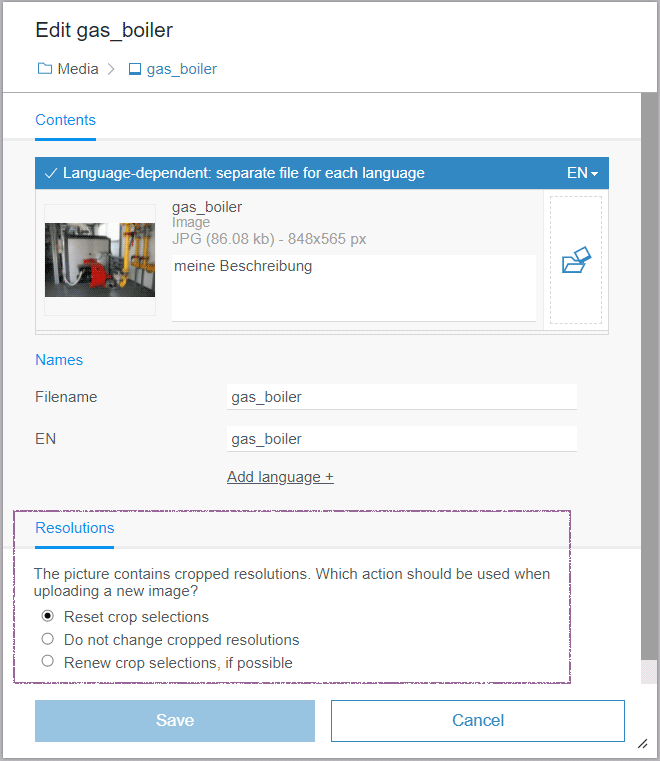
- Reset crop selections
Existing image crops are removed and must be created new. This option is initially selected. - Do not change cropped resolutions
Existing image crops are kept. They may potentially no longer match the original image. This is the current standard behavior. - Renew crop selections, if possible
Image crops are recalculated and applied. For example, this is practical when the motive and size of the original image remained unchanged.
In the crop dialog of the FirstSpirit ContentCreator, a corresponding note is now displayed when crops exist and the original image was replaced:
Some resolutions have a deprecated crop selection!2.2 FS_CATALOG: moving entries in the preview
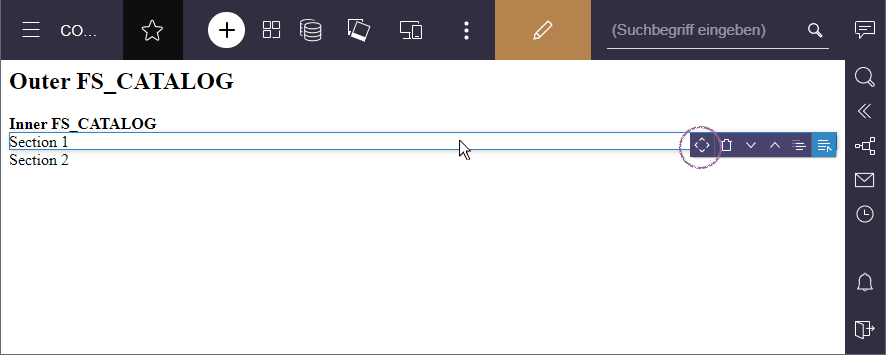
In the FS_CATALOG input component (“Catalog List”), lists of sections or links can be created and maintained.
If such component in turn contains an FS_CATALOG, the order of the internal elements could previously only be changed in the form itself with drag-and-drop.
With the most recent release, the order can now also be changed directly in the preview with drag-and-drop:
2.3 Optimizations concerning UI and UX
The most recent release includes some minor optimizations concerning the design and user guidance (UI and UX) in the FirstSpirit ContentCreator:
- After creating a new medium or dataset, it will now be selected accordingly and can therefore be found better.
- When saving changes for media elements, an indicator now shows the loading process.
- The standard size of forms has been marginally increased.
- The scaling of the font size now also affects the Rich-Text Editor.
- The display of thumbnails in the reports has been improved with an additional space.
- A security questions is now displayed when deleting entries of an FS_CATALOG component in the preview (“Do you really want to delete the element ...?”).
- The display of tasks now also shows the comments since the last non-automatic transition.
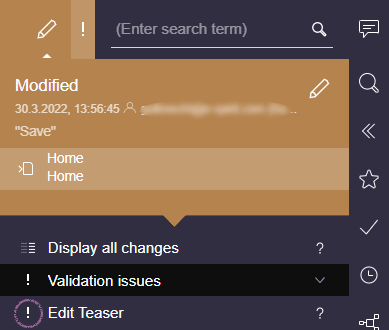
- Element Status entries are now visualized with the ! Icon (instead of the previous Edit icon) in case of validation problems:
3 FirstSpirit Content Experience Tools (CXT)
3.1 Latest module versions
FirstSpirit 2022.4 supports the following module versions for “FirstSpirit Content Experience Tools”.
| Module / file name | Version number |
FirstSpirit CXT Plattformplatform-[version].fsm | 2.5.4 |
FirstSpirit CXT DAP Bridgedataservice-[version].fsm | 1.44.4 |
FirstSpirit CXT FragmentCreatorfragment-creator-[version].fsm | 3.4.8 |
FirstSpirit Fragment DAPfragmentdap-[version].fsm | 1.40.9 |
FirstSpirit Media DAPmediadap-[version].fsm | 1.31.4* |
FirstSpirit PageRef DAPpagerefdap-[version].fsm | 1.9.4 |
FirstSpirit Markdown Editormarkdown-editor-[version].fsm | 1.29.3* |
FirstSpirit Tagging Editortagging-editor-[version].fsm | 1.29.3 |
FirstSpirit CXT FragmentCreator - CaaS Integrationcaas-integration-[version].fsm | 1.31.4 |
* These modules require FirstSpirit 2020-03 or higher from this version.
3.2 Timeout for the registration of MicroApps
The registration of MicroApps can take some time, especially in the case of the restart of a FirstSpirit-Server or the Tomcat web server.
In the past, an error message was displayed while starting the FragmentCreator after a timeout of 5 minutes.
x MicroApps could not be registered in a reasonable amount of time.when the existing MicroApps could not be registered during this time and the FragmentCreator was not started.
With the most recent release, the default value for the timeout was increased to 10 minutes.
If necessary, you can now also adjust it individually for the requirements of your installation by using the new parameter
cxt.fragmentcreator.microAppRegistration.timeoutInMinutesin the properties file cxt-fragment-creator.properties.
Excerpt from the properties file:
<context-param>
   		<param-name>cxt.fragmentcreator.microAppRegistration.timeoutInMinutes</param-name>
   		<param-value>10</param-value>
	</context-param>
For more information about cxt-fragment-creator.properties, see https://docs.e-spirit.com/odfs/edocs/cxt/installation-mo/installing-modu/fragmentcreator/index.html#web_xml.
4 Template development
Images: defining format of automatically generated image files
During an upload to FirstSpirit, images are initially stored in the project without changes concerning the format and resolution (resolution “Original”). However, for certain actions (based on the original image data), new image files are automatically generated by FirstSpirit, for example:
- when generating a preview image
- when generating new resolutions
- when using an automatically generated resolution
- in case of an image crop (in the FirstSpirit ContentCreator or SiteArchitect)
ImageWriteParams(FirstSpirit Access API, package de.espirit.firstspirit.access.project, interface Project, Method setCustomProperties). For example, you can configure the compression rate of images to generate a better image quality or smaller file size.
With the most recent release, it is now also possible to specify the image format of automatically generated images (targetType).
Example script, which was used to generate all automatically generated image files in the WebP format:
project = context.getProject();
project.lock();
properties = new java.util.LinkedHashMap();
properties.put("default.targetType", "webp");
project.setCustomProperties("ImageWriteParam", properties);
project.save();
project.unlock();
This script must be executed once with Administrator permissions in the project.
The change applies to all images that are automatically generated after executing the script.
For instructions on how you can remove already calculated resolutions from the project, please contact e-Spirit Technical Support.
Important: ImageWriteParams, that are already configured for the respective project must also be included in the script because they will otherwise be overwritten.
Find out if and what parameters are already configured via
context.project.getCustomProperties("ImageWriteParam");In addition, you can define definitions for individual image formats and/or resolutions.
The setting for the currently specified image type will thereby be used. If it does not exist, the global setting will be used for the resolution as a fallback.
Example script, that maintains the type for PNG images, for the “Icon” resolution uses the JPG type and applies the WebP type for all other scalable images:
project = context.getProject();
project.lock();
properties = new java.util.LinkedHashMap();
properties.put("default.targetType", "webp");
properties.put("default.png.targetType", "png");
properties.put("resolution.Icon.targetType", "jpg");
project.setCustomProperties("ImageWriteParam", properties);
project.save();
project.unlock();
If images that are generated by the font(...) function must be output in the WebP format, the filetyp to be transferred must be webp.
For more information, see:
Overview
| ID | Description | Categories |
|---|---|---|
| CORE-10584 | In the project properties (FirstSpirit ServerManager), a Substitution medium can be defined (section: “Substitutions”). For example, this is displayed when the originally selected medium is not released or the referenced image has been deleted. The most recent release now takes additional cases into account where the substitution medium is used. If a medium cannot be found, attempts to access this medium (URL, size, etc.) are now diverted to the substitution medium as long as it has been configured. |
Developer, FirstSpirit Administrator, Media, Media Store |
| CORE-11435 | With use of the “Accept template changes” function, possible rule violations are now ignored on the pages to be updated. In the past, the process stopped with an |
Developer, SiteArchitect, Template Development, Template Store |
| CORE-12206 | It is now possible to specify the image format of automatically generated images ( |
Developer, FirstSpirit Administrator, Media, Media Store |
| CORE-13700 | When a database schema is implicitly added to a Content Transport Feature (i.e. the folder containing the schema, not the schema itself), it was possible that the name of the database incorrectly changed in the schema after the installation of the feature (parameter dbname). In this case, no datasets of the schema were displayed in the target project. The dbname of the schema is now no longer changed in the target for an import. |
Content Transport, Database, Developer, FirstSpirit Administrator |
| CORE-13891 | A bug was fixed that prevented that the contexts in the preview were not closed correctly ( |
FirstSpirit API |
| CORE-14208 | Multiple problems concerning the use of cluster generation have been eliminated. |
Clustering, FirstSpirit Administrator, Generation |
| CORE-14221 | The memory management of the Berkeley databases used by FirstSpirit has been improved so that storage made available for them can be better divided between them. |
FirstSpirit Administrator, Performance, Repository |
| CORE-14234 | An error has been fixed which could cause the thumbnails of WebP images not to be displayed in some places in the FirstSpirit SiteArchitect. |
Editor, Input Components, Media |
| CORE-14235 | When transporting database schemata (using “External Synchronization ”or “Content Transport”), columns with names that are identical except for the upper and lower case spelling can now also be transported. |
Content Store, Content Transport, Database, Developer, External synchronization |
| CORE-14253 | An error has been fixed which, in very rare cases, could cause the FirstSpirit Server to become unusable due to an exception in the |
FirstSpirit Administrator |
| CORE-14265 | An error was fixed that could lead to that additional sessions subject to licensing remained open when using the FirstSpirit ContentCreator. |
ContentCreator, FirstSpirit Administrator, Sessions |
| CORE-14276 | Empty 1:1 columns are now exported correctly via ContentTransport or External Synchronization and the column in the target project is cleared during import accordingly. |
Content Store, Content Transport, Database, Developer, External synchronization, FSDevTools, FirstSpirit Administrator |
| CORE-14283 | Information concerning some statistics can now be downloaded conveniently at the same time in the FirstSpirit ServerMonitoring. |
Debugging, FirstSpirit Administrator, Monitoring, ServerMonitoring |
| CORE-14285 | FirstSpirit Content Experience Tools: Latest module versions |
Developer, FirstSpirit Administrator, FirstSpirit Content Experience Tools (CXT), FragmentCreator, Modules |
| CORE-14303 | An error has been eliminated that, in rare cases, could result in that a FirstSpirit Server was deemed to be degraded after starting even though there was no problem. The cause for this was that corresponding recent status changes (up to 24 hours) were incorrectly taken into account. |
FirstSpirit Administrator, Health Center, Monitoring |
| CORE-14326 | Update of internally used software Further information can be found in chapter “Administration: Update of internally used software”. |
FirstSpirit Content Experience Tools (CXT), Integrated software |
| CXT-2264 | For the selection of elements in the ContentCreator, the behavior of the search dialog was corrected, so that pressing X now only removes the search term that was entered. |
ContentCreator, Editor, Input Components |
| CXT-2372 | The default value of the timeout for the registration of MicroApps has been increased and can now be configured specific to the customer. |
Developer, FirstSpirit Administrator, FirstSpirit Content Experience Tools (CXT), FragmentCreator, Performance |
| CXT-2538 | With the most recent release, the editor can now choose in the FirstSpirit ContentCreator how to proceed in case of a replaced original image with existing crops. |
ContentCreator, Editor, Media, Media Store |
| CXT-2549 | The most recent release includes some minor optimizations concerning the design and user guidance (UI and UX) in the FirstSpirit ContentCreator. Further information can be found in chapter “ContentCreator: Optimizations concerning UI and UX”. |
ContentCreator, Editor |
| CXT-2551 | In the FirstSpirit ContentCreator, new tasks are now displayed promptly in the “Tasks” and “Dashboard” reports. |
ContentCreator, Editor, Reports, Workflow |
| CXT-2563 | With the most recent release, the order of internal entries of an FS_CATALOG component can now also be changed directly in the preview with drag-and-drop. |
ContentCreator, Editor, Input Components |
| CXT-2565 | In rare cases, the content was not directly visible in the “Page” section of the navigation bar in the FirstSpirit ContentCreator. |
ContentCreator, Editor, Navigation view |
Deprecations
| Functionality | Deprecated as of | Will be removed / Was removed as of |
|---|---|---|
| Input component CMS_INPUT_CONTENTAREALIST | 5.2R3 | |
| Input component CMS_INPUT_CONTENTLIST | 5.2R3 | |
| Input component CMS_INPUT_FILE | 5.2R3 | |
| Input component CMS_INPUT_LINKLIST | 5.2R3 | |
| Input component CMS_INPUT_OBJECTCHOOSER | 5.2R3 | |
| Input component CMS_INPUT_PAGEREF | 5.2R3 | |
| Input component CMS_INPUT_PICTURE | 5.2R3 | |
| Input component CMS_INPUT_TABLIST | 5.2R3 | |
| FirstSpirit Access API: de.espirit.firstspirit.agency.GroupsAgent | 5.2R15 | |
| FirstSpirit Access API: delete (de.espirit.firstspirit.access.AccessUtil) | 5.2R18 | |
| FirstSpirit Access API: release (de.espirit.firstspirit.access.AccessUtil) | 2018-06 | |
| FirstSpirit Access API: getLastLoginAsDate (de.espirit.firstspirit.agency.UserStatisticsAgent) | 2018-07 | |
| FirstSpirit Access API: remainingDurationOfCurrentStageInMillis (de.espirit.firstspirit.server.MaintenanceModeInfo) | 2018-07 | 2025-13 |
| FirstSpirit Access API: getStartingTimeOfStageAsDate (de.espirit.firstspirit.server.MaintenanceModeInfo) | 2018-07 | 2025-13 |
| FirstSpirit Access API: getSelectedWebserverConfiguration (de.espirit.firstspirit.access.serverConfiguration) | 2018-10 | 2025-13 |
| FirstSpirit Access API: setSelectedWebserverConfiguration (de.espirit.firstspirit.access.serverConfiguration) | 2018-10 | 2025-13 |
| FirstSpirit Access API: getSelectedWebServer (de.espirit.firstspirit.access.project.Project) | 2018-10 | 2025-13 |
| FirstSpirit Access API: setSelectedWebServer (de.espirit.firstspirit.access.project.Project) | 2018-10 | 2025-13 |
| FirstSpirit Access API: getLostAndFoundStoreNodes(); (de.espirit.firstspirit.feature.FeatureInstallResult) | 2018-10 | |
| FirstSpirit Access API: getDeletedStoreNodes(); (de.espirit.firstspirit.feature.FeatureInstallResult) | 2018-10 | |
| FirstSpirit Access API: de.espirit.firstspirit.access.store.Previewable | 2019-01 | |
| WebSphere Application Server support for FirstSpirit | 2019-05 | |
| Database layer for Oracle Database 11g/12c | 2020-12 | 2025-05 |
| FirstSpirit Access API: redirectTemplateLogToDefaultLog() (Interface RenderingAgent.Renderer) | 2021-05 |