
Release Notes
1 Administration
1.1 Update of internally used software
As of the release 2023.10, the following internally used software has been updated.
- Java Service Wrapper (configuration and monitoring of FirstSpirit Java VM, 3.5.50 --> 3.5.54)
Note: When the FirstSpirit server is updated (auto-update, in-place upgrade), the Java Service Wrapper files are not automatically updated. The Java Service Wrapper can be updated via the tar gzip update archive (file fs-update-[version].tar.gz) as described in the FirstSpirit installation instructions.
Additional documentation:
1.2 Configurable metric to detect blocked threads
With the help of a new parameter schedule.maxInactivityTimeout in fs-server.conf, it can be defined within which period of time a schedule task action is considered blocked and aborted if no CPU time has been consumed.
This metric makes it possible to identify threads or schedule task actions that are not using CPU resources within a specified period of time and to cancel them if necessary to optimise efficiency and resource use.
By default, this time frame is set to 10 minutes. A check for the termination condition is made every five minutes.
In exceptional cases, a thread in the standard configuration can therefore remain without CPU consumption for up to 15 minutes before it is recognised as blocked and terminated.
1.3 Critical security vulnerability: "Heap Buffer Overflow" in WebP
Due to CVE-2023-4863, the WebP library used by FirstSpirit has been updated to a version based on libwebp version 1.3.2.
A “heap buffer overflow” in WebP allowed a remote attacker to perform an out-of-bounds memory-write, and thus possibly inject malicious code. A manipulated WebP image can therefor lead to code injection.
FirstSpirit versions since 2019.11 are affected.How can the vulnerability be exploited?
- An editor adds a manipulated WebP image to a project.
What do you have to do?
- (Server) Update to 5.2.230813 (Non-Jakarta) or 5.2.231008 (Jakarta)
- (Client) Disable the integrated preview in SA (JxBrowser)
- (Client) Update the local browsers
Mitigation without FS Update
- (Server) Prevent uploading of WebP (set appropriate restrictions in the project) or
- (Server) Configure WebP as media type
file - (Client) Disable the integrated preview in SA (JxBrowser)
- (Client) Update the local browsers
1.4 Security: External authentication of internal admins
For security reasons, it is no longer possible for server administrators for whom the “external user” option is not set to log in via external authentication (e.g. SAML or LDAP). An attempt to do so will now result in the login dialog being displayed.
This restriction does not apply to normal users and also not to project administrators.
2 Administration / Modules
2.1 SAML Login: Match Modes for External Groups
Two new match modes for external groups have been introduced in the FirstSpirit SAML login module.
The new parameters can be defined in fs-saml.conf (see Installation and Setup of the Module).
group.match.mode
Possible values:
contains(default value)equals
With this parameter, the assignment to external groups can be changed from “SAML group must contain the external designation of the group” (contains) to “SAML group must be identical to the external designation” (equals).
group.name
group.name=${saml:groupName}With this parameter it is possible to extend the SAML group name by any prefix and/or suffix.
Example:
group.name=SAML-${saml:groupName}-GROUPThis configuration would result in a “users” group obtained via SAML login being used in FirstSpirit as a “SAML-users-GROUP”.
2.2 Migration to Jakarta Servlet 6.0
The migration to Jakarta Servlet 6.0 is an essential step to ensure the security of web applications.
With the FirstSpirit version 2023.9, the changeover to Jakarta Servlet 6.0 with support for automatic migration took place.
Support for automatic migration will be removed with FirstSpirit 2024.9.
In contrast to the phased rollout for cloud customers, on-premises customers are able to test and migrate their FirstSpirit servers once version 2023.9 or 2023.10 has been released.
However, we strongly recommend to wait with the update of productive servers at least until release 2023.11 since we aim to guarantee the compatibility for modules provided by Crownpeak with that release.Important:
- If FirstSpirit is run in an on-premises scenario, the Tomcat version must be updated when migrating to the FirstSpirit JakartaEE edition. Since the servlet version will be updated to 6.0, a 10.1.x version of Tomcat is required.
- The use of FirstSpirit version 2023.9 or newer requires that Java version 17 is used.
The FirstSpirit installation may be affected if any of the following conditions apply:
- The FirstSpirit installation is not maintained in the Crownpeak Cloud and deploys web-applications to an application server like Apache Tomcat.
- A custom module is used that contains a WebApp component with code that uses the legacy Java Servlet API.
- A custom module is used that contains a WebApp component with dependencies that use the old JavaEE API, e.g.,
Spring Boot 2.x.
More information and updates can be found in the Crownpeak Community and the detailed Jakarta FAQ.
Contact Customer Support Team if you have questions or feedback regarding the migration.
3 General
Information on the servlet version used
In the ServerManager, the list of web applications now also provides information on the servlet version used. This can be used to determine whether components are still installed on a server with Jakarta EE support that are to be migrated to the Jakarta EE API in the near future.
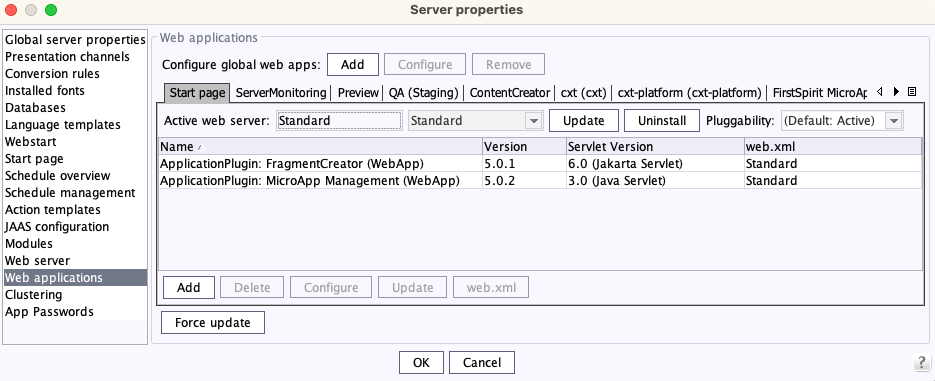
Servlet Version
4 External Synchronization / Content Transport
ContentTransport: Improved feature cleanup
When creating features, these are now no longer always saved in the project local storage, but only if this has been explicitly selected.
Note: When creating features using the FirstSpirit API, the project local storage is automatically used.
5 FirstSpirit Content Experience Tools (CXT)
Latest module versions
FirstSpirit 2023.10 supports the following module versions for FirstSpirit Content Experience Tools.
| Module / file name | Version number |
FirstSpirit CXT Plattformplatform-[version].fsm | 5.0.2 |
FirstSpirit CXT DAP Bridgedataservice-[version].fsm | 1.44.15 |
FirstSpirit CXT FragmentCreatorfragment-creator-[version].fsm | 5.0.1 |
FirstSpirit Fragment DAPfragmentdap-[version].fsm | 1.40.23 |
FirstSpirit Media DAPmediadap-[version].fsm | 1.31.14 |
FirstSpirit PageRef DAPpageref-[version].fsm | 1.9.14 |
FirstSpirit Markdown Editormarkdown-editor-[version].fsm | 1.29.13 |
FirstSpirit Tagging Editortagging-editor-[version].fsm | 1.29.13 |
FirstSpirit CXT FragmentCreator - CaaS Integrationcaas-integration-[version].fsm | 1.31.13 |
6 Module Development, Scripts, API
6.1 Specification of a minimum supported FS version for modules
With the current FirstSpirit release it is now possible to optionally specify a minimum required FirstSpirit version during module development (module.xml).
The corresponding FirstSpirit version can be defined within the <module> block.
Example:
<module>
   <name>FirstSpirit Beispiel-Modul</name>
   <version>5.2</version>
   <min-fs-version>5.2.230909</min-fs-version>

   <components>
   ...
   </components>
<module>
This syntax can be used, for example, to ensure that a module can only be installed on a FirstSpirit server with version 5.2.230909 or newer.
The syntax is <FSMajorVersion>.<FSMinorVersion>.<FSBuildNumber>, where
<FSMajorVersion>: 5<FSMinorVersion>: 2<FSBuildNumber>: 6-digit number consisting of two digits each for<year>,<version in year>,<build number>
6.2 New method for getting the path to a web application directory of the web server
The interface WebServer (FirstSpirit Developer API, package de.espirit.firstspirit.module) was extended by a new method getWebAppDir(String targetPath), which returns the path to a specific web application directory of this web server. Since the method has a default implementation, no modification is necessary for most derivations of the class.
In addition, the error that led to the results of generation jobs not being visible for the embedded Tomcat provided with FirstSpirit 2023.9 was fixed.
Overview
| ID | Description | Categories |
|---|---|---|
| CORE-8226 | The interfaces in the API package |
FirstSpirit API |
| CORE-11447 | Installing and uninstalling web application components using the API methods installWebApp and uninstallWebapp (FirstSpirit Developer API, interface |
FirstSpirit API |
| CORE-13304 | During module development it is now possible to specify a minimum supported FirstSpirit version. |
Module development |
| CORE-14442 | With the help of a new parameter |
Server Administrator |
| CORE-15037 | Update of internally used software Further information can be found in chapter “Administration: Update of internally used software”. |
Integrated software |
| CORE-15129 | Fixed a problem when selecting section templates with a FS_CATALOG input component. When too many section templates were present, the template selection could be cut off at the edge of the display in rare cases. |
SiteArchitect |
| CORE-15476 | A problem has been fixed that caused an incorrect configuration of the web application of “FirstSpirit Dynamic Database Access” Module ( |
Server Administrator |
| CORE-15501 | Two new match modes for external groups have been introduced in the FirstSpirit SAML login module. This provides the flexibility to define the matching strategy for external groups according to requirements. |
Server Administrator |
| CORE-15530 | When creating features, only explicitly selected features are stored in the “Project-Local-Storage”. |
Content Transport |
| CORE-15544 | The robustness of revision generation in FirstSpirit has been improved so that the probability of |
FirstSpirit Administrator |
| CORE-15565 | Fixed a possible deadlock when updating the search index. |
Server Administrator |
| CORE-15569 | New method |
FirstSpirit API, Server Administrator |
| CORE-15597 | For security reasons, it is no longer possible for server administrators for whom the “external user” option is not set to log in via external authentication (e.g. SAML or LDAP). |
Security, Server Administrator |
| CORE-15604 | Fixed an error that could lead to the preview image not being calculated based on the original image when importing images incl. corresponding resolutions. |
Media |
| CORE-15610 | In the ServerManager, the list of web applications now also provides information on the servlet version used. Further information can be found in chapter “General: Information on the servlet version used”. |
ServerManager |
| CORE-15613 | The “FirstSpirit BasicSearch” module now no longer uses legacy components. |
Modules |
| CORE-15634 | In the course of the changeover to the new Jakarta servlet version, web applications are now deployed with XML schema version 6.0. |
Server Administrator, Web applications |
| CORE-15652 | FirstSpirit Content Experience Tools: Latest module versions |
FirstSpirit Content Experience Tools (CXT) |
| CORE-15662 | When installing modules that contain FirstSpirit artefacts, an error message is now issued. In addition, these artefacts are ignored during operation. |
Server Administrator |
| CORE-15671 | Migration to Jakarta Servlet 6.0 |
FirstSpirit Administrator, Java, Module development, Modules, Server Administrator |
| CORE-15682 | A WebP library |
Security |
| CXT-2941 | The order of allowed format templates in the input components CMS_INPUT_DOM and CMS_INPUT_DOMTABLE is now considered for the display in the editor. |
ContentCreator |
| CXT-2968 | If an external preview URL has been defined for the ContentCreator, this is now also called up if there is no start page in the Site Structure of the project. |
ContentCreator |
Deprecations
| Functionality | Deprecated as of | Will be removed / Was removed as of |
|---|---|---|
| Input component CMS_INPUT_CONTENTAREALIST | 5.2R3 | |
| Input component CMS_INPUT_CONTENTLIST | 5.2R3 | |
| Input component CMS_INPUT_FILE | 5.2R3 | |
| Input component CMS_INPUT_LINKLIST | 5.2R3 | |
| Input component CMS_INPUT_OBJECTCHOOSER | 5.2R3 | |
| Input component CMS_INPUT_PAGEREF | 5.2R3 | |
| Input component CMS_INPUT_PICTURE | 5.2R3 | |
| Input component CMS_INPUT_TABLIST | 5.2R3 | |
| FirstSpirit Access API: de.espirit.firstspirit.agency.GroupsAgent | 5.2R15 | |
| FirstSpirit Access API: delete (de.espirit.firstspirit.access.AccessUtil) | 5.2R18 | |
| FirstSpirit Access API: release (de.espirit.firstspirit.access.AccessUtil) | 2018-06 | |
| FirstSpirit Access API: getLastLoginAsDate (de.espirit.firstspirit.agency.UserStatisticsAgent) | 2018-07 | |
| FirstSpirit Access API: remainingDurationOfCurrentStageInMillis (de.espirit.firstspirit.server.MaintenanceModeInfo) | 2018-07 | 2025-13 |
| FirstSpirit Access API: getStartingTimeOfStageAsDate (de.espirit.firstspirit.server.MaintenanceModeInfo) | 2018-07 | 2025-13 |
| FirstSpirit Access API: getSelectedWebserverConfiguration (de.espirit.firstspirit.access.serverConfiguration) | 2018-10 | 2025-13 |
| FirstSpirit Access API: setSelectedWebserverConfiguration (de.espirit.firstspirit.access.serverConfiguration) | 2018-10 | 2025-13 |
| FirstSpirit Access API: getSelectedWebServer (de.espirit.firstspirit.access.project.Project) | 2018-10 | 2025-13 |
| FirstSpirit Access API: setSelectedWebServer (de.espirit.firstspirit.access.project.Project) | 2018-10 | 2025-13 |
| FirstSpirit Access API: getLostAndFoundStoreNodes(); (de.espirit.firstspirit.feature.FeatureInstallResult) | 2018-10 | |
| FirstSpirit Access API: getDeletedStoreNodes(); (de.espirit.firstspirit.feature.FeatureInstallResult) | 2018-10 | |
| FirstSpirit Access API: de.espirit.firstspirit.access.store.Previewable | 2019-01 | |
| WebSphere Application Server support for FirstSpirit | 2019-05 | |
| Database layer for Oracle Database 11g/12c | 2020-12 | 2025-05 |
| FirstSpirit Access API: redirectTemplateLogToDefaultLog() (Interface RenderingAgent.Renderer) | 2021-05 | |
| Support for Log4j 1 | 2022-05 | 2024-06 |