
Release Notes
1 Administration
Adaptations of the Java Service Wrapper and support of the Java Flight Recorder (JFR)
As part of the product maintenance, the Java Service Wrapper, which is used to start and end the Java Virtual Machine (Java VM) of FirstSpirit, was adapted to changes of Java 16. Beyond that, the Java Flight Recorder (JFR) that has been available since Java 11 is also supported.
The changes are delivered with the installation and update archives of the current FirstSpirit Release (Version 2.1.0).
- These changes are not only applied automatically in the case of New Installations but also with updates of an existing FirstSpirit Servers via Tar-Gzip Update Archive (file
fs-update-[version].tar.gz). A prompt update is recommended for existing installations.
If necessary, the settings that are rolled out with the current release can be adapted manually (see below). - In the case of an update of the FirstSpirit Server via Auto-Update or In-place-Upgrade (exchange of the file
fs-isolated-server.jarin the file system), the files of the Java Service Wrapper will not be updated automatically. The Java Service Wrapper should be updated promptly via the Tar-Gzip Update Archive (filefs-update-[version].tar.gz) in this case as well.
Change of the default value of illegal-access
The parameter illegal-access controls access by reflection on the class path. With Java 16, the default value was changed from permit to deny: Access to the class path is thereby no longer possible. The parameter is deprecated and can be omitted in a later version. Access to the class path would thereby no longer be permitted.
To facilitate an easier conversion, the corresponding parameter in the FirstSpirit Wrapper has now been set from permit to warn:
wrapper.java.additional.32=--illegal-access=warnEvery corresponding access to class paths is thereby recorded as a warning in the log:
WARNING: An illegal reflective access operation has occurredThis method can be used to identify and add potentially missing information in customer-specific FirstSpirit modules. If this information is missing, it is possible that functional changes or losses in later versions may occur.
To reduce the message frequency, the parameter can be set manually to permit again:
wrapper.java.additional.32=--illegal-access=permitIn this case, a warning is only issued for the first illegal access, e.g.
WARNING: Use --illegal-access=warn to enable warnings of further illegal reflective
   access operations
WARNING: All illegal access operations will be denied in a future release
Addition of add-opens in the Vendor file
In the Vendor file, add-opens were added so that based on the new configuration illegal-access=warn, no warnings are output for FirstSpirit Servers in the default configuration.
If information is missing, warnings are recorded in the log in the following format:
WARNING: Illegal reflective access by de.espirit.firstspirit.common.xml.XmlSerializer
  (file:/opt/firstspirit/.../fs-isolated-server.jar)
  to field java.util.concurrent.atomic.AtomicReference.value
In this case, check if the use stems from a customer-specific module or from FirstSpirit. If in doubt, please contact e-Spirit Technical Support.
Change on the Garbage Collection Log
With the current Wrapper Version, file logging of the Garbage Collector occurs rotating again, which means a maximum of 9 log files with a maximum size of 10 Mb are stored. When these values are reached, new log files will overwrite existing log files.
The corresponding parameter is:
wrapper.java.additional.33=-Xlog:gc*,gc+age=trace,safepoint,heap*,phases*:
   file=log/fs-gc.log::filecount=9,filesize=10M
To restore the previous status (no rotation, no overwriting of files), this parameter should be replaced with the following parameter in the fs-wrapper.conf file:
wrapper.java.additional.33=-Xlog:gc*,gc+age=trace,safepoint,heap*,phases*:log/fs-gc.logNew: Configuration for the Java Flight Recorder (JFR)
As of Java 11, the JFR can be used to retrieve additional information (https://access.redhat.com/documentation/en-us/openjdk/11/pdf/using_java_flight_recorder_for_java_mission_control/using-java-flight-recorder-for-java-mission-control.pdf).
The installation and update archives of the current FirstSpirit Release contain a default configuration for the JFR.
By default, the JFR is deactivated. To activate it, the fs-recording.conf.disabled file in the conf directory must be renamed to
fs-recording.confThe default configuration in this file is as follows:
#encoding=UTF-8
-XX:FlightRecorderOptions=repository=work/recording
-XX:StartFlightRecording=name=FirstSpirit,disk=true,dumponexit=true,
   filename=log/fs-recording.jfr,maxsize=50m,maxage=1d
In the JDK Mission Control, the relevant JFR information can thereby be retrieved under “FirstSpirit”.
In case of an unexpected shut-down of the server, a dump will be created and stored in the fs-recording.jfr file (directory log). It is configured for a maximum size of 50 Mb and a maximum age of one day.
Using JFR for existing installations: The JFR file is included in the fs-update-[version].tar.gz update archive under conf/conf-all/fs-recording.conf.disabled.default.txt and located there in the FirstSpirit Server directory after an update. This file must then be copied to conf/fs-recording.conf.disabled and/orconf/fs-recording.conf accordingly.
Additional documentation
- on Java Service Wrapper (manual for administrators)
- on Updating the Java Service Wrapper (installation instructions)
- on Java Flight Recorder (JFR): https://access.redhat.com/documentation/en-us/openjdk/11/pdf/using_java_flight_recorder_for_java_mission_control/using-java-flight-recorder-for-java-mission-control.pdf
2 ContentCreator
Support for Shadow DOM
Nowadays, modern web solutions increasingly use content from different sources. To avoid collisions between markups, scripts and styles from different sources, Shadow DOM (e. g. ... .attachShadow({mode: 'open'})...) can be used: this technology enables an encapsulation of HTML elements. This method can be used to create reusable and interacting components. Shadow DOM is supported by the relevant browsers for FirstSpirit in their current versions.
With the current release, contents in nested Shadow DOM components can now also be edited in the FirstSpirit ContentCreator with EasyEdit and InEdit.
This requires the use of the editorId. Components that already use the editorId do not require any changes to use the new Shadow DOM-Support.
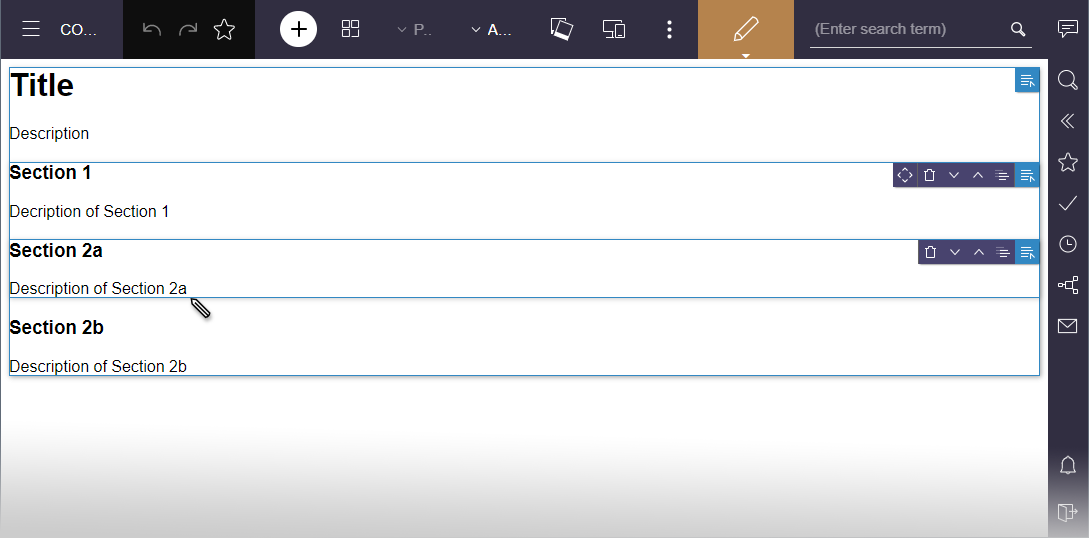
Note: Due to technical reasons, it is possible that when Shadow DOM elements are used for reloads, not only the changed partial sections are exchanged but the entire preview will be reloaded. This applies to automatic reloads as well as targeted reload operations via the WE_API, such as WE_API.Preview.reload(Element) or WE_API.Preview.reload(String).
For more information, see
3 FirstSpirit Content Experience Tools (CXT)
3.1 Latest module versions
FirstSpirit 2021-06 supports the following module versions for “FirstSpirit Content Experience Tools”:
| Module / file name | Version number |
FirstSpirit CXT Plattformplatform-[version].fsm | 2.2 |
FirstSpirit CXT DAP Bridgedataservice-[version].fsm | 1.42 |
FirstSpirit CXT FragmentCreatorfragment-creator-[version].fsm | 3.2 |
FirstSpirit Fragment DAPfragmentdap-[version].fsm | 1.38 |
FirstSpirit Media DAPmediadap-[version].fsm | 1.30* |
FirstSpirit PageRef DAPpagerefdap-[version].fsm | 1.8 |
FirstSpirit Markdown Editormarkdown-editor-[version].fsm | 1.28* |
FirstSpirit Tagging Editortagging-editor-[version].fsm | 1.28 |
FirstSpirit CXT FragmentCreator - CaaS Integrationcaas-integration-[version].fsm | 1.29 |
* These modules require FirstSpirit 2020-03 or higher from this version.
3.2 Status page: new security check
The parameter cxt.dataservice.url is used to specify the address used to reach the DAP Bridge in the FragmentCreator configuration.
If an http address is entered there, the attribute secure cannot be set to true (secure="true") for the HTTP connector of the Tomcat because in this case, a connection between DAP Bridge and Tomcat is suppressed for security reasons.
The status page now checks (under the item “Configuration check”) if cxt.dataservice.url has the value http or https and if the attribute secure was set for the HTTP connector of the Tomcat (secure="true"):
- If
cxt.dataservice.urlis an http address and the attributesecureof the connector is set to true, it will be seen as an ERROR. A connection will then not be possible. - If the attribute
secureis not set (or set to false) or if an https address is used with the attributesecure="true", a connection will be possible.
If the respective set-up absolutely requires http address for cxt.dataservice.url and secure="true" for the Tomcat connector, two separate Tomcat connectors must be created (on different ports):
- for the external communication: This one can use https and / or
secure="true". The DAP Bridge must then be configured for the port of this connector. - for the internal communication: This one can only have a
secure="true"attribute when the value forcxt.dataservice.urlis an https address.
For information on the configuration of Tomcat HTTP connectors, also refer to https://tomcat.apache.org/tomcat-9.0-doc/config/http.html.
3.3 Separation of CXT platform and FragmentCreator
FirstSpirit Content Experience Tools was designed as a microservice architecture right from the start. The aims of the module structure and independent processes include improving availability and scalability, as well as making service and maintenance easier.
Previously, the CXT platform was integrated into FragmentCreator and included in its scope of delivery. Services, which are required for the platform, were started up and managed every time a FragmentCreator instance was launched, even if they were not needed (e.g., OAuth, MicroService Controller, Eureka etc.).
To improve performance and control, the CXT platform has now been separated from FragmentCreator. The CXT platform and FragmentCreator now each operate as independent web applications. This continues to be in line with the principle of a microservice.
With the current release, the following versions of the modules concerned include this technological change:
- “Platform” module: Version 2.x
- “FragmentCreator” module: Version 3.x
The modules can be requested from Technical Support.
Requirements for the use of the new technology:
- FragmentCreator and the platform each require a SOCKET connection to FirstSpirit Server.
- Both web applications must be accessible from the same external host (“same-origin”).
Configuration
The modules come with a standard configuration which supports operation. The configuration of the modules can be customized in the Classpath under
/config/cxt-platform.properties
/config/cxt-fragment-creator.properties
Alternatively, they can be configured using the web.xml file. However, an automatic update of FirstSpirit will overwrite/reset this file, as will the values of an existing properties file.
The parameter values are described here:
- https://docs.e-spirit.com/odfs/edocs/cxt/installation-mo/installing-modu/plattform/index.html#web_xml_1 (Platform)
- https://docs.e-spirit.com/odfs/edocs/cxt/installation-mo/installing-modu/fragmentcreator/index.html#web_xml (FragmentCreator)
Migration
Only a small number of changes have to be made to existing installations to use the new technology:
Installation of the new “Platform” module
1) Install file in latest version (3.x):
platform-[version].fsm(FirstSpirit Server Manager / “Server Properties / Modules”, “Install” button; see also https://docs.e-spirit.com/odfs/edocs/admi/firstspirit-ser/server-properti/modules/index.html)
2) Create global web application
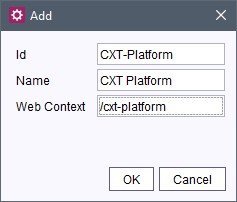
Next, define and configure the web application as a separate, global web application under “Web Applications”.
(FirstSpirit Server Manager / “Server Properties / Web Applications / Configure Global Web Apps”, “Add” button; see also https://docs.e-spirit.com/odfs/edocs/admi/firstspirit-ser/server-properti/web-application/index.html)
The value in the Web Context field must be
/cxt-platforme.g.,
3) Add web components
Select a suitable web server for this global web application and then add the “CXT Platform” web component.
4) Edit web.xml
cxt.dataservice.url=http://localhost:8080/cxt/
cxt.platform.internal-url=http://localhost:8080/cxt-platform/
cxt.platform.external-url=https://external/cxt-platform/
cxt.platform.internal-port=8080
cxt.platform.eureka.password=[...]
cxt.platform.firstspirit.hostname=localhost
cxt.platform.firstspirit.port=1088
cxt.platform.firstspirit.connection-mode=SOCKET
cxt.platform.cors-allowed-origins=[...]
cxt.platform.microapps.csp-origins=[...]
cxt.platform.oauth.client-secret=[...]
cxt.platform.oauth.jwt-signing-key=[...]
cxt.platform.oauth.access-token-validity-seconds=3600
cxt.platform.oauth.refresh-token-validity-seconds=43200
Alternatively, the configuration settings can also be made using a properties file, in the classpath under
/config/cxt-platform.propertiesThe configuration written to this file overwrites all other properties (even including the configuration in the web.xml file). In the event of an automatic FirstSpirit update, the settings saved in the properties file remain unchanged; they are not overwritten or reset.
5) Deploy
Finally, roll out the web application configured as described above for the CXT platform on the selected web server by pressing the “Install” button.
(See also https://docs.e-spirit.com/odfs/edocs/admi/firstspirit-ser/server-properti/web-application/index.html.)
Installing and adapting the configuration of the “FragmentCreator” module
1) Install file:
fragmentcreator-[version].fsm2) Update web component
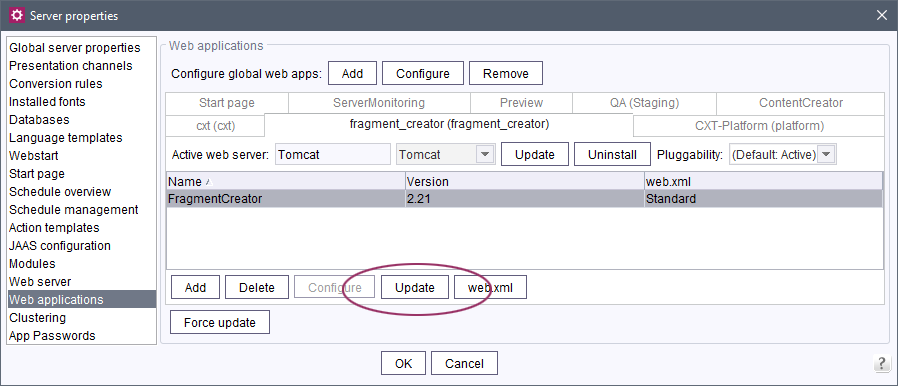
Under “Web Applications” on the tab for the global web app for FragmentCreator, update the “FragmentCreator” web component (“Update” button):
3) Edit web.xml
The parameters used previously
firstSpiritDataServiceBaseUrl=http://localhost:8080/cxt/
webServiceBaseUrl=http://localhost:8080/FragmentCreator/
externalBaseUrl=https://external/FragmentCreator/
firstSpiritHost=localhost
firstSpiritPort=1088
firstSpiritConnectionMode=SOCKET
oAuthClientSecret=[...]
corsAllowedOrigins=*
eurekaPassword=[...]
accessTokenValiditySeconds=3600
refreshTokenValiditySeconds=43200
have now been organized into a package structure and their names have been standardized:
cxt.fragmentcreator.internal-url=http://localhost:8080/FragmentCreator/
cxt.fragmentcreator.external-url=https://external/FragmentCreator/
cxt.fragmentcreator.platform.oAuth-client-secret=[...]
cxt.fragmentcreator.platform.eureka-password=[...]
cxt.fragmentcreator.cors-allowed-origins=*
cxt.platform.firstspirit.hostname=localhost
cxt.platform.firstspirit.port=1088
cxt.platform.firstspirit.connection-mode=SOCKET
The previous parameters
firstSpiritDataServiceBaseUrl
accessTokenValiditySeconds
refreshTokenValiditySeconds
cxt.platform.microapps.csp-origins
have been removed and are configured through the platform:
cxt.fragmentcreator.platform.internal-url=http://localhost:8888/cxt-platform/
cxt.fragmentcreator.platform.external-url=https://external/cxt-platform/
(See web.xml for the platform module above)
If customer-specific values have been configured previously for FragmentCreator, they also have to be included in the configuration of the new FragmentCreator module.
Alternatively, the configuration settings can also be made using a properties file, in the class path under
/config/cxt-fragment-creator.propertiesThe configuration written to this file overwrites all other properties (even including the configuration in the web.xml file). In the event of an automatic FirstSpirit update, the settings saved in the properties file remain unchanged; they are not overwritten or reset.
4) Deploy
Finally, roll out the web application configured as described above for FragmentCreator on the selected web server by pressing the “Update” button.
(See also https://docs.e-spirit.com/odfs/edocs/admi/firstspirit-ser/server-properti/web-application/index.html.)
Adapting API URLs
If the Fragment DAP is used in ContentCreator, it becomes a MicroApp Client, i.e., it incorporates the CXT MicroApp API api.js.
(See also https://docs.e-spirit.com/odfs/edocs/cxt/installation-mo/installing-modu/fragment-dap/index.html#fragment_dap_for_contentcreator)
The “CxtMicroApp API URL” must be adapted to:
https://external/cxt-platform/microapps/api.jsThe path must also be adapted accordingly for other clients which load the CXT MicroApp API api.js.
This completes the configuration of the modules.
Further notes
Cloud customers do not have to take any action in this regard: e-Spirit makes all the necessary changes to the configuration.
Alternatively, the “FragmentCreator” module can continue to be used in a version < 3.x for a transitional period.
4 Compatibility
Modules and extensions for FirstSpirit 2021-06
The following modules and extensions are compatible with FirstSpirit 2021-06:
| Module name/File name | Version number | Compatibility |
FirstSpirit Update Archivefs-update-[version].tar.gz | 2.1.0 | - |
FirstSpirit Install Archiv fs-install-[version].tar.gz | 2.1.0 | - |
FirstSpirit LauncherFSLauncher.exe | 1.0.40 | as of FirstSpirit 2018-08 |
FirstSpirit Launcher JRE modulefs-launcher-jre-[version].fsm | 1.18 | as of FirstSpirit 2020-11 |
FirstSpirit SAML Login modulefs-saml-login-[version].fsm | 1.2 | as of FirstSpirit 2019-02 |
FSDevToolsfs-cli-[version].tar.gzfs-cli-[version].zip | 2.6.9 | as of FirstSpirit 2020-08 |
FirstSpirit Module Gradle Pluginfirstspirit-module-gradle-plugin-[version].jar | 2.1.1 | as of FirstSpirit 2019-06 |
5 System
Updates to integrated third-party software
The following internal software has been updated in the latest FirstSpirit release:
- Java Service Wrapper (configuration and monitoring of FirstSpirit Java VM)
Updated from version 3.5.44 to version 3.5.45.
Note: When the FirstSpirit server is updated (auto-update, in-place upgrade), the Java Service Wrapper files are not automatically updated. The Java Service Wrapper can be updated via the tar gzip update archive (file fs-update-[version].tar.gz) as described in the FirstSpirit installation instructions.
Additional documentation:
6 Template development
JSON: Improved output of references from remote projects
The current FirstSpirit version has improved the output of references from remote projects. In addition to the remote object itself, information on the remote project is included in the JSON output. For all remote references (type IDProvider, e.g., media and page references) the internal FirstSpirit unique identifier (UUID) of the remote project is now additionally output via the new attribute remoteProject.
The output of a remote medium via:
$CMS_VALUE(json(ref(media:"st_reference_MEDIA",remote:"remote-project").node))$now indicates the new attribute remoteProject in the JSON output:
    "fsType":"Media",
      "name":"UPS",
      "displayName":"UPS",
      "identifier":"68baba6f-2d9c-422c-abe7-b339a3844d48",
     "remoteProject":"eef72dea-d4fc-49b8-af51-80d3940713b7",
      "uid":"UPS",
      "uidType":"MEDIASTORE_LEAF",
      (....)
Overview
| ID | Description | Categories |
|---|---|---|
| CORE-11593 | Database schemata in FirstSpirit access the data of the database via an OR Session. The access restrictions for these OR Sessions have been adapted with the current FirstSpirit release as follows:
Note: Rights that are defined on a schema or Content2 Object will not be taken into account when changing data sets (Entities) via an OR Session. |
Database, FirstSpirit Administrator, Permissions, Security, Sessions, Tasks |
| CORE-13182 | Internal software has been updated in the latest FirstSpirit release. Further information can be found in chapter “System: Updates to integrated third-party software”. |
FirstSpirit Administrator, Integrated software, Java |
| CORE-13493 | JSON: The current FirstSpirit version has improved the output of references from remote projects. In addition to the remote object itself, information on the remote project is included in the JSON output. For all remote references (type |
Developer, Remote access, Support for JSON |
| CORE-13566 | Adaptations of the Java Service Wrapper and support of the Java Flight Recorder (JFR) |
FirstSpirit Administrator, Java |
| CORE-13602 | The speed of FS_CATALOG output has been improved. |
Developer, Editor, FirstSpirit Administrator, Input Components, Performance |
| CORE-13606 | The following modules and extensions are compatible with FirstSpirit 2021-06. |
Developer, FirstSpirit Administrator, Modules, Server Administrator |
| CORE-13636 | FirstSpirit Content Experience Tools: Latest module versions |
ContentCreator, Developer, FirstSpirit Administrator, FirstSpirit Content Experience Tools (CXT), FragmentCreator, Modules |
| CXT-1289 | CXT platform and FragmentCreator have been split. Minimum adaptations have to be made to existing installations for non-Cloud customers. |
Developer, FirstSpirit Administrator, FirstSpirit Content Experience Tools (CXT), FragmentCreator, Migration, Modules |
| CXT-2063 | The display of the input element for formatted text input (FS_MARKDOWN) in conjunction with lots of text has been optimized. |
Editor, FirstSpirit Content Experience Tools (CXT), FragmentCreator |
| CXT-2082 | The |
Developer, FirstSpirit Administrator, FirstSpirit Content Experience Tools (CXT), FragmentCreator, Modules, Performance |
| CXT-2111 | Support for Shadow DOM Further information can be found in chapter “ContentCreator: Support for Shadow DOM”. |
ContentCreator, Developer, Editor, Input Components, Template Development |
| CXT-2131 | With soft line breaks (
Shift
+
Enter
), the FS_MARKDOWN input component in the FragmentCreator now generates the correct output |
Editor, FirstSpirit Content Experience Tools (CXT), FragmentCreator |
| CXT-2179 | The status page now checks the configuration of |
Developer, FirstSpirit Administrator, FirstSpirit Content Experience Tools (CXT), Modules, Security |
| CXT-2270 | When using FS_INDEX to create or edit fragments in FragmentCreator or ContentCreator, content would temporarily not be displayed correctly when switching tabs (CMS_GROUP). |
ContentCreator, Editor, FirstSpirit Content Experience Tools (CXT), FragmentCreator |
| CXT-2300 | Objects (fragments, media) that are referenced in FS_INDEX are now displayed directly in the Fragment Creator again, and not just after a refresh. |
Editor, FirstSpirit Content Experience Tools (CXT), FragmentCreator |
| CXT-2323 | The display of data sources in the search report in ContentCreator has been improved. |
Content Store, ContentCreator, Editor, Reports |
| CXT-2326 | Media can now be uploaded to (sub)folders again in ContentCreator with the appropriate permissions, even if read-only permissions are assigned for the top level of the media management. |
ContentCreator, Editor, FirstSpirit Administrator, Media, Media Store |
Deprecations
| Functionality | Deprecated as of | Will be removed / Was removed as of |
|---|---|---|
| Input component CMS_INPUT_CONTENTAREALIST | 5.2R3 | |
| Input component CMS_INPUT_CONTENTLIST | 5.2R3 | |
| Input component CMS_INPUT_FILE | 5.2R3 | |
| Input component CMS_INPUT_LINKLIST | 5.2R3 | |
| Input component CMS_INPUT_OBJECTCHOOSER | 5.2R3 | |
| Input component CMS_INPUT_PAGEREF | 5.2R3 | |
| Input component CMS_INPUT_PICTURE | 5.2R3 | |
| Input component CMS_INPUT_TABLIST | 5.2R3 | |
| FirstSpirit Access API: de.espirit.firstspirit.agency.GroupsAgent | 5.2R15 | |
| FirstSpirit Access API: delete (de.espirit.firstspirit.access.AccessUtil) | 5.2R18 | |
| FirstSpirit Access API: release (de.espirit.firstspirit.access.AccessUtil) | 2018-06 | |
| FirstSpirit Access API: getLastLoginAsDate (de.espirit.firstspirit.agency.UserStatisticsAgent) | 2018-07 | |
| FirstSpirit Access API: remainingDurationOfCurrentStageInMillis (de.espirit.firstspirit.server.MaintenanceModeInfo) | 2018-07 | 2025-13 |
| FirstSpirit Access API: getStartingTimeOfStageAsDate (de.espirit.firstspirit.server.MaintenanceModeInfo) | 2018-07 | 2025-13 |
| FirstSpirit Access API: getSelectedWebserverConfiguration (de.espirit.firstspirit.access.serverConfiguration) | 2018-10 | 2025-13 |
| FirstSpirit Access API: setSelectedWebserverConfiguration (de.espirit.firstspirit.access.serverConfiguration) | 2018-10 | 2025-13 |
| FirstSpirit Access API: getSelectedWebServer (de.espirit.firstspirit.access.project.Project) | 2018-10 | 2025-13 |
| FirstSpirit Access API: setSelectedWebServer (de.espirit.firstspirit.access.project.Project) | 2018-10 | 2025-13 |
| FirstSpirit Access API: getLostAndFoundStoreNodes(); (de.espirit.firstspirit.feature.FeatureInstallResult) | 2018-10 | |
| FirstSpirit Access API: getDeletedStoreNodes(); (de.espirit.firstspirit.feature.FeatureInstallResult) | 2018-10 | |
| FirstSpirit Access API: de.espirit.firstspirit.access.store.Previewable | 2019-01 | |
| WebSphere Application Server support for FirstSpirit | 2019-05 | |
| Legacy mode for the FirstSpirit server | 2019-06 | 2022-03 |
| Database layer for Oracle Database 11g/12c | 2020-12 | 2025-05 |
| FirstSpirit Access API: redirectTemplateLogToDefaultLog() (Interface RenderingAgent.Renderer) | 2021-05 |