
Release Notes
1 Administration
1.1 Update of internally used software
As of the release 2025.11, the following internally used software has been updated.
- JxBrowser (Chrome browser engine for displaying the integrated preview in FirstSpirit SiteArchitect)
Update to version 8.12.0 (Chromium 140.0.7339.81) --> includes security updates
1.2 Deactivation of the Java Security Manager
The SecurityManager has been part of Java since version 1.0 and allows the configuration of security policies that apply to the entire application. However, it has been discussed for more than four years now to remove it from Java. This goal is now approaching: while Java 17 already marked the class as "to be removed", it is no longer functional in versions from Java 24 onwards.
As announced in the release notes for version 2025.9, the SecurityManager is now disabled by default in version 2025.11.
Please note:
- Securing executions in scripts or templates is no longer possible.
- Manual adjustments in the file
fs-server.policyno longer have any effect.
2 ContentCreator
Navigation aid
To improve accessibility, a navigation aid is now available via the keyboard shortcut Alt + F10 .
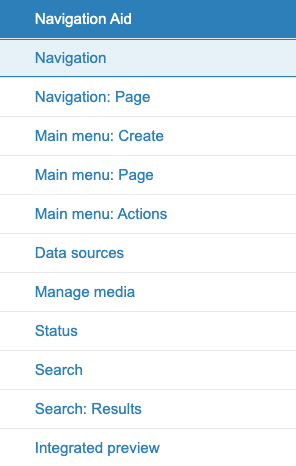
Navigation aid
This menu allows central components of the ContentCreator to be selectively opened and focused. An integrated search function is started by entering terms.
3 External Synchronization / Content Transport
The new default value for the "Intelligent Schema Mapping"
The value for the "Intelligent Schema Mapping" is now set to "Enabled" by default for newly created projects.
For the following transport scenarios, the setting for new projects must now be manually set to "deactivated":- The new standard behavior primarily has a potential impact on GIT-based (i.e., ExternalSync) automated processes because columns for languages present only in the target are thus automatically created and mapped for language-dependent columns. In this scenario, a subsequent export of the target project via ExternalSync results in changed data in the export since the additionally created columns are now also present in the export and would then be imported accordingly into the master during an import.
- The behavior applies analogously when transporting a schema via ContentTransport if a schema is transported between "source project -> target project -> back to the source project." The schema in the original source project would receive additional unwanted columns as a result.
4 FirstSpirit Content Experience Tools (CXT)
Latest module versions
FirstSpirit 2025.11 supports the following module versions for FirstSpirit Content Experience Tools.
| Module / file name | Version number |
FirstSpirit CXT Plattformplatform-[version].fsm | 6.2.1 |
FirstSpirit CXT DAP Bridgedataservice-[version].fsm | 1.45.1 |
FirstSpirit CXT FragmentCreatorfragment-creator-[version].fsm | 5.0.24 |
FirstSpirit Fragment DAPfragmentdap-[version].fsm | 1.40.47 |
FirstSpirit Media DAPmediadap-[version].fsm | 1.31.37 |
FirstSpirit PageRef DAPpageref-[version].fsm | 1.9.37 |
FirstSpirit Markdown Editormarkdown-editor-[version].fsm | 1.29.35 |
FirstSpirit Tagging Editortagging-editor-[version].fsm | 1.29.35 |
FirstSpirit CXT FragmentCreator - CaaS Integrationcaas-integration-[version].fsm | 1.31.34 |
FirstSpirit Image Assistantimagerecognition-module-[version].fsm | 1.0.66 |
FirstSpirit Analyze AsisstantFirstSpirit-AiAnalyze-[version].fsm | 0.9.11 |
Template Development MicroAppfs-sitedev-microapp-[version].fsm | 0.10.1 |
FirstSpirit Multisite Managementfs-multisite-[version].fsm | 1.5.10 |
FirstSpirit Collaboration (Beta)fs-collaboration-[version].fsm | 0.9.0 |
5 AI-powered tools
Integration of MCP servers
With version 2025.9, FirstSpirit AI received support for Function Calling.
With the new GenerativeAIFunctionServerPlugin, server-side functions, such as those from MCP servers, can now be integrated centrally and configurable.
The selection of permitted functions is done on an opt-in basis and can be set in the AI prompt configuration for individual operations. The permitted functions can also be defined by GenerativeAIAgent API usages. Additionally, an MCP connector module has been added for easy connection and authentication of external servers.
The configuration of the MCP servers is reserved for the server administrators.
6 Module: Multisite Management
6.1 Behavior change in the transport of datasets and data sources
With the current release, the behavior of transporting datasets and data sources has been fundamentally changed.
Previously, the associated table templates and the schema were automatically included in the bundle. This automatic integration is no longer available from now on.
The advantage of this change is that unwanted updates caused by automatically packaged table templates and schemas during transport are avoided.
However, this also means that the user is now responsible for ensuring the completeness of the bundle. In particular, when updating the schema or table templates, these must be manually added to the bundle.
6.2 Warning for intelligent schema mapping
A warning now appears in the distribution view whenever the "Intelligent Schema Mapping" is deactivated in a target project. Project administrators of the target project have the option to enable this setting directly by clicking the provided button.
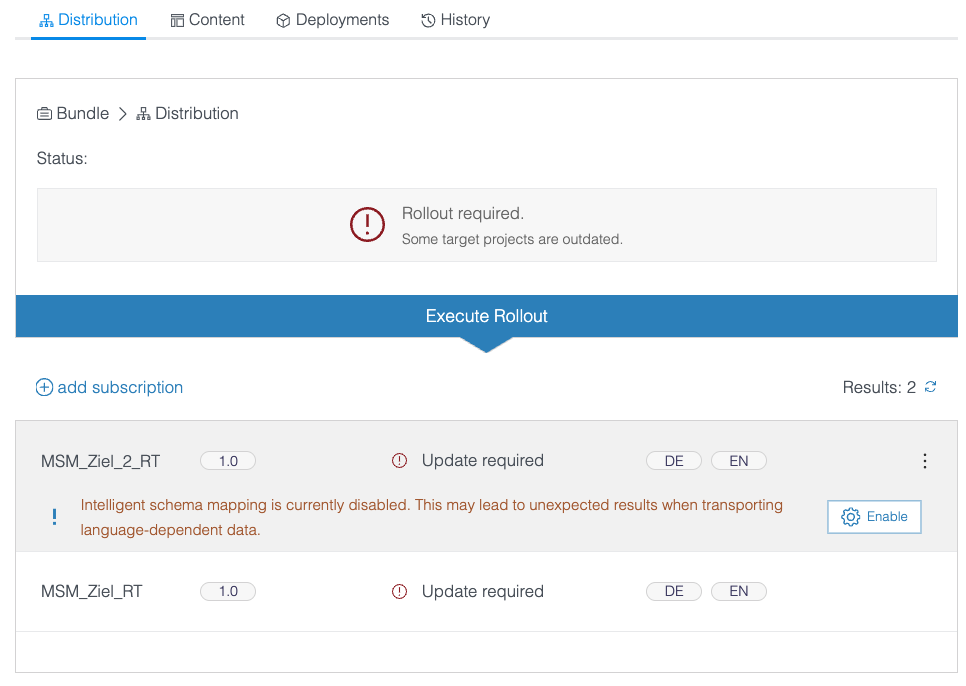
Users without administrator permissions in the target project receive an additional notice.
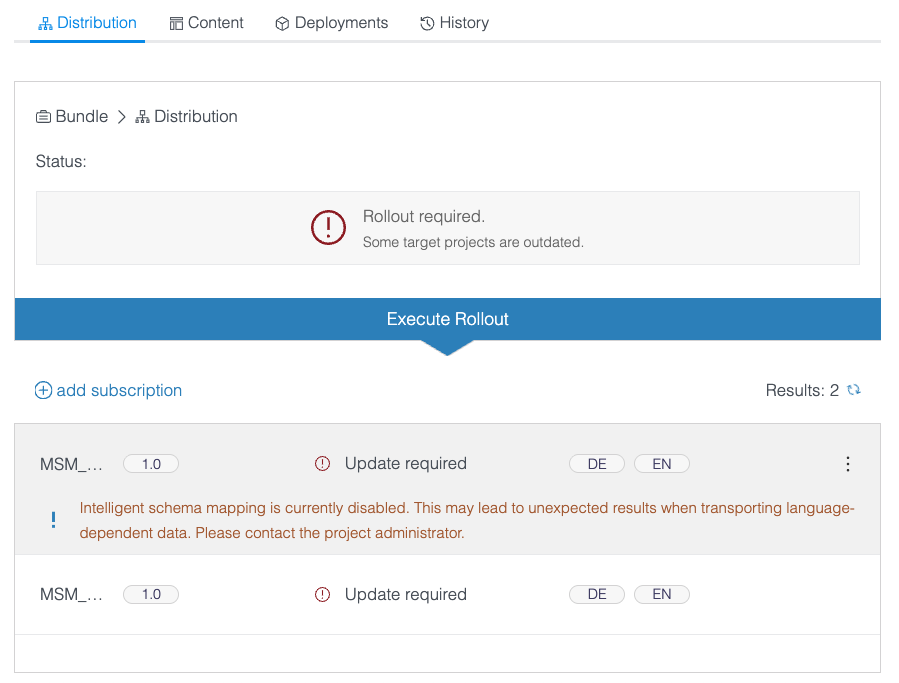
Overview
| ID | Description | Categories |
|---|---|---|
| CORE-12459 | If a service in ServerManager cannot be started properly after clicking "Start service," the user will now receive an appropriate error message. |
ServerManager, Services |
| CORE-16378 | For easier assignment, the database dialog now displays the names of the schemas during project import. This requires that the corresponding export was performed with FirstSpirit 2025.11 or newer. |
Project export / import, ServerManager |
| CORE-16644 | When calling the RenderingAgent via an external FirstSpirit connection, warnings and errors were not correctly captured. |
Logging |
| CORE-16901 | When releasing a move operation for a previously released element, non-released form contents were mistakenly released as well. |
Release |
| CORE-17112 | Behavioral change in the transport of datasets and data sources |
Multisite Management |
| CORE-17223 | The behavior of the DQM Headless Connector has been improved for a large number of requests. |
DQM Connect |
| CORE-17226 | With the new Further information can be found in chapter “AI-powered tools: Integration of MCP servers”. |
AI-powered tools |
| CORE-17266 | Deactivation of the Java SecurityManager |
Server Administrator |
| CORE-17267 | An integrity check has been introduced for revision metadata. Each revision receives a checksum for this purpose. |
Language-dependent Release |
| CORE-17317 | The unnecessary session creation during the indexing of datasets in one case has been resolved. |
Sessions |
| CORE-17346 | The format of the revision metadata has been adjusted to recognize language-dependent XML changes in store elements. |
Language-dependent Release |
| CORE-17352 | Updating modules could lead to |
Modules, Server Administrator |
| CORE-17366 | The initialization of the logging API used for internal logging by the |
Logging |
| CORE-17368 | A problem with the validation of rules within FS_CATALOG cards was fixed in the translation aid. |
Dynamic Forms, SiteArchitect |
| CORE-17372 | The value for Intelligent Schema Mapping is now set to "Enabled" by default for newly created projects. |
Content Store, Content Transport, Database, External synchronization |
| CORE-17373 | FirstSpirit MSM now displays warning messages when the "Intelligent Schema Mapping" is disabled for the target project, and allows project admins to activate it via the UI. |
Multisite Management |
| CORE-17395 | When using custom input components, issues could arise during rule execution if the rules themselves used custom properties of the input component. |
ContentCreator, Dynamic Forms, Input Components |
| CORE-17398 | Under certain circumstances, an archiving job did not correctly remove all old revisions. |
Archiving |
| CORE-17399 | The limitation on the maximum duration of archiving tasks was not correctly taken into account under certain circumstances. |
Archiving |
| CORE-17407 | FirstSpirit Content Experience Tools: Latest module versions |
FirstSpirit Content Experience Tools (CXT) |
| CORE-17413 | Changing the abbreviation of a style template can lead to problems if it is already in use. In SiteArchitect, a corresponding warning is now displayed in such cases. |
Template Store |
| CORE-17419 | Update of internally used software Further information can be found in chapter “Administration: Update of internally used software”. |
Integrated software |
| CORE-17463 | A problem with accessing datasets in an older release revision has been fixed. |
Release |
| CORE-17465 | The restriction introduced with FirstSpirit 2025.10 on the isolated classpath for scripts recognized classes as "internal" under certain circumstances, even though they were provided by the module. |
Developer |
| CXT-3499 | When adopting a suggestion in Content Assistant for a text field, the save button of the form dialog did not become active. |
AI-powered tools, Content Assistant |
| CXT-3527 | With the keyboard shortcut Further information can be found in chapter “ContentCreator: Navigation aid”. |
Accessibility, ContentCreator |
| CXT-3538 | Actions for displaying references or the history of items now take into account the TailoredUI setting for the corresponding report. |
ContentCreator |
| CXT-3611 | In the modules "AWS S3-Deployment," "AWS URL Redirect," and "Image Assistant," the current version 2.33.5 of the AWS SDK has been adopted, which fixes several security vulnerabilities. |
AWS S3 Deployment, Image Assistant, Security |
| CXT-3625 | Within rules for a DOM editor, only a single space was considered as EMPTY. |
ContentCreator |
Deprecations
| Functionality | Deprecated as of | Will be removed / Was removed as of |
|---|---|---|
| Input component CMS_INPUT_CONTENTAREALIST | 5.2R3 | |
| Input component CMS_INPUT_CONTENTLIST | 5.2R3 | |
| Input component CMS_INPUT_FILE | 5.2R3 | |
| Input component CMS_INPUT_LINKLIST | 5.2R3 | |
| Input component CMS_INPUT_OBJECTCHOOSER | 5.2R3 | |
| Input component CMS_INPUT_PAGEREF | 5.2R3 | |
| Input component CMS_INPUT_PICTURE | 5.2R3 | |
| Input component CMS_INPUT_TABLIST | 5.2R3 | |
| FirstSpirit Access API: de.espirit.firstspirit.agency.GroupsAgent | 5.2R15 | |
| FirstSpirit Access API: delete (de.espirit.firstspirit.access.AccessUtil) | 5.2R18 | |
| FirstSpirit Access API: release (de.espirit.firstspirit.access.AccessUtil) | 2018-06 | |
| FirstSpirit Access API: getLastLoginAsDate (de.espirit.firstspirit.agency.UserStatisticsAgent) | 2018-07 | |
| FirstSpirit Access API: remainingDurationOfCurrentStageInMillis (de.espirit.firstspirit.server.MaintenanceModeInfo) | 2018-07 | 2025-13 |
| FirstSpirit Access API: getStartingTimeOfStageAsDate (de.espirit.firstspirit.server.MaintenanceModeInfo) | 2018-07 | 2025-13 |
| FirstSpirit Access API: getSelectedWebserverConfiguration (de.espirit.firstspirit.access.serverConfiguration) | 2018-10 | 2025-13 |
| FirstSpirit Access API: setSelectedWebserverConfiguration (de.espirit.firstspirit.access.serverConfiguration) | 2018-10 | 2025-13 |
| FirstSpirit Access API: getSelectedWebServer (de.espirit.firstspirit.access.project.Project) | 2018-10 | 2025-13 |
| FirstSpirit Access API: setSelectedWebServer (de.espirit.firstspirit.access.project.Project) | 2018-10 | 2025-13 |
| FirstSpirit Access API: getLostAndFoundStoreNodes(); (de.espirit.firstspirit.feature.FeatureInstallResult) | 2018-10 | |
| FirstSpirit Access API: getDeletedStoreNodes(); (de.espirit.firstspirit.feature.FeatureInstallResult) | 2018-10 | |
| FirstSpirit Access API: de.espirit.firstspirit.access.store.Previewable | 2019-01 | |
| WebSphere Application Server support for FirstSpirit | 2019-05 | |
| FirstSpirit Access API: redirectTemplateLogToDefaultLog() (Interface RenderingAgent.Renderer) | 2021-05 | |
| Omnichannel Manager 2.x | 2025-01 | |
| FragmentCreator | 2025-01 | 2025-12 |
| Jetty Web Server | 2025-09 | 2026-02 |
| Java SecurityManager | 2025-09 | 2025-11 |