
Release Notes
1 General
1.1 FirstSpirit Launcher: New parameters for configuration via FSLauncher.vmoptions file
Three new parameters have been introduced to configure the launcher. These three parameters can be defined in the launcher installation directory via {FS-Launcher installation path}/FSLauncher.vmoptions file.
-DlauncherDir: Can be used to define the directory where the launcher should place the downloaded and temporary files.
Example: -DlauncherDir=c:/temp/FSLauncher/
Default value: ~Userhome/.firstspirit/FSLauncher
Note: This parameter replaces the parameter -Duser.home
-DuseLocalJre: Can be used to define that the JRE used to start the FirstSpirit desktop apps should not be downloaded from the FirstSpirit server, but that a local JRE should be used instead.
Example: -DuseLocalJre=true
Default value: false
Note: The JRE to be used is determined automatically. In most cases this will be the JRE used by the launcher itself.
-DlocalJre: Can be used in conjunction with -DuseLocalJre to define which local JRE is to be used. The path to the installation directory of the corresponding Java version must be specified as the value.
Example: -DlocalJre=c:/Program Files/Java/jdk-11/
IMPORTANT: This parameter is only taken into account if -DuseLocalJre=true has also been defined.
1.2 Java: Support for OpenJDK 16
For operating FirstSpirit, e-Spirit AG supports:
- OpenJDK: the current Java version as well as the latest LTS (Long-Term-Support) variant.
- Oracle Java: only the latest LTS (Long-Term-Support) variant.
This applies to both the FirstSpirit Server and the FirstSpirit desktop applications.
As of FirstSpirit 2021-04, OpenJDK 16 (non-LTS; release date 2021/03) is officially approved for use with FirstSpirit (i.e., the FirstSpirit Server and the FirstSpirit desktop applications).
AdoptOpenJDK 16 is included in the “FirstSpirit Launcher JRE” module. After appropriate configuration, FirstSpirit desktop applications can be started via the “FirstSpirit Launcher JRE” module using the FirstSpirit Launcher with AdoptOpenJDK 16.
(For documentation on the “FirstSpirit Launcher JRE” module, see the corresponding documentation).
With support for OpenJDK 16, support for OpenJDK 15 (non-LTS; release date was 2020/09) expires.
FirstSpirit is expected to remain functional with OpenJDK 15. However, e-Spirit AG will neither carry out tests with OpenJDK 15 nor implement any measures designed to eliminate errors or problems that are exclusively associated with the use of OpenJDK 15.
Current status: The following JDKs are therefore compatible for FirstSpirit 2021-04:
- OpenJDK 16 (in its current version) (non-LTS) (*)
- OpenJDK 11 (in its current version) (LTS) (*)
- Oracle Java 11 (in its current version) (LTS)
(*) Recommended: Use of the OpenJDK distribution AdoptOpenJDK (HotSpot JVM).
Further documentation see FirstSpirit: Technical requirements and recommendations.
2 ContentCreator
Media management: Download media
As of the current release, media can now also be downloaded from the Media management. For this purpose, the following icon is available when you mouse-over media in the Media management:
.png)
If it is a medium for which files for different languages are available, a context menu is displayed:

The desired language can be selected from this menu.
Where the medium will be saved on your workstation depends on the respective browser and the user-specific download settings.
Images are always downloaded in their original resolution.
3 Input components
3.1 JSON function: Configure JSON rendering of inherited metadata
With the current FirstSpirit release, the JSON function supports the rendering of inherited metadata.
No new version of the JSON output format will be published for this change; the changes will be made in the current format version 1.1.
Overview of changes in format version 1.1
Support for the rendering of inherited metadata
Metadata is additional information available for an object in FirstSpirit. Apart from metadata assigned by the system (such as “last modification date”) it is also possible to define project-specific metadata, which is managed by the user. If you would like to use metadata in your project, a metadata template must be defined for the project. You can then maintain this project-specific metadata on the corresponding FirstSpirit objects (e.g., on a page or page reference) in the “Metadata” tab using a form. In some cases, this project-specific metadata is maintained hierarchically. This means that the metadata is maintained once on a store's root node or a folder and then automatically inherited by all hierarchically subordinate FirstSpirit objects (e.g., when defining user permissions via the input component CMS_INPUT_PERMISSION).
The JSON function can be used to transfer metadata into a JSON object structure. In doing so, the JSON output format takes into account the metadata of the relevant FirstSpirit object (pages, page references, media) at the time of generation. When a page or a page reference is rendered in the JSON output format, the metadata of the corresponding object is rendered as well. The output in format 1.1 will then contain the metaFormData attribute (see example).
You can configure the JSON rendering of metadata by using the JSON function. New: As of the current FirstSpirit release it is possible to also render metadata that was not defined on the object itself but inherited from a hierarchically superordinate object. Inherited metadata was previously not taken into account.
Configuration options for the rendering of metadata:
- option
$CMS_SET(#global.json.metaDataRendering, <BOOLEAN>)$(defaulttrue):
Any object's meta data will be rendered, unless rendering is explicitly disabled via$CMS_SET(#global.json.metaDataRendering, false)$. - New: option
$CMS_SET(#global.json.metaInheritanceRendering, <BOOLEAN>)$(defaultfalse):- The configuration
$CMS_SET(#global.json.metaInheritanceRendering, true)$, will render metadata which was not defined on the FirstSpirit object itself but on a hierarchically superordinate object. The inherited metadata is transferred into a JSON object structure. The metadata used, is always the metadata of the next-higher object for which metadata has been defined (up to the store's root node). - The default configuration
$CMS_SET(#global.json.metaInheritanceRendering, false)$will only render metadata defined on the object itself. If no metadata is defined on the object itself, an empty value is rendered using themetaFormDataattribute, even if the object has inherited metadata.
- The configuration
Special Notes
$CMS_SET(#global.json.metaInheritanceRendering, true)$: For the rendering of inherited metadata the metadata of the hierarchically superordinate FirstSpirit objects are evaluated. Starting from the origin object, the entire parent chain is evaluated until an object is found for which metadata has been defined. The evaluation ends at the store's root node (inclusively).
The following applies: If the input component containing the metadata is not set on a FirstSpirit object in the metadata form, the value of the next highest FirstSpirit object is evaluated. An input component is considered “not set” if the isSet() function returns false, i.e., an object is not available in the current context. This state is reached if an input component has never been set or an input component once set is overwritten with NULL, e.g., via a script (see “example: Switch input component to “not set””).
Simply deleting a value in the input component is not sufficient (in this case the input component is empty (isEmpty() == true) but still set (isSet() == true) (cf. API documentation Interface: FormField - method: isEmpty()).
Example - $CMS_SET(#global.json.metaInheritanceRendering, true)$
{
    "fsType": "PageRef",
    "name": "pt_metadata_selective_1",
    "displayName": "pt_metadata_selective",
    "identifier": "15ff7b8d-9059-4721-b92b-e697e153fc85",
    "uid": "pt_metadata_selective_1",
    "uidType": "SITESTORE_LEAF",
     "metaDataIsInherited": true,
    "metaFormData": {
       "meta_field1": {
          "fsType": "CMS_INPUT_TEXT",
          "name": "meta_field1",
          "identifier": "meta_field1",
          "value": null,
          "valueSchema": {
             "type": "null"
          }
       },
       "meta_field2": {
          "fsType": "CMS_INPUT_TEXT",
          "name": "meta_field2",
          "identifier": "meta_field2",
          "value": "value_field2_set",
          "valueSchema": {
             "type": "string"
         }
       },
       "meta_field3": {
          "fsType": "CMS_INPUT_DATE",
          "name": "meta_field3",
          "identifier": "meta_field3",
          "value": null,
          "valueSchema": {
             "type": "null"
          }
       }
    },
(...)
Example: Switch input component to “not set”:
Input component FS_BUTTON:
<FS_BUTTON name="meta_field1" noBreak="yes" onClick="script:delete_meta_data">
      <LANGINFOS>
        <LANGINFO lang="*" label="Delete meta data"/>
      </LANGINFOS>
      <PARAMS>
        <PARAM name="meta_data">#field.meta_field1</PARAM>
      </PARAMS>
    </FS_BUTTON>
Script (delete_meta_data):
import de.espirit.firstspirit.forms.FormField;
 if (meta_data instanceof FormField) {
 meta_data.set(null);
 }
Further documentation:
3.2 JSON function: Support for CMS_INPUT_PERMISSION
In the latest FirstSpirit release, the JSON function supports the CMS_INPUT_PERMISSION input component.
No new version of the JSON output format will be published for this change; the changes will be made in the current format version 1.1.
Overview of changes in format version 1.1
Support for CMS_INPUT_PERMISSION (metadata/user permissions)
Specific access and execution permissions (“user permissions”) for generated and published FirstSpirit objects (pages, page references, and media) are defined using the CMS_INPUT_PERMISSION input component. The CMS_INPUT_PERMISSION input component is specified by the template developer using a project-specific metadata template. The user permissions for individual users and groups can then be defined on the “Metadata” tab of the FirstSpirit objects. The CMS_INPUT_PERMISSION input component also takes into account how these permissions are inherited, i.e., permissions inherited from a higher-level node are also read out by the input component.
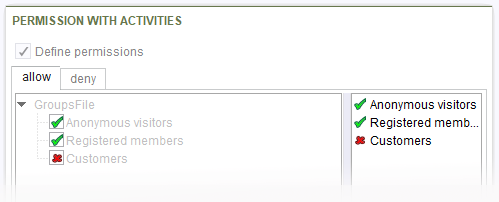
CMS_INPUT_PERMISSION input component (with activities)
In the current FirstSpirit version and higher, the JSON function can be used to transfer the user permissions, which were defined on a FirstSpirit object with the help of the CMS_INPUT_PERMISSION input component, into a JSON object structure. In doing this, the JSON output format takes into account the metadata made persistent on the relevant FirstSpirit object (pages, page references, media) at the time of generation (activity, groups, permissions).
When a page or a page reference is rendered in the JSON output format, the metadata of the corresponding object is rendered as well. The output in format 1.1 will then contain:
- the activities of the CMS_INPUT_PERMISSION input component
- If activities have been defined, the metadata is rendered separately for each individual activity (see example 1 for
"activity":"allow"and"activity":"deny") - If no activities have been defined, the metadata is rendered just once for
"activity":null(see example 2, "activity":null)
- If activities have been defined, the metadata is rendered separately for each individual activity (see example 1 for
- the groups of the CMS_INPUT_PERMISSION input component
- the “allowed” and “forbidden” permission, which have been defined for the relevant groups on the object
- but (in the default setting) no inherited permissions (see restriction)
Restriction: If no permissions have been defined within the input component (“Define permissions” option is deactivated for the input component), the visible, inherited permissions are only rendered if metadata inheritance has been activated (by using the option $CMS_SET(#global.json.metaInheritanceRendering, true)$ - see “Configure metadata inheritance (JSON output)” below).
Example (JSON format for CMS_INPUT_PERMISSION):
Example 1) Rendering of user permissions if activities have been defined for the CMS_INPUT_PERMISSION input component (in this case: "allow" and "deny"):
{
   "formData":{
      "permission_with_act":{
         "fsType":"CMS_INPUT_PERMISSION",
         "name":"permission_with_act",
         "metadataIsInherited": false,
         "value":[
            {
               "activity":"allow",
               "forbidden":[
                  {
                     "groupId":"4",
                     "groupName":"Customers"
                  }
               ],
               "allowed":[
                  {
                     "groupId":"2",
                     "groupName":"Anonymous visitors"
                  },
                  {
                     "groupId":"3",
                     "groupName":"Registered members"
                  }
               ]
            },
            {
               "activity":"deny",
               "forbidden":[
                  {
                     "groupId":"2",
                     "groupName":"Anonymous visitors"
                  },
                  {
                     "groupId":"3",
                     "groupName":"Registered members"
                  }
               ],
               "allowed":[
                  {
                     "groupId":"4",
                     "groupName":"Customers"
                  }
               ]
            }
         ]
      }
Example 2) Rendering of user permissions if no activities have been defined for the CMS_INPUT_PERMISSION input component:
      "permission_without_act":{
         "fsType":"CMS_INPUT_PERMISSION",
         "name":"permission_without_act",
         "metadataIsInherited": false,
         "value":[
            {
               "activity":null,
               "forbidden":[
                  {
                     "groupId":"3",
                     "groupName":"Registered members"
                  },
                  {
                     "groupId":"4",
                     "groupName":"Customers"
                  }
               ],
               "allowed":[
                  {
                     "groupId":"2",
                     "groupName":"Anonymous visitors"
                  }
               ]
            }
         ]
      }
   }
Configure metadata inheritance (JSON output)
The configuration $CMS_SET(#global.json.metaInheritanceRendering, <BOOLEAN>)$ can be used to activate or deactivate the rendering of inherited metadata in JSON.
(Default) configuration: $CMS_SET(#global.json.metaInheritanceRendering, false)$
The default configuration will only render user permissions defined on the object itself.
- Initial situation - permissions defined: Permissions are defined in the CMS_INPUT_PERMISSION input component (input component's “Define permissions” option is enabled):
- JSON output: This configuration will only render user permissions defined on the FirstSpirit object itself using the CMS_INPUT_PERMISSION input component.
- Initial situation - Inherited permissions: No user permissions are defined on the FirstSpirit object itself (input component's “Define permissions” option is disabled), but user permissions that are defined on a hierarchically superordinate object have been inherited:
- JSON output: an empty value is rendered, even if the object has inherited permissions.
- Initial situation - No permissions available: No user permissions are defined on the FirstSpirit object itself (input component's “Define permissions” option is disabled), and no user permissions have been defined on a hierarchically superordinate object (up to the store's root node).
- JSON output: an empty value is rendered.
Configuration: $CMS_SET(#global.json.metaInheritanceRendering, true)$
Considers user permissions defined on the FirstSpirit object itself and inherited user permissions of a hierarchically superordinate object.
- Initial situation - permissions defined: Permissions are defined in the CMS_INPUT_PERMISSION input component (input component's “Define permissions” option is enabled):
- JSON output: This configuration will render user permissions defined on the FirstSpirit object itself using the CMS_INPUT_PERMISSION input component. The JSON output also contains the attribute's
metadataIsInheritedvaluefalseto indicate that the rendered user permissions for this object have not been inherited.
- JSON output: This configuration will render user permissions defined on the FirstSpirit object itself using the CMS_INPUT_PERMISSION input component. The JSON output also contains the attribute's
- Initial situation - Inherited rights: No user permissions are defined on the FirstSpirit object itself (input component's “Define permissions” option is disabled), but user permissions that are defined on a hierarchically superordinate object have been inherited:
- JSON output: The inherited user permissions are transferred into a JSON object structure. The values used, are always the user permissions of the next-higher object for which user permissions have been defined (up to the store's root node). The JSON output also contains the attribute's
metadataIsInheritedvaluetrueto indicate that the rendered user permissions for this object have been inherited.
- JSON output: The inherited user permissions are transferred into a JSON object structure. The values used, are always the user permissions of the next-higher object for which user permissions have been defined (up to the store's root node). The JSON output also contains the attribute's
- Initial situation - No permissions available: No user permissions are defined on the FirstSpirit object itself (input component's “Define permissions” option is disabled), and no user permissions have been defined on a hierarchically superordinate object (up to the store's root node).
- JSON output: an empty value is output.
Previous behavior:
The CMS_INPUT_PERMISSION input component was not supported previously. When user permissions were rendered via the JSON channel, this lack of support was indicated:
"permission_not_supported": {
         "fsType": "CMS_INPUT_PERMISSION",
         "name": "permission_not_supported",
         "value": {
            "error":
             "Type 'de.espirit.firstspirit.access.editor.value.PermissionsImpl'
              is not supported by the FirstSpirit json engine"
         }
      }
Additional documentation:
4 FirstSpirit Content Experience Tools (CXT)
4.1 Latest module versions
FirstSpirit 2021-04 supports the following module versions for “FirstSpirit Content Experience Tools”:
| Module / file name | Version number |
FirstSpirit CXT DAP Bridgedataservice-[version].fsm | 1.40 |
FirstSpirit CXT FragmentCreatorfragment-creator-[version].fsm | 2.21 |
FirstSpirit Fragment DAPfragmentdap-[version].fsm | 1.36 |
FirstSpirit Media DAPmediadap-[version].fsm | 1.28* |
FirstSpirit PageRef DAPpagerefdap-[version].fsm | 1.6 |
FirstSpirit Markdown Editormarkdown-editor-[version].fsm | 1.26* |
FirstSpirit Tagging Editortagging-editor-[version].fsm | 1.26 |
FirstSpirit CXT FragmentCreator - CaaS Integrationcaas-integration-[version].fsm | 1.27 |
* These modules require FirstSpirit 2020-03 or higher from this version.
4.2 Announcement: Separation of CXT Platform and FragmentCreator
FirstSpirit Content Experience Tools has been designed as a microservice architecture from the very beginning. The goal of the modular structure and independent processes are, among other things, improved availability, scalability and maintainability.
Up to now, the CXT platform is integrated into the FragmentCreator and is delivered with it. Services required for the platform are booted and managed every time a FragmentCreator instance is started, even if they are not needed (e.g. OAuth, MicroService controller, Eureka, etc.).
To improve performance and controllability, e-Spirit is currently working on separating the CXT platform and FragmentCreator. The aim is to operate the CXT platform and FragmentCreator as independent web applications. This will also allow the microservice concept to continue to be pursued..
After the technical changeover, the platform will be installed as an independent module and rolled out in a separate global WebApp. The configuration is done in the file system via a separate properties file.
With the release of the separation, the following versions of the affected modules will be supported:
- “Platform” module: version 2.x
- “FragmentCreator” module: version 3.x
Prerequisites for using the new technology:
- FragmentCreator and Platform each require a SOCKET connection to the FirstSpirit server.
- Both web applications must be accessible via the same external host (“same-origin”).
For existing installations, few adjustments have to be made to use the new technology, e.g.:
- installation of the new “Platform” module
- installation and adjustment of the “FragmentCreator” module (via
web.xmlor properties file) - modification of API URLs (eg. in the “Fragment DAP” module)
Detailed instructions about the steps to be taken will be provided with the release of this technological changeover.
The release of the separation and the new modules is planned for the 2021-05 release.Alternatively, for a transition period, the “FragmentCreator” module in a version < 3.0 can continue to be used.
Cloud customers do not need to take any action in this context: e-Spirit will take care of all necessary configuration changes.
4.3 FragmentDAP: Limiting the selection of variants
The “Variant” principle of FirstSpirit Content Experience Tools allows different versions of a fragment and thus an economical reuse of content. A typical variant dimension of a fragment can be the language, for example. Other conceivable dimensions distinguish fragments, for example, in terms of the level of detail, language form (simple vs. complex), target group, etc.
Technically, variant dimensions are realized by using the editions identifier for a <CMS_GROUP> form in the metadata template.
In FragmentCreator, a variant of a fragment can be selected using the variant manager, in FirstSpirit ContentCreator and SiteArchitect a selection is possible via the FragmentDAP or in the “Fragments” report.
By default, all available variants are displayed to the editor for selection.
As of the current release, it is possible to configure which variant dimension(s) should be able to be selected via FragmentDAP.
In a first step, this functionality is now supported in the FirstSpirit ContentCreator and in the FirstSpirit SiteArchitect. A corresponding implementation for the FragmentCreator will follow with a later release.
Sample syntax:
<FS_INDEX name="fragments" useLanguages="no" viewMode="details">
   <LANGINFOS>
       <LANGINFO lang="*" label="Select text fragments"/>
       <LANGINFO lang="DE" label="Text-Fragmente auswählen"/>
   </LANGINFOS>
   <SOURCE name="FirstSpiritFragmentAccess/FSFAConnector">
       <PROJECT remote="fragments">
          <VARIANT name="language" value="EN"/>
          <VARIANT name="language" value="DE"/>
          <VARIANT name="device" value="Mobile"/>
       </PROJECT>
   </SOURCE>
</FS_INDEX>
Tags / attributes:
VARIANT: Use this tag to configure the selection of variant dimensions via FS_INDEX with FragmentDAP.
OneVARIANTdefinition must exist for each variant dimension that the editor is to be able to select.
If this tag is not specified, all variant dimensions will be available for selection.
EachVARIANTdefinition requires anameandvalueattribute to be specified:name: Use this attribute to specify the identifier of the variant dimension that is to be available for selection.
This is the value of thenameattribute of the desired component in the metadata template of the fragment project from which the selection is made via FragmentDAP.
For each variant dimension that the editor should be able to select, oneVARIANTdefinition with a matchingnameattribute must exist.
If more than one variant dimensions are defined, only those variants will be displayed that fulfill all conditions (AND conjunction).value: Use this attribute to restrict the selection to certain types of a variant dimension.
This is the value of thevalueattribute withinENTRIES/ENTRYof the desired component in the metadata template of the fragment project from which the selection is made via FragmentDAP.
For each type of variant dimension that the editor should be able to select, aVARIANTdefinition with fittingnameandvalueattribute must exist.
If more than one type of a variant dimension is defined, all variants matching these types will be displayed (OR conjunction).
The order of the VARIANT definitions affects the order in which the variants are displayed in the selection dialog. In the example above, variants of the dimension language of type EN are always displayed (i.e. English-language variants).
Variants (and thus the associated fragment) to which the variant restrictions do not apply are not displayed.
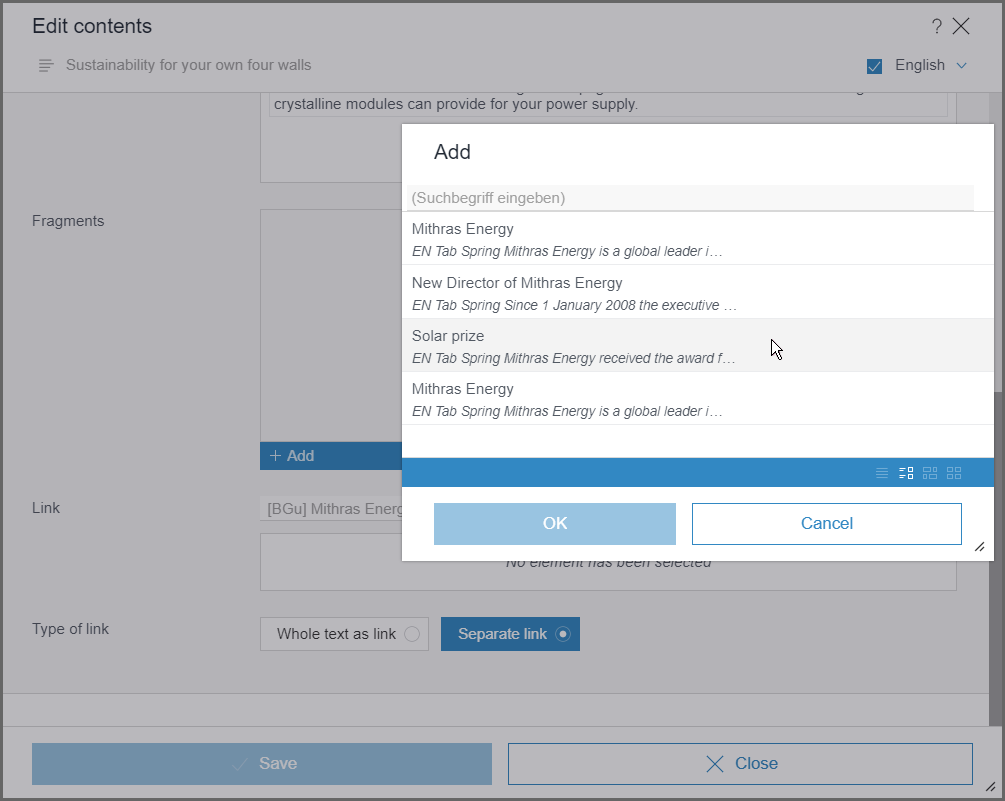
An additional restriction of selectable fragments / variants is still available via the CATEGORY tag.
This new filtering option via VARIANT tag is only effective in a correspondingly configured FS_INDEX component, but not in the “Fragment” report. However, the display in the report now reflects the order of the VARIANT definitions.
Note: This functionality has not yet been released for the FragmentCreatorand should not be used there in combination with the creation of fragments.
For more information on configuration and use of the FragmentDAP see https://docs.e-spirit.com/odfs/edocs/cxt/templates/using-fragments/index.html.
5 Compatibility
Modules and extensions for FirstSpirit 2021-04
The following modules and extensions are compatible with FirstSpirit 2021-04:
| Module name/File name | Version number | Compatibility |
FirstSpirit Update Archivefs-update-[version].tar.gz | 1.0.12 | - |
FirstSpirit Install Archiv fs-install-[version].tar.gz | 1.0.12 | - |
FirstSpirit LauncherFSLauncher.exe | 1.0.39 | as of FirstSpirit 2018-08 |
FirstSpirit Launcher JRE modulefs-launcher-jre-[version].fsm | 1.17 | as of FirstSpirit 2020-11 |
FirstSpirit SAML Login modulefs-saml-login-[version].fsm | 1.1 | as of FirstSpirit 2019-02 |
FSDevToolsfs-cli-[version].tar.gzfs-cli-[version].zip | 2.6.9 | as of FirstSpirit 2020-08 |
FirstSpirit Module Gradle Pluginfirstspirit-module-gradle-plugin-[version].jar | 1.0.2 | as of FirstSpirit 2019-06 |
6 SiteArchitect / ServerManager
Schedules are only run after complete server boot up
With FirstSpirit in its current version it is ensured that schedules are only started after the server is completely booted.
This resolves issues related to dependencies between schedules and required resources (e.g., services).
7 System
Updates to integrated third-party software
As of the current release, the following internally used software has been updated:
- Java (JRE with which the FirstSpirit Launcher is operated)
The following Java versions are currently available:- Integrated in FirstSpirit (default): 11.0.10+9 64bit AdoptOpenJDK
- New: In the FirstSpirit Launcher JRE module: 16+36 64bit AdoptOpenJDK
- Removed: From the FirstSpirit Launcher JRE module: 15.02+7 64bit AdoptOpenJDK
- Spring Boot (used for MicroApp Framework)
Update from version 2.3.5 to version 2.4
8 Template development
Workflows: Further configuration option for context-based information in e-mails
In e-mails sent by workflows, special placeholders may be used that are automatically replaced by the system based on the context. For example, this can be used to include a link to preview the page on which the workflow is active or to provide a wide range of other information in the e-mail.
The placeholders can be configured based on the properties of an activity or a transition in the “E-mail” tab “(Template store”/“Workflows”/“State diagram”). When a transition or an activity is switched, e-mails containing the relevant information are then sent automatically.
In the current FirstSpirit release, the following option have been added to the placeholders:
%CREATOR_FULLNAME%= The name of the person who created the workflow. The full name is displayed (if this is not known, the login name is shown).
Additional documentation:
Overview
| ID | Description | Categories |
|---|---|---|
| CORE-11681 | In the current FirstSpirit version and higher, the JSON function can be used to transfer the user permissions, which were defined on a FirstSpirit object with the help of the CMS_INPUT_PERMISSION input component, into a JSON object structure. In doing this, the JSON output format takes into account the metadata made persistent on the relevant FirstSpirit object (pages, page references, media) at the time of generation (activity, groups, permissions). |
Developer, Input Components, Metadata, Permissions, Support for JSON |
| CORE-12631 | An error has been corrected which, in rare cases, may have caused display errors when editing a form in SiteArchitect. |
Editor, SiteArchitect |
| CORE-13260 | Metadata can be transferred into a JSON object structure. A new feature in the current FirstSpirit release is the option to render metadata that has not been defined on the object itself but has been inherited from a hierarchically superordinate object. Inherited metadata was previously not taken into account. |
Developer, Input Components, Metadata, Support for JSON |
| CORE-13278 | New parameters are available for configuration of the FirstSpirit Launcher via |
Launcher |
| CORE-13375 | Preview URLs for media from remote projects can be generated via the |
ContentCreator, Developer, FirstSpirit API, FirstSpirit Omnichannel Manager, Remote access |
| CORE-13382 | Schedules are only started after the server has completely booted. |
ServerManager |
| CORE-13388 | In e-mails sent by workflows, special placeholders may be used that are automatically replaced by the system based on the context. In the current FirstSpirit release, these placeholders have been expanded to include a further configuration option. |
Developer, Template Development, Workflow |
| CORE-13485 | Support OpenJDK 16: As of FirstSpirit 2021-04, OpenJDK 16 (non-LTS; release date 2021/03) is officially approved for use with FirstSpirit (i.e., the FirstSpirit Server and the FirstSpirit desktop applications). With support for OpenJDK 16, support for OpenJDK 15 (non-LTS; release date was 2020/09) expires. Further information can be found in chapter “General: Java: Support for OpenJDK 16”. |
Developer, FirstSpirit Administrator, Java, Server Administrator |
| CORE-13489 | Update of internally used software. Further information can be found in chapter “System: Updates to integrated third-party software”. |
Developer, FirstSpirit Content Experience Tools (CXT), Integrated software, Java, Launcher |
| CORE-13511 | The following modules and extensions are compatible with FirstSpirit 2021-04. |
Developer, FirstSpirit Administrator, Modules, Server Administrator |
| CORE-13514 | In the current FirstSpirit version, a resource issue due to unfinished threads in FirstSpirit web applications has been fixed. |
FirstSpirit Administrator, Performance, Web server |
| CORE-13524 | Fixed a bug that could lead to URLs not being generated correctly in FirstSpirit 2021-03 and to a |
Developer, Generation |
| CXT-1779 | Media can now also be downloaded in the Media management. Further information can be found in chapter “ContentCreator: Media management: Download media”. |
ContentCreator, Editor, Media, Media Store |
| CXT-2069 | The contents of FS_CATALOG components are now recursively transferred to the target language in the translation help (functions “Copy all content from source language” and “Copy entry content from source language”), and thus extended to support polymorphic structures (e.g., language-dependent in language-independent in language-dependent component). |
ContentCreator, Editor, Input Components, Languages |
| CXT-2094 | As of the current release, the selection of variant dimensions via FragmentDAP can now be influenced in FirstSpirit ContentCreator and SiteArchitect |
ContentCreator, Developer, Editor, Input Components, SiteArchitect, Template Development |
| CXT-2100 | Optimizations for WebSocket event-based refreshes. |
ContentCreator, Performance, Sessions |
| CXT-2139 | Long menu names are now suitably shortened if necessary, making them easier to read. |
ContentCreator, Editor |
| CXT-2240 | Announcement: CXT Platform and FragmentCreator will be separated. Minimal adjustments are required for existing installations for non-cloud customers. |
Developer, FirstSpirit API, FirstSpirit Administrator, FirstSpirit Content Experience Tools (CXT), FragmentCreator, Migration, Module development, Modules |
| CXT-2257 | FirstSpirit Content Experience Tools: Latest module versions |
Developer, FirstSpirit Administrator, FirstSpirit Content Experience Tools (CXT), FragmentCreator, Modules |
| CXT-2258 | Display of language-dependent media in the selection dialog of FS_INDEX with Media DAP in FragmentCreator has been optimized. |
Editor, FirstSpirit Content Experience Tools (CXT), FragmentCreator, Media, Media Store, Remote access |
| CXT-2263 | Temporarily the input component CMS_INPUT_SECTIONLIST was not available in the FirstSpirit ContentCreator (error message: “The editor 'xyz' of type 'CMS_INPUT_SECTIONLIST' is not supported.”) |
ContentCreator, Developer, Editor, Input Components, Template Development |
Deprecations
| Functionality | Deprecated as of | Will be removed / Was removed as of |
|---|---|---|
| Input component CMS_INPUT_CONTENTAREALIST | 5.2R3 | |
| Input component CMS_INPUT_CONTENTLIST | 5.2R3 | |
| Input component CMS_INPUT_FILE | 5.2R3 | |
| Input component CMS_INPUT_LINKLIST | 5.2R3 | |
| Input component CMS_INPUT_OBJECTCHOOSER | 5.2R3 | |
| Input component CMS_INPUT_PAGEREF | 5.2R3 | |
| Input component CMS_INPUT_PICTURE | 5.2R3 | |
| Input component CMS_INPUT_TABLIST | 5.2R3 | |
| FirstSpirit Access API: de.espirit.firstspirit.agency.GroupsAgent | 5.2R15 | |
| FirstSpirit Access API: delete (de.espirit.firstspirit.access.AccessUtil) | 5.2R18 | |
| FirstSpirit Access API: release (de.espirit.firstspirit.access.AccessUtil) | 2018-06 | |
| FirstSpirit Access API: getLastLoginAsDate (de.espirit.firstspirit.agency.UserStatisticsAgent) | 2018-07 | |
| FirstSpirit Access API: remainingDurationOfCurrentStageInMillis (de.espirit.firstspirit.server.MaintenanceModeInfo) | 2018-07 | 2025-13 |
| FirstSpirit Access API: getStartingTimeOfStageAsDate (de.espirit.firstspirit.server.MaintenanceModeInfo) | 2018-07 | 2025-13 |
| FirstSpirit Access API: getSelectedWebserverConfiguration (de.espirit.firstspirit.access.serverConfiguration) | 2018-10 | 2025-13 |
| FirstSpirit Access API: setSelectedWebserverConfiguration (de.espirit.firstspirit.access.serverConfiguration) | 2018-10 | 2025-13 |
| FirstSpirit Access API: getSelectedWebServer (de.espirit.firstspirit.access.project.Project) | 2018-10 | 2025-13 |
| FirstSpirit Access API: setSelectedWebServer (de.espirit.firstspirit.access.project.Project) | 2018-10 | 2025-13 |
| FirstSpirit Access API: getLostAndFoundStoreNodes(); (de.espirit.firstspirit.feature.FeatureInstallResult) | 2018-10 | |
| FirstSpirit Access API: getDeletedStoreNodes(); (de.espirit.firstspirit.feature.FeatureInstallResult) | 2018-10 | |
| FirstSpirit Access API: de.espirit.firstspirit.access.store.Previewable | 2019-01 | |
| WebSphere Application Server support for FirstSpirit | 2019-05 | |
| Legacy mode for the FirstSpirit server | 2019-06 | 2022-03 |
| Database layer for Oracle Database 11g/12c | 2020-12 | 2025-05 |