
Release Notes
1 Administration
1.1 New default value: Attribute SameSite=Lax for the FirstSpirit Session Cookie
FirstSpirit uses several standard web applications (fs5root, fs5webedit, fs5webmon, fs5preview, fs5staging) as well as possibly additional, project-local web applications (fs5webedit_PROJECTID and fs5preview_PROJECTID). For (user) authentication FirstSpirit, like most other web applications, uses randomly generated session cookies (see information on the use of cookies).
Many browsers (including Chrome 80) have massively restricted third-party cookies since the beginning of the year. All cookies that do not have the attribute SameSite are causing warning messages. SameSite is a standard that is intended to prevent cookies from being automatically sent by the browser with so-called cross-site requests and thus offers protection against cross-site request forgery (CSRF). In addition to this security aspect, the SameSite attribute allows you to define which cookies can be read in which context.
The FirstSpirit Session Cookie supports the SameSite attribute from FirstSpirit 2020-05 on with the option of configuration (see configuration servletSessionCookieSameSite). The previously recommended default setting (SameSite attribute is not set) can now cause the following log output in the JavaScript console in some browsers:
Cookie “FS52ID” will be soon treated as cross-site cookie (...)The default setting for the SameSite attribute is changed with FirstSpirit 2020-09 to SameSite=Lax.
With this setting the session cookie is only sent in the first-party context (i.e. only if the page for the cookie matches the URL in the browser) and only together with cross-site requests that are considered “safe”. This applies to secure HTTP methods (GET, HEAD, OPTIONS, and TRACE) and top-level navigation (actions that cause the URL in the browser address bar to change, such as links).
e-Spirit recommends retaining the default settings of the fs-server.conf configuration file. In most cases the default setting covers both security aspects (good protection against cross-site request forgery) and user concerns (good user experience).
Only in exceptional cases (e.g. FirstSpirit as an embedded web app) a change is necessary.
The value for the FirstSpirit Session Cookies can be set via the configuration file fs-server.conf, both globally via the parameter servletSessionCookieSameSite and individually for specific WebApp paths, e.g. servletSessionCookieSameSite.fs5webmon=None for FirstSpirit ServerMonitoring. A WebApp-specific configuration overwrites the global setting servletSessionCookieSameSite for this WebApp path.
1.2 Problems starting the server after updating from FirstSpirit 2020-08
When switching from FirstSpirit 2020-08 to another FirstSpirit version, the FirstSpirit server may not be accessible. The web applications log an error message of the type
de.espirit.firstspirit.common.ConnectError: Wrong client versionIn this case the web applications should be deleted manually. The following directories can be affected:
~/tomcat/webapps~/firstspirit/web~/firstspirit/data/modules/FirstSpirit Jetty Server.JettyService/webapps
The FirstSpirit server can then be restarted.
If you require support, please contact e-Spirit Technical Support (https://help.e-spirit.com).
2 ContentCreator
Restoring a version in the "Show modifications" dialog
In the “Comparison View” for a page, changes that have been made to the page can be visualized in the “Show modifications” dialog. This is opened via the “Display differences” icon:
.png)
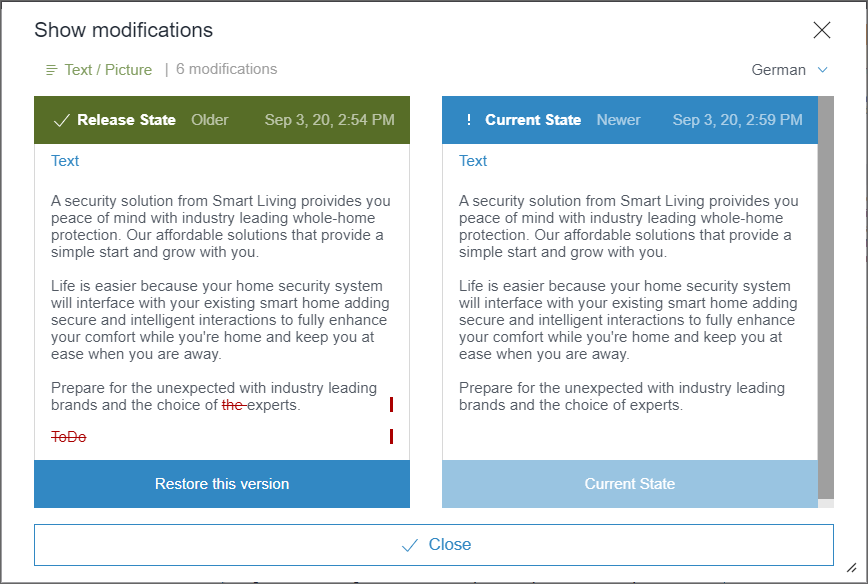
The user guidance when restoring a version has been modified in this dialog (via the “Restore this version” button or icon
.png)
Previously, the dialog closed immediately after restoring the version, but now it remains open until the “Restoration succeeded. The current version will now be loaded” information dialog is confirmed with “OK”:
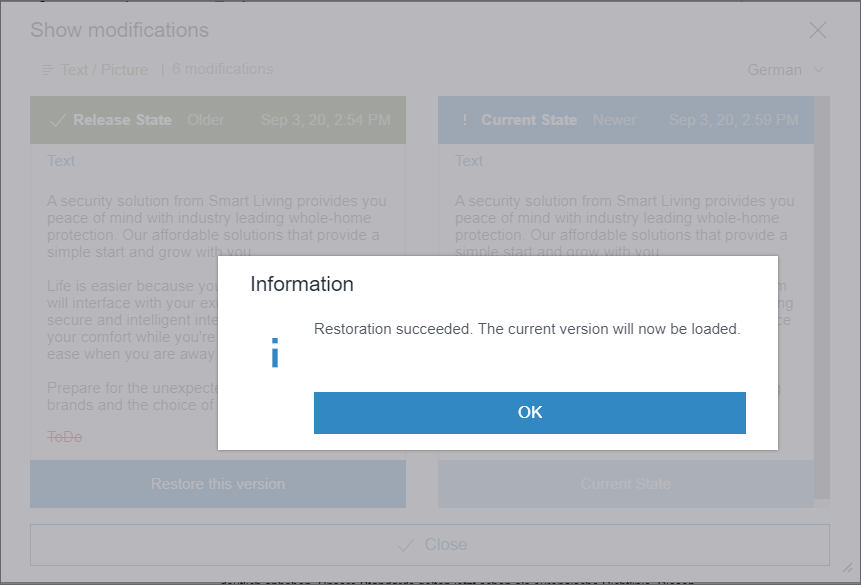
In this way, it is now possible – when using the API (ComparisonDialogOperation interface, de.espirit.firstspirit.webedit.server package, FirstSpirit Developer API) – to hold off on closing the dialog until another action is carried out.
3 FirstSpirit Content Experience Tools (CXT)
3.1 Latest module versions
FirstSpirit 2020-09 supports the following module versions for “FirstSpirit Content Experience Tools”:
| Module / file name | Version number |
FirstSpirit CXT DAP Bridgedataservice-[version].fsm | 1.32 |
FirstSpirit CXT FragmentCreatorfragment-creator-[version].fsm | 2.10 |
FirstSpirit Fragment DAPfragmentdap-[version].fsm | 1.28 |
FirstSpirit Media DAPmediadap-[version].fsm | 1.25* |
FirstSpirit PageRef DAPpagerefdap-[version].fsm | 1.2 |
FirstSpirit Markdown Editormarkdown-editor-[version].fsm | 1.23* |
FirstSpirit Tagging Editortagging-editor-[version].fsm | 1.23 |
FirstSpirit CXT FragmentCreator - CaaS Integrationcaas-integration-[version].fsm | 1.24 |
* These modules require FirstSpirit 2020-03 or higher from this version.
3.2 Media DAP: Uploading directory structures
To upload and select media in FragmentCreator, the “FS_INDEX” component is used with the “Media DAP” module. In the current release, entire directory structures (folders), including any images and files of different formats they contain, can be selected for upload instead of just files from the workstation PC.
To do this, the required folder(s) must be moved to the upload dialog using drag-and-drop.
Once the folders have been dropped, all media contained in the folders are displayed in the dialog. This enables the media that are to be referenced in the component to be selected.
Potential restrictions regarding file size and format that have been implemented by the project developer are taken into account directly. Only files which meet the size and format requirements are transferred to the dialog.
The folder path for the media to be uploaded is displayed underneath the media, along with the file name.
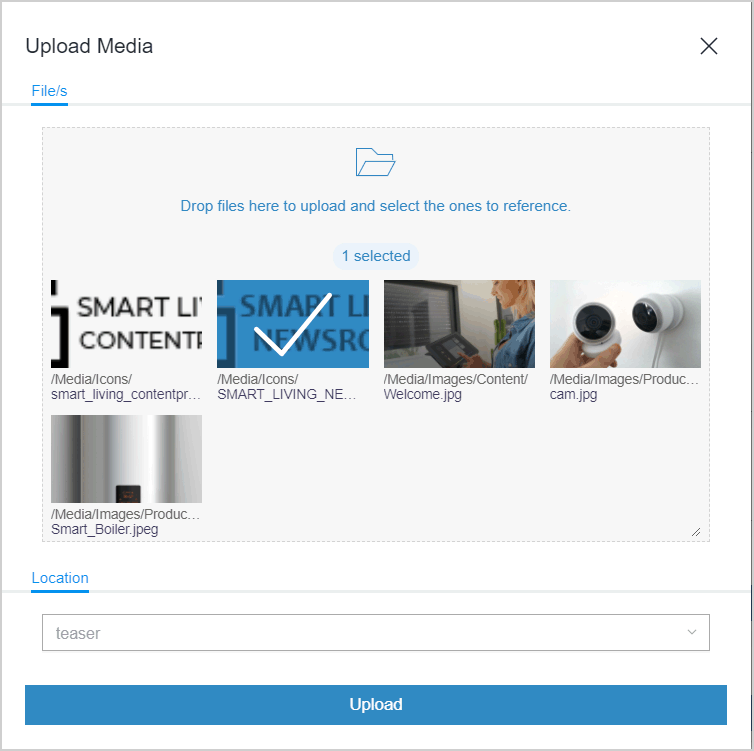
Once all the required media have been selected, the upload can be started by clicking “Upload”. The upload dialog closes automatically once the media have been uploaded successfully. Exception: In the event of an error, the dialog stays open, displays a corresponding error message, and the media affected are not uploaded.
In the Media Store in the associated FirstSpirit project, the uploaded media and folders are mapped in the file structure of the workstation PC. Empty folders are not taken into account, however.
For both the media and the folders, the names of the folders and files are used by the workstation PC in each case.
3.3 New input component for switching between two states: CMS_INPUT_TOGGLE
In the current release, FragmentCreator also supports CMS_INPUT_TOGGLE, the input component for switching between two states.
Example:
<CMS_INPUT_TOGGLE name="picture_position" useLanguages="yes">
         <LANGINFOS>
           <LANGINFO lang="*" label="Picture position"/>
           <LANGINFO lang="DE" label="Ausrichtung des Bildes"/>
         </LANGINFOS>
         <OFF>
           <LANGINFO lang="*" label="Right"/>
           <LANGINFO lang="DE" label="Rechts"/>
         </OFF>
         <ON>
           <LANGINFO lang="*" label="Left"/>
           <LANGINFO lang="DE" label="Links"/>
         </ON>
</CMS_INPUT_TOGGLE>
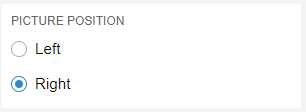
CMS_INPUT_TOGGLE in FragmentCreator
The various states are mapped via the mandatory tags <ON> and <OFF>. A label must be defined for each state via the <LANGINFO> tag.
The radio buttons for the component are displayed one below the other with the <ON> state at the top and the <OFF> state at the bottom. This order cannot be changed.
Note: Unlike in FirstSpirit ContentCreator and SiteArchitect, only the “Radio button” type is supported in FragmentCreator (corresponds to type="RADIO"). The type parameter is not taken into account in FragmentCreator; the input component is always presented as a radio button.
For more information, see https://docs.e-spirit.com/odfs/edocs/cxt/templates/input-component/index.html.
4 Compatibility
Postponed: Release of the new database layer Oracle Database 19c
The release of the new database layer Oracle Database 19c, planned for 2020Q3, has been postponed and is now scheduled for 2020Q4.
Currently, the Oracle Database 19c layer is still in the EAP (Early Access Program) phase. The EAP phase will be accompanied through the FirstSpirit Community (https://community.e-spirit.com). Detailed documentation regarding the use of Oracle Database 19c with FirstSpirit is also published in the Community.
5 Module Development, Scripts, API
5.1 Accessing generated data via schedule script
In a generation process, data is generated from FirstSpirit elements and is stored in the file system. After one or more generation processes of this nature, it is often necessary to carry out post-processing steps on the generated data. Examples include:
- replacing placeholder media with media from a MAM (controlled via metadata)
- training a search engine using metadata stored for the individual FirstSpirit elements
The new method getOutput()in the GenerationAgent interface (FirstSpirit Developer API, de.espirit.firstspirit.scheduling.agency package) can be used to allocate the generated files to the corresponding FirstSpirit objects after a generation process. This information can be used in a downstream schedule step in order to change the generated data or to forward the information about this data to third-party systems.
Example code (Beanshell):
import de.espirit.firstspirit.scheduling.agency.GenerationAgent;
import de.espirit.firstspirit.agency.LanguageAgent;
import de.espirit.firstspirit.scheduling.agency.FileEntry;
import de.espirit.firstspirit.access.store.IDProvider;

generationAgent = context.requireSpecialist(GenerationAgent.TYPE);
ml = context.requireSpecialist(LanguageAgent.TYPE).getMasterLanguage();
Collection<FileEntry> output = generationAgent.getOutput();
for (entry : output) {
 uid = entry.getElementUid();
 IDProvider.UidType uidType = entry.getElementUidType();
 path = entry.getPath();
 element = entry.getElement(context, false);
 context.logInfo("+ Generated: " + uid + " (" + uidType + ") = " +
   element.getDisplayName(ml) + " at: " + path);
}
The method getOutput() outputs all data that is located in the generation directory when the script is executed (i.e., the data could potentially be deployed). Multiple previous generations of the schedule are taken into account automatically.
In addition to the output allocation, the PermissionsAgent (FirstSpirit Developer API, de.espirit.firstspirit.access.editor package) has been introduced in order to determine existing access and execution permissions for the individual FirstSpirit objects. These permissions are special user permissions which are specified by the template developer via a project-specific metadata template using the CMS_INPUT_PERMISSION input component and are then defined in the metadata tab of the FirstSpirit objects (they are not editorial permissions which are defined in FirstSpirit). The PermissionsAgent also takes into account the inheritance of these permissions, i.e., permissions which have been inherited from a higher-level node are also read out.
5.2 During delta generation, media changes can now be forwarded to datasets that reference the medium in question.
The new rule PROPAGATE_MEDIA_CHANGES_TO_CONTENTSTORE in the DeltaGeneration interface (FirstSpirit Developer API, de.espirit.firstspirit.access.schedule package) can now be used to forward media changes to datasets.
When the rule is used, releasing a medium means that all datasets that reference this medium in the release state are regarded as “changed” for the delta generation.
6 SiteArchitect / ServerManager
6.1 External users can now be used for password configurations in ServerManager.
In the current FirstSpirit release, external users can also be used for password configurations in ServerManager. These passwords can be used both for scripts and for remote connections.
The extension affects all passwords which were explicitly set in remote connections or script tasks in ServerManager.
- In the Schedule management area – in the “Script properties” dialog,
see Documentation for administrators – FirstSpirit ServerManager / Schedule entry planning / Server-based actions / Execute script - In the Remote projects area – in the “Edit remote project configuration” dialog,
see Documentation for Administrators – FirstSpirit ServerManager / Project properties / Remote projects
Note: For security reasons, server administrators cannot be used for the password configuration.
To expand the users, the password format of the PasswordAgent has been changed. This does not affect existing data; the old format can continue to be read. A new authentication only takes place if the password is re-entered in the configuration dialogs. The old login implementation continues to be used with old persistent data.
Note: Forward compatibility is ensured. Once the FirstSpirit Server has been updated to the latest version, all set passwords continue to be valid. It is not necessary to reset the passwords.
Note: If the FirstSpirit Server is downgraded to FirstSpirit version 2020-08 or earlier, encrypted passwords are now no longer compatible via the PasswortAgent and must be reset.
6.2 Certificate update FirstSpirit Launcher
The FirstSpirit Launcher is digitally signed. Thanks to the signature, the customer knows where the application comes from and that it was not manipulated during the transfer (from the manufacturer to the recipient).
In the current FirstSpirit version, the certificate of the FirstSpirit Launcher is updated.
Overview
| ID | Description | Categories |
|---|---|---|
| CORE-7234 | External users can now be used for password configurations in ServerManager. |
ServerManager |
| CORE-10457 | Syntax errors in BeanShell scripts for script visibility are now handled appropriately and no longer cause menus to be hidden, for example. |
ContentCreator, Developer, Editor, FirstSpirit Administrator |
| CORE-11017 | The new rule |
Delta generation, Developer |
| CORE-11179 | The |
ContentCreator, Developer, Editor, FirstSpirit API |
| CORE-11540 | A problem has been rectified which could lead to unnecessary waiting times when copying datasets in FirstSpirit SiteArchitect (from the second copy of a dataset). |
Content Store, Database, Performance, SiteArchitect |
| CORE-11592 | The error tolerance when implementing customer-specific reports has been increased so that reports can now also be displayed if there are problems using icons (e.g., error message |
Data Access Plug-In, Debugging, Developer, Editor, FirstSpirit Administrator, Module development, Reports |
| CORE-12297 | Element caching when using FirstSpirit connections has been corrected. In rare cases, data changes to store elements in service implementations have not been correctly detected or forwarded. |
Developer, FirstSpirit API |
| CORE-12416 | The new method |
Developer, FirstSpirit API, Generation, Module development |
| CORE-12515 | In the current FirstSpirit version, the certificate of the FirstSpirit Launcher is updated. |
Launcher |
| CORE-12623 | When using an FS_CATALOG input component with multiple FS_INDEX input components which can each be used to select the data from a DataAccess plug-in via drag-and-drop, the transfer type is now evaluated correctly in ContentCreator. Previously, erroneous behavior could occur in FS_CATALOG when dragging and dropping data. |
ContentCreator, Developer, Editor, Input Components, Module development, Reports |
| CORE-12651 | With the current FirstSpirit release the FirstSpirit Session Cookie is extended by the attribute |
FirstSpirit Administrator, Security, Server Administrator, ServerMonitoring |
| CORE-12677 | When switching from FirstSpirit 2020-08 to another FirstSpirit version, the FirstSpirit server may not be accessible. |
FirstSpirit Administrator, Server Administrator |
| CORE-12701 | Modified user guidance when restoring a version in the “Show modifications” dialog. |
ContentCreator, Developer, Editor, FirstSpirit API |
| CORE-12728 | The performance when using the Navigation view has been improved. Previously, particularly in the event of larger volumes of referenced datasets, increased numbers of server requests could occur in certain cases, resulting in higher loads. |
ContentCreator, Developer, FirstSpirit Administrator, Performance |
| CORE-12816 | The release of the new database layer Oracle Database 19c, planned for 2020Q3, has been postponed and is now scheduled for 2020Q4. Currently, the Oracle Database 19c layer is still in the “EAP” (“Early Access Program”) phase. |
Database |
| CXT-1558 | The input component for switching between two states – CMS_INPUT_TOGGLE – is now also supported in FragmentCreator. |
Developer, FirstSpirit Content Experience Tools (CXT), FragmentCreator, Input Components |
| CXT-1682 | If a large number of groupings (CMS_GROUP) are defined for a form, navigation using the arrows now works again in all cases. |
ContentCreator, Editor, Input Components |
| CXT-1746 | Uploading media to directory structures using drag-and-drop |
Developer, Editor, FirstSpirit Content Experience Tools (CXT), FragmentCreator, Media, Media Store |
| CXT-1755 | The sessions in the DAP Bridge are now closed correctly when logging out of FragmentCreator. |
FirstSpirit Administrator, FirstSpirit Content Experience Tools (CXT), FragmentCreator, Modules, Remote access, Sessions |
| CXT-1760 | Entries from the WebeditStatusNotePlugins (FirstSpirit Developer API, package |
ContentCreator, Developer, FirstSpirit API, Module development |
| CXT-1773 | Validations in link templates within a CMS_INPUT_LINK input component now function as expected in FirstSpirit ContentCreator. |
ContentCreator, Developer, Dynamic Forms, Editor, Input Components |
| CXT-1786 | In rare cases, tooltips were not hidden in FirstSpirit ContentCreator when the mouse pointer was moved to a different area. This problem has been rectified. |
ContentCreator, Editor |
| CXT-1793 | Previously, when using the “Undo” or “Restore” function in the menu bar, the function “Display differences” (page state / “Display all changes”) or when resetting a section via the |
ContentCreator, Developer |
| CXT-1800 | Fixed update problems in the tree view of the Navigation view. |
ContentCreator, Editor |
| CXT-1832 | FirstSpirit Content Experience Tools: Latest module versions |
Developer, FirstSpirit Administrator, FirstSpirit Content as a Service (CaaS), FragmentCreator, Modules |
| CXT-1837 | When cropping the original resolution using the ContentCreator's media management (“Edit image section”), incorrect cropping and error messages could occur when saving. |
ContentCreator, Editor, Media, Media Store |
| DEVEX-395 | As of FSDevTools release 2.5.10, the execution of project and server schedules by means of the
In order to correctly detect incorrect executions, the |
Developer, FSDevTools |
Deprecations
| Functionality | Deprecated as of | Will be removed / Was removed as of |
|---|---|---|
| Input component CMS_INPUT_CONTENTAREALIST | 5.2R3 | |
| Input component CMS_INPUT_CONTENTLIST | 5.2R3 | |
| Input component CMS_INPUT_FILE | 5.2R3 | |
| Input component CMS_INPUT_LINKLIST | 5.2R3 | |
| Input component CMS_INPUT_OBJECTCHOOSER | 5.2R3 | |
| Input component CMS_INPUT_PAGEREF | 5.2R3 | |
| Input component CMS_INPUT_PICTURE | 5.2R3 | |
| Input component CMS_INPUT_TABLIST | 5.2R3 | |
| FirstSpirit Access API: de.espirit.firstspirit.agency.GroupsAgent | 5.2R15 | |
| FirstSpirit Access API: delete (de.espirit.firstspirit.access.AccessUtil) | 5.2R18 | |
| FirstSpirit Access API: release (de.espirit.firstspirit.access.AccessUtil) | 2018-06 | |
| FirstSpirit Access API: getLastLoginAsDate (de.espirit.firstspirit.agency.UserStatisticsAgent) | 2018-07 | |
| FirstSpirit Access API: remainingDurationOfCurrentStageInMillis (de.espirit.firstspirit.server.MaintenanceModeInfo) | 2018-07 | 2025-13 |
| FirstSpirit Access API: getStartingTimeOfStageAsDate (de.espirit.firstspirit.server.MaintenanceModeInfo) | 2018-07 | 2025-13 |
| FirstSpirit Access API: getSelectedWebserverConfiguration (de.espirit.firstspirit.access.serverConfiguration) | 2018-10 | 2025-13 |
| FirstSpirit Access API: setSelectedWebserverConfiguration (de.espirit.firstspirit.access.serverConfiguration) | 2018-10 | 2025-13 |
| FirstSpirit Access API: getSelectedWebServer (de.espirit.firstspirit.access.project.Project) | 2018-10 | 2025-13 |
| FirstSpirit Access API: setSelectedWebServer (de.espirit.firstspirit.access.project.Project) | 2018-10 | 2025-13 |
| FirstSpirit Access API: getLostAndFoundStoreNodes(); (de.espirit.firstspirit.feature.FeatureInstallResult) | 2018-10 | |
| FirstSpirit Access API: getDeletedStoreNodes(); (de.espirit.firstspirit.feature.FeatureInstallResult) | 2018-10 | |
| FirstSpirit Access API: de.espirit.firstspirit.access.store.Previewable | 2019-01 | |
| WebSphere Application Server support for FirstSpirit | 2019-05 | |
| Legacy mode for the FirstSpirit server | 2019-06 | 2022-03 |
| Control files for Windows and Linux operating systems (old) | 2020-08 | 2021-02 |