
Release Notes
1 Administration
1.1 Configuring ContentCreator logging
In the context of refactoring and as part of a fundamental review of the technical basis, FirstSpirit ContentCreator has been using the “Spring Boot” open source framework for some time now. Its default logging framework is “Logback”. Logback is faster than the “Log4j” framework and offers more configuration options.
Similar to the CXT platform and FragmentCreator, an optional file
~/config/cxt-cc.propertiesis now supported in the class path.
Logging can be configured in this file.
ContentCreator logs to the console by default.
To activate logging to a file as well, in the Properties file, set the
logging.file.nameparameter. The path and the name of a file to which logs are to be written must be defined in this parameter, e.g.,
logging.file.name=/home/tomcat/logs/firstspirit-cc.log The default log level is INFO; this means that errors in the ERROR, WARN, and INFO will be recorded.
The available properties Properties (incl. logging.file.name) are the corresponding default spring boot properties. The logging configuration can be customized further if required: https://docs.spring.io/spring-boot/docs/2.4.2/reference/html/appendix-application-properties.html#common-application-properties-core.
A log file is not generated by default.
If “Log4j” has previously been used for logging in ContentCreator, logging must now be configured in the way described here.
Notice: The configuration via ~/config/cxt-cc.properties is valid for all ContentCreator instances, both for the global ContentCreator and for any “project local” ContentCreator instances that might have been configured (= a web server is configured on the “ContentCreator” tab under “Project properties/Web components”).
1.2 Conversion rules: Upload now also in non-hexadecimal notation
In FirstSpirit, conversion rules are used to convert characters that are input.
To use a customer-specific conversion rule, a corresponding text file must first have been created. This file can then be uploaded to the server in the FirstSpirit ServerManager under “Server Properties / Conversion Rules” (“Add” button).
The character to be replaced in this case can now be entered directly using the keyboard, e.g.,
ä = "ae"Previously, the hexadecimal unicode value had to be entered.
When using non-hexadecimal notation, an error message such as ERROR 03.08.2021 09:17:11.228 (de.espirit.firstspirit.admin.gui.ConversionTablePanel): Error creating conversion table ... de.espirit.firstspirit.access.AccessRuntimeException: Error parsing line 2... was displayed
For more information, see https://docs.e-spirit.com/odfs/edocs/admi/firstspirit-ser/server-eigensch/konvertierungs/index.html.
1.3 MBeans and ServerMonitoring: New information about the health state and the server's current load
With “ServerMonitoring” and the JMX console, FirstSpirit offers options to monitor and manage the FirstSpirit server during runtime, for example with regard to memory usage and load.
For the JMX console, all values and actions are provided by what are known as managed beans (“MBeans”).
New MBeans information about the health state and the current load of the server is available with the current release:
HealthManager
- runlevel of the server
- last log message of level
FATAL - number of loggings of level
FATALper day - last “Out of memory” log message
- number of open connections
- ...
ScheduleManager
- number of schedule entries currently running / by type
- number of schedule entries currently running
- ...
RepositoryManager
- number of repositories currently open
- number of write operations currently in progress in all repositories
- write operations per minute
- revisions generated per minute
- ...
MediaManager
- number of media uploaded, scaled media, and preview calculation
- number of currently uploaded and scaled media plus preview calculations / by type
- actions with regard to upload, scaling, and preview calculation per minute
- ...
Moreover, the history of some of theses values can now be downloaded as a file in CSV format via the JMX console (the last 14 days by default unless a different value is specified).
New statistical values have also been added to “ServerMonitoring” under “FirstSpirit / Monitoring / Codes”:
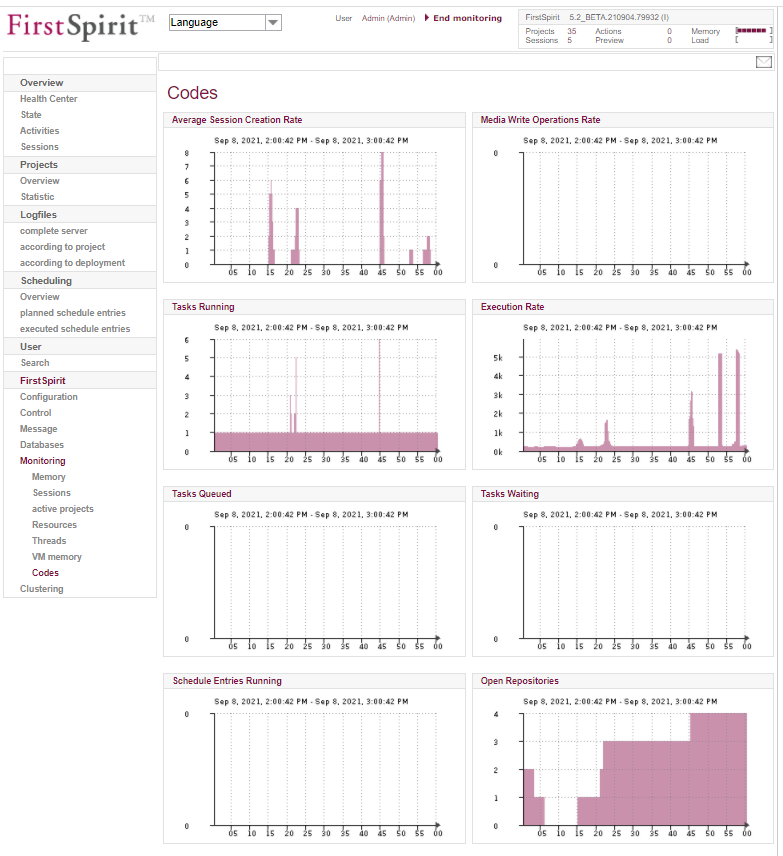
Some of the values can now also be downloaded here as a CSV file or sent as an e-mail attachment. Icon:
.png)
Data for schedule entries can also be downloaded/sent in ServerMonitoring under “Overview / Activities”.
By default, data is available for the last 21 days or since the last server restart.
For more information, see
1.4 New configuration file for server settings: "fs-server-aux.conf"
The fs-server.conf file enables the FirstSpirit server to be adapted to customer-specific requirements. The configuration is done via parameters that are described in the “Documentation for administrators”.
As of the current release, there is another configuration option for the server: the
fs-server-aux.confconfiguration file.
This can be used to overwrite the configuration made by the fs-server.conf file.
Parameters for the server configuration are now evaluated in the following order (if used):
-DJava properties- environment variables of the operating system
fs-server-aux.conffs-server.conf- default values
The use of the fs-server-aux.conf file is intended for scenarios where the fs-server.conf file is generated automatically. Manual adjustments to this file are overwritten or removed by automatic updates. The fs-server-aux.conf file, in contrast, is not overwritten or modified.
The file can be created and edited in “FirstSpirit – Configuration – Server”:
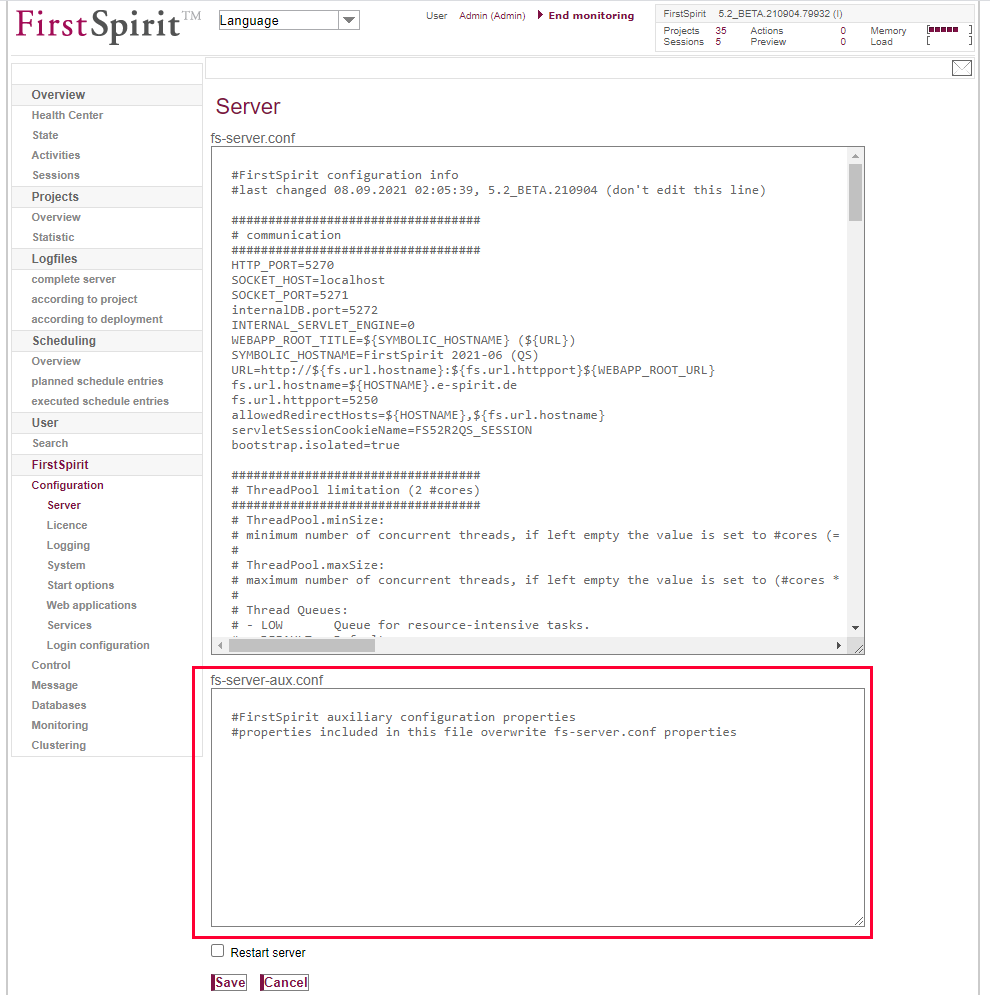
The file is then located in the ~fs5\conf directory.
If the file exists and contains parameters, it is read out when the server is started. The following message can be found in the log file fs-server.log:
INFO 01.09.2021 12:18:23.348 (de.espirit.firstspirit.server.ServerManagerImpl):
   Loaded auxiliary ini file '~/firstspirit/conf/fs-server-aux.conf'
Note: Not all parameters are suitable for use in the fs-server-aux.conf file (e.g. services).
Documentation of unsuitable parameters will be provided with one of the upcoming releases.
1.5 Deleting a project including databases
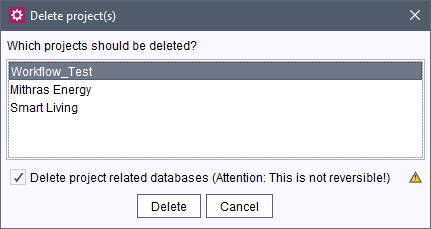
When a project is deleted (via FirstSpirit ServerManager / Project / Delete) all databases managed by the project are now also deleted with it. As well as easily freeing up memory space that is no longer required, for example, this also makes managing databases and projects easier.
As a general rule, databases are only deleted if a schema exists for the database and none of the “Write-protected” and “No schema sync” options are activated for the layer (in FirstSpirit ServerManager / Project Properties / Databases).
If these databases should not be deleted, uncheck the “Delete project related databases” box:
2 ContentCreator
2.1 Beta phase: Data source management in ContentCreator
The functionality of the “Datenquellen-Verwaltung” in FirstSpirit ContentCreator is still in Beta phase.
It is recommended to test it in a development environment first.
Potential problems should be reported to e-Spirit in a timely manner.
For more information please see Release Notes for FirstSpirit 2021-08 (https://docs.e-spirit.com/odfs/releasenotes/2021-08/FirstSpirit_Releasenotes_EN.pdf).
2.2 Preferred display language
By default, labels for input elements and tooltips in forms are displayed in the language that is currently being edited.
In the FirstSpirit world, this language is also referred to as the “display language” (or: “editorial language”. The project developer defines which label is used in which language.
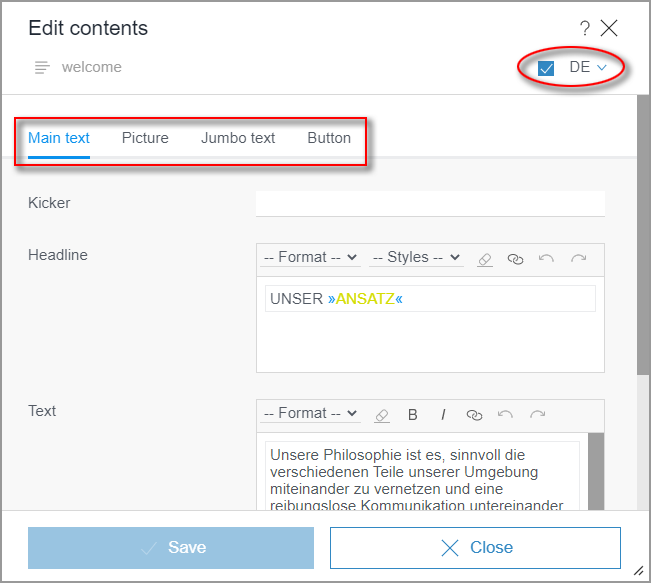
Previously, the preview language or the client language (via the FirstSpirit start page) had to be changed in order to change the display language. Changing the language in the form only affected the language used for content.
With the current release, the language to be used as the display language can be configured:
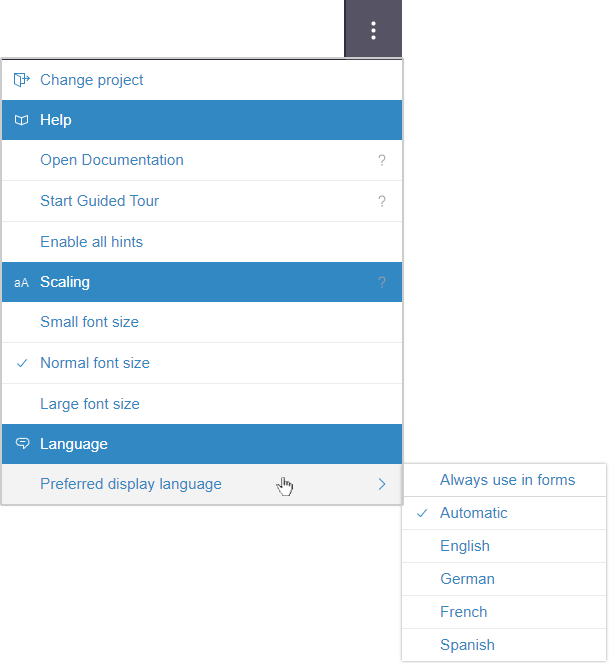
(menu “Further functions” / “Preferred display language”)
In this menu all languages defined as “Editorial languages” in the ServerManager are offered for selection.
Language selection:
- Either a preferred display language can be selected, in which content is displayed, or
- Automatic: The display language is determined, as before, on the basis of the language selected on the FirstSpirit start page.
This language selection generally affects the content of the Media management (as well as the Data source management that has not yet been released).
If the language is changed (incl. “Automatic”), a dialog is displayed with corresponding information. The “Reload browser” button triggers the reload of the browser content.
Always use in forms: By activating this option the display language selected in this submenu will also be used for the labeling in forms.
In the navigation bar and the reports, the language is still based on the selected preview language.
The “preferred display language” settings made in the submenu are saved for the entire project.
For more information, see:
- Languages in ContentCreator: https://docs.e-spirit.com/contentcreator/introduction/use-multiple-la/index.html
- “Further functions” menu: https://docs.e-spirit.com/contentcreator/menu-functions/further-functio/index.html
2.3 Image cropping directly in FS_REFERENCE
The FS_REFERENCE input element is used to record any reference. It can be used to display references to other pages or images on the website, for example.
With the current release, users can now conveniently crop the image they are using directly from within an FS_REFERENCE input element in FirstSpirit ContentCreator. Users now no longer have to switch to the Media management first.
The corresponding icon is then only displayed once an image has been selected.
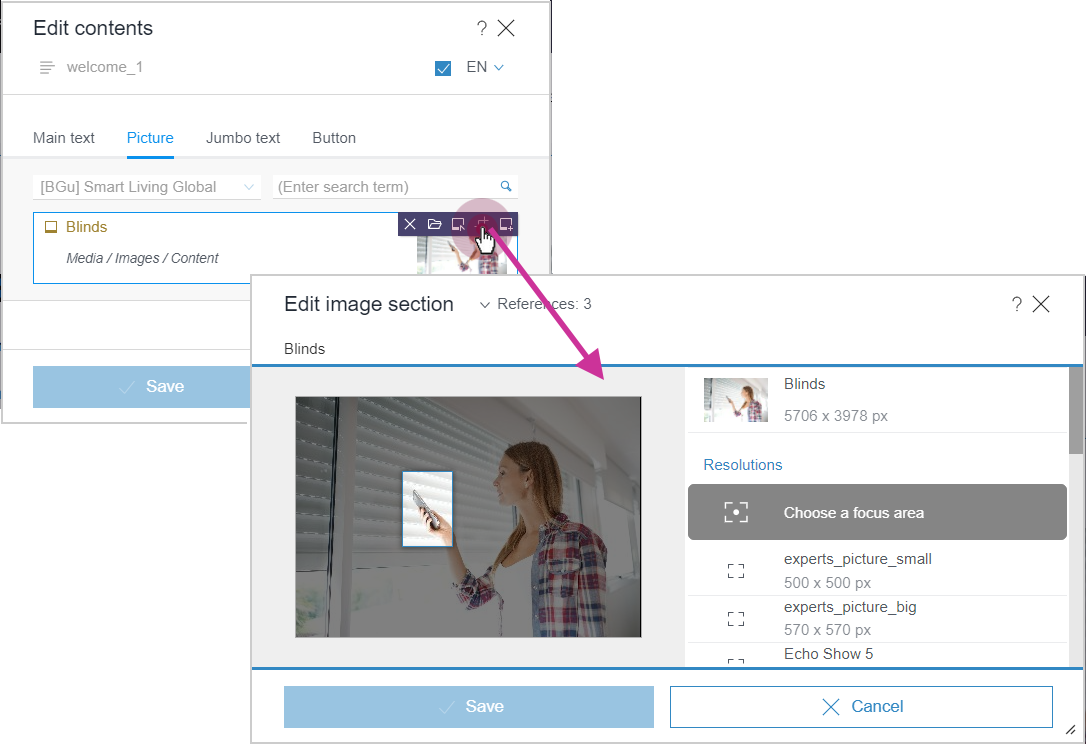
The function is, of course, only available for images, not for other object types.
2.4 Navigation bar: New functions
The navigation bar, which can be opened on the left-hand side of the screen, maps the hierarchical structure of the site (“Navigation” tab) or the page currently selected (“Page” tab) in a clear tree structure.
The latest release features new functions:
Rename sections
The “Rename” menu item for sections (“Page” tab) can now be used to change the (display) name of a section.
Notice: To rename a Page, use the “Rename” function on the “Navigation” tab.
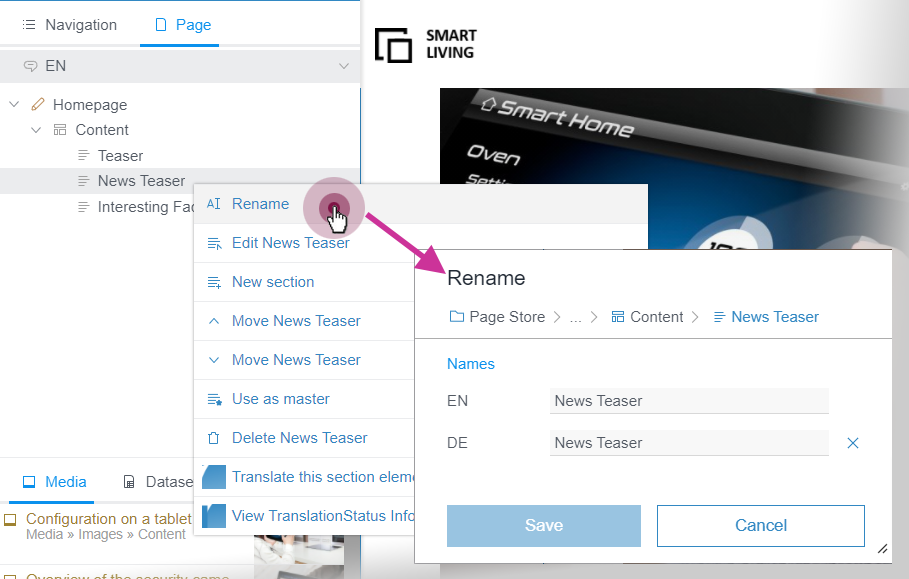
Executing workflows on elements
If an element is set to the “released” state, changes recently made to an object usually only become visible the next time the page is deployed. If a page has not been released, the most recent changes are not visible even when it is deployed.
A workflow is required to release elements. Previously, workflows could be started and advanced in the report area or by changing the status of the element.
Now, workflows are also available on elements of the tree structure in the navigation bar, on the “Navigation” tab:
.png)
The available workflows or workflow steps are displayed in the submenu underneath the state of the element. Click a workflow or a workflow step to select it.
The error message
The object is marked as “read only” in the workflow.indicates that a higher-level element is currently write-protected in a workflow. The element can then only be advanced in the workflow if the higher-level element is advanced.
Notice: The workflow state and the available workflows for an element sometimes depend on the selected “Element Status Provider”. If the “Page based” provider is selected, the corresponding page from the page store will be visualized in the workflow dialog, for example.
3 External Synchronization / Content Transport
Transport of database schemata and content between projects with different language quantities
The FirstSpirit “External Synchronization” and FirstSpirit “Content Transport” functionalities can be used to export project content and properties of a FirstSpirit project (source project) and import them in other FirstSpirit projects (target projects).
The behavior particularly during the transport of database content with different language quantities in target and source project has now been improved:
During the transport of database schemata
when importing languages that only exist in the target project, the corresponding language-dependent columns are now assigned in the table templates accordingly (“Mapping”) and created in the schema.
Language-dependent columns included in the export from languages that do not exist in the target project, are also created in the schema and will not be modified there.
The structure and content of external databases cannot be changed: Therefore, mapping does not occur in the case of external databases.
Important: If necessary, potentially existing project solutions that imitate the functionality of this feature must be adapted or removed. Otherwise, unexpected behavior may occur (e.g., loss of data or failed scripts).
The functionality utilizes the FirstSpirit Name Schema as the basis for language-dependent columns (which means “Column_EN”, “Column_DE”, “Column_FR”, etc.). In the case of projects that do not use this schema, this can potentially lead to unexpected behavior.
During the transport of datasets
language-dependent content that has been maintained in the target project in languages, but does not exist in the source project, will now remain unchanged.
In contrast, content of languages that exist in the source project and the target project is always overwritten with the content from the source project.
Important: This applies to input components that are language-dependent and mapped to separate columns.
In the case of language-independent input components for which language-dependent forms have been configured, the content of the source project is applied. In this case, content that is maintained in languages that only exist in the target project will continue to be lost during transport.
This is especially the case with the FS_CATALOG input component: in case of configuration with uselanguages="no" and <TEMPLATES type="section">, language-dependent content in the input components of the internal sections is updated with the data from the source project during transport.
Activation
In order to use the functionality, it must first be activated. This is done in the FirstSpirit ServerManager under “Project properties – Compatibility”:
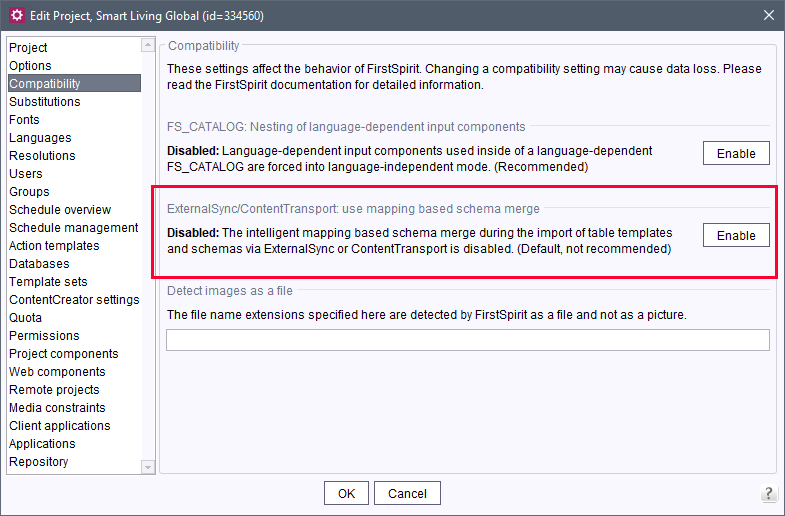
Option “ExternalSync/ContentTransport: use mapping based schema merge”
The current status can be checked in the text on the left.
- Enabled: (recommended) If this option is activated, when importing a database schema in the target, missing language-dependent database columns are added and language-dependent column contents that only exist in the target are not overwritten.
- Disabled: (not recommended) This is the default setting. If this option is activated, missing, language-dependent database columns will not be added and language-dependent column contents that only exist in the target will be overwritten when importing a database schema in the target.
Switching is possible by clicking on the button (“Disable” or “Enable”) and must be verified by a confirmation prompt.
Although the new behavior is an improvement, it is also a significant change in software behavior compared to previous releases. A change to the new behavior should be executed and tested on a test system beforehand, if possible. Potentially existing project solutions that imitate the functionality of this feature may have to be adapted or removed.4 FirstSpirit Content Experience Tools (CXT)
Latest module versions
FirstSpirit 2021-09 supports the following module versions for “FirstSpirit Content Experience Tools”.
| Module / file name | Version number |
FirstSpirit CXT Plattformplatform-[version].fsm | 2.4.1 |
FirstSpirit CXT DAP Bridgedataservice-[version].fsm | 1.44.0 |
FirstSpirit CXT FragmentCreatorfragment-creator-[version].fsm | 3.4.1 |
FirstSpirit Fragment DAPfragmentdap-[version].fsm | 1.40.1 |
FirstSpirit Media DAPmediadap-[version].fsm | 1.31.0* |
FirstSpirit PageRef DAPpagerefdap-[version].fsm | 1.9.0 |
FirstSpirit Markdown Editormarkdown-editor-[version].fsm | 1.29.0* |
FirstSpirit Tagging Editortagging-editor-[version].fsm | 1.29.0 |
FirstSpirit CXT FragmentCreator - CaaS Integrationcaas-integration-[version].fsm | 1.31.0 |
* These modules require FirstSpirit 2020-03 or higher from this version.
5 Compatibility
5.1 Announcement: Final removal of some deprecated components
As is the case with the FirstSpirit core, the use of third-party components will be subject to intensive quality assurance processes. With such a multitude of operating systems being supported, as well as Java versions, interfaces with third-party components, and the various possibilities for combining and configuring all these systems, the test environment will naturally be extremely complex. In order to ensure good maintainability and sustainability in the further development of FirstSpirit in the long term, support for components that are no longer supported and/or used is deprecated at regular intervals. During a transition period, customers and partners will have sufficient time to switch operations to alternative solutions - also with the assistance of e-Spirit Technical Support. In a final step, the code for the components that are no longer supported will then be removed on the software side.
For some components that have been deprecated by e-Spirit for some time and are no longer supported, this final step will be taken in the next FirstSpirit releases.
Migration only affects on-premises customers and should already have been completed. Corresponding migration paths have already been communicated in detail.
Java Web Start (removal with FirstSpirit 2021-10)
“Java Web Start” allows Java applications to be downloaded from the Internet and executed with one click. It has been included in Java since version 5.0. However, “Java Web Start” dropped with version 11.
“Java Web Start” support for FirstSpirit was deprecated with FirstSpirit 2019-10, and it can no longer be used since Java 8 was dropped (FirstSpirit 2020-06).
With FirstSpirit 2021-10, “Java Web Start” will no longer be included in FirstSpirit.
The FirstSpirit Launcher is available as a replacement.
For more information on the FirstSpirit Launcher, see https://docs.e-spirit.com/odfs/edocs/admi/firstspirit-sta/areas-the-start/firstspirit-lau/index.html.
Legacy mode for FirstSpirit Server and module development (removal with FirstSpirit 2022-01)
The main goal of the FirstSpirit server's “Isolated mode” is to give module developers greater freedom in selecting the libraries they use. Especially the potential conflicts with libraries supplied by the FirstSpirit core should be hereby minimised.
“Isolated mode” was released in February 2019 (2019-02). Since then, “Isolated mode” has been the standard for newly installed servers. “Legacy mode” has been deprecated since FirstSpirit 2019-06.
As of FirstSpirit 2022-01, the components for “Legacy mode” will no longer be included in FirstSpirit.
An indication that a server is running in “Isolated mode” is the use of the fs-isolated-server.jar file in the ~/server/lib-isolated directory (instead of fs-server.jar in the ~/server/lib directory in “Legacy mode”).
Server and custom modules that have not yet been migrated to “Isolated mode” should be modified appropriately.
If you require assistance with the changeover, please contact e-Spirit Technical Support.
For information on migrating FirstSpirit servers and customer-specific modules to “Isolated mode” please see https://docs.e-spirit.com/odfs/edocs/modd/index.en.html.
InternalJetty (removal with FirstSpirit 2022-01)
(Web server of type Internal)
The functionality of this internal Jetty web server was deprecated in February 2018 (5.2R18) and is no longer supported since August 2018 (2018-08).
As of FirstSpirit 2022-01, the components for the “InternalJetty” will no longer be included in FirstSpirit.
If the “InternalJetty” on a FirstSpirit server is still configured for one or more web applications, FirstSpirit administrators will see a corresponding note on the start page of the FirstSpirit server (“Use(s) of internal Jetty detected...”).
As a substitute, the use of an external web server (e.g. “Apache Tomcat”) is recommended.
For information please see https://docs.e-spirit.com/odfs/edocs/admi/firstspirit-ser/server-properti/web-server/index.html.
5.2 Modules and extensions for FirstSpirit 2021-09
The following modules and extensions are compatible with FirstSpirit 2021-09:
| Module name/File name | Version number | Compatibility |
FirstSpirit Update Archivefs-update-[version].tar.gz | 2.1.0 | - |
FirstSpirit Install Archiv fs-install-[version].tar.gz | 2.1.0 | - |
FirstSpirit LauncherFSLauncher.exe | 1.0.41 | as of FirstSpirit 2018-08 |
FirstSpirit Launcher JRE modulefs-launcher-jre-[version].fsm | 1.19 | as of FirstSpirit 2020-11 |
FirstSpirit SAML Login modulefs-saml-login-[version].fsm | 1.3 | as of FirstSpirit 2019-02 |
FSDevToolsfs-cli-[version].tar.gzfs-cli-[version].zip | 3.0.2 | as of FirstSpirit 2021-07 |
FirstSpirit Module Gradle Pluginfirstspirit-module-gradle-plugin-[version].jar | 2.3.2 | as of FirstSpirit 2019-06 |
6 Module Development, Scripts, API
6.1 IDProviderEventAgent: Filtering events based on revision
In the context of eventing (e.g., change to objects), the new getRevision(); method can now be used to also identify the revision (FirstSpirit Access-API, de.espirit.firstspirit.event package, EventInfo interface).
This method can be used to decide whether or not the event should be filtered out.
Example:
eventFilter = new Predicate<EventInfo>() {
	   boolean test(info) {
		      eventrevision = info.getRevision();
      		...
      		return ...
		   }
};
6.2 Implementing validation for customer-specific input components
An option to support the reporting of validation errors has been created for the JavaScript implementation of a WebPluginGadget.
The JavaScript controller might look like this, for example:
// method to be implemented by the JavaScript controller
validateIntegrity: function(integrity) {
    // add methods for each value state
    integrity.addInfo('info message');
    integrity.addWarning('warning message');
    integrity.addError('error message');
}
See also
- JavaScript controller: https://docs.e-spirit.com/odfs/plug-developmen/universal-exten/input-component/contentcreator/javascript-cont/index.html
- Validation / Rules / Dynamic forms: https://docs.e-spirit.com/odfs/template-develo/rules/index.html
7 Template development
JSON: New format version
A new version of the JSON output format is being deployed with the latest FirstSpirit release: 1.2.
This new format version 1.2 is being used as standard from FirstSpirit 2021-09, unless a different version is defined via the formatVersion parameter (system object #global.json).
When using “CaaSConnect”, information for list elements and table cells from CMS_INPUT_DOM and CMS_INPUT_DOMTABLE will be (in an upcoming version) also output with this JSON format version (listConfig and propertyConfig attributes).
This change does not affect JSON output when using an output channel.
Overview
| ID | Description | Categories |
|---|---|---|
| CORE-7379 | Configuration of the preferred display language Further information can be found in chapter “ContentCreator: Preferred display language”. |
ContentCreator, Editor, Languages |
| CORE-11755 | When using macOS, several individual elements can now be selected again in FirstSpirit SiteArchitect and ServerManager using the Command key. |
Developer, Editor, FirstSpirit Administrator, ServerManager, SiteArchitect |
| CORE-11954 | Filtering events based on revision. |
Developer, FirstSpirit API |
| CORE-12099 | The layout of the file selection dialog in FirstSpirit SiteArchitect has been adapted to significantly accelerate the display of directories whose content the user might not have full access to. |
Editor, SiteArchitect |
| CORE-12410 | When a project is deleted, all databases managed by the project are now also deleted along with it. |
Database, FirstSpirit Administrator, Performance, ServerManager |
| CORE-13031 | New version of JSON output format (1.2). Further information can be found in chapter “Template development: JSON: New format version”. |
Developer, Input Components, Support for JSON |
| CORE-13305 | dmp files in the |
Editor, Performance, SiteArchitect |
| CORE-13555 | Querying the use of a remote reference via API ( |
Developer, FirstSpirit API |
| CORE-13698 | Configuring ContentCreator logging Further information can be found in chapter “Administration: Configuring ContentCreator logging”. |
ContentCreator, Debugging, Developer, FirstSpirit Administrator |
| CORE-13718 | New information about the health state and the server's current load (MBeans and ServerMonitoring) |
Debugging, Server Administrator, ServerMonitoring |
| CORE-13724 | New configuration file for server settings: “fs-server-aux.conf” |
FirstSpirit Administrator, ServerMonitoring |
| CORE-13758 | Conversion rules: Upload now also in non-hexadecimal notation |
FirstSpirit Administrator, Server Administrator, ServerManager |
| CORE-13787 | If a page contains a section reference, when the page is copied, the section reference is now also retained in FirstSpirit ContentCreator. Previously, a copy of the section was created and the reference to the source section was lost. |
ContentCreator, Editor |
| CORE-13789 | The behavior during the transport of database contents via FirstSpirit “External Synchronization” and FirstSpirit “Content Transport” with different language quantities in the target and source project has been improved. |
Content Store, Content Transport, Database, Developer, External synchronization, Languages, Table templates |
| CORE-13798 | Announcement: Final removal of some deprecated components (“Legacy mode”, “InternalJetty”, “Java Web Start” support) |
Developer, FirstSpirit Administrator, Integrated software, Java, Module development, Web server, Webstart |
| CORE-13803 | The state of the current element was not always being updated in the “Dashboard” report in FirstSpirit ContentCreator. |
ContentCreator, Editor, Workflow |
| CORE-13817 | Fixed an error that could cause a |
FirstSpirit Administrator, Modules |
| CORE-13863 | FirstSpirit Content Experience Tools: Latest module versions |
FirstSpirit Administrator, Modules |
| CORE-13869 | Modules and extensions for FirstSpirit 2021-09 |
Developer, FSDevTools, Launcher, Modules |
| CXT-1232 | Implementing validation for customer-specific input components |
ContentCreator, Developer, Dynamic Forms, FirstSpirit API, Input Components |
| CXT-1664 | New functions have been added to the navigation bar (rename sections, release elements). Further information can be found in chapter “ContentCreator: Navigation bar: New functions”. |
ContentCreator, Editor, Navigation view, Release |
| CXT-1894 | The display of the CMS_INPUT_TOGGLE, CMS_INPUT_RADIOBUTTON and CMS_INPUT_CHECKBOX input components in ContentCreator has been improved, in particular where long labels are used ( |
ContentCreator, Editor |
| CXT-2303 | FS_REFERENCE now also supports (smart) image cropping. |
ContentCreator, Editor, Input Components, Media |
| CXT-2375 | In rare cases, an incorrect character format was being applied to a selection in ContentCreator. This error has been fixed. |
ContentCreator, Editor, Input Components |
| CXT-2396 | Metadata can now be edited again in the FirstSpirit ContentCreator via InEdit (error message before: “...500 The call failed on the server...”). |
ContentCreator, Editor, Metadata |
| CXT-2408 | Fixed a bug that could cause the status displayed in the ContentCreator “Dashboard” to not match the element status in rare cases. |
ContentCreator, Editor, Reports, Workflow |
| CXT-2413 | The functionality of the “Data source management” in the FirstSpirit ContentCreator is still in the beta phase. |
Content Store, ContentCreator, Developer, Editor, FirstSpirit Administrator |
Deprecations
| Functionality | Deprecated as of | Will be removed / Was removed as of |
|---|---|---|
| Input component CMS_INPUT_CONTENTAREALIST | 5.2R3 | |
| Input component CMS_INPUT_CONTENTLIST | 5.2R3 | |
| Input component CMS_INPUT_FILE | 5.2R3 | |
| Input component CMS_INPUT_LINKLIST | 5.2R3 | |
| Input component CMS_INPUT_OBJECTCHOOSER | 5.2R3 | |
| Input component CMS_INPUT_PAGEREF | 5.2R3 | |
| Input component CMS_INPUT_PICTURE | 5.2R3 | |
| Input component CMS_INPUT_TABLIST | 5.2R3 | |
| FirstSpirit Access API: de.espirit.firstspirit.agency.GroupsAgent | 5.2R15 | |
| FirstSpirit Access API: delete (de.espirit.firstspirit.access.AccessUtil) | 5.2R18 | |
| FirstSpirit Access API: release (de.espirit.firstspirit.access.AccessUtil) | 2018-06 | |
| FirstSpirit Access API: getLastLoginAsDate (de.espirit.firstspirit.agency.UserStatisticsAgent) | 2018-07 | |
| FirstSpirit Access API: remainingDurationOfCurrentStageInMillis (de.espirit.firstspirit.server.MaintenanceModeInfo) | 2018-07 | 2025-13 |
| FirstSpirit Access API: getStartingTimeOfStageAsDate (de.espirit.firstspirit.server.MaintenanceModeInfo) | 2018-07 | 2025-13 |
| FirstSpirit Access API: getSelectedWebserverConfiguration (de.espirit.firstspirit.access.serverConfiguration) | 2018-10 | 2025-13 |
| FirstSpirit Access API: setSelectedWebserverConfiguration (de.espirit.firstspirit.access.serverConfiguration) | 2018-10 | 2025-13 |
| FirstSpirit Access API: getSelectedWebServer (de.espirit.firstspirit.access.project.Project) | 2018-10 | 2025-13 |
| FirstSpirit Access API: setSelectedWebServer (de.espirit.firstspirit.access.project.Project) | 2018-10 | 2025-13 |
| FirstSpirit Access API: getLostAndFoundStoreNodes(); (de.espirit.firstspirit.feature.FeatureInstallResult) | 2018-10 | |
| FirstSpirit Access API: getDeletedStoreNodes(); (de.espirit.firstspirit.feature.FeatureInstallResult) | 2018-10 | |
| FirstSpirit Access API: de.espirit.firstspirit.access.store.Previewable | 2019-01 | |
| WebSphere Application Server support for FirstSpirit | 2019-05 | |
| Legacy mode for the FirstSpirit server | 2019-06 | 2022-03 |
| Database layer for Oracle Database 11g/12c | 2020-12 | 2025-05 |
| FirstSpirit Access API: redirectTemplateLogToDefaultLog() (Interface RenderingAgent.Renderer) | 2021-05 |