
Release Notes
1 Administration
Data protection: Deleting user data
The Datenschutzgrundverordnung (DSGVO) is an EU regulation (internationally referred to as “General Data Protection Regulation” (GDPR)), that protects the fundamental rights of European citizens to privacy and regulates the handling of personal data. Among other things, the DSGVO regulates the option to delete personal data (“Right to be forgotten”).
FirstSpirit stores personal system data (e.g., names and contact data of editors), which is used in different places, such as the version history or in release workflows to be able to contact an editor of a page, if necessary.
In some places, only IDs that do not permit any conclusions to be drawn with respect to a user will be processed. In other places, the respective user can be determined by using the user name and/or login.
With the current release, data that permits the determination of the respective user can be deleted in FirstSpirit.
In comparison to an anonymisation using the privacy.anonymizeDeletedUsersData=true parameter in the fs-server.conf configuration file, this new implementation is a permanent anonymisation: while an anonymisation using privacy.anonymizeDeletedUsersData=true can be reversed by setting the parameter to false or remove it from the fs-server.conf file, data that is deleted by way of permanent anonymisation cannot be restored.
An anonymization only affects deleted users, which means, for example, users that were deleted with “FirstSpirit ServerManager” / “User” / “Delete”.
The login of the respective user must be known for a permanent anonymisation (“Login” field when creating or editing users).
In the ServerManager, under “User”, the “Anonymize” option must then be opened:

The login of the user to be anonymized must be entered in the text field. There is no differentiation between upper and lower case.
Multiple user logins can be entered separated by commas or blank spaces.
The anonymization begins with “OK”.
The process can (depending on the project size) take some time.
The data of deleted users can then no longer be determined. A user name/login will no longer be displayed in the version history and other places, or {DELETED USER}.
If the login of a user who has not been deleted is entered in the text field, the corresponding error message will be displayed:
Anonymizing deleted users failed! User 'Editor' is not deleted!Log files, contents of archives, backups or other export files will not be anonymized. These files (incl. potential user data they contain) can be deleted as soon as they are no longer needed.
For more information, see also:
- The DSGVO and FirstSpirit: https://docs.e-spirit.com/odfs/edocs/admi/notes-gdpr/index.html
- Anonymization via
privacy.anonymizeDeletedUsersData: https://docs.e-spirit.com/odfs/edocs/admi/firstspirit-ser/configuration-f/firstspirit-ser/area-privacy/index.html
2 General
Code signing certificate update
As of the current FirstSpirit release, the content of FirstSpirit jar files and the FirstSpirit Launcher is signed with a new certificate. An update of the FirstSpirit Server is not necessary.
3 ContentCreator
3.1 Beta status: Automatic image cropping via “Image Recognition” module
Images are always important for an Internet presence to be able to relay contents clearly and emotionally.
The concept of the “image resolutions” in FirstSpirit has thereby always enabled a uniform use of image sizes in online presences. The system automatically calculates and generates the desired resolutions for a project as standard.
However, depending on the image material and project settings, these automatically generated resolutions often have to be checked and adjusted manually by the editor: in some project set-ups (e.g., when concrete page lengths are specified), the resolutions are distorted and the proportions of the supplied image material do not match the proportions and sizes that are needed for the Internet presence. In other cases, a special focus is to be selected in the available images to move a specific section into the “focus”.
The “FirstSpirit Image Recognition” module integrates AI-assisted image recognition into the editing processes so that faces, objects and texts on images can be automatically recognized: during the upload in the ContentCreator, the images are enriched with matching data and cut to size automatically upon request.

The functionality has been successfully used for quite some time by selected customers and partners. With the current release, e-Spirit is extending the number of users to obtain further feedback and findings resulting from concrete application cases.
The functionality itself already underwent an intensive quality assurance process. However, it has not yet been officially released. It is therefore recommended to test it in a development environment if there is any interest.
- Cloud customers who want to try out the functionality will have to activate it for the desired project or projects.
Depending on the desired form, a corresponding option must be activated in the FirstSpirit ServerManager and/or the metadata template of the project must be adjusted. - Customers who operate FirstSpirit itself must install the module first:
imagerecognition-module-[version].fsm.
Prerequisite: The module uses the image recognition service for the “Amazon Rekognition” image recognition service. This requires an Amazon account with credentials that permits the use of “Amazon Rekognition” and (optional) an S3 Bucket.
If you are interested in this functionality, please contact your e-Spirit contact person.
An official release of the module for all customers is planned for one of the upcoming releases.
3.2 Media: Workflows and other improvements for handling media
Corporate processes usually provide for the publication of new contents for online presences or changes to existing contents after a review, such as by the Chief Editor and, if necessary, other instances. For this purpose, FirstSpirit works with “workflows”: new content or a change must pass through the provided workflow before it will be publicly visible on the generated page.
This also applies to Media.
Until now, the user guidance in the FirstSpirit ContentCreator stipulated that media are not released individually, but instead the page on which the medium is used.
Only the presentation of media in the workspace that was introduced with FirstSpirit 2020-01 (“Media management”) enables extended view and editing options for media.
With the current release, the Media management now also offers the starting and moving of workflows to individual media, not only for the current project but also for possible remote projects.
For this purpose, media can be selected with a click in the Media management (multiple selection within a folder with Ctrl or Shift ):
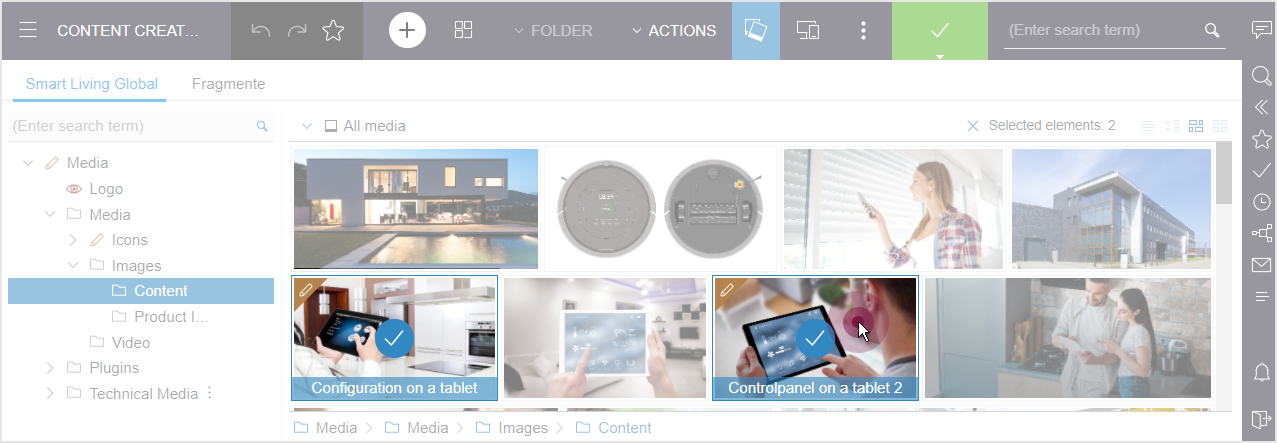
Selected media can be deselected again by:
- selecting another element
- icon X for “Selected elements” above the workspace
In the Dashboard, the desired workflow can be started or switched:
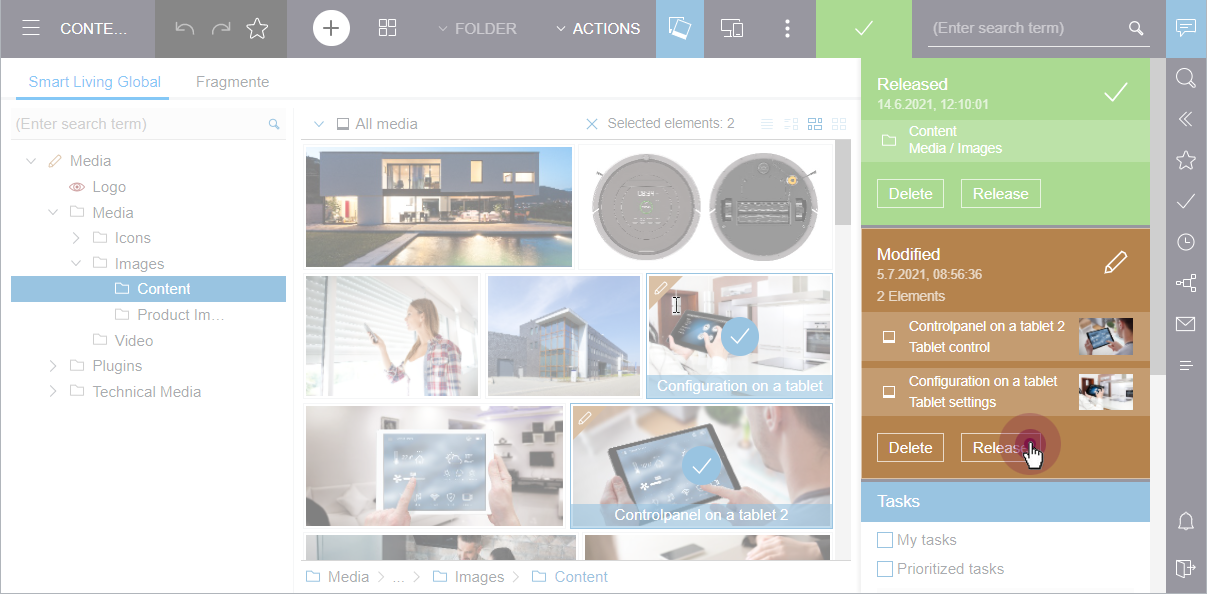
It must thereby be observed that the workflow that can be switched via the Status display (also “Element Status”, in the menu bar, marked green in the example above) always refers to the higher level folder.
When multiple elements are located in the same workflow step, the workflow is switched for these elements at the same time by pressing the corresponding button (in the example above: “Release”).
Switching a large number of elements at the same time can require a lot of time. This is why a corresponding note is displayed starting at 20 elements. In case of a large number of elements, it is recommended to start (and switch) a workflow on the higher level folder as long as a suitable workflow is available.
If a higher level element that is write-protected is located in a workflow, it is not possible to start or switch a workflow for a subordinate element.
The following message will be displayed:
The changes has been saved, but the workflow could not be started. Object cannot be edited.In this case, the higher level element must be switched so that the subordinate element in the workflow can be switched.
If a workflow has been started, it can be completed dialog-supported as usual, for example,
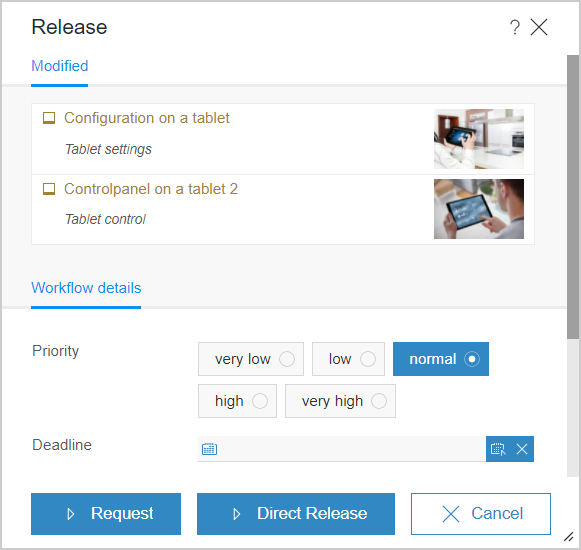
See also https://docs.e-spirit.com/contentcreator/report-area/tasks/workflows/index.html.
The state of media and whether or not they have to be released, if necessary, can be read from the corresponding icons on the respective element in the Media management, for example,

Modified

In workflow
For folders, these status visualizations are also shown in the folder view/navigation bar:

Within a media folder, media can also be displayed filtered by their state using the “All media” drop-down list, depending on the workflow, for example,
.png)
State: Modified

State: Release requested

State: Released
To improve working with media and tasks, the user guidance was also adapted to the new conditions in other places:
- Clicking on a medium in the Report area now opens the respective folder in the Media management and the medium is selected.
- Double-clicking on an image in the Media management opens the image in a layer in a size that is adapted to the browser window. Clicking again will close the layer again.
- The breadcrumb, which maps the structure of the Media management, can now be found below the work view.
- If access to media from other projects is possible (“remote”), the desired project can be selected in the “Tasks” report. The media from the project that are in a workflow will then be displayed.
Note: The new option described here for executing workflows for manually selected media elements is preferred over potential grouping by WebeditElementStatusProviderPlugin (https://docs.e-spirit.com/odfs/plug-developmen/contentcreator/interactive-fea/element-status/code-example/index.html) so that grouping by WebeditElementStatusProviderPlugin will then not be considered for manually selected media elements.
4 External Synchronization / Content Transport
FSDevTools: Compatibility with Java 16
The current release (Release 2.6.10) of FSDevTools now also supports Java versions 16 and higher (however, at least Java 8).
Additionally, installations in directories with paths that contain blank spaces are now also supported.
5 FirstSpirit Content Experience Tools (CXT)
5.1 Latest module versions
FirstSpirit 2021-07 supports the following module versions for “FirstSpirit Content Experience Tools”:
| Module / file name | Version number |
FirstSpirit CXT Plattformplatform-[version].fsm | 2.3 |
FirstSpirit CXT DAP Bridgedataservice-[version].fsm | 1.43 |
FirstSpirit CXT FragmentCreatorfragment-creator-[version].fsm | 3.3 |
FirstSpirit Fragment DAPfragmentdap-[version].fsm | 1.39 |
FirstSpirit Media DAPmediadap-[version].fsm | 1.30* |
FirstSpirit PageRef DAPpagerefdap-[version].fsm | 1.8 |
FirstSpirit Markdown Editormarkdown-editor-[version].fsm | 1.28* |
FirstSpirit Tagging Editortagging-editor-[version].fsm | 1.28 |
FirstSpirit CXT FragmentCreator - CaaS Integrationcaas-integration-[version].fsm | 1.30 |
* These modules require FirstSpirit 2020-03 or higher from this version.
5.2 FragmentDAP: Variant selection can now also be limited in the FragmentCreator
As of FirstSpirit 2021-04, the selection of variant dimensions can be influenced via FragmentDAP using the VARIANT tag (CXT-2094). See https://docs.e-spirit.com/odfs/edocs/cxt/templates/using-fragments/index.html.
The current release now also supports this functionality in the FragmentCreator without limitation.
6 Compatibility
6.1 Announcement: Incompatibility of FirstSpirit with Java < 11
FirstSpirit is successfully used by customers and partners with a wide variety of different third-party components (Operating Systems, JDKs, Servlet Engines, Application Servers, Databases) and with use of external libraries. Some of these components/libraries in their current versions are no longer compatible with Java 8. For example, this applies to the internal Apache Derby database that is included with FirstSpirit. This means that these third-party components/libraries can no longer be updated, which is particularly critical for safety related updates.
Oracle itself has not provided any public updates for Java 8 since February 2019 and recommends that developers and end users transition to a higher Java version to continue receiving public updates and security enhancements.
Basically, FirstSpirit supports only the last LTS (Long Term Support) version of OpenJDK and Oracle Java as well as the respective latest released version of OpenJDK. The support for Java versions older than 11 has been announced for some time. FirstSpirit has taken a number of measures to ensure compatibility with Java 11 (and higher versions).
With the next release (FirstSpirit 2021-08), the byte code level will be changed from Java 8 to Java 11 as the last step. This means that all Java versions older than Java 11 (LTS) will be incompatible with FirstSpirit.
This means that FirstSpirit will no longer run with Oracle Java < 11 or OpenJDK < 11 and that no measures are taken by e-Spirit AG to eliminate errors or problems that are related to Java < 11.
If it has not already happened, the change to Java 11 (and higher) on servers must first be checked on a test system, particularly with the use of third-party components and customer-specific extensions. Java 8 and 11 can be immensely different in some cases so that utilized libraries and implementations can be incompatible with Java 11 (and higher). In this case, it is often helpful to update the affected libraries, if an update exists. When changing to Java 11 (and higher), it is also recommended to switch the server to the “Isolated Mode” because this can prevent a duplicated check of modules and implementations. Refer to https://docs.e-spirit.com/odfs/edocs/modd/index.html.
For more information on the respective Java versions that are supported by FirstSpirit, go to https://docs.e-spirit.com/odfs/edocs/admi/technical-requi/index.html#java__firstpirit.
6.2 Modules and extensions for FirstSpirit 2021-07
The following modules and extensions are compatible with FirstSpirit 2021-07:
| Module name/File name | Version number | Compatibility |
FirstSpirit Update Archivefs-update-[version].tar.gz | 2.1.0 | - |
FirstSpirit Install Archiv fs-install-[version].tar.gz | 2.1.0 | - |
FirstSpirit LauncherFSLauncher.exe | 1.0.41 | as of FirstSpirit 2018-08 |
FirstSpirit Launcher JRE modulefs-launcher-jre-[version].fsm | 1.19 | as of FirstSpirit 2020-11 |
FirstSpirit SAML Login modulefs-saml-login-[version].fsm | 1.3 | as of FirstSpirit 2019-02 |
FSDevToolsfs-cli-[version].tar.gzfs-cli-[version].zip | 2.6.10 | as of FirstSpirit 2020-08 |
FirstSpirit Module Gradle Pluginfirstspirit-module-gradle-plugin-[version].jar | 2.3.0 | as of FirstSpirit 2019-06 |
7 Module Development, Scripts, API
"Report” interface: Explicit update via “refresh” method
The Report interface (FirstSpirit Developer-API, Package de.espirit.firstspirit.webedit.client.api) enables the display and filter configuration of standard ContentCreator reports as well as project-specific reports that were added via FirstSpirit modules.
The interface has now been extended with the refresh method that can be used to update the desired report, for example when switching pages.
It is hereby possible to specify a standard report or enter the path to a customer-specific report plug-in, for example
WE_API.Report.refresh("de.espirit.firstspirit.opt.example.universal.dataaccess.
    TextBlocksDataAccessPlugin");
If the report is not known, this will be recorded as an error message in the console.
8 System
Updates to integrated third-party software
As of the current release, the following internally used software has been updated:
- Spring Boot (used for MicroApp Framework)
Update from version 2.4 to version 2.5
9 Template development
Database queries now also support FS_GIDs
Queries can be created to limit the number of datasets of a data source in the output or to output them sorted (under “Template Store” | “Database schemata” | “Schema” | “Query”):
.png)
The combination wizard now also supports the use of the FS_GID column:
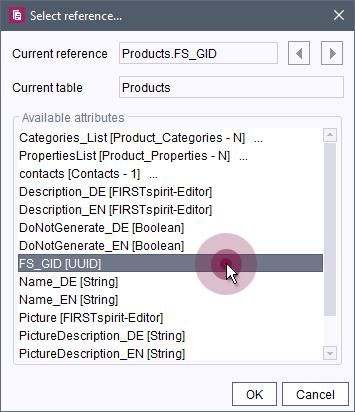
In comparison to the ID that is stored in the fs_id column and that is unique for the current project, the ID in the FS_GID column is an ID that is unique server-wide (also called GID).
The desired GID can be determined in the Data Store via the context menu entry “Copy GID” of the corresponding dataset.
The field expects values in the UUID format. Any missing places (e.g., with the manual entry of a GID) will thereby be filled with 0 automatically.
Example of a source text with FS_GID attribute:
<QUERY entityType="Products">
   	<EQ attribute="FS_GID" datatype="java.util.UUID"
         value="2a8f0ecc-4f28-4e92-970f-53a9ea658c34"/>
</QUERY>
The GIDs can also be used for queries on the “Content” tab of page references (Site Store) in the “Filter Configuration” section.
For more information, see also
- Creating queries: https://docs.e-spirit.com/odfs/templates-basic/composition-tem/database-schema/queries/index.html
- Syntax of queries: https://docs.e-spirit.com/odfs/template-develo/template-syntax/database-querie/index.html
- “Content” tab of a page reference: https://docs.e-spirit.com/odfs/edocs/fsar/site-store/settings-at-pag/index.html
Overview
| ID | Description | Categories |
|---|---|---|
| CORE-12732 | The determination of the MIME type for media has been improved. Especially for media, that were already uploaded with earlier FirstSpirit versions, it was possible that null was incorrectly shown as the MIME type. |
Media, Media Store |
| CORE-13298 | The combination wizard in database queries now also supports the use of the FS_GID column. |
Content Store, Database, Developer, Template Development, Template Store |
| CORE-13374 | With the current release, data that permits conclusions to be drawn pertaining to the respective user can now be deleted permanently in FirstSpirit. Further information can be found in chapter “Administration: Data protection: Deleting user data”. |
FirstSpirit Administrator, Permissions, Security, Server Administrator, ServerManager |
| CORE-13547 | An error has been eliminated that, in very rare cases, could lead to that the URL was not shortened as expected with the use of |
Advanced URL, Developer, FirstSpirit Administrator, Generation |
| CORE-13618 | The class loading of the |
Developer, FirstSpirit API, Module development |
| CORE-13639 | As of the current FirstSpirit release, the content of FirstSpirit jar files and is signed with a new certificate. Further information can be found in chapter “General: Code signing certificate update”. |
ContentCreator, ServerManager, SiteArchitect |
| CORE-13677 | Announcement: With FirstSpirit 2021-08, FirstSpirit will be incompatible with all Java versions older than Java 11 (LTS). |
Developer, FirstSpirit Administrator, Java, Module development |
| CORE-13691 | FirstSpirit Content Experience Tools: Latest module versions |
Developer, FirstSpirit Administrator, FirstSpirit Content Experience Tools (CXT), FragmentCreator, Module development, Modules, Template Development |
| CXT-1326 | With the current release, workflows can be started and switched directly to media in the Media management. In addition, further simplifications for handling media have been implemented: for example, it is now possible to switch directly from reports to the medium in the Media management. |
ContentCreator, Editor, Media, Media Store, Release, Reports, Workflow |
| CXT-2167 | A search with special characters in the FragmentCreator will no longer return an error in the Browser Console. |
Editor, FirstSpirit Content Experience Tools (CXT), FragmentCreator, Search |
| CXT-2218 | The current release now also supports the influence on the selection of variant dimensions via FragmentDAP using the |
Developer, Editor, FirstSpirit Content Experience Tools (CXT), FragmentCreator, Input Components, Modules |
| CXT-2333 | Beta status for automatic image cropping via “Image Recognition” module |
ContentCreator, Developer, Editor, FirstSpirit Administrator, FragmentCreator, Media, Media Store, Modules, ServerManager, SiteArchitect, Template Development |
| CXT-2335 | Update of internally used software. Further information can be found in chapter “System: Updates to integrated third-party software”. |
FirstSpirit Administrator, FirstSpirit Content Experience Tools (CXT), Integrated software |
| CXT-2336 | Reports in the ContentCreator can now be explicitly updated via API. |
ContentCreator, FirstSpirit API, Module development |
| DEVEX-504 | The following modules and extensions are compatible with FirstSpirit 2021-07. |
Developer, Modules |
| DEVEX-505 | FSDevTools: Compatibility with Java 16 |
Developer, FSDevTools |
Deprecations
| Functionality | Deprecated as of | Will be removed / Was removed as of |
|---|---|---|
| Input component CMS_INPUT_CONTENTAREALIST | 5.2R3 | |
| Input component CMS_INPUT_CONTENTLIST | 5.2R3 | |
| Input component CMS_INPUT_FILE | 5.2R3 | |
| Input component CMS_INPUT_LINKLIST | 5.2R3 | |
| Input component CMS_INPUT_OBJECTCHOOSER | 5.2R3 | |
| Input component CMS_INPUT_PAGEREF | 5.2R3 | |
| Input component CMS_INPUT_PICTURE | 5.2R3 | |
| Input component CMS_INPUT_TABLIST | 5.2R3 | |
| FirstSpirit Access API: de.espirit.firstspirit.agency.GroupsAgent | 5.2R15 | |
| FirstSpirit Access API: delete (de.espirit.firstspirit.access.AccessUtil) | 5.2R18 | |
| FirstSpirit Access API: release (de.espirit.firstspirit.access.AccessUtil) | 2018-06 | |
| FirstSpirit Access API: getLastLoginAsDate (de.espirit.firstspirit.agency.UserStatisticsAgent) | 2018-07 | |
| FirstSpirit Access API: remainingDurationOfCurrentStageInMillis (de.espirit.firstspirit.server.MaintenanceModeInfo) | 2018-07 | 2025-13 |
| FirstSpirit Access API: getStartingTimeOfStageAsDate (de.espirit.firstspirit.server.MaintenanceModeInfo) | 2018-07 | 2025-13 |
| FirstSpirit Access API: getSelectedWebserverConfiguration (de.espirit.firstspirit.access.serverConfiguration) | 2018-10 | 2025-13 |
| FirstSpirit Access API: setSelectedWebserverConfiguration (de.espirit.firstspirit.access.serverConfiguration) | 2018-10 | 2025-13 |
| FirstSpirit Access API: getSelectedWebServer (de.espirit.firstspirit.access.project.Project) | 2018-10 | 2025-13 |
| FirstSpirit Access API: setSelectedWebServer (de.espirit.firstspirit.access.project.Project) | 2018-10 | 2025-13 |
| FirstSpirit Access API: getLostAndFoundStoreNodes(); (de.espirit.firstspirit.feature.FeatureInstallResult) | 2018-10 | |
| FirstSpirit Access API: getDeletedStoreNodes(); (de.espirit.firstspirit.feature.FeatureInstallResult) | 2018-10 | |
| FirstSpirit Access API: de.espirit.firstspirit.access.store.Previewable | 2019-01 | |
| WebSphere Application Server support for FirstSpirit | 2019-05 | |
| Legacy mode for the FirstSpirit server | 2019-06 | 2022-03 |
| Database layer for Oracle Database 11g/12c | 2020-12 | 2025-05 |
| FirstSpirit Access API: redirectTemplateLogToDefaultLog() (Interface RenderingAgent.Renderer) | 2021-05 |