
Release Notes
1 General
Java: Support for OpenJDK 15
For operating FirstSpirit, e-Spirit AG supports:
- OpenJDK: the current Java version as well as the latest LTS (Long-Term-Support) variant.
- Oracle Java: only the latest LTS (Long-Term-Support) variant.
This applies to both the FirstSpirit Server and the FirstSpirit desktop applications.
As of FirstSpirit 2020-11, OpenJDK 15 (non-LTS; release date 2020/09) is officially approved for use with FirstSpirit (i.e., the FirstSpirit Server and the FirstSpirit desktop applications).
AdoptOpenJDK 15 is included in the “FirstSpirit Launcher JRE” module (see module “FirstSpirit Launcher JRE”: Updating Java versions). After appropriate configuration, FirstSpirit desktop applications can be started via the “FirstSpirit Launcher JRE” module using the FirstSpirit Launcher with AdoptOpenJDK 15. (For documentation on the FirstSpirit Launcher JRE module, see the corresponding documentation).
With support for OpenJDK 15, support for OpenJDK 14 (non-LTS; release date was 2020/03) expires.
FirstSpirit is expected to remain functional with OpenJDK 14. However, e-Spirit AG will neither carry out tests with OpenJDK 14 nor implement any measures designed to eliminate errors or problems that are exclusively associated with the use of OpenJDK 14.
Current status: The following JDKs are therefore compatible for FirstSpirit 2020-11:
- OpenJDK 15 (in its current version) (non-LTS) (*)
- OpenJDK 11 (in its current version) (LTS) (*)
- Oracle Java 11 (in its current version) (LTS)
(*) Recommended: Use of the OpenJDK distribution AdoptOpenJDK (HotSpot JVM).
Further documentation see FirstSpirit: Technical requirements and recommendations.
2 ContentCreator
2.1 “Smart Cropping": Official release
Images are important for any website; they are vital if content is to be conveyed clearly and evoke an emotional response. However, images provided for a website often have to be cropped first before they can be used: The proportions of the original images might not be compatible with those required for a website. Or, if images contain multiple motifs or objects, the editor might want to “focus” on a certain section of the image. This can mean a great deal of manual effort, not least if different formats (in the world of FirstSpirit: “resolutions”) are involved and different crops need to be created for different formats.
The new “SmartCropping” function in ContentCreator delivers intelligent technology to help editors to find and define a compatible crop from an image for all resolutions simultaneously in just a few clicks. The function automatically calculates a suitable crop for any resolution based on an area of the image selected by the editor drawing a frame around it as the main motif (“focus area”). The “golden cut” ensures that the composition of the image is proportioned organically and harmonically rather than being rigid and engineered.
The steps taken by editors are intuitive, because cropping results are immediately visible and can be checked and then easily reset.
FirstSpirit 2020-07 marked the start of the ramp-up phase for the new “Smart Cropping” function. Since then the function has been tested by selected customers and partners.
In FirstSpirit 2020-10, the fs-server.conf file was expanded to support activation by a configuration parameter and also tested.
With the current release, the function is now available as standard to all customers and partners in all projects.
It can be accessed in ContentCreator via the icon
.png)
on images in the Media Management or (if the settings have been configured accordingly, “editorId”) on images in the preview.
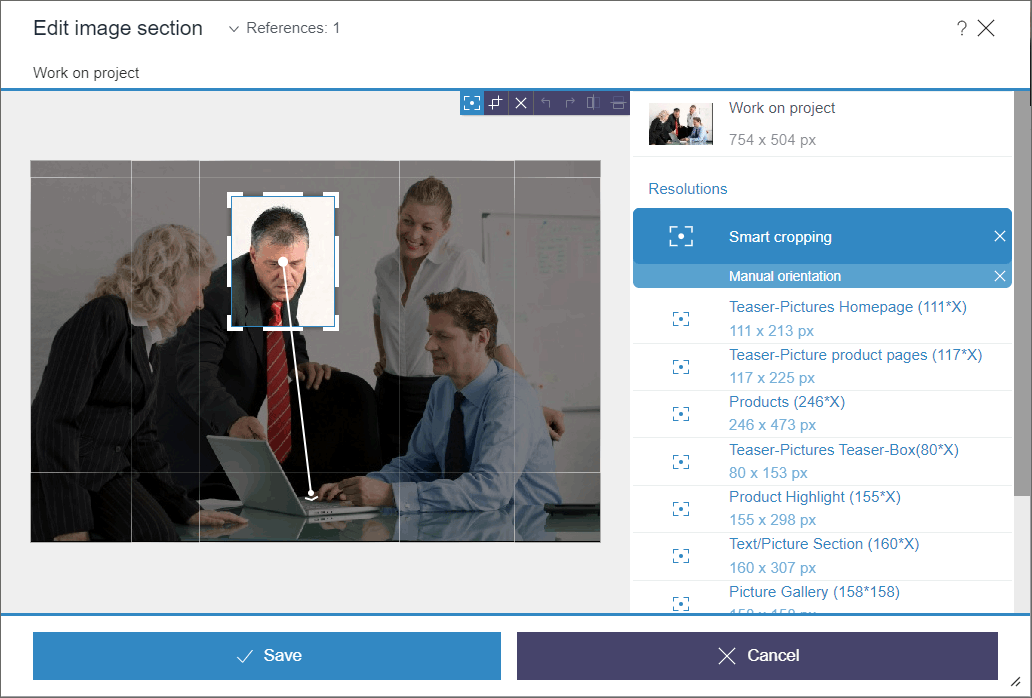
As before, the resolutions for an image are calculated automatically by the system. They are identified by this icon:
.png)
The editing options bar is displayed above the image when you hover over with the mouse.
Image areas for all resolutions calculated automatically can be defined as follows:
- Use the mouse pointer to draw a frame around the main motif in the image.
- For an approximate check, other frames show what the crop will look like for other resolutions.
- Move the frame (make it bigger/smaller) to select a compatible area of the image for all resolutions.
- Use the perspective handle to expand the crops calculated automatically based on the area of focus in a specific direction.
- Once the result meets the requirements for all resolutions, it can be saved.
For fine-tuning, the effect can be checked separately for each resolution.
Simply hover the mouse pointer over the required resolution.
Click to select the resolution. A frame can be drawn around a suitable area manually for this purpose (“manual crop”).
Crops can be reset easily using the icons
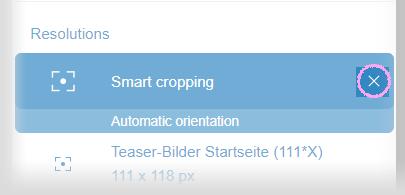
List of resolutions
or

Image edit options (mouseover)
Additional documentation:
- For editors: “ContentCreator documentation”, Crop image page
- For administrators: “Documentation for administrators”, Resolutions page
Migration notice: If parameter webedit.eap.focuscrop=true has been set in the fs-server.conf configuration file or in FirstSpirit ServerMonitoring with FirstSpirit 2020-10, it should be removed with FirstSpirit 2020-11. It is no longer needed.
Outlook: Special online services (e.g., from Google, Amazon, Microsoft) already support automatic recognition of objects in images. e-Spirit is currently developing a FirstSpirit module which will support the use of this type of automatic recognition with the crop function in ContentCreator. Crops from web-based image recognition could then be generated directly via upload to FirstSpirit. Ideally, no further action would then be required by the editor.
2.2 Editing datasets from the search report
Datasets can now also be edited in ContentCreator from the “search” report. This makes more direct editing of datasets possible, specifically for datasets which cannot be accessed via the navigation (“content projection”).
The following icon is available for this purpose:
.png)
.png)
Dataset in a search report
Changes to a dataset are only reflected in the search report display once the report has been updated.
2.3 Media Management: Editing media from other projects (“remote”)
FirstSpirit enables a project to access other projects (known as “remote projects”) located on the same FirstSpirit server. This enables objects (e.g., media) that are managed in a central project to be used by different projects (also known as “target projects”), for example. Physically, the objects remain in the remote project; they are simply referenced in the target projects.
Benefits:
- No additional memory requirement for media used in multiple projects.
- Simplified updating and managing since all media are located in a centralized media project.
- Shortened generation time for participating target projects.
With the latest release, media from other projects (“remote” projects) can be edited in the Media Management in ContentCreator if the project has been configured accordingly.
The available projects are displayed horizontally above the Media Store:
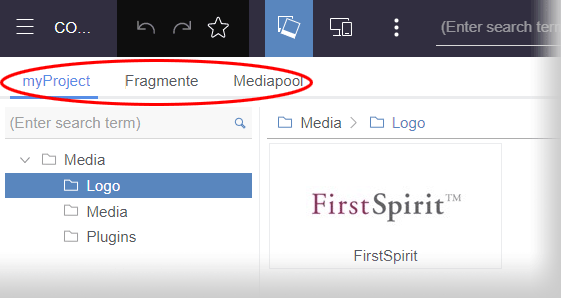
Media Store with remote projects
Click to select the required project. The currently selected project is displayed in blue and underlined.
The media and folders shown from other projects can be edited in the same way as those in the current (“local”) project.
Exceptions:
- Bookmarks cannot be set to elements from remote projects.
- Workflows for remote media projects are currently not yet supported.
- Elements can be moved within a project but not to other projects.
In the context of this feature, minor changes have been made to the design and other features of the Media Management:
- The presentation of the elements was revised. Among other things, further display modes are now available.
.png)
- There are now handles for moving folders.
.png)
Note: The usage of remote projects requires a valid license.
2.4 Navigation view: Handle for moving elements
To stop elements from being moved inadvertently, a handle icon is now being used to move elements in the navigation tree. The handle icon appears whenever the mouse pointer is hovered over a corresponding element:
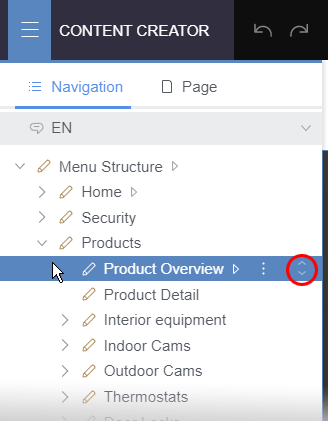
Handle to move a page
The element selected with the handle can be moved in the usual way with the mouse button held down and then added to the required position in the structure by releasing the mouse button. These icons make it possible to see exactly which element is being moved (including during the move operation itself).
This applies for all elements that can currently be moved on the “Navigation” and “Page” tabs, i.e., for pages, menu levels, and sections.
3 FirstSpirit Content Experience Tools (CXT)
3.1 "SameSite" attribute with HTTP/S connections
As of FirstSpirit 2020-08, the cxt.platform.csrf-samesite parameter has been available for configuring the SameSite attribute of cookies for the MicroApp Framework. Previously, the default value was Unset, which meant the attribute for the cross-site cookie was not set by default.
To facilitate communication between MicroApp API and FragmentCreator when they are located on different domains (for integrating customer-specific MicroApps, for example), the value None had to be set explicitly (cxt.platform.csrf-samesite=None).
However, this configuration (SameSite=None) requires an HTTPS connection; HTTP is not permitted.
In the latest release, therefore, the corresponding cookie (XSRF) and SameSite=None are set when HTTPS connections are used. As such, there is no longer any need to manually configure the cxt.platform.csrf-samesite parameter when HTTPS is used.
When HTTP is used, the cookie is not set and CSRF protection is completely deactivated.
It is not recommended to have a live operation without HTTPS. Unencrypted HTTP is only intended for development or test systems.3.2 Latest module versions
FirstSpirit 2020-11 supports the following module versions for “FirstSpirit Content Experience Tools”:
| Module / file name | Version number |
FirstSpirit CXT DAP Bridgedataservice-[version].fsm | 1.34 |
FirstSpirit CXT FragmentCreatorfragment-creator-[version].fsm | 2.12 |
FirstSpirit Fragment DAPfragmentdap-[version].fsm | 1.28 |
FirstSpirit Media DAPmediadap-[version].fsm | 1.25* |
FirstSpirit PageRef DAPpagerefdap-[version].fsm | 1.3 |
FirstSpirit Markdown Editormarkdown-editor-[version].fsm | 1.23* |
FirstSpirit Tagging Editortagging-editor-[version].fsm | 1.23 |
FirstSpirit CXT FragmentCreator - CaaS Integrationcaas-integration-[version].fsm | 1.25 |
* These modules require FirstSpirit 2020-03 or higher from this version.
3.3 PageRef DAP: Supports URL output and can be used in the markdown editor
You can reference pages via the “PageRef Access Plugin” (PageRef DAP, module file name: pagerefdap-[version].fsm).
The references to pages selected by the user can be output as HTML links.
As of the current release, the UrlSupporting aspect (package de.espirit.firstspirit.client.plugin.dataaccess.aspects, FirstSpirit Developer API) is now also supported by the PageRef DAP.
This can be used to determine a URL string for an object that comes from the PageRef DAP. An UrlGenerationContext is passed for this. Among other things, this provides access to the URL creator (provider) to be used, the language and the processing status of the object (released or not released).
This can be used in the Markdown Editor “Quill”, for example, to reference text with pages (for example from another FirstSpirit project) using the icon
.png)
Code example:
<FS_MARKDOWN name="text" useLanguages="no">
    <DATALINKSOURCES>
      <DATALINKSOURCE name="Pages"
          plugin="FirstSpiritPageRefAccess/PageRefConnector">
           <PROJECT remote="pageref"/>
      </DATALINKSOURCE>
      <DATALINKSOURCE name="Media"
          plugin="FirstSpiritMediaAccess/Connector">
        <LANGINFOS>
          <LANGINFO lang="*" label="Media"/>
        </LANGINFOS>
      </DATALINKSOURCE>
    </DATALINKSOURCES>
    <LANGINFOS>
      <LANGINFO lang="*" label="Content"/>
      <LANGINFO lang="DE" label="Inhalt"/>
    </LANGINFOS>
</FS_MARKDOWN>
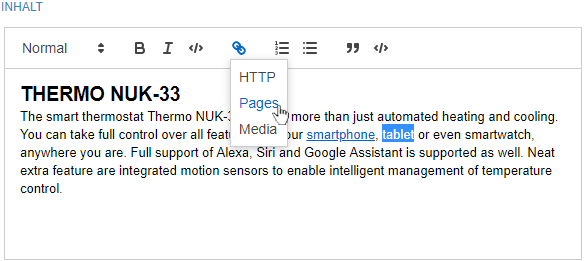
Referencing text in Markdown with a page
Output / JSON
Attribute url:
The url attribute is now also returned during JSON generation of the corresponding FS_INDEX input component when using a PageRef DAP.
It contains the resolved URL of the page selected by the user.
Attribute dataLinks: The link / reference is mapped using a special internally used link scheme:
dap://{linkSource}/{objectId}dap://: URI schema/protocol{linkSource}: identifier of the DAP configuration in the Markdown component (attributenamewithin theDATALINKSOURCEtag){objectId}: identifier of the DAP object selected by the editor
The values given here in curly brackets are URL-encoded. Resolved an example could look like this:
dap://pageref/%7B%22uid%22%3A%22produkte_7%22%2C%22type%22%3A%22SITESTORE_LEAF
    %22%2C%22remote%22%3A%22pageref%22%7D
In addition, an error was fixed in this context that caused references from remote projects to be displayed incorrectly in the reference graph, for example.
Further information
- Markdown-Editor module
- Configuration of the input component FS_MARKDOWN
- General information about JSON output
4 SiteArchitect / ServerManager
"FirstSpirit Launcher JRE" module: update to Java versions
The Java versions included in the “FirstSpirit Launcher JRE” module were updated in the latest FirstSpirit release:
In addition to the version supplied with the FirstSpirit Launcher, AdoptOpenJDK 11.0.8+10 (default), the following Java variant is currently available:
- AdoptOpenJDK 15+36 (new)
AdoptOpenJDK 14.0.2+12 was removed from the “FirstSpirit Launcher JRE” module.
For documentation on the “FirstSpirit Launcher JRE” module, see the corresponding manual.
5 System
5.1 Updates to integrated third-party software
The following internal software has been updated in the latest FirstSpirit release:
ASM (library for analyzing and modifying Java byte code)
Updated from version 8.0.1 to version 9.0.
5.2 Reminder: Changeover to the new control files for Windows and Linux
With FirstSpirit 2020-08, the new improved control files for Windows and Linux operating systems have been released. The use of these files is therefore recommended with immediate effect in live environments.
As already announced in the Release Notes for FirstSpirit 2020-08, the old control files are being removed. Support is scheduled to cease with FirstSpirit 2021-02 (see “Deprecations”). Calls of these control files and any features in your application, which depend on them, may no longer work after an upgrade to FirstSpirit 2021-02.
e-Spirit recommends the following process:
- All new installations should be carried out exclusively with the new control files.
- All existing installations that still use the old control files should be updated to the new control files by January 2021.
Providing and preconditions for the use of the new control files: Java and the Java Service Wrapper are required to operate a FirstSpirit Server. The Java Service Wrapper and corresponding control files are provided by e-Spirit via:
- the installation archive (for new installations) or
- the update archive (for existing installations)
Both archives are available for download (please contact Technical Support for login details).
Control files in the installation or update archive:
- New: fs-server (for Linux)
- New: fs-server.bat (for Windows)
- Old: fs5 (for Linux) (will be dropped soon)
- Old: fs5.cmd (for Windows) (will be dropped soon)
To use the new control files, the Tanuki Java Service Wrapper must be updated to version 3.5.42. This version of the wrapper is included in the latest installation and update archive.
For a new installation please follow the instructions Installation via installation archive.
To update an existing installation, please follow the instructions Update the FirstSpirit backend.
The FirstSpirit server can then be started using the new control files fs-server (for Linux) or fs-server.bat (for Windows).
For further information on the scope of functions and control, see:
Overview
| ID | Description | Categories |
|---|---|---|
| CORE-10330 | Identification of problems preventing releases has been improved. |
Dynamic Forms, SiteArchitect |
| CORE-11730 | An error which could lead to an |
Editor, SiteArchitect |
| CORE-12502 | For optimum memory management when using a PostGreSQL database, from FirstSpirit release 2020-11, the driver has been assigned a The For more information, see: https://jdbc.postgresql.org/documentation/head/connect.html |
Database, FirstSpirit Administrator, Performance |
| CORE-12628 | Internal software has been updated in the latest FirstSpirit release. Further information can be found in chapter “System: Updates to integrated third-party software”. |
FirstSpirit Administrator, Integrated software |
| CORE-12799 | The Java versions included in the “FirstSpirit Launcher JRE” module were updated in the latest FirstSpirit release. |
Java, Launcher |
| CORE-12876 | An error has been fixed which could lead to problems under certain conditions when using FirstSpirit schemes with some database drivers. |
Content Store, Database, FirstSpirit Administrator |
| CORE-12905 | The handling of API-incompatible service implementations has been corrected, which in rare cases could result in the FirstSpirit server not starting correctly. |
FirstSpirit API, FirstSpirit Administrator, Module development |
| CORE-12947 | With FirstSpirit 2020-08, the new improved control files for Windows and Linux operating systems have been released. The use of these files is therefore recommended with immediate effect in live environments. As already announced in the Release Notes for FirstSpirit 2020-08, the support for the old control files is scheduled to cease in the future. e-Spirit recommends a timely switch to the new control files to avoid potential problems in future FirstSpirit versions. |
Server Administrator |
| CORE-12978 | Support OpenJDK 15: As of FirstSpirit 2020-11, OpenJDK 15 (non-LTS; release date 2020/09) is officially approved for use with FirstSpirit (i.e., the FirstSpirit Server and the FirstSpirit desktop applications). With support for OpenJDK 15, support for OpenJDK 14 (non-LTS; release date was 2020/03) expires. Further information can be found in chapter “General: Java: Support for OpenJDK 15”. |
Developer, FirstSpirit Administrator, Java, Server Administrator |
| CXT-1379 | When using FirstSpirit Omnichannel Manager (OCM) the preview element and its language are now also available on the server side via |
ContentCreator, Developer, FirstSpirit API, Languages |
| CXT-1510 | PageRefDAP now also supports |
Developer, FirstSpirit Content Experience Tools (CXT), FragmentCreator, Module development |
| CXT-1660 | Datasets can now also be edited in ContentCreator from the search report. |
Content Store, ContentCreator, Database, Editor, Reports |
| CXT-1692 | Handle for moving elements in the navigation view |
ContentCreator, Editor |
| CXT-1697 | In the new ContentCreator it is now again possible to call up an external PHP preview. |
ContentCreator, Developer, Editor, FirstSpirit Administrator, Preview |
| CXT-1743 | If a variant had never been released before, when this variant was released, all variants of the fragment in question were incorrectly transferred to Live CaaS instances instead of just Preview CaaS instances. |
Developer, Editor, FirstSpirit Content Experience Tools (CXT), FirstSpirit Content as a Service (CaaS), FragmentCreator, Release |
| CXT-1790 | Editing media from other projects (“remote”) |
ContentCreator, Editor, Media, Media Store, Remote access |
| CXT-1796 | In the latest release, the corresponding cookie (XSRF) and |
FirstSpirit Administrator, FirstSpirit Content Experience Tools (CXT), FragmentCreator, Security |
| CXT-1899 | Official release of “Smart Cropping” Further information can be found in chapter “ContentCreator: “Smart Cropping": Official release”. |
ContentCreator, Editor, Media, Media Store |
| CXT-1911 | FirstSpirit Content Experience Tools: Latest module versions |
Developer, FirstSpirit API, FirstSpirit Content Experience Tools (CXT), Modules |
| CXT-1917 | Change information relating to changes made via the new navigation/tree view in ContentCreator are now also forwarded to the front end via the FirstSpirit Omnichannel Manager (OCM). |
ContentCreator, Developer, Editor, FirstSpirit Omnichannel Manager |
Deprecations
| Functionality | Deprecated as of | Will be removed / Was removed as of |
|---|---|---|
| Input component CMS_INPUT_CONTENTAREALIST | 5.2R3 | |
| Input component CMS_INPUT_CONTENTLIST | 5.2R3 | |
| Input component CMS_INPUT_FILE | 5.2R3 | |
| Input component CMS_INPUT_LINKLIST | 5.2R3 | |
| Input component CMS_INPUT_OBJECTCHOOSER | 5.2R3 | |
| Input component CMS_INPUT_PAGEREF | 5.2R3 | |
| Input component CMS_INPUT_PICTURE | 5.2R3 | |
| Input component CMS_INPUT_TABLIST | 5.2R3 | |
| FirstSpirit Access API: de.espirit.firstspirit.agency.GroupsAgent | 5.2R15 | |
| FirstSpirit Access API: delete (de.espirit.firstspirit.access.AccessUtil) | 5.2R18 | |
| FirstSpirit Access API: release (de.espirit.firstspirit.access.AccessUtil) | 2018-06 | |
| FirstSpirit Access API: getLastLoginAsDate (de.espirit.firstspirit.agency.UserStatisticsAgent) | 2018-07 | |
| FirstSpirit Access API: remainingDurationOfCurrentStageInMillis (de.espirit.firstspirit.server.MaintenanceModeInfo) | 2018-07 | 2025-13 |
| FirstSpirit Access API: getStartingTimeOfStageAsDate (de.espirit.firstspirit.server.MaintenanceModeInfo) | 2018-07 | 2025-13 |
| FirstSpirit Access API: getSelectedWebserverConfiguration (de.espirit.firstspirit.access.serverConfiguration) | 2018-10 | 2025-13 |
| FirstSpirit Access API: setSelectedWebserverConfiguration (de.espirit.firstspirit.access.serverConfiguration) | 2018-10 | 2025-13 |
| FirstSpirit Access API: getSelectedWebServer (de.espirit.firstspirit.access.project.Project) | 2018-10 | 2025-13 |
| FirstSpirit Access API: setSelectedWebServer (de.espirit.firstspirit.access.project.Project) | 2018-10 | 2025-13 |
| FirstSpirit Access API: getLostAndFoundStoreNodes(); (de.espirit.firstspirit.feature.FeatureInstallResult) | 2018-10 | |
| FirstSpirit Access API: getDeletedStoreNodes(); (de.espirit.firstspirit.feature.FeatureInstallResult) | 2018-10 | |
| FirstSpirit Access API: de.espirit.firstspirit.access.store.Previewable | 2019-01 | |
| WebSphere Application Server support for FirstSpirit | 2019-05 | |
| Legacy mode for the FirstSpirit server | 2019-06 | 2022-03 |
| Control files for Windows and Linux operating systems (old) | 2020-08 | 2021-02 |