
Release Notes
1 Administration
Restriction of permissions to create internal groups
Project administrators are permitted to create, edit, and delete (internal) groups by default (e.g., via “FirstSpirit ServerManager” / “Project Properties” / “Groups”).
With the latest release, this permission can be deactivated by setting the
localGroupManagementDisabledparameter in the fs-server.conf file accordingly.
To withdraw permission to create, edit, and delete groups from project administrators, the parameter must be set to true:
localGroupManagementDisabled=trueWith this setting, only server administrators are permitted to modify groups.
The corresponding context menu under “Groups” is grayed out for project administrators and a java.lang.SecurityException is recorded in the log.
External groups are not affected by this restriction and can continue to be modified by project administrators even if the parameter is set to true.
2 ContentCreator
2.1 "Edit" in InEdit mode
Some input components support the InEdit functionality. This function enables modifications to content without having to open a form beforehand. A pencil symbol on the mouse pointer shows the editor whether the corresponding value can be edited via InEdit. The editor can start InEdit mode simply by clicking at the desired spot in the preview (using Ctrl + CLICK ).
In the latest release, clicking on the “Edit” icon again opens the entire form.

This provides a convenient way of updating content from adjacent input components as well as content in other languages.
Previously, only the individual input components were displayed in the dialog that opened.
2.2 Language selection for content
Specifically in projects with lots of different languages, editors can now set the priority languages for displaying content.
The configuration setting is made using the “Visible languages” menu item in the “three-point” menu:
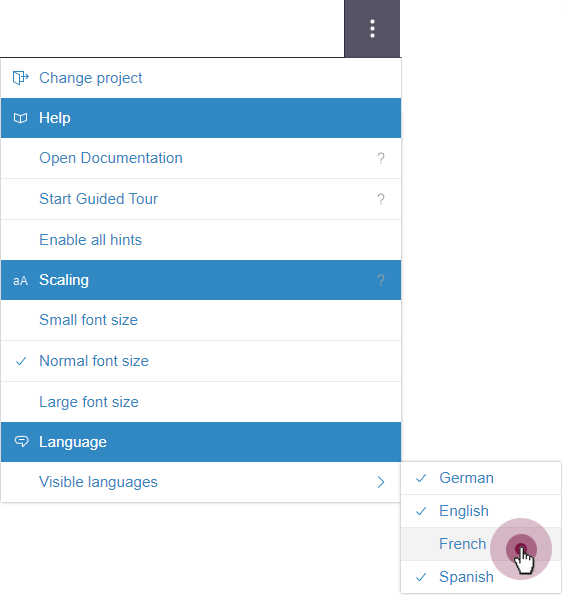
Selecting content language(s)
By default, content is displayed in all available project languages.
Languages that are less relevant for the user can be deactivated via the menu: Content in the activated language(s) can be selected directly via the menu and deactivated language(s) can be accessed via the “More languages” dropdown submenu.
The selection of visible project languages is applied in various places:
Forms
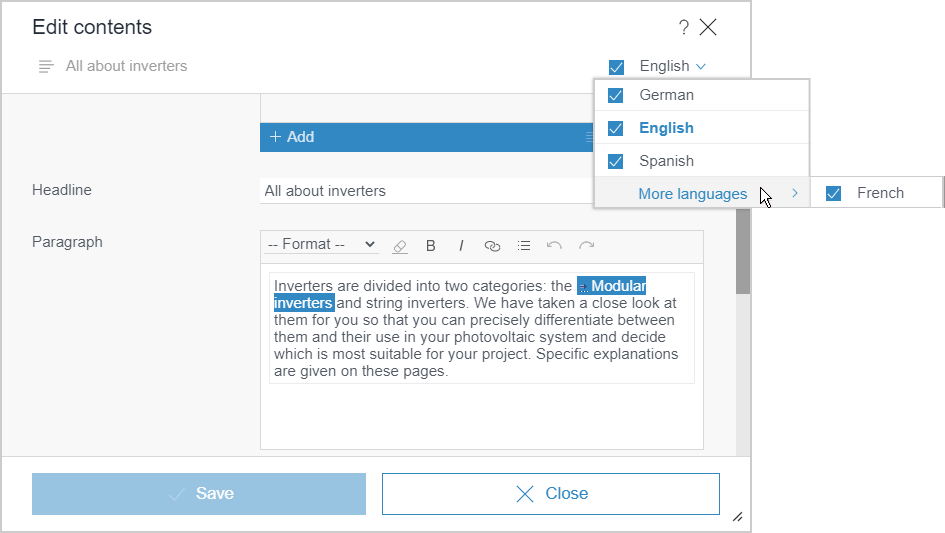
Language selection in forms
Navigation bar
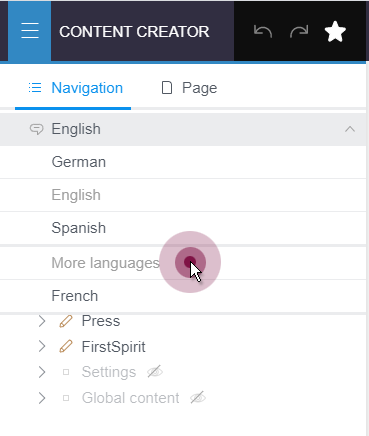
Language selection in the navigation bar
Creating, editing, and downloading (language-dependent) media
In the case of media, the language selection menu is displayed for the following functions if the “Language-dependent” box is checked:
- Upload new medium (menu bar):
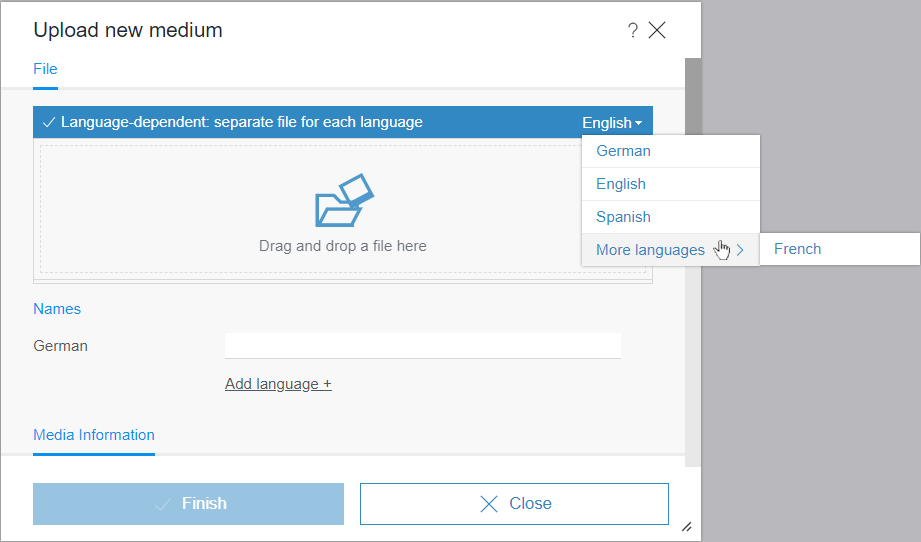
Language selection when uploading language-dependent media
- Edit medium
.png)
The language selection menu is displayed for the following functions if the medium is language-dependent. Only those languages for which a language variant is available are listed for selection:
- Edit image section
.png)
- Download medium
.png)
For more detailed information, see https://docs.e-spirit.com/contentcreator/menu-functions/further-functio/index.html.
The settings made via the “Visible languages” menu item are saved to the corresponding server for all projects associated with the relevant user.
The available configuration settings are determined by the “Languages can be hidden” setting in FirstSpirit ServerManager in the properties of the corresponding project (under “Options”):
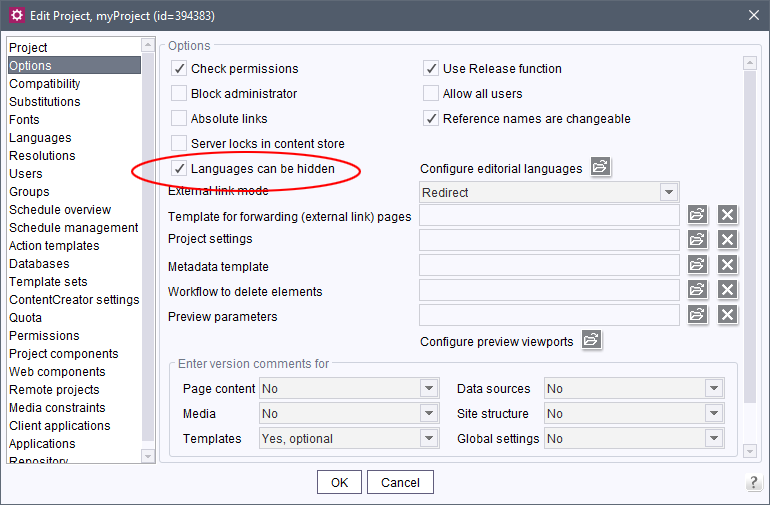
Activating the configuration
To display the “Language” menu item in ContentCreator and thus use the new functionality, this box must be checked.
Notice: The setting made here is also applied in FirstSpirit SiteArchitect.
2.3 Changing languages in forms with multiple tabs (CMS_GROUP)
In forms with multiple tabs (CMS_GROUP), only the selected tabs are synchronized when the language is changed:
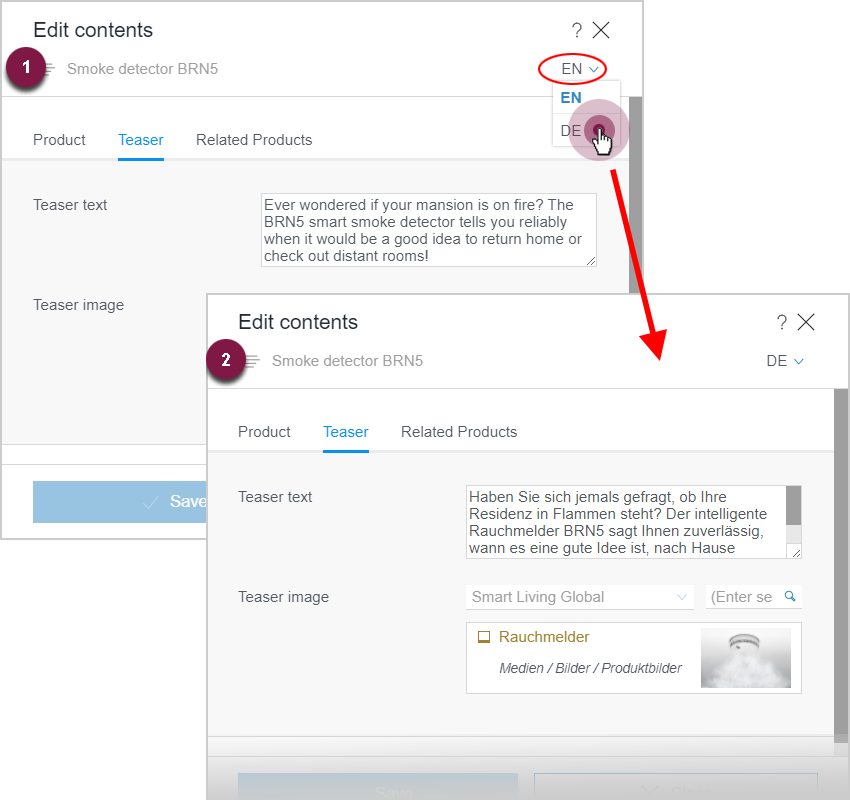
Changing languages in forms with multiple tabs
3 FirstSpirit Content Experience Tools (CXT)
3.1 Latest module versions
FirstSpirit 2021-05 supports the following module versions for “FirstSpirit Content Experience Tools”:
| Module / file name | Version number |
FirstSpirit CXT DAP Bridgedataservice-[version].fsm | 1.41 |
FirstSpirit CXT FragmentCreatorfragment-creator-[version].fsm | 2.21 |
FirstSpirit Fragment DAPfragmentdap-[version].fsm | 1.37 |
FirstSpirit Media DAPmediadap-[version].fsm | 1.29* |
FirstSpirit PageRef DAPpagerefdap-[version].fsm | 1.7 |
FirstSpirit Markdown Editormarkdown-editor-[version].fsm | 1.27* |
FirstSpirit Tagging Editortagging-editor-[version].fsm | 1.27 |
FirstSpirit CXT FragmentCreator - CaaS Integrationcaas-integration-[version].fsm | 1.28 |
* These modules require FirstSpirit 2020-03 or higher from this version.
3.2 PageRef DAP and Media DAP: Configure JSON output
In the FS_INDEX component, media can be referenced using the media data access plug-in (“Media DAP”) and page references can be referenced using the PageRef access plug-in (“PageRef DAP”).
With the latest release, the JSON information for the media or page references referenced in the FS_INDEX component can be included in the output. This can be activated via the new
jsonSupportingattribute in the SOURCE tag of the FS_INDEX component by setting the value to yes.
Example:
...
<SOURCE name="FirstSpiritMediaAccess/Connector" jsonSupporting="yes">
    <PROJECT remote="remote"/>
</SOURCE>
...
This attribute is only available when using the “FirstSpiritMediaAccess/Connector” and “FirstSpiritPageRefAccess/PageRefConnector” DataAccessPlugin components.
By default, the JSON information for the referenced media or page references is not included in the output (corresponds to jsonSupporting="no").
For more information about JSON output of media, see also https://docs.e-spirit.com/odfs/enhanced-json-s/json-ausgabe-me/index.html.
4 Compatibility
Modules and extensions for FirstSpirit 2021-05
The following modules and extensions are compatible with FirstSpirit 2021-05:
| Module name/File name | Version number | Compatibility |
FirstSpirit Update Archivefs-update-[version].tar.gz | 1.0.12 | - |
FirstSpirit Install Archiv fs-install-[version].tar.gz | 1.0.12 | - |
FirstSpirit LauncherFSLauncher.exe | 1.0.40 | as of FirstSpirit 2018-08 |
FirstSpirit Launcher JRE modulefs-launcher-jre-[version].fsm | 1.18 | as of FirstSpirit 2020-11 |
FirstSpirit SAML Login modulefs-saml-login-[version].fsm | 1.1 | as of FirstSpirit 2019-02 |
FSDevToolsfs-cli-[version].tar.gzfs-cli-[version].zip | 2.6.9 | as of FirstSpirit 2020-08 |
FirstSpirit Module Gradle Pluginfirstspirit-module-gradle-plugin-[version].jar | 1.0.3 | as of FirstSpirit 2019-06 |
5 Module Development, Scripts, API
5.1 API extension for responding to events
The FirstSpirit Access API has been extended to include the following classes for responding to various events in the case of changes:
de.espirit.firstspirit.agency.IDProviderEventAgent;
de.espirit.firstspirit.event.RevisionEvent;
de.espirit.firstspirit.event.EventInfo;
de.espirit.firstspirit.event.EntityInfo;
de.espirit.firstspirit.event.DatasetChange;
de.espirit.firstspirit.event.IDProviderChange;
5.2 Automatic logging when using "RenderingAgent.Renderer”
The
redirectTemplateLogToDefaultLog()method in the RenderingAgent.Renderer interface (de.espirit.firstspirit.agency package, FirstSpirit Developer API) is now activated by default, so corresponding log data are output automatically in the standard log. This makes it easier to analyze problems.
In this context, the actual method has been marked as deprecated and may be omitted from a future release of FirstSpirit.
Therefore, it should be removed from scripts in which it is used.
6 Security
Encryption of the connection to the SMTP server (TLS)
The standard protocol when using an encrypted connection to the SMTP server has been changed to TLS 1.2.
If a different protocol is required, this can continue to be defined using the javamail.mail.smtp.ssl.protocols parameter in fs-server.conf.
In the event of problems with the recommended encryption, the following entry would be necessary to revert to the previous default value:
javamail.mail.smtp.ssl.protocols=TLSv1.0Notice: The TLS protocols V1.0 and V1.1 are outdated and not secure. They should undergo a thorough assessment from the point of view of security prior to an activation.
7 SiteArchitect
New “Copy GID” context menu function for datasets
With the new release, it is possible to call up the “Copy GID” function via the context menu of a dataset. This function writes the GID of the current dataset to the buffer.
This function can only be called up for a dataset which has a GID. If the dataset is new and has not previously been saved, for example, this menu option will be deactivated.
8 System
Updates to integrated third-party software
As of the current release, the following internally used software has been updated:
- Java (JRE with which the FirstSpirit Launcher is operated)
The following new Java version is available:- New: Integrated in FirstSpirit (default): 11.0.11+9 64bit AdoptOpenJDK
- New: In the FirstSpirit Launcher JRE module: 16.0.1+9 64bit AdoptOpenJDK
- Java Mail Library (for mail delivery)
Update from Java Mail 1.4.4 to Jakarta Mail 1.6.6 - Eclipse Jetty (contained in the module
fs-jetty.fsm/ “FirstSpirit Jetty Service”)
Update from version 9.4.33 to version 9.4.39
For operation with FirstSpirit Content Experience Tools (CXT) Eclipse Jetty is not supported.
Overview
| ID | Description | Categories |
|---|---|---|
| CORE-10613 | The response when installing modules has been modified so that resource conflicts between other modules no longer generate a message that a problem has occurred during installation. If the conflicts affect the module currently being installed, a corresponding error will continue to be output during installation. If conflicts between other modules are found, a corresponding conflict will continue to be displayed in the |
FirstSpirit Administrator, Modules |
| CORE-11307 | The FirstSpirit Access API has been extended to include classes for responding to various events in the case of changes. |
Developer, FirstSpirit API |
| CORE-12975 | Update of internally used software. Further information can be found in chapter “System: Updates to integrated third-party software”. |
Developer, FirstSpirit Administrator, FirstSpirit Jetty Web Server, Integrated software, Java, Launcher, Server Administrator |
| CORE-13139 | An error has been fixed which, in certain configurations, could lead to an endless loop in the browser during loading when using SingleSignOn (e.g., with SAML). |
Server Administrator |
| CORE-13141 | In the current release, permissions to create internal groups have been restricted to server administrators. |
FirstSpirit Administrator, Permissions |
| CORE-13265 | The stability of the system in scenarios with a high number of changes has been improved. |
Performance |
| CORE-13299 | The new “Copy GID” function is available via the context menu of a dataset. |
SiteArchitect |
| CORE-13484 | The standard protocol when using an encrypted connection to the SMTP server has been changed to |
FirstSpirit Administrator, Java, Security |
| CORE-13515 | An error has been fixed which, in very rare cases, could cause an update to the launcher to fail as a result of user sessions expiring. |
Launcher, Sessions |
| CORE-13528 | Automatic logging when using |
Developer, FirstSpirit API |
| CORE-13537 | The following modules and extensions are compatible with FirstSpirit 2021-05. |
Developer, FirstSpirit Administrator, Modules, Server Administrator |
| CORE-13538 | An error has been fixed which could lead to information relating to resolutions being incomplete in the JSON output for remote images. |
Developer, Media, Support for JSON |
| CORE-13546 | The |
Input Components, Support for JSON |
| CXT-1681 | Optimization of form display when changing languages and using multiple tabs (CMS_GROUP). |
ContentCreator, Editor, Languages |
| CXT-1769 | Specifically in projects with lots of different languages, editors can now set the priority languages for displaying content. Further information can be found in chapter “ContentCreator: Language selection for content”. |
ContentCreator, Editor, FirstSpirit Administrator, Languages, ServerManager |
| CXT-1916 | Information for referenced page references or media can now also be included in the JSON output for PageRef DAP and Media DAP. |
Developer, FirstSpirit API, FirstSpirit Content Experience Tools (CXT), FragmentCreator, Media, Module development, Support for JSON |
| CXT-1968 | “Edit” in InEdit mode now supports editing forms. Further information can be found in chapter “ContentCreator: "Edit" in InEdit mode”. |
ContentCreator, Developer, Editor, FirstSpirit Omnichannel Manager, Input Components, Preview |
| CXT-2194 | There have been problems starting modules involving the use of the |
ContentCreator, Developer, Module development |
| CXT-2212 | Changes to content in FS_CATALOG components are now displayed correctly in ContentCreator (via “Display all changes”). |
ContentCreator, Editor, Input Components |
| CXT-2269 | The configured “Store Mapping” (project properties in FirstSpirit ServerManager under “ContentCreator settings”, FirstSpirit Developer API |
ContentCreator, Developer, Editor |
| CXT-2293 | Automatically cutting images in ContentCreator generated multiple intermediate revisions depending on the resolutions concerned. In combination with CaaS Connect, the resulting change events were leading to unnecessary deployments of the media concerned. |
ContentCreator, Developer, FirstSpirit Administrator, Media |
| CXT-2294 | FirstSpirit Content Experience Tools: Latest module versions |
Developer, FirstSpirit Administrator, FirstSpirit Content Experience Tools (CXT), FragmentCreator, Modules |
Deprecations
| Functionality | Deprecated as of | Will be removed / Was removed as of |
|---|---|---|
| Input component CMS_INPUT_CONTENTAREALIST | 5.2R3 | |
| Input component CMS_INPUT_CONTENTLIST | 5.2R3 | |
| Input component CMS_INPUT_FILE | 5.2R3 | |
| Input component CMS_INPUT_LINKLIST | 5.2R3 | |
| Input component CMS_INPUT_OBJECTCHOOSER | 5.2R3 | |
| Input component CMS_INPUT_PAGEREF | 5.2R3 | |
| Input component CMS_INPUT_PICTURE | 5.2R3 | |
| Input component CMS_INPUT_TABLIST | 5.2R3 | |
| FirstSpirit Access API: de.espirit.firstspirit.agency.GroupsAgent | 5.2R15 | |
| FirstSpirit Access API: delete (de.espirit.firstspirit.access.AccessUtil) | 5.2R18 | |
| FirstSpirit Access API: release (de.espirit.firstspirit.access.AccessUtil) | 2018-06 | |
| FirstSpirit Access API: getLastLoginAsDate (de.espirit.firstspirit.agency.UserStatisticsAgent) | 2018-07 | |
| FirstSpirit Access API: remainingDurationOfCurrentStageInMillis (de.espirit.firstspirit.server.MaintenanceModeInfo) | 2018-07 | 2025-13 |
| FirstSpirit Access API: getStartingTimeOfStageAsDate (de.espirit.firstspirit.server.MaintenanceModeInfo) | 2018-07 | 2025-13 |
| FirstSpirit Access API: getSelectedWebserverConfiguration (de.espirit.firstspirit.access.serverConfiguration) | 2018-10 | 2025-13 |
| FirstSpirit Access API: setSelectedWebserverConfiguration (de.espirit.firstspirit.access.serverConfiguration) | 2018-10 | 2025-13 |
| FirstSpirit Access API: getSelectedWebServer (de.espirit.firstspirit.access.project.Project) | 2018-10 | 2025-13 |
| FirstSpirit Access API: setSelectedWebServer (de.espirit.firstspirit.access.project.Project) | 2018-10 | 2025-13 |
| FirstSpirit Access API: getLostAndFoundStoreNodes(); (de.espirit.firstspirit.feature.FeatureInstallResult) | 2018-10 | |
| FirstSpirit Access API: getDeletedStoreNodes(); (de.espirit.firstspirit.feature.FeatureInstallResult) | 2018-10 | |
| FirstSpirit Access API: de.espirit.firstspirit.access.store.Previewable | 2019-01 | |
| WebSphere Application Server support for FirstSpirit | 2019-05 | |
| Legacy mode for the FirstSpirit server | 2019-06 | 2022-03 |
| Database layer for Oracle Database 11g/12c | 2020-12 | 2025-05 |
| FirstSpirit Access API: redirectTemplateLogToDefaultLog() (Interface RenderingAgent.Renderer) | 2021-05 |