
Release Notes
1 Administration
1.1 Generation directories of deleted orders are cleaned up.
If a schedule with a generation action is deleted and there is a corresponding directory for this schedule on the application server on which the Staging Web application is running, the corresponding directory on the application server is also deleted.
1.2 Automatically update Java version-specific wrapper files
The FirstSpirit Java VM is started and stopped via the Tanuki Java Service Wrapper.
Previous behavior:
The start parameters of the Java VM were defined with the help of a corresponding configuration file for the wrapper (fs-wrapper[.isolated].conf).
When changing the Java version, the start parameters were adjusted. The changed configuration was directly available for new FirstSpirit installations. For existing installations, the changed configuration of the start parameters had to be adapted manually.
New behavior:
This behavior is improved with the current FirstSpirit release. For this purpose, the startup options have been split into two separate configuration files:
- New:
fs-wrapper-vendor.confcontains the recommended vendor startup options - Changed:
fs-wrapper[.isolated].confnow only contains the startup options that should be adjusted server specific
Objective: The new configuration file fs-wrapper-vendor.conf is part of the FirstSpirit update archive fs-update-[version].tar.gz. When updating the FirstSpirit server via the update archive fs-update-[version].tar.gz the startup options are automatically updated. Thus, the configuration adjustments are also available for existing FirstSpirit installations without any manual adjustments.
fs-wrapper-vendor.conf should not be changed. Should it be necessary in individual cases to adjust the recommended vendor startup options, the corresponding startup parameters should be redefined in the configuration file fs-wrapper[.isolated].conf (and not overwritten in fs-wrapper-vendor.conf). Display via FirstSpirit ServerMonitoring
The start options from both configuration files are displayed via FirstSpirit ServerMonitoring (at “FirstSpirit” / “Configuration” / “Startup options”). Here the values from both files are combined in one view:
.png)
Display of the startup options (ServerMonitoring)
Editing via FirstSpirit ServerMonitoring
By clicking on “Edit”, the start options can be edited via the FirstSpirit ServerMonitoring (at “FirstSpirit” / “Configuration” / “Startup options”). Only the content of the configuration file fs-wrapper[.isolated].conf is offered for editing.
The start parameters of the configuration file fs-wrapper-vendor.conf are displayed read-only at the bottom, with the note that the values for overwriting should be redefined (“manufacturer properties: Redefine property to overwrite the recommended value”).
Clicking “Save” saves the changes to the configuration file. If invalid configuration settings are made, the error is indicated in the ServerMonitoring when saving the configuration and the save operation will not be completed.
By transferring and changing the values in the configuration file fs-wrapper[.isolated].conf all parameters of the configuration file fs-wrapper-vendor.conf can be overwritten (not only the general Java parameters wrapper.java.additional.#)
.png)
Editing of the startup options (ServerMonitoring)
Migration guide
To convert to the new behavior, the following steps should be carried out for all existing FirstSpirit installations:
- Download the update archive
fs-update-[version].tar.gz. The changes are available for update archives from version 1.0.5 on. The update archive is available for download (if you need login data, please contact the Technical Support). - Stop the FirstSpirit server.
- First, decompress the update archive
fs-update-[version].tar(e.g., via g(un)zip) and then unpack it to the desired FirstSpirit installation directory. Example call under Linux:~/firstspirit5$ tar xvfz fs-update-[version].tar.gz - Compare the configuration files
<FirstSpiritROOT>/conf/fs-wrapper[.isolated].conf
and<FirstSpiritROOT>/conf/conf-all/fs-wrapper[.isolated].conf.default.txt
Then, adjust the parameters with different values in the following file:<FirstSpiritROOT>/conf/conf-all/fs-wrapper[.isolated].conf.default.txt
Especially, the following parameters have to be taken care of:wrapper.java.commandwrapper.java.maxmemorywrapper.java.initmemory(set to the value ofwrapper.java.maxmemory)wrapper.ntservice.name(only at Windows))wrapper.umask
If known, apply self-defined parameters to<FirstSpiritROOT>/conf/conf-all/fs-wrapper[.isolated].conf.default.txt
(ideally, no adjustments are required). - After the adjustment, rename the file
<FirstSpiritROOT>/conf/fs-wrapper[.isolated].conf
to<FirstSpiritROOT>/conf/fs-wrapper[.isolated].old. - Then rename the file
<FirstSpiritROOT>/conf/conf-all/fs-wrapper[.isolated].conf.default.txt
to<FirstSpiritROOT>/conf/fs-wrapper[.isolated].conf - Start the FirstSpirit server.
- Optional: If no problems occurred after several days of operation, the file
<FirstSpiritROOT>/conf/fs-wrapper[.isolated].oldcan be deleted.
Further documentation:
2 General
2.1 FirstSpirit documentation: PDF format discontinued
Documentation for all FirstSpirit products is now provided in the HTML format.
Until recently, we have provided documentation in the PDF format as well, but as of the current release, we will discontinue those efforts.
More specifically:
- The navigation entry “Documentation” has been removed from the FirstSpirit online documentation interface.
- The DVD index, that depends on the beforementioned navigation structure of the online documentation, has now been detached and will keep the state it had in FirstSpirit Release 2020-03.
- The conversion of the FirstSpirit release notes to the HTML format is currently ongoing (for the duration, release notes will be provided in the PDF format).
- Currently, the documentation for some of our FirstSpirit modules is only available in the PDF format, and may still be obtained from https://docs.e-spirit.com/.
2.2 Java: Current status and outlook
For operating FirstSpirit, e-Spirit AG supports:
- OpenJDK: the current Java version as well as the latest LTS (Long-Term-Support) variant.
- Oracle Java: only the latest LTS (Long-Term-Support) variant.
This applies to both the FirstSpirit Server and the FirstSpirit desktop applications.
Deviating from this rule, e-Spirit AG continues to support Oracle Java and OpenJDK Version 8 for the time being, and will discontinue support for Java 8 in the future (see below for Outlook Java 8 support).
As of FirstSpirit 2020-04, OpenJDK 14 (non-LTS; release date 2020/03) is officially approved for use with FirstSpirit (i.e, the FirstSpirit Server and the FirstSpirit desktop applications).
AdoptOpenJDK 14 is included in the “FirstSpirit Launcher JRE” module (see module “FirstSpirit Launcher JRE”: Updating Java versions). After appropriate configuration, FirstSpirit desktop applications can be started via the “FirstSpirit Launcher JRE” module using the FirstSpirit Launcher with AdoptOpenJDK 14. (For documentation on the “FirstSpirit Launcher JRE” module, see the corresponding documentation).
With support for OpenJDK 14, support for OpenJDK 13 (non-LTS; release date was 2019/07) expires.
FirstSpirit is expected to remain functional with OpenJDK 13. However, e-Spirit AG will neither carry out tests with OpenJDK 13 nor implement any measures designed to eliminate errors or problems that are exclusively associated with the use of OpenJDK 13.
Current status: The following JDKs are therefore compatible for FirstSpirit 2020-04:
- Oracle Java 11 (in its current version) (LTS)
- Oracle Java 8 (in its current version) (LTS; outdated)
- OpenJDK 14 (in its current version) (non-LTS) (**)
- OpenJDK 11 (in its current version) (LTS) (**)
- OpenJDK 8 (in its current version) (LTS; outdated) (*) (**)
(*) Version 8u242 (Outdated) contained in the “FirstSpirit Launcher JRE” module will not be updated to version 8u252 (Outdated) in April 2020.
(**) Recommended: Use of the OpenJDK distribution AdoptOpenJDK (HotSpot JVM).
A complete list of the supported Java versions can be found in Technical requirements and recommendations (Documentation for administrators).
Outlook Java 8 support:
As part of product maintenance, discontinuation of support for Java 8 was first announced with FirstSpirit 2019-05 (**).
FirstSpirit is scheduled to no longer support Oracle Java 8 and OpenJDK 8 from June 2020.
(**) Oracle has not provided any public updates for Java 8 since February 2019 and recommends that developers and end users transition to a higher Java version in order to continue receiving public updates and security enhancements.
Background: FirstSpirit is operated successfully by customers and partners with a wide range of different third-party components (operating systems, JDKs, servlet engines, application servers, and databases) and external libraries. Some of these components / libraries are no longer compatible with Java 8 in its current version. This applies, for example, to the internal “Apache Derby” database supplied with FirstSpirit. As a consequence, updates can no longer be carried out for those third-party components / libraries, which is particularly critical for security-relevant updates.
Should security gaps or security-relevant problems occur under Java 8 in the future, e-Spirit AG reserves the right to terminate Java 8 support for FirstSpirit prematurely (before June 2020).
Also, with the end of Java 8 support, as announced before:
- The support for the Windows installer will be dropped. We advise our customers to use the new installation method via the install archive (see Installing FirstSpirit).
- The option of starting the FirstSpirit desktop applications via Java Web Start will no longer be available. (The Java Web Start functionality is included in Oracle Java 8, but is not support from Oracle Java 11 on. OpenJDK does not offer a replacement.) Therefore, SiteArchitect and ServerManager may only be started via the FirstSpirit Launcher (see FirstSpirit Launcher documentation). The FirstSpirit JNLP files, which were required for Java Web Start, will also be dropped.
The ramp-down phase for Java 8 started as planned in the second quarter of 2020 and will gradually reduce the Java 8 compatibility tests. In 2020Q4 the byte code level will be switched from Java 8 to Java 11. From this point on, all Java versions prior to Java 11 (LTS) will be incompatible with FirstSpirit.
This means that FirstSpirit will no longer be executable with Oracle Java 8 or OpenJDK 8 and that e-Spirit AG will no longer implement any measures to eliminate errors or problems associated with Java 8. We recommend that you switch to a higher Java version soon.
On the server side, a change from Java 8 to Java 11 (and higher) should be tested extensively on a test system, especially when using third-party components and individual customer extensions. Java 8 and Java 11 in parts differ considerably, which may result in that existing libraries and implementations are not compatible with Java 11 (and higher). In such cases, updating the respective libraries may help, if possible. When changing from Java 8 to Java 11 (and higher) we recommend changing the FirstSpirit server to Isolated Mode at same time, in order to avoid having to test modules and implementations twice. For this topic see Switching to Isolated Mode.2.3 External database support via the DatasetDataAccessPlugin
The DatasetDataAccessPlugin was extended in such a way that external data sources configured in FirstSpirit, on which FirstSpirit does not have write permissions (e.g. read-only referenced databases), can now also be referenced via the FS_INDEX input component.
In this case a coded variant of the primary key of the respective table is used as identifier.
3 ContentCreator
3.1 New navigation view in the ContentCreator combines hierarchical structure display, context information and editing options
In order to make work for editors particularly simple and intuitive, the preview is the focus of the FirstSpirit ContentCreator's operating concept: Content is edited directly on the website in the browser. This allows the editor to see immediately how changes will later affect the website. Previously, only the preview itself and reports (e.g. search, Related elements) were used to navigate to the pages to be edited.
Due to increased requirements for editing projects using the ContentCreator, the current release now also displays the project or website structure in a structure tree.
Among other things, it permits the following:
- a quick overview of structural relationships within the website structure (hierarchy)
- an uncomplicated, direct navigation to pages, even if they are not accessible via the website navigation (typical for landing pages or technical project pages)
- a quick overview of contextual information on individual pages (e.g. release status, presence of metadata, etc.)
- editing vof properties and contents of pages and sections
- simple and intuitive moving of menu items
Synchronization and highlighting bridge the gap between preview and structure information: a click on an element in the structure shows the corresponding page in the preview and highlights it in the preview. In turn, the new navigation view also follows the editor's mouse pointer in the preview.
Additionally, the new navigation view allows switching between different languages of the project.
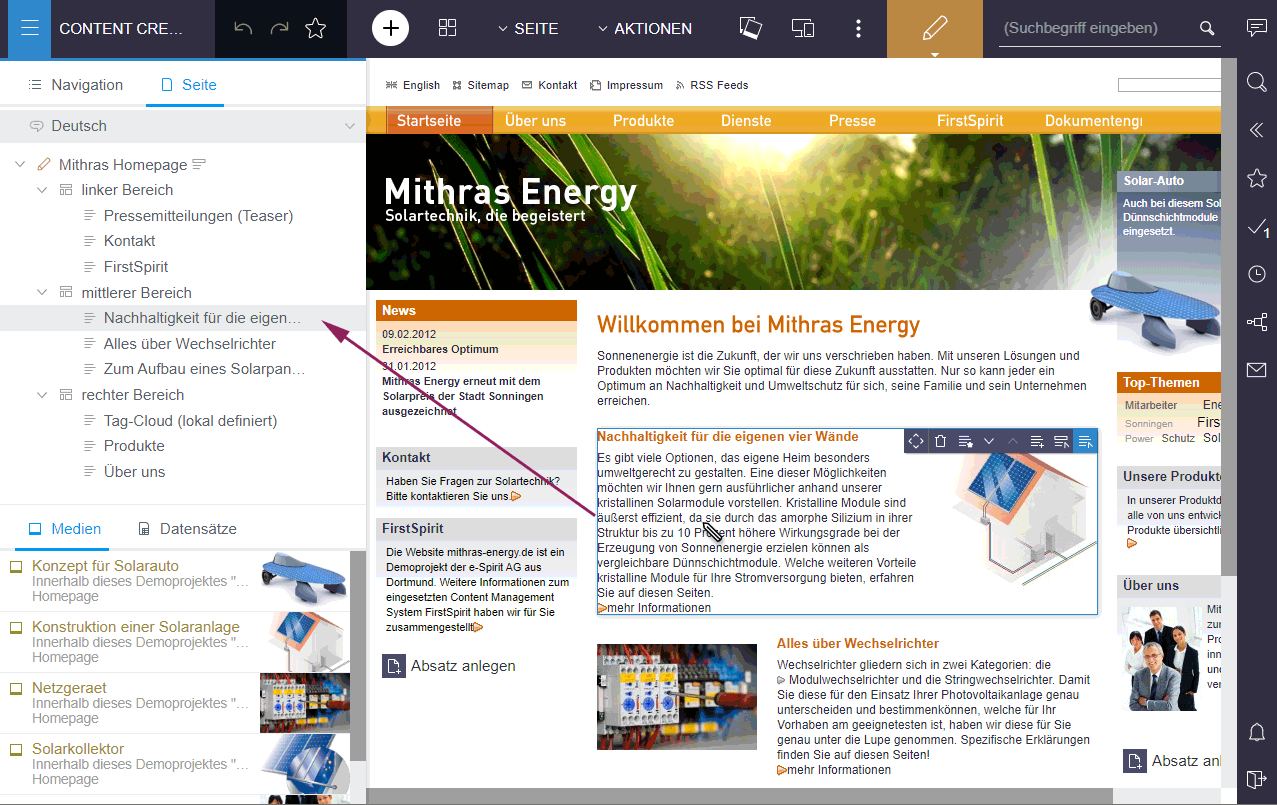
The corresponding function is located behind the icon on the far left of the menu bar:
.png)
In this context, the dialog for editing the navigation, which was previously available under the menu entry “Edit navigation” in the “ACTIONS” menu, has been removed, since the same functions are now offered by the new navigation view. Instead of the dialog, the “Edit navigation” menu entry now opens the navigation view.
It is planned to include new functions in this new navigation view in future releases. The new navigation view is not available in the old ContentCreator.
Note for developers and administrators: The new navigation view displays the entire site store of a project by default. Unlike before, editors can now navigate to any page. And thus, probably also to more “technical” pages that may not have any output that is readable by the editor. This should be taken into account during project development and nodes in the site store that are not relevant for editors should be hidden by appropriate permission assignment.
3.2 Use of the "old" ContentCreator
The design and technical basis of FirstSpirit ContentCreator were revised.
By default, the “new” ContentCreator is automatically used for all projects that are started with the ContentCreator. However, you can switch back to the “classic” ContentCreator for individual projects if required.
With FirstSpirit 2020-07, the ContentCreator in the “old” design will be eliminated as planned. The recommendation is therefore to use the “new” ContentCreator for all projects as early as possible.
If one or more web applications are configured to run on the “old” of a FirstSpirit server, the start page of the FirstSpirit server will show a warning to users with the administrator role:
Legacy ContentCreator usage detected. Web application: ...For further information please see https://docs.e-spirit.com/odfs/edocs/admi/firstspirit-ser/server-properti/web-application/index.html.
Note on the new ContentCreator: It is recommended that you use Google Chrome or Microsoft Edge on chromium basis for the new ContentCreator. The new ContentCreator is not compatible with Microsoft Internet Explorer.4 FirstSpirit Content Experience Tools (CXT)
4.1 Latest module versions
FirstSpirit 2020-04 supports the following module versions for “FirstSpirit Content Experience Tools”:
| Module / file name | Version number |
FirstSpirit CXT DAP Bridgedataservice-[version].fsm | 1.27 |
FirstSpirit CXT FragmentCreatorfragment-creator-[version].fsm | 2.2 |
FirstSpirit Fragment DAPfragmentdap-[version].fsm | 1.23 |
FirstSpirit Media DAPmediadap-[version].fsm | 1.23* |
FirstSpirit Markdown Editormarkdown-editor-[version].fsm | 1.20* |
FirstSpirit Tagging Editortagging-editor-[version].fsm | 1.20 |
FirstSpirit CXT FragmentCreator - CaaS Integrationcaas-integration-[version].fsm | 1.19 |
* These modules require FirstSpirit 2020-03 or higher from this version.
4.2 Error analysis for MicroApp Framework
An incorrect configuration is a common source of errors. It can result in the software not functioning as expected or not functioning at all.
The latest release makes it possible to set up an error page for the MicroApp Framework which presents the current configuration of the server clearly and lists error messages.
The error page is accessible via
/statusfor administrators, appended to the URL of the FragmentCreator, e.g.
http://myServer:8080/fragments/status
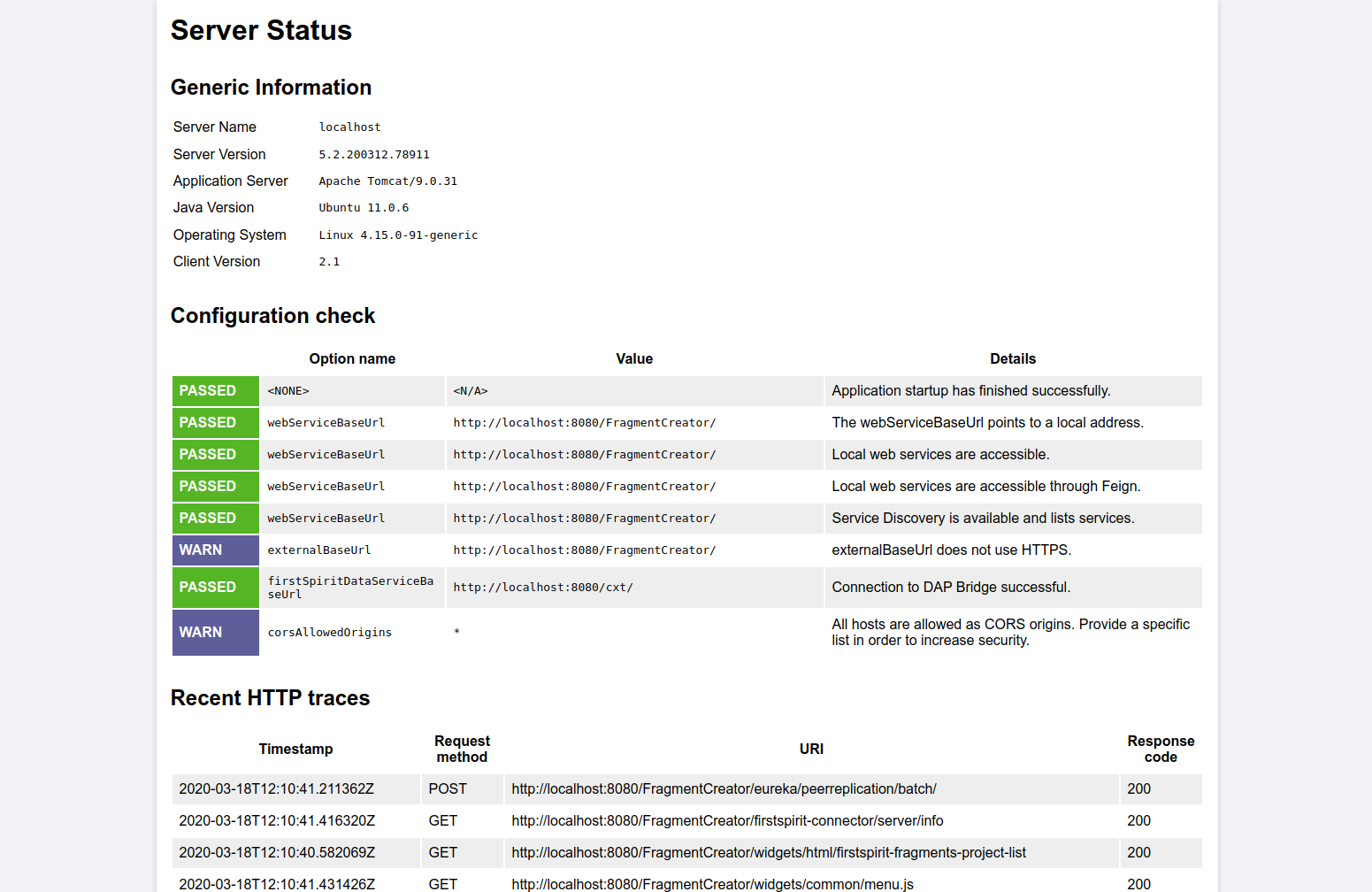
Along with providing information about the server, it also runs a test on the configuration and lists the most recent HTTP requests and log messages.
In order to receive log messages, the logging.file.name parameter must be specified with the desired log file (e.g., /tmp/fc.log) in the web.xml file, e.g.
logging.file.name=/home/tomcat/logs/fragments.logor alternatively in the properties file /config/cxt-fragment-creator.properties.
See also the manual for the MicroApp Framework, https://docs.e-spirit.com/odfs/edocs/cxt/installation-mo/installing-modu/fragmentcreator/index.html.
4.3 FS_INDEX now also supports the creation of fragments of several different categories (tag CATEGORY)
With the fragment DAP, fragments from one fragment project can be referenced in another fragment project, edited there and new ones can be created. The input component FS_INDEX with DataAccessPlugin component FirstSpiritFragmentAccess/FSFAConnector used for this.
The CATEGORY tag was previously used to restrict the selection to certain categories. If only one category was specified, a button was added to FS_INDEX, via which new fragments of the relevant category could be created.
As of the current release, the creation of fragments of different categories is now also supported if several categories are specified.
Example syntax:
<FS_INDEX name="fragments">
    <LANGINFOS>
      <LANGINFO lang="*" label="Fragments"/>
      <LANGINFO lang="DE" label="Fragmente"/>
    </LANGINFOS>
    <SOURCE name="FirstSpiritFragmentAccess/FSFAConnector">
      <PROJECT remote="fragmentproject"/>
        <CATEGORY uid="contact"/>
        <CATEGORY uid="teaser"/>
    </SOURCE>
</FS_INDEX>
The behavior regarding the CATEGORY tag is now as follows:
- No specification of
CATEGORY: Only a selection of fragments from the project specified by thePROJECTtag is possible, no fragments can be created. - Specification of one
CATEGORYtag: Fragments of the specified category can be selected and created. Clicking on the button for creating new fragments opens the corresponding form. - Specification of more than one
CATEGORYtag: Fragments of the specified categories can be selected and created. Clicking on the button for creating new fragments opens a list of available categories:
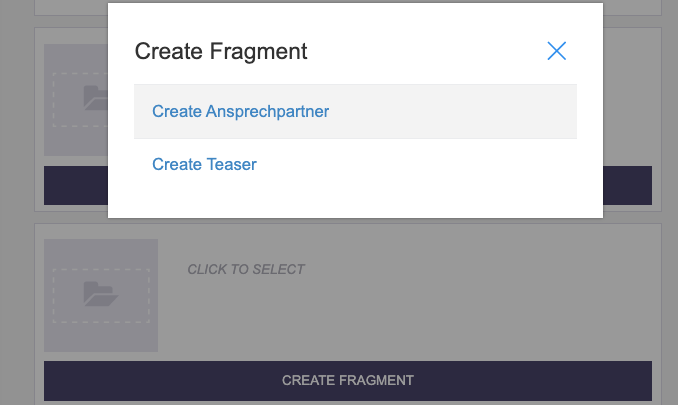
The referenced fragments can be edited, too.
In projects in which FS_INDEX with DataAccessPlugin component FirstSpiritFragmentAccess/FSFAConnector and tagCATEGORY is already used, the configuration should be checked due to the new behavior: If more than one CATEGORY tag was specified, only a selection of fragments by editors was previously possible. Now editors can also create new fragments of the types specified by the CATEGORY tags.4.4 Configuration of the Content-Security-Policy header
Using the configuration property cxt.platform.microapps.csp-origins allows for modifying the Content-Security-Policy header. This might be necessary when access to MicroApps should be allowed from different domains.
The default value is 'self'.
4.5 Media DAP: Type-dependent upload of files
Up to now only images could be uploaded in the FirstSpirit FragmentCreator via the FS_INDEX input component with Media DAP (<SOURCE name="FirstSpiritMediaAccess/Connector">). The current release now also supports the upload of files of other formats. In addition, the mode attribute in the SOURCE tag can be used to control which media type may be uploaded. As before, the filter also refers to the selection of media types:
PICTURE: Only images can be uploaded and selected.FILE: Only non-image files can be uploaded and selected.ANY(default) All media (both images and files) can be uploaded and selected.
Example syntax:
<FS_INDEX name="files">
    <LANGINFOS>
      <LANGINFO lang="*" label="Files"/>
      <LANGINFO lang="DE" label="Dateien"/>
    </LANGINFOS>
    <SOURCE name="FirstSpiritMediaAccess/Connector" mode="file">
      <PROJECT remote="media"/>
    </SOURCE>
</FS_INDEX>
If media are dropped into the upload dialog that do not match the type specified by mode, a corresponding warning is displayed and these files are not uploaded to the project.
For further information see https://docs.e-spirit.com/odfs/edocs/cxt/templates/access-media/index.html.
5 Module Development, Scripts, API
API extension for generating references (ReferenceConstructionAgent and ValueReferencesJournal)
Essential FirstSpirit functions are based on a project's reference graph which is used to identify dependencies of objects within complex projects.
To generate references via the FirstSpirit Developer API, an agent of the type ReferenceConstructionAgent is required. A ReferenceConstructionAgent can then be used to generate instances of the type ReferenceHolder.
The ReferenceConstructionAgent (FirstSpirit Developer API, package de.espirit.firstspirit.client.access.editor) was expanded with the latest FirstSpirit release to include methods which enable references to be generated on the basis of meta information (via the unique identifier (UID) and IDProvider.UidType of a FirstSpirit object or via the global identifier (GID) for references to datasets). Previously, an instance of the type IDProvider was required in order to generate references.
New methods in the ReferenceConstructionAgent:
IDProviderReferenceHolder create(String uid, IDProvider.UidType uidType,...);IDProviderReferenceHolder create(String schemaUid, String entityTypeName,...);The ValueReferencesJournal interface (FirstSpirit Access API, package de.espirit.firstspirit.client.plugin.dataaccess.aspects) was also optimized at the same time. In the latest FirstSpirit release, methods that were specifically provided for adding defective references (broken references) are marked as “deprecated”. Instead, the interface has been expanded with new methods which can be used to add defective as well as regular references (e.g., in a DataAccessProvider). The desired object is simply transferred when adding the reference – the system will check by itself whether the target object is accessible or not and evaluate the reference accordingly.
The new method in the ValueReferencesJournal interface
addReferenceToElement(final String uid, final IDProvider.UidType uidType,...); replaces the previous method, for example:
addBrokenReferenceToElement(String uid, IDProvider.UidType uidType,...);6 System
Update of internally used software
As of the current release, the following internally used software has been updated:
Java (JRE which is used to operate the FirstSpirit Launcher)
The Java versions included in the “FirstSpirit Launcher JRE” module (see “FirstSpirit Launcher JRE” documentation) were updated in the latest FirstSpirit release. In addition to the version supplied with the FirstSpirit Launcher, AdoptOpenJDK 11.0.6 (default), the following Java variants are currently available:
- AdoptOpenJDK 14 (new)
- AdoptOpenJDK 8u242 (outdated)
AdoptOpenJDK 13.0.2 was removed from the FirstSpirit Launcher JRE module.
After updating the module, it may be necessary to restart the ServerManager to perform the appropriate configuration.Spring Boot (used for MicroApp Framework)
Update from version 2.2.2 to version 2.2.5
Spring Cloud Hoxton (used for MicroApp Framework)
Update from version Hoxton.SR1 to version Hoxton.SR3
Eclipse Jetty (contained in the module fs-jetty.fsm / “FirstSpirit Jetty Service”)
Update from version 9.4.23 to version 9.4.27
Overview
| ID | Description | Categories |
|---|---|---|
| CORE-5816 | Corrected a bug that could cause a |
Developer, Support for JSON, Template Development |
| CORE-10776 | With the current FirstSpirit release the Java VM's startup parameters can be automatically updated. For this purpose, the startup options have been split into two separate configuration files. The new file |
FirstSpirit Administrator, Java, Migration, Server Administrator, ServerMonitoring |
| CORE-10836 | When deleting a schedule with a generation action, the corresponding directory on the application server on which the Staging Web application is running is now also deleted. |
FirstSpirit Administrator |
| CORE-11471 | A bug was fixed that could cause that after updating a module used in schedules, the corresponding action could not be used until the server was restarted. Note: The problem may still occur once within the current execution for schedules that were running at the time of the update. |
FirstSpirit Administrator, Isolated mode, Modules, Server Administrator, Tasks |
| CORE-11816 | The |
Developer, FirstSpirit API, Support for JSON |
| CORE-11827 | Update of internally used software Further information can be found in chapter “System: Update of internally used software”. |
FirstSpirit Administrator, FirstSpirit Content Experience Tools (CXT), FirstSpirit Jetty Web Server, Integrated software, Java, Launcher |
| CORE-11858 | The |
Data Access Plug-In, Developer, FirstSpirit API, Module development |
| CORE-11911 | The DatasetDataAccessPlugin now also supports the referencing of records from external databases. |
Data Access Plug-In, Database |
| CORE-12018 | Support Open JDK 14: As of FirstSpirit 2020-04, OpenJDK 14 (non-LTS; release date 2020/03) is officially approved for use with FirstSpirit (i.e, the FirstSpirit Server and the FirstSpirit desktop applications). With support for OpenJDK 14, support for OpenJDK 13 (non-LTS; release date was 2019/07) expires. Further information can be found in chapter “General: Java: Current status and outlook”. |
Developer, FirstSpirit Administrator, Java, Server Administrator |
| CORE-12031 | An error could occur when using services from your own services if the components involved were not yet fully started. This dependency scenario has been corrected. |
FirstSpirit Administrator, Server Administrator |
| CORE-12043 | An error has been resolved which, in rare cases, could previously lead to problems when using X.509 certificates in conjunction with the |
FirstSpirit Jetty Web Server, Server Administrator, Web server |
| CORE-12060 | FirstSpirit documentation which we provide in the HTML format will no longer be provided as PDF. |
Documentation |
| CORE-12079 | In rare cases, datasets could not be edited via EasyEdit due to incorrect evaluation of the relevant |
Content Store, ContentCreator, Developer, Editor, Table templates |
| CORE-12091 | If one or more web applications are configured to run on the “old” ContentCreator of a FirstSpirit server, the start page of the FirstSpirit server will show a warning to users with the administrator role. Further information can be found in chapter “ContentCreator: Use of the "old" ContentCreator”. |
ContentCreator, Developer, FirstSpirit Administrator |
| CXT-846 | FS_INDEX with DataAccessPlugin component FirstSpiritFragmentAccess/FSFAConnector now also supports the creation of fragments of several different categories (tag |
Developer, FirstSpirit Content Experience Tools (CXT), FragmentCreator, Input Components |
| CXT-1205 | The Media DAP now allows the type-dependent upload of files. |
Developer, Editor, FirstSpirit Content Experience Tools (CXT), FragmentCreator, Media, Modules |
| CXT-1206 | Information for analysis and debugging |
Debugging, Developer, FirstSpirit Administrator, FirstSpirit Content Experience Tools (CXT) |
| CXT-1221 | Language selection lists now have a scroll bar if there are large numbers of entries. |
ContentCreator, Editor, Languages |
| CXT-1319 | The standard workflow for deleting fragments and variants – “Request deletion” – now once again removes entire fragments from live CaaS instances rather than just individual variants. |
FirstSpirit Content Experience Tools (CXT), FirstSpirit Content as a Service (CaaS) |
| CXT-1330 | In rare cases no preview image was displayed after dragging and dropping images into the corresponding dialog of FS_INDEX (error message: |
Editor, FirstSpirit Content Experience Tools (CXT), FragmentCreator, Media |
| CXT-1338 | The display of buttons in dialogs in the “new” FirstSpirit ContentCreator has been optimized so that labels in dialogs for switching on workflows are now easier to read. |
ContentCreator, Developer, Editor |
| CXT-1343 | A bug has been fixed that could cause unwanted flickering of icons in the new ContentCreator in rare cases (e.g. bookmark icon in the menu bar, icons in the image cropping dialog. |
ContentCreator, Developer, Editor |
| CXT-1354 | LiveEdit now works again with the “new” ContentCreator. |
ContentCreator, Developer, LiveEdit |
| CXT-1376 | When uploading files by drag-and-drop in the new ContentCreator (via FS_REFERENCE), the MIME type is now correctly recognized by the file extension |
ContentCreator, Editor, Media |
| CXT-1378 | The MicroApp Framework now works even more stably with native DataAccess plug-ins which are included in the standard scope of delivery of FirstSpirit, such as the DatasetDataAccessPlugin. |
Data Access Plug-In, Developer, FirstSpirit Content Experience Tools (CXT), FragmentCreator |
| CXT-1405 | In addition to the preview, the FirstSpirit ContentCreator now offers navigation and editing options via a structure tree. |
ContentCreator, Editor |
| CXT-1419 | It is now possible to configure the |
FirstSpirit Administrator, FirstSpirit Content Experience Tools (CXT) |
| CXT-1421 | After having made modifications to pages, the view is now directly updated again, so that, among other things, the correct status (editing status/work flow) in combination with FirstSpirit Omnichannel Manager is displayed again. |
ContentCreator, Developer, Editor, FirstSpirit Administrator, Omnichannel Manager / Third Party Preview, Workflow |
| CXT-1436 | FirstSpirit Content Experience Tools: Latest module versions |
Developer, FirstSpirit Administrator, FirstSpirit Content Experience Tools (CXT), FragmentCreator, Modules |
Deprecations
| Functionality | Deprecated as of | Will be removed / Was removed as of |
|---|---|---|
| Input component FS_LIST | 5.2R3 | 2020-07 |
| Input component CMS_INPUT_CONTENTAREALIST | 5.2R3 | |
| Input component CMS_INPUT_CONTENTLIST | 5.2R3 | |
| Input component CMS_INPUT_FILE | 5.2R3 | |
| Input component CMS_INPUT_LINKLIST | 5.2R3 | |
| Input component CMS_INPUT_OBJECTCHOOSER | 5.2R3 | |
| Input component CMS_INPUT_PAGEREF | 5.2R3 | |
| Input component CMS_INPUT_PICTURE | 5.2R3 | |
| Input component CMS_INPUT_TABLIST | 5.2R3 | |
| FirstSpirit Access API: de.espirit.firstspirit.agency.GroupsAgent | 5.2R15 | |
| FirstSpirit Access API: delete (de.espirit.firstspirit.access.AccessUtil) | 5.2R18 | |
| Windows installation program | 2018-06 | 2020-06 |
| FirstSpirit Access API: release (de.espirit.firstspirit.access.AccessUtil) | 2018-06 | |
| FirstSpirit Access API: getLastLoginAsDate (de.espirit.firstspirit.agency.UserStatisticsAgent) | 2018-07 | |
| FirstSpirit Access API: remainingDurationOfCurrentStageInMillis (de.espirit.firstspirit.server.MaintenanceModeInfo) | 2018-07 | 2025-13 |
| FirstSpirit Access API: getStartingTimeOfStageAsDate (de.espirit.firstspirit.server.MaintenanceModeInfo) | 2018-07 | 2025-13 |
| FirstSpirit Access API: getSelectedWebserverConfiguration (de.espirit.firstspirit.access.serverConfiguration) | 2018-10 | 2025-13 |
| FirstSpirit Access API: setSelectedWebserverConfiguration (de.espirit.firstspirit.access.serverConfiguration) | 2018-10 | 2025-13 |
| FirstSpirit Access API: getSelectedWebServer (de.espirit.firstspirit.access.project.Project) | 2018-10 | 2025-13 |
| FirstSpirit Access API: setSelectedWebServer (de.espirit.firstspirit.access.project.Project) | 2018-10 | 2025-13 |
| FirstSpirit Access API: getLostAndFoundStoreNodes(); (de.espirit.firstspirit.feature.FeatureInstallResult) | 2018-10 | |
| FirstSpirit Access API: getDeletedStoreNodes(); (de.espirit.firstspirit.feature.FeatureInstallResult) | 2018-10 | |
| FirstSpirit Access API: de.espirit.firstspirit.access.store.Previewable | 2019-01 | |
| Java 8 support for FirstSpirit | 2019-05 | 2020-06 |
| WebSphere Application Server support for FirstSpirit | 2019-05 | |
| Legacy mode for the FirstSpirit server | 2019-06 | 2022-03 |
| Java Web Start support for FirstSpirit | 2019-10 | 2020-06 |
| FirstSpirit ContentCreator (old design / old technology) | 2019-11 | 2020-07 |
| Mithras Energy demo project | 2020-02 | 2020-06 |