
Release Notes
1 Administration
1.1 Fallback for language-dependent media without content
If a medium is created language-dependently, the image files and files of other media formats must be provided for every existing language. Categorically, the medium will otherwise not be output and/or the medium is linked to an URL that does not exist.
With the latest release, it is now possible to define that for the language, for which a file has not been stored, the file of the master language will be used.
For this, select the option “Use master language” (FirstSpirit ServerManager/Project Properties/Substitutions, “Language substitution (media”)):
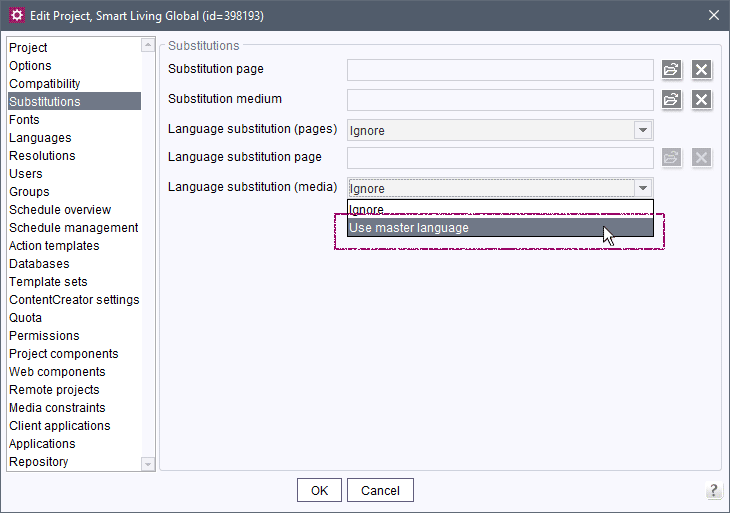
If the option “Ignore” is selected (this is the default setting), nothing is displayed for the language of the medium for which no file is stored.
Note: a medium will also not be displayed in the following cases:
- No file is stored in the master language for a language-dependent medium.
- No file is stored for a language-independent medium.
- No file is stored for a language that is not equal to the master language for a language-dependent medium and for “Language substitution (media)”, the option “Use master language” is not activated.
One of the following FirstSpirit releases will provide a corresponding solution for these cases.
In the context of this new functionality, the FirstSpirit Access API was also expanded to be able to respond to this project setting: Package de.espirit.firstspirit.access.project, Interface Project.
1.2 Health state: Expansions for web applications and web servers
In the “Health Center” (FirstSpirit ServerMonitoring), the current state of health of the FirstSpirit server can be read out. For example, the degraded state (symbol: exclamation mark on red background) can indicate that there are problems concerning the available memory or an excessive load on the server.
However, web applications that are included with FirstSpirit as standard that were not correctly rolled out at the FirstSpirit start (“deployed”) will also cause the degraded state.
More detailed information is provided in the server-incidents.log file (downloadable in FirstSpirit ServerMonitoring under “FirstSpirit / Monitoring / Codes” via the envelope icon; “Server status is degraded!” message). Here, causes that lead to or have led to the problematic state can be read out.
If the server is in the degraded state, suitable measures must be taken to remedy the problems.
A FirstSpirit Server is now also viewed as degraded when an aggregating web server is used and a web application cannot be rolled out successfully on all web servers of the aggregating web server.
Message in the server-incidents.log file:
Web server errors detected: #whereby # is the number of the corresponding warnings.
The message
Some core web applications are not running: ...indicates that at least one web application could not be rolled out and which one.
In rare cases, no explicit error message was displayed when a web application or a web component could not be rolled out on a web server. This error has also been rectified now.
The MBean HealthManager was enhanced with two additional pieces of information:
LastWebServerErrorWebServerErrorsPerDay
Messages pertaining to the Health state are now also included in the fs-server.log file. They are output via the de.espirit.firstspirit.server.HealthStatus class. Corresponding messages can thereby also be found later on. Example:
INFO  19.01.2022 14:14:47.570 (de.espirit.firstspirit.server.HealthStatus):
   RUN_LEVEL (de.espirit.firstspirit.server.RunLevelHolder) Reached run level:
   STARTED(100)
Note: in some cases, messages will be output twice now.
In the context of the Health state, a few threshold values from which a FirstSpirit Server under a high load is considered to be degraded have also been raised, based on experience gained so far.
2 FirstSpirit Content Experience Tools (CXT)
Latest module versions
FirstSpirit 2022.2 supports the following module versions for “FirstSpirit Content Experience Tools”.
| Module / file name | Version number |
FirstSpirit CXT Plattformplatform-[version].fsm | 2.5.2 |
FirstSpirit CXT DAP Bridgedataservice-[version].fsm | 1.44.2 |
FirstSpirit CXT FragmentCreatorfragment-creator-[version].fsm | 3.4.5 |
FirstSpirit Fragment DAPfragmentdap-[version].fsm | 1.40.5 |
FirstSpirit Media DAPmediadap-[version].fsm | 1.31.3* |
FirstSpirit PageRef DAPpagerefdap-[version].fsm | 1.9.3 |
FirstSpirit Markdown Editormarkdown-editor-[version].fsm | 1.29.2* |
FirstSpirit Tagging Editortagging-editor-[version].fsm | 1.29.2 |
FirstSpirit CXT FragmentCreator - CaaS Integrationcaas-integration-[version].fsm | 1.31.3 |
* These modules require FirstSpirit 2020-03 or higher from this version.
3 Module Development, Scripts, API
ModuleAdminAgent: Change for getProjectAppConfig() in case of error
The ModuleAdminAgent.getProjectAppConfig() method (FirstSpirit Developer API, package de.espirit.firstspirit.agency) – as described in the API documentation – returns an IllegalArgumentException already since FirstSpirit 2022.1, if the project component is not added / installed in the project concerned.
Note: This only applies to servers running in “Isolated mode”. For servers still running in the deprecated “Legacy mode”, it was always the IllegalArgumentException that was returned.
4 Template development
4.1 FS_CATALOG: Managing the duplication of entries
FirstSpirit input components can be adapted by project developers extremely flexibly and fine-tuned to the requirements of the respective project and editors.
For example, the FS_CATALOG input component allows the convenient creation of lists that can consist of sections or links.
The central function is thereby the creation of new entries.
This function can be managed using a specific rule definition, namely via the NEW property.
In the past, this property was also the basis for the “Duplicate” function, which can be executed in the FirstSpirit ContentCreator in the form via icon:
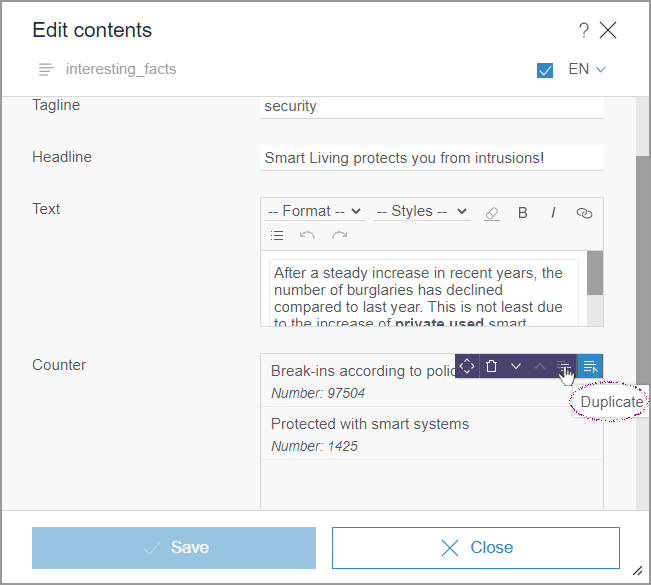
in the FirstSpirit SiteArchitect via context menu:
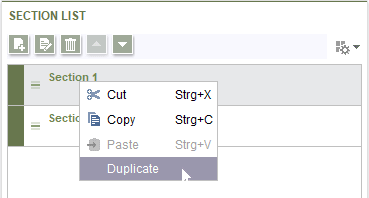
Until now, the functions “New”and “Duplicate” could only be activated or deactivated together.
With the latest release the functions “New” and “Duplicate” can now be controlled separately using the new property COPY:
PROPERTY name="COPY"For reasons of compatibility, COPY takes the status of NEW into account unless there is an explicit definition for COPY.
To make “Duplicate” possible, but not “New”, COPY must be activated explicitly, NEW must be deactivated, e.g.:
<RULES>
    <RULE>
        <WITH>
            <TRUE/>
        </WITH>
        <DO>
            <PROPERTY name="COPY" source="catalog"/>
            <NOT>
                <PROPERTY name="NEW" source="catalog"/>
            </NOT>
        </DO>
    </RULE>
</RULES>
Note: the icons in the preview (EasyEdit icons) cannot be influenced with rules. The Tailored UI functionality can be used to categorically prohibit the duplication in the preview.
For more information, see:
- FS_CATALOG: https://docs.e-spirit.com/odfs/template-develo/forms/input-component/catalog/index.html
- COPY property: https://docs.e-spirit.com/odfs/template-develo/rules/form-properties/property-cop/index.html
- Tailored UI: https://docs.e-spirit.com/odfs/template-develo/contentcreator/customization/standard-functi/index.html
4.2 JSON: Debugging of unresolvable references
Unresolvable references during the JSON generation now lead to WARN level log messages.
For example, this is the case when a linked medium cannot be accessed in the release state because it was never released or the parent chain of the medium contains a folder that was never released.
Example:
WARN  24.01.2022 14:26:24.248{g-node=850537} (de.espirit.firstspirit.generate.
   SiteProduction): Reference 'xyz' [type=MEDIASTORE_LEAF] is set but not accessible!
   It may have been deleted or is not correctly released.
Overview
| ID | Description | Categories |
|---|---|---|
| CORE-14023 | With the latest release, the monitoring for web applications and web servers has been expanded. |
Debugging, FirstSpirit Administrator, Monitoring |
| CORE-14052 | In FS_CATALOG components, the creation and duplication of entries can now be activated or deactivated separately. |
ContentCreator, Developer, Dynamic Forms, Editor, Input Components |
| CORE-14058 | Unresolvable references during the JSON generation now lead to |
Debugging, Developer, Generation, Release, Support for JSON |
| CORE-14099 | Fallback for language-dependent media without content |
FirstSpirit Administrator, Media, ServerManager |
| CORE-14132 | An error has been corrected, which, in case of invalid user settings (system_properties file) could lead in vary rare cases to that the FirstSpirit start page is no longer displayed for the corresponding users. |
Editor, FirstSpirit Administrator, FirstSpirit home page |
| CORE-14135 | Errors in schedules that cause a |
Debugging, FirstSpirit Administrator, Health Center, Monitoring, ServerMonitoring, Tasks |
| CORE-14145 | An error has been fixed which, in very rare cases, could cause the FirstSpirit Server to no longer be accessible due to locks in the Streaming Manager (regulates the data flow). |
FirstSpirit Administrator |
| CORE-14155 | With FirstSpirit 2022.1, the setting of the “Automatic cropping enabled by default” checkbox of the “FS Image Recognition - AWS Connector” service of the “FirstSpirit Image Recognition” module was not evaluated correctly: when this checkbox was activated and the project component “FS Image Recognition - Configuration” was not installed for the respective project, images were no longer cropped automatically when uploading. This error has been corrected. |
ContentCreator, Developer, FirstSpirit Administrator, Media, Modules |
| CORE-14159 | FirstSpirit Content Experience Tools: Latest module versions |
Developer, FirstSpirit Administrator, FirstSpirit Content Experience Tools (CXT), FragmentCreator, Modules |
| CORE-14177 | The |
Developer, FirstSpirit API, Isolated mode, Module development, Modules |
| CXT-2492 | With the use or rules in the FirstSpirit ContentCreator for CMS_INPUT_DATE, not all tags were evaluated correctly (specifically ADD and GREATER_THAN). Furthermore, during a ValueService implementation (package |
ContentCreator, Developer, Dynamic Forms, Input Components |
| CXT-2501 | The repeated executing of the functions “Convert menu item to page” or “Convert page to menu item” successively is now prevented. |
ContentCreator, Editor, Performance |
| CXT-2512 | If an editor has no permissions for a subsection of a project, in rare cases this could lead to the project not being able to be opened in the FirstSpirit ContentCreator. Instead, a 500 error was displayed. |
ContentCreator, Developer, Permissions |
Deprecations
| Functionality | Deprecated as of | Will be removed / Was removed as of |
|---|---|---|
| Input component CMS_INPUT_CONTENTAREALIST | 5.2R3 | |
| Input component CMS_INPUT_CONTENTLIST | 5.2R3 | |
| Input component CMS_INPUT_FILE | 5.2R3 | |
| Input component CMS_INPUT_LINKLIST | 5.2R3 | |
| Input component CMS_INPUT_OBJECTCHOOSER | 5.2R3 | |
| Input component CMS_INPUT_PAGEREF | 5.2R3 | |
| Input component CMS_INPUT_PICTURE | 5.2R3 | |
| Input component CMS_INPUT_TABLIST | 5.2R3 | |
| FirstSpirit Access API: de.espirit.firstspirit.agency.GroupsAgent | 5.2R15 | |
| FirstSpirit Access API: delete (de.espirit.firstspirit.access.AccessUtil) | 5.2R18 | |
| FirstSpirit Access API: release (de.espirit.firstspirit.access.AccessUtil) | 2018-06 | |
| FirstSpirit Access API: getLastLoginAsDate (de.espirit.firstspirit.agency.UserStatisticsAgent) | 2018-07 | |
| FirstSpirit Access API: remainingDurationOfCurrentStageInMillis (de.espirit.firstspirit.server.MaintenanceModeInfo) | 2018-07 | 2025-13 |
| FirstSpirit Access API: getStartingTimeOfStageAsDate (de.espirit.firstspirit.server.MaintenanceModeInfo) | 2018-07 | 2025-13 |
| FirstSpirit Access API: getSelectedWebserverConfiguration (de.espirit.firstspirit.access.serverConfiguration) | 2018-10 | 2025-13 |
| FirstSpirit Access API: setSelectedWebserverConfiguration (de.espirit.firstspirit.access.serverConfiguration) | 2018-10 | 2025-13 |
| FirstSpirit Access API: getSelectedWebServer (de.espirit.firstspirit.access.project.Project) | 2018-10 | 2025-13 |
| FirstSpirit Access API: setSelectedWebServer (de.espirit.firstspirit.access.project.Project) | 2018-10 | 2025-13 |
| FirstSpirit Access API: getLostAndFoundStoreNodes(); (de.espirit.firstspirit.feature.FeatureInstallResult) | 2018-10 | |
| FirstSpirit Access API: getDeletedStoreNodes(); (de.espirit.firstspirit.feature.FeatureInstallResult) | 2018-10 | |
| FirstSpirit Access API: de.espirit.firstspirit.access.store.Previewable | 2019-01 | |
| WebSphere Application Server support for FirstSpirit | 2019-05 | |
| Legacy mode for the FirstSpirit server | 2019-06 | 2022-03 |
| Database layer for Oracle Database 11g/12c | 2020-12 | 2025-05 |
| FirstSpirit Access API: redirectTemplateLogToDefaultLog() (Interface RenderingAgent.Renderer) | 2021-05 |