
Release Notes
1 Administration
1.1 "Tailored UI": Configuration via new project component
The “Tailored UI” functionality enables the project-specific arrangement, hiding, and deactivation of functions in the ContentCreator. In this way the interface of the ContentCreator can be conveniently adapted to the requirements of the project and the editors.
Up to now, configuration was carried out via the “FirstSpirit CXT ContentCreator Extension” system module.
For easier use and configuration in the cloud, the functionality of the module has been integrated into the ContentCreator with the current release.
As a result, configuration is now no longer carried out via the “CXT ContentCreator Extension: Feature Configuration”, but via the “CXT ContentCreator: Feature Configuration ProjectApp”:
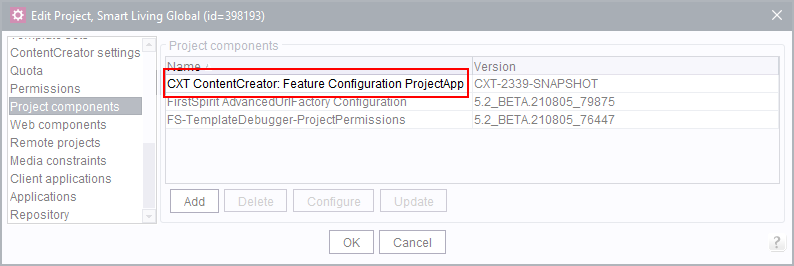
(FirstSpirit ServerManager / Project properties / Project components)
If the project component “CXT ContentCreator Extension: Feature Configuration” was already added to projects, the new project component“CXT ContentCreator: Feature Configuration ProjectApp” is automatically used with the update to the current FirstSpirit release. Existing configuration is also migrated automatically during the update: No manual adjustments are required.
In projects in which the project component “CXT ContentCreator Extension: Feature Configuration” was not yet present before the update to the current FirstSpirit release, the new project component “CXT ContentCreator: Feature Configuration ProjectApp” must be added manually to the desired project with the current release in order to be able to use the “Tailored UI” functionality.
When updating to the current FirstSpirit release, the “FirstSpirit CXT ContentCreator Extension” system module, which is now no longer required, is automatically uninstalled.
With the “FirstSpirit CXT ContentCreator Extension” system module, the “CXT ContentCreator Extension: WebApp for ContentCreator” has also been dropped in this context.
For further information please refer to https://docs.e-spirit.com/odfs/template-develo/contentcreator/customization/standard-functi/index.html.
1.2 Advanced URL Creator: handling special characters
FirstSpirit provides several options for generating URLs as needed.
Particularly the “Advanced URL Creator” included in the delivery generates URLs on the basis of the display names of FirstSpirit objects. The latest FirstSpirit release can be used to define project-specific conversion rules for character replacements. Based on this rule, a conversion then occurs during the generation, e.g.,
- ä => ae
- Ä => Ae
- & => and
The new project component “FirstSpirit AdvancedUrlFactory Configuration” is now available for this purpose (FirstSpirit ServerManager / Project Properties / Project Components):
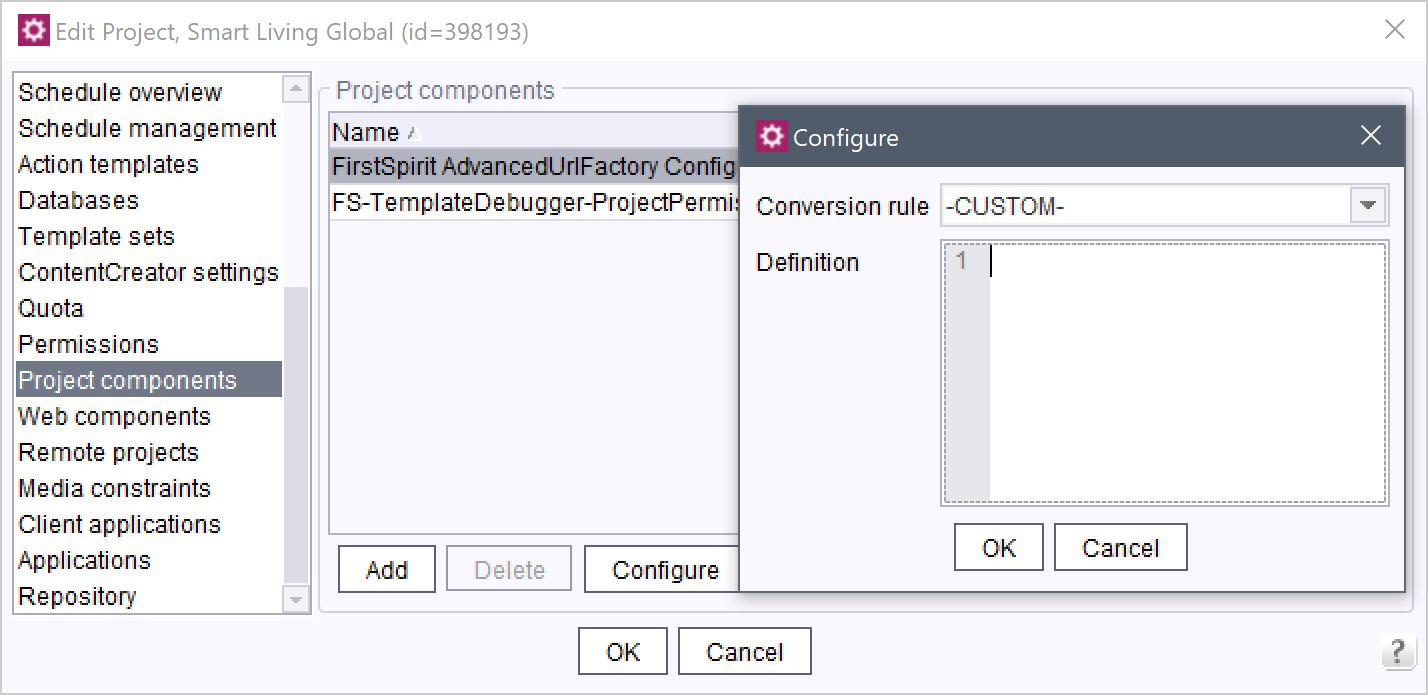
In existing projects this project component must be added manually, in new projects the project component is included automatically.
You can either
- select a one of the server-wide valid conversion rules or
- define a project-specific conversion rule.
1. Server-wide valid conversion rules are defined in the FirstSpirit ServerManager under Server Properties / Conversion Rules.
The desired rule can be selected from the “Conversion Rule” drop-down menu. The definition is shown in the “Definition” field. It cannot be edited here.
2. A project-specific conversion rule can be defined when the selection in the “Conversion Rule” drop-down menu is -CUSTOM-.
Each rule must be on its own line and consists of two values separated by an equal sign:
- To the left of the equal sign, enter the special character to be converted either directly via keyboard or as hexadecimal code (e.g., 0xe4 for ae).
- To the the right of the equal sign, the valid character(s), placed within double quotation marks, to which the special character is to be converted when using the Advanced URL Creator.
Note: equal signs (0x3D), spaces (0xa0) and a few other control codes must necessarily be indicated in hexadecimal code.
Example:
[convert]
Ä="Ae"
Ö="Oe"
Ü="Ue"
ä="ae"
ö="oe"
ü="ue"
ß="ss"
Note: Changing the rule from -CUSTOM- to a different rule will reset the -CUSTOM- rule and overwrite it. Non-cloud customers are recommended to use a server-wide valid rule.
A reset is possible by saving an empty -CUSTOM- rule.
As part of this feature for the conversion of characters to generations, the Configuration format of conversion rules was also changed in general: where the character to be replaced could only be entered in a hexadecimal Unicode value until now, the latest release permits entering the characters to be replaced mainly directly via keyboard.
Note: the requirement to enter equal signs (0x3D), spaces (0xa0) and a few control codes in hexadecimal code remains unchanged.
For more information, see:
- Advanced URLs: https://docs.e-spirit.com/odfs/advanced-topics/generation/advanced-urls/index.html
- Server-wide conversion rules: https://docs.e-spirit.com/odfs/edocs/admi/firstspirit-ser/server-properti/conversion-rule/index.html
- Conversion in format templates: https://docs.e-spirit.com/odfs/templates-basic/composition-tem/format-template/conversion/index.html
1.3 Schedules: Parallel execution
Executing schedules, e.g. generations, backups, etc., can lead to a high load on the server and thus cause performance problems.
Normally, schedules are started automatically based on set timings.
With the current release, the number of schedules started at the same time is now limited by default:
Backups
This includes both schedules of type “Execute project backup” and “Enterprise backup” schedules.
By default, a maximum of 4 such schedules can now be run simultaneously.
Note: Manually started project exports are not affected by this setting and continue to be executed immediately (“FirstSpirit ServerManager / Project / Export”).
Generations
By default, a maximum of 10 such schedules can now be run simultaneously.
Other schedules types
are executed as before via the so-called “Default Thread Queue”. This is a general execution queue that is not restricted to schedules.
The number of schedules that may be executed simultaneously in this queue is by default the number of cores * 6.
(See also https://docs.e-spirit.com/odfs/edocs/admi/firstspirit-ser/configuration-f/firstspirit-ser/area-thread-que/index.html.)
If the maximum allowed number of concurrently running schedules is reached, schedules exceeding this number will be queued and will not be executed until the number of concurrently running schedules falls below the allowed number again.
Configuration
Use the following parameters to define how many schedules may be executed at the same time. A separate queue can be configured for
- backup schedules (
backupQueue) - generation schedules (
generateQueue) - all other schedule types (
defaultQueue)
- The
maxRunningparameters limit the simultaneous execution of the respective schedule type. If schedules exceeding this limit are started, they are queued and executed only when the number of running schedules falls below themaxRunningvalue.
IfmaxRunningis set to -1, the general “Default Thread Queue” will be used. - If no explicit values are specified for the parameters (empty), the value of the general “Default Thread Queue” will be used.
schedule.generateQueue.maxRunning: Specifies how many generation schedules may be executed simultaneously.
Default value is 10.
schedule.generateQueue.queueCapacity: Specifies the maximum number of generation schedules that can be added to the queue.
Default value is empty.
schedule.backupQueue.maxRunning: Specifies how many backup schedules may be executed simultaneously.
Default value is 4.
schedule.backupQueue.queueCapacity: Specifies the maximum number of backup schedules that can be added to the queue.
Default value is 128.
schedule.defaultQueue.maxRunning: Specifies how many schedules of this queue may be executed simultaneously.
Default value is -1 (i.e.: the “Default Thread Queue” will be used).
schedule.defaultQueue.queueCapacity: Specifies the maximum number of schedules that can be included in this queue.
Default value is empty.
For further information please refer to
- Schedule entry planning: https://docs.e-spirit.com/odfs/edocs/admi/firstspirit-ser/schedule-entry/index.html
- Configuration of the queues: https://docs.e-spirit.com/odfs/edocs/admi/firstspirit-ser/configuration-f/firstspirit-ser/area-server/index.html
- Default Thread Queue: https://docs.e-spirit.com/odfs/edocs/admi/firstspirit-ser/configuration-f/firstspirit-ser/area-thread-que/index.html
1.4 Generation: Restricting the number of resolutions to be created by using tags
If projects have a very large number of resolutions defined for images, generation of new images can lead to a very high server load and large memory consumption.
As of the current release, resolutions can be tagged to limit the number of resolutions to be generated during “Media generation” and JSON output of media data.
These tags can then be accessed in generation tasks via variable and via the API.
The tags are shown in the resolution table:
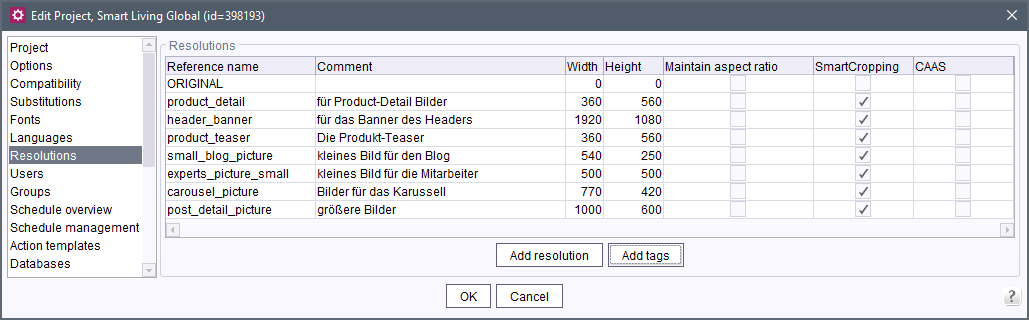
(FirstSpirit ServerManager / Project properties / Resolutions)
The tags can be activated or deactivated for the desired resolutions by clicking on them.
New tags can be created via the “Add tags” button. These will be added to all existing resolutions. To add the new tag to a resolution (“tagging”), it must be activated in the table for the desired resolution.
Evaluation in the generation
To generate in a media generation only the resolutions for which one or more tags are activated, use the variable
media_resolution_tagsin the schedule “Execute generation”, on the “Extended” tab in the “Variables” area:
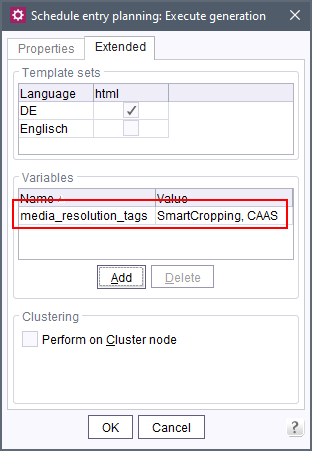
(FirstSpirit ServerManager / Project properties / Schedule management)
Multiple tags can be specified separated by commas.
This variable is only taken into account if the starting point is in the Media Store (“Properties” tab, “Execute PartialGeneration for following start nodes”).
If the variable is not specified, generation will not be restricted.
The media_resolution_tags variable is also evaluated in the JSON output. It can be set for this in the schedule, in the corresponding templates, or via API using the additionalContext(); method of the RenderingAgent.Renderer interface (FirstSpirit Developer API, package de.espirit.firstspirit.agency).
Access via API
Use the new methods getTags(); and setTags(); (FirstSpirit Access API, interface Resolution, package de.espirit.firstspirit.access.project) to get the tags of a resolution via API or add new ones, e.g.
resolution.getTags();The new method getResolutionsByTag (FirstSpirit Developer API, interface ResolutionAgent , package de.espirit.firstspirit.agency) can be used to determine the resolutions for which one or more tags are activated, e.g.
getResolutionsByTag("SmartCropping");Whether the SmartCropping tag is set for a resolution can be determined via the isSmartCropping() method in the Resolution interface (FirstSpirit Access API, package de.espirit.firstspirit.access.project).
Edit tags
Existing tags can be renamed or removed in the resolution table via context menu:
Rename tag Use this function to rename the selected tag for all resolutions.
Exception: The SmartCropping system tag cannot be renamed.
Remove tag: Use this function to remove the selected tag from all resolutions.
Exception: The SmartCropping system tag cannot be removed.
SmartCropping system tag
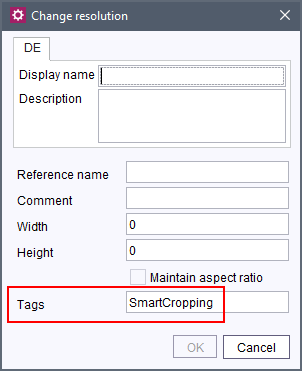
By default, the SmartCropping system tag is assigned for each new resolution.
The tag ensures that the “SmartCropping” functionality is used in the ContentCreator for the resolution in question.
If you do not want the “SmartCropping”functionality to be used for a newly created resolution, remove the tag from the field. If required, enter other tags, or leave the field empty.
For more information please refer to
1.5 Generation: Logging extended by information about media
As of the current FirstSpirit release, the number of generated media and scaled images as well as their file size are now also recorded in the log during a generation, e.g.
INFO  20.07.2021 10:43:43.092 {uID=0,seID=1258682,pID=1249405} (de.espirit.firstspirit.
   server.scheduler.GenerateTaskExecutor): 1929 media files produced, 72,171 MB of
   media data copied, 833 scaled pictures with a total of 4,571 MB created, ~31 ms
   per scaled picture, 0:00:26.648 total picture scaling time
In this way, you can better assess the load of an order.
For information about generation schedules please see also https://docs.e-spirit.com/odfs/edocs/admi/firstspirit-ser/schedule-entry/project-based-a/execute-generat/index.html.
1.6 Timeout for the start of services
The behavior when starting services has been improved: if a service cannot be started within three minutes, the start attempt is terminated so that other services can then be subsequently started as needed.
The time interval (in seconds) can be set up in the fs-server.conf configuration file via the services.start.timeout parameter.
2 General
Release frequency
In order to provide an even more regular and reliable schedule for FirstSpirit updates, we will be changing the patch day schedule starting in August. From that point on, patch days will take place every 4 weeks, instead of once per month."
3 ContentCreator
3.1 Beta phase: Data source management in ContentCreator
FirstSpirit offers the capability to manage highly structured content in a database. This can be product catalogs or address lists, for example. The management of such content in databases (as “datasets”) enables, among other things, efficient and complex search queries for this data in the client and (automatically) filtered output on the website. They can be clearly presented in tables and datasets can be easily reused in a wide variety of places.
Datasets that exist on one data structure and use the same input components for recording and storing the data are managed in FirstSpirit in so-called “Data sources”. For example, datasets in an “Address list” data source include data on first name, last name, telephone number, e-mail address, and picture, while a “Product catalog” data source includes data on product name, description, properties such as size, weight, and so on.
.png)
Type icon for data sources
Until now, creating and editing datasets was particularly easy to do in FirstSpirit SiteArchitect, while FirstSpirit ContentCreator only provided basic editing of dataset content.
As of the current release, the ContentCreator now also provides a clear display of datasets. In this view, datasets can be conveniently created and edited.
The functionality has already undergone intensive quality assurance. However, it has not yet been officially released. Therefore, it is recommended to test it in a development environment first.
Potential problems should be reported to e-Spirit in a timely manner.
An official release of the functionality is planned for one of the upcoming releases. The documentation for administrators and editors will also be supplemented in this context.
Activation and configuration
By default, the functionality is inactive in the ContentCreator. It is part of the “Tailored UI”. To be able to use it, it must be activated via the FirstSpirit ServerManager:
- If not already done: Add the project component “CXT ContentCreator: Feature Configuration ProjectApp” to the desired project (FirstSpirit ServerManager / Project properties / Project components).
- The data source display and editing can be configured via the so-called “Features” (
DOPPELKLICK
or “Configure” button on the project component).
The features belong to the EntityManagement group:
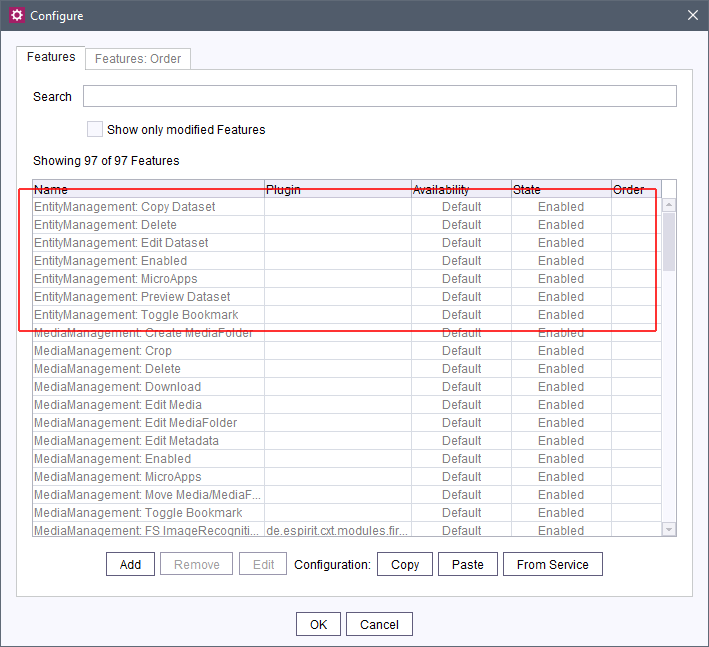
The default setting for the EntityManagement: enabled feature is currently Unavailable. To be able to use the functions, the availability Available must be configured for this feature. The other features of the EntityManagement group are then also Available, they do not have to be explicitly activated..
Display and use in the ContentCreator
If the EntityManagement: Enabled feature is activated (Available), the data source view can be opened in the corresponding project via the corresponding icon in the menu bar:
.png)
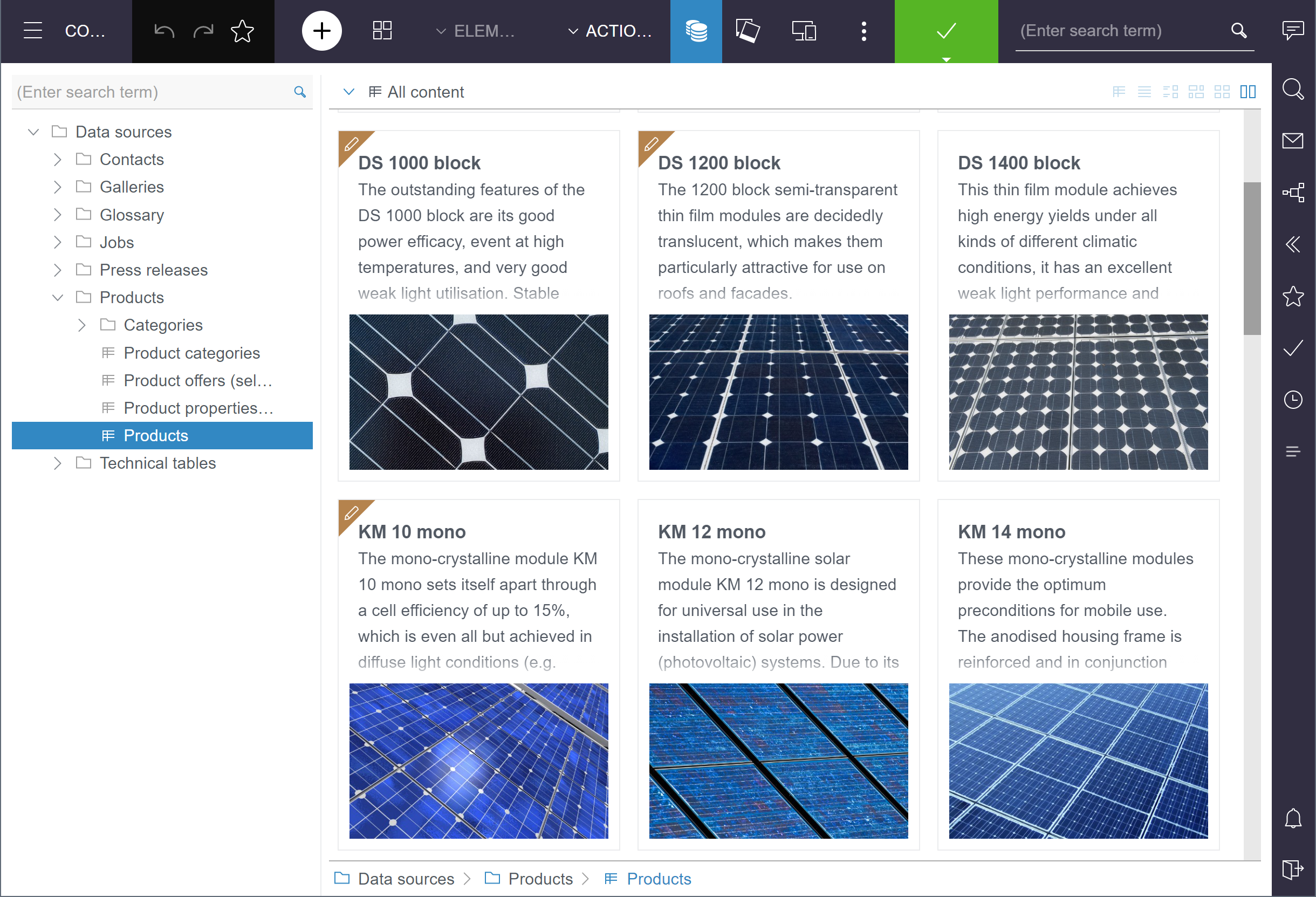
The data source view is basically structured like the media management:
- On the left is the tree structure with the data sources available in the project. These can be structured in folders depending on the project configuration.
Bookmarks can be set here. - In the main area, the data sources and datasets are displayed.
In addition to the previously known display modes, there are now also the options “Table” and “Tile”:

Table display
How the data source is displayed as a table is determined by the mapping of the corresponding table template. The mapping can be used, for example, to configure whether a column is to be hidden (“Display” option).
Hiding one or more columns can improve performance, especially with large amounts of data.
Columns of simple data types can be sorted (up and down, for example alphabetically or numerically).
.png)
The column that currently is used for sorting is highlighted in blue.
The default sorting is determined by the database used.
The sorting is always valid for one session and one user only.
Columns of type FS_INDEX are shown here only if they use the DatasetDataAccessPlugin.
Search
The data source search above the tree structure allows a full text search over all data source.
The search starts directly by entering characters in the search field.
The number of search hits is displayed behind the data source/folders.
One dataset can exist in several data sources, for example if it is a “filtered” data source (this is configured in FirstSpirit SiteArchitect).
In this case, a numerical range is displayed next to the data source, e.g. Product (0-11). This means that the data source in question contains up to 11 search hits.
If a data source is selected directly, the datasets with search hits are displayed.
Actions

- Set bookmark
Bookmarks can be set for datasets as well as data sources and data source folders. - Delete dataset
Deleting datasets is done by a workflow that has to be configured. - Show preview
To check how the dataset is actually displayed (also: “rendered”) on a page, you can switch to a corresponding page by clicking on this icon.
Precondition: For the table template in question, a page must be set on the “Properties” in the “Preview page” field on which the dataset is actually rendered. - Copy dataset
Existing datasets can be copied. - Edit dataset
Opens an edit window with all input elements of the selected dataset.
New datasets can still be created using the + icon in the menu bar.
If a data source is currently selected, it is displayed at the top of the menu. This allows new datasets to be created directly in this data source.
Furthermore, as before, only those data sources are offered for selection in the menu for which a preview page is selected and for which the option “Use in ContentCreator” is activated (both in the corresponding table template “Properties”).
Status and workflows
The respective workflow status is visualized at each dataset.
The datasets can be filtered (via “Alle elements”) by status.
To start or advance a workflow on datasets, data sources or folders, they can be selected by clicking on them (multiple selection within a data source or folder with
Ctrl
or
Shift
).
The desired workflow can then be started or advanced in the Dashboard.
It should be noted that the workflow that can be switched via the status display (also: “Element status”, in the menu bar) always refers to the parent element.
Datasets in reports
- If you are in the preview (e.g. of a page), clicking on a data set in reports displays a page on which the dataset is actually rendered.
Precondition: For the table template in question, a page must be set on the “Properties” in the “Preview page” field on which the dataset is actually rendered. - Otherwise ( except for the preview), the dataset is opened in the data source view and highlighted in the relevant data source.
From there, the “Show preview” icon can be used to switch to the dataset in the preview, if required.
Further information
- Dataset concept:
- Template development for database content:
- “Tailored UI”:
- Appearance and operation of the media management:
3.2 Release: automatic picture sizing via “Image Recognition” module
Pictures are always important for an Internet presence to be able to relay contents clearly and emotionally.
The concept of the “picture resolutions” in FirstSpirit has thereby always enabled a uniform use of picture sizes in online presences. The system automatically calculates and generates the desired resolutions for a project as standard.
However, depending on the picture material and project settings, these automatically generated resolutions often have to be checked and adjusted manually by the editor: in some project set-ups (e.g., when concrete page lengths are specified), the resolutions are distorted and the proportions of the delivered picture material do not match the proportions and sizes that are needed for the Internet presence. In other cases, a special focus must be selected in the available pictures to move a specific section into the “center”.
The “FirstSpirit Image Recognition” module integrates AI-assisted image recognition into the editing processes so that faces, objects and texts on images can be recognized automatically: during the upload in the ContentCreator, the images are enriched with matching data and cut to size automatically upon request.

The latest FirstSpirit release includes the official release for the use of the “FirstSpirit Image Recognition” module.
- Cloud customers have to activate the functionality for the desired project or projects.
Depending on the desired form, a corresponding option must be activated in the FirstSpirit ServerManager and/or the metadata template of the project must be adjusted. - Customers who operate FirstSpirit themselves and are waiting must first install the module
imagerecognition-module-[version].fsm. It can be requested via Technical Support.
Prerequisite: the module uses the “Amazon Rekognition” image recognition service for the image analysis. This requires an Amazon account with credentials that permit the use of “Amazon Rekognition” and (optional) an S3 Bucket.
For more information, see:
- Installation, activation and template development: https://docs.e-spirit.com/odfs/vorlagenentwick/contentcreator/index.html
- Use in the ContentCreator: https://docs.e-spirit.com/contentcreator/vorschauseite-b/arbeiten-mit-di/bildausschnitt/index.html
3.3 Media: Changing file names
Each medium in FirstSpirit requires a file name. Compared to the display name, which can be assigned individually for each project language, the file name is of a rather technical nature. If a medium does not have an assigned display name, the file name is used in some cases as a workaround.
Depending on the project configuration, the file name of media is also used to generate URLs for media.
The latest FirstSpirit release permits changes to not only the display name of media but also their file name with the option to enter them manually during creation, for example,
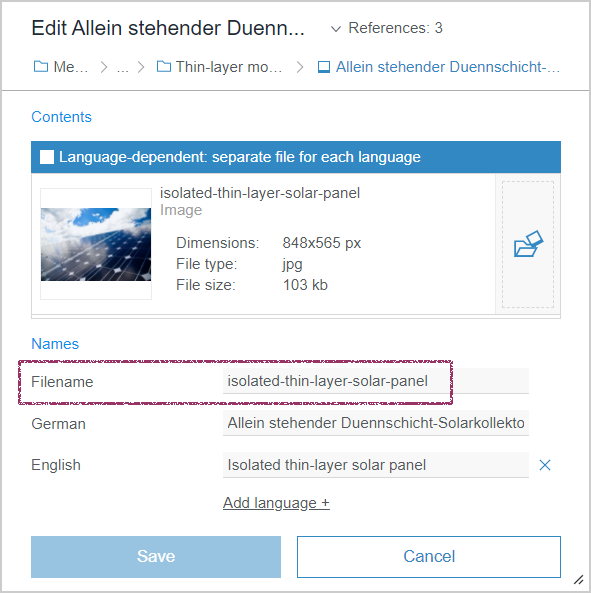
Permissible characters are:
letters (upper and lower case), numbers, underscores, minus signs
a-z 0-9 _ -The file name of media is always language-independent, which means that one file name applies to all languages of a medium.
If the file name is changed in different language views, the last value that was entered in the field will be used to store the data.
When a medium is made language-dependent and a medium is uploaded for the other language, the file name will remain unchanged.
When a medium is replaced by another file, the file name will remain unchanged. If the file name is to be created new (on the basis of the new file), the value in the field can be deleted prior to the upload.
When multiple media are uploaded at the same time, neither the file name nor the display name can be assigned manually: the names are created and assigned automatically by the system on the basis of the respective file names of the uploaded files. If necessary, the file and display names can be adapted for each medium individually at a later time.
4 External Synchronization
FSDevTools (fs-cli): Parameters for the transport of permissions
As of version 3.0.0 FSDevTools supports now new parameters for transporting permissions:
--permissionModeThis parameter can be used to configure whether
- editorial permissions (value:
STORE_ELEMENT) - workflow permissions (value:
WORKFLOW) - both (value:
ALL) or - no permissions (value:
NONE)
should be transported.
By default, when exporting, no permissions will be exported (NONE).
When importing, by default those permissions will be included, that were previously exported and are allowed on import (ALL).
--updateExistingPermissionsIf this switch is set for import, existing permissions in the target project will be overwritten (value: true). By default (if the switch is not specified), they remain unchanged.
Information about the parameters is also available by calling
fs-cli help <command>Compatibility: As of version 3.0.0, FSDevTools requires FirstSpirit in at least version 2021-07.
In addition, from now on the version of FSDevTools is oriented to “Semantic Versioning” (pattern: MAJOR.MINOR.PATCH; see also https://semver.org).
5 FirstSpirit Content Experience Tools (CXT)
Latest module versions
FirstSpirit 2021-08 supports the following module versions for “FirstSpirit Content Experience Tools”. Versioning is now oriented towards “Semantic Versioning” (pattern: MAJOR.MINOR.PATCH; see also https://semver.org).
| Module / file name | Version number |
FirstSpirit CXT Plattformplatform-[version].fsm | 2.4.0 |
FirstSpirit CXT DAP Bridgedataservice-[version].fsm | 1.44.0 |
FirstSpirit CXT FragmentCreatorfragment-creator-[version].fsm | 3.4.0 |
FirstSpirit Fragment DAPfragmentdap-[version].fsm | 1.40.0 |
FirstSpirit Media DAPmediadap-[version].fsm | 1.31.0* |
FirstSpirit PageRef DAPpagerefdap-[version].fsm | 1.9.0 |
FirstSpirit Markdown Editormarkdown-editor-[version].fsm | 1.29.0* |
FirstSpirit Tagging Editortagging-editor-[version].fsm | 1.29.0 |
FirstSpirit CXT FragmentCreator - CaaS Integrationcaas-integration-[version].fsm | 1.31.0 |
* These modules require FirstSpirit 2020-03 or higher from this version.
6 Compatibility
6.1 Incompatibility of FirstSpirit with Java < 11
FirstSpirit is successfully used by customers and partners with a wide variety of different third-party components (Operating Systems, JDKs, Servlet Engines, Application Servers, Databases) and with use of external libraries. Some of these components/libraries in their current versions are no longer compatible with Java 8. For example, this applies to the internal Apache Derby database that is included with FirstSpirit. This means that these third-party components/libraries can no longer be updated, which is particularly critical for safety related updates.
Oracle itself has not provided any public updates for Java 8 since February 2019 and recommends that developers and end users transition to a higher Java version to continue receiving public updates and security enhancements.
Basically, FirstSpirit supports only the last LTS (Long Term Support) version of OpenJDK and Oracle Java as well as the respective current released version of OpenJDK. The support for Java versions older than 11 has been announced for some time. FirstSpirit has taken a number of measures to ensure compatibility with Java 11 (and higher versions).
With the current release, the byte code level was changed from Java 8 to Java 11 as the last step. This means that all Java versions older than Java 11 (LTS) are incompatible with FirstSpirit.
This means that FirstSpirit will no longer run with Oracle Java < 11 or OpenJDK < 11 and that no measures are taken by e-Spirit AG to eliminate errors or problems that are related to Java < 11.
For more information on the respective Java versions that are supported by FirstSpirit, go to https://docs.e-spirit.com/odfs/edocs/admi/technical-requi/index.html#java__firstpirit.
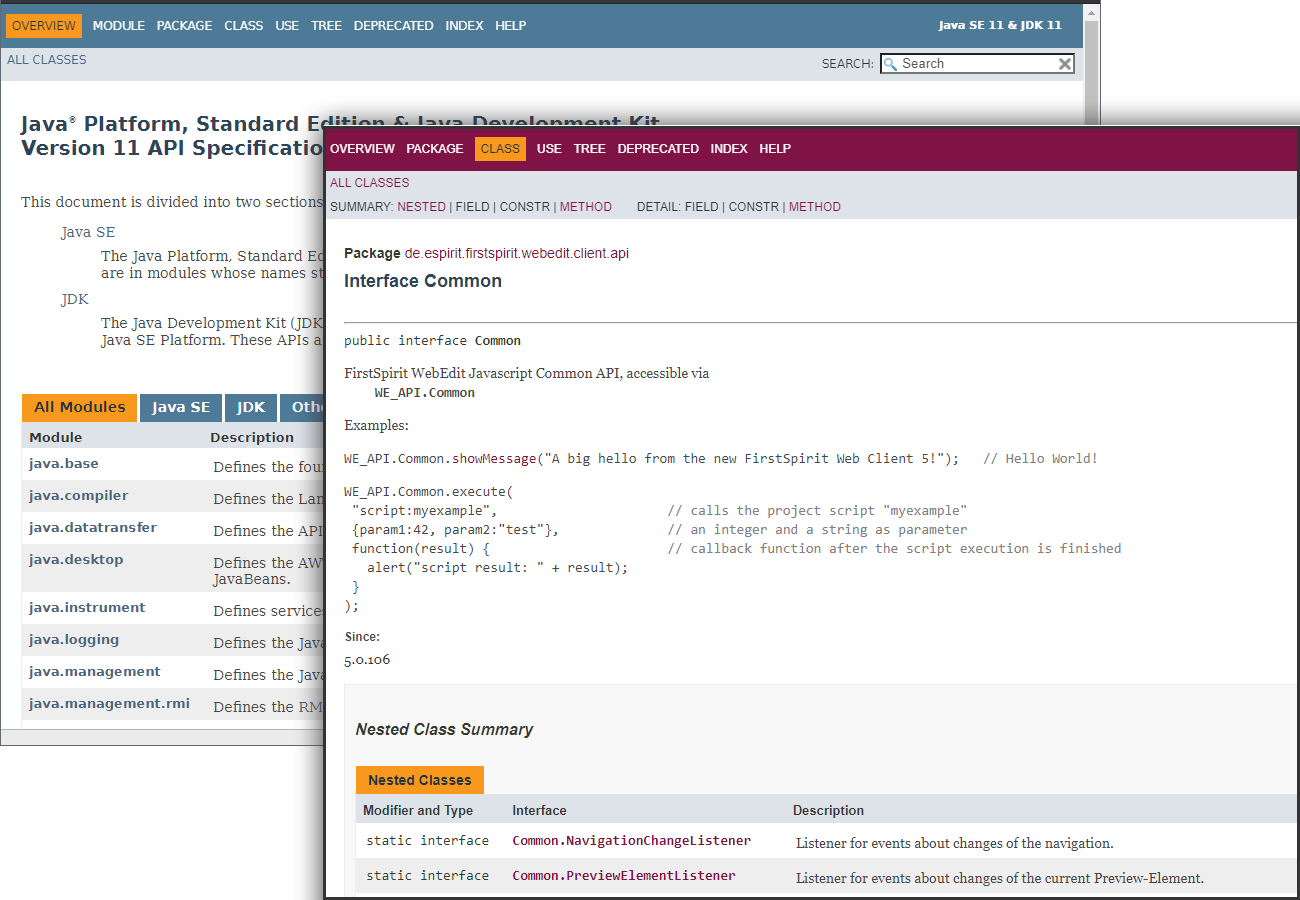
As part of this change, the presentation of the API documentation is now also based on that of Oracle's API documentation, version 11+ (https://docs.oracle.com/en/java/javase/11/docs/api/index.html): Instead of navigation via menus in frames, this now offers a search with which content can be found. This new design is more aligned with the current HTML5 standard.
6.2 Modules and extensions for FirstSpirit 2021-08
The following modules and extensions are compatible with FirstSpirit 2021-08:
| Module name/File name | Version number | Compatibility |
FirstSpirit Update Archivefs-update-[version].tar.gz | 2.1.0 | - |
FirstSpirit Install Archiv fs-install-[version].tar.gz | 2.1.0 | - |
FirstSpirit LauncherFSLauncher.exe | 1.0.41 | as of FirstSpirit 2018-08 |
FirstSpirit Launcher JRE modulefs-launcher-jre-[version].fsm | 1.19 | as of FirstSpirit 2020-11 |
FirstSpirit SAML Login modulefs-saml-login-[version].fsm | 1.3 | as of FirstSpirit 2019-02 |
FSDevToolsfs-cli-[version].tar.gzfs-cli-[version].zip | 3.0.1 | as of FirstSpirit 2021-07 |
FirstSpirit Module Gradle Pluginfirstspirit-module-gradle-plugin-[version].jar | 2.3.2 | as of FirstSpirit 2019-06 |
7 Template development
JSON: Output of entities
With the JSON output of entities, references are now output to the corresponding dataset. This reference can then be used to determine the associated dataset and load it accordingly, e.g.,
{
   "fsType": "Entity",
   "entityType": "table",
   "identifier": "06ff8faa-dade-495d-b94b-e86733b1ebed"
}
Overview
| ID | Description | Categories |
|---|---|---|
| CORE-9783 | The logging of the |
Debugging, Developer, FirstSpirit Administrator, Release, Workflow |
| CORE-11912 | Project administrators can now create project-local action templates again (FirstSpirit ServerManager / Project properties / Action templates / “Add”, error message before: |
FirstSpirit Administrator, Permissions, ServerManager |
| CORE-13424 | If the input components CMS_INPUT_DOM and CMS_INPUT_DOMTABLE are output via JSON by the Note: this change does not affect the use of the JSON function without |
Developer, Editor, Input Components, Support for JSON |
| CORE-13445 | In some cases, changes made in the translation help dialog were not saved completely. This mainly affected changes to language-independent FS_CATALOG components. With the current release, the changed contents are now correctly transferred from the translation help. |
Editor, Languages, SiteArchitect |
| CORE-13450 | The new project component “FirstSpirit AdvancedUrlFactory Configuration” can be used to create rules for character replacements by using the “Advanced URL Creator”. Beyond that, most special characters can now be entered directly during the definition of conversion rules in FirstSpirit and an input in the hexadecimal format is no longer required. |
Advanced URL, FirstSpirit Administrator, ServerManager |
| CORE-13473 | With the JSON output of entities, references are now output to the corresponding dataset. Further information can be found in chapter “Template development: JSON: Output of entities”. |
Content Store, Database, Developer, Support for JSON |
| CORE-13557 | Restricting the number of resolutions to be generated in a generation by using tags |
FirstSpirit Administrator, Generation, Media, Performance, ServerManager |
| CORE-13598 | The behavior when starting services has been improved. Further information can be found in chapter “Administration: Timeout for the start of services”. |
FirstSpirit Administrator, Modules, Services |
| CORE-13632 | Fixed an error that caused two events to be incorrectly created when creating a |
Page Store |
| CORE-13660 | Configuring parallel execution of schedules Further information can be found in chapter “Administration: Schedules: Parallel execution”. |
FirstSpirit Administrator, Performance, Tasks |
| CORE-13671 | Fixed an error that caused two events to be generated for the corresponding “Release” revision instead of one when releasing a dataset. |
Database, Release, Workflow |
| CORE-13695 | Due to timing issues, the used servlet engine could fail to exit. |
FirstSpirit Administrator, Web server |
| CORE-13704 | With FirstSpirit 2021-08, FirstSpirit is incompatible with all Java versions older than Java 11 (LTS). |
Developer, FirstSpirit Administrator, Java, Module development |
| CORE-13707 | When using the “Rebuild search index” schedule, errors of type |
FirstSpirit Administrator, Indexing, Search, Tasks |
| CORE-13712 | The configuration of the “Tailored UI” (previously per system module “FirstSpirit CXT ContentCreator Extension”) has been moved to another location. |
ContentCreator, FirstSpirit Administrator, Modules, ServerManager |
| CORE-13715 | As of the current FirstSpirit release, the number of generated media and scaled images as well as their file size are now also recorded in the log during a generation. |
Debugging, FirstSpirit Administrator, Generation, Media, Tasks |
| CORE-13771 | Release frequency Further information can be found in chapter “General: Release frequency”. |
Developer, FirstSpirit Administrator |
| CORE-13773 | FirstSpirit Content Experience Tools: Latest module versions |
Developer, FirstSpirit API, FirstSpirit Administrator, FirstSpirit Content Experience Tools (CXT), FragmentCreator, Modules |
| CORE-13774 | The following modules and extensions are compatible with FirstSpirit 2021-08. |
Developer, FSDevTools, Launcher, Modules |
| CORE-13780 | A project is now closed immediately after the completion of a schedule task, so that the memory used by the project is now available to the server more quickly. |
FirstSpirit Administrator, Performance, Tasks |
| CXT-1770 | The latest FirstSpirit release permits changes to not only the display name of media but also their file name with the option to enter them manually during creation. Further information can be found in chapter “ContentCreator: Media: Changing file names”. |
ContentCreator, Editor, Media, Media Store |
| CXT-2339 | In the ContentCreator, datasets can now also be clearly displayed in a separate view and edited conveniently. This functionality is currently still in beta phase |
Content Store, ContentCreator, Database, Developer, Editor, FirstSpirit Administrator, Table templates |
| CXT-2359 | The latest FirstSpirit release includes the official release for the use of the “FirstSpirit Image Recognition” module. |
ContentCreator, Developer, Editor, FirstSpirit Administrator, Media, Media Store |
| CXT-2366 | If a user is explicitly configured for access to a remote project (FirstSpirit ServerManager / Project properties / Remote projects, “User” field), the media management in the ContentCreator was not displayed temporarily (error message in the web server log: |
FirstSpirit Administrator, Media Store, Remote access |
| CXT-2368 | Not allowed |
ContentCreator, Editor |
| CXT-2373 | File sizes of files from the media management are now correctly displayed as tooltip again. (Intermediate error message: |
ContentCreator, Editor, Media |
| CXT-2378 | The display of bullets of lists in the edit dialog of CMS_INPUT_DOM and CMS_INPUT_DOMTABLE in ContentCreator has not been kept. |
ContentCreator, Editor |
| DEVEX-333 | The log outputs of “fs-cli” (FSDevTools) have been improved for some errors. |
Debugging, Developer, FSDevTools |
| DEVEX-503 | For “fs-cli” (FSDevTools) there are now parameters for the transport of permissions. |
Developer, FSDevTools, Permissions |
Deprecations
| Functionality | Deprecated as of | Will be removed / Was removed as of |
|---|---|---|
| Input component CMS_INPUT_CONTENTAREALIST | 5.2R3 | |
| Input component CMS_INPUT_CONTENTLIST | 5.2R3 | |
| Input component CMS_INPUT_FILE | 5.2R3 | |
| Input component CMS_INPUT_LINKLIST | 5.2R3 | |
| Input component CMS_INPUT_OBJECTCHOOSER | 5.2R3 | |
| Input component CMS_INPUT_PAGEREF | 5.2R3 | |
| Input component CMS_INPUT_PICTURE | 5.2R3 | |
| Input component CMS_INPUT_TABLIST | 5.2R3 | |
| FirstSpirit Access API: de.espirit.firstspirit.agency.GroupsAgent | 5.2R15 | |
| FirstSpirit Access API: delete (de.espirit.firstspirit.access.AccessUtil) | 5.2R18 | |
| FirstSpirit Access API: release (de.espirit.firstspirit.access.AccessUtil) | 2018-06 | |
| FirstSpirit Access API: getLastLoginAsDate (de.espirit.firstspirit.agency.UserStatisticsAgent) | 2018-07 | |
| FirstSpirit Access API: remainingDurationOfCurrentStageInMillis (de.espirit.firstspirit.server.MaintenanceModeInfo) | 2018-07 | 2025-13 |
| FirstSpirit Access API: getStartingTimeOfStageAsDate (de.espirit.firstspirit.server.MaintenanceModeInfo) | 2018-07 | 2025-13 |
| FirstSpirit Access API: getSelectedWebserverConfiguration (de.espirit.firstspirit.access.serverConfiguration) | 2018-10 | 2025-13 |
| FirstSpirit Access API: setSelectedWebserverConfiguration (de.espirit.firstspirit.access.serverConfiguration) | 2018-10 | 2025-13 |
| FirstSpirit Access API: getSelectedWebServer (de.espirit.firstspirit.access.project.Project) | 2018-10 | 2025-13 |
| FirstSpirit Access API: setSelectedWebServer (de.espirit.firstspirit.access.project.Project) | 2018-10 | 2025-13 |
| FirstSpirit Access API: getLostAndFoundStoreNodes(); (de.espirit.firstspirit.feature.FeatureInstallResult) | 2018-10 | |
| FirstSpirit Access API: getDeletedStoreNodes(); (de.espirit.firstspirit.feature.FeatureInstallResult) | 2018-10 | |
| FirstSpirit Access API: de.espirit.firstspirit.access.store.Previewable | 2019-01 | |
| WebSphere Application Server support for FirstSpirit | 2019-05 | |
| Legacy mode for the FirstSpirit server | 2019-06 | 2022-03 |
| Database layer for Oracle Database 11g/12c | 2020-12 | 2025-05 |
| FirstSpirit Access API: redirectTemplateLogToDefaultLog() (Interface RenderingAgent.Renderer) | 2021-05 |