
Release Notes
1 Administration
1.1 Update of internally used software
As of the release 2023.2, the following internally used software has been updated.
- Apache Commons IO (library with operations for file inputs and outputs)
Update from version 1.3.2 to version 2.11.0 - Apache Commons Lang
Update to version 3.12.0 - Java (JRE, with which the desktop clients SiteArchitect and ServerManager are operated)
Integrated in FirstSpirit (standard): 17.0.5+8 64bit AdoptOpenJDK
As of the release 2023.3, the following internally used software will be updated.
- Gson (2.8.0 --> 2.10)
- metadata-extractor (2.11.0 --> 2.18.0)
- Apache POI (3.7 --> 5.2.2)
- commons-codec (1.11 --> 1.15)
- commons-collections (4.1 --> 4.4)
- commons-math (3.6.1, new)
- xmlbeans (2.5.0 --> 5.0.3)
- dom4j (1.6.1 --> no longer used)
Note: Since “Legacy Mode” is no longer supported, affected modules should be switched to “Isolated Mode” if possible (see https://docs.e-spirit.com/odfs/edocs/modd/module-developm/index.html).
1.2 FirstSpirit-Server witht Java 17 or up: add-opens start parameters
If the FirstSpirit ContentCreator was run with an application server on Java 17 or newer, this could lead to problems with creating new sections or editing existing ones.
To resolve this, it is necessary to use the following parameter:
--add-opens=java.base/java.lang=ALL-UNNAMEDThe parameter has been added to the fs-wrapper-vendor.conf file. After a FirstSpirit server update, it is available automatically.
The start parameters of external application servers (e.g. Tomcat) need to be complemented with the --add-opens parameters found in the fs-wrapper-vendor.conf file.
1.3 Java 17 for the launch of FirstSpirit desktop applications
Java 17 is now used by default to start the FirstSpirit desktop applications (ServerManager, SiteArchitect).
1.4 Linux server settings: improved file handle monitoring
If the operating system ran out of free file handles for the user for which the FirstSpirit server was operated, this led to severe follow-up problems.
The server settings for Linux-based operating systems have now been edited in the fs-server.conf file to prevent such problems:
- The Open Files are being checked every 60 seconds.
- As soon as the warning limit is surpassed (pre-setting: 90%), the server receives the “Degraded” status.
- As soon as the shutdown limit is surpassed (pre-setting: 95%), the server is being shut down.
- The server administrator is notified via e-mail about a surpassed limit.
Default values of the fs-server.conf file:
# open files warning limit
files.limit.percent=90
files.limit.active=true
# open files shutdown limit
files.shutdown.percent=95
files.shutdown.active=true
You can check the Open Files in the “HealthManager MBeans” using the entries maxFileHandles and openFileHandles.
2 General
Behavior in case of DAP implementation errors in JSON rendering
So far, JSON generation has been cancelled if implementation errors in the Data Access Plugin occurred.
JSON generation is now continued even if DAP errors occur. The error is output as a JSON error object.
3 ContentCreator
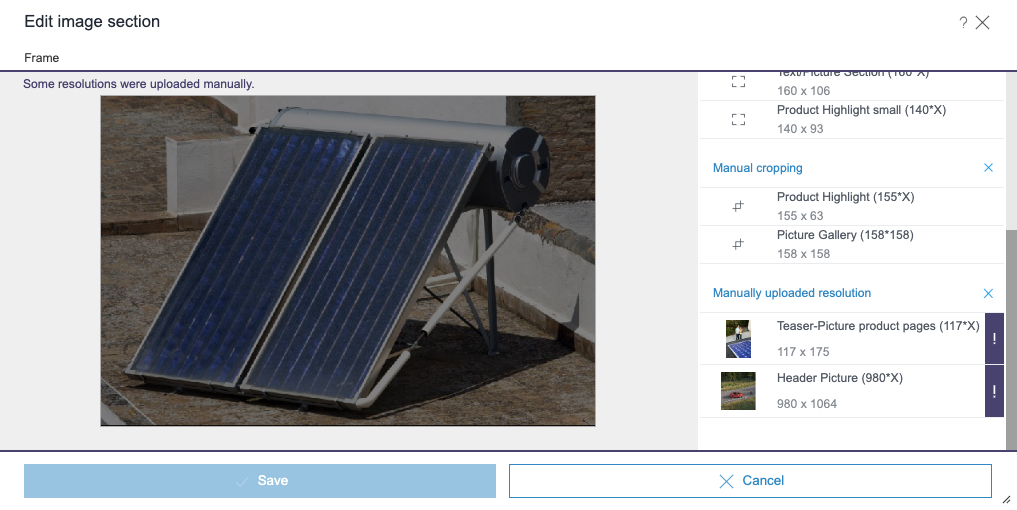
Cropping dialogue: Reset all manual croppings
Manual croppings can be reset for the complete group. Resolutions that have been uploaded manually are highlighted with an exclamation mark and can also be reset as a group.
4 FirstSpirit Content Experience Tools (CXT)
4.1 Latest module versions
FirstSpirit 2023.2 supports the following module versions for “FirstSpirit Content Experience Tools”.
| Module / file name | Version number |
FirstSpirit CXT Plattformplatform-[version].fsm | 3.0.2 |
FirstSpirit CXT DAP Bridgedataservice-[version].fsm | 1.44.10 |
FirstSpirit CXT FragmentCreatorfragment-creator-[version].fsm | 4.0.2 |
FirstSpirit Fragment DAPfragmentdap-[version].fsm | 1.40.15 |
FirstSpirit Media DAPmediadap-[version].fsm | 1.31.9* |
FirstSpirit PageRef DAPpagerefdap-[version].fsm | 1.9.9 |
FirstSpirit Markdown Editormarkdown-editor-[version].fsm | 1.29.8* |
FirstSpirit Tagging Editortagging-editor-[version].fsm | 1.29.8 |
FirstSpirit CXT FragmentCreator - CaaS Integrationcaas-integration-[version].fsm | 1.31.9 |
* These modules require FirstSpirit 2020-03 or higher from this version.
4.2 The management page is only accessible for server or project administrators
From FirstSpirit Relase 2022.13 it is possible to configure the availability of MicroApps via the management page.
This management page is accessible under
/management(appended to the URL of the platform), e.g.
http://myServer:8080/cxt-platform/managementPreviously, the management page was only accessible to server administrators.
With the current release, the page is also accessible for project administrators.
Installation / Modules / Installing modules / Platform (→Documentation “Content Experience Tools”)
5 SiteArchitect / ServerManager
Warning limits and shutdown limits with absolute values
Threshold values for free disk space can be defined in the global server settings (FirstSpirit ServerManager) or using the parameters hdd.limit and hdd.shutdown (fs-server.conf). When these values are surpassed, an e-mail is sent to the server administrator. If the shutdown limit is surpassed, the FirstSpirit server is shut down.
So far, the threshold value could only be set as a disk space percentage.
With the current release, the free disk space can be set as an absolute value instead of the percentage.
Note:
Values under 100 are interpreted as a percentage setting:
hdd.shutdown=1073741824: shutdown limit at 1 GiB remaining disk spacehdd.shutdown=97: shutdown limit at 97% of the total disk space
For absolute values' settings, you can also use m (MiB), g (GiB) and t (TiB):
hdd.shutdown=2g: shutdown limit at 2 GiB remaining disk space
Note:
- Technically smallest possible shutdown limit setting for remaining disk drive: 512 MiB
- Recommended shutdown limit setting for remaining disk drive: 95%, minimum 2 GiB
The threshold values can also be defined via API (FirstSpirit access API, package de.espirit.firstspirit.server.configuration). The previous methods have been deprecated and replaced by new ones. Now, the threshold values are transferred as String.
6 Template development
No use of spaces in table names
So far, when creating or editing a table in a database schema, it was possible to use spaces in the table name. With spaces in table names, it was possible that no results were found when searching the corresponding table's data source.
With the current release, you cannot use spaces in table names any longer when creating new tables or editing existing ones in the GUI.
Note: The names of existing tables have not been adjusted and still are considered correct even if spaces in the table name do exist. When changing the table name, you will need to delete such spaces.
Overview
| ID | Description | Categories |
|---|---|---|
| CORE-10462 | When creating or editing a table, spaces can no longer be used in the table name. Further information can be found in chapter “Template development: No use of spaces in table names”. |
Template Development |
| CORE-12729 | The log level of most messages in the |
Logging, Server Administrator |
| CORE-14359 | The display logic for contextless workflows will be now respected. |
Workflow |
| CORE-14446 | JSON generation continuation in case of DAP errors |
Support for JSON |
| CORE-14472 | Update of internally used software Further information can be found in chapter “Administration: Update of internally used software”. |
Integrated software |
| CORE-14855 | Possibility to set shutdown limits regarding remaining hard disk space as absolute values |
ServerManager |
| CORE-14951 | With the current FirstSpirit release, Java 17 is now used as standard for launching the FirstSpirit desktop applications. |
Java, Launcher, ServerManager, SiteArchitect |
| CORE-14981 | The loading of the module overview in the server properties (FirstSpirit ServerManager) has been optimised. |
Server Administrator |
| CORE-15017 | Problems with creating and editing sections in FirstSpirit ContentCreator with Java 17 resolved |
Server Administrator |
| CORE-15025 | An automated switching-off mechanism has been implemented for Linux servers to enhance the monitoring of available file handles |
Server Administrator |
| CORE-15036 | FirstSpirit Content Experience Tools: Latest module versions |
FirstSpirit Content Experience Tools (CXT) |
| CXT-2721 | Manual croppings can be reset for the complete group. |
ContentCreator |
| CXT-2757 | The management page is now also accessible for project administrators. |
FirstSpirit Content Experience Tools (CXT) |
| CXT-2770 | Visibility rules in forms were in rare cases not evaluated correctly when opening the dialog. |
ContentCreator, Dynamic Forms |
Deprecations
| Functionality | Deprecated as of | Will be removed / Was removed as of |
|---|---|---|
| Input component CMS_INPUT_CONTENTAREALIST | 5.2R3 | |
| Input component CMS_INPUT_CONTENTLIST | 5.2R3 | |
| Input component CMS_INPUT_FILE | 5.2R3 | |
| Input component CMS_INPUT_LINKLIST | 5.2R3 | |
| Input component CMS_INPUT_OBJECTCHOOSER | 5.2R3 | |
| Input component CMS_INPUT_PAGEREF | 5.2R3 | |
| Input component CMS_INPUT_PICTURE | 5.2R3 | |
| Input component CMS_INPUT_TABLIST | 5.2R3 | |
| FirstSpirit Access API: de.espirit.firstspirit.agency.GroupsAgent | 5.2R15 | |
| FirstSpirit Access API: delete (de.espirit.firstspirit.access.AccessUtil) | 5.2R18 | |
| FirstSpirit Access API: release (de.espirit.firstspirit.access.AccessUtil) | 2018-06 | |
| FirstSpirit Access API: getLastLoginAsDate (de.espirit.firstspirit.agency.UserStatisticsAgent) | 2018-07 | |
| FirstSpirit Access API: remainingDurationOfCurrentStageInMillis (de.espirit.firstspirit.server.MaintenanceModeInfo) | 2018-07 | 2025-13 |
| FirstSpirit Access API: getStartingTimeOfStageAsDate (de.espirit.firstspirit.server.MaintenanceModeInfo) | 2018-07 | 2025-13 |
| FirstSpirit Access API: getSelectedWebserverConfiguration (de.espirit.firstspirit.access.serverConfiguration) | 2018-10 | 2025-13 |
| FirstSpirit Access API: setSelectedWebserverConfiguration (de.espirit.firstspirit.access.serverConfiguration) | 2018-10 | 2025-13 |
| FirstSpirit Access API: getSelectedWebServer (de.espirit.firstspirit.access.project.Project) | 2018-10 | 2025-13 |
| FirstSpirit Access API: setSelectedWebServer (de.espirit.firstspirit.access.project.Project) | 2018-10 | 2025-13 |
| FirstSpirit Access API: getLostAndFoundStoreNodes(); (de.espirit.firstspirit.feature.FeatureInstallResult) | 2018-10 | |
| FirstSpirit Access API: getDeletedStoreNodes(); (de.espirit.firstspirit.feature.FeatureInstallResult) | 2018-10 | |
| FirstSpirit Access API: de.espirit.firstspirit.access.store.Previewable | 2019-01 | |
| WebSphere Application Server support for FirstSpirit | 2019-05 | |
| Database layer for Oracle Database 11g/12c | 2020-12 | 2025-05 |
| FirstSpirit Access API: redirectTemplateLogToDefaultLog() (Interface RenderingAgent.Renderer) | 2021-05 | |
| Support for Log4j 1 | 2022-05 | 2024-06 |