
Release Notes
1 ContentCreator
1.1 "References” report: Show usages and relations
In FirstSpirit, you can use elements repeatedly, e.g., images, sections, pages, datasets, etc. This means that these contents can appear in multiple places of the site. This is also referred to as “Usages” or “References”.
When an element is changed in one place, these changes can also affect other pages. For example, if you cut an image in the Media Store or directly on a page, the image will also appear on other pages in the modified format.
There are now additional functions to better be able to evaluate and check if, where and how the changes you made to elements have an impact:
Report “References”

The “References” report lists dependent elements.
By default (when the report is opened via the icon in the Report bar), the list refers to the actual preview element, which means generally to the current preview page.
A distinction is made for references between
- Incoming references:
Here, all elements that reference the current element are shown.
Example: pages that contain a link to the current page. - Outgoing references:
Here, all elements that are used by the selected element are shown.
Example: media or datasets that are included on the current page (e.g. per FS_REFERENCE or FS_DATASET).
The entry below the report heading shows the element to which the report refers.
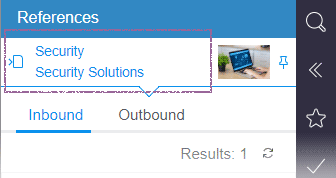
If you are in the preview, the report always refers to the current page.
If you change to another page via Preview or Navigation bar, the references of the selected page are shown.
You can fix the current element by clicking on the icon
.png)
This way, the references of the fixed element continue to be shown when changing to another element and can be checked step-by-step.
The background will then turn blue.
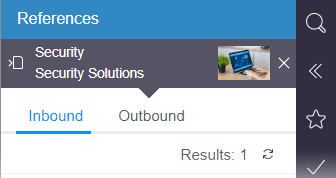
Click on the text with the blue background to return to this fixed element at any time.
Clicking on the icon
.png)
Will release the fixation and the references are displayed again in the preview.
Note: The display of references can also contain elements from other projects, or elements for which there is no display option in the current ContentCreator session. Such references are shown in the report; however, further interaction is not possible.
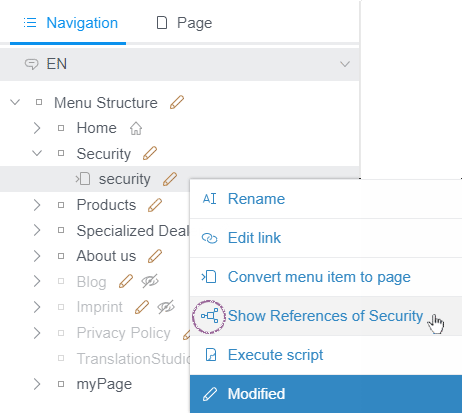
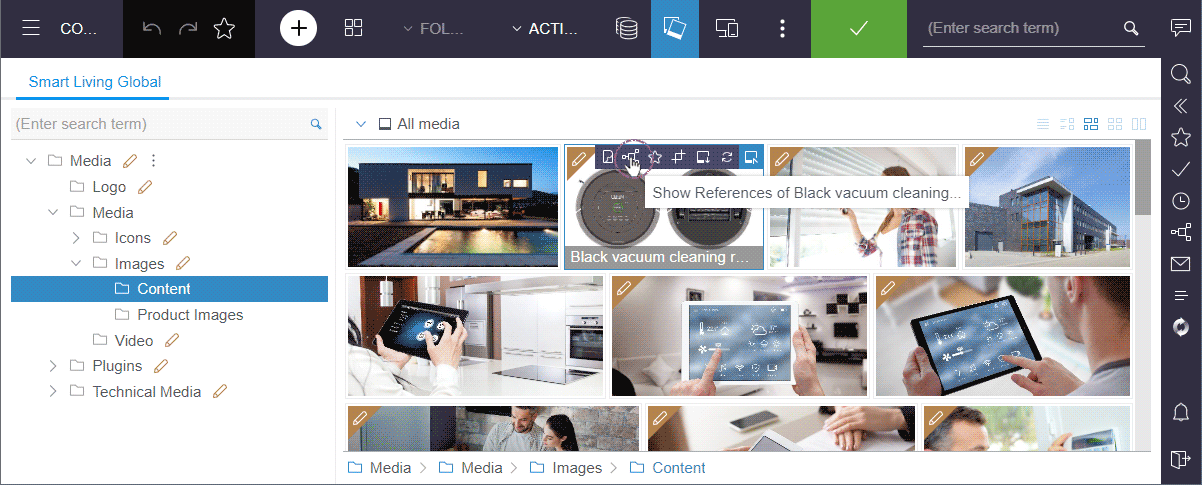
For elements such as sections, media and datasets, the respective references can be displayed via the icon
You will find it in many places in the ContentCreator:
- EasyEdit bar

- Navigation bar
- Media management and Data sources
- Editing dialogs
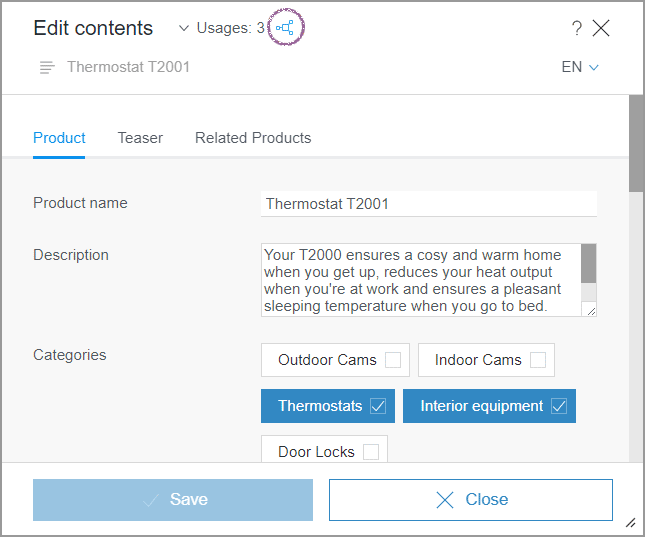
For more information, see also https://docs.e-spirit.com/contentcreator/report-area/references/index.html.
Report “Related objects”
The “References” report replaces the previous “Related objects” report and takes on its functions:
- “Inbound links”:
pages that contain a reference to the current page.
Now located on the “Inbound” tab. - “Outbound links”:
elements that are used by the current element.
Now located on the “Outbound” tab. - “Neighborhood”:
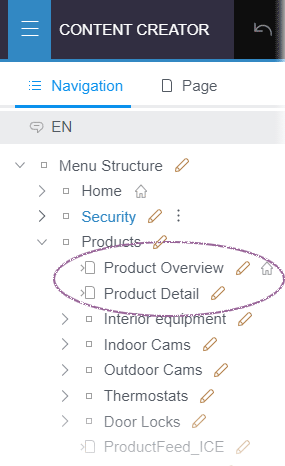
these are pages that are below the same menu item, such as the current page, but that do not have their own menu item.
They are no longer displayed in the report but are shown in the Navigation view:
1.2 Upload of media via input component
The user guidance when uploading media via the input element “Reference selection” (FS_REFERENCE) and “Reference sensitive graphic” (CMS_INPUT_IMAGEMAP) has been improved (Parameter upload):
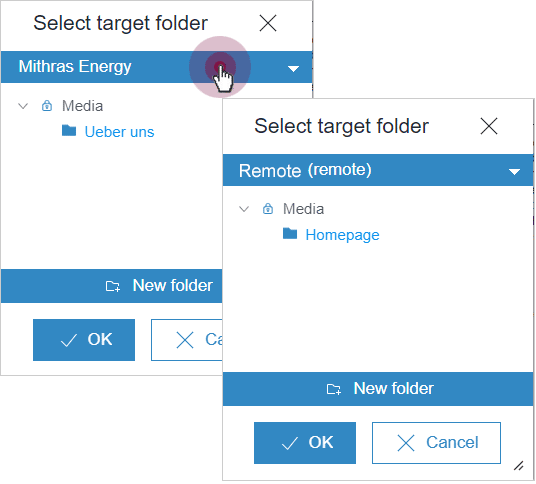
If the upload was not limited to a specific folder with the uploadFolder parameter, only those folders are now offered from which a selection is actually permitted, including their subfolders.
Example
<FS_REFERENCE name="st_picture" hFill="yes" imagePreview="yes" upload="yes"
           useLanguages="yes">
  <FILTER>
    <ALLOW type="picture"/>
    <HIDE type="file"/>
  </FILTER>
  <LANGINFOS>
    <LANGINFO lang="*" label="Picture" description="Choose the desired picture."/>
    <LANGINFO lang="DE" label="Bild" description="Wählen Sie das gewünschte Bild aus."/>
  </LANGINFOS>
  <PROJECTS>
    <LOCAL name=".">
      <SOURCES>
        <FOLDER name="aboutus" store="mediastore"/>
      </SOURCES>
    </LOCAL>
    <REMOTE name="remote">
      <SOURCES>
        <FOLDER name="homepage" store="mediastore"/>
      </SOURCES>
    </REMOTE>
  </PROJECTS>
</FS_REFERENCE>
This input component enables an upload to the aboutus folder of the local project, the homepage folder of the remote project and subfolder:
2 FirstSpirit Content Experience Tools (CXT)
Latest module versions
FirstSpirit 2022.7 supports the following module versions for “FirstSpirit Content Experience Tools”.
| Module / file name | Version number |
FirstSpirit CXT Plattformplatform-[version].fsm | 2.5.5 |
FirstSpirit CXT DAP Bridgedataservice-[version].fsm | 1.44.5 |
FirstSpirit CXT FragmentCreatorfragment-creator-[version].fsm | 3.4.9 |
FirstSpirit Fragment DAPfragmentdap-[version].fsm | 1.40.10 |
FirstSpirit Media DAPmediadap-[version].fsm | 1.31.5* |
FirstSpirit PageRef DAPpagerefdap-[version].fsm | 1.9.5 |
FirstSpirit Markdown Editormarkdown-editor-[version].fsm | 1.29.4* |
FirstSpirit Tagging Editortagging-editor-[version].fsm | 1.29.4 |
FirstSpirit CXT FragmentCreator - CaaS Integrationcaas-integration-[version].fsm | 1.31.5 |
* These modules require FirstSpirit 2020-03 or higher from this version.
3 Module Development, Scripts, API
3.1 Sending e-mails to CC and BCC addresses
With the latest release, e-mails can now also be sent via API to visible and invisible copy recipients (cc / “Carbon copy” and bcc / “Blind carbon copy” / “Blind copy”).
The class MailHeader.Builder (package de.espirit.firstspirit.access, FirstSpirit Access API) has been expanded with the methods
ccRecipient
bccRecipient
Example:
import de.espirit.firstspirit.access.MailHeader;
import de.espirit.firstspirit.access.MailService;

mailHeaderBuilder = MailHeader.getBuilder();
mailHeaderBuilder.bccRecipient("<mailadress1>;<mailadress2>");
mailHeaderBuilder.ccRecipient("<mailadress1>;<mailadress2>");
mailHeaderBuilder.recipient("<mailadress1>;<mailadress2>");
mailHeaderBuilder.sender("<senderMailadressFromServer>");
mailHeader = mailHeaderBuilder.create();
attachment = null;
service = context.getConnection().getService(MailService.class);
service.sendMail(mailHeader, "<Subject>", "<Mailbody>", attachment);
3.2 "StoreElement” interface: check of permissions when changing workflow permissions
A security gap was closed that allowed users to adjust the workflow permissions via FirstSpirit API in spite of insufficient permissions.
This affects the StoreElement interface, de.espirit.firstspirit.access.store package (FirstSpirit Access API):
When using the Setter methods and some modifying Getter methods, e.g.
setWorkflowPermissionsetWorkflowPermissionssetInheritWorkflowPermissiongetCreateWorkflowPermission
a check now determines if the executing user has the permission to change workflow permissions (CAN_CHANGE_PERMISSION, permission 128).
If the user does not have the respective permission, the method is not executed and a corresponding exception is logged, e.g.
...
Target exception: de.espirit.firstspirit.access.AccessSecurityException: Access
   denied to StoreElement 'xyz' with permission 128!
   (de.espirit.firstspirit.store.access.sitestore.PageRefFolderImpl, id=1600310)
...
Previously, the methods were also executed without sufficient permissions.
Existing customer solutions that use these methods must be checked for functionality and, if necessary, the required permissions must be assigned to the executing user.
Overview
| ID | Description | Categories |
|---|---|---|
| CORE-12142 | With the latest release, e-mails can now also be sent via API to visible and invisible copy recipients (cc and bcc). |
Developer, FirstSpirit API |
| CORE-13917 | A security gap was closed that allowed users to adjust the workflow permissions via FirstSpirit API in spite of insufficient permissions. |
Developer, FirstSpirit API, FirstSpirit Administrator, Permissions, Workflow |
| CORE-14183 | For some methods of the class |
Developer, FirstSpirit API |
| CORE-14400 | Improvements in the area of “Security”: If the FirstSpirit Root-WebApp is opened via a secure connection (HTTPS), the FirstSpirit SecurityFilter now sets a Strict Transport Security-Header with a time period of 90 days (HSTS, see also https://en.wikipedia.org/wiki/HTTP_Strict_Transport_Security). |
FirstSpirit Administrator, Security |
| CORE-14410 | An error has been rectified, which, in rare cases, led to that due to an error, the change of the project name was not successful until the second try ( |
FirstSpirit Administrator, ServerManager |
| CORE-14416 | Changed objects were intermittently not released after a roll-out/import of the package in spite of an automatic release. |
Corporate Content |
| CORE-14434 | Internal libraries that are used to support image formats have been updated. |
Developer, FirstSpirit Administrator, Integrated software, Media |
| CORE-14445 | FirstSpirit Content Experience Tools: Latest module versions |
Developer, FirstSpirit Administrator, FirstSpirit Content Experience Tools (CXT), FragmentCreator, Modules |
| CORE-14450 | In the meantime, an error occurred when debugging with the Template Debugger when reaching breakpoints. |
Debugging, Developer, SiteArchitect, Template Debugger |
| CXT-1594 | In the Comparison View (“Display all changes”), it is now possible to select the Comparison View for the outer or inner element specifically in the case of nested elements (“Compare xyz”). |
ContentCreator, Editor, Version history |
| CXT-2114 | To better be able to evaluate and check if, where and how the changes you make to elements have an impact, there are now additional functions you can use to display references. |
ContentCreator, Editor, Reports |
| CXT-2568 | The display of indentions in the Rich Text Editor in the FirstSpirit ContentCreator for writings with a writing direction from right to left was improved. |
ContentCreator, Editor, Languages |
| CXT-2603 | The user guidance when uploading media via the input elements “Reference selection” (FS_REFERENCE) and “Reference sensitive graphic” (CMS_INPUT_IMAGEMAP) was improved. Further information can be found in chapter “ContentCreator: Upload of media via input component”. |
ContentCreator, Developer, Editor, Input Components, Media |
| CXT-2604 | The file selection dialog in the FirstSpirit ContentCreator intermittently failed to open when exchanging the medium. |
ContentCreator, Editor, Media, Media Store |
| CXT-2611 | In the FirstSpirit ContentCreator, the change recognition has been improved when editing texts, tables, references and lists, so that the “Save” button will now only become active with actual changes made. |
ContentCreator, Editor |
| CXT-2624 | In rare cases, the selected date in the input element for date and time (CMS_INPUT_DATE) was shown incorrectly in the form in the ContentCreator: for example, when the first day of a month was selected, the first day of the following month was shown as selected, |
ContentCreator, Editor, Input Components |
Deprecations
| Functionality | Deprecated as of | Will be removed / Was removed as of |
|---|---|---|
| Input component CMS_INPUT_CONTENTAREALIST | 5.2R3 | |
| Input component CMS_INPUT_CONTENTLIST | 5.2R3 | |
| Input component CMS_INPUT_FILE | 5.2R3 | |
| Input component CMS_INPUT_LINKLIST | 5.2R3 | |
| Input component CMS_INPUT_OBJECTCHOOSER | 5.2R3 | |
| Input component CMS_INPUT_PAGEREF | 5.2R3 | |
| Input component CMS_INPUT_PICTURE | 5.2R3 | |
| Input component CMS_INPUT_TABLIST | 5.2R3 | |
| FirstSpirit Access API: de.espirit.firstspirit.agency.GroupsAgent | 5.2R15 | |
| FirstSpirit Access API: delete (de.espirit.firstspirit.access.AccessUtil) | 5.2R18 | |
| FirstSpirit Access API: release (de.espirit.firstspirit.access.AccessUtil) | 2018-06 | |
| FirstSpirit Access API: getLastLoginAsDate (de.espirit.firstspirit.agency.UserStatisticsAgent) | 2018-07 | |
| FirstSpirit Access API: remainingDurationOfCurrentStageInMillis (de.espirit.firstspirit.server.MaintenanceModeInfo) | 2018-07 | 2025-13 |
| FirstSpirit Access API: getStartingTimeOfStageAsDate (de.espirit.firstspirit.server.MaintenanceModeInfo) | 2018-07 | 2025-13 |
| FirstSpirit Access API: getSelectedWebserverConfiguration (de.espirit.firstspirit.access.serverConfiguration) | 2018-10 | 2025-13 |
| FirstSpirit Access API: setSelectedWebserverConfiguration (de.espirit.firstspirit.access.serverConfiguration) | 2018-10 | 2025-13 |
| FirstSpirit Access API: getSelectedWebServer (de.espirit.firstspirit.access.project.Project) | 2018-10 | 2025-13 |
| FirstSpirit Access API: setSelectedWebServer (de.espirit.firstspirit.access.project.Project) | 2018-10 | 2025-13 |
| FirstSpirit Access API: getLostAndFoundStoreNodes(); (de.espirit.firstspirit.feature.FeatureInstallResult) | 2018-10 | |
| FirstSpirit Access API: getDeletedStoreNodes(); (de.espirit.firstspirit.feature.FeatureInstallResult) | 2018-10 | |
| FirstSpirit Access API: de.espirit.firstspirit.access.store.Previewable | 2019-01 | |
| WebSphere Application Server support for FirstSpirit | 2019-05 | |
| Database layer for Oracle Database 11g/12c | 2020-12 | 2025-05 |
| FirstSpirit Access API: redirectTemplateLogToDefaultLog() (Interface RenderingAgent.Renderer) | 2021-05 | |
| Support for Log4j 1 | 2022-05 | 2024-06 |